ultimate-ppt-master-skill
Health Pass
- License — License: MIT
- Description — Repository has a description
- Active repo — Last push 0 days ago
- Community trust — 29 GitHub stars
Code Fail
- spawnSync — Synchronous process spawning in apps/bridge/server.mjs
- os.homedir — User home directory access in apps/bridge/server.mjs
- process.env — Environment variable access in apps/bridge/server.mjs
- network request — Outbound network request in apps/bridge/server.mjs
Permissions Pass
- Permissions — No dangerous permissions requested
No AI report is available for this listing yet.
Local-first AI presentation hub for Codex/Claude Code: turn PDFs, docs, PPTX and URLs into agent-ready projects, editable PowerPoint, and Web Decks.
Ultimate PPT Master - Local-first AI Presentation Generator
Turn PDFs, Word docs, PPTX decks, spreadsheets, URLs, and rough notes into Agent-ready presentation projects, then produce editable PowerPoint decks or magazine-style Web Decks locally.
v2.4.0 · English · 中文 README · Docs · Agent Bridge · Agent Skill
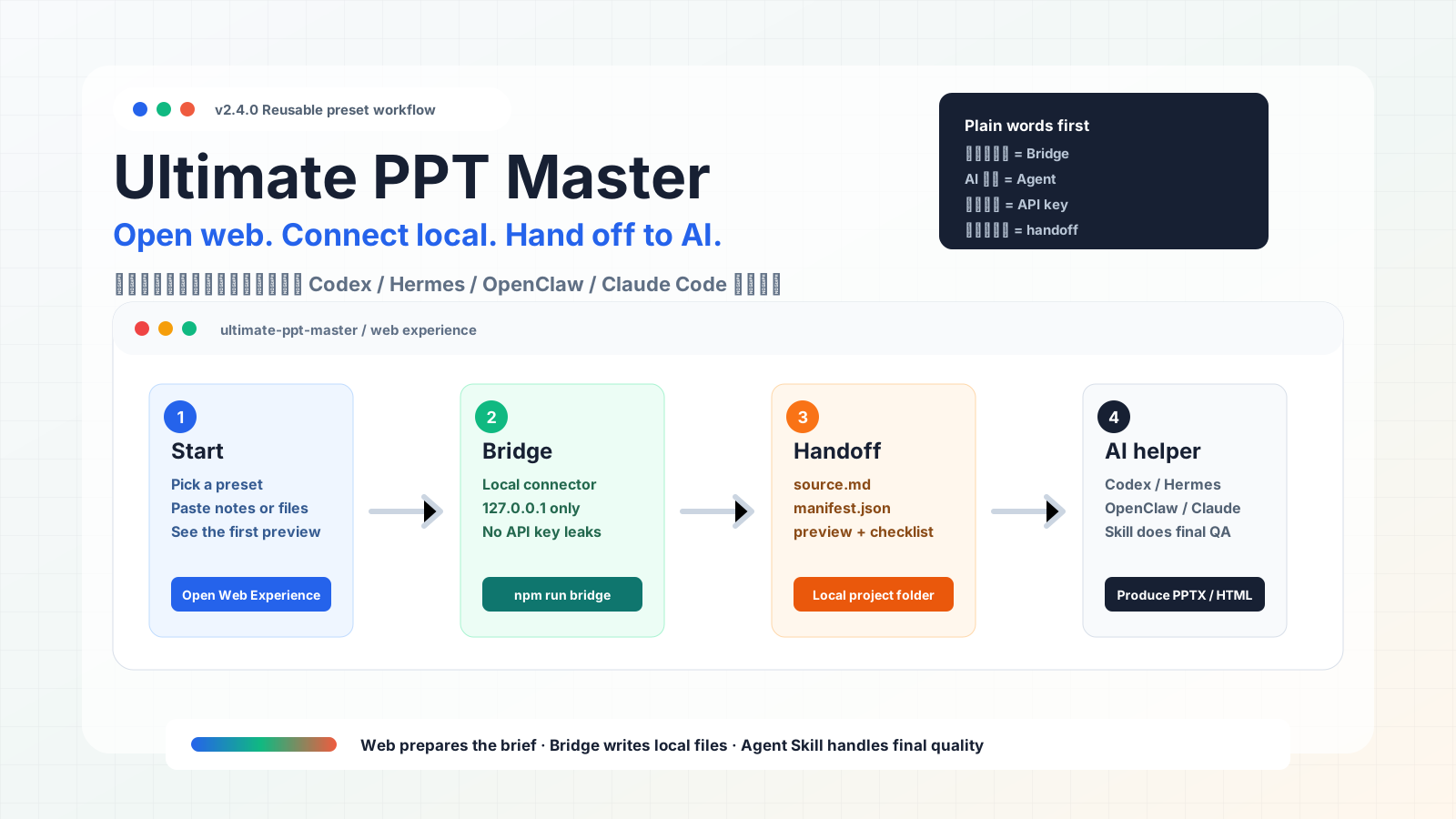
Open Web Experience · Latest Release · Discussions · 3-Step Quickstart · Use as Agent Skill







Why People Star It
| If you need... | Ultimate PPT Master gives you... |
|---|---|
| An AI presentation generator that does not hide your source files | A local-first Web Experience plus Bridge handoff folder. |
| Editable PowerPoint output, not screenshots pasted into slides | A PPTX-oriented Agent Skill path with quality checks. |
| Better first drafts from messy PDFs, Word docs, PPTX, URLs, and notes | Starter packs, source skeletons, manifests, and QA checklists. |
| Web-native, magazine-style decks for demos or reports | A Web Deck route with browser previews and shareable HTML output. |
Use It In Three Moves
| Step | What you do | What you get |
|---|---|---|
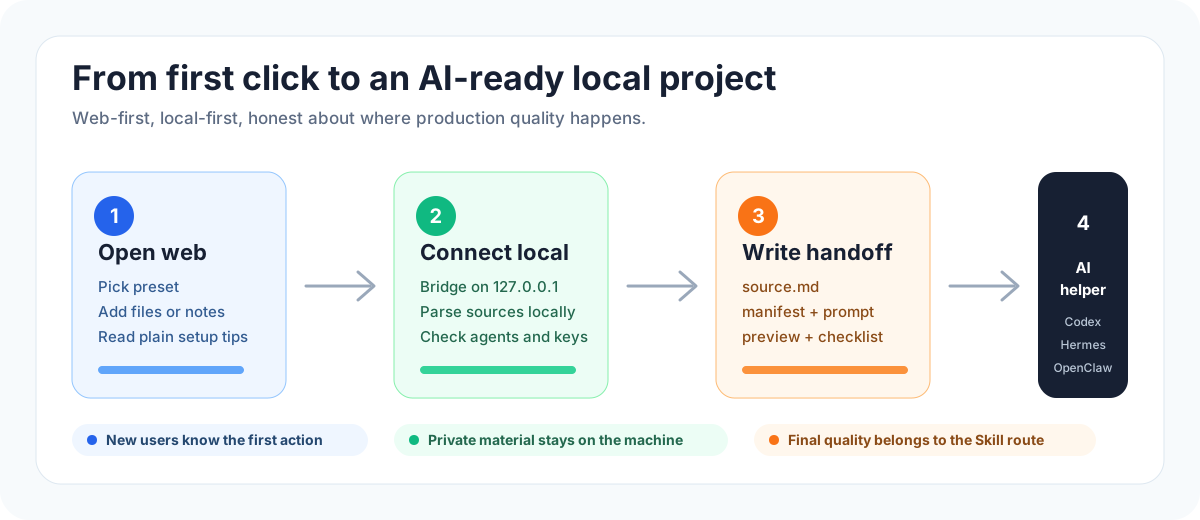
| 1. Open the Web Experience | Visit the static web page, pick a preset, and write or paste the deck goal. | A readable brief, preview, source template, and plain-language setup guide. |
| 2. Connect this computer | Run npm run bridge from a local clone when you want real file parsing and local project output. |
The local connector (Bridge) detects Codex / Hermes / OpenClaw / Claude Code and keeps files on 127.0.0.1. |
| 3. Send it to an AI helper | Click Send to local connector, then copy or launch the generated command. | A local project folder with source files, manifest, agent prompt, preview, and quality checklist. |
git clone https://github.com/kdnsna/ultimate-ppt-master-skill.git
cd ultimate-ppt-master-skill
npm run setup
npm run bridge
Then open the web page and click Send to local connector.
What It Is
Ultimate PPT Master is a local-first AI presentation hub. It gives non-technical users a friendly web page, then gives power users a real local handoff folder that Codex, Claude Code, Hermes, OpenClaw, or another agent can continue from.
It is designed as a practical fusion layer around two strong routes:
- the editable PPTX route inspired by Hugo He's PPT Master direction;
- the high-impact single-file Web Deck route inspired by op7418 / Guizang-style presentation skills.
The goal is simple: the web page should make the workflow easy to understand; the local Skill should keep the production quality high.
v2.4.0 Release Focus
v2.4.0 turns the recent Web + Bridge work into a more reusable production system: GitHub-informed direction, stronger preset packs, and release gates for reusable deck starters.
This release improves the Web Experience and Skill package in the places that help other people reuse it:
- a GitHub technology scan maps current signals such as MarkItDown, MCP servers, Slidev, Marp, PptxGenJS, DOM-to-PPTX, and open AI presentation products to concrete product decisions;
- Consulting Proposal and Tech Trend Web Deck now join Executive Business Review and Product Pitch as reusable preset starter packs;
- each starter pack has a machine-readable
preset.json, sanitizedsource.md, andquality-checklist.md; scripts/audit_preset_packs.pyverifies preset-pack contracts before release and now runs in CI;- the Web Experience exposes the new pack paths and richer quality checks so handoff prompts are more specific;
- Bridge / handoff kits still preserve
manifest,engine-plan, andquality-checklistso the Agent has a clear acceptance contract.
v2.4.0 In Plain Words
- You no longer start from a blank prompt. Pick a starter pack and the project tells the Agent what material to ask for, which story shape to use, which templates fit, and what to check.
- The new GitHub scan explains why the project cares about Markdown handoff, local agents, editable PPTX, and web decks. It is the reasoning behind the release, not vague trend-chasing.
- Every starter pack now has a small public proof: a source skeleton, a web preview, a cover image, and a checklist. That makes the output direction easier to understand before anyone runs the full workflow.
- Maintainers get a simple audit command,
npm run audit:presets, so reusable packs cannot silently lose required files.
Next Direction
v2.4.0 ships a stronger preset-pack reuse layer on top of the Bridge + Skill setup path. The next direction is to add production-grade sample decks, screenshot sets, and benchmark runs for each pack before calling them stable.
Read the plan: Next Roadmap - Content and Template Presets. Read the scan: GitHub Technology Scan - May 2026. Preset catalog: templates/presets.
Why Not Just Use Codex To Install A Skill?
You can. For expert users, direct Skill install is still the fastest path.
Ultimate PPT Master exists for the moment before that: when the user has files, a rough goal, uncertain model setup, and no clear idea whether the job should become editable PPTX, a Web Deck, or both.
The product adds value by:
- turning a vague request into a structured brief;
- packaging real source files into a local handoff folder;
- showing Bridge, Agent, and provider readiness before production;
- generating an engine plan and quality checklist;
- preserving the original upstream quality routes instead of replacing them with a weaker web-only generator.
Read the deeper positioning note: Product Positioning.
One-Line Updates
This project is moving quickly. If you already installed it, update before producing serious client or team-facing material.
Update a local clone:
cd ultimate-ppt-master-skill
npm run update
Update the Codex Skill install:
bash -lc 'set -e; dir="$HOME/.codex/skills/ultimate-ppt-master"; if [ -d "$dir/.git" ]; then git -C "$dir" pull --ff-only; else git clone https://github.com/kdnsna/ultimate-ppt-master-skill.git "$dir"; fi; cd "$dir"; npm run setup'
Update a generic Agent Skill install:
bash -lc 'set -e; dir="$HOME/agent-skills/ultimate-ppt-master"; if [ -d "$dir/.git" ]; then git -C "$dir" pull --ff-only; else mkdir -p "$HOME/agent-skills"; git clone https://github.com/kdnsna/ultimate-ppt-master-skill.git "$dir"; fi; cd "$dir"; npm run setup'
Or ask Codex:
Update ~/.codex/skills/ultimate-ppt-master to the latest GitHub version, run npm run setup, then use the README demo to confirm it works.
Input To Output Demo
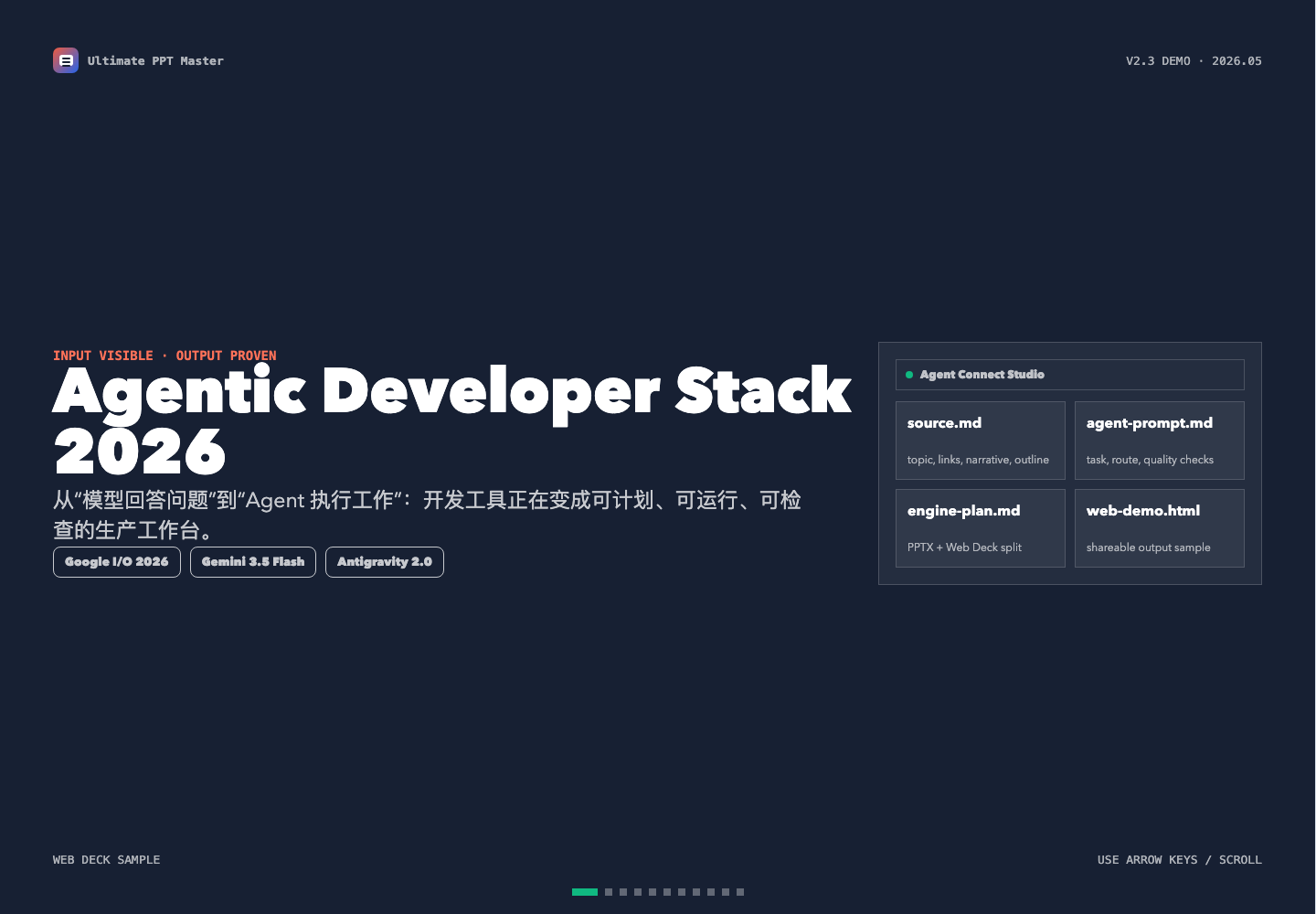
This public sample shows what users should provide and what they get back:
| What you provide | What it produces |
|---|---|
A sanitized source.md with topic, public references, narrative, slide outline, and constraints. |
A self-contained Web Deck plus a handoff structure that a local Agent can continue into PPTX / Web Deck production. |
| A clear Agent prompt with audience, output route, and quality requirements. | Reproducible production files such as agent-prompt.md, engine-plan.md, and quality-checklist.md. |
Input material excerpt:
Topic: Agentic Developer Stack 2026
Goal: use a non-sensitive tech trend to explain why the web page is the front door and the Skill is the production engine.
Sources: Google I/O 2026 developer highlights, Google Developers Blog, and public technology coverage.
Output: an 11-slide magazine-style Web Deck, with a handoff path ready for editable PPTX production.
Example Agent prompt:
Use $ultimate-ppt-master with examples/agentic-developer-tools-2026/source.sanitized.md.
Create a polished magazine-style Web Deck for GitHub Pages and keep the handoff ready for an editable PPTX route.
Verify layout, mobile readability, source references, and final exported files before delivery.
Open the full sample:
Web Experience
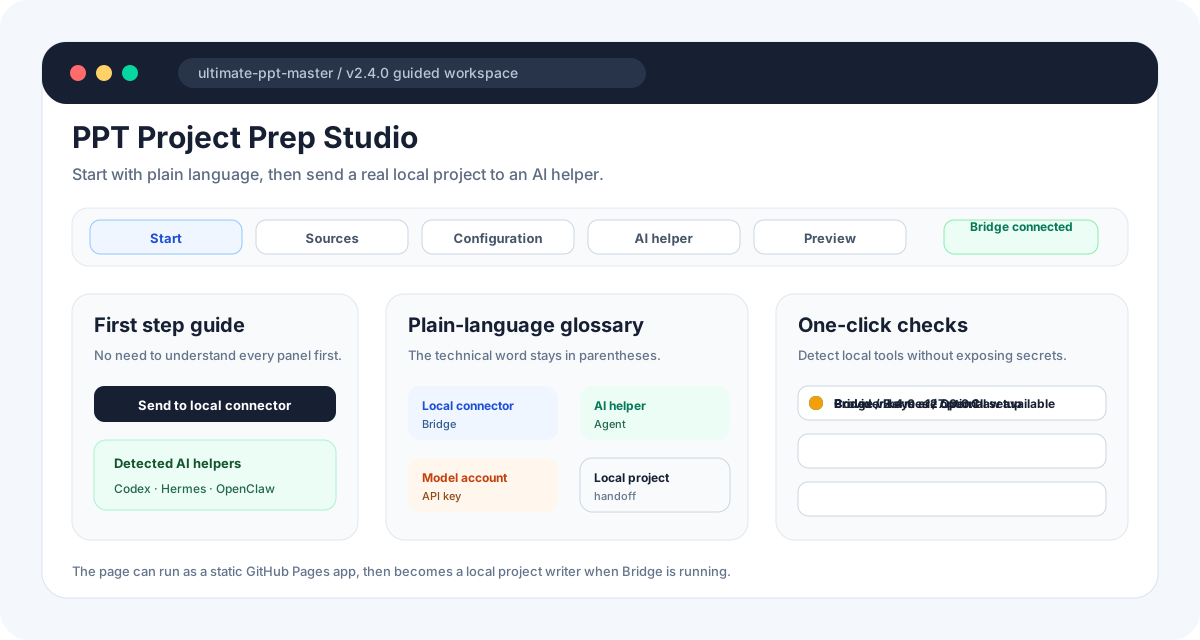
The Web Experience is the public front door. It can run from GitHub Pages without a backend, account, model host, or API key storage.
It helps users:
- import
.md,.txt,.pdf,.docx,.pptx,.xlsx, URLs, or pasted text; - choose scenario, audience, output route, style, language, target agent, and model preference;
- see whether each source is browser-readable, locally parsed, or preserved as an attachment;
- generate an Agent handoff prompt and download a
source.mdtemplate; - preview a rough
preview-web-deck.html; - download
handoff-kit.zipwhen Bridge is offline; - send the same project to the local Bridge when Bridge is online;
- jump directly to Skill installation instructions.
Open it here:
https://kdnsna.github.io/ultimate-ppt-master-skill/
For local web development:
npm --prefix apps/web install
npm run dev:web
Build the GitHub Pages artifact:
npm run build:web
Connect Local Agent
Bridge turns the static web page into a local production console.
git clone https://github.com/kdnsna/ultimate-ppt-master-skill.git
cd ultimate-ppt-master-skill
npm run setup
npm run bridge
Bridge writes handoff projects under:
~/UltimatePPTMaster/handoffs/
Safety defaults:
- binds only to
127.0.0.1; - reads provider config from environment variables, repo
.env, or~/.ppt-master/.env; - returns provider readiness and model names, never API key values;
- parses source files locally through
scripts/source_to_md/*; - does not launch an Agent unless you explicitly opt in.
Optional advanced launch mode:
npm run bridge -- --allow-launch
Full guide: Agent Connect Bridge.
Handoff Kit
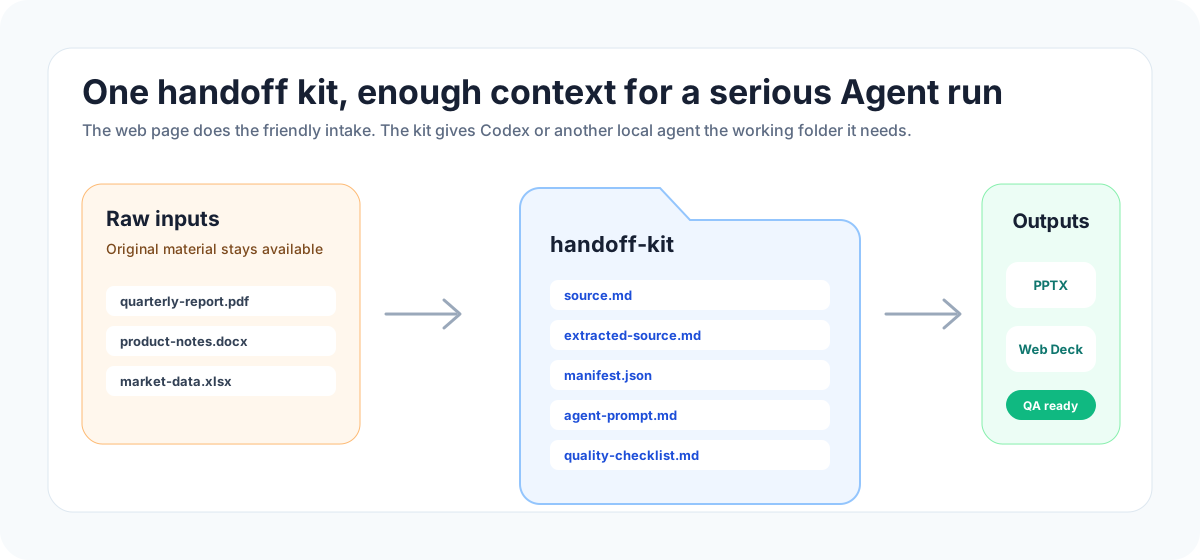
Every handoff project is meant to be understandable by both humans and agents:
source.md: clean fallback source;extracted-source.md: locally parsed source text when available;attachments/: original files preserved for the Agent;manifest.json: parse status, source metadata, and suggested commands;agent-prompt.md: ready-to-copy Agent prompt;project-brief.json: structured scenario, audience, style, and output settings;engine-plan.md: PPTX / Web Deck production plan;quality-checklist.md: review checklist before final delivery;preview-web-deck.html: browser-local rough preview;README.md: handoff folder instructions.
Use as Agent Skill
Use the Skill route when quality matters more than the fastest first click. This is the route for Codex, Claude Code, Hermes, OpenClaw, Cursor-style IDEs, and other local agents that can read files and run scripts.
Codex
git clone https://github.com/kdnsna/ultimate-ppt-master-skill.git ~/.codex/skills/ultimate-ppt-master
cd ~/.codex/skills/ultimate-ppt-master
npm run setup
Ask:
Use $ultimate-ppt-master to turn reports/q3-review.pdf into a 12-slide editable PPTX for an executive meeting. Verify the deck before delivery.
Claude Code, Hermes, OpenClaw, And Generic Agents
mkdir -p ~/agent-skills
git clone https://github.com/kdnsna/ultimate-ppt-master-skill.git ~/agent-skills/ultimate-ppt-master
cd ~/agent-skills/ultimate-ppt-master
npm run setup
Agent prompt:
Read ~/agent-skills/ultimate-ppt-master/AGENTS.md and follow SKILL.md.
Use that repository path as SKILL_DIR.
Turn the provided source material into an editable PPTX and preview the result before delivery.
Full guide: Agent Setup.
Output Gallery
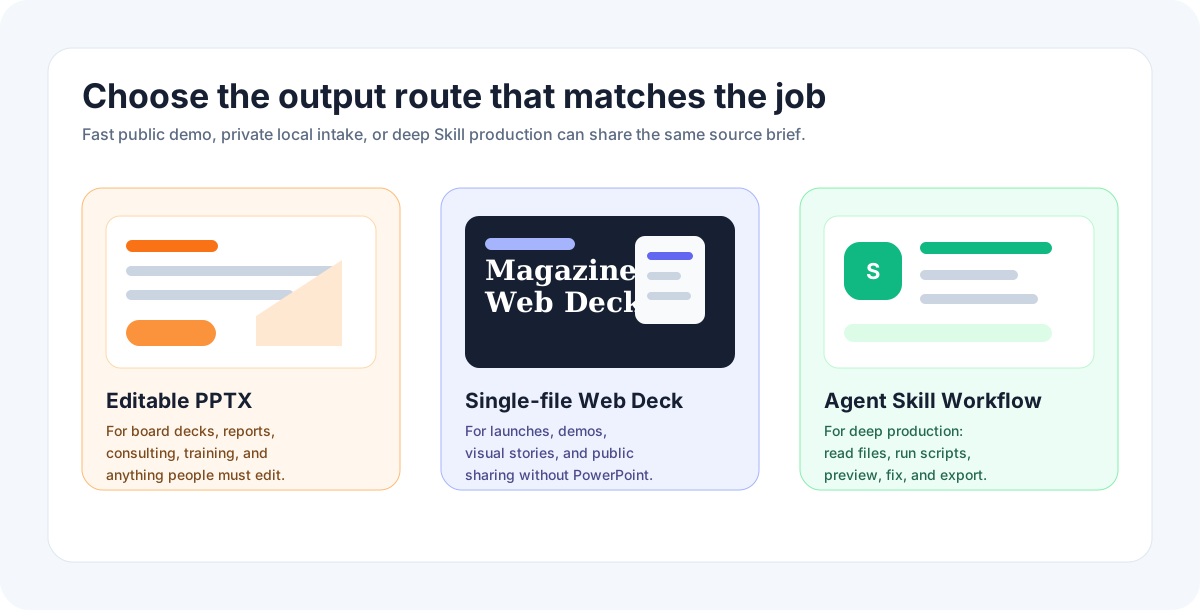
| Output | Best for | Production route |
|---|---|---|
Editable PowerPoint (.pptx) |
Business reports, consulting proposals, training decks, investor updates, and review-heavy work. | Agent Skill with local files, scripts, preview, repair, and export checks. |
Magazine Web Deck (index.html) |
Launches, demo days, product stories, keynotes, and visually rich sharing. | Web Experience preview first, then Skill for final polish and QA. |
| Agent Handoff Project | Users who already have Codex, Claude Code, Hermes, OpenClaw, Cursor, Cline, Roo, or Windsurf. | Bridge-generated folder or handoff-kit.zip. |
Public sanitized demos:
- Executive Business Review Starter
- Consulting Proposal Starter
- Product Pitch Starter
- Tech Trend Web Deck Starter
- Agentic Developer Stack 2026
- Desktop Cultural Tourism Demo
Pick Your Path
| Path | Use it when | Start |
|---|---|---|
| Open Web Experience | You want the fastest way to understand the project and build a prompt. | Open Web Experience |
| Web + Bridge | You want real file intake without uploading source material to a hosted service. | Run npm run bridge, then send from the web page. |
| Agent Skill | You already work inside Codex, Claude Code, Hermes, OpenClaw, Cursor, Cline, Roo, or Windsurf. | Agent Setup |
| Web + Skill | Recommended production flow: prepare the handoff kit visually, then let the agent finish it locally. | Use Web Experience, then Bridge or handoff-kit.zip. |
| Desktop Later | You want advanced local preview or future signed desktop packaging. | Quickstart Desktop |
Desktop Later
The Tauri desktop app remains in apps/desktop, but it is no longer the first promotion path. Signing, notarization, Homebrew distribution, and native packaging are now release-maintenance work.
Developer preview:
git clone https://github.com/kdnsna/ultimate-ppt-master-skill.git
cd ultimate-ppt-master-skill
npm run setup
npm run desktop
Maintenance references:
Documentation
| Need | Guide |
|---|---|
| Use the static online front door | Web Experience |
| Connect the web page to local files and Agents | Agent Connect Bridge |
| Install and invoke the Skill | Agent Setup |
| Pick Web vs Skill vs Desktop Later | Choosing a Workflow |
| Configure provider keys locally | Model and Provider Setup |
| Understand why this exists beside direct Skill install | Product Positioning |
| See the next content/template direction | Next Roadmap - Content and Template Presets |
| Review v2.4.0 release focus | Release Notes - v2.4.0 |
| Review GitHub technology signals | GitHub Technology Scan - May 2026 |
| Review the local upstream benchmark | Upstream Benchmark - May 2026 |
| Debug setup, extraction, output, provider, Tauri, or agent loading issues | Troubleshooting |
| Release, Pages, Homebrew, signing, privacy, and maintenance | Release and Maintenance |
v2.4.0 Highlights
- Added a GitHub technology scan that links current open-source signals to project decisions.
- Promoted Consulting Proposal and Tech Trend Web Deck into reusable starter packs.
- Added visible starter proofs for Executive Business Review, Consulting Proposal, Product Pitch, and Tech Trend Web Deck.
- Added a preset-pack audit script and wired it into CI.
- Kept one-click local setup checks and agent selection across Codex, Hermes, OpenClaw, and Claude Code.
- Kept Bridge / handoff kit focused on local source staging, provider readiness, Agent commands, previews, and quality checks.
- Kept the Skill as the high-quality production route for final PPTX / Web Deck generation, preview, and repair.
See UPSTREAM_SYNC.md for upstream baselines and adaptation policy.
Repo About
AI presentation hub: source files in, local Agent handoff out, editable PPTX and magazine Web Decks delivered.
AI 演示生产中枢:资料进来,本地 Agent 接手,输出可编辑 PPTX / 杂志风网页演示。
License
MIT. See LICENSE.
Reviews (0)
Sign in to leave a review.
Leave a reviewNo results found