opencode-prime
Health Uyari
- No license — Repository has no license file
- Description — Repository has a description
- Active repo — Last push 0 days ago
- Low visibility — Only 8 GitHub stars
Code Basarisiz
- process.env — Environment variable access in install/src/i18n.ts
- execSync — Synchronous shell command execution in install/src/installer.ts
- fs.rmSync — Destructive file system operation in install/src/installer.ts
- os.homedir — User home directory access in install/src/installer.ts
- process.env — Environment variable access in install/src/installer.ts
Permissions Gecti
- Permissions — No dangerous permissions requested
Bu listing icin henuz AI raporu yok.
🛠️ OpenCode production-level engineering configuration: full-chain engineering safeguards, hierarchical MCP code intelligence and database gateways, as well as collaboration among 17 experts and hierarchical model management|🛠️ OpenCode 生产级工程化配置:全链路工程护栏、分层MCP代码智能与数据库网关、17位专家协同与分层模型治理
OpenCode Prime (OCP)
The Flagship Production Engineering & Multi-Agent Suite for OpenCode
A production-ready OpenCode suite for real-world software engineering: layered MCP code intelligence and database gateway, hard engineering guardrails (ADR / secret-file / E2E / commit discipline), 21 specialist agents, and one-shot model tier governance — installed into ~/.config/opencode with a single command.
English | 中文 | 📖 Online Documentation (GitBook / Docs)
This README is the user manual. If you want to modify this repo itself (agents, plugins, tests, releases), see DEVELOPING.md.
⚡ 10-Second Quick Install
Install directly to ~/.config/opencode with a single command (no Git clone required):
macOS / Linux / WSL
curl -fsSL https://github.com/kenlin8827/opencode-prime/releases/latest/download/opencode-prime-latest.tar.gz -o /tmp/ocp.tar.gz && tar xzf /tmp/ocp.tar.gz -C /tmp && bash /tmp/opencode-prime-*/install/install.sh
Windows (PowerShell)
$url = "https://github.com/kenlin8827/opencode-prime/releases/latest/download/opencode-prime-latest.zip"; Invoke-WebRequest -Uri $url -OutFile "$env:TEMP\ocp.zip"; Expand-Archive -Path "$env:TEMP\ocp.zip" -DestinationPath "$env:TEMP\ocp" -Force; & (Get-ChildItem "$env:TEMP\ocp\opencode-prime-*\install\install.ps1").FullName
💡 Zero-Risk Upgrades: Re-running the command above smoothly upgrades to the latest release while preserving all your API keys, custom models, and tier assignments.
- Part I: Getting Started
- Part II: Core Capabilities & Daily Use
- Part III: Advanced Workflows & Governance
- Part IV: Installation & Maintenance
Part I: Getting Started
✨ What you get
| Feature | What it means for you |
|---|---|
| Specialist Agents | 21 specialists (@java-dev, @security, @dba, @frontend-dev, @fast-coder, etc.) tuned with domain-specific prompts, routed automatically |
| Four working modes | @code (direct development, default), @coworker (collaborative pair-programming with real-customer framing), @build (orchestrated execution), @plan (read-only analysis) — switchable in install/options.jsonc |
| Code intelligence & DB (MCP) | Pre-configured MCP servers (Serena LSP, CodeGraph knowledge graph, GitNexus, DBHub gateway) with automatic CLI provisioning |
| Profiles | /profile maps all 5 model tiers to a provider's models in one shot — no per-agent set model |
| Workflow slash commands | /quick-dev · /fast-dev · /deep-dev · /ultra-dev dev loops, /review-fix-loop, /grill-improve-loop, /goal, /handoff, /grill-me, /advisor modes, and more |
| Optional guardrails | Per-project ADR enforcement (/adr-guard), secret-file gate (env-guard), E2E gate (/e2e-guard), commit discipline (/project) — all default off |
| One-command installer | PowerShell + Bash, manifest-based upgrades; your credentials and model picks survive every reinstall |
| Token savings | rtk output compression (60–90%) auto-provisioned on install |
| Second-opinion advisor | @advisor for blocking decisions, with an adversarial red-team stance for design review |
⚖️ Positioning: omp vs OpenCode Prime
Two kinds of batteries, two kinds of rides. omp builds and ships its own native runtime; OCP loads engineering-discipline batteries into the OpenCode you already run.
| Dimension | omp (omp.sh) |
OpenCode Prime (OCP) |
|---|---|---|
| Relationship to Runtime | Standalone harness — replaces your agent runtime | ⚡ Zero-migration discipline layer — keep your OpenCode runtime, plugins & config |
| What's in the Box | 🔧 Native tooling firepower: ~80k-line Rust core, hashline edits, built-in LSP/DAP, memory, browser, collab | 🧰 Discipline firepower: 21 specialist agents, MCP code intelligence, /profile presets, guardrails, workflow commands |
| Delivery Pacing | Magic keywords (ultrathink / orchestrate), single-track autonomy |
🏆 /quick-dev · /fast-dev · /deep-dev · /ultra-dev — explicit human-selected tiers, SOP-friendly |
| Scheduling & Orchestration | 🟢 task fan-out into isolated worktrees, typed results, live subagent hub |
🏆 @build orchestrator + predefined role pipelines (plan visible before execution) + tiered scheduling (Flash codes, Flagship reviews) + dynamic domain-persona injection + auto-retry with task resume |
| Review Gates | /review post-hoc P0–P3 verdict, single reviewer |
🏆 /deep-dev dual flagship review + @advisor safety arbitration — fixes converge inside the loop |
| Spec-Driven Lifecycle | None built-in (requires external tools) | 🏆 /prd → /plan (auto-links PRD & ADRs) → /impl → /sdd handoff — full SDD lifecycle |
| Workflow Command Suite | ultrathink / orchestrate / workflowz keywords |
🏆 /grill-me Socratic plan interrogation + /review-fix-loop auto-fix until zero P0/P1 + /grill-improve-loop score-driven improvement loop + /goal mechanically-checkable stop conditions + /handoff git-safe session bundles |
| Token & Cost Governance | hashline edit savings + efficient in-process tools | 🏆 Five-tier agent-to-model routing (tiers.json) + RTK proxy-layer output compression (60–90%) auto-provisioned at install |
| Guardrails | Stream rules course-correct model behavior mid-stream | 🏆 Auditable policy gates: ADR/MADR enforcement + secret-file gate + E2E gate + commit discipline |
| Code Intelligence | 🟢 Built-in LSP/DAP/AST (14 LSP + 28 DAP ops) | Serena LSP + CodeGraph call graphs + GitNexus + DBHub database gateway |
| Provider Governance | 60+ providers, role-based routing | 🏆 /profile one-shot five-tier mapping — 36 presets covering the entire OpenCode built-in model family (opencode-go) plus Anthropic / OpenAI / Google / DeepSeek, routers, and first-class Chinese coding plans; TUI dashboard |
| Upgrade Safety | Binary reinstall | 🏆 Manifest-based zero-risk upgrade — keys & model picks preserved across every reinstall |
| Documentation | English | 🏆 Full bilingual docs tree (English + Chinese) |
| Ecosystem & Extensibility | 🟢 TS extension modules, plugin hot-reload, inherits 8 existing config formats | 🏆 Rides the OpenCode ecosystem — the whole npm plugin registry, MCP ecosystem, and community assets are directly reusable; OCP itself is 30+ composable plugins |
| Client / UI Surfaces | Terminal TUI + Zed (ACP) + collab viewer | 🏆 TUI + browser Web UI + OpenChamber desktop GUI (side-by-side diff, multi-model comparison) — one config shared across all surfaces, zero re-setup |
🎯 Which one fits you?
- Choose
omp.sh: When you want a batteries-included native harness and are fine replacing your runtime — its Rust tooling, hashline edits, and DAP debugging are genuinely excellent. - Choose OpenCode Prime: When you build real-world commercial software on OpenCode and want explicit delivery tiers, multi-model review gates, auditable policy guardrails, and Chinese-provider governance — without leaving the ecosystem you've already invested in.
- Coexistence is fine: omp as a standalone power tool, OCP as team discipline inside your OpenCode stack.
📋 Prerequisites
| Requirement | Why | Install |
|---|---|---|
| opencode CLI | Runtime that reads the config and dispatches agents | curl -fsSL https://opencode.ai/install | bash |
| PowerShell 7+ (Windows) | Install script | winget install Microsoft.PowerShell |
Bash 4+ + jq (macOS / Linux / WSL) |
Same script, bash side | brew install jq or sudo apt install jq |
| Git | Version control & manifest fallback | — |
| Node.js 22.5+ + npm (Optional) | Runtime for CodeGraph / GitNexus / DBHub MCPs | nodejs.org |
| uv / Python 3.13+ (Optional) | Runtime for Serena LSP MCP | curl -LsSf https://astral.sh/uv/install.sh | sh |
- Bun is only needed if you develop this repo (see DEVELOPING.md) — opencode compiles the bundled TypeScript plugins at runtime.
- Node.js and uv are only needed when their corresponding MCP servers are enabled. When enabled in
install/options.jsoncand missing from PATH, the installer automatically invokesnpm/uvusing the pre-configuredinstallcommand.
🚀 Quick start
After running the 10-Second Quick Install above, you can proceed with whichever workflow fits your needs:
1. Start Coding Immediately (Most Common)
Open any project directory in your terminal and launch OpenCode:
opencode
- 🎯 Initialize project environment (Highly Recommended): Run
/project initto scaffold the code knowledge graph (CodeGraph + Serena LSP) and project guardrails (ADR + secret-file gates):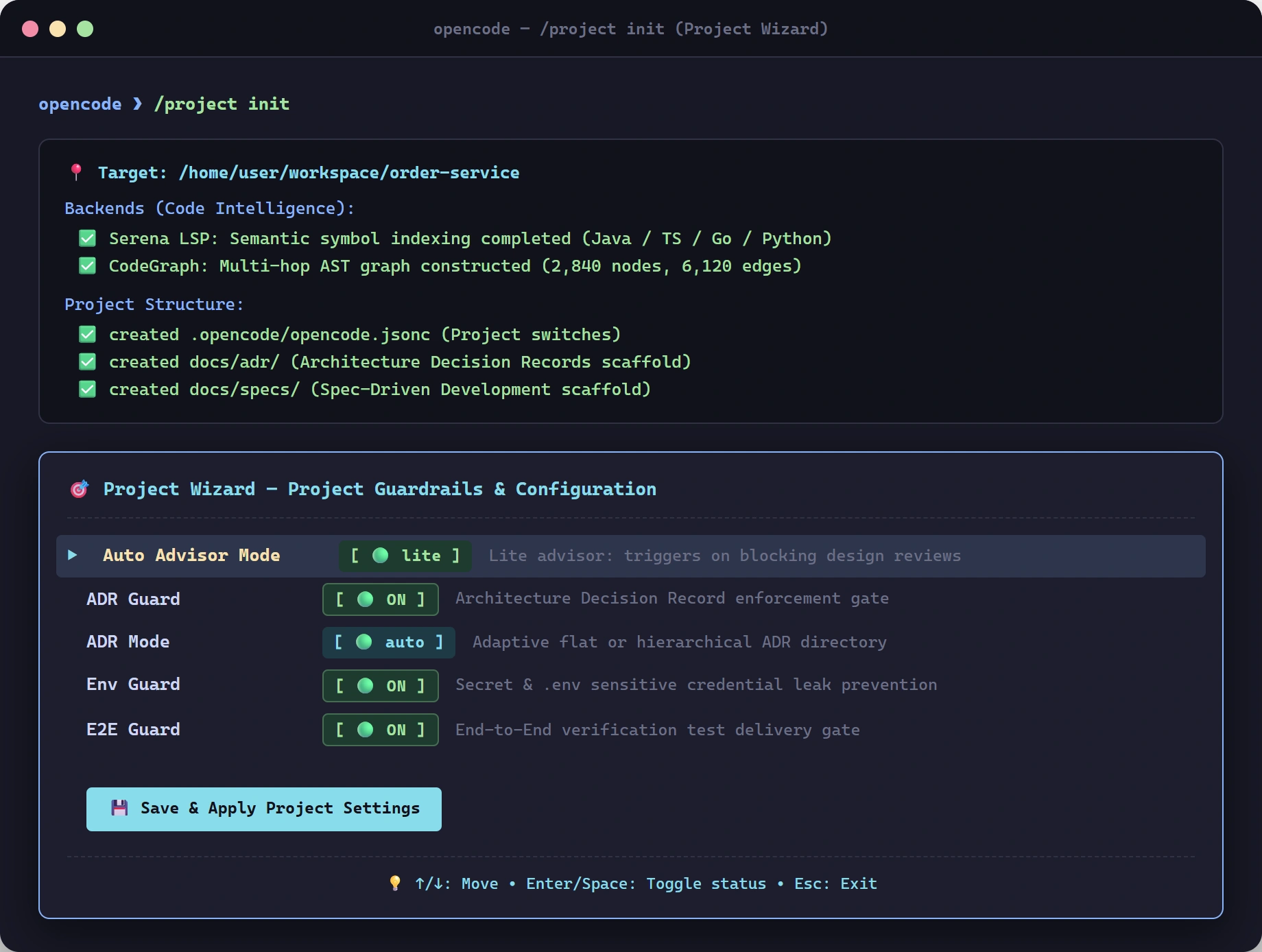
- Connect provider & profile: Run
/connect deepseek(or kimi, anthropic, openai, etc.), then/profileto assign models across all 5 tiers. - Start coding:
@codemode is the default daily driver — just describe your task in natural language!
2. Single-Screen TUI Control Center (Toggle switches & agent tiers)
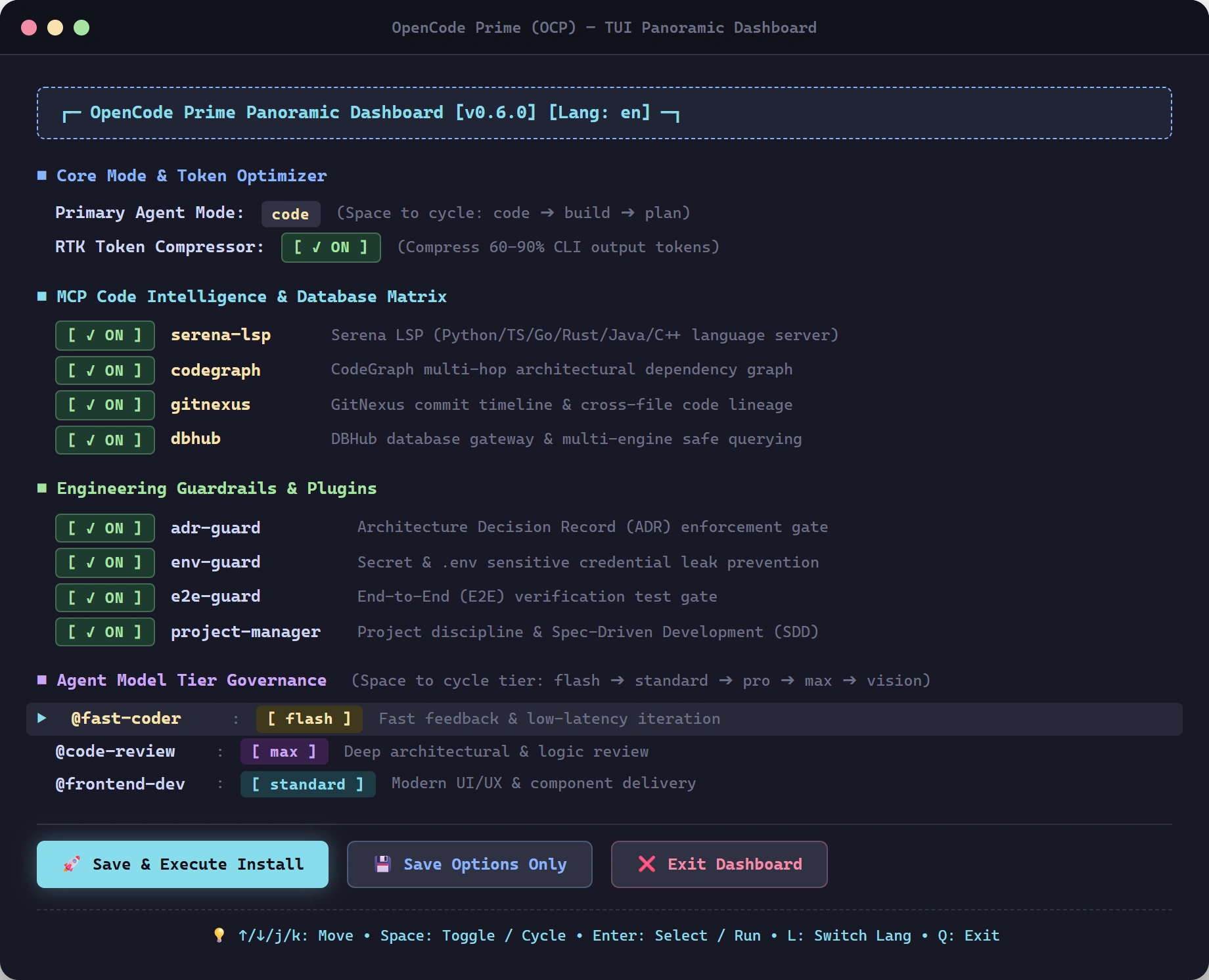
Running the install command (or running the global command ocp / opencode-prime anytime later) directly opens the Single-Screen TUI Control Center, allowing you to press Space to toggle MCP servers, plugins, RTK optimizer, or cycle Agent-to-Tier model assignments (flash / standard / pro / max / vision):
💡 Keyboard Shortcuts:
↑/↓Move cursor,SpaceToggle/Cycle tier,EnterExecute action,LInstant language switch (EN/ZH),QExit.
3. Open Dashboard Anytime (ocp / opencode-prime)
After installation, run any of the global commands from any terminal directory:
ocp              # 3-letter quick direct access (recommended)
opencode-prime   # Official full suite command
opencode-config  # Backward-compatible alias
You can now adjust settings or perform one-click seamless upgrades anytime without worrying about install paths!
Developer method: Clone and install
If you plan to modify or contribute to this repo, install via Git:
# 1. Clone
git clone https://github.com/kenlin8827/opencode-prime.git
cd opencode-prime

# 2. Run install (Windows: pwsh install/install.ps1)
./install/install.sh
Part II: Core Capabilities & Daily Use
Daily Use & Modes
Code mode (default)
@code is the default entry point — direct developer; writes, modifies, tests, and verifies code itself without unsolicited delegation:
> @code Fix off-by-one error in pagination logic
> @code Add input validation to registration form
You can still manually delegate auxiliary subagents (@advisor, @explorer, @code-review, @vision) when needed. If a task is cross-cutting, @code will recommend switching to @build.
Co-worker mode (collaborative)
Switch to @coworker for a pair-programming partner that frames every task as a real customer requirement — high-stakes accountability ("the customer is watching, don't let them question our competence") with a "we're in this together" partnership dynamic. If anything is unclear, the co-worker relays your question to the customer for you:
> @coworker The customer needs a paginated user search API with fuzzy matching
  → frames the stakes, plans the attack, co-implements with you
  → asks you (not guesses) when a requirement is ambiguous
  → verifies build + tests before reporting done
Use @coworker when you want the extra motivation and collaborative back-and-forth — a senior partner who treats your task as a real deliverable, not a toy.
Build mode (orchestration)
Switch to @build for cross-cutting tasks — it routes work to the right specialist:
> Add a Spring Boot user registration endpoint with JPA and BCrypt
  → @build routes to @java-dev

> Review my recent commits with focus on security
  → @build routes to @code-review (adds @security if sensitive)

> Design the architecture for a new payment service
  → @build routes to @architect (presents multi-step plan first)
You don't need to specify which agent — just describe the task. For cross-cutting tasks, @build presents an execution plan before starting.
Plan mode (read-only)
Switch to @plan for analysis-only tasks (no code modifications):
> @plan Audit the codebase for technical debt and security vulnerabilities
  → @plan dispatches @architect, @security, @code-review, @qa in parallel
  → Aggregates findings into a prioritized report
Switch between modes via Tab or @code / @coworker / @build / @plan.
Calling specialists directly
You can bypass the orchestrator and call any specialist directly:
> @dba Optimize the indexes on the orders table
> @frontend-dev Create a reusable Button component with design tokens
> @code-review Review PR #42
Multi-step workflow example
For complex features, @build creates and executes a plan:
## Execution Plan

1. [@architect] — Design event sourcing architecture → ADR + design doc
2. [@dba] — Design event store schema → DDL + migration scripts
3. [@java-dev] — Implement producer and consumer → code + tests
4. [@qa] — Write integration tests → test suite
5. [@security] — Security review → report
6. [@code-review] — Code review → findings
7. [@tech-writer] — Documentation → README + API docs

Proceed?
MCP Servers (Code Intelligence & Database)
Why integrate MCP? (Core Significance & Design Philosophy)
Traditional AI coding assistants rely on blind text searching (grep / glob) and bulk file reads to understand codebases. For non-trivial repositories, this pattern suffers from severe bottlenecks:
- Context Window Saturation & High Token Cost: Tracing a multi-step call chain often requires reading dozens of files, quickly bloating context tokens, degrading reasoning quality, and driving up API costs.
- Lack of Structural Global Awareness: Text grep cannot understand AST syntax trees, polymorphism / dynamic dispatch, interface implementations, or multi-hop call paths. As a result, agents easily overlook the blast radius (downstream breakages) of a change.
- Database Hallucination & Trial-and-Error: When dealing with databases, LLMs frequently hallucinate table or column names, leading to SQL execution errors and wasted roundtrips.
To eliminate these bottlenecks, this configuration integrates a tiered Code Intelligence & Database Gateway matrix via the Model Context Protocol (MCP):
                               ┌────────────────────────────────────────────────────────┐
                               │               OpenCode Agent Team                      │
                               └───────┬─────────────────┬────────────────────┬─────────┘
                                       │                 │                    │
              ┌────────────────────────┴────────┐ ┌──────┴───────────────┐ ┌──┴─────────────────────────┐
              │      Symbol-Level (Real-time)   │ │  Macro Graph & Architecture│ │   Universal Database Gateway  │
              │         (Symbol Layer)          │ │       (Graph Layer)   │ │      (Database Layer)         │
              ├─────────────────────────────────┤ ├───────────────────────┤ ├─────────────────────────────┤
              │ Serena MCP (Live LSP)           │ │ CodeGraph / GitNexus  │ │ DBHub MCP (Bytebase)        │
              │ • find_symbol                   │ │ • codegraph_explore   │ │ • search_objects (Metadata) │
              │ • find_referencing_symbols      │ │ • Call paths / Impact │ │ • execute_sql (Read-only)   │
              │ • get_symbols_overview          │ │ • Cross-file overview │ │                             │
              └─────────────────────────────────┘ └───────────────────────┘ └─────────────────────────────┘
- Precise Symbol Inquiries → Serena (LSP): Exact definitions, references, and symbol outlines. Zero indexing wait, minimal payload, returns only what's asked without bloating the context.
- Architectural Understanding & Impact → CodeGraph / GitNexus: "How does component X work?", "What breaks if I change this function?" — single-call responses covering complete call flows and blast radius.
- Reliable Data Exploration → DBHub: Enforces discovering real schema (
search_objects) before running queries (execute_sql), preventing hallucinated table/column names.
Built-in MCP Servers Overview
| Server | Type | License | Core Tool | Best For | Lifecycle & Indexing |
|---|---|---|---|---|---|
| Serena | Live LSP Semantic Engine | MIT | find_symbol, find_referencing_symbols, get_symbols_overview |
Precise symbol lookups: definitions, references, file outlines (zero hallucination) | Connects live to LSP upon session start; no pre-indexing step |
| CodeGraph | Code Knowledge Graph (Default) | MIT | codegraph_explore |
High-level architecture, "How X works", complete call paths, blast radius / impact analysis | Run codegraph init (or /project init) once per repo; background watcher auto-syncs on every save |
| GitNexus | Deep Graph Analysis (Optional) | PolyForm Noncommercial | Cypher queries, clustering | Multi-repo groups, arbitrary Cypher graph queries, cluster/process visualization | Re-index with gitnexus analyze (or /project index) after big changes |
| DBHub | Universal DB Gateway | MIT (Bytebase) | search_objects, execute_sql |
Unified gateway for PostgreSQL / MySQL / SQLite / SQL Server / MariaDB | Per-project dbhub.toml config supporting ${ENV_VAR} interpolation |
Automated Provisioning & Configuration
The MCP stack is seamlessly woven into the installer and agent runtime:
1. Centralized Switches & CLI Auto-Provisioning (install/options.jsonc)
Manage active MCP servers in install/options.jsonc:
// install/options.jsonc
{
  "mcp": {
    "serena": true,     // LSP semantic queries (auto-installed via uv if missing)
    "codegraph": true,  // Code knowledge graph (auto-installed via npm if missing)
    "gitnexus": false,  // Deep Cypher graph (check PolyForm license for commercial use)
    "dbhub": true       // Universal DB gateway (auto-installed via npm if missing)
  }
}
- Automatic CLI Provisioning: When running
pwsh install/install.ps1or./install/install.sh, if an enabled MCP CLI is missing from PATH, the installer automatically runs itsinstallcommand (fromopencode.jsonc) to provision it.
2. Runtime Profiling & Routing (project-profiler plugin)
You don't need to manually tell agents which tool to call. The bundled project-profiler.ts plugin:
- Automatically detects project languages, active MCP servers, and local index status (
.codegraph/,.gitnexus/). - Injects guidance into the system prompt: mandates querying graph/LSP backends first rather than crawling files blindly.
3. Project Lifecycle Management (/project command)
Initialize and maintain project indexes effortlessly with /project:
/project init       # One-shot scaffolding: runs `codegraph init` and scaffolds `dbhub.toml`
                    # if respective MCPs and CLIs are ready
/project index      # Refreshes indexes: runs `codegraph sync` and `gitnexus analyze`
4. Database Setup Example (dbhub.toml)
Create a dbhub.toml in your project root (or let /project init scaffold it):
# dbhub.toml
[[sources]]
id = "default"
dsn = "${DBHUB_DSN}"   # Store DSN in environment variable (e.g. postgres://user:pass@localhost:5432/mydb)

[[tools]]
name = "execute_sql"
source = "default"
readonly = true        # Safety: enforce read-only execution
Configuration & Profiles
All provider/model configuration happens inside opencode itself — the oldinstall/config.ps1 / install/config.sh helpers are retired:
- Provider setup — connect official APIs via the
/connectslash command (recommended) - Custom provider setup — for bundled router definitions (
codex-router,qoder-router, …) use the/providerdialog wizard: credentials (baseURL/apiKey) and model-list maintenance, all via dialogs - LLM Router setup — for self-hosted or third-party routing services, set credentials via environment variables (or edit
opencode.jsoncdirectly) - Qoder setup — the
opencode-qoder-bridgeplugin is enabled globally and injects theqoderprovider at startup; just log in with the Qoder CLI (qoder login) and apply theqoderprofile
Selection Guide: Choose method 1 if you want to directly connect to official APIs like DeepSeek, Kimi, etc. (simpler and faster); choose method 2 for the bundled router definitions shipped in
providers/; choose method 3 if you need to set up your own LLM router or use third-party routing services; choose method 4 if you have a Qoder subscription and want its model catalog (Ultimate/Performance/Kimi/DeepSeek/Qwen/GLM/…) through the official Qoder Agent SDK.
Provider setup inside opencode (recommended)
For existing providers (such as official DeepSeek, Kimi, Qwen APIs, not self-hosted LLM routers), configure through OpenCode slash commands:
/connect <provider-name>    # connect to existing provider
/profile                    # open the profile picker dialog
Configuration Flow:
- Connect Provider — Use
/connectcommand to connect to an existing provider - Select Profile — Use
/profileto open the picker dialog and select the corresponding configuration profile
Example:
> /connect deepseek
  → Connect to DeepSeek provider
> /profile
  → Dialog opens — pick the "deepseek" entry to apply the official API profile
Important: After configuration is complete, please exit the current opencode session and re-enter to ensure the new provider and profile configurations take full effect.
This configuration method is suitable for:
- Users who already have existing LLM providers (e.g., DeepSeek, Kimi, Qwen, etc.)
- Users who don't want to self-host an LLM router
- Quick interactive configuration scenarios
Profiles automatically configure tier-to-model mappings, eliminating the need to manually set models for each tier.
Profiles
A profile is a named preset that maps all model tiers to a specific provider's models in one shot, rather than setting each tier individually.
Available profiles
| Profile | Description |
|---|---|
llm-router |
Server-side routing baseline |
codex-router |
Self-hosted codex gateway (Sol/Luna series) |
qoder-router |
Self-hosted qoder gateway (Ultimate/Performance/Lite) |
claude-code-router |
Self-hosted Claude Code gateway (Anthropic protocol, Fable/Opus/Sonnet/Haiku series) |
antigravity-router |
Self-hosted Antigravity gateway (Gemini Flash/Pro + Claude Sonnet/Opus Thinking + GPT-OSS) |
qoder |
Qoder subscription via opencode-qoder-bridge (official Qoder Agent SDK; needs qoder login) |
qoder-deepseek |
Full DeepSeek lineup alternative on Qoder (dmodel = DeepSeek-V4-Pro, dfmodel = DeepSeek-V4-Flash) |
qoder-qwen |
Full Qwen lineup alternative on Qoder (qmodel_preview = Qwen3.8-Max-Preview, qmodel_latest = Qwen3.7-Max, qmodel = Qwen3.7-Plus) |
opencode-go-ultimate |
Quality first, cost no object |
opencode-go-performance |
Daily driver |
opencode-go-economy |
Balanced price/performance |
opencode-go-lite |
Minimum viable cost |
opencode-go-qwen |
Full Qwen lineup alternative |
opencode-go-kimi |
Full Kimi lineup alternative |
kimi-code |
Kimi For Coding (official plan) |
opencode-go-deepseek |
Full DeepSeek lineup alternative |
opencode-go-glm |
Full GLM lineup alternative |
Using profiles
The /profile slash command is a single entry point for two orthogonal operations — no arguments, opens the native picker dialog:
/profile
  ┌─ Level 1: Main menu
  │
  ├─ "( Edit agent→tier mapping )"  ── reassign which tier (flash/standard/pro/max/vision) each agent uses
  ├─ "( Show current tier mapping )"  ── inspect active profile + per-tier model refs
  └─ <profile list>  ─────────────────── pick a profile to apply
       │
       ▼
  ┌─ Level 2 (pick profile): Tier review — override models per tier
  │
  │  Pick a tier → pick provider → pick model (from opencode's service
  │  catalog: built-in + configured providers; manual '<provider>/<model_id>'
  │  entry as fallback), then "( Apply profile )":
  │    prefers server-side global config API for hot application (no restart);
  │    falls back to direct opencode.jsonc write (backup .bak) on older builds
  │
  ┌─ Level 2 (pick Edit): Agent→tier editor — reassign agent tiers
  │
  │  Lists all agents with current tier + model. Pick an agent → pick a new
  │  tier (flash/standard/pro/max/vision). "( Apply changes )" writes
  │  tiers.json atomically + live-applies agent models to the new tier's ref
  │
  → Esc cancels at any level
All agents in covered tiers are rewritten to the profile's provider/model_id reference; the root model follows the standard tier. Tiers not listed in the profile remain unchanged. Everything is validated before write; hot-apply path is patched server-side preserving JSONC comments, while fallback path creates a backup opencode.jsonc.bak before rewriting and requires a restart. Note: hot-apply recreates the server instance, which can interrupt an ongoing reply stream (session history is preserved).
Tip: The two sub-menus are complementary. Use the agent→tier editor to decide which tier an agent belongs to (writes
tiers.json), then pick a profile to decide which model each tier uses (writesopencode.jsonc). See Configuration & Profiles for the full operation guide.
Model Routing & Tier Architecture
The system uses 5 model tiers, each mapped to a set of agents:
| Tier | Purpose | Agents |
|---|---|---|
flash |
Fast, lightweight, exploration, high-throughput | explorer, fast-coder |
standard |
General orchestrator, high-traffic workhorse (root model) | build, plan, researcher, tech-writer |
pro |
Professional engineering, code generation & debugging | code, java/python/go/rust/node-dev, frontend-dev, qa, dba, devops |
max |
Deep reasoning, system design, security, red-team review | advisor, architect, security, code-review |
vision |
Multimodal visual analysis, UI critique | vision |
Each tier resolves to the provider/model mapped by the active profile. Variant (low/medium/high) controls thinking/reasoning effort per agent; silently ignored if the backing model does not support variants.
Custom providers (/provider wizard)
The /provider slash command (a TUI plugin registered via tui.json) configures custom providers end to end through native dialogs — no arguments:
/provider
  → dialog: "( Manage provider models )" + one entry per provider
    (active in opencode.jsonc, or available from providers/*.json —
    picking an inactive one activates it from its definition file)
  → pick a provider: baseURL prompt → apiKey prompt → atomic write
    (opencode.jsonc.bak backup) + toast; empty input keeps current values,
    '{env:VAR}' tokens are supported, secrets are never pre-filled
  → "( Manage provider models )": pick an active provider → its model list:
    "( Add model… )" walks three prompts (key → upstream id → display
    name); picking an existing model asks for removal confirmation
  → Esc cancels
Notes:
- TUI-only: the wizard runs inside the opencode TUI; headless sessions have no equivalent.
- Credential changes require an opencode restart to take effect; they survive reinstalls (preserved fields).
- Models added here show up immediately in the
/profiletier pickers.
LLM Router credentials
For the llm-router custom provider, set baseURL / apiKey via the
environment variables below (recommended), via the /provider wizard
(interactive), or by editing ~/.config/opencode/opencode.jsonc directly.
Environment variables (recommended for API keys)
The shipped opencode.jsonc uses env-var substitution tokens:
"baseURL": "{env:LLM_ROUTER_BASE_URL}",
"apiKey":  "{env:LLM_ROUTER_API_KEY}"
Set them in your shell profile (PowerShell):
# Add to $PROFILE
$env:LLM_ROUTER_BASE_URL = "https://router.example.com/v1"
$env:LLM_ROUTER_API_KEY  = "sk-xxxx"
Bash (~/.bashrc or ~/.zshrc):
export LLM_ROUTER_BASE_URL="https://router.example.com/v1"
export LLM_ROUTER_API_KEY="sk-xxxx"
These survive every reinstall. If you prefer hardcoded literals, edit ~/.config/opencode/opencode.jsonc directly — literals are preserved too.
Qoder provider (opencode-qoder-bridge)
The opencode-qoder-bridge plugin is included in the shipped opencode.jsonc's plugin array and injects the qoder provider and its full model catalog at startup — no provider block or API keys needed. It communicates with Qoder through the official @qoder-ai/qoder-agent-sdk using your Qoder CLI credentials.
Prerequisites:
- Node.js
^22.18 || >=24.11 - Qoder CLI installed and logged in:
qoder login(credentials stored in~/.qoder/.auth/user)
Then restart opencode and apply the shipped qoder profile via /profile. Available models follow your Qoder account/plan — the bridge discovers the catalog in real-time through the SDK (auto, ultimate, performance, efficient, lite, cmodel, qmodel*, kmodel*, gm51model, dmodel, dfmodel, mmodel, etc.).
Extra capabilities shipped with the bridge:
/qoder-usageinside opencode orqoder-usagein your terminal — per-model consumption/token accounting + live balance- The bridge adds a TUI widget on first load showing live Qoder quota (restored automatically if a reinstall overwrites
tui.json)
Troubleshooting: auth prompt on start → run qoder login and restart; qodercli not found → add Qoder CLI to PATH. If you do not use Qoder, drop "opencode-qoder-bridge" from the plugin array in ~/.config/opencode/opencode.jsonc.
Part III: Advanced Workflows & Governance
Workflow Slash Commands
| Command | Category | What it does |
|---|---|---|
/prd <topic> |
SDD Lifecycle | Scaffold & draft Product Requirements Document in docs/prd/ (see Specification-Driven Development (SDD)) |
/adr [new|supersede|tree|check|migrate|mode] |
Architecture | Architecture Decision Record management: automated drafting, supersede lifecycle, DAG graph, link audits, bidirectional migrations & hierarchy mode switches (see ADR iron law) |
/plan <topic> |
SDD Lifecycle | Scaffold & draft phased Implementation Plan in docs/plan/ with automatic PRD & ADR linking |
/impl [task] |
SDD Lifecycle | Execute test-driven code implementation & verification adhering to specifications |
/sdd [status|handoff|help] |
SDD Lifecycle | Specification-Driven Development lifecycle navigator & session handoff (/sdd handoff) |
/grill-me <topic> |
Brainstorming | Socratic interview that rigorously pressure-tests a plan or design |
/grill-with-docs <topic> |
Brainstorming | Same as /grill-me, plus automatically creates CONTEXT.md glossary and ADRs |
/quick-dev <task> |
Dev Loop | Quick-Dev Zero-Review Fast Track: Flash model coding + dynamic domain persona injection (zero review overhead, instant delivery, alias /flash-dev, see Four-Tier Dev Loops) |
/fast-dev <task> [--max-rounds=N] |
Dev Loop | Fast-Dev Agile Single-Review Loop: High-velocity Flash model coding (with dynamic domain persona injection) + flagship single-review evidence-driven audit until approval (default max 10 rounds) |
/deep-dev <task> [--max-rounds=N] |
Dev Loop | Deep-Dev Mission-Critical Dual-Review Loop: Flash model coding + dual flagship review (100% requirement alignment + quality/security defense) + Advisor consensus arbitration with full-stack multi-stage decomposition (default max 10 rounds) |
/ultra-dev <objective> [--max-rounds=N] [--max-phases=N] |
Dev Loop | Ultra-Dev Autonomous Multi-Phase Track: End-to-end autonomous execution — decomposes large objectives into phases, each with its own /deep-dev cycle, context compaction, git-commit isolation, and --resume support (default max 6 phases, see Four-Tier Dev Loops) |
/review-fix-loop [scope] [--max-rounds=N] |
Quality Loop | Automated review-verify-fix-re-review loop until zero P0/P1 issues. Scope: last commit, HEAD~N, branch, PR, or uncommitted changes |
/grill-improve-loop [subject] [--max-rounds=N] [--target=N] |
Score Loop | Score-driven improvement loop: score → analyze → fix/refactor → verify → re-score until structural ceiling, stall, or max rounds. Triggers verification-honesty scoring (Rules 5–7) every round |
/goal [text] |
Goal Execution | Structured goal execution protocol with audit-friendly checklists and mechanically checkable stop conditions |
/handoff [focus] |
Session State | Compacts current session state into a git-safe handoff bundle (.opencode/handoffs/) and outputs a paste-ready opener for a fresh session |
/adr-guard [on|off|status] |
Quality Gate | Project-level ADR commit gate: enforces architecture decision records on feat: and refactor: commits |
/e2e-guard [on|off|status] |
Quality Gate | Project-level E2E testing gate: requires end-to-end coverage verification on features and bug fixes |
/env-guard [on|off|status] |
Security Gate | Project-level secret leak prevention: blocks reading or leaking .env files to external tools |
/deepseek-anchor [on|off|status] |
Model Engine | DeepSeek V4/Pro reasoning depth anchor: prevents reasoning degradation and gates tools during deliberation |
/auto-advisor [off|lite|full] |
Intelligence | Toggle auto-advisor mode (off, lite recommendations, full factual auto-answers) |
/md-to-pdf <file.md> [output.pdf] |
Publishing | Export Markdown to high-res A4 PDFs with 300 DPI Mermaid diagrams, CSS themes & --doctor diagnostics |
/md-to-docx <file.md> [output.docx] |
Publishing | Export Markdown to publication-grade Word (.docx) with pure TS engine, dual fonts & Mermaid rendering |
/project [init|index|sync] |
Project Setup | Scaffold project baseline files (.opencode/opencode.jsonc etc.) and trigger CodeGraph / GitNexus indexing |
/project-wizard |
TUI Wizard | Interactive project configuration wizard: toggle MCP services and plugins via visual terminal UI |
/profile |
TUI Wizard | Open model profile picker: easily switch or customize Auto / Ultimate / Performance / Economy / Lightweight tiers |
/provider |
TUI Wizard | Open provider wizard: configure credentials (baseURL / apiKey) and manage model catalogs |
/queued |
TUI Wizard | Interactive TUI dialog to inspect, edit, or cancel queued messages submitted while the agent was busy |
Specification-Driven Development (SDD)
Specification-Driven Development (SDD) establishes a structured, specification-first engineering workflow:
PRD (Requirements)→ADR (Architecture)→PLAN (Implementation Plan)→IMPL (Code & Verification)
Key Capabilities
- Flexible Entry Points:
- Requirements & User Stories →
/prd <feature>createsdocs/prd/<feature>.md - Architecture & Tech Decisions →
/adr <decision>createsdocs/adr/records - Task Decomposition →
/plan <feature>createsdocs/plan/<feature>.md - Direct Execution →
/impl <task>test-driven implementation
- Requirements & User Stories →
- Interactive Stage Transitions (Ask Tool):
- At the completion of each phase, the agent interactively prompts for the next step, providing Recommended Next Stage (e.g.
/prd→/adr), Direct Jump (e.g./prd→/impl), Backtracking, or Finish.
- At the completion of each phase, the agent interactively prompts for the next step, providing Recommended Next Stage (e.g.
- Relationship with Standalone ADR Governance (
adr-guard):adr-guard(Specialized Architecture Engine): Independently manages/adr new,/adr supersede,/adr tree,/adr check, flat/hierarchical modes, and the Git commit gate.sdd(Lifecycle Orchestrator): Bridges PRD requirements into ADR decision drivers, and automatically links recent ADRs into implementation plans.
Example: review-fix-loop
> /review-fix-loop last commit
  → @code-review finds P0/P1 issues
  → Verifies each finding (reads code, traces data flow, checks upstream guards)
  → If false positive → skipped only after @advisor confirms
  → If confirmed BUG → @<domain-dev> fixes each verified issue
  → @code-review re-reviews
  → Repeats until clean or max rounds reached (default: 5)
  → Summary output: verdict + stats

> /review-fix-loop HEAD~3 --max-rounds=8
  → Same flow, up to 8 rounds (good for larger diffs)
Auto-advisor mode
@advisor provides an independent second opinion on blocking decisions only — and only when genuinely warranted (frugality rule in advisor protocol). Non-blocking decisions proceed by stating assumptions.
| Mode | Behavior |
|---|---|
| off (default) | @advisor is never dispatched; orchestrator decides alone. Manual @advisor calls still work. |
| lite | @advisor is dispatched; presents both perspectives to the user to decide. |
| full | @advisor is dispatched; FACTUAL questions with confidence >= 8 → auto-executes (max 10/session, then degrades to lite); otherwise presents to user (lite flow). |
Switching
/auto-advisor off
/auto-advisor lite
/auto-advisor full
The auto-advisor-mode plugin writes the config before the LLM sees the command, so transitions are code-level reliable.
State persistence
- Storage:
autoAdvisorModefield inopencode.jsonc— no hidden state files, no environment variables. Values:off/lite/full(legacy fieldadvisorModeand legacy valuesadvisory/decisivenormalized automatically). - Resolution: Project config (
opencode.jsoncor.opencode/opencode.jsonc) →off(default). Purely project-scoped — no global fallback. - Project-only writes:
/auto-advisor <mode>updates the field in the project'sopencode.jsonc(preserving comments and other fields); never modifies global config. - Persists across sessions and processes, scoped to the individual project.
Red-team stance (adversarial design review)
An optional dispatch where @advisor argues AGAINST a proposal instead of balancing options:
- Triggers: user asks explicitly ("压测这个方案" / "red team this" / "唱反调"), or orchestrator auto-triggers before irreversible design decisions (schema migration, public API contract, auth redesign, destructive data ops)
- Output: verdict (
HOLDS/HOLDS WITH CAVEATS/FAILS) + severity-ranked attack list + steelmanned defense - On FAILS: orchestrator re-dispatches the design owner with attacks for rebuttal, then presents both to the user
- Auto-execute isolation: red-team output never carries a confidence score; code-level guard suppresses all auto-execute directives — adversarial verdicts can never trigger full-mode auto-execute
Plugins & Project Guardrails
Plugins provide runtime enforcement and workflows that prompts alone cannot achieve. Everything below ships enabled — nothing to install.
| Plugin | What it does for you |
|---|---|
project-profiler.ts |
Detects project languages & active MCP servers at session start; steers agents to LSP/graph queries before grep |
design-token-guard.ts |
Blocks writes with hardcoded colors/spacing/radius — keeps frontend code on design tokens |
ai-slop-scanner.ts |
Warns about AI anti-patterns in frontend files (gradient soup, div soup) |
metrics.ts |
Auto-records tool call metrics (duration, success, agent) as JSONL in ~/.config/opencode/.metrics/ |
auto-format.ts |
Auto-runs prettier/eslint/ruff/gofmt/rustfmt after file edits |
auto-advisor-mode.ts |
/auto-advisor command, protocol injection, mode gating, red-team suppression (see Auto-advisor mode) |
quick-dev.ts |
/quick-dev (and /flash-dev) command & protocol — Zero-review fast-track: Flash coding + dynamic domain persona (zero review overhead, instant delivery) |
fast-dev.ts |
/fast-dev command & protocol — Agile single-review loop: Flash coding (dynamic domain persona) + Flagship review |
deep-dev.ts |
/deep-dev command & protocol — Mission-critical dual-review consensus loop: Flash coding + Dual flagship review + Advisor arbitration |
review-fix-loop.ts |
/review-fix-loop command and protocol |
grill-improve-loop.ts |
/grill-improve-loop command and protocol — score-driven improvement loop |
ultra-dev.ts |
/ultra-dev command and protocol — autonomous multi-phase execution track |
goal.ts |
/goal command and protocol |
handoff.ts |
/handoff command and protocol |
deepseek-anchor.ts |
/deepseek-anchor command — anchor-based reasoning protocols with DeepSeek models |
adr-guard.ts |
/adr-guard command — per-project ADR enforcement (see below) |
env-guard.ts |
Per-project secret-file gate (see below) |
e2e-guard.ts |
/e2e-guard command + system prompt protocol injection — per-project switch: guides LLM to assess E2E impact on feat/fix tasks, suggest missing E2E specs, and interactively confirm with the user via ask before running (see below) |
project-manager.ts |
/project command + commit discipline (see below) |
queue-manager.ts |
/queued command — manage prompts queued while the session is busy (see below) |
profile-wizard.ts, provider-wizard.ts, project-wizard.ts |
/profile, /provider, and /project-wizard TUI dialog wizards (interactive two-tier switch wizard & re-entrant echo) |
md-to-pdf.ts |
/md-to-pdf command & md_to_pdf tool — export Markdown files as publication-quality A4 PDFs (via Pandoc + Playwright) |
md-to-docx.ts |
/md-to-docx command & md_to_docx tool — export Markdown files as publication-quality Word (.docx) documents (Chinese typography, auto TOC, styled tables & code blocks) |
For hook-level internals (which OpenCode hooks each plugin uses, registration patterns), see DEVELOPING.md.
ADR iron law (adr-guard)
Optional per-project enforcement of Architecture Decision Records. The switch is project-level and defaults to off:
/adr-guard on       # enable for this project (writes <project>/.opencode/.adr-guard)
/adr-guard off      # disable
/adr-guard          # status report (state + ADR dir)
When on:
- Soft layer — the iron-law protocol is injected into the system prompt: agents write/update the ADR proactively before committing.
- Hard layer —
git commitis blocked when the message type isfeat/refactor(scoped/breaking variants included) and no file under the ADR directory appears in the working-tree change set (staged, unstaged, or untracked).--amend, other commit types, and commits without an inline message are not gated. - ADR format — strict MADR (industry standard, nothing added): frontmatter
status+date, body## Context and Problem Statement+## Decision Outcome. Sequential numbering (docs/adr/NNNN-slug.md, never reset); changed decisions get a new superseding ADR (status: superseded by NNNN) instead of edits.
Project-config fields (all optional, in the project's opencode.jsonc):
{
  "adrGuard": "on",            // committed default for the whole team
  "adrGuardDir": "docs/adr",   // ADR directory
  "adrMode": "auto"            // auto (adaptive) | flat (single dir) | hierarchical (multi-tier)
}
Full /adr command suite supported (/adr new, /adr supersede, /adr tree, /adr check, /adr migrate, /adr mode) as well as direct natural language interaction (automatic background research, trade-off analysis, MADR drafting & index sync).
Secret file guard (env-guard)
Optional per-project gate keeping secret-bearing env files out of the LLM context. The switch is project-level and defaults to off:
# enable for this project (either one)
echo on > <project>/.opencode/.env-guard
# or add "envGuard": "on" to the project's opencode.jsonc
When on, agent access is blocked before execution for:
- File tools (read/edit/write/patch/multiedit) and the grep tool targeting
.env,.env.local,.env.production, … - bash/shell commands that read a sensitive
.envfile into output (cat,grep,Get-Content, …), redirect one into stdin (< .env), or copy one out to another path (cp .env out)
Always allowed: .env.example (the sanctioned scaffold), cp .env.example .env, non-reading verbs (touch, ls, rm, git). The block message points to safe alternatives, including npx envsitter keys for inspecting key names without values.
Known boundary: subshell wrappers (bash -c '...'), command substitution, and glob references (*.env) are not inspected — the guard is a hard wall on the common paths, not a formal sandbox.
E2E guard (e2e-guard)
Optional per-project switch guiding E2E testing best practices and quality red lines. Instead of a rigid mechanical tool interceptor, e2e-guard injects the E2E Red-Line Protocol into the LLM's system prompt when enabled (on), empowering the LLM to assess diff impact on feat and fix tasks while keeping the user in control via interactive question tools (ask). The switch is project-level and defaults to off:
/e2e-guard on            # enable for this project ("e2eGuard": "on" in the project opencode.jsonc)
/e2e-guard off           # disable
/e2e-guard status        # view gate status (on / off)
When enabled (on):
- Trigger Scope:
- Mandatory on
feat(new features) andfix(bug fixes) tasks. - Evaluated upon task completion (handoff) and before
git commit/git push.
- Mandatory on
- Impact & Scope Assessment:
- Targeted E2E: Localized changes mapped to specific test specs (e.g.
playwright test tests/login.spec.ts). - Full E2E: Architectural or cross-cutting changes affecting global user flows.
- Skip: Pure cosmetic, docs, or non-functional modifications.
- Targeted E2E: Localized changes mapped to specific test specs (e.g.
- Test Gap & Case Supplement Check:
- When a
featorfixlacks existing E2E spec coverage, the LLM actively flags the test gap and offers to author/supplement the missing E2E test case.
- When a
- Interactive Alignment via
ask:- The LLM never runs E2E suites silently or skips without confirmation; it presents options (Targeted E2E / Full E2E / Supplement Cases / Skip) to the user via interactive
asktools.
- The LLM never runs E2E suites silently or skips without confirmation; it presents options (Targeted E2E / Full E2E / Supplement Cases / Skip) to the user via interactive
- Primary Agent Scoping:
- Injected exclusively into primary delivery agents (
code,build,architect, root sessions); subagents are exempt.
- Injected exclusively into primary delivery agents (
// project opencode.jsonc — committed team default (optional)
{ "e2eGuard": "on" }
Commit discipline & project scaffolding (project-manager / project-wizard)
Per-project commit-convention enforcement with a file-as-switch: no state file, no on/off command — the discipline is active exactly while docs/git-commits.md exists.
/project-wizard     # [TUI mode] open interactive two-tier dialog wizard (scaffolding/switches/sync/index)
/project            # [CLI mode] display command usage help & available subcommands
/project init       # [Headless / Direct] scaffold baseline files & bootstrap indexes (never overwrites;
                    #   an existing project config gets new template switches appended):
                    #   .opencode/opencode.jsonc, docs/git-commits.md, AGENTS.md
                    #   then runs first-time backend index builds (codegraph init, gitnexus analyze)
/project setup      # inspect project switches & setup status in CLI mode
/project index      # manually refresh existing indexes: codegraph sync, gitnexus analyze when stale
/project sync       # top up project config alone (append-only)
/project-wizard Interactive Wizard Highlights:
- Two-Tier Navigation: Level 1 main actions (Init / Configure Switches / Template Sync / Refresh Index / Exit) and Level 2 quality guard customization.
- Safe In-Memory Draft: Modifying switches stays in memory without touching disk until explicit
💾 Save & Apply Changesis confirmed. - Closed-Loop Alerts: Operations display native
DialogAlertmodal cards and smoothly return to the wizard without abrupt exits. - Truncation-Free Layout: Compact badges (
🟢 ON/🔴 OFF/⚪ default) and concise descriptions fit neatly even in narrow terminal viewports.
While docs/git-commits.md exists:
- Soft layer (progressive disclosure) — a compact pointer (~50 tokens) is injected into the system prompt naming the file; the document itself is never injected. Agents read it before committing; the mechanical gate backstops any commit made without reading it.
- Hard layer —
git commitis blocked when the message violates the structural subset of Conventional Commits: first line must matchtype(scope): summarywith a known type (feat,fix,refactor,docs,test,chore,perf,ci,build,style,revert) and stay ≤ 72 characters.--amend(per invocation),Merge/Revert/fixup!/squash!messages, and commits without an inline message are not gated. - Delete the file → both layers deactivate immediately.
Note: the gate enforces the mechanically checkable structure only; the rest of docs/git-commits.md is guidance carried by the soft layer.
Managing queued prompts (/queued)
When you submit prompts while the session is busy, OpenCode persists them immediately as user messages (the TUI shows a QUEUED badge on them) and works through them after the current run finishes. The bundled queue-manager.ts TUI plugin gives that queue an interactive management UI — it ships enabled via tui.json, nothing to install.
Usage: /queued (or command palette → "Manage queued messages") opens a select dialog listing every queued message (preview + age). Picking one opens a per-message menu — Edit text, Cancel message, View full text — and the list also offers a Cancel ALL bulk action.
Key behavior:
- The "queue" is computed from the session history: every user message that has no assistant reply yet, minus internal messages (compaction, subtask) and plugin feedback.
- Edits are written back to storage immediately; the processing loop re-reads messages every step, so the edited text is what gets used when the message's turn arrives.
- Cancel deletes the message outright when the session is idle. While busy, OpenCode refuses message deletion (409), so the plugin strips the message instead — its text becomes a tombstone note and attachments are removed — the model never receives the original instruction.
- TUI-only plugin; headless sessions have no equivalent.
Document Export & Typography (md-to-pdf)
Export Markdown documents (API specs, ADR proposals, research briefs) into publication-ready, styled A4 PDFs.
- Natural Language Steered: Type
@doc/api-v1.md to PDForExport @README.md as PDF, and agents automatically callmd_to_pdfto render and attach the result. - Slash Commands:
/md-to-pdf README.md(renders PDF),/md-to-pdf --doctor(diagnostics),/md-to-pdf --install-deps(auto-repair dependencies). - Refined Typography & Printing: Pandoc GFM parsing + A4 layout styles + isolated Node.js Playwright printing.
Word Document Export & Typography (md-to-docx)
Export Markdown documents into publication-ready, styled Word (.docx) files.
- Natural Language Steered: Mention
@docs/design.md convert to wordorExport @README.md to docx, and agents automatically invoke themd_to_docxtool. - Slash Commands:
/md-to-docx README.md(renders DOCX),/md-to-docx --doctor(diagnostics),/md-to-docx --install-deps(auto-provision packages). - Publication Typography: SongTi/HeiTi styles + A4 margins + auto localized TOC + 100% full-width adaptive tables (dark blue header) + monospace code blocks + image calibration.
Part IV: Installation & Maintenance
Installation & Advanced Options
The installer copies whitelisted runtime files (agents/, commands/, plugins/, instructions/, opencode.jsonc, tui.json, profiles/, providers/) to ~/.config/opencode/. Everything else (.git/, install/, tests/, node_modules/, etc.) stays in the repo.
Commands
| Mode | PowerShell | Bash | What it does |
|---|---|---|---|
| Install (default) | pwsh install/install.ps1 |
./install/install.sh |
Apply current manifest to target |
| Force reinstall | pwsh install/install.ps1 install -Force |
./install/install.sh install -f |
Re-apply same version |
| Status | pwsh install/install.ps1 status |
./install/install.sh status |
Show installed vs repo version |
| Generate manifest | pwsh install/install.ps1 generate |
./install/install.sh generate |
Scan repo, write manifest (no install) |
| Init (fresh start) | pwsh install/install.ps1 init |
./install/install.sh init |
Backup + clear entire target directory |
| Register global cmd | pwsh install/install.ps1 register |
./install/install.sh register |
Install opencode-prime, ocp, and opencode-config shims to ~/.local/bin |
| Unregister global cmd | pwsh install/install.ps1 unregister |
./install/install.sh unregister |
Remove global shims |
Install Options (options.jsonc)
install/options.jsonc is the single source of truth for runtime options.
1. Customizing Options Before Installing
If you want to toggle optional features (such as enabling opencode-qoder-bridge / opencode-mem plugins, adjusting Serena / CodeGraph / DBHub MCP servers, or changing the default agent) before running the installer:
- Clone the repository or extract the release archive and enter the directory:
cd opencode-prime - Edit
install/options.jsoncto set switches (true/false):// install/options.jsonc { // rtk output compression (60-90% token savings) "rtk": true, // Primary agent on start: code (direct dev) / coworker (collaborative pair-programming) / build (orchestrator) / plan (read-only) "default_agent": "code", // MCP server switches (missing CLIs auto-provisioned on install) "mcp": { // Serena LSP semantic code retrieval & symbol analysis (needs uv / Python 3.13+) "serena": true, // CodeGraph AST code knowledge graph (needs npm) "codegraph": true, // GitNexus code graph (PolyForm Noncommercial license; requires indexing) "gitnexus": false, // DBHub universal database gateway (PostgreSQL / MySQL / SQLite; needs npm) "dbhub": true }, // External npm plugin switches (true: enabled; false: disabled) "plugin": { // Lazy coding protocol: build what was asked, name the lazier alternative "@dietrichgebert/ponytail": true, // Injects Qoder provider/models via official SDK (needs qoder login) "opencode-qoder-bridge": false, // Persistent project memory (vector store; extra LLM capture call per idle session) "[email protected]": false } } - Run the installer:
# macOS / Linux / WSL
./install/install.sh

# Windows (PowerShell)
pwsh install/install.ps1
2. Modifying Options After Installation
To adjust settings later, simply edit install/options.jsonc and re-run the installer with the force flag (-Force on PowerShell or -f on Bash) when the version is unchanged:
pwsh install/install.ps1 install -Force
./install/install.sh install -f
Token savings (rtk)
Install auto-provisions rtk — a CLI proxy that compresses command output (git status, test runs, builds, ...) by 60-90% before it reaches the model. No manual steps: if rtk is not on PATH, the installer downloads the pinned release into ~/.local/bin (SHA256-verified, added to the user PATH on Windows when needed). The opencode hook ships in-tree as the vendored openrtk plugin (plugins/openrtk.ts) — it rewrites shell commands through rtk transparently, no rtk init step. A leftover official plugin from a previous rtk init -g --opencode is removed automatically. Telemetry is disabled after setup.
To opt out entirely: set "rtk": false in install/options.jsonc and re-run install — the options file overwrites the target on every install, so the download is skipped and the vendored openrtk plugin is removed from the target. To remove the binary afterwards: delete ~/.local/bin/rtk(.exe).
Preserved fields across reinstalls
When opencode.jsonc is overwritten by a new template, these fields are snapshotted from your existing config and restored afterwards:
| Field | Why |
|---|---|
provider.<name>.options.baseURL |
Your API endpoint |
provider.<name>.options.apiKey |
Your API key |
provider.<name>.models |
Your model definitions (custom model ids, user-added models) — deep-merged back: your fields win per model, template-only models and fields still get in |
model (root) |
Your default-tier model pick |
agent.<name>.model (per tier) |
Your per-tier model assignments |
All other fields come from the repo template. To discard preserved picks, remove <target>/opencode.jsonc before reinstalling.
Global commands (ocp / opencode-prime)
After the initial install, register the repo to provision global command shortcuts (ocp, opencode-prime, and opencode-config):
pwsh install/install.ps1 register              # shims at ~/.local/bin
pwsh install/install.ps1 register -BinDir C:\Tools\bin  # custom directory
./install/install.sh register
./install/install.sh register --bin-dir ~/bin
register creates trampoline scripts that re-execute the in-repo dispatcher, so git pull updates the command immediately. It will refuse to overwrite a file it did not create. Add ~/.local/bin to your user PATH, then run from any directory:
ocp status
ocp install -Force
ocp unregister   # remove global shims
Custom target (safe testing)
$tmp = Join-Path $env:TEMP "opencode-test-$(Get-Random)"
pwsh install/install.ps1 install -Target $tmp
# inspect...
Remove-Item -Recurse -Force $tmp
./install/install.sh install -t /tmp/opencode-test
Upgrading
# 1. Pull latest
git pull origin main

# 2. Check changes
pwsh install/install.ps1 status

# 3. Install (credentials + model picks are preserved)
pwsh install/install.ps1
git pull origin main
./install/install.sh status
./install/install.sh
The installer reads .CONFIG_VERSION from the target directory, looks up that version's manifest, deletes its files, then copies the current manifest. Your credentials and model picks are preserved.
Release archive users: download the new archive and run the installer again — same preservation rules apply.
Uninstalling & Fresh Start
Full uninstall
rm -rf ~/.config/opencode
Remove-Item -Recurse -Force "$HOME/.config/opencode"
This removes all agents, commands, plugins, instructions, and configuration. Metrics under ~/.config/opencode/.metrics/ are also deleted. If you registered the global command, run ocp unregister first (or delete the shims from ~/.local/bin).
Init mode (backup + clear)
Use init to back up the entire target directory to a timestamped sibling (~/.config/opencode.backup.YYYYMMDD-HHMMSS) and clear everything inside — preparing for a clean install.
pwsh install/install.ps1 init             # backup + clear
pwsh install/install.ps1 init -NoBackup   # clear without backup
pwsh install/install.ps1 init -Yes        # skip confirmation prompt
./install/install.sh init               # backup + clear
./install/install.sh init --no-backup    # clear without backup
./install/install.sh init -y            # skip confirmation prompt
After init, run install to reinstall configuration files, then configure providers and models inside opencode (/connect + /profile).
Troubleshooting
"provider.llm-router not configured"
Set credentials via environment variables LLM_ROUTER_BASE_URL / LLM_ROUTER_API_KEY (see LLM Router credentials), or edit ~/.config/opencode/opencode.jsonc directly, then restart opencode.
Auto-advisor mode does not switch
Check the autoAdvisorMode field in your project opencode.jsonc (run from your project root):
Select-String -Path "opencode.jsonc" -Pattern "autoAdvisorMode"
If the field does not exist, mode is off (default). Run /auto-advisor lite to write the field to project config and enable advisor consultations.
/profile does not preserve JSONC comments
The /profile plugin strips comments when rewriting opencode.jsonc. If comments are important to you, maintain them in the repo template (opencode.jsonc) — reinstalling copies the original file (comments restored), though subsequent /profile edits will strip them again.
Other issues?
See install/README.md for installer internals (manifests, preserved fields, custom targets). See DEVELOPING.md for repo development issues (plugin type errors, tests).
Documentation map
| Document | Audience |
|---|---|
README.md (this file) / README.zh-CN.md |
Users — installation, configuration, daily workflows |
DEVELOPING.md |
Contributors — architecture, prompt standards, testing, releases |
install/README.md |
Installer internals — manifests, preserved fields, init, custom targets |
tests/README.md |
Test suite reference |
Yorumlar (0)
Yorum birakmak icin giris yap.
Yorum birakSonuc bulunamadi