claude-music
Health Warn
- License — License: MIT
- Description — Repository has a description
- Active repo — Last push 0 days ago
- Low visibility — Only 5 GitHub stars
Code Pass
- Code scan — Scanned 11 files during light audit, no dangerous patterns found
Permissions Pass
- Permissions — No dangerous permissions requested
This is a lightweight agent/plugin that streams live internet radio and curated music genres directly into your Claude Code terminal sessions. It features an AI DJ that suggests music based on your current coding activity or stated mood.
Security Assessment
Overall risk: Low. The tool streams audio from the internet, which inherently requires outgoing network requests and likely executes local shell commands to interface with your system's media player. The automated code scan of 11 files found no dangerous patterns, no hardcoded secrets, and the project does not request any sensitive system permissions. Because it interacts with external streaming services, it poses the same minimal privacy and network risks as any standard internet radio application. It does not appear to access sensitive local files.
Quality Assessment
The project is very new and has low visibility, currently sitting at only 5 GitHub stars, which indicates limited community testing and trust. However, it is actively maintained (the last push was today) and is properly licensed under the permissive MIT license. The documentation is excellent, providing clear installation steps, automatic audio-player detection, and straightforward usage instructions.
Verdict
Safe to use — it is a fun, harmless, and well-documented utility with standard network requirements and no dangerous code, though you should expect a young project with limited community backing.
Great music in your Claude Code sessions, with an AI DJ that understands your vibes



Music in your Claude Code Sessions
Enjoy great music and vibes while Claude Code does the heavy lifting. Lofi, jazz, classical, ambient, and more — streaming live from the internet, right in your coding session.
No setup, no sign ups, no accounts. Just install the plugin and start listening.
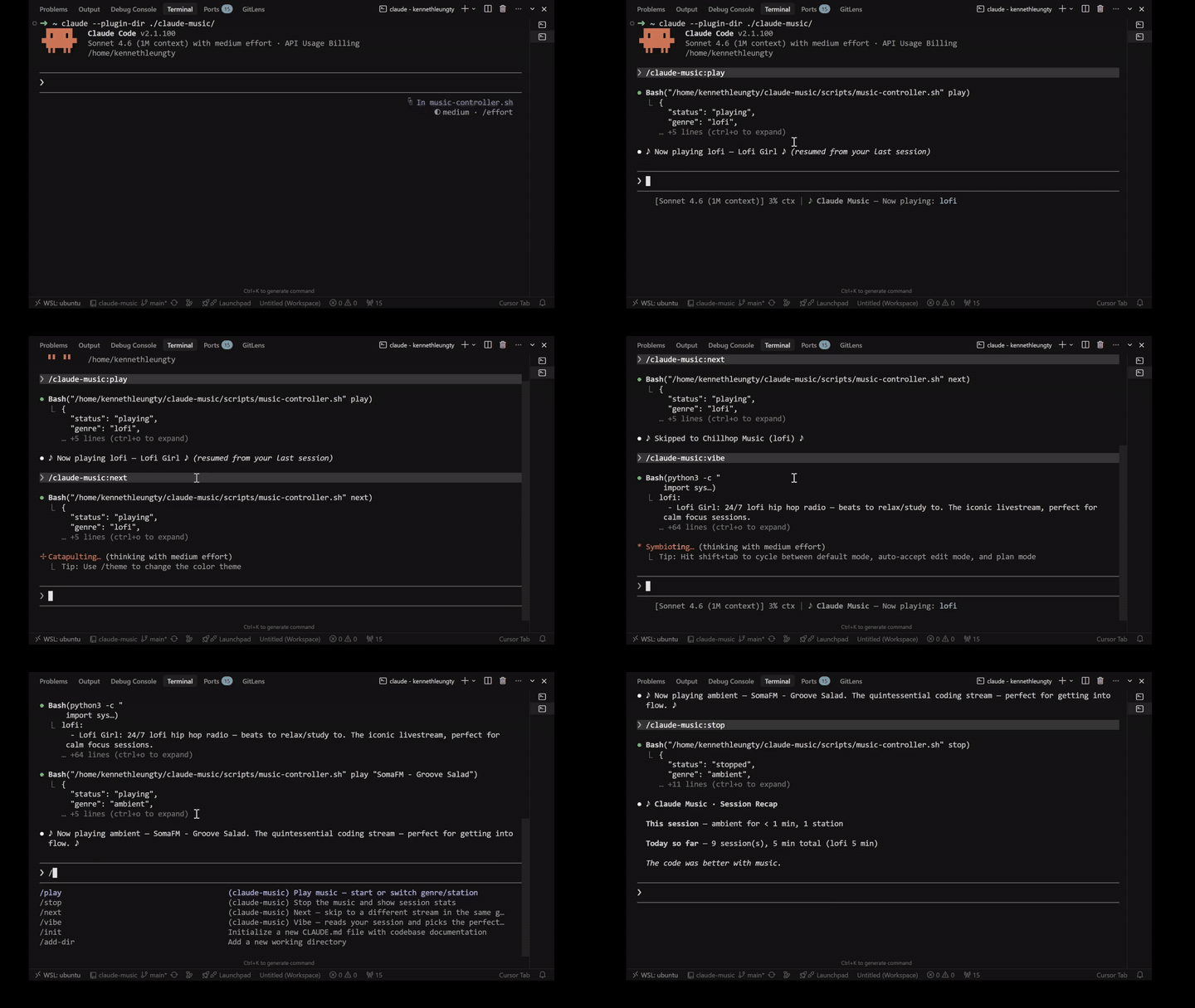
Quick Start
/play                # Start playing (lofi genre by default)
/play jazz           # Play a specific genre or station name
/next                # Skip to a different station (same genre)
/prev                # Go back to the previous station
/stop                # Stop the music
/volume up           # Nudge volume up (or down, or set 0-100)
/mute                # Mute without stopping the stream
/shuffle             # Random genre, random station — surprise me
/status              # See what's playing right now
Or let the resident AI DJ Ken pick for you:
/vibe                            # DJ reads your session and picks automatically
/mood feeling tired, need energy  # Tell the DJ your mood in your own words
Or start a focus session with a timer:
/focus              # 25 min pomodoro — music fades out and chimes when done
/focus 45 ambient   # 45 min with ambient music
See the full command list for more.
Installation
Claude Code (via Plugin Marketplace)
Register the marketplace first:
/plugin marketplace add kennethleungty/claude-music-marketplace
Then install the plugin:
/plugin install claude-music@claude-music-marketplace
Verify Installation
Start a new session and try /play or /vibe.
Don't have an audio player installed? No worries — the plugin detects this and walks you through installing one automatically.
AI DJ
The plugin includes a resident AI DJ (DJ Ken) that picks the right music for you. Debugging? He switches to lofi. Deep in a code review? Classical kicks in. He learns your preferences over time — the more you use it, the better he gets.
/vibe— DJ Ken reads your current session and picks automatically. No input needed./mood <feeling>— Tell him what you want in your own words: "calm me down", "something retro and fun"./prefs— See what he's learned about your taste over time.
Genres
| Genre | Vibe | Great for | Stations |
|---|---|---|---|
| lofi | Chill downtempo beats, mellow vibes | Focused coding, debugging, writing tests | 3 |
| jazz | Smooth jazz, bossa nova, instrumental | Building features, refactoring | 4 |
| classical | Orchestral, chamber music, deep focus | Code review, reading, research | 3 |
| ambient | Atmospheric drones, space music | Brainstorming, design, creative work | 6 |
| electronic | Electronic, trance, IDM, dubstep, trip-hop | Shipping sprints, high-energy sessions | 6 |
| synthwave | Retro-futuristic, 80s-inspired | Late night coding, nostalgic vibes | 3 |
| lounge | Cinematic, spy-movie elegance | Demos, presentations, smooth backdrop | 2 |
| indie | Indie pop, folk, dream pop | Creative writing, docs, warm sessions | 4 |
Each genre has multiple stations. Use /next to cycle through them.
Works Everywhere
| Platform | How it plays |
|---|---|
| macOS | mpv or ffplay (via Homebrew) or built-in afplay |
| Linux | mpv or ffplay (via apt, dnf, pacman, etc.) |
| WSL2 | mpv/ffplay inside WSL (with WSLg audio) or Windows-side mpv.exe |
| Windows | mpv (via winget, scoop, or chocolatey) |
The plugin auto-detects your platform and available audio players. If nothing is installed, it offers to set one up for you.
All Commands
| Command | What it does |
|---|---|
/play [genre or station] |
Start playing by genre or station name |
/stop |
Stop the music and show session stats |
/next |
Switch to a different station (same genre) |
/prev |
Go back to the previous station |
/pause |
Stop the music (alias for /stop) |
/mute |
Silence the music without stopping the stream (volume 0) |
/vibe |
AI DJ reads your session and picks the best genre |
/dj |
Same as /vibe |
/mood <feeling> |
Tell the DJ how you're feeling and it picks the right music |
/focus [min] [genre] |
Pomodoro timer with music (default 25 min) |
/pomodoro |
Same as /focus |
/shuffle |
Pick a completely random genre and station |
/volume [0-100 | up | down] |
Set volume, nudge up/down by 10, or show current |
/status |
See what's playing right now |
/list |
List available genres and their stations |
/stats |
See current session and lifetime listening stats |
/prefs |
See your saved preferences and favorite stations |
/reset |
Clear all preferences back to defaults |
/sources |
View, add, edit, or remove streams |
/feedback |
Report a bug or share feedback on GitHub |
/help |
Show help |
Start a pomodoro session with background music. When the timer ends, the music fades out and a chime plays.
/focus              # 25 min, current genre
/focus 45 ambient   # 45 min of ambient
The status line at the bottom of your terminal shows what's currently playing — genre, station name, track title, and pomodoro countdown when active. Always visible, never scrolls away.
Your settings are saved automatically and persist locally across sessions:
- Genre — your preferred default (lofi by default when fresh start)
- Volume — 0 to 100 (changed via
/volume)
All streams are free, ad-free, and require no account. The station library is a mix of curated SomaFM radio streams and 24/7 YouTube livestreams.
- Lofi — Lofi Girl, Chillhop Music, Groove Salad
- Jazz — Coffee Shop Radio, SomaFM Fluid, Bossa Beyond, WDCB Jazz
- Classical — Classical Piano & Fireplace, All Classical Portland, France Musique
- Ambient — Relaxing Ambient, SomaFM Drone Zone, Deep Space One, Mission Control, Dark Zone, Stereoscenic Ambient
- Electronic — Beat Blender, The Trip, Cliqhop IDM, Dub Step Beyond, Suburbs of Goa, Groove Salad Classic
- Synthwave — Synthwave Radio, Nightwave Plaza, SomaFM Synphaera
- Lounge — SomaFM Secret Agent, Illinois Street Lounge
- Indie — SomaFM Lush, Indie Pop Rocks, Folk Forward, BAGeL Radio
Want to add your own stations? Use /sources to manage streams interactively.
Contributing
Know a great stream that belongs here? We'd love your help growing the station library. Musicians, DJs, radio nerds, and anyone with good taste — open an issue or PR with your recommendation. Include the stream URL, a short description, and which genre it fits best.
All streams should be free, ad-free, and publicly accessible.
For Music Producers & Composers
Make music that's perfect for coding? We're always looking for new streams to feature.
This plugin plays background music during Claude Code sessions. If you produce lofi, ambient, jazz, electronic, or anything that pairs well with deep focus, your music could reach developers while they're actually in flow.
To get featured, open an issue with:
- A link to your stream (YouTube livestream, Icecast/Shoutcast URL, etc.)
- A short description of your sound
- Which genre category fits best (or suggest a new one)
We'll listen, and if it's a good fit, add it to the station library for everyone.
Coming Soon
Spotify Integration — Connect your Spotify account and play your own playlists directly through the plugin.
Reviews (0)
Sign in to leave a review.
Leave a reviewNo results found