pier
Health Gecti
- License — License: MIT
- Description — Repository has a description
- Active repo — Last push 0 days ago
- Community trust — 10 GitHub stars
Code Gecti
- Code scan — Scanned 2 files during light audit, no dangerous patterns found
Permissions Gecti
- Permissions — No dangerous permissions requested
Bu listing icin henuz AI raporu yok.
Give every agent session its own VM. One command up, zero burn when idle.
for local alternative - wt preps git worktrees for parallel agent sessions on your machine.
⚓ pier

Give every agent session its own VM. One command up, zero burn when idle.
Full dev environments on your own AWS or GCP account: your repo, your
secrets, your tools. One command to set up. Detach and it parks itself.
Attach and it's back in under a minute. Outgrown the box? One command
resizes it.
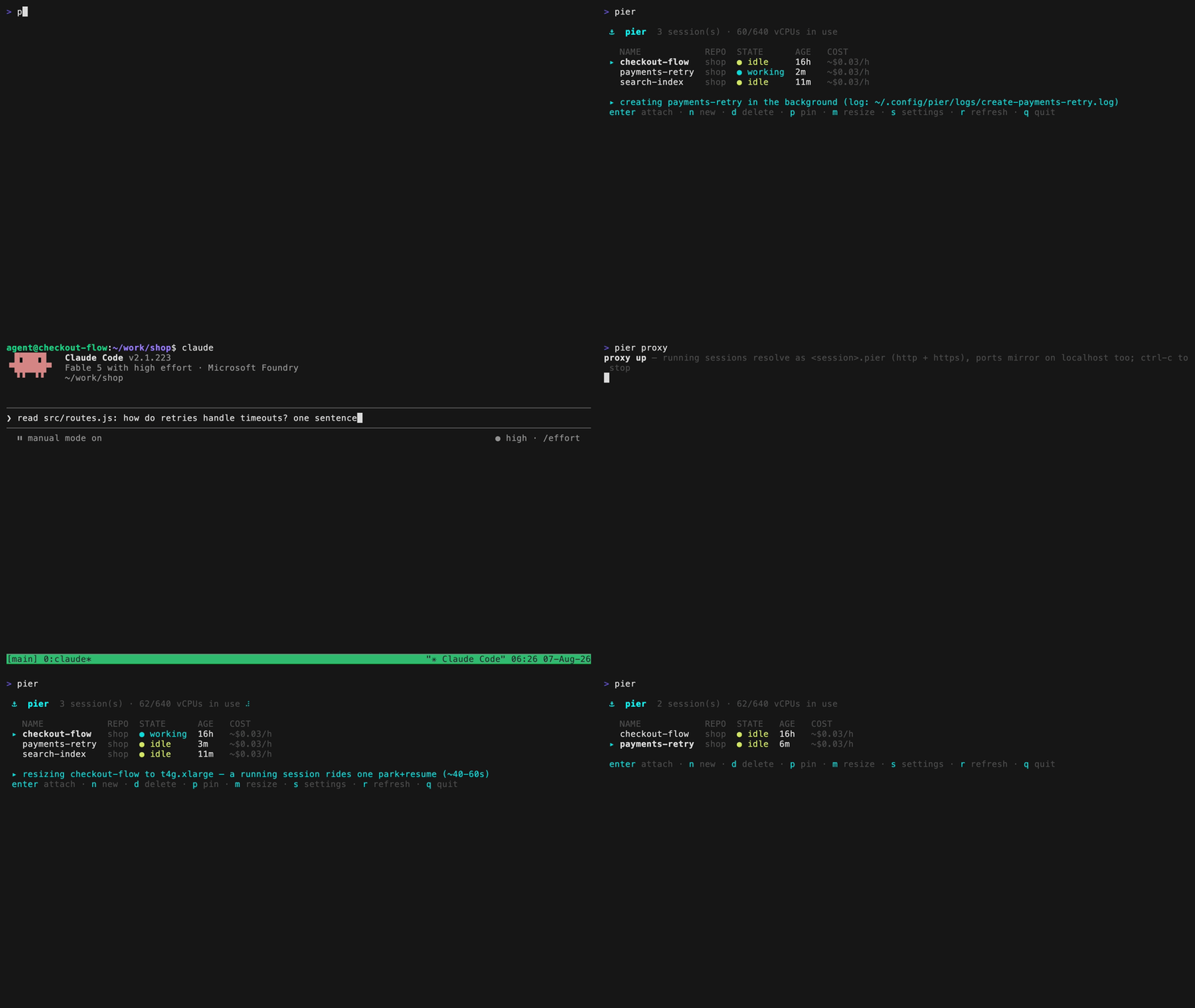
pier setup          # once: a short wizard sets up the account groundwork
cd ~/code/myapp
pier fix-login      # new session: your branch, your secrets, your dev env
pier proxy          # sessions as hostnames: the dev server at fix-login.pier:3000
pier                # the TUI: list, attach, create, resize, destroy
Contents
- Why pier
- The solution
- Installation
- Setup
- Usage
- Making your repo pier-ready
- The pier-onboard skill
- Features
- Caveats
- How it works
- Design decisions
- vs. other tools
- Roadmap
- Contributing
- License
Why pier
Coding agents changed what a dev environment is. A session is no longer you
at one machine. It's an agent that runs for hours and wants its own branch,
its own ports, its own docker daemon. And you want several at once.
Every existing place to run them fights you:
- Your laptop. Sessions fight over ports and files. Closing the lid
kills the run. - Hosted agent platforms. Your code, your secrets, and your agent's
credentials live on someone else's infra, billed by the seat. - A cloud dev box. Bills 24/7 while the agent thinks and while you
sleep. You still hand-build repo, auth, secrets, and tools for every
session.
The solution
pier makes each session a micro-VM that manages its own lifecycle.
$ pier checkout-flow
One command launches a VM on your cloud account and drops you into tmux
inside it, with:
- your repo on a fresh branch, uncommitted edits included
- Claude Code and Codex installed and authenticated
- your MCP servers configured
- your dev environment built by the repo's own setup script
Detach and forget it. An in-VM supervisor parks the VM once the agent goes
quiet: the instance stops, the disk persists. Attach again and it resumes in
about 20 seconds on AWS and about a minute on GCP, with files, branches, and
credentials exactly as you left them. If the session outgrows its hardware,pier resize swaps the machine type in one park and resume cycle, disk
intact. And to see what the agent built,pier proxy turns every running session into a hostname:checkout-flow.pier:3000 opens in your browser like localhost.
| Session state | Costs |
|---|---|
| running | ~$0.04/h |
| parked | ~$3-4/mo (disk only) |
There is no control plane. No server, no database, no daemon on your laptop.
Session state lives in instance tags. Every byte between you and the VM is
plain ssh. On AWS it dials the instance directly with port 22 open to your
IP only, and networks that block that path fall back to an SSM tunnel
automatically (aws.direct = false forces it). On GCP it rides Google's IAP
tunnel and the instance accepts nothing else from the internet.
Why AWS and GCP? Most teams already have the account, the credits, the
budget line, and the compliance review, so pier rides them instead of
introducing a new vendor. VMs are also the right substrate for park/resume:
native stop/start keeps disks intact (measured on EC2: parked in 44s,
resumed in 21s), SSM and IAP give audited access with no bastion, and tags
are a free state store.
Installation
brew install usepier/tap/pier
Or build from source with make, not go build (the in-VM supervisor must
be embedded):
git clone https://github.com/usepier/pier
cd pier
make install
You also need, on the laptop:
- on AWS:
awsCLI v2 and the Session Manager plugin - on GCP: the
gcloudCLI gitand OpenSSH (already on macOS/Linux)- Go 1.24+ (only when building from source)
pier doctor checks all of it, plus your cloud auth and account groundwork.
Setup
pier setup
The wizard handles the account groundwork once:
- Asks which cloud and authenticates against your AWS profile or GCP
project. - Creates the groundwork. On AWS: an IAM role and instance profile carrying
onlyAmazonSSMManagedInstanceCore, plus one egress-only security group.
On GCP: the compute and IAP API enables, plus two firewall rules that
admit only Google's IAP range to pier VMs and shut everything else out. - Writes
~/.config/pier/config.toml. - Detects the agent config and credentials it will copy into sessions.
- Offers to bake an image for the current repo.
- Runs the
pier doctorchecks.
Everything it creates is tagged and removable with pier teardown. Change
any setting later from inside the TUI. Run pier and press s.
No admin rights? pier setup --print-admin prints the handful of commands
for an admin to run once. The wizard then works with what exists.
AWS permissions
Two permission levels exist. Setup needs IAM rights once, to create the
role, the instance profile, and the security group. Daily use needs only:
ec2: run, start, stop, terminate, describe, and create-tagsssm: start-session and get-parametersts: get-caller-identityiam: PassRole onpier-session(plus get-role and get-instance-profile
forpier doctor)ec2security group ingress calls for direct connect (skipped whenaws.direct = false)
pier resize adds ec2:ModifyInstanceAttribute. pier bake addsec2:CreateImage, ec2:DeregisterImage and ec2:DeleteSnapshot. The vCPU
headroom display reads servicequotas:GetServiceQuota and degrades politely
without it. The same list ships as comments in pier setup --print-admin.
GCP permissions
Setup needs a project owner or editor once, to enable the compute and IAP
APIs and create two firewall rules. Daily use needs only:
roles/compute.instanceAdmin.v1(instances, disks, images, metadata,
labels)roles/iap.tunnelResourceAccessor(the ssh tunnel)
Sessions run with no service account, so no roles/iam.serviceAccountUser
grant is needed. The CPU headroom display reads the region quotas, whichinstanceAdmin already covers. pier setup --print-admin prints the exact
setup commands for an admin.
pier locks its VMs down harder than a fresh project does. GCE default
networks ship a rule that opens :22 to the whole internet, and pier VMs hold
an external IP for egress. Setup therefore creates a deny-all ingress rule
for pier VMs and one allow rule above it for exactly Google's IAP range
(35.235.240.0/20). Both rules target only instances taggedpier-session. The rest of your network is untouched.
Usage
pier                      the TUI: sessions live-updating
                          enter attach · n new · d delete · p pin · m resize · s settings · r refresh · q quit
pier <branch> [base]      new session off base (default HEAD), then attach
    -d, --detach          create without attaching
    --idle <dur|never>    idle self-park timeout (default 30m)
    --cap <dur|never>     unattended runaway cap (default 8h)
    --no-park             shorthand for --idle never
pier ls                   plain list (pipeable)
pier attach <session>     attach (parked sessions auto-resume, ~20-60s)
pier logs <session>       show the setup script log (-f follows)
pier rm <session> [-f]    destroy the session and its disk
pier keep <session>       pin: disable idle self-park
pier resize <session> <type>   grow/shrink the VM (~1-2 min, same CPU arch)
pier bake                 prebake this repo's session image (~1-2 min creates)
pier mcp login <session>  one-time browser approvals for OAuth MCP servers
pier proxy                every running session as <session>.pier (macOS)
pier port <session> <p>   manual port forward (8080:3000 = local:session)
pier doctor               environment + account checks
pier teardown             remove all pier groundwork from the account
A day with pier:
$ cd ~/code/shop && pier checkout-flow
creating checkout-flow (shop @ HEAD)
  ▸ launching t4g.medium (baked image)
  ▸ pushing secrets + repo (GitHub-first: only secrets ride the tunnel)
  ▸ bootstrap: branch checkout-flow, dirty patch applied, setup running
session checkout-flow ready
[tmux opens: claude is installed, authenticated, on your branch]

# ... in a second terminal: the session's ports, one hostname away ...
$ pier proxy
proxy up — running sessions resolve as <session>.pier (http + https), ports mirror on localhost too; ctrl-c to stop
# the agent's dev server, live in your browser: http://localhost:3000
# or, when two sessions hold the same port: http://checkout-flow.pier:3000

# ... detach with C-b d, close the laptop, have dinner ...

$ pier ls
NAME           REPO  STATE   AGE  COST
checkout-flow  shop  parked  3h   ~$3-4/mo

$ pier attach checkout-flow
resuming checkout-flow (~20-60s)...
[right where you left it]
Making your repo pier-ready
Three optional files at the repo root, all committed:
| File | Runs / read | Contains |
|---|---|---|
.pier-setup.sh |
Every session's first boot, async, in a setup tmux window |
Repo state: deps, services, migrations, seeds |
.pier-include |
At create | Untracked/ignored files to carry (env files, local certs) |
.pier-bake.sh |
Once, during pier bake |
Toolchains beyond the default image (pnpm, python, rust, ...) |
# .pier-setup.sh (cwd is the repo root, logs to ~/.pier-setup.log)
set -euo pipefail
pnpm install
docker compose up -d
pnpm db:migrate
Prefer docker compose up -d for services. A bare background process must
fully detach with setsid cmd </dev/null >log 2>&1 & or it dies when the
setup window closes.
# .pier-include: one path or glob per line (no **), a directory carries its subtree
.env
apps/*/.env.local
# .pier-bake.sh (agent user, passwordless sudo, NO repo checkout yet)
set -euo pipefail
sudo corepack enable
echo COREPACK_ENABLE_DOWNLOAD_PROMPT=0 | sudo tee -a /etc/environment >/dev/null
COREPACK_ENABLE_DOWNLOAD_PROMPT=0 corepack install -g [email protected]
The pier-onboard skill
Don't write those files by hand. This repo shipsskills/pier-onboard, a skill that teaches
a coding agent to inspect your repo and write all three files with the right
boundaries.
cp -r pier/skills/pier-onboard ~/.claude/skills/ # or your repo's .claude/skills/
Then ask your agent to "set this repo up for pier".
Features
Fast repo transfer, GitHub-first
Tunnels are slow (the SSM one moves about 1 MB/s), so anything big avoids
them:
- Base commit on a GitHub origin: the VM fetches straight from GitHub, only
secrets ride the tunnel. - Local-only commits: a thin delta bundle through the tunnel.
- Anything else: a full-history bundle, slow but universal.
- Uncommitted edits to tracked files: one git patch, applied after checkout.
Private repos reuse whatever GitHub credential the laptop already has (gh
login, git's https credential helper, or ssh keys through a forwarded
agent). pier verifies the fetch works with exactly the auth the session will
have before skipping the bundle. Pushing from a session works anytime with a
token, and while attached with ssh keys only (the forwarded agent leaves
when you do).
Secrets, deliberately boring
Secrets travel once, at create, as an explicit manifest:
~/.claude,~/.codex, tokens (gh auth token,claude setup-token)- the repo files your
.pier-includelists
Nothing loose ships by default. The create prints which env files it is
not carrying. The VM never holds cloud credentials. On AWS its instance
role carries SSM and nothing else. On GCP it runs with no service account
at all.
MCP servers, agents, skills
MCP servers travel with their config, including auth when it's static (env
vars, API-key headers). OAuth-backed remotes keep rotating tokens in the OS
keychain and can't be copied, so they need one browser approval per session:
pier mcp login <session> # sweeps whatever still needs auth
Headless Chromium ships in the default image, so browser MCPs and skills
(screenshots, web automation) work out of the box.
pier proxy: sessions as hostnames
$ pier proxy
proxy up — running sessions resolve as <session>.pier (http + https), ports mirror on localhost too; ctrl-c to stop
- Open
http://checkout-flow.pier:3000in a browser, orpsql -h checkout-flow.pier. https://checkout-flow.pier:3000also works, on the same port.- Ports the session listens on are discovered and mirrored live.
- Ports also appear on plain
localhost. Auth callbacks and CORS rules
that only trusthttp://localhost:<port>keep working unchanged. - Dev servers are accelerated. The proxy caches modules on your machine
and prefetches imports in parallel, so vite-style servers load in
seconds over the WAN instead of one round trip per file. The cache
warms itself as soon as a port appears, before you open the browser.
It persists on disk, so a proxy restart starts warm too. - A live connection counts as attachment, so a session never parks under
your open browser tab. - One sudo on first run. macOS only for now.
pier port <session> 3000is the manual, zero-sudo fallback everywhere.
pier bake: per-repo images
A stock create installs the harnesses under cloud-init, which takes minutes.
Baking pays that cost once:
pier bake # one throwaway instance + your .pier-bake.sh, snapshotted as an image
Creates from a baked image drop to a minute or two. Images are keyed to
the repo, so one project's toolchain never bleeds into another's. Re-baking
supersedes the old image, and pier teardown sweeps them all by tag.
Setup that can't fail silently
.pier-setup.sh runs async in its own tmux window on first boot, after the
checkout, dirty patch, and .pier-include files are in place. The outcome
always surfaces:
pier lsand the TUI show(setup running)or(setup failed)pier logs <session>prints the log from anywhere, no attach needed
(-ffollows,lin the TUI)~/.pier-setup.logends withpier setup: doneorpier setup: FAILED (exit N)- a failed window renames to
setup-failedand stays open instead of vanishing
Set PIER_SETUP_SCRIPT to run a different script for one create.
Strain and resize
The supervisor reports sustained cpu/mem pressure (kernel PSI), and pier resize fixes it without losing anything:
$ pier ls
NAME           REPO  STATE               AGE  COST
checkout-flow  shop  working (strained)  2h   ~$0.04/h

$ pier resize checkout-flow t4g.xlarge
Or press m in the TUI. It lists same-arch machines with their vCPU, memory
and hourly cost, so nobody memorizes instance type names.
One park/resume cycle, about a minute on AWS and about two on GCP, disk and
state intact. Deliberately not automatic: the VM holds no cloud credentials,
and auto-scaling is a surprise-cost footgun.
Honest states
The cloud says "running" long before a session is usable, so pier doesn't:
- A session lists as
creatinguntil the bootstrap's last act marks the
instance ready (a tag on AWS, a label on GCP). - Attaching early gets a plain "still setting up", not a raw connection error.
- TUI creates run in the background and the row flips when ready.
- A deleted session lists as
deletinguntil the cloud actually removes it.
GCE takes a minute there and would otherwise read as parked. - A create that fails cleans up its own instance.
Caveats
- The SSM fallback tunnel is about 1 MB/s. Repos that can't come from
GitHub push their history through it (a 300 MB history takes about 5
minutes, once per create). The create output says which transfer mode you
got and why. - Parking loses processes. Files, git state, and installed tools
survive. The tmux server and an in-flight agent run don't. Hibernate
(park with RAM) is on the roadmap. - OAuth MCPs need a browser approval per session. Keychain-held tokens
can't be copied safely. This floor is real. - ssh-key-only GitHub auth pushes while attached. The forwarded agent
disconnects with you. Any token lifts this. pier proxyis macOS-only for now.pier portworks everywhere.- GCP wakes slower than AWS. Resume to attached is about a minute
against EC2's ~20s, and a running resize takes about two minutes. GCE
stop/start simply takes longer. - Bake hooks live only in baked images. A repo with a
.pier-bake.sh
that was never baked runs stock. Setup then fails loudly, not silently. - Resize stays within the CPU arch (t4g to t4g). Providers only allow
type changes on stopped instances.
How it works
A session is one VM plus its persistent disk, tagged and namespaced by your
caller identity (your STS ARN on AWS, your authed principal on GCP), so a
team shares one account with zero collisions. All state lives in those tags
and on the disk. pier ls is one filtered describe call, and there is
nothing else to operate, back up, or pay for.
laptop                              AWS account (yours)
──────                              ───────────────────
pier CLI/TUI ── aws cli ──────────▶ EC2 API        (create/stop/start/tags)
     │                              ┌─────────────────────────┐
     └── ssh ─────────────────────▶ │ session VM               │
         (direct to its public IP,  │  tmux ▸ claude / codex   │
          SSM tunnel as fallback)   │  pier-supervisor         │
                                    │  └─ parks the VM when    │
                                    │     detached and quiet   │
                                    └─────────────────────────┘
GCP is the same picture with gcloud, the GCE API, and Google's IAP tunnel
in place of SSM.
The supervisor samples every 5 seconds for attached (tmux clients, or a
live forwarded TCP connection) and busy (a running setup script, agent
process-tree CPU, recent pty output):
- attached or busy resets the idle clock
- detached and quiet past
idle_timeoutparks - detached but busy past
unattended_capparks anyway, so a looping agent
can't burn compute for days
Parking is the VM running shutdown -h now, with the instance configured
to stop rather than terminate. The supervisor holds no credentials and calls
no APIs. It beacons state to /run/pier/status.json, which ls, the TUI,
and pier proxy read.
Full design, including the settled trade-offs and measured spike numbers:
docs/SPEC.md.
Design decisions
The choices contributors should know before proposing changes
(details in CONTRIBUTING.md and docs/SPEC.md):
- No control plane, ever. State lives in instance tags. Adding a server,
database, or laptop daemon needs an extraordinary reason. - The cloud CLI, not the SDK.
awsandgcloudare already required
for their tunnels, and SSO/profiles/MFA come with them for free. v1 has
no SDK dependency. - No cloud credentials in the VM. Parking is the VM shutting itself
down. Resize is human-triggered. Anything needing account credentials
happens from the laptop. - One transport. Attach, exec, file push, and port forwards are all
OpenSSH, straight to the VM or through the cloud's tunnel. No second
mechanism to secure or debug. - Guarded cloud-init, identical on stock and baked images. Every
install step is a no-op when the image already has it. Baking is an
optimization, never a requirement. - Images are toolchains, sessions are state.
pier bakeinstalls
tools. Deps, migrations, and env belong to.pier-setup.shat boot. - Dirty state travels as a git patch, not rsync. Binary-safe,
reviewable, applied atomically after checkout. - Truth over optimism in states. The ready tag, the setup status file,
the strained flag: pier reports what is, not what the cloud claims. pier lsstays plain (pipeable). The TUI is the pretty view.
vs. other tools
| pier | Codespaces / devcontainers | Hosted agent platforms | DIY EC2 + tmux | |
|---|---|---|---|---|
| Runs on | your AWS or GCP account | GitHub's infra | vendor's sandbox | your AWS account |
| Idle cost | ~$3-4/mo (self-parks) |
metered, auto-stop | per-seat / per-task | full rate unless you script it |
| Agent-ready | harnesses + auth + MCP travel | you configure | their agent only | you configure |
| Session lifetime | until you rm it |
workspace-scoped | task-scoped | until you clean it up |
| Interface | your terminal, tmux | VS Code / web | web UI | your terminal |
| Setup | one wizard | per-repo config | account signup | everything by hand |
Honest framing: Codespaces is more polished for humans editing in VS
Code. Hosted agent platforms are simpler for fire-and-forget tasks when
you don't mind whose infra they run on. pier is for keeping long-lived,
stateful agent sessions on infrastructure you already own and already trust
with your code, at storage prices when you're not using them.
Roadmap
- Hibernate/suspend parking. Keep RAM, resume mid-agent-run.
- Linux
pier proxy. - Custom base images. Bring your own golden image under pier's harness
layer.
Contributing
See CONTRIBUTING.md. Start with an issue for anything
beyond a small fix. The design ground rules above are load-bearing.
License
Yorumlar (0)
Yorum birakmak icin giris yap.
Yorum birakSonuc bulunamadi