bettercode
Health Gecti
- License — License: MIT
- Description — Repository has a description
- Active repo — Last push 0 days ago
- Community trust — 22 GitHub stars
Code Uyari
- process.env — Environment variable access in .github/workflows/release.yml
Permissions Gecti
- Permissions — No dangerous permissions requested
Bu listing icin henuz AI raporu yok.
Every coding agent in one desktop workspace. Run Claude Code, OpenAI Codex, Cursor Agent and Grok side by side. Bring your own CLI. Free during beta. Open source as of 21 September 2026 (MIT).
BetterC0de
Your coding agents. One desktop workspace.
[!WARNING]
Beta software: BetterC0de is an early beta release. Bugs, crashes, incomplete features, and breaking changes are normal and expected. Save your work, review changes before running them, and report problems through GitHub Issues.Download the current beta installers from the GitHub Releases page. GitHub Packages does not contain the desktop installers.
Bring your AI conversations, project files, terminals, and live previews together.
Move from an idea to a change you can see, understand, and review.
Website · Download · Docs · Blog · Discord
Meet your workspace
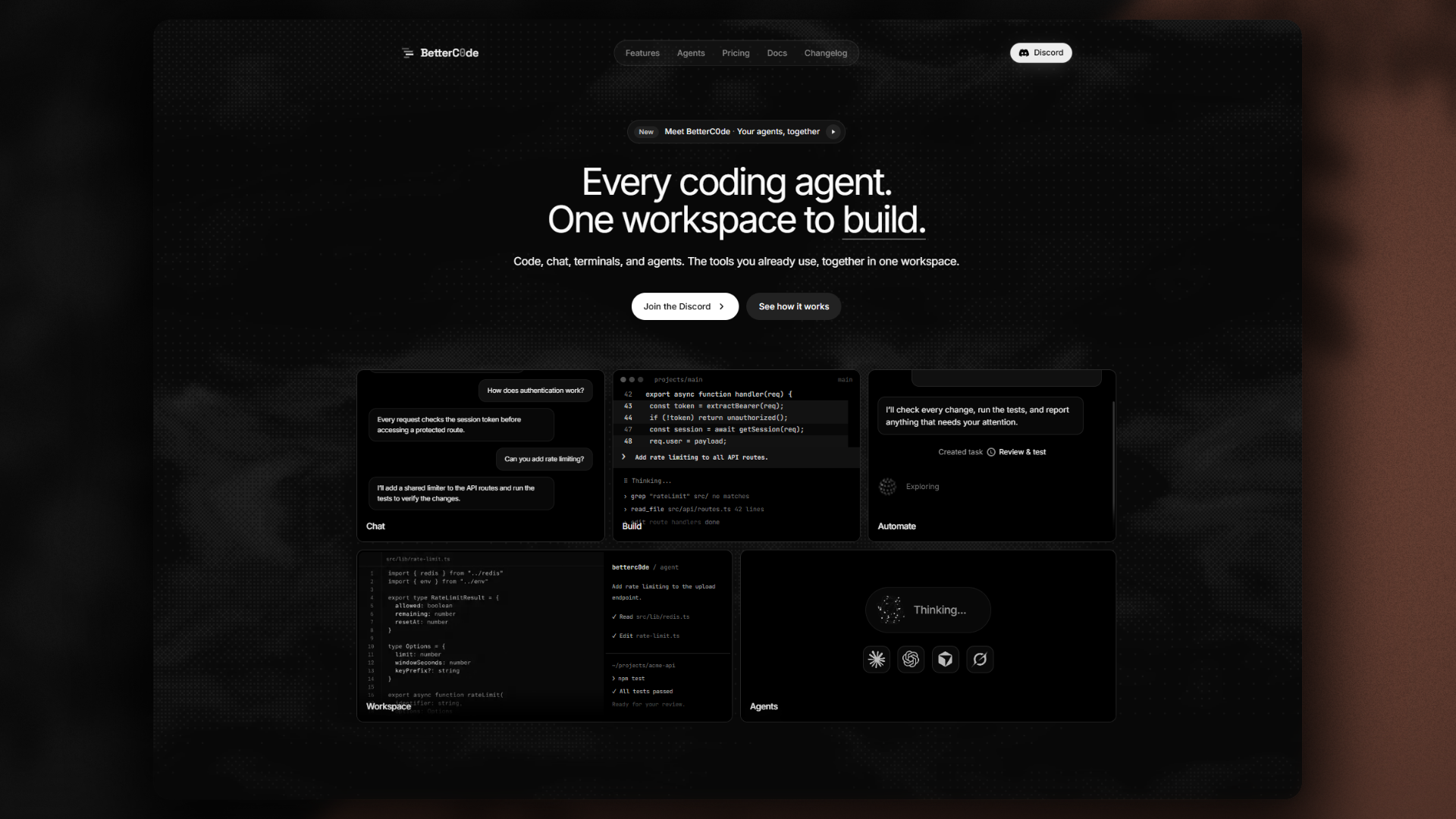
BetterC0de is a desktop AI coding environment. It brings coding assistants such as Claude Code, OpenAI Codex, Cursor Agent, and Grok into a shared workspace with an editor, terminal, Git tools, and browser previews.
Open a project, choose an available provider, and describe what you want to build. Keep the conversation next to your files, inspect the results, and review the changes before you commit them.
Three ways to work
| Mode | Make room for what matters |
|---|---|
| Editor | Work directly with files, search your project, inspect changes, and keep an AI conversation beside your code. |
| Agent | Focus on conversations and tasks. Arrange panes so chats, terminals, plans, and diffs are easy to reach. |
| Canvas | Arrange projects on a visual canvas with live previews and runtime information. Explore how your work looks across screen sizes. |
Built around your workflow
- Bring your preferred agents. Connect supported coding tools and choose from the providers and models available to your setup.
- Keep context close. Work with project files, conversations, terminals, and changes in the same app.
- Work side by side. Keep several conversations visible and organize the workspace around the task.
- See what you are building. Use browser previews, select page elements, and send visual feedback to your agent.
- Review with confidence. Inspect staged and unstaged changes through the Git and Diff views.
- Make it your own. Adjust appearance, panel layouts, and separate windows to suit your working style.
Download
BetterC0de is free during the beta. The GitHub Releases page contains the installer files and update metadata for each version. Select the newest beta, expand Assets, and choose your platform.
Open source as of 21 September 2026. The full source is in this repository under the MIT License. Beta installers are below.
| Platform | Requirements | Download |
|---|---|---|
| Windows | Windows 10 / 11, 64-bit | Release assets |
| macOS · Apple Silicon | M1 or newer | Release assets |
| macOS · Intel | Intel-based Mac | Release assets |
| Linux | x64 | Release assets (.AppImage or .tar.gz) |
Not sure which Mac you have? Open About This Mac — an "Apple M…" chip means Apple Silicon. Or just use betterc0de.com/download, which picks the right build for your system.
Start here
- Download BetterC0de for your platform.
- Install BetterC0de and connect a supported AI provider.
- Open a project folder and start your first conversation.
- Review the resulting files and changes in your workspace.
Follow the getting-started guide for a walkthrough without terminal commands.
Explore the guides
| Guide | What you will find |
|---|---|
| Getting started | Installation, provider setup, your first task, and troubleshooting. |
| How BetterC0de works | Workspace concepts, everyday workflows, and diagnostic data. |
| Brand guide | The name, logo, visual direction, and reusable product descriptions. |
Build and contribute
The application source, mobile companion, tests, and build tools are included in this repository. Start with the installation and setup guide, then use the development guide for local workflows and platform builds. Read Contributing, Security, and third-party notices before submitting changes or distributing a build.
BetterC0de source is released under the MIT License. Third-party terms stay with their owners; see third-party notices.
Stay connected
Visit betterc0de.com for product information, join the Discord community, or read the terms and data information.
BetterC0de is in beta and was open-sourced on 21 September 2026. Available installers and features may vary by release. AI provider access, usage limits, and billing depend on the provider you connect. The app also sends a periodic heartbeat and diagnostic reports; see Diagnostics and data.
BetterC0de
Your next idea starts in your workspace.
Free during beta · Open source 21 September 2026 · Built by kerim0x1
Yorumlar (0)
Yorum birakmak icin giris yap.
Yorum birakSonuc bulunamadi