mudroom
Health Uyari
- License — License: MIT
- Description — Repository has a description
- Active repo — Last push 0 days ago
- Low visibility — Only 6 GitHub stars
Code Basarisiz
- rm -rf — Recursive force deletion command in install.sh
- rm -rf — Recursive force deletion command in scripts/build-app.sh
- rm -rf — Recursive force deletion command in scripts/make-demo.sh
- process.env — Environment variable access in scripts/make-demo.sh
- network request — Outbound network request in scripts/make-demo.sh
- rm -rf — Recursive force deletion command in scripts/make-gif.sh
Permissions Gecti
- Permissions — No dangerous permissions requested
Bu listing icin henuz AI raporu yok.
Run coding agents in a Linux VM on a clone of your project, then review and apply their changes like a pull request
Mudroom
Run coding agents in a sandbox, then review their changes like a pull request
before anything touches your project.
Coding agents work best with permission prompts turned off, and that means
they can delete files or reach any host while you aren't looking. Mudroom
runs Claude Code, Codex, Gemini CLI, opencode, Aider (or any command) in a
Linux micro-VM, on a copy-on-write clone of your project, with network access
limited to the hosts you allow. Your real folder is never mounted. When the
agent is done you read the diff, apply all of it, some files, some hunks or
none, and undo any apply later.
macOS app and CLI on Apple-silicon Macs. CLI only (with Docker or Podman) on
Linux and Intel Macs.
Status: early prototype. Expect rough edges and breaking changes.
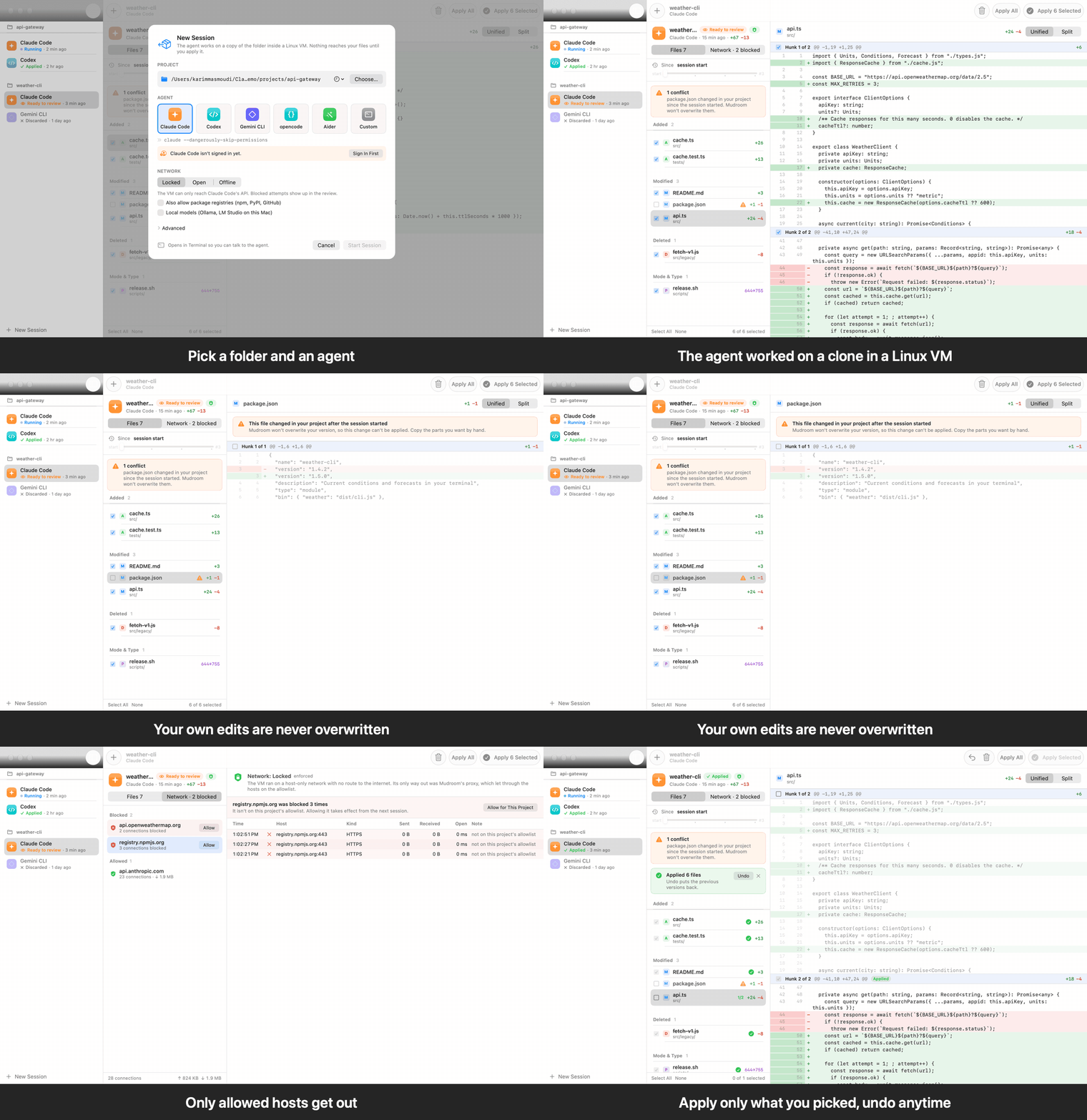
Watch the 33-second overview (with sound)
Quick start
Install (Apple-silicon Mac, macOS 26 or later):
curl -fsSL https://raw.githubusercontent.com/Kernel-Hunter/mudroom/main/install.sh | shOr with Homebrew:
brew install --cask kernel-hunter/tap/mudroomOpen Mudroom and work through the Setup window: install and start the VM
runtime, build the agent image (a few minutes, once), and sign in an
agent.mudroom setupdoes the same in a terminal.Click New Session, pick a folder and an agent, and start. When the agent
finishes, review the diff in Mudroom and apply what you want.
Contents
- Requirements
- Install
- Setup
- The app
- Command line
- Agents, sign-in and API keys
- Network
- Review and apply
- Docker and Podman
- How it works
- How it compares
- Limitations
- Development
Requirements
| Platform | What you get | Sandbox backend |
|---|---|---|
| macOS 26+, Apple silicon | App and CLI | apple (Apple's container, one VM per session), or docker/podman |
| macOS 26+, Intel | CLI only (build from source) | docker or podman |
| Linux x86_64 and arm64 | CLI only (build from source) | docker or podman |
| Windows | Not supported. WSL2 is untested. |
The apple backend needs Apple's container
CLI, version 1.5 or later. Setup installs it with Homebrew if you don't have
it.
The CLI picks a backend with --backend apple|docker|podman|auto (orMUDROOM_BACKEND). auto, the default, uses Apple's container on an
Apple-silicon Mac with macOS 26+ where it is installed, otherwise Docker,
otherwise Podman. A session remembers its backend, so mudroom start uses
the same one again. See Docker and Podman for how
isolation differs from the VM backend.
Install
curl -fsSL https://raw.githubusercontent.com/Kernel-Hunter/mudroom/main/install.sh | sh
The script needs macOS 26 or later on Apple silicon. It downloads the latest
release, checks its SHA-256 when the release publishes one, puts Mudroom.app
in /Applications (or ~/Applications if /Applications isn't writable) and
links the mudroom command into /opt/homebrew/bin, /usr/local/bin or
~/.local/bin. It doesn't use sudo. Set MUDROOM_VERSION=0.1.1 to pick a
version. To remove Mudroom (your sessions and settings stay):
curl -fsSL https://raw.githubusercontent.com/Kernel-Hunter/mudroom/main/install.sh | sh -s -- --uninstall
Or with Homebrew, which also installs Apple's container CLI:
brew install --cask kernel-hunter/tap/mudroom
Mudroom is ad-hoc signed, not notarized. The install script and the Homebrew
cask remove the quarantine flag, so macOS opens it. If you download the zip
in a browser, use System Settings > Privacy & Security > Open Anyway, or runxattr -dr com.apple.quarantine /Applications/Mudroom.app.
Build from source
You need Xcode 26+ (Swift 6.2+).
git clone https://github.com/Kernel-Hunter/mudroom
cd mudroom
scripts/build-app.sh            # build/Mudroom.app (app + bundled CLI), ad-hoc signed
open build/Mudroom.app
For the command line only (macOS or Linux):
swift build -c release
cp .build/release/mudroom /usr/local/bin/   # or anywhere on your PATH
On Linux you need Swift 6.2 or later (swift.org/install)
and Docker Engine or Podman. Then build the agent image once:
mudroom image build --backend docker      # or --backend podman
mudroom network check --backend docker    # see what the sandbox can reach
Setup
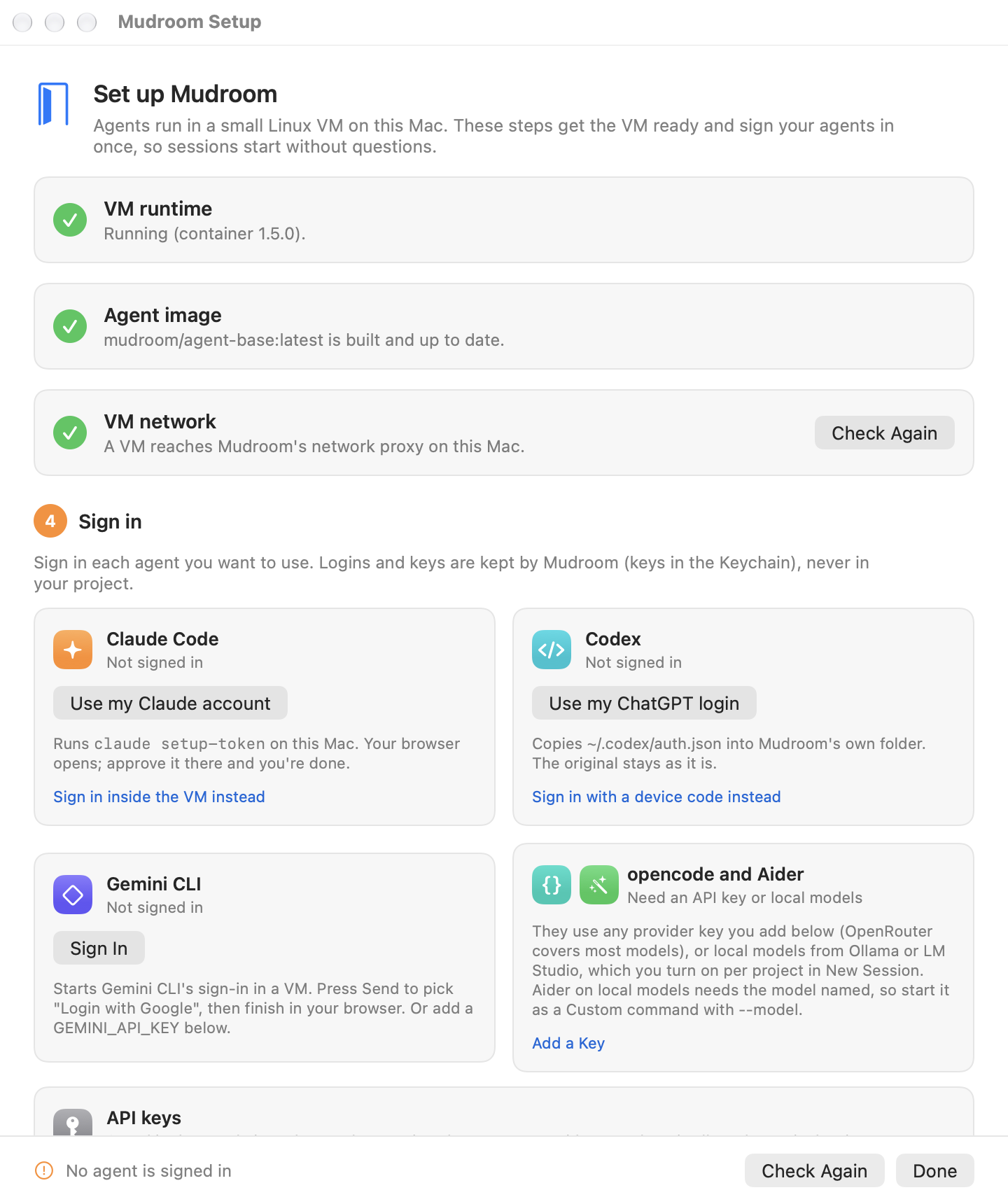
The Setup window opens on the first launch. It has four steps:
- VM runtime: Install runs
brew install container, and Start starts
it. The first start also downloads Apple's recommended Linux kernel. - Agent image: Build creates
mudroom/agent-base:latestwith Node LTS,
git, ripgrep and the agent CLIs (Claude Code, Codex, Gemini CLI, opencode
and Aider). It takes a few minutes and about 1.5 GB the first time. - VM network: a quick check that a VM reaches Mudroom's network proxy,
with a Repair button if it doesn't. - Sign in: "Use my Claude account" opens your browser; approve there and
you're done. Codex and Gemini CLI can reuse the login you already have on
this Mac. For opencode and Aider, add a provider API key (OpenRouter works
for most models).
Setup stays out of the way once everything is green. It's always under
Mudroom > Setup, and the sidebar tells you when a step needs attention. If
the VM runtime stops later (after a reboot, say), starting a session starts
it again.
In a terminal:
mudroom setup                      # checks each step and asks before each fix
mudroom setup --yes --no-sign-in   # unattended: install, start, build, repair; skip sign-in
mudroom setup --check              # report only, change nothing
By hand, the same steps are brew install container, container system start --enable-kernel-install, mudroom image build and mudroom agent login claude.
The app
- Sidebar: sessions grouped by project, each with its agent, time and
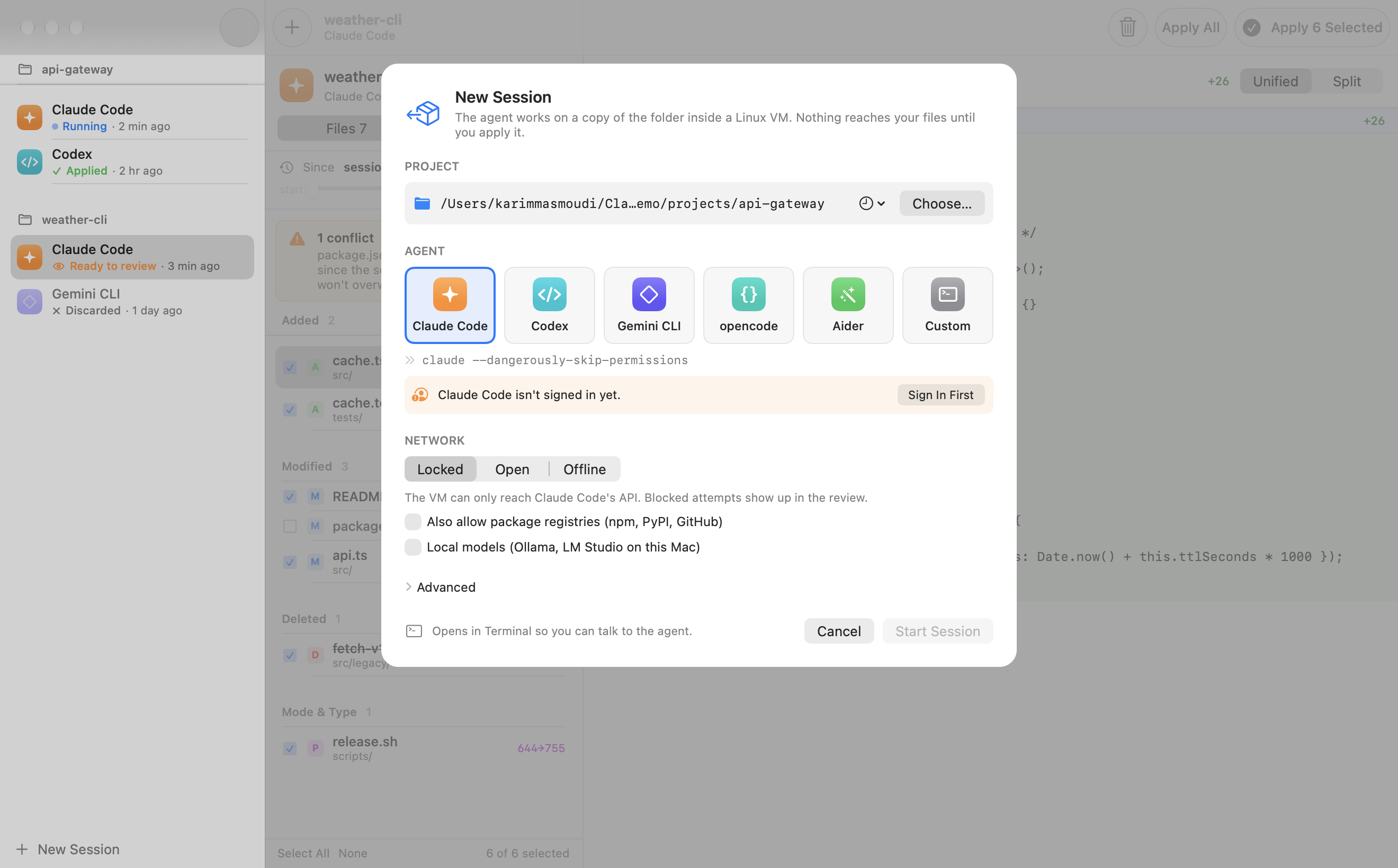
status (running, ready to review, applied, discarded). - New Session (⌘N): pick a folder, an agent (Claude Code, Codex, Gemini
CLI, opencode, Aider or a custom command) and a network mode (Locked, Open,
Offline), then start. Mudroom clones the folder and opens the agent in a
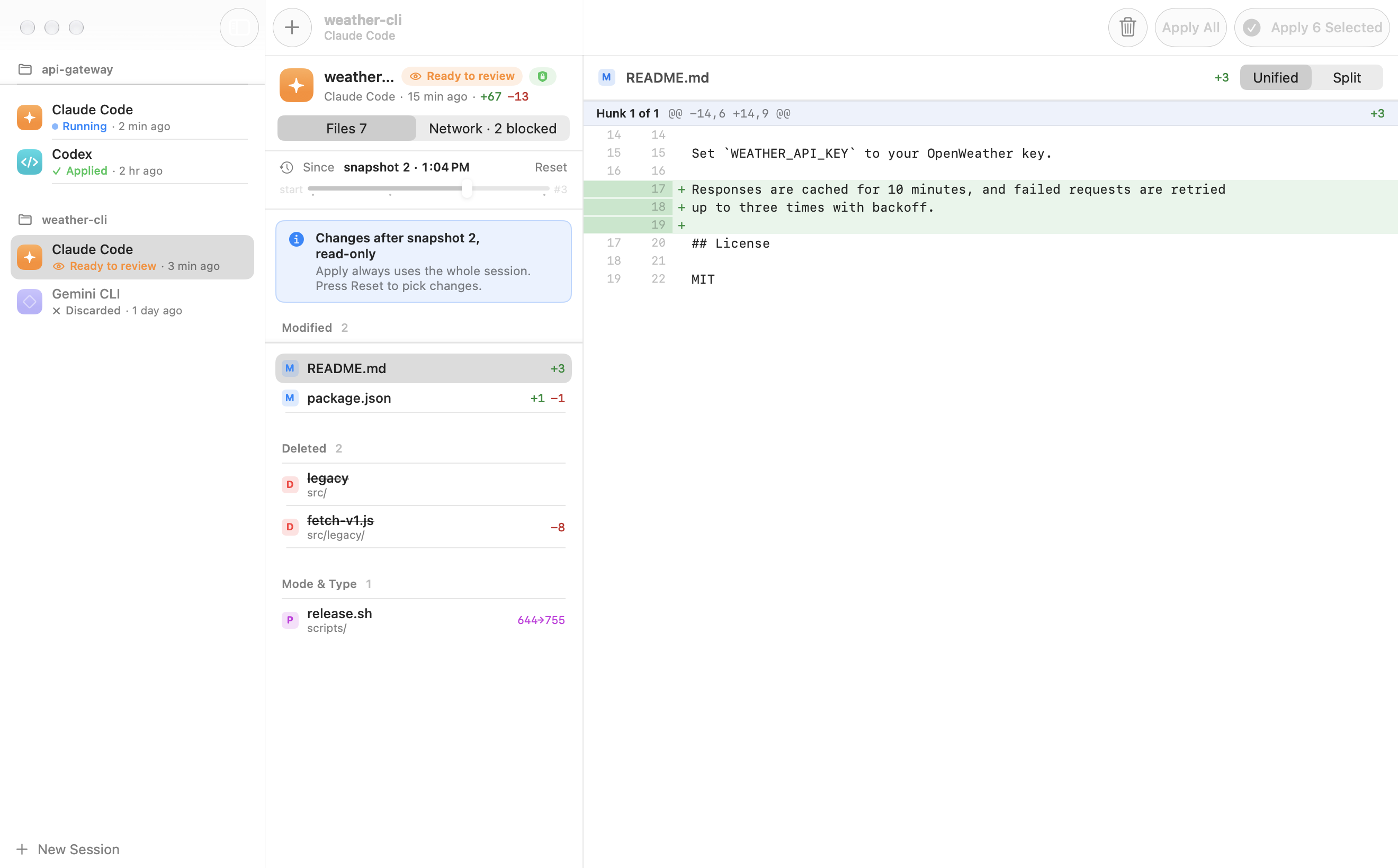
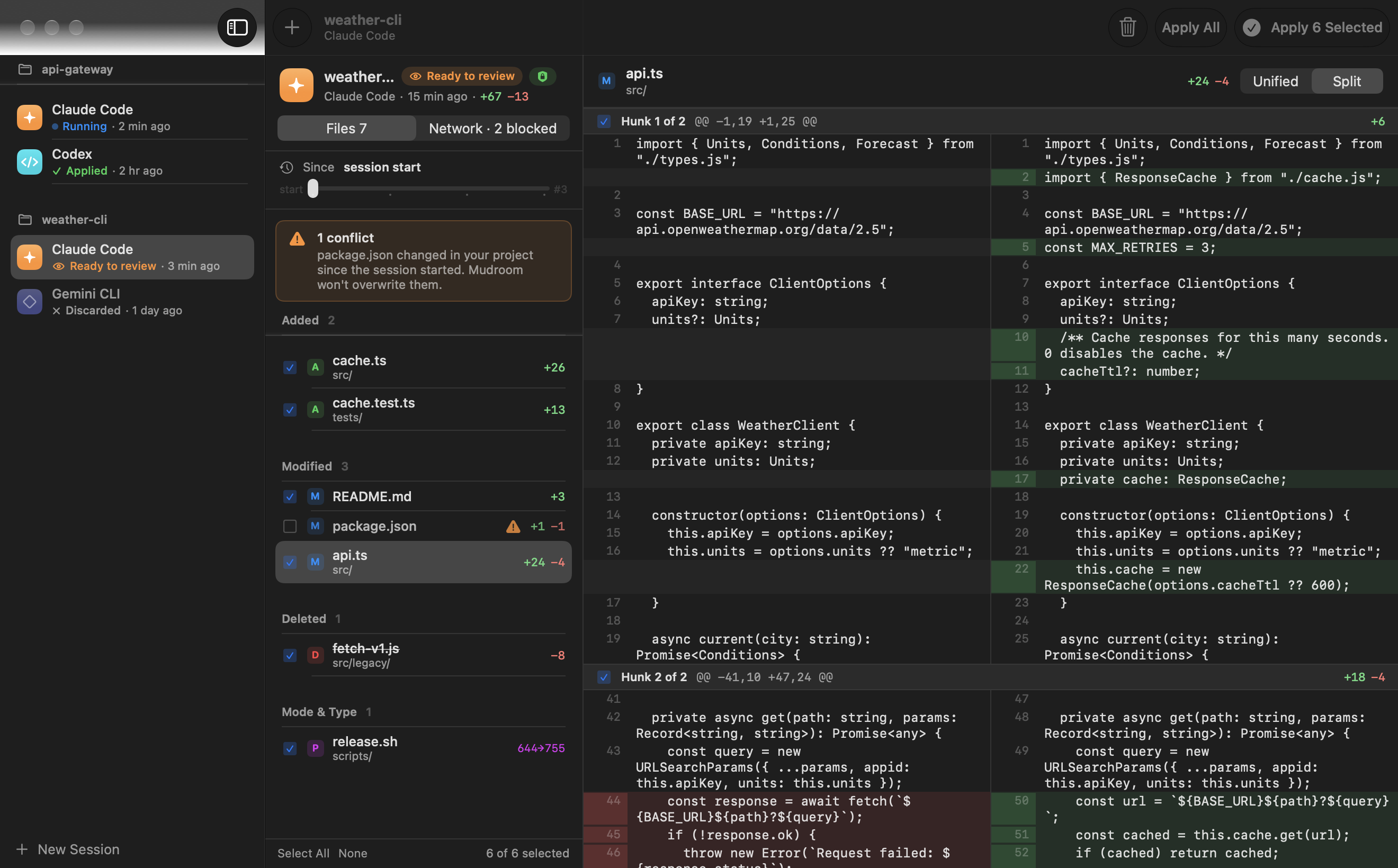
new Terminal window. - Review, Files: changed files grouped into Added, Modified, Deleted and
Mode & Type, each with a checkbox. The right pane shows a unified or
side-by-side diff with line numbers. Modified text files have a checkbox per
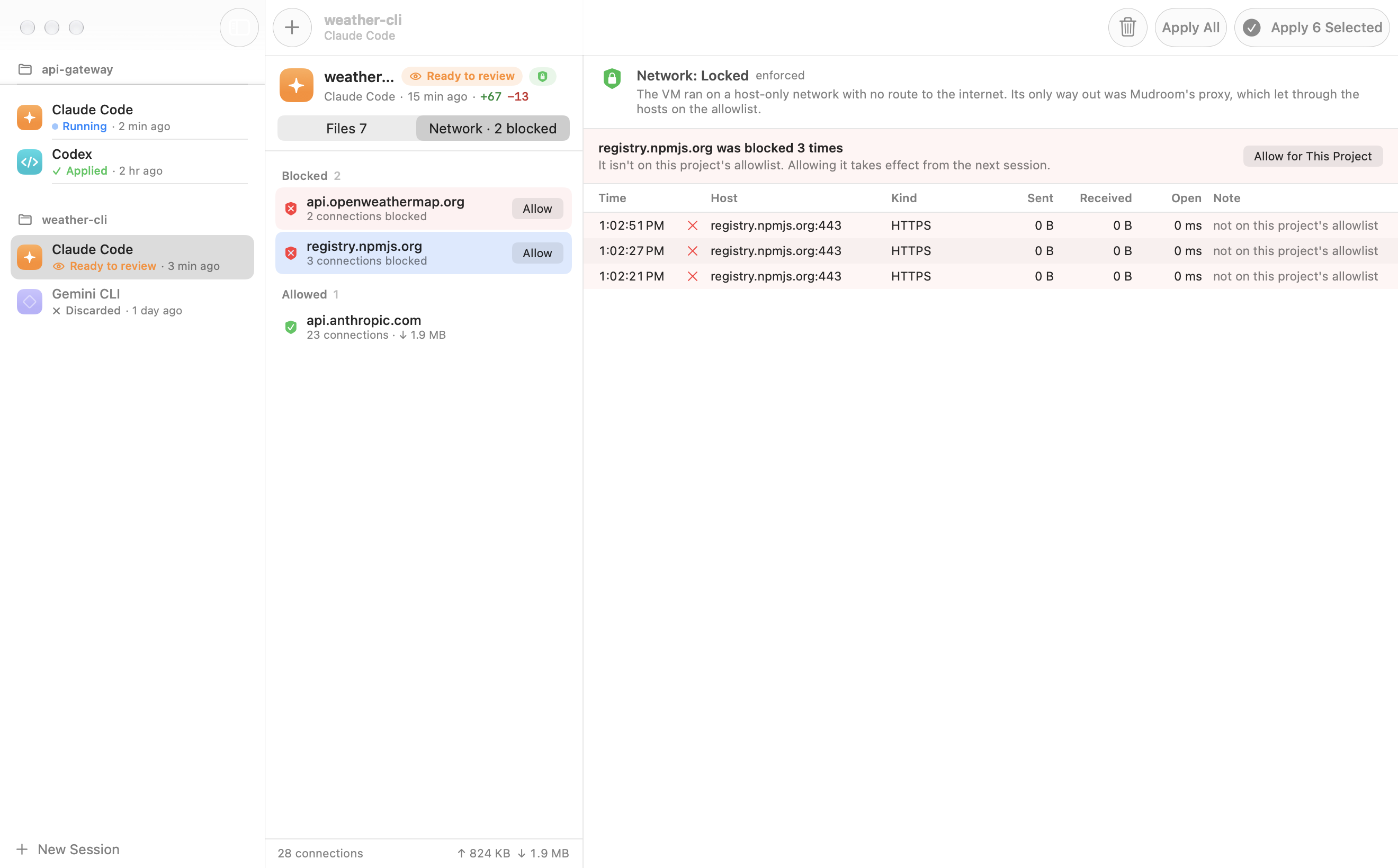
hunk, so you can take some edits and leave others. - Review, Network: every host the VM tried to reach, blocked ones first,
with bytes and connection counts. Allow adds a blocked host to the
project's allowlist for the next session. - Timeline: if the session has snapshots, a slider picks a point in time
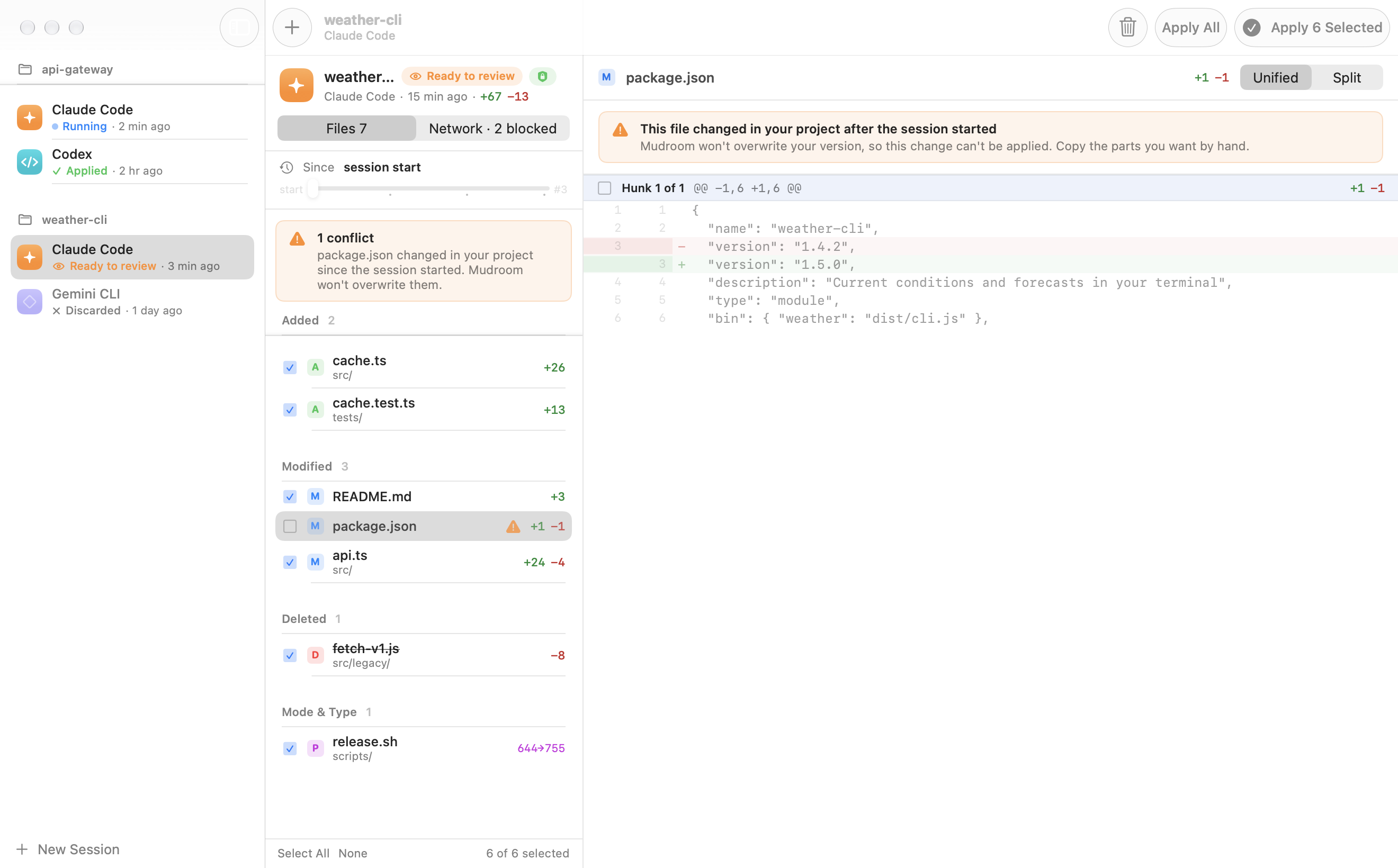
and the file list shows only what changed after it (read-only). - Conflicts: files you changed yourself since the session started are
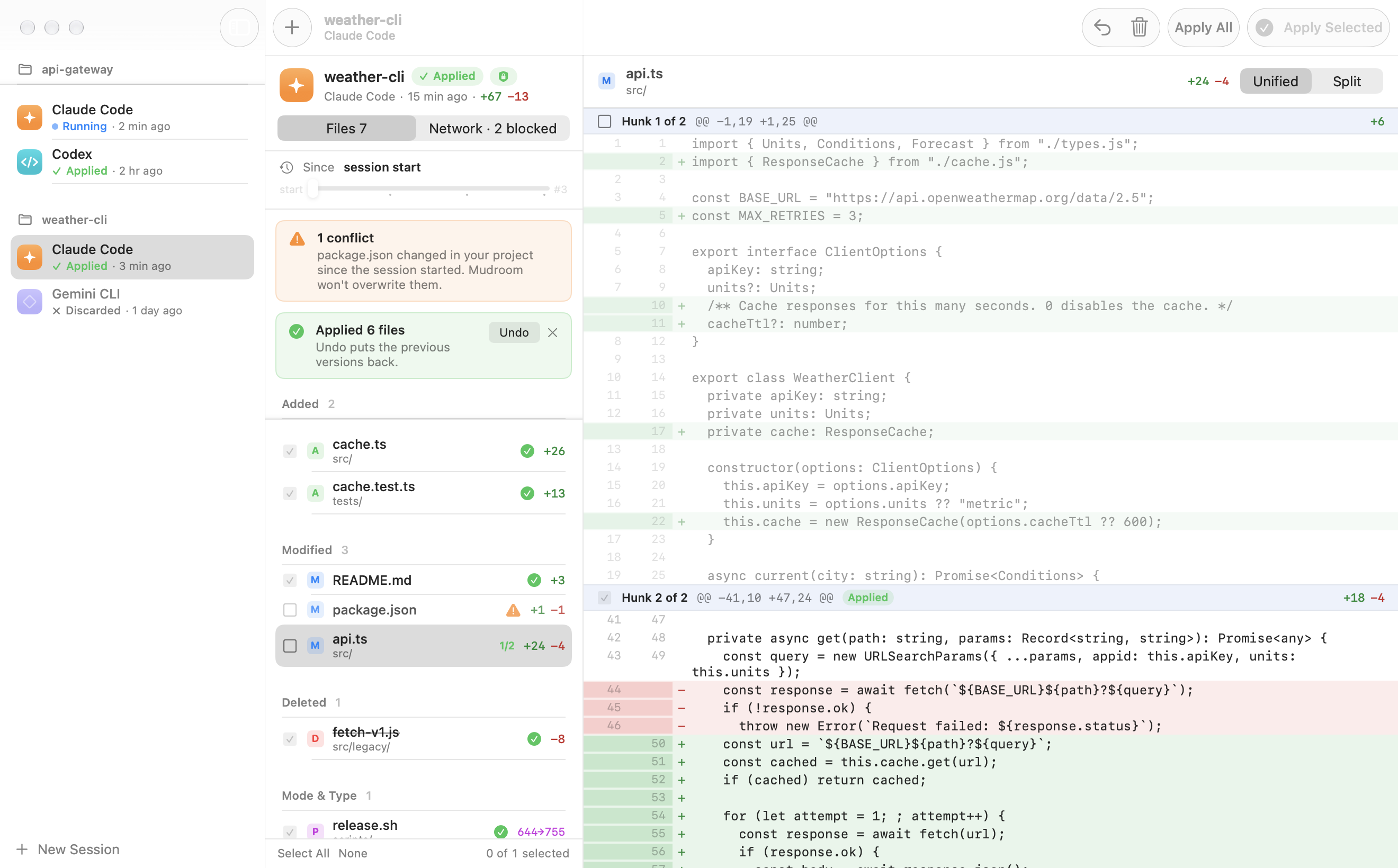
flagged in the list and above the diff, and are never overwritten. - Apply Selected (⌘↩), Apply All (⇧⌘↩), Undo (⌥⌘Z) and
Discard (⌘⌫). Each apply can be undone in one step. Space toggles the
selected file.
 |
 |
 |
 |
 |
 |
Agents are interactive terminal programs, and you often need to answer them,
so sessions run in Terminal.app instead of a terminal built into Mudroom. The
app writes a small run.command into the session folder that runs mudroom start <id> in a login shell (so PATH and API keys match your usual shell),
and follows progress through session.json, which mudroom start keeps up
to date.
The review app is macOS only. Elsewhere, mudroom review <session> is a
basic terminal review screen (toggle files, read diffs, apply the selection),
next to mudroom diff, hunks and apply.
Command line
# Start a session: clone the project, boot a VM, run the agent on the clone.
mudroom run ~/code/myapp -- claude --dangerously-skip-permissions

# Review.
mudroom review last             # terminal review: space toggles, enter shows the diff, x applies
mudroom diff last --stat
mudroom diff last
mudroom network log last        # what the VM connected to, and what was blocked

# Apply everything, only some paths, or only some hunks of one file.
mudroom apply last --all
mudroom apply last src/parser.swift docs/
mudroom hunks last src/parser.swift            # numbered hunks
mudroom apply last src/parser.swift --hunks 1,3

# Changed your mind.
mudroom undo last

# Snapshots taken while the agent ran.
mudroom snapshots last
mudroom diff last --from 2 --to work           # what changed after snapshot 2
mudroom diff last --from 1 --to 3

# Housekeeping.
mudroom list
mudroom stop <session>          # stops a sandbox left running (e.g. mudroom was killed)
mudroom discard <session>       # deletes the session's clones, never the project

# Two-step start (what the app does).
mudroom new ~/code/myapp --agent "Claude Code" -- claude --dangerously-skip-permissions
mudroom start <session>
Sessions can be named by full id, a unique prefix, or last. run andstart also take --network locked|open|offline, --allow <host> (this run
only), --snapshot-every <minutes>, --cpus, --memory, --backend apple|docker|podman|auto and, for Docker and Podman, --oci-runtime <name>
(for example runsc). If the VM runtime isn't running, run and start
start it first.
Network settings
mudroom network show                          # mode and allowlist for the current directory
mudroom network allow registry.npmjs.org '*.githubusercontent.com'
mudroom network allow pypi.org --session last # the project of a session
mudroom network deny registry.npmjs.org
mudroom network registries on                 # npm, PyPI and GitHub in one go
mudroom network mode offline
mudroom network check                         # boot a VM and try to get out (see below)
Settings are per project, in~/Library/Application Support/Mudroom/projects/<hash>.json on macOS and~/.local/share/mudroom/projects/<hash>.json on Linux, outside the project
so the agent can't change them.
Agents, sign-in and API keys
Sessions never stop to ask you to sign in. Sign each agent in once, in Setup
or from a terminal, and every later session starts signed in. New Session
sends you to Setup when the agent you picked isn't ready, and mudroom run
and mudroom start refuse to start Claude Code, Codex or Gemini CLI before
it is signed in (add --sign-in-in-session to sign in inside the session
instead). Aider needs either a provider key or a model named with --model;
without one, the session stops right away with a message instead of waiting
for a sign-in that can't finish inside the VM.
| Agent | Ways to sign in |
|---|---|
| Claude Code | Your Claude account (claude setup-token on the Mac), a sign-in inside the VM, or ANTHROPIC_API_KEY |
| Codex | Your existing ChatGPT login (~/.codex/auth.json), a device code, or an OpenAI API key |
| Gemini CLI | Your existing Google login (~/.gemini/oauth_creds.json), a sign-in inside the VM, or GEMINI_API_KEY |
| opencode, Aider, custom commands | Any provider API key, or local models |
Claude Code: your Claude account
If the claude CLI is installed on your Mac (Mudroom looks on your PATH,
then in ~/.local/bin, /opt/homebrew/bin and /usr/local/bin, then on your
login shell's PATH), "Use my Claude account" in Setup, or mudroom agent login claude, runs claude setup-token in a terminal of its own. Claude
opens your browser. Once you approve, Mudroom reads the long-lived token from
Claude's output and stores it. You never see or copy it, and Mudroom hides
it from the output it shows. If the page shows a code instead, paste it into
the field in Setup (or the terminal).
mudroom agent login claude      # the same from a terminal
mudroom agent token claude      # or paste a token you already have (shown as dots)
mudroom agent token claude --clear
The token is kept in the macOS Keychain (serviceio.github.kernel-hunter.mudroom, written with SecItemAdd, never through a
command line). On Linux it goes to ~/.local/share/mudroom/agents/<agent>/token,
mode 0600. Sessions get it as CLAUDE_CODE_OAUTH_TOKEN. Mudroom also marks
Claude Code's first-run screens (theme, the bypass-permissions notice, folder
trust for /workspace) as done in its own copy of Claude's settings, so a
session starts straight at the prompt.
Codex and Gemini CLI: the login you already have
If ~/.codex/auth.json or ~/.gemini/oauth_creds.json exists, "Use my
ChatGPT login" or "Use my Google login" copies it into Mudroom's agent
directory, only when you click. It is a copy: the original isn't changed or
mounted. If you sign in again on the Mac later, import again.
mudroom agent import codex
mudroom agent import gemini
With an OpenAI API key and no ChatGPT login, Codex sessions get the key as
both OPENAI_API_KEY and CODEX_API_KEY (Codex reads the second one).
Signing in inside a VM
Without those, the agent signs in inside a VM. In Setup, the device code
(Codex) or the sign-in page (Claude, Gemini) opens for you, and a field takes
the code the page gives you.
mudroom agent login claude --in-vm   # `claude auth login` in the sandbox
mudroom agent login codex            # `codex login --device-auth`
mudroom agent login gemini           # Gemini CLI's own sign-in screen
mudroom agent status                 # signed in or not, per agent
Copying a sign-in link out of a terminal is fragile: it wraps over several
lines, and losing the end gives errors such as "Invalid
code_challenge_method". So each run sets BROWSER in the sandbox to a small
script on a mounted folder, and when the agent tries to open the link,
Mudroom gets it on the host. It checks that the link is an https page on a
known sign-in host (claude.ai, claude.com, platform.claude.com,
console.anthropic.com, auth.openai.com, chatgpt.com, accounts.google.com),
opens it in your browser, copies it to the clipboard and prints it on one
line. Claude Code's link points back to a port inside the sandbox, so
Mudroom swaps the redirect for Claude's own "copy this code" page and leaves
the rest of the request (PKCE challenge, state) unchanged. After signing in,
paste the code back: in Setup into the code field, in a terminal where the
prompt is (the agent's prompt doesn't echo it).
Agent config directories
Each agent gets its own config directory,~/Library/Application Support/Mudroom/agents/<agent>/home (Linux:~/.local/share/mudroom/agents/<agent>/home). Your real ~/.claude (and the
others) is never mounted. A session doesn't mount this directory either: it
gets a copy, sessions/<id>/agent-home, at /home/node/.claude,/home/node/.codex or /home/node/.gemini. When the session ends, only the
sign-in is copied back (.credentials.json and the account fields of.claude.json for Claude Code, auth.json for Codex, oauth_creds.json andgoogle_accounts.json for Gemini). A login made in a session sticks, while
settings, hooks or MCP servers a session adds stay in that session.
API keys
For opencode, Aider, custom commands, or an API key instead of a
subscription, store provider keys with Mudroom. Setup has a field for each;
from a terminal:
mudroom keys set OPENROUTER_API_KEY   # paste it; shown as dots
mudroom keys                          # names only, never values
mudroom keys remove OPENROUTER_API_KEY
Known names: ANTHROPIC_API_KEY, OPENAI_API_KEY, GEMINI_API_KEY,OPENROUTER_API_KEY, DEEPSEEK_API_KEY, GROQ_API_KEY, MISTRAL_API_KEY,TOGETHER_API_KEY, FIREWORKS_API_KEY, XAI_API_KEY. Any other
upper-case name works too. Keys live in the Keychain (Linux: 0600 files).
Claude Code, Codex and Gemini CLI get only their own key. opencode, Aider and
custom commands get all of them, and in locked mode the API host of each
provider whose key is set is allowed automatically: openrouter.ai,
api.deepseek.com, api.groq.com, api.mistral.ai, api.together.xyz,
api.fireworks.ai, api.x.ai (plus api.anthropic.com, api.openai.com and
generativelanguage.googleapis.com). When Claude Code has a sign-in token, a
stored ANTHROPIC_API_KEY is left out, so Claude doesn't stop to ask which
one to use.
ANTHROPIC_API_KEY, CLAUDE_CODE_OAUTH_TOKEN, OPENAI_API_KEY andGEMINI_API_KEY are also forwarded from your shell when they are set there.
How secrets reach the sandbox
Tokens and keys are passed by name (container run --env NAME, docker run --env NAME), so their values don't show up in the process list or on a
command line. The runtime does write them down while the session runs:
- Apple's
containerstores each running container's configuration,
environment included, in plain text in aconfig.jsonwith mode 0644 under~/Library/Application Support/com.apple.container/containers/. Your~/Libraryfolder is private to your user, but any process running as
you can read that file while the session is up. - Docker and Podman show the environment in
docker inspect/podman inspectto anyone who can talk to the daemon.
The entry goes away when the session's container is removed at the end of
the session.
Local models (Ollama, LM Studio)
Turn on Local models for a project (New Session, or mudroom network local-models on) and the VM can use Ollama and LM Studio running on your
Mac. They are reached as http://host.mudroom.internal:11434 (Ollama) andhttp://host.mudroom.internal:1234 (LM Studio) through Mudroom's proxy,
which connects to 127.0.0.1 on those two ports itself. No other port on the
Mac becomes reachable, and nothing else changes about the allowlist.
Sessions get OLLAMA_HOST, OLLAMA_API_BASE (Aider) and LM_STUDIO_API_BASE
pointing there. Local models need locked mode: open and offline sessions
don't go through the proxy.
Aider needs the model named. In the app, pick Custom and enter:
aider --yes-always --no-auto-commits --model ollama_chat/qwen2.5:7b-instruct
opencode needs the provider in its config, for example an opencode.json in
the project:
{
  "provider": {
    "ollama": {
      "npm": "@ai-sdk/openai-compatible",
      "options": { "baseURL": "http://host.mudroom.internal:11434/v1" },
      "models": { "qwen2.5:7b-instruct": { "tools": true } }
    }
  }
}
and then opencode run -m ollama/qwen2.5:7b-instruct "..." (or pick the model
in opencode). Small models often get tool calls wrong; that is the model, not
the sandbox.
Network
Each project has a mode:
- Locked (default). The VM is attached to a host-only network
(container network create --internal, namedmudroom-hostonly). It has
no route to the internet and no DNS.mudroom startruns a small HTTP
proxy on the Mac for as long as the agent runs, and the VM getsHTTP_PROXY/HTTPS_PROXYpointing at it. The proxy handlesCONNECT
(HTTPS) and plain HTTP, lets through only allowlisted hosts, and writes one
line per connection (host, port, allowed or blocked, bytes, duration) to
the session'snetwork.jsonl. - Open. Normal outbound access. Nothing is filtered or logged.
- Offline. The host-only network with no proxy: no internet at all.
The allowlist is the agent's own hosts plus whatever you add:
| Agent | Default hosts |
|---|---|
| Claude Code | api.anthropic.com, console.anthropic.com, platform.claude.com, claude.ai |
| Codex | api.openai.com, chatgpt.com, auth.openai.com |
| Gemini CLI | generativelanguage.googleapis.com, cloudcode-pa.googleapis.com, oauth2.googleapis.com, www.googleapis.com |
| opencode | models.opencode.ai, models.dev (its model catalog), plus the API host of each key you set |
| Aider, custom commands | the API host of each key you set |
| Package registries (off by default) | registry.npmjs.org, pypi.org, files.pythonhosted.org, github.com, codeload.github.com, *.githubusercontent.com |
Telemetry and error-reporting hosts are left out; Claude Code runs withCLAUDE_CODE_DISABLE_NONESSENTIAL_TRAFFIC=1 so it doesn't try them. Patterns
are exact hosts or *.suffix, which matches subdomains but not the bare
domain.
The proxy is strict about what it accepts:
- A host must be a plain DNS name (letters, digits, hyphens, dots) or an IP
literal. Anything else is refused: NUL bytes,%, spaces, user info,
trailing junk, and numeric forms like0x7f.1or2130706433. The name it
checks is the name it connects to. - After DNS, the address is checked too. An allowed name that resolves to a
loopback, private (10/8, 172.16/12, 192.168/16, fc00::/7), link-local, CGNAT,
multicast, VM-network or one of the Mac's own addresses is refused, unless
that exact address is on the allowlist. - For plain HTTP, the
Hostheader is rewritten to the host that was checked. - A client gets 10 seconds to send its request head (then 408), the head can
be at most 32 KB (then 400), and at most 256 connections are open at once
(then 503).
What the isolation stops
mudroom network check starts a sandbox with a project's settings and tries
to get out. This is its output on macOS 27 with container 1.5.0, locked
mode:
ok        got through  CONNECT api.anthropic.com:443 via proxy: HTTP/1.1 200 Connection Established
ok        got through  HTTPS GET https://api.anthropic.com/ (proxy variables, if set): HTTP 404
ok        stopped      CONNECT example.com:443 via proxy: HTTP/1.1 403 Forbidden
ok        stopped      HTTPS GET https://example.com/ (proxy variables, if set): Request was cancelled.
ok        stopped      resolve example.com in the sandbox: EAI_AGAIN
ok        stopped      TCP 1.1.1.1:443, ignoring the proxy: timeout
ok        stopped      TCP [2606:4700:4700::1111]:443, ignoring the proxy: ENETUNREACH
ok        stopped      UDP DNS query to 8.8.8.8:53: no reply
note      got through  TCP 192.168.128.1:7000 (the host on the sandbox network; macOS often listens on 7000): connected
A program in the VM that ignores the proxy settings, or opens raw sockets,
gets nowhere: no DNS, no route over IPv4, IPv6 or UDP. Offline mode stops
all of these, including the proxy lines; only the last line (the Mac itself)
still gets through. Run the check on your own machine before relying on it.
If your container version can't create host-only networks, locked mode
falls back to the normal NAT network with the proxy variables set. The
session is then marked proxy-enforced (advisory) in the CLI and the app:
well-behaved tools go through the allowlist, but nothing stops a direct
connection.
When the VM can't reach the network
A locked session has one way out, Mudroom's proxy on the Mac. Apple's VM
network sometimes gets into a state where the VM can't reach the Mac at all
(EHOSTUNREACH to 192.168.128.1) until the VM runtime restarts. Before a
locked session, Mudroom boots a tiny VM and checks that it reaches the proxy
(it skips this if a check passed in the last 90 seconds). If the check
fails, the session doesn't start; New Session and Setup show Repair Network,
and in a terminal you can run:
mudroom network probe            # check
mudroom network probe --repair   # check, and restart the VM runtime if needed
mudroom setup --repair-network
Repair runs container system stop and container system start, checks
again, and recreates Mudroom's host-only network if that wasn't enough. It
asks first if a Mudroom session is running.
Review and apply
What diff shows
M  src/app.swift
A  src/new.swift
D  old/
D  old/notes.txt
P  scripts/build.sh  (mode 644 -> 755)
L  current  (v1 -> v2)
T  config  (file -> symlink)
git metadata changed (12 entries under .git/)
Text files get a unified diff from Mudroom's own line diff. Binary files showbinary changed (size a -> b) (or binary added, binary deleted). Changes
inside any .git directory (also nested ones, and .GIT on case-insensitive
disks) are collapsed into one line unless you pass --include-git; apply
skips them by default for the same reason.
Some lines get a marker:
?  secret.pem  (unreadable: permission denied; not applied)
M  scripts/run  ! setuid/setgid bit, dropped on apply
A  .husky/pre-commit  ! a git hook script that runs on the host
? is an entry Mudroom couldn't read (permissions, a socket or a FIFO). It is
listed so it isn't silently missing, and it is never applied. Files that your
tools may run on your side, such as .envrc, .gitattributes,.gitmodules, .pre-commit-config.yaml, .npmrc, .vscode/tasks.json and
scripts under .husky/ or .githooks/, are marked and start unselected in
the review. Aider's own cache and history files (.aider.tags.cache.v4/,.aider.chat.history.md) are listed with a ~ note and start unselected
too. setuid and setgid bits are dropped when a file is applied.
Files are compared by content hash, never by timestamp, so an agent can't hide
an edit by resetting mtime. The agent's tree is read through file descriptors
that never follow symlinks and never block on FIFOs, so a swapped path can't
point Mudroom at a file outside the session.
How apply stays safe
For each path, Mudroom checks that the real project still has exactly what the
session started from. If you edited README.md while the agent was working,apply reports a conflict for that file and leaves it alone; the rest still
applies. Other rules:
- Files are written to a temp name and renamed into place.
- Directories are removed with
rmdir, so a directory that gained a file on
your side is not deleted. - Mudroom won't write through a symlinked directory in your project.
- Before touching a file, Mudroom copies it into a rollback bundle in the
session directory.undorestores from there, and skips any path you changed
again after the apply (--forceoverrides, and keeps a copy of the edit it
replaces). - Per-hunk apply uses Mudroom's own line diff (Myers), not
patch. It
rebuilds the file from the base version plus the chosen hunks, keeps CRLF
line endings and a missing final newline as they were, and writes through
the same checks. A file that already has some hunks from an earlier apply is
not a conflict; the new hunks are added to it. - Apply writes what you reviewed.
diff,hunks,reviewand the app
record the content hash of each file they show you. If the agent's copy
changed after that, apply refuses that file and asks you to look again.
Staged copies are hashed again after copying. - Apply and undo refuse to run while the session's agent is still running,
checked through a lock the sandbox process holds and by asking the backend. - Each apply writes a journal before touching anything, so an apply that is
killed halfway can still be undone. Two applies to the same project wait for
each other. - Renames that only change case (
readme.mdtoREADME.md) work on
case-insensitive disks, and file names close to the 255-byte limit work too.
Snapshots don't change this: apply always compares the session's base with
the agent's final copy, whatever point the timeline shows.
Docker and Podman
With --backend docker or --backend podman the agent runs in a container
from the same image (mudroom image build --backend docker builds it withdocker build from the same Containerfile). The session's work/ clone is
bind-mounted at /workspace and the agent's config directory at its usual
place; the real project is never mounted. Credentials are passed by name.
The container runs with --cap-drop ALL and no-new-privileges. On Linux,
if your uid isn't 1000 (the image's user), it runs as your uid so files inwork/ stay yours; rootless Podman gets --userns keep-id.
Networks:
- Open: the runtime's default bridge.
- Offline: an internal network,
mudroom-internal
(docker network create --internal). On Docker it is also created without
an address on the host (com.docker.network.bridge.inhibit_ipv4), so the
container has no route anywhere, the host included. - Locked: the same internal network plus a small forwarder container
attached to both the internal network and the default bridge. It runs
read-only with no capabilities and only relays TCP to Mudroom's proxy on
the host (host.docker.internal). The proxy applies the allowlist and
writes the log, as with the VM backend. On Linux the proxy listens on the
default bridge's gateway address and accepts only that bridge; on macOS it
listens on 127.0.0.1, which Docker Desktop forwardshost.docker.internal
to.
mudroom network check --backend docker, locked mode, gave this on Docker
Desktop (engine 29.8) on macOS 27, and the same apart from addresses on
Docker Engine 29.1 on Ubuntu 24.04 arm64 (run nested in a privileged
container):
ok        got through  CONNECT api.anthropic.com:443 via proxy: HTTP/1.1 200 Connection Established
ok        got through  HTTPS GET https://api.anthropic.com/ (proxy variables, if set): HTTP 404
ok        stopped      CONNECT example.com:443 via proxy: HTTP/1.1 403 Forbidden
ok        stopped      HTTPS GET https://example.com/ (proxy variables, if set): Request was cancelled.
ok        stopped      resolve example.com in the sandbox: EAI_AGAIN
ok        stopped      TCP 1.1.1.1:443, ignoring the proxy: ENETUNREACH
ok        stopped      TCP [2606:4700:4700::1111]:443, ignoring the proxy: ENETUNREACH
ok        stopped      UDP DNS query to 8.8.8.8:53: no reply
note      stopped      TCP 172.18.0.1:7000 (the host on the sandbox network; macOS often listens on 7000): ENETUNREACH
Unlike the VM backend, the last line is stopped too: the internal network
has no host address, so services on the host aren't reachable.
How strong is the isolation
A container is not a VM. On Linux, Docker and Podman containers share the
host's kernel. The agent runs as an unprivileged user with no capabilities,
but a kernel bug or a runtime misconfiguration can be enough to get out of
a container, and that is much less true of a VM. Treat the Docker backend on
Linux as weaker than the apple backend.
To narrow the gap, run the container under a runtime with its own kernel
boundary, if you have one installed:
mudroom run ~/code/myapp --backend docker --oci-runtime runsc -- claude   # gVisor
mudroom run ~/code/myapp --backend docker --oci-runtime kata -- claude    # Kata Containers (name as configured)
export MUDROOM_OCI_RUNTIME=runsc                                           # or set it once
Docker Desktop on macOS and Windows, and Podman machine on macOS, already
run every container inside a Linux VM, so the agent is separated from your
Mac by that VM (shared by all containers, not one per session).
Not tested yet: Podman (the code path exists, including rootlesskeep-id), colima, rootless Docker, and Docker Engine on x86_64. Rootless
setups may fail in locked mode because the proxy can't listen on the bridge
address; mudroom network check will tell you.
How it works
~/Library/Application Support/Mudroom/      (Linux: ~/.local/share/mudroom/)
  sessions/<id>/
    session.json   id, project path, command, image, status, network mode and allowlist
    base/          clone of the project when the session started
    work/          clone the agent edits, mounted at /workspace in the sandbox
    snapshots/     <n>-<time>/ clones of work/ taken while the agent ran
    network.jsonl  one line per proxied or refused connection
    agent-home/    this session's copy of the agent's config directory
    reviewed.json  content hashes of what you last reviewed
    runner.lock    held while the agent runs
    rollback/      one bundle per apply: manifest.json, journal.jsonl, copies of overwritten files
  projects/<hash>.json   per-project network mode, allowlist, snapshot interval
  agents/<agent>/home/   the agent's persistent config directory
  agents/<agent>/token   stored token on Linux (macOS: the Keychain)
The clones cover the whole folder, including untracked, ignored and non-git
files. They are copy-on-write clones (APFS on macOS, a reflink on btrfs or
XFS), not git clones or worktrees, so on APFS they take no extra disk until
files change. If the project is on a different volume or a disk that can't
clone, Mudroom falls back to plain copies that keep modes, symlinks and
timestamps.
diff compares base/ with work/. apply copies from work/ to the
project after checking the project against base/. Set MUDROOM_HOME to keep
all of this somewhere else. Keychain items don't move with it; addMUDROOM_TOKEN_STORE=file to keep tokens and keys as 0600 files underMUDROOM_HOME too (handy for a test setup).
Snapshots are clones of work/, taken every 5 minutes while the agent
runs (configurable per project or with --snapshot-every) and once when it
exits. A snapshot is skipped when nothing changed since the last one, and the
oldest are pruned past 24.
The sandbox layer is a small SandboxBackend protocol with two
implementations: one shells out to Apple's container CLI, which boots each
container in its own lightweight VM, and one to docker or podman. The
proxy is plain BSD sockets, so it runs the same on macOS and Linux.
How it compares
Checked against each project's docs on 2026-09-30. Corrections welcome.
| Where the agent works | When its writes reach your folder | Review before they land | |
|---|---|---|---|
| Mudroom | Linux micro-VM, on an APFS clone; your folder is never mounted | When you apply | Diff app, per file and per hunk, with undo |
| Docker Sandboxes | microVM; your folder mounted read-write by default, or a private git clone with --clone |
Right away by default; with --clone, when you fetch |
Through git, in clone mode |
Apple's sandboxy example |
Linux VM with your folder shared in | Right away | No |
| ArcBox | microVM with nothing mounted | Only what you copy out | No |
| Claude Code sandboxing | Your real folder, with OS-level limits (no VM) | Right away | Per-edit prompts, unless you skip permissions |
If your project is a git repo and you're happy reviewing with git, Docker Sandboxes' --clone mode gets you close. Mudroom also covers untracked and ignored files and folders that aren't repos, and gives you a review screen and per-apply undo.
Limitations
- With the apple backend, the VM can reach services on your Mac. The
host-only network's gateway is the Mac itself, so anything listening on all
interfaces (AirPlay Receiver on port 7000, a dev server bound to0.0.0.0,
a database) is reachable from the VM.network checkreports this. Bind
local services to127.0.0.1, or turn off the ones you don't need. Closing
this needs packet filtering that neithercontainernor Mudroom offers
yet. The Docker backend doesn't have this gap (see Docker and
Podman), but has a weaker boundary on Linux. - While a session runs, its tokens and keys are on disk in plain text.
Apple'scontainerkeeps the session's environment in a 0644config.json, and Docker shows it indocker inspect. See How secrets
reach the sandbox. - The allowlist works on host names. An allowed host is allowed completely:
Mudroom doesn't look inside TLS, so it can't tell which API calls the agent
makes or what it uploads. - Tools that ignore proxy variables fail in locked mode. That is intended,
but some installers (and anything that opens raw sockets) will need the
project switched to open for that run. - A sign-in made in a session is carried back to the agent's shared config
directory and used by later sessions. Everything else a session changes in
its copy (settings, hooks, MCP servers) is dropped. - Snapshots skip unchanged trees by comparing file size, mode and mtime. An
edit that keeps both size and mtime the same doesn't trigger a snapshot on
its own. The review diff always compares content. - No review app on Linux.
mudroom reviewcovers files and diffs; per-hunk
applies go throughmudroom hunksandapply --hunks. - No Windows support. WSL2 is untested.
- The app is ad-hoc signed, not notarized. See Install for what
that means when you download it.
Development
swift build
swift test                 # diff, hunks, apply, undo, allowlist, proxy, snapshot tests; no VM needed (macOS and Linux)
scripts/make-demo.sh       # demo sessions in build/demo (no VM)
scripts/screenshots.sh     # regenerates docs/screenshots from the demo
scripts/release.sh 0.4.0   # dist/Mudroom-0.4.0.zip and its SHA-256
mudroom network check      # verifies isolation in a real sandbox (any backend)
On Linux, or in a swift:6.2 container, swift build and swift test
build and test MudroomCore and the CLI; the app target only exists on
macOS. CI runs both.
The proxy tests run it against a loopback test server. The app target isMudroomApp (SwiftUI, macOS 26+, left out of the package on other
platforms). MudroomCore has no UI code; the app and the CLI both sit on
top of it.
License
MIT. See LICENSE.
Yorumlar (0)
Yorum birakmak icin giris yap.
Yorum birakSonuc bulunamadi