ccplus
Health Warn
- License — License: MIT
- Description — Repository has a description
- Active repo — Last push 0 days ago
- Low visibility — Only 6 GitHub stars
Code Pass
- Code scan — Scanned 12 files during light audit, no dangerous patterns found
Permissions Pass
- Permissions — No dangerous permissions requested
No AI report is available for this listing yet.
A desktop app for Claude Code with multi-tab sessions, agent observability, and usage analytics.
cc+ — Watch your agents work.
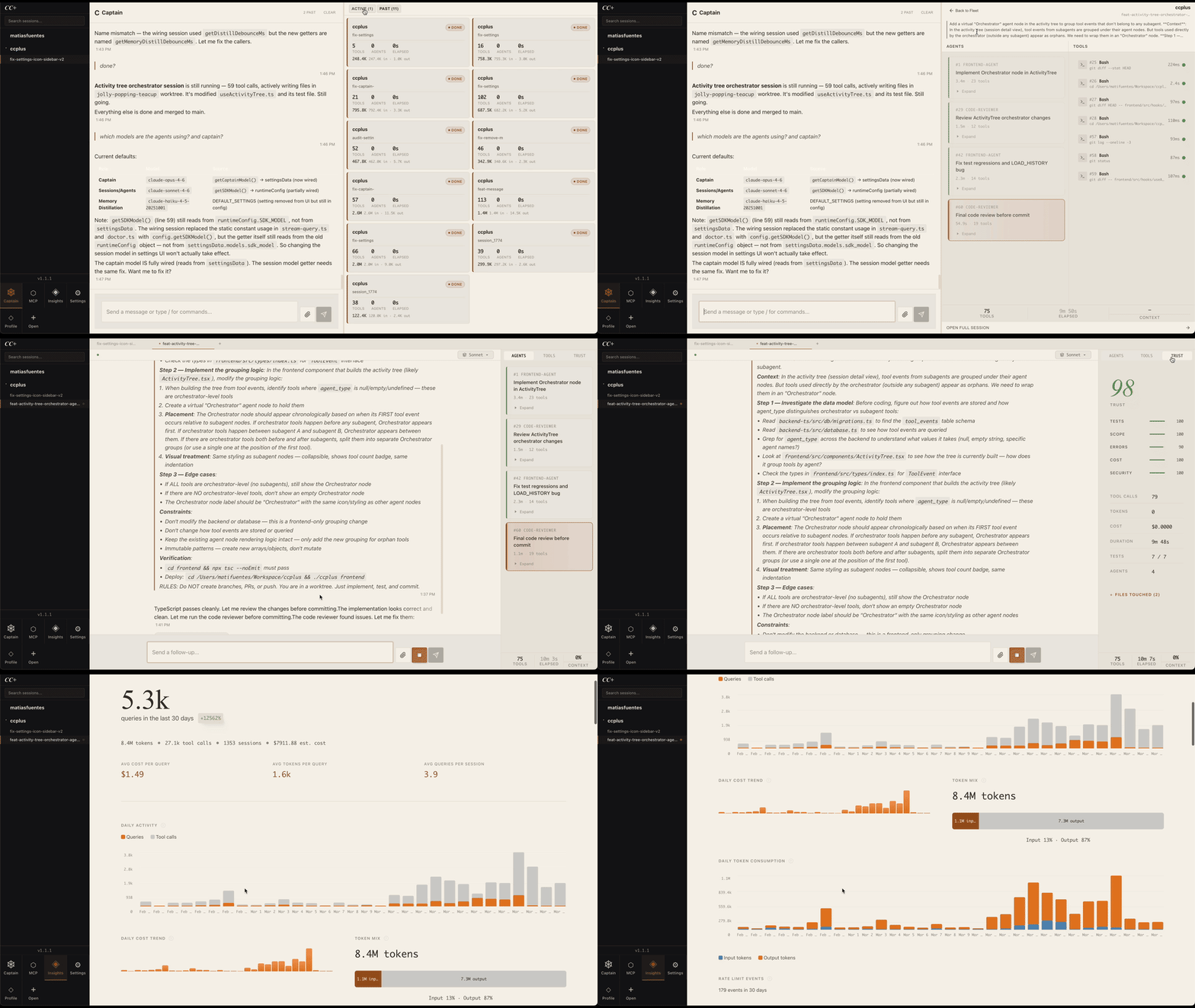
Open-source desktop app for Claude Code. See every tool call, every agent, every token — in real-time. Run multiple sessions. Orchestrate your fleet with Captain. Free, local, yours.




Quick Install
curl -fsSL https://ccplus.run/install | sh
Requires Claude Code CLI. macOS and Linux.
Install from Source
Prerequisites
- Node.js 16+ (check:
node --version) - Claude Code CLI installed globally:
npm install -g @anthropic-ai/claude-code - Claude authentication: Run
claude loginand follow prompts - Git (for cloning the repository)
Install Steps
Clone the repository:
git clone https://github.com/kerplunkstudio/ccplus.git
cd ccplus
Install dependencies:
cd backend-ts && npm install && cd ..
cd frontend && npm install && cd ..
Configure environment (optional):
cp .env.example .env
# Edit .env to customize workspace path, port, etc.
Build and launch:
./ccplusThe first run will:
- Build backend TypeScript →
backend-ts/dist/ - Build frontend React app →
static/chat/ - Launch desktop app (Electron)
- Build backend TypeScript →
Quick Start
After installation, you can:
- Launch desktop app:
./ccplus - Launch web UI:
./ccplus web(access at http://localhost:4000) - Run both simultaneously:
./ccplus desktop-parallel(desktop + web on port 4001) - Check system health:
./ccplus doctor - View logs:
./ccplus logs
Desktop app users: Run ./ccplus desktop-parallel for development to keep both desktop and web interfaces running.
See Everything
Real-time activity trees. Every agent spawn, tool call, and file edit, structured as a hierarchy. Agent → sub-agent → Read → Edit → Write. Status, duration, parameters. Not terminal scroll, a live tree.
Token and cost tracking per query, session, and project. Context window usage. Trust scores. Cache efficiency.
Run the Fleet
Multi-tab sessions (Cmd+T, Cmd+W, Ctrl+Tab). Each tab is its own Claude Code session. Fleet monitor shows all sessions at once: status, tools, tokens, files touched.
Captain: a persistent AI that manages your sessions. Tell it what you want in plain language. It writes the prompt, picks the workspace, starts the session in an isolated worktree, and watches it. If an agent gets stuck, Captain cancels and retries with a better prompt. When it's done, you get a summary.
Access Anywhere
Desktop app (Electron, macOS + Linux). Web UI at localhost. Telegram bridge: message Captain from your phone, get status updates, start sessions remotely. Voice messages supported.
Telegram Setup
- Create a bot via @BotFather and copy the token
- Add to your
.env:CCPLUS_TELEGRAM_BOT_TOKEN=your-bot-token CCPLUS_TELEGRAM_ALLOWLIST=your-username - Restart cc+. Message your bot to talk to Captain.
Comma-separated for multiple users.
More Features
Click to expand- Built-in browser (dev servers detected automatically)
- Integrated terminal
- Command palette (Cmd+K)
- Conversation search (FTS5)
- Scheduled tasks (cron-based recurring prompts)
- Cross-session memory
- Session import from Claude Code history
- Insights dashboard (daily trends, model breakdowns, tool success rates)
- Image attachments
- Themes
- Crash recovery
Architecture
User messages → WebSocket → Claude Agent SDK → Real-time callbacks → SQLite + activity tree.
Stack: Node.js / TypeScript / Express + Socket.IO / React 19 / SQLite / Electron
CLI Reference
| Command | Description |
|---|---|
./ccplus |
Build everything + launch desktop app |
./ccplus web |
Build everything + start web server |
./ccplus desktop |
Launch desktop app (skip build) |
./ccplus desktop-parallel |
Desktop + web server on port 4001 |
./ccplus frontend |
Build + deploy frontend only |
./ccplus backend |
Build backend only |
./ccplus server |
Restart server |
./ccplus stop |
Stop server |
./ccplus import |
Import historical Claude Code sessions |
./ccplus doctor |
System diagnostics |
./ccplus setup |
Re-run interactive setup |
./ccplus status |
Show server status |
./ccplus logs |
Tail server logs |
./ccplus update |
Update to latest version |
./ccplus release |
Package desktop app for distribution |
Development
Click to expand development guideBackend Development
cd backend-ts

# Install dependencies
npm install

# Development (watch mode, auto-reload)
npm run dev

# Build (compile TypeScript to dist/)
npm run build

# Test (Vitest)
npm test

# Coverage
npm run test:coverage
Frontend Development
cd frontend

# Install dependencies
npm install

# Development server (port 3001, proxies API to 3000)
npm start

# Production build
npm run build

# Test (Jest + React Testing Library)
npm test
After modifying frontend source, deploy the build:
./ccplus frontend # Build + deploy to static/chat/ (no restart)
Then hard refresh browser (Cmd+Shift+R) to clear cached assets.
Important: Express serves from static/chat/, not frontend/src/. If you edit source files but do not deploy, the browser shows stale code.
Environment Variables
See .env.example for all available environment variables. Key settings:
WORKSPACE_PATH— Working directory for SDK sessions (default:~/Workspace)SDK_MODEL— Default model for SDK queries (default:sonnet)PORT— Server port (default:4000)CCPLUS_TELEGRAM_BOT_TOKEN— Enable Telegram bridge (optional)CCPLUS_CAPTAIN_MODEL— Captain AI model (default:claude-opus-4-6)
File Tree
ccplus/
├── backend-ts/          # Express + Socket.IO server
│   ├── src/             # TypeScript source
│   └── dist/            # Compiled output (gitignored)
├── electron/            # Desktop app (Electron)
├── frontend/            # React 19 app
│   ├── src/components/  # React components
│   ├── src/hooks/       # Custom hooks
│   └── build/           # Build output (gitignored)
├── static/chat/         # Deployed frontend (gitignored)
├── data/                # SQLite database (gitignored)
├── docs/                # Architecture, database, development, testing
└── ccplus               # Unified CLI launcher
Testing
Backend Tests
Run all tests:
cd backend-ts && npm test
Run specific module:
cd backend-ts && npx vitest run src/__tests__/database.test.ts
Coverage:
cd backend-ts && npm run test:coverage
Frontend Tests
Run all tests:
cd frontend && npm test
Test Policy
Tests are mandatory for all implementations:
- New features: Unit tests for logic + integration tests for flows
- Bug fixes: Regression test that fails without the fix, passes with it
- Refactoring: Existing tests pass before and after changes
Coverage targets: 80%+ on critical paths (sdk-session, database), 100% on utility functions (auth, config).
Contributing
Fork, branch, test, PR. See CLAUDE.md for conventions.
License
MIT License. Copyright 2025-present Matias Fuentes. See LICENSE.
Built with Claude by @kerplunkstudio
Reviews (0)
Sign in to leave a review.
Leave a reviewNo results found