mcp-sliit-courseweb
Health Warn
- No license — Repository has no license file
- Description — Repository has a description
- Active repo — Last push 0 days ago
- Low visibility — Only 7 GitHub stars
Code Fail
- fs.rmSync — Destructive file system operation in src/courseweb.ts
- process.env — Environment variable access in src/courseweb.ts
- network request — Outbound network request in worker/index.ts
Permissions Pass
- Permissions — No dangerous permissions requested
No AI report is available for this listing yet.
A Model Context Protocol (MCP) server to automate SLIIT Courseweb (Moodle). List modules, track academic deadlines, check assignment status, and bulk-sync course materials directly through AI agents like Claude.

SLIIT Courseweb MCP Server 🚀
Bridge SLIIT Courseweb (Moodle) into Claude Code, Antigravity, OpenAI Codex, ChatGPT & Cursor.





Watch Video • 1-Prompt Install • Login & MFA • Tools (9) • Superpowers • Live Website
🎬 Quick Video Showcase
Watch Claude Code autonomously parse a 103-page PDF exam marksheet, locate a student's grade breakdown, and delta-sync lecture slides without opening a single browser tab:
▶️ Watch 20-Second Launch Video (600 KB MP4) • 🌐 Stream in 1080p on Live Web Portal
Compressed 720p 60fps faststart preview (600 KB). Captured live running in Claude Code CLI.
💡 Why This Exists
SLIIT Courseweb is the central hub for lecture materials, lab sheets, and assignment submissions. But every semester, students face the same bottlenecks:
- ⏳ Slow loading during peak hours: Courseweb crawls right before assignment submission deadlines.
- 📑 100+ Page Exam Marksheet PDFs: Midterm and final marks are released as massive multi-page PDFs where finding your IT number is a chore.
- 📦 Manual Download Fatigue: Downloading 14 weeks of lecture slides, lab exercises, and tutorial answers requires clicking dozens of links.
- ⏰ Missed Deadlines: Assignment cutoffs are scattered across individual course tabs.
The Solution: An open-source Model Context Protocol (MCP) server that allows your AI agent (Claude Code, Cursor, Antigravity, Windsurf) to query Courseweb directly. Your agent acts as your personal academic assistant.
⚡ 1-Prompt Agent Self-Installation
You don't need to manually edit JSON configuration files. Just copy the prompt for your favorite AI assistant, paste it into the agent chat, and let the agent configure itself!
🟧 Claude Code CLI
Please configure the SLIIT Courseweb MCP server for Claude Code CLI:
1. Run: git clone https://github.com/kesaruhasun/mcp-sliit-courseweb.git
2. Inside the folder run: npm install && npm run build
3. Add to Claude Code MCP registry:
   claude mcp add sliit_courseweb node "$(pwd)/build/index.js" -e HEADLESS=true
4. Run `claude mcp list` to verify the server is connected.
5. Remind me to perform `interactive_login` if my session token is expired.
🟦 Google Antigravity
Antigravity, please self-configure the SLIIT Courseweb MCP server:
1. Clone `https://github.com/kesaruhasun/mcp-sliit-courseweb.git` or inspect the local repo.
2. Run `npm install` and compile TypeScript using `npm run build`.
3. Add the `sliit_courseweb` definition into your MCP configuration (`mcp_config.json`) pointing `command` to `node` and `args` to the absolute path of `build/index.js`.
4. Confirm tool schema registration for `list_modules`, `sync_module`, and `get_deadlines`.
5. Guide me on running `interactive_login` or injecting `MoodleSession` via `set_session_cookie`.
🟢 OpenAI Codex
You are OpenAI Codex. Please install and self-configure the SLIIT Courseweb MCP server in this workspace:
1. Clone the repository if not already present:
   git clone https://github.com/kesaruhasun/mcp-sliit-courseweb.git
2. Navigate into `mcp-sliit-courseweb` and compile:
   npm install && npm run build
3. Register the MCP server via Codex CLI:
   codex mcp add sliit_courseweb --env HEADLESS=true -- node "$(pwd)/mcp-sliit-courseweb/build/index.js"
   (or configure [mcp_servers.sliit_courseweb] in ~/.codex/config.toml or .codex/config.toml)
4. Confirm tool schema registration for `list_modules`, `get_deadlines`, and `sync_module`.
5. Guide me on running `interactive_login` for Microsoft MFA or injecting `MoodleSession` via `set_session_cookie`.
💬 ChatGPT Desktop App (macOS & Windows)
Connect SLIIT Courseweb MCP directly to ChatGPT Desktop App:
- Clone & compile:
git clone https://github.com/kesaruhasun/mcp-sliit-courseweb.git cd mcp-sliit-courseweb && npm install && npm run build - Start the local SSE bridge (supports ChatGPT remote MCP protocol):
npx -y supergateway --port 8000 -- node build/index.js - In ChatGPT Desktop App:
- Go to Settings → Connectors (or Developer Mode).
- Toggle Developer Mode ON and click "Add MCP Server".
- Server Name:
SLIIT Courseweb - Server URL:
http://localhost:8000/sse
- In any chat, prompt ChatGPT: "List my enrolled Courseweb modules and check any upcoming deadlines."
⬛ Cursor Composer / IDE
You are my Cursor Composer agent. Please install and self-configure the SLIIT Courseweb MCP server in this workspace:
1. Clone the repository if not present:
   git clone https://github.com/kesaruhasun/mcp-sliit-courseweb.git
2. Navigate into `mcp-sliit-courseweb` and compile:
   npm install && npm run build
3. Create or update `.cursor/mcp.json` in the workspace root with:
   {
     "mcpServers": {
       "sliit_courseweb": {
         "command": "node",
         "args": ["${workspaceFolder}/mcp-sliit-courseweb/build/index.js"],
         "env": {
           "HEADLESS": "true"
         }
       }
     }
   }
4. Confirm tool schema registration for `list_modules`, `get_deadlines`, and `sync_module`.
5. Guide me on running `interactive_login` for Microsoft MFA or injecting `MoodleSession` via `set_session_cookie`.
🟩 Windsurf Cascade
Cascade, please install the SLIIT Courseweb MCP server for this session:
1. Clone `https://github.com/kesaruhasun/mcp-sliit-courseweb.git` and compile: `npm install && npm run build`.
2. Add the configuration to `~/.codeium/windsurf/mcp_config.json`:
   {
     "mcpServers": {
       "sliit_courseweb": {
         "command": "node",
         "args": ["<ABSOLUTE_PATH_TO_BUILD_INDEX_JS>"],
         "env": { "HEADLESS": "true" }
       }
     }
   }
3. Restart your MCP connection and test by running `get_deadlines`.
🟪 Claude Desktop
Add this snippet to your claude_desktop_config.json (~/Library/Application Support/Claude/claude_desktop_config.json on macOS or %APPDATA%\Claude\claude_desktop_config.json on Windows):
{
  "mcpServers": {
    "sliit_courseweb": {
      "command": "node",
      "args": ["/ABSOLUTE/PATH/TO/mcp-sliit-courseweb/build/index.js"],
      "env": {
        "SLIIT_USERNAME": "ITxxxxxxxx",
        "SLIIT_PASSWORD": "your_password",
        "HEADLESS": "true"
      }
    }
  }
}
🔐 Login Methods
Courseweb is protected by SLIIT's Microsoft Office 365 Single Sign-On (SSO) and Multi-Factor Authentication (MFA). This MCP server supports two seamless login strategies:
Method 1: Interactive Browser Login (Recommended for Local Machines)
Ideal for macOS, Windows, or Linux with a desktop GUI:
- In your agent chat, run the
interactive_logintool:"Run interactive_login to sign into Courseweb." - A Playwright Chromium browser window pops up, navigates to
courseweb.sliit.lk, and automatically fills your email and password. - Complete the Microsoft Authenticator 2-digit number match on your phone.
- Once authenticated, the browser captures your session and securely persists cookies to
storage_state.json. All future requests run 100% headlessly in the background!
Method 2: Session ID / Cookie Injection (Headless Cloud & VMs)
Ideal for headless Linux servers, GitHub Codespaces, or remote VMs where opening a browser window is not possible:
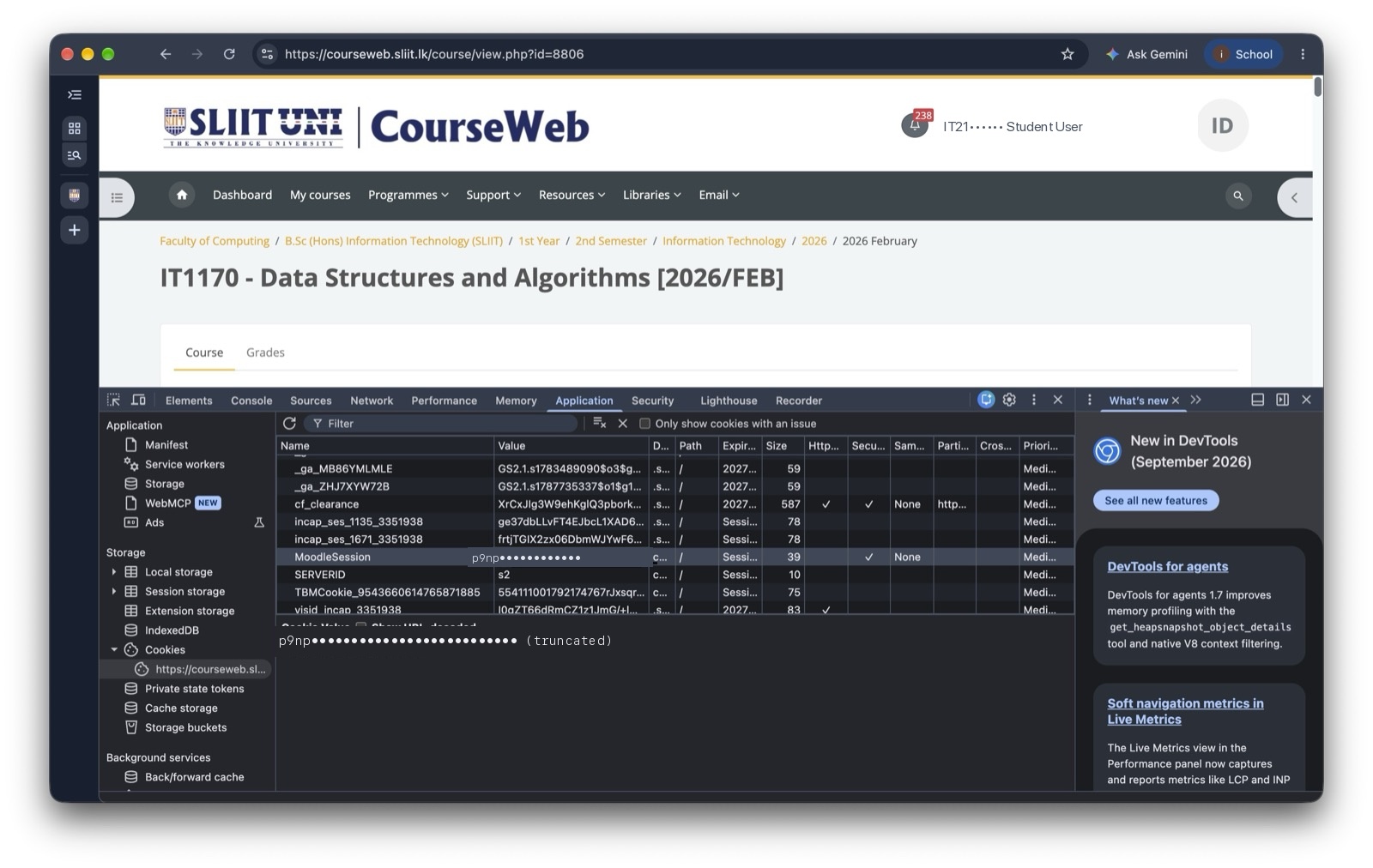
- Open your laptop browser, navigate to courseweb.sliit.lk, and log in.
- Press
F12(orCmd + Option + I) to open Developer Tools → Console. - Paste this one-liner and press Enter to copy your active session cookie:
copy(document.cookie.split('; ').find(row => row.startsWith('MoodleSession=')).split('=')[1]) - Tell your AI assistant:
"Use set_session_cookie with this value: <PASTE_COOKIE_HERE>" - You're immediately logged in without any browser UI!
🛠️ Complete MCP Tool Reference
This server provides 9 specialized tools exposed via the Model Context Protocol:
| Tool | Purpose | Key Parameters | Example Prompt |
|---|---|---|---|
list_modules |
Lists all enrolled modules, codes, and Moodle course IDs | None | "What modules am I registered for this semester?" |
get_deadlines |
Scrapes upcoming assignment submission deadlines and calendar events | None | "What assignments are due in the next 7 days?" |
get_announcements |
Fetches course notices, exam schedules, and lecturer broadcasts | courseId (optional) |
"Did the Distributed Systems lecturer post any exam notices?" |
check_module_updates |
Detects newly posted files or modified sections in a course | courseId |
"Check if any new tutorial answers were uploaded to Software Architecture." |
sync_module |
Delta-downloads all slides, lab sheets, and materials (MD5 hashed) | courseId, outputDir |
"Download all slides from Computer Networks to ./slides/networks." |
download_file |
Downloads a specific file or syllabus document directly | url, outputPath |
"Download the lecture 4 PDF from this URL." |
check_assignment_status |
Inspects submission status, grading grade, and marker comments | assignmentId |
"Did my SE4020 assignment 1 get graded yet?" |
scrape_page |
Scrapes any Courseweb URL into clean, LLM-ready markdown | url |
"Scrape the main page for module 14202 and summarize the syllabus." |
interactive_login |
Launches Playwright browser for Microsoft SSO & MFA approval | None | "Run interactive login." |
set_session_cookie |
Manually injects MoodleSession cookie for headless environments |
cookie |
"Set Moodle session cookie to 9a8b7c6d5e4f..." |
🌟 Student Superpowers
Superpower 1: 103-Page Exam Marksheet PDF Search
Instead of waiting 5 minutes for a 20MB PDF to render in your browser and searching line by line, let your agent download and parse it:
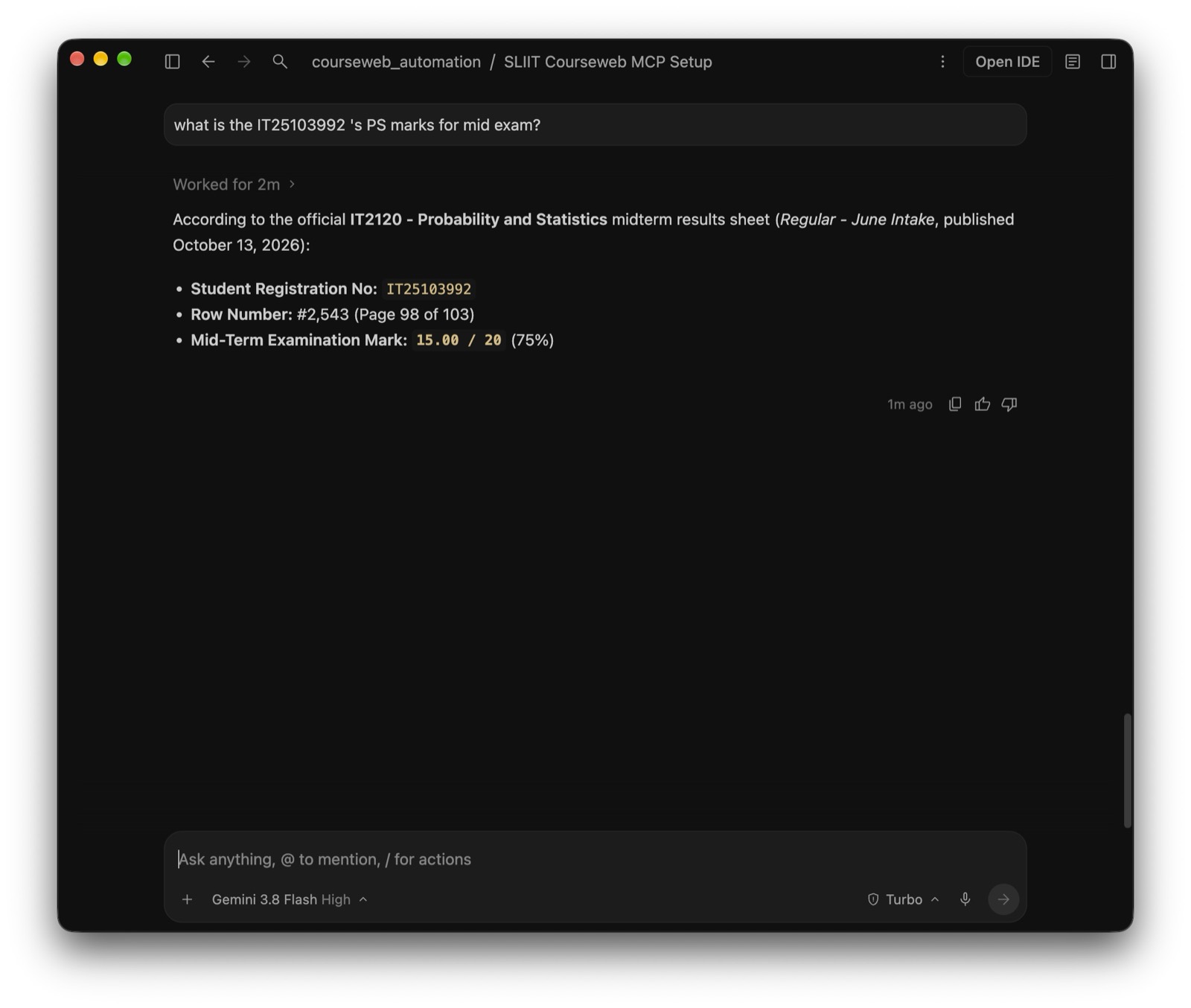
Prompt: "Check Courseweb for the Software Engineering Midterm marks PDF. Download it and find the score for IT21000000. Give me my class percentile and average."
Superpower 2: Intelligent Delta File Syncing
Never download duplicate files again. sync_module computes MD5 checksums for every file, creating local mirrors and downloading only fresh slides:
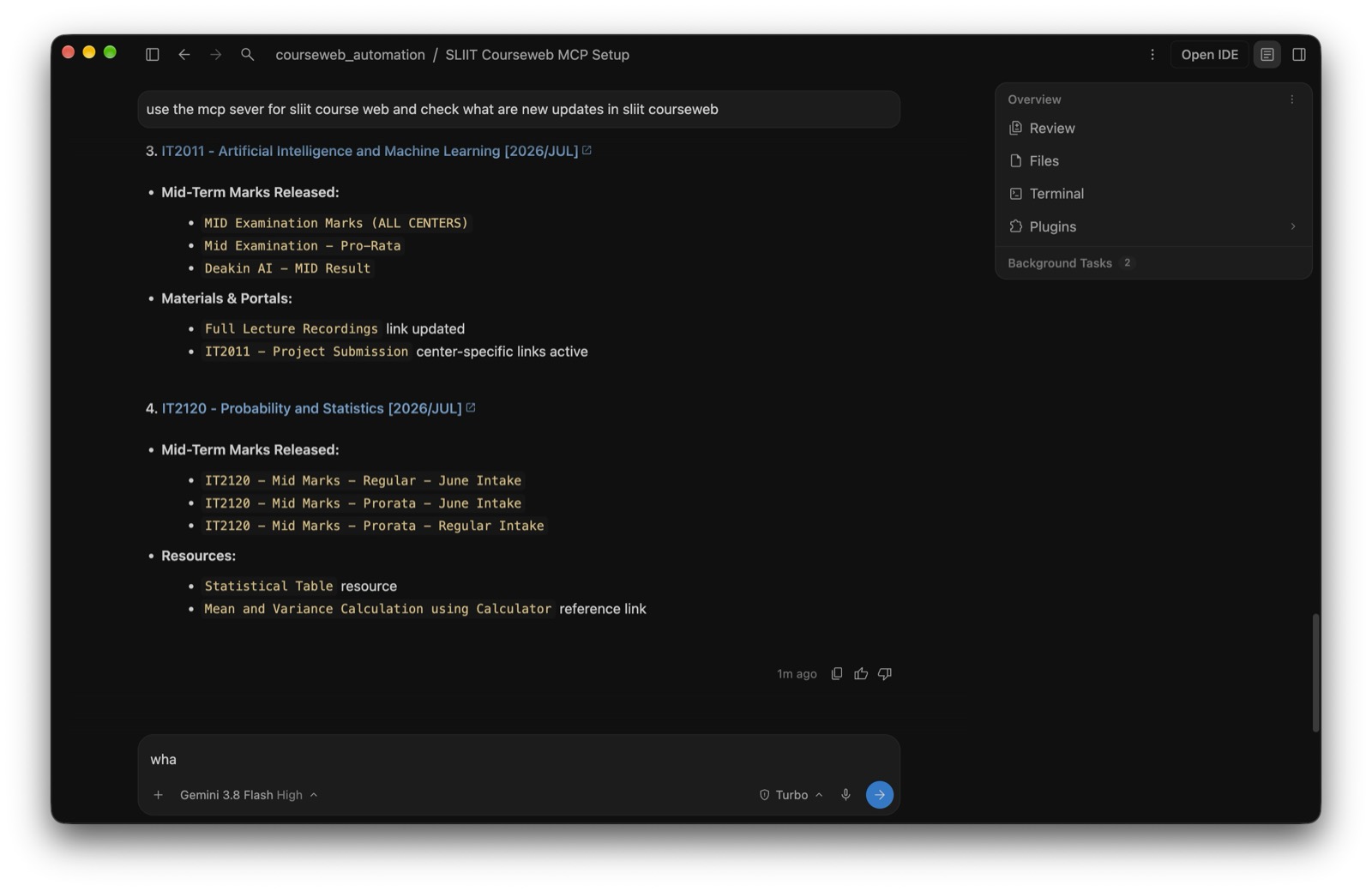
Prompt: "Sync all lecture materials for Machine Learning to ./ML_Lectures. Only download newly uploaded slides."
Superpower 3: Autonomous Weekly Academic Standup
Prompt: "List all assignments due across all my modules this Sunday. Generate a priority to-do list with time estimates."
⚙️ Manual Build & Development
If you prefer building and running from source manually:
# 1. Clone repository
git clone https://github.com/kesaruhasun/mcp-sliit-courseweb.git
cd mcp-sliit-courseweb

# 2. Install dependencies
npm install

# 3. Compile TypeScript
npm run build

# 4. Configure environment
cp .env.example .env
# Edit .env with your SLIIT credentials:
# SLIIT_USERNAME=ITxxxxxxxx
# SLIIT_PASSWORD=your_password
# HEADLESS=true

# 5. Start MCP Server (stdio mode)
node build/index.js
🌐 Live Landing Page & Multilingual Support
Check out the interactive web portal at https://sliitcoursewebmcp.kesaru.me.
- 🇱🇰 Spoken Sinhala (සිංහල): Explains MCP and Courseweb automation in casual student terms with Apple SF-style Sinhala typography (
Gemunu Libre/Sinhala MN). - 🇱🇰 Spoken Tamil (தமிழ்): Native Sri Lankan Tamil explanations for students across all campuses.
- ⚡ Interactive Prompt Builder: Instant copy-paste blocks for Claude, Antigravity, Cursor, and Windsurf.
- 🎥 Live Video Player: Stream the 60fps launch showcase directly in your browser.
🛡️ Fair Use & Institutional Disclaimer
- This project is an independent open-source utility developed for personal educational efficiency and is not officially affiliated with or endorsed by SLIIT.
- The server uses polite request throttling and intelligent MD5 caching to avoid generating unnecessary server load on campus infrastructure.
- Users are responsible for keeping their institutional credentials secure and complying with campus IT acceptable use policies.
👨💻 Author & Contributions
Built with ❤️ by Kesaru Hasun.
- 🌐 Portfolio & Blog: kesaru.me
- 🐙 GitHub: @kesaruhasun
- 💬 Questions or bug reports? Open an Issue or submit a Pull Request!
Reviews (0)
Sign in to leave a review.
Leave a reviewNo results found