Local-Search
Health Warn
- License — License: MIT
- Description — Repository has a description
- Active repo — Last push 0 days ago
- Low visibility — Only 5 GitHub stars
Code Fail
- spawnSync — Synchronous process spawning in scripts/run-agent-docs.ts
- process.env — Environment variable access in scripts/run-agent-docs.ts
- exec() — Shell command execution in site/app/page.tsx
Permissions Pass
- Permissions — No dangerous permissions requested
No AI report is available for this listing yet.
1.06 MB Rust CLI that turns your local browser into a structured search API for Claude Code, Codex, Cursor, and shell agents—no API key or metered billing.





local-search
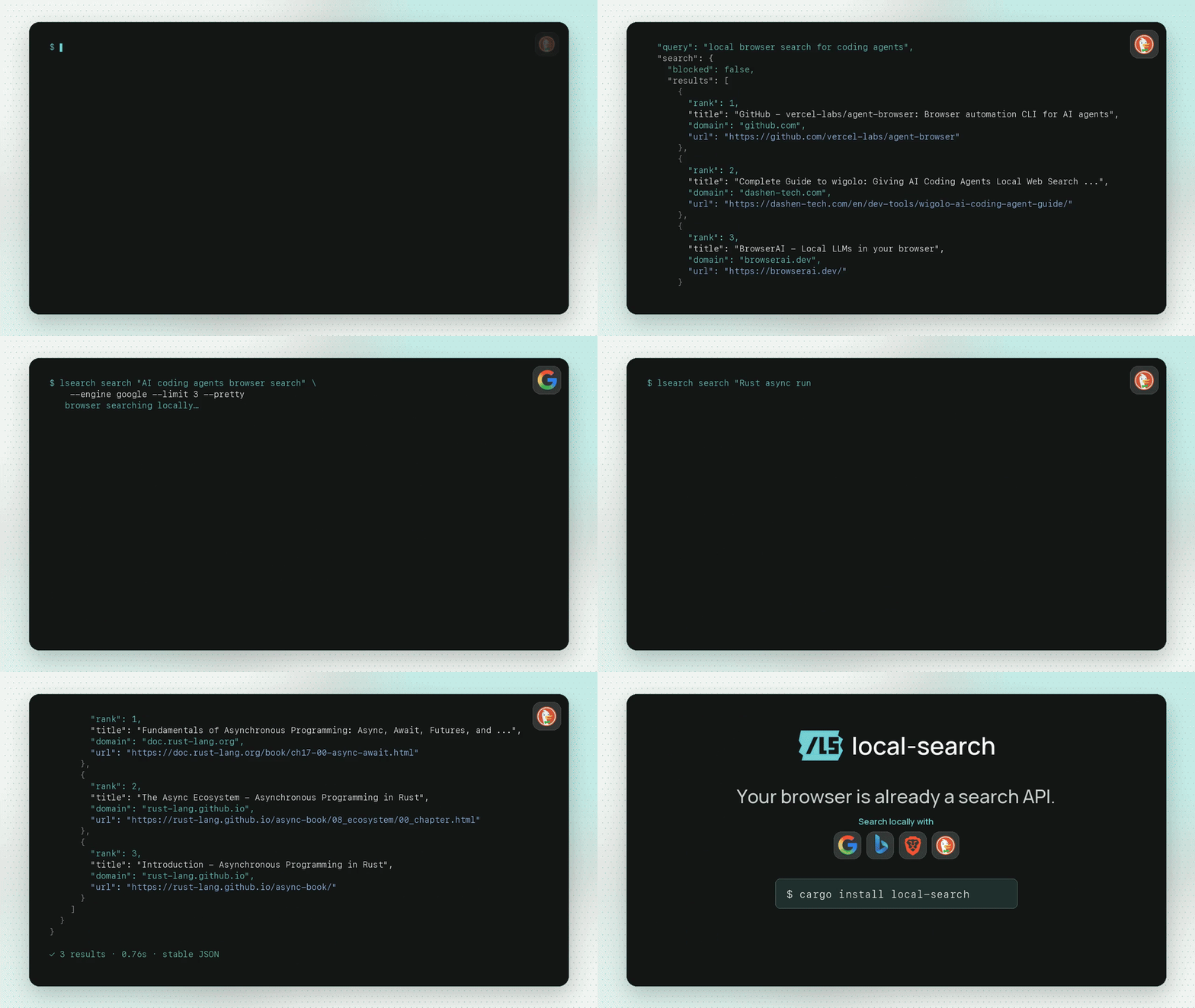
Free structured web search for agents, powered by your local browser.
lsearch "open source browser automation rust"
local-search gives agents Exa/Firecrawl/Brave/Tavily-style search, read, and
extract outputs without an API key or metered search bill. The primary CLI islsearch. It searches through a local Chrome/Chromium profile, so it can use the
same public web, logged-in sessions, cookies, and regional results you can see in
the browser.
What You Get
- Search results as stable JSON, without Exa/Brave/Tavily-style metering.
- Optional result-page content extraction with
--with-content. - Local
read,extract,map,request, screenshot, MHTML, HTML, and HAR-like
capture commands. - A managed Chrome profile that avoids repeated debugging prompts.
lsearch cleanupso agents do not leave browser instances or stale profile
markers behind.- Compatibility binaries:
local-searchandlocal-browser.
Install
cargo install local-search
For the latest unreleased build, install directly from GitHub:
cargo install --git https://github.com/Kevin-Liu-01/Local-Search
From a checkout:
cargo install --path . --force
lsearch doctor --pretty
Compatibility binaries are also installed:
local-search --help
local-browser --help
Quick Start
Start the managed browser profile once:
lsearch launch
This opens a persistent Chrome profile owned by local-search at:
~/Library/Application Support/local-search/chrome-profile
Sign in to accounts there once if you want authenticated search/read/extract.
After that:
lsearch "latest rust cdp browser automation"
lsearch search "site:docs.rs tokio Runtime" --limit 5 --pretty
lsearch search "best browser search APIs for agents" --with-content --limit 3 --pretty
lsearch read https://example.com
lsearch extract "a[href]" --field title=text --field url=href --pretty
lsearch map https://example.com --depth 1 --limit 25 --pretty
lsearch cleanup --pretty
Agent-style flow:
lsearch search "agent broom github" --limit 1 --pretty
lsearch search "example domain" --limit 1 --with-content --content-chars 240 --pretty
lsearch map https://example.com --depth 1 --limit 10 --pretty
lsearch cleanup --kill --pretty
Switching Search Engines vs Browsers
lsearch has two separate choices that are easy to mix up:
- Search engine: the search site queried inside the browser.
- Browser backend: the local browser automation transport used to load pages.
Search engines are switched with --engine. Google is the built-in default for
the fastest cold searches. Pass --engine when you want DuckDuckGo, Bing, or Brave Search:
lsearch search "open source browser automation" --engine duckduckgo
lsearch search "open source browser automation" --engine google
lsearch search "open source browser automation" --engine bing
lsearch search "open source browser automation" --engine brave
The shorthand form uses the default search engine:
lsearch "open source browser automation"
Matching searches reuse locally cached browser results for five minutes. This
makes repeated agent queries and depth changes return in a few milliseconds.
Use --no-cache for a fresh search, or change the window with --cache-ttl.
Search snippets are capped at 120 characters by default; --snippet-chars
changes that cap.
Browser backend is different. Today, local-search is built around
Chrome/Chromium's Chrome DevTools Protocol because it can control a normal local
profile. The recommended setup is still:
lsearch launch
To use a different Chromium-family app, pass its executable path when launching
the managed profile:
lsearch launch --browser-path "/Applications/Brave Browser.app/Contents/MacOS/Brave Browser"
lsearch launch --browser-path "/Applications/Microsoft Edge.app/Contents/MacOS/Microsoft Edge"
To attach to an already-running Chromium/CDP endpoint:
lsearch --cdp 9222 search "open source browser automation" --engine google
lsearch --cdp ws://127.0.0.1:9222/devtools/browser/... search "browser tooling" --engine duckduckgo
Safari is not currently a supported local signed-in browser backend. Safari's
official WebDriver automation uses isolated automation sessions, not the normal
profile state this project depends on. In practice: use Google, DuckDuckGo, or
Bing as the search engine inside a managed Chrome/Chromium profile; do not expect--browser safari to reuse your normal Safari session.
Token Benchmarks
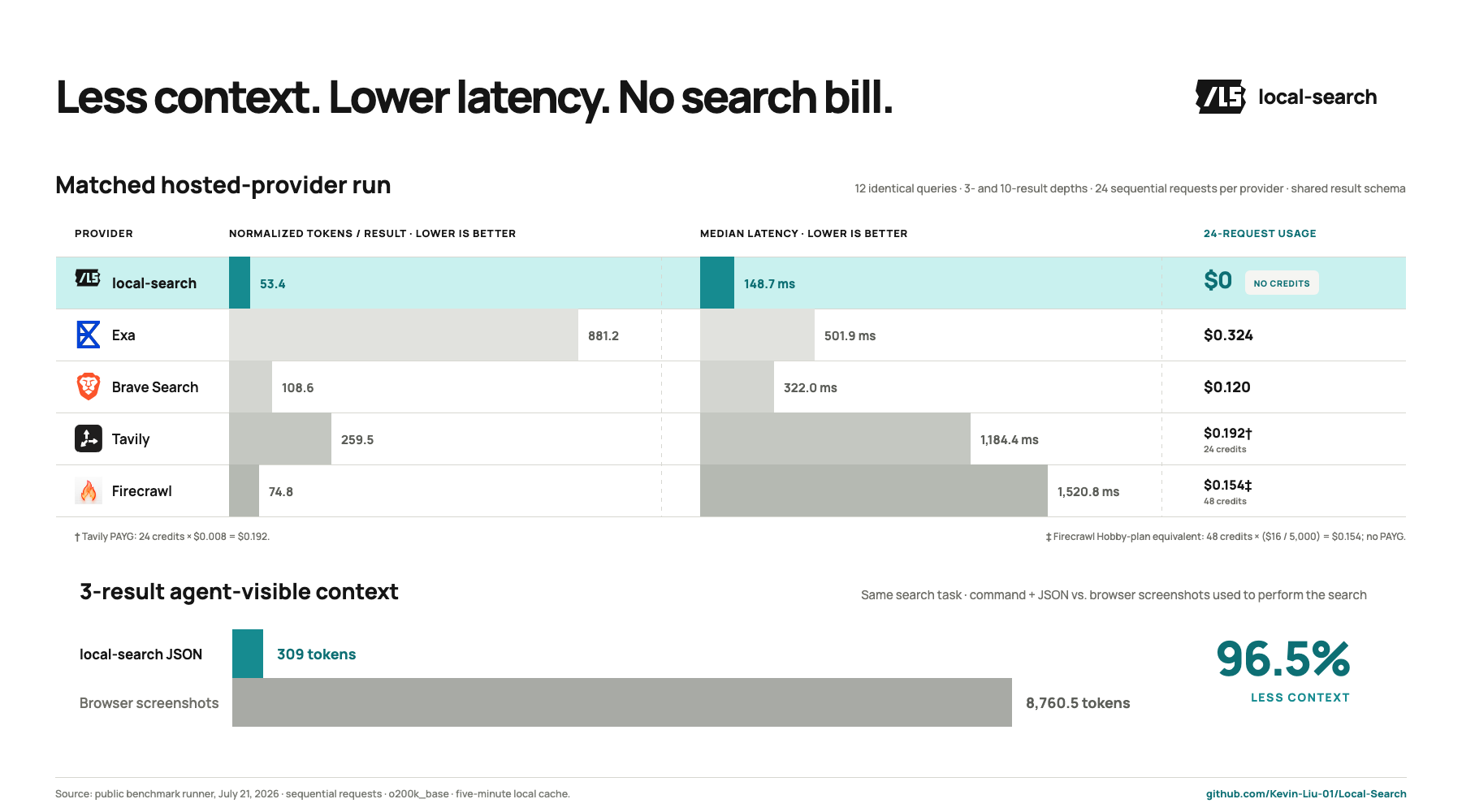
lsearch keeps browser plumbing and full search-page snapshots out of the
agent's context. A source-build benchmark on 2026-07-21 measured visible command
text plus stdout with the o200k_base tokenizer. It ran 12 queries through the
same managed Chrome profile against DuckDuckGo, Google, and Bing, then compared
normalized search JSON with a compact interactive snapshot of the same rendered
results page.
| Results requested | Usable runs | Median lsearch tokens |
Median snapshot tokens | Median paired reduction |
|---|---|---|---|---|
| 3 | 36/36 | 309 | 8,760.5 | 96.5% |
| 10 | 36/36 | 891 | 8,708 | 89.8% |
All 72 cross-engine searches returned the requested number of results. A
separate DuckDuckGo stability check ran 12 queries five times each: 60/60
responses matched the output schema, and 58/60 returned the exact same top-three
URLs.
Content extraction was stress-tested across 24 three-result searches. All 72
result pages returned the full 1,200-character text cap, with zero command
failures and zero about:blank pages.
Hosted Structured APIs
A second live benchmark ran the same queries and depths through lsearch, Exa,
Brave Search, Tavily, and Firecrawl. Each response was measured as returned, then
normalized to the common rank, title, url, and snippet fields. Exa used
highlights, Brave and Firecrawl used descriptions, Tavily used basic-search
content, and lsearch used its search snippets.
| Provider | Usable runs | Requested depth fulfilled | Median raw tokens | Median normalized tokens/result | Median latency | Full-run usage |
|---|---|---|---|---|---|---|
lsearch |
24/24 | 24/24 | 413.5 | 53.4 | 148.7 ms | $0 |
| Exa | 24/24 | 24/24 | 4,472.5 | 881.2 | 501.9 ms | $0.324 |
| Brave Search | 24/24 | 24/24 | 13,104 | 108.6 | 322.0 ms | $0.120 |
| Tavily | 24/24 | 17/24 | 1,163 | 259.5 | 1,184.4 ms | 24 credits ($0.192 PAYG) |
| Firecrawl | 24/24 | 24/24 | 509 | 74.8 | 1,520.8 ms | 48 credits (≈$0.154 Hobby-plan equivalent) |
lsearch was the fastest provider and returned the fewest raw and normalized
tokens in this comparison while spending zero API credits. The matched workload
contains 12 cold three-result searches followed by the same 12 queries at ten
results. lsearch retained the full browser result set locally, so the second
depth completed from its five-minute cache: cold median 384.5 ms, warm median
6.5 ms. The full methodology and runner live inbenchmarks/.
Why This Exists
Agent search is dominated by paid or hosted APIs:
- Exa offers search plus extracted
contents/highlights and deeper research modes. - Firecrawl offers
search, scrape, crawl, map, extract, and agentic web data features. - Brave Search API
exposes Brave's independent index, including LLM-oriented context endpoints. - Tavily
offers search, extract, crawl, and research APIs for agents.
Those are useful production services. local-search is for the cases where an
agent should use the browser already on the machine and spend zero API credits.
The browser-tooling neighbors are different:
- browse.sh / Browserbase Browse CLI is a broader browser
skills and browser automation surface. - agent-browser is an
agent-first browser automation CLI with snapshots, refs, tabs, forms, and
network tools. - browser-use CLI
gives coding agents direct browser control using local or cloud browsers. - AgentWebSearch is the closest
local-search neighbor: local LLM web search through real Chrome/CDP.
local-search keeps the browser controls, but frames them as search
infrastructure.
Comparison
| Tool | Primary job | Hosted/API key | What local-search optimizes for |
|---|---|---|---|
| Exa | AI-native web search, contents, highlights, deep search | Yes | Zero-cost local search and browser-session auth |
| Firecrawl | Search, scrape, crawl, map, extract at scale | Hosted or self-hosted | Single-machine agent search without service setup |
| Brave Search API | Independent search index and LLM context | Yes | Consumer search surfaces through your own browser |
| Tavily | Search/extract/crawl/research APIs | Yes | No account, no metered usage, local browser state |
| browse.sh / Browse CLI | Browser skills and browser/cloud automation | Optional cloud | Search-first CLI with paid-search replacement framing |
| agent-browser | General browser automation for agents | No | Structured search/read/extract as the main product |
| browser-use CLI | Agent browser control via Python workflows | Optional cloud | Native Rust, JSON-first search API replacement |
| AgentWebSearch | Local Chrome search for LLMs | No | CLI-first structured outputs plus extraction/artifacts |
Commands
Search:
lsearch "hi"
lsearch search "open source browser automation rust" --limit 10
lsearch search "firecrawl alternatives" --engine duckduckgo --with-content --limit 5
Google is the default engine for speed. DuckDuckGo, Bing, and Brave Search remain
available with --engine duckduckgo, --engine bing, and --engine brave.
Read and extract:
lsearch read https://example.com --format markdown
lsearch read https://example.com --format json --pretty
lsearch extract "article" --field title="h1=>text" --field url="a=>href"
Map a site locally:
lsearch map https://docs.rs --depth 1 --limit 50 --pretty
Authenticated browser fetch:
lsearch request https://example.com/api/me --header "Accept: application/json" --pretty
Artifacts:
lsearch screenshot artifacts/page.png --full-page
lsearch mhtml artifacts/page.mhtml
lsearch record https://browse.sh/ --har artifacts/browse.har --mhtml artifacts/browse.mhtml
Browser primitives for debugging workflows:
lsearch snapshot --pretty
lsearch click @e3
lsearch fill "input[name=q]" "local search cli"
lsearch press Enter
Output Contract
Successful structured commands return:
{ "ok": true, "...": "..." }
Failures are JSON on stderr:
{ "ok": false, "error": { "code": "browser_not_found", "message": "..." } }
Human-readable read --format markdown, read --format text, and html
without a path write raw content to stdout.
Agent Hygiene
lsearch is designed to be called by agents repeatedly. Use:
lsearch cleanup --pretty
to inspect the managed browser state, and:
lsearch cleanup --kill --pretty
when the task is done and the managed browser should be stopped. Cleanup only
targets the managed local-search browser listener and stale profile marker files;
it does not delete cookies, history, or profile data.
Browser Setup
Recommended:
lsearch launch
lsearch cleanup --pretty       # dry-run managed browser cleanup
lsearch cleanup --kill         # stop managed browser and clear stale markers
This avoids Chrome's default-profile remote debugging prompts by using a
separate persistent local-search profile. You can still attach to an existing
endpoint when needed:
lsearch --cdp 9222 doctor
lsearch --cdp ws://127.0.0.1:9222/devtools/browser/... tabs list
Agents can call the cleanup wrapper directly:
scripts/local-search-cleanup.sh --pretty
scripts/local-search-cleanup.sh --kill --pretty
Safari is intentionally limited. Its official WebDriver automation uses isolated
automation sessions, not the normal signed-in browsing profile this project
targets.
Reviews (0)
Sign in to leave a review.
Leave a reviewNo results found