codex-collab
Health Gecti
- License — License: MIT
- Description — Repository has a description
- Active repo — Last push 0 days ago
- Community trust — 79 GitHub stars
Code Basarisiz
- rm -rf — Recursive force deletion command in install.sh
- spawnSync — Synchronous process spawning in src/cli.test.ts
- rm -rf — Recursive force deletion command in src/cli.test.ts
- spawnSync — Synchronous process spawning in src/cli.ts
- rm -rf — Recursive force deletion command in src/events.test.ts
- spawnSync — Synchronous process spawning in src/integration.test.ts
- process.env — Environment variable access in src/integration.test.ts
Permissions Gecti
- Permissions — No dangerous permissions requested
This tool acts as a bridge allowing developers to run OpenAI's Codex tasks, perform code reviews, and conduct research directly from within an Anthropic Claude Code session via a JSON-RPC protocol.
Security Assessment
Risk: Medium. The tool actively spawns child processes (`spawnSync`) and executes shell commands to run Codex and manage threads. The automated install script and testing suite use `rm -rf` (recursive force deletion) to manage files, which is standard for build scripts but requires caution. It accesses environment variables, likely to retrieve necessary API keys for the external AI models. No hardcoded secrets were detected, and the tool does not request any inherently dangerous system permissions.
Quality Assessment
The project is in good health and actively maintained, with its most recent updates pushed today. It has solid community trust for a niche utility, backed by 79 GitHub stars. The codebase is written in modern TypeScript and comes with an industry-standard MIT license. Furthermore, the inclusion of an automated CI pipeline and dedicated integration tests indicates a reliable and well-structured development workflow.
Verdict
Use with caution—the core functionality inherently relies on executing external processes and communicating over the network, but the transparent codebase, active maintenance, and standard permissions make it safe for developers who understand these requirements.
Collaborate with Codex from Claude Code
codex-collab




Collaborate with Codex from Claude Code. Run tasks, get code reviews, do parallel research, all without leaving your Claude session.
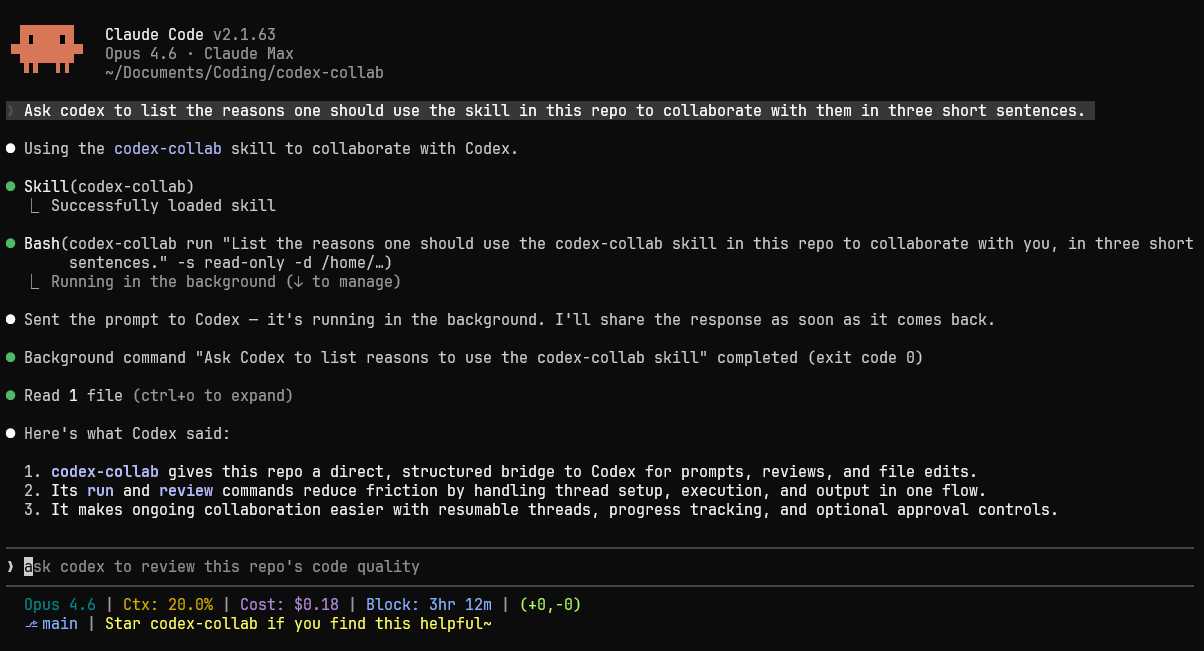
codex-collab is a Claude Code skill that drives Codex through its app server JSON-RPC protocol. It manages threads, streams structured events, handles tool-call approvals, and lets you resume conversations — all without leaving your Claude session.
Why
- Structured communication — Talks to Codex via JSON-RPC over stdio. Every event is typed and parseable.
- Event-driven progress — Streams progress lines as Codex works, so Claude sees what's happening in real time.
- Review automation — One command to run code reviews for PRs, uncommitted changes, or specific commits in a read-only sandbox.
- Thread reuse — Resume existing threads to send follow-up prompts, build on previous responses, or steer the work in a new direction.
- Approval control — Configurable approval policies for tool calls: auto-approve, interactive, or deny.
Installation
Requires Bun >= 1.0 and Codex CLI (npm install -g @openai/codex) on your PATH. Tested on Linux (Ubuntu 22.04), macOS, and Windows 10.
git clone https://github.com/Kevin7Qi/codex-collab.git
cd codex-collab
Linux / macOS
./install.sh
Windows
powershell -ExecutionPolicy Bypass -File install.ps1
After installation, reopen your terminal so the updated PATH takes effect, then run codex-collab health to verify.
The installer builds a self-contained bundle, deploys it to your home directory (~/.claude/skills/codex-collab/ on Linux/macOS, %USERPROFILE%\.claude\skills\codex-collab\ on Windows), and adds a binary shim to your PATH. Once installed, Claude discovers the skill automatically.
Use --dev to symlink source files for live-reloading instead of building a bundle:
# Linux / macOS
./install.sh --dev

# Windows (may require Developer Mode or an elevated terminal for symlinks)
powershell -ExecutionPolicy Bypass -File install.ps1 -Dev
Quick Start
# Run a prompted task
codex-collab run "what does this project do?" -s read-only --content-only

# Code review
codex-collab review --content-only

# Resume a thread
codex-collab run --resume <id> "now check error handling" --content-only
CLI Commands
| Command | Description |
|---|---|
run "prompt" [opts] |
Start thread, send prompt, wait, print output |
review [opts] |
Code review (PR, uncommitted, commit) |
jobs [--json] [--all] |
List threads (--limit <n> to cap) |
kill <id> |
Interrupt running thread |
output <id> |
Full log for thread |
progress <id> |
Recent activity (tail of log) |
models |
List available models |
health |
Check dependencies |
| Command | Description |
|---|---|
delete <id> |
Archive thread, delete local files |
clean |
Delete old logs and stale mappings |
approve <id> |
Approve a pending request |
decline <id> |
Decline a pending request |
| Flag | Description |
|---|---|
-d, --dir <path> |
Working directory |
-m, --model <model> |
Model name (default: auto — latest available) |
-r, --reasoning <level> |
low, medium, high, xhigh (default: auto — highest for model) |
-s, --sandbox <mode> |
read-only, workspace-write, danger-full-access (default: workspace-write; review always uses read-only) |
--mode <mode> |
Review mode: pr, uncommitted, commit, custom |
--ref <hash> |
Commit ref for --mode commit |
--resume <id> |
Resume existing thread |
--approval <policy> |
Approval policy: never, on-request, on-failure, untrusted (default: never) |
--content-only |
Suppress progress lines; with output, return only extracted content |
--timeout <sec> |
Turn timeout (default: 1200) |
--base <branch> |
Base branch for PR review (default: main) |
Defaults & Configuration
By default, codex-collab auto-selects the latest model (preferring -codex variants) and the highest reasoning effort supported by that model. No configuration needed — it stays current as new models are released.
To override defaults persistently, use codex-collab config:
# Show current config
codex-collab config

# Set a preferred model
codex-collab config model gpt-5.3-codex

# Set default reasoning effort
codex-collab config reasoning high

# Unset a key (return to auto-detection)
codex-collab config model --unset

# Unset all keys
codex-collab config --unset
Available keys: model, reasoning, sandbox, approval, timeout
CLI flags always take precedence over config, and config takes precedence over auto-detection:
CLI flag > config file > auto-detected
Config is stored in ~/.codex-collab/config.json.
Contributing
See CONTRIBUTING.md for development setup and guidelines. This project follows the Contributor Covenant code of conduct.
See also
For simpler interactions, you can also check out the official Codex MCP server. codex-collab is designed as a Claude Code skill, with built-in support for code review, thread management, and real-time progress streaming.
Yorumlar (0)
Yorum birakmak icin giris yap.
Yorum birakSonuc bulunamadi