claude-profiles-windows
Health Uyari
- License — License: MIT
- Description — Repository has a description
- Active repo — Last push 0 days ago
- Low visibility — Only 5 GitHub stars
Code Basarisiz
- exec() — Shell command execution in src/claude_profiles/app.py
- Hardcoded secret — Potential hardcoded credential in src/claude_profiles/models.py
Permissions Gecti
- Permissions — No dangerous permissions requested
Bu listing icin henuz AI raporu yok.
Windows tray app for anyone juggling multiple Claude Code accounts: see every account's 5h/7d usage at a glance, switch in one click, or open a terminal bound to any of them. Local-only, built on claude-swap.

Claude Profiles
Juggle as many Claude Code accounts as you have on Windows, without the log-out/log-in dance.
See every account's quota at a glance, switch in one click, or open a terminal bound to any of them.





⬇️ Download the installer for Windows · Website · All releases
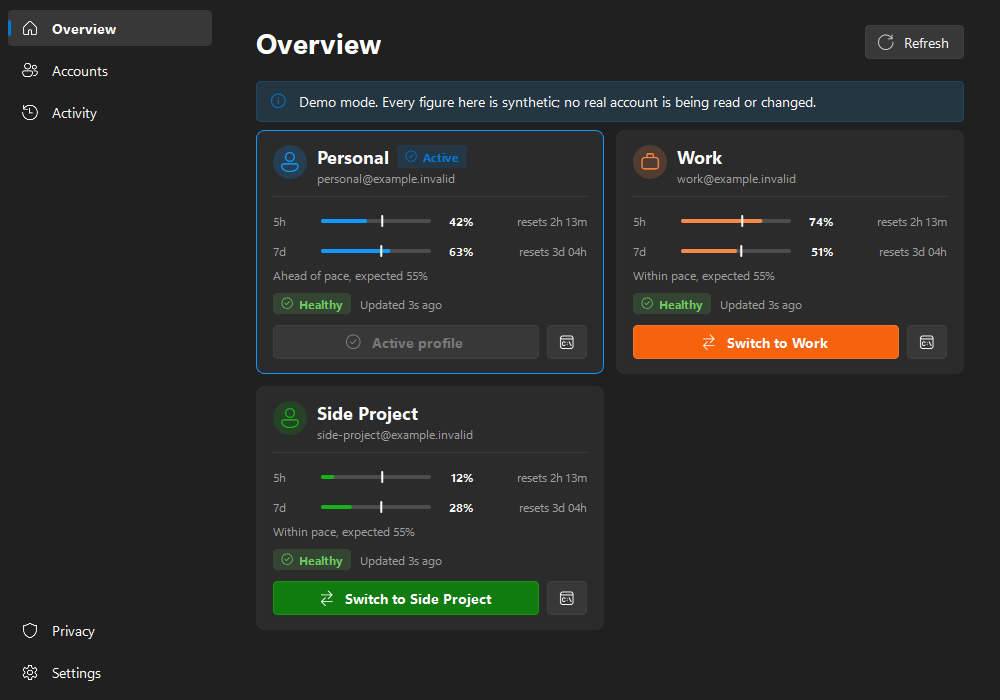
Sound familiar?
If you use Claude Code with more than one account, such as
a personal subscription, a work seat, a client's organisation, or a spare account for when you hit
your limits, you have probably hit some of these:
- Claude Code only knows one account at a time. Changing account means
/logout,/login, a
browser round-trip, and remembering which email you are in right now. - You hit the 5-hour limit halfway through a task, and you cannot tell which of your other
accounts has headroom without switching to each one first. - Usage is invisible until it is a problem. Your 5-hour and 7-day limits are checked one account at
a time, so you find out you are at 95% when Claude stops answering. - You want several accounts at once: one terminal on the work account, another on a personal
one, without one login clobbering the other. - The tools that exist don't fit Windows. claude-swap
solves the credential side well, but it is a CLI. The polished multi-profile usage trackers are
macOS apps.
Claude Profiles is a small Windows tray app that fixes all of the above. It puts every account's
usage in your notification area, however many you have. Switching is one click, and it can open a
terminal locked to any account. It never touches your credentials itself.
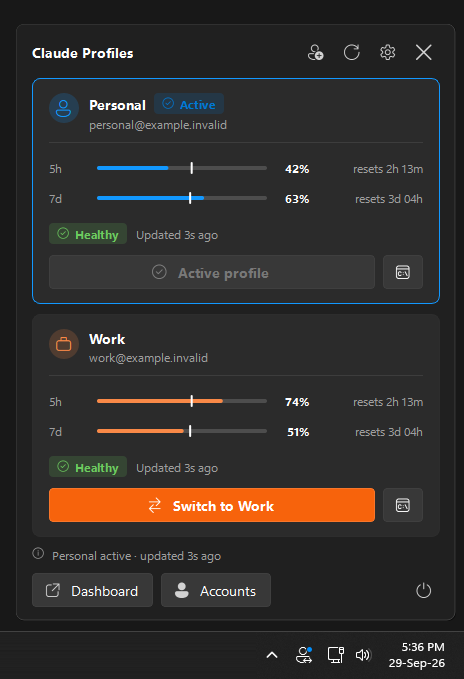
The real tray icon and flyout on Windows 11. Left-click the icon to open it. Demo data.
Features
| 📊 Every account at a glance | 5-hour and 7-day usage with reset countdowns, data age, and login health, plus any model-specific limit claude-swap reports for an account. |
| 📏 Know your pace | A white line on the 5-hour and 7-day bars marks where you would be if you spent the quota evenly. Fill past the line means you are burning through it; short of it, you have room. |
| 🔁 One-click switching | Changes the account Claude Code uses for new sessions. The controls lock while the switch runs, and a Windows notification confirms the result. |
| 🖥️ Isolated sessions | Open a Claude Code terminal bound to one account without changing the global active account, so you can run several side by side. |
| ➕ As many accounts as you have | Two, three or ten: every account registered with claude-swap gets a card, a colour, a menu entry and a shortcut. Name them whatever you like: personal, work, client-acme. |
| 🪟 A proper Windows tray app | Monochrome Fluent glyph that follows your taskbar theme, with a coloured badge for the active profile. Left-click for the flyout; right-click for a native menu. |
| 🧭 Full dashboard | WinUI-style navigation with Overview, Accounts, Activity, Privacy and Settings pages. It follows your Windows accent colour and uses Segoe Fluent Icons. |
| 🧑💻 Guided account setup | Add an account walks you through signing in and naming each account, and shows exactly which address you are about to register. Rename accounts at any time. |
| 🔔 Threshold alerts (opt-in) | Notifies you when usage crosses a warning or critical level. It fires once per crossing and re-arms after the reset. |
| ⌨️ Global shortcuts (opt-in) | Ctrl+Alt+1 to Ctrl+Alt+9 switch to your first nine accounts, in the order the Overview shows them. |
| ⚡ Smart refresh | Opening the flyout refreshes it. Polling speeds up to 30 s while a window is visible and backs off automatically after errors. |
| 🚀 Starts with Windows | Adds a Start menu and Startup shortcut. No registry keys are written. |
| 🧪 Demo mode | --mock runs the whole UI on synthetic data. Useful for trying it before you set anything up. |
| 🔒 Local-only by design | No network code, no telemetry, and no credential access. See Privacy and security. |
What it can and cannot switch
| ✅ Switches | The account Claude Code uses for new sessions, via claude-swap. |
| ✅ Isolated sessions | cswap run opens a terminal bound to one account, leaving the global profile alone. |
| ❌ Does not switch | Your browser session on claude.ai. Signing in there is separate and unaffected. |
| ❌ Does not touch | Running Claude Code processes, VS Code, terminals, or open chats. Nothing is ever killed for you. |
| ⚠️ Needs a nudge | An already-open VS Code Claude panel may still show the previous account. Close and reopen that panel. |
How it works
Claude Profiles is a presentation layer on top of
claude-swap (cswap), which does the actual account
storage, switching and quota fetching. The installer includes claude-swap, so there is nothing
else to set up. The app runs that bundled cswap as a separate program, parses its JSON output,
and draws it.
 Tray icon / flyout / dashboard
              │
        ProfileService ── polling, switching, activity log
              │
         CswapClient   ── allowlisted commands only, never a shell
              │
            cswap      ── owns your credentials; Claude Profiles never does
This split is deliberate: the app itself contains no OAuth logic, no token parsing, no credential
backups, and no writes to .credentials.json. The bundled claude-swap is pinned to the version the
app was tested against, and is updated when you install a newer Claude Profiles. See docs/architecture.md for the
details.
Getting started
Prerequisites
- Windows 10 or 11 (64-bit)
- Claude Code
That's all. claude-swap comes with the installer.
1. Install Claude Profiles
Download ClaudeProfiles-Setup.exe
from the latest release and run it.
- It includes claude-swap, so this is the only thing to install.
- It installs for your user only, to
%LOCALAPPDATA%\Programs\Claude Profiles. No administrator
rights are needed. - It adds a Start menu entry and an uninstaller under Settings > Apps.
- To upgrade, run a newer installer. It closes the running app and replaces it, and the bundled
claude-swap with it, in place. - Optionally, tick Add the bundled claude-swap (cswap) to my PATH to use
cswapfrom a
terminal too. It is off by default and removed again on uninstall.
The tray icon appears in the notification area. Left-click it for the compact view.
Prefer not to install? Use the portable zip or run from source"Windows protected your PC"? The installer is not code-signed yet, so SmartScreen warns about
it. Choose More info, then Run anyway. Every release is built by GitHub Actions from the
tagged source, with SHA-256 checksums and a
build provenance attestation
you can check yourself:gh attestation verify ClaudeProfiles-Setup.exe --repo kevinabouhanna/claude-profiles-windows
Portable: download ClaudeProfiles-X.Y.Z-win-x64-portable.zip from the same release, unzip it
anywhere, and run ClaudeProfiles.exe.
From source (Python 3.12 or newer). A source checkout does not include claude-swap, so install
it first with uv tool install claude-swap:
git clone https://github.com/kevinabouhanna/claude-profiles-windows.git
cd claude-profiles-windows

uv venv
uv pip install -e .

.venv\Scripts\python.exe -m claude_profiles
Just want a look first? Run
ClaudeProfiles.exe --mock(orpython -m claude_profiles --mock
from source) to explore everything with synthetic data. No accounts are read or changed.
Windows 11 hides new tray icons by default. To keep this one visible, go to Settings >
Personalisation > Taskbar > Other system tray icons and switch on Claude Profiles.
2. Register your accounts
You can do this inside the app. Choose Add an account from the tray menu or the flyout. For
each account you use, as many as you have:
- Sign in. The button opens a terminal running Claude Code. Sign in there (type
/loginto change
account), then close it. The wizard notices the sign-in on its own. - Name it and save it. The wizard shows which address Claude Code is signed in as right now.
Check it, give it a short name such aspersonal,workorclient-acme, and save.
Repeat for the next account. To rename one later, use the Accounts page, which also lists every
account claude-swap knows about.
These need cswap on your PATH: tick the installer's PATH option, or install claude-swap yourself.
claude                      # sign in as the first account, then exit
cswap add --alias personal

claude                      # sign in as the next account, then exit
cswap add --alias work      # ...and so on, one alias per account

cswap list                  # every account should appear with its alias
cswap alias 3 client-acme   # to rename an existing account
Claude Profiles stores no account identifiers of its own. The list of accounts, their names and
their email addresses are read from cswap list --json each time, and never written into source
or config.
Demo scenarios
& "$env:LOCALAPPDATA\Programs\Claude Profiles\ClaudeProfiles.exe" --mock
& "$env:LOCALAPPDATA\Programs\Claude Profiles\ClaudeProfiles.exe" --scenario work_reauth
Scenarios: healthy, two_accounts, work_reauth, work_stale, work_unavailable, high_usage, no_accounts,unknown_schema.
Settings
| Setting | Default | Notes |
|---|---|---|
| Refresh interval | 120 s | Used while the app is in the tray. Polls never overlap and back off automatically after errors. |
| Launch at Windows sign-in | On | Creates a shortcut in your Startup folder. No registry keys are ever written. Turning it off deletes the shortcut. |
| Threshold notifications | Off | Fires on an upward crossing only, and re-arms after a reset. |
| Global shortcuts | Off | Ctrl+Alt+1 to Ctrl+Alt+9, one per account in Overview order. Registered only when enabled. |
Switch confirmations always appear, regardless of the notification setting, because they are the
direct result of something you clicked.
When usage refreshes
There is no Refresh button, because there is nothing to press:
- Opening the flyout or the dashboard refreshes it, unless a reading arrived in the last 10 seconds.
- Polling speeds up while you are looking. With a window on screen the interval drops to 30
seconds, then returns to your configured interval once everything is hidden. - After a switch, state is re-read immediately.
When an account needs re-authentication
If claude-swap reports token_expired, relogin_required, or no_credentials, the card shows
Sign-in needed. All you do is sign in again with Claude Code, as that account:
- The account Claude Code is signed in as is picked up on its own. claude-swap keeps its own
copy of each login, and keeps flagging an account while that copy holds the old token, even after
you have signed in again. When the app sees the active account flagged, it stores the current
sign-in with claude-swap (cswap add, which is the step claude-swap asks for). If that sign-in
has expired too, it tries again later, sooner whenever you open the app. - Fix sign-in does the same immediately. If the account is not the one Claude Code is signed in
as, or the sign-in itself has expired, it opens the reconnect wizard: sign in from the terminal it
opens, then save.
The app never signs in for you. Signing in is always Claude Code's, in a terminal, driven by you.
Privacy and security
- Local only. The app opens no network connections. Its only external interaction is running
its bundledcswapand parsing the JSON it prints. Fetching usage is claude-swap's job, and the
bundled copy has its PyPI update check turned off. - No credential access.
%USERPROFILE%\.claude\.credentials.json,.claude-swap-backup\, and
Claude Code session files are never read, written, copied, exported, or backed up. - Allowlisted commands. Only
cswap list,status,switch,run,add, andaliascan be
invoked. There is no free-form command path, argv is always a list, and a shell is never used.remove,purge,export,import,add-token, andconfigare all refused. - Setup is not authentication.
addonly records the account Claude Code is already signed
in as. Signing in stays an interactive step you perform yourself. The oneaddthe app runs
without a click is a barecswap addfor the account claude-swap reports as active, after
confirming Claude Code is signed in as that same account, to store a sign-in you already made. - No raw output is logged.
cswapstdout and stderr never reach a log or the UI. Only parsed,
redacted error fields do. - Redaction everywhere. Anything written to disk passes through a scrubber for API keys, JWTs,
bearer tokens andtoken=/secret=assignments. Email addresses are masked. - No telemetry, analytics, crash reporting, cloud sync, or remote configuration.
- Restricted storage.
%LOCALAPPDATA%\ClaudeProfiles\is locked to your user account on
creation. It holds only UI preferences and a capped activity history.
The in-app Privacy page says the same, and has Open data folder and Clear local activity
history buttons. See docs/privacy.md for the full data inventory.
Uninstalling
Use Settings > Apps > Installed apps > Claude Profiles > Uninstall. It stops the app and removes
the program, its Start menu and Startup shortcuts, and its icon cache. Your preferences in%LOCALAPPDATA%\ClaudeProfiles are kept. Delete that folder, or use Clear local activity
history on the Privacy page first, if you want them gone too. Your registered accounts, which
claude-swap keeps in %USERPROFILE%\.claude-swap-backup, are not touched.
Releases and versioning
Claude Profiles uses Semantic Versioning, and every release is listed inCHANGELOG.md. Pushing a vX.Y.Z tag makes GitHub Actions test, build, verify,
attest and publish the installer and portable zip. No release binary is built on a personal
machine. The full process is in docs/releasing.md.
Building it yourself
The packaged build behaves like an ordinary Windows application: a windowed binary with its own
icon and version details that never opens a console. With Inno Setup 6
installed (winget install JRSoftware.InnoSetup):
uv pip install -r requirements-dev.txt
powershell -ExecutionPolicy Bypass -File tools\build_release.ps1
uv pip install --require-hashes -r tools\cswap\requirements.txt   # the claude-swap to bundle
powershell -ExecutionPolicy Bypass -File tools\build_release.ps1
# -> release\ClaudeProfiles-Setup-X.Y.Z.exe, the portable zip, and SHA256SUMS.txt
The script renders the icon and freezes the app with PyInstaller. It then freezes the pinned
claude-swap (cswap.spec) into the app's cswap folder and writesTHIRD-PARTY-NOTICES.txt. It runs tools\verify_build.py against the result, then packs the zip
and compiles installer/ClaudeProfiles.iss.
- One folder, not one file. A one-file build re-extracts ~45 MB to a temp directory on every
launch and leaves a bootloader process beside the real one. - The icon is rendered before the build. Drawing it needs a
QPixmap, and creating one without
aQGuiApplicationaborts the process. Inside a.specthat looks like PyInstaller crashing
at the PYZ stage with no error. verify_build.pyis not optional. A broken build can still look healthy from the outside,
so it checks that the app reached its own code, not just that a process exists.- uv's
pythonw.exeis not windowed. A.venvcreated by uv ships apythonw.exethat is a
console-subsystem trampoline, so running the app through it opens a terminal. The app detects
this and points its shortcuts at the installed build, or at a genuinely windowed interpreter.
Development
uv pip install -r requirements-dev.txt
.venv\Scripts\python.exe -m pytest -q
.venv\Scripts\python.exe -m ruff check .

# Optional: check the live claude-swap contract. Read-only; never switches,
# adds or aliases anything. Worth running after upgrading claude-swap.
.venv\Scripts\python.exe -m pytest --run-integration -m integration
See docs/development.md and docs/architecture.md.
Issues and pull requests are welcome.
Credits
Claude Profiles would not exist without these projects. Thank you to their authors.
- realiti4/claude-swap (MIT) is the engine underneath.
It handles account storage, switching, isolated sessions and quota fetching. The installer
bundles it, unmodified apart from its self-update check, as a separatecswap.exethat Claude
Profiles runs as a subprocess. If this app is useful to you, go star that repo. - jens-duttke/usage-monitor-for-claude
(MIT) was the reference for Windows tray behaviour, adaptive polling and privacy practice.
No code copied. - hamed-elfayome/Claude-Usage-Tracker
(MIT) was the UX reference for presenting multiple profiles. It is a macOS Swift app; no code
ported. - Built with PySide6 / Qt for Python and packaged with
PyInstaller.
No source from these projects is copied into this repository. The installer ships claude-swap and
its dependencies, Qt through PySide6, and the Python runtime, so every release includesTHIRD-PARTY-NOTICES.txt with each of their licences, generated bytools/third_party_notices.py.
Licence
MIT. See LICENSE.
Claude Profiles is an independent community project. It is not affiliated with, endorsed by, or
supported by Anthropic. "Claude" and "Claude Code" are trademarks of Anthropic, PBC.
Yorumlar (0)
Yorum birakmak icin giris yap.
Yorum birakSonuc bulunamadi