commander
Health Warn
- License — License: MIT
- Description — Repository has a description
- Active repo — Last push 0 days ago
- Low visibility — Only 5 GitHub stars
Code Warn
- fs module — File system access in .github/workflows/ci.yml
Permissions Pass
- Permissions — No dangerous permissions requested
No AI report is available for this listing yet.
CC Commander — Master Claude Code instantly. The Fable Method: 12 enforceable gates so any model delivers Fable-shaped results. 71 plugin skills, 22 specialist agents, 23 lifecycle hooks (39 handlers). Free for now. commanderplugin.com
CC Commander — AI PM for Claude Code · 71 Skills · 22 Agents · Free for Now
Ship faster with Claude Code and Cowork Desktop. One plugin install activates 71 skills, 22 specialist AI agents, and 23 lifecycle hooks across Claude Code Desktop, Claude Code CLI, Cursor, Windsurf, and every MCP-capable IDE.
Install in 30 seconds:
Settings → Plugin Marketplace → Add from GitHub: KevinZai/commander → Install
What you get: 71 click-first /ccc-* plugin skills · 22 specialist sub-agents (architect, reviewer, debugger, designer, and more) · 23 lifecycle hooks · 2 bundled MCP servers · 502+ ecosystem skills · Free for now.

🖥️ Primary surface: Claude Code Desktop (aka Cowork Desktop). Install once via Settings → Plugin Marketplace. All 71 plugin skills, 22 agents, 23 lifecycle hooks (39 handlers), and 2 credential-free bundled MCP servers (+16 opt-in via
/ccc-connect) appear inside every session automatically — no terminal needed.Cowork Desktop and Claude Code Desktop are the same app, two UI modes. The plugin works identically in both. All screenshots in
docs/screenshots/were taken in Desktop.







Powered by:


Kevin Zicherman · @kzic · Built from 200+ community sources · Aggregates 19 vendor packages
Why CC Commander · The 70 skills · Browse Skills · Agent Bible · Ecosystem · BIBLE · Changelog
🎯 Who it's for
| If you are... | CC Commander is... |
|---|---|
| 👋 New to AI coding agents → using Claude Cowork Desktop | Your onboarding buddy — /ccc pops up a native chip picker: Build · Review · Ship · Design · Learn · More. Click. No typing. 28 guided workflows, zero config. |
| 💻 A developer → using Claude Code Desktop or Claude Code CLI | Your project manager — routes complexity, compounds knowledge across sessions, Kevin Z Method built in. /ccc-plan → spec interview → plan file. |
| 🔧 In Cursor / Windsurf / Cline / Continue / Codex | One hosted MCP endpoint unlocks all 459+ skills in your IDE of choice |
| 📱 On Claude mobile or iPad | Same skills, same license, synced across devices (hosted MCP) |
⭐ 30-second install
For Cowork Desktop or Claude Code Desktop users (99% of people). No terminal needed.
- Open Settings → Plugin Marketplace
- Click Add from GitHub → enter
KevinZai/commander→ Add - Find
commanderin the marketplace → click Install - Cmd+Q, reopen the app, type
/ccc— you're live
✅ 71 plugin skills activate. ✅ Zero config. ✅ Zero API keys.
Power-user CLI install:
/plugin marketplace add KevinZai/commander
/plugin install commander
Or full dev environment + ccc binary:
curl -fsSL https://raw.githubusercontent.com/KevinZai/commander/main/install-remote.sh | bash
🌐 One plugin, every agent
Commander is a PM layer for whichever AI coding tool you use. Same 71 skills, same 22 specialist agents, same lifecycle hooks — different install path per platform. The package name stays
commandereverywhere; the surrounding UI (Claude Code, Codex, Cursor, etc.) provides the platform context.
| Platform | Status | Install |
|---|---|---|
| Claude Code Desktop / Cowork Desktop ⭐ | Shipping (primary) | Settings → Plugin Marketplace → Add from GitHub: KevinZai/commander |
| Claude Code CLI | Shipping | /plugin marketplace add KevinZai/commander then /plugin install commander |
| Cursor / Windsurf / Cline / Continue / Codex | Shipping (hosted MCP) | Point MCP client at mcp.commanderplugin.com |
| Codex / Gemini native plugin runtimes | Roadmap | Same repo, platform-specific adapter (planned v4.2+) |
One brand: Commander. One tagline: The guided AI PM for every AI coding agent. One repo: KevinZai/commander. Everywhere.
🎯 Why CC Commander
Stock Claude Code is a blank terminal with amnesia. Every other plugin solves one slice. CC Commander is the first guided AI PM — click-first UX, an intelligence layer that thinks before you do, and the whole ecosystem pre-wired. One install, everything active.
🥇 What no competitor has
| Moat | CC Commander | Cursor / Windsurf / Copilot | OSS (Cline / Continue / Aider) |
|---|---|---|---|
| Lifecycle hooks (23 × 39 handlers) | ✅ SessionStart, PreToolUse, PostToolUse, Stop, PreCompact, Notification, etc. | ❌ None | ❌ None |
| 22 specialist agent personas | ✅ Architect, Security-Auditor, TypeScript-Reviewer, Designer, Debugger, etc. | ❌ None ship pre-built | ❌ None ship pre-built |
| 18 MCP servers (2 bundled + 16 opt-in) | ✅ Zero-config — Notion, Slack, Supabase, Figma, Linear, GitHub, Vercel, Fly… | ⚠️ Manual MCP setup required | ⚠️ Manual MCP setup required |
| Spec-first planning (/ccc-plan → interview → spec → multi-agent execution) | ✅ Native | ❌ No planning primitive | ❌ No planning primitive |
| Cross-platform (CLI + Desktop + VS Code path + hosted MCP) | ✅ Same brain everywhere | ❌ IDE-locked | ⚠️ IDE-locked |
| Pricing transparency | ✅ Free for now — no signup, no card, no gates | ⚠️ Cursor $20+ confusing tiers; Windsurf credit confusion | ✅ BYOK free |
The marketing angle: Set it once, the AI works smarter every session. Lifecycle hooks fire automatically. Specialist agents already know your codebase conventions. The MCP ecosystem is pre-wired. No other tool ships any of this out of the box.
- 🖱️ Click-first UX — every menu is a native
AskUserQuestionchip picker. No typing. No numbered menus. No ASCII prompts. Works identically in Cowork Desktop, Claude Code Desktop, and the CLI. - 🧠
/ccc-suggestintelligence layer — Opus-class real-time recommendation. Scans your project state, recommends one starred next step with reasoning + named 3rd-party plugins. Kills info-paralysis. - 🧩 71 plugin skills including 13
/ccc-*specialist workflows — plain slash commands (nocommander:prefix), skill-based architecture:ccc,ccc-start,ccc-browse,ccc-plan,ccc-build,ccc-review,ccc-ship,ccc-design,ccc-learn,ccc-xray,ccc-linear,ccc-fleet,ccc-connect+/ccc-e2e,/ccc-save-session,/ccc-resume-session,/ccc-changelog,/ccc-doctor,/ccc-tuneup,/ccc-upgrade,/ccc-yolo-setup,/ccc-eccand 11 domain routers. - 🧭 Orchestrator / Executor model —
/ccc-orchestratehas Fable/Opus write a Skill.md-style goal file, GPT-5.5 viacodexor a Sonnet subagent execute it, and the orchestrator verify acceptance criteria. Pair it with/ccc-handofffor frequent fresh-chat resets and/ccc-adoptto bring the doctrine into any existing project. Pay for Fable on the thinking, not the typing. - 🎭 22 specialist agents with persona voices — architect, security-auditor, performance-engineer, content-strategist, data-analyst, designer, product-manager, technical-writer, devops-engineer, qa-engineer, reviewer, builder, researcher, debugger, fleet-worker, typescript-reviewer, python-reviewer, go-reviewer, rust-reviewer, java-reviewer, kotlin-reviewer, csharp-reviewer. Each with a distinct voice layer in
commander/cowork-plugin/rules/personas/. - 🔌 2 credential-free bundled MCP servers —
context7(library docs) +sequential-thinking. Opt-in via/ccc-connect: 16 more including Tavily, GitHub, Supabase, Figma, Playwright, Slack, Notion, claude-mem, Exa, Firecrawl, Zapier, Google Drive, Vercel, Neon, Fly.io, Upstash. - 🪝 23 lifecycle hooks × 39 handlers — SessionStart, UserPromptSubmit, PreToolUse, PostToolUse, Stop, Notification, PreCompact, SubagentStop, PermissionRequest. Schema-compliant, 100% pass on
claude plugin validate. - 🗺️
/ccc-cheatsheetlive Mermaid map — reads the filesystem as single source of truth, renders the whole plugin as a flow diagram. Never drifts. - 🔄 Weekly vendor auto-sync — 19 vendor submodules auto-update via GitHub Actions. The ecosystem stays current without you touching a thing.
- 🌐 Cross-client, one license — Cowork Desktop, Code Desktop, Code CLI, Cursor, Windsurf, Cline, Continue, Codex, mobile (hosted MCP).
- 🚁 Fleet orchestration —
/ccc-fleetruns multiple Sonnet agents in parallel git worktrees. Fan-out, pipeline, FOR/AGAINST, background modes. - 🆓 Free for now — no credit card, no signup. No feature gating, no paywalls.
- 🧬 Shared brain: plugin + CLI — same intelligence layer, same skill catalog, same personas. Install either, get both.
- 📖 The Kevin Z Method —
BIBLE.mdships with the plugin. 7 rules, 200+ sources, 14 months of production methodology. - 📄 Printable cheat sheets —
docs/cheatsheets/ships 3 print-ready PDFs: CC Commander Essentials, The Orchestrator/Executor Method, and Agents & Model Tiers. - 📚 459+ skills across 11 CCC domains — design, marketing, SaaS, DevOps, SEO, testing, security, data, research, mobile, makeover. Plus the vendor ecosystem.
- 🎯 Plugins-name-plugins —
/ccc-suggestcalls out specific 3rd-party plugins by name (claude-mem,superpowers,caveman,impeccable,graphify, and more) at the right moment. You learn the whole ecosystem through CC Commander.
🧠 The Fable Method
The operating doctrine distilled from Anthropic's frontier Fable 5 model, encoded as 12 enforceable gates — so ANY model running CC Commander produces Fable-shaped results, not just the flagship one. Arm it with /ccc-fable on, self-check with /ccc-fable audit. Full doctrine: commander/cowork-plugin/rules/fable-method.md.
- Never trust a single pass — the agent that does the work never grades it. Every finding gets adversarial verification from a fresh context.
- Loops need verifiers, state, and stops — repetition without a real verifier, a state file, and a deterministic stop condition is just an agent agreeing with itself on repeat.
- Prove it before you alarm — a scary number is a hypothesis until you run the exact check, open real samples, and hunt the disconfirming case.
- Context is disposable, state is durable — the durable record is handoff docs, memory, and the tracker, never the live chat.
The method IS the moat. A mid-tier model following all 12 gates reliably out-delivers an ungated frontier model on any task longer than one turn.
💡 How the intelligence works (the beginner headline)
New to Claude Code? Start here: /ccc-suggest.
Every time you run it, CC Commander reads your project state — detected stack, current branch, last 5 commits, open todos, recent errors — and returns one starred recommendation with plain-English reasoning. If another plugin would serve you better right now (e.g. claude-mem for persistent memory, superpowers for structured thinking, caveman for token-heavy iteration), it names it. Three reasoning tiers fire in order:
- Strong signals — an open PR, a failing test, a dirty worktree, a mid-plan session
- Stack signals — nextjs + Stripe detected → suggest
ccc-saas; mobile repo → suggestccc-mobile - User intent — pattern-match your recent prompts against the 502-skill catalog
One click → one next step. No info paralysis.
Built on Claude Agent SDK primitives
CC Commander is built on Anthropic's 2026 Claude Agent SDK sub-agent architecture — the same primitives that power agentic workflows across Claude Code Desktop, Cowork Desktop, and the CLI. The brain/hands pattern separates orchestration (the PM layer: planning, routing, decision-making) from execution (22 specialist sub-agent personas that each embody a distinct role, model, and voice). 23 lifecycle hook events with 39 handlers fire automatically throughout every session — from SessionStart initialization through SubagentStop result aggregation — so the right agent is always running at the right moment without you lifting a finger.
Using Cursor, Windsurf, Cline, Continue, or Codex?
Hosted MCP setup — one URL + license key unlocks all 459+ skills in your editor.
🌟 What's new in v5.1.0
- 🧠 Opus 4.8 session default —
claude-opus-4-8, $5/$25 per MTok, Fast mode 2.5× at $10/$50. Newultra/xhigheffort levels.thinking: {type: "adaptive"}replaces deprecatedbudget_tokens. - ⚡ Dynamic workflows (research preview, requires Claude Code v2.1.154+) — 4 bundled JS workflow scripts spawn parallel subagents that cross-check findings:
ccc-audit(backs/ccc-xray),ccc-deep-review(backs/ccc-review),ccc-migrate,ccc-fleet. Skills fall back toAgent()on older clients. - 🚀
/ccc-ultracode— new skill forxhigheffort + automatic workflow orchestration. Or addworkflow:to any prompt for a one-off run. - 🪝 Hooks 9 → 23 events — 14 new lifecycle events:
SessionEnd,PostCompact,SubagentStart,TaskCreated,TaskCompleted, and 9 more. Handlers: 24 → 38. Correctness fix:session-savemovedStop→SessionEnd. - 🎯 71 plugin skills — recent channel/CI/ECC/setup skills (
/ccc-brainstorm,/ccc-qa,/ccc-loop,/ccc-hermes,/ccc-nightwatch,/ccc-ci,/ccc-yolo-setup,/ccc-ecc) + 5 language reviewer agents (Go, Rust, Java, Kotlin, C#) +/ccc-ultracode. - 🔐 4 security mediums resolved — telemetry scrubber hardened, error messages sanitized.
- 🤖 22 specialist sub-agent personas — 5 new language reviewers added (Go · Rust · Java · Kotlin · C#).
- 📦 15 vendor pins refreshed — ECC v1.7.0, oh-my-claudecode v4.14.4, repomix v1.14.1, and 12 more.
- 🧪 284 tests passing — +5 security regression tests added.
- 🖥️ Desktop-first positioning throughout — all docs now lead with "Claude Code Desktop is the primary surface."
🚀 What's new in v6.0.0
- 🧠 Selective Fable 5 deep-mode — Opus 4.8 stays session default (everyday), Fable 5 escalation-tier via
/model claude-fable-5with once-per-day deep-reasoning nudge. Motto: pay for Fable on the thinking, not the typing. - 🎛️ Smart model routing — selectModelForComplexity(score) auto-assigns: 0-29 Haiku, 30-65 Sonnet, 66-85 Opus, 86-100 Fable. Dispatch tiers: power=Fable/Opus, assisted=Opus/Sonnet, guided=Sonnet/Haiku.
- 💰 Savings counter +
ccc --savings— every dispatch logs estimated cost vs baseline. Footer shows daily estimate (sv$X.XX); report command prints full breakdown to~/.claude/commander/savings.json. - 🎭 4 deep personas on Fable — architect, debugger, security-auditor, product-manager run claude-fable-5 for complex reasoning.
⚡ Dynamic Workflows + Ultracode
Research preview — requires Claude Code v2.1.154+. Skills fall back to standard
Agent()dispatch on older clients.
Dynamic workflows are JS scripts the runtime executes in the background, spawning many subagents that cross-check findings and merge results before returning. Four bundled workflows ship in commander/cowork-plugin/workflows/:
| Workflow | Backs | What it does |
|---|---|---|
ccc-audit |
/ccc-xray |
Repo-wide audit — security, performance, architecture, test coverage in parallel |
ccc-deep-review |
/ccc-review |
4-dimension branch review (correctness · security · perf · maintainability) + reconciler |
ccc-migrate |
/ccc-build migrate |
Discover → transform → verify pipeline for safe large migrations |
ccc-fleet |
/ccc-fleet |
Fan-out / pipeline / judge orchestration patterns |
Ultracode combines xhigh effort + automatic workflow orchestration. Three ways to activate:
/ccc-ultracode               # guided path — recommended
/effort ultracode            # set for current session
workflow: <your task here>   # one-off without mode switch
The built-in /deep-research is also available for multi-source validated research.
The 71 plugin skills
Each /ccc-* workflow works via native Desktop chip picker — no typing, just click:
| Command | What it does | First click |
|---|---|---|
/ccc |
Main hub — 6 intent tiles | Build · Review · Ship · Design · Learn · More |
/ccc-suggest 🌟 |
Intelligence layer — recommends ONE starred next step | Scans state → 1 move + reasoning + named plugins |
/ccc-start |
First-run onboarding + plan file | New project · Existing · Tour · Skip |
/ccc-browse |
Searchable catalog of every skill + agent | Domains · Workflows · Agents · All |
/ccc-plan |
Spec interview → implementation plan file | New feature · Bug fix · Refactor · From Linear |
/ccc-build |
Scaffold a project | Web app · API · CLI · Mobile · From spec |
/ccc-review |
Audit current branch | Diff · Security · Performance · Full x-ray |
/ccc-ship |
Pre-flight + deploy | Pre-flight · Release · Deploy · Rollback |
/ccc-design |
UI/UX workflow | Landing · Components · Polish · Figma→code |
/ccc-learn |
Skill discovery | Design · Marketing · SaaS · More domains |
/ccc-xray |
Project health scorecard | Quick · Full · Deps-focused · Security-focused |
/ccc-linear |
Linear board integration | View · Pick · Create · Overview |
/ccc-fleet |
Multi-agent orchestration (git worktrees) | Fan-out · Pipeline · FOR/AGAINST · Background |
/ccc-connect |
Opt-in MCP connector | Notion · Zapier · Supabase · Slack · GDrive |
/ccc-cheatsheet |
Live Mermaid map of the whole plugin | Filesystem is single source of truth |
/ccc-e2e |
E2E test scaffolding + Playwright automation | New suite · Existing project · Visual regression |
/ccc-save-session |
Save session state for later resume | Saves context, todos, plan to ~/.claude/commander/ |
/ccc-resume-session |
Resume a previously saved session | Lists recent sessions → pick one to restore |
/ccc-orchestrate |
Cross-runtime Orchestrator/Executor | Fable/Opus goal file → GPT-5.5 or Sonnet executor → verified acceptance criteria |
/ccc-handoff |
Proactive fresh-chat handoff | Dense session file + explicit restart before context quality decays |
/ccc-adopt |
Adopt CCC doctrine in another repo | Merge Orchestrator/Executor markers into CLAUDE.md without clobbering project rules |
/ccc-fable |
Arm the Fable Method — 12-gate session contract | on · status · audit · off — model-agnostic |
/ccc-yolo-setup |
Safe-YOLO permissions + Plan mode guardrails | Conservative · Balanced · Aggressive-safe |
/ccc-ecc |
Selective ECC component loader | Load skill · Load agent · Load hook · List |
Plus 11 domain routers (ccc-design, ccc-marketing, ccc-saas, ccc-devops, ccc-seo, ccc-testing, ccc-security, ccc-data, ccc-research, ccc-mobile, ccc-makeover) + 2 vendor-sourced skills (/ccc-agent-writing, /ccc-systematic-debugging). See SKILLS-INDEX.md for the full catalog.
Click a cell → pick a sub-option → CC Commander handles it. No config files, no YAML editing, no syntax to memorize.
🤝 Works with these amazing OSS plugins
/ccc-suggest doesn't hoard — when another plugin is the right tool, it names it. Here's what CC Commander recommends at the right moment:
| Plugin | When /ccc-suggest calls it out |
|---|---|
| claude-mem | Persistent cross-session memory — you're 10+ sessions into a project and want recall |
| superpowers | Forces structured thinking — you're drifting on a multi-step task |
| caveman | Token-heavy iteration — cuts ~75% output tokens during rapid loops |
| impeccable | Final polish pass on UI — pixel-perfect micro-interactions |
| graphify | Any input (code, docs, papers) → clustered knowledge graph + HTML report |
| claude-reflect | Self-improving skills with reflection loops — you keep repeating a mistake |
| Everything Claude Code (ECC) | Full harness — 156 skills, 72 commands, 38 agents, lifecycle hooks |
| gstack | CEO/eng plan review, office hours, QA gates |
| Compound Engineering | Knowledge compounding + mandatory code review enforcement |
| repomix | Pack a codebase for AI (60% smaller via tree-sitter compression) |
| claude-hud | Real-time status display + offline cost tracking + git diffs |
| RTK | Token optimization (60–90% savings) + 25 AWS subcommands |
| oh-my-claudecode | HUD with worktree support, quota tracking, hyperlinks |
| acpx | ACP protocol, Flows system, structured agent-to-agent comms |
| Caliber | Config scoring, drift detection |
Install any of these separately — CC Commander detects what's available and routes to it. If you've got claude-mem installed, /ccc-suggest will reach for it when memory recall is the right move.
🧩 How Commander Extends ECC
Everything Claude Code (ECC) is the comprehensive harness — 156 skills, 72 commands, 38 agents, full lifecycle hooks. CC Commander is not a replacement for it — it's the PM/orchestration UX layer on top.
| Layer | Owns |
|---|---|
| ECC (harness) | Raw breadth — skills, commands, agents, hook lifecycle |
| CC Commander (UX) | Curation + guidance + memory: click-first /ccc-* chips (AskUserQuestion), /ccc-suggest routing, the brain/hands pattern, The Kevin Z Method |
What Commander adds on top of ECC:
- Click-first front door — 70 curated
/ccc-*workflows via native chip pickers, instead of memorizing 156+ commands. /ccc-suggest— Opus-class "next best move" routing across the whole ecosystem (names ECC when ECC is the right tool)./ccc-orchestrate+/ccc-handoff+/ccc-adopt— cross-runtime plan/execute split, proactive context reset, and one-command doctrine adoption for existing projects./ccc-ecc— selective ECC loader for one skill, agent, or hook without installing the full harness.- Memory + compounding — sessions learn;
/ccc-knowledge+ claude-mem integration. - Vendor aggregation — ECC is one of 19 vendor packages; the Smart Orchestrator scores and routes across all of them.
ECC-sourced parts are labeled in the vendor tree (vendor/everything-claude-code/). Commander ports a minimal hook/agent set and otherwise defers to ECC upstream — run /ccc-upgrade to bump the pin. Install ECC separately for the full harness; Commander detects it and routes to it.
🆚 Compare to other Claude Code plugins
CC Commander is a meta-layer — it routes to other plugins, not away from them. Here's how it differs from the top alternatives:
| CC Commander | ECC | Superpowers | gstack | |
|---|---|---|---|---|
| Primary surface | Claude Code Desktop plugin + CLI | CLI harness | Claude Code CLI | Claude Code CLI |
| Click-first UX | ✅ Native chip pickers, no typing | ❌ Text menus | ❌ Slash commands | ❌ Slash commands |
| Sub-agent personas | 22 (architect, reviewer, debugger…) | 38 agents | 0 | 3 |
| Skill count | 502+ (71 plugin + 450+ ecosystem) | 156 | ~20 | ~15 |
| Hosted MCP server | ✅ (100 calls/mo free) | ❌ | ❌ | ❌ |
| Cross-IDE | ✅ (Cursor, Windsurf, Cline, Codex) | ❌ Claude only | ❌ Claude only | ❌ Claude only |
| Free | ✅ Forever | ✅ | ✅ | ✅ |
| Recommends rivals | ✅ /ccc-suggest names other plugins |
❌ | ❌ | ❌ |
Bottom line: if you want the full Claude Code harness (156 skills, 72 commands), install ECC. If you want the click-first PM layer that works across Cowork Desktop, CLI, and Cursor, install CC Commander. Many users run both.
2-Minute First Win
# 1. Open the command center
/ccc

# 2. Say: "build me a REST API with TypeScript"
# → Commander asks 3 clarifying questions
# → Selects the right model + skills automatically
# → Ships working code with tests

# 3. Say: "review my last PR"
# → reviewer agent runs severity-rated code review
# → Flags Critical/High/Medium/Low findings with file:line citations

# 4. Say: "night mode — build a landing page while I sleep"
# → 8-hour autonomous build with checkpoints every 10 edits
# → Wakes you up to shipped code
Works In 8 IDEs
Claude Code · Cursor · Windsurf · Cline · Continue · Codex · Claude mobile · Claude Desktop
Free for Now
All 71 plugin skills, 22 specialist agents, 23 lifecycle hooks, 2 bundled MCP servers, and 16 opt-in connectors — free, no credit card, no feature gating.

Why CCC
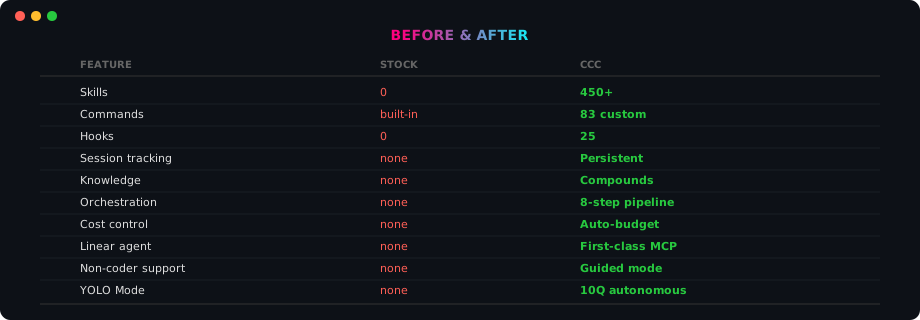
Stock Claude Code is a blank terminal with amnesia. No skills. No guidance. No memory. Every session starts from zero. And it wastes 98% of your context window on tool output you'll never re-read.
CCC remembers everything, learns from every session, and gets smarter the more you use it. It wraps every major Claude Code tool into one install — with a smart orchestrator, guided menus, and an Intelligence Layer that auto-adjusts every dispatch based on your project.
You type: ccc
You get:  A guided AI project manager with 502+ skills,
          71 plugin skills, 22 agents, 19 vendor packages,
          real learning, and zero setup.
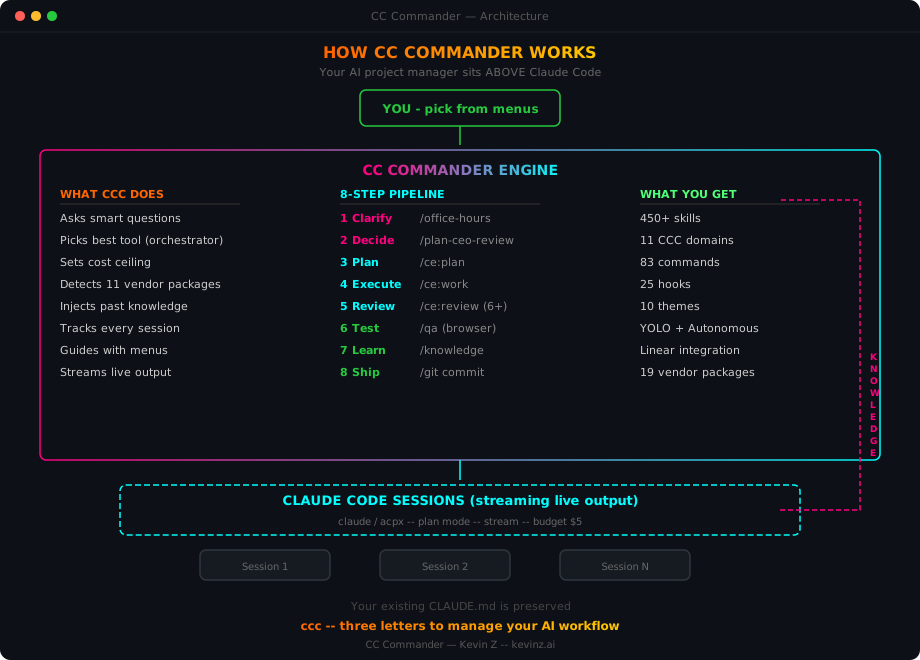
See It In Action
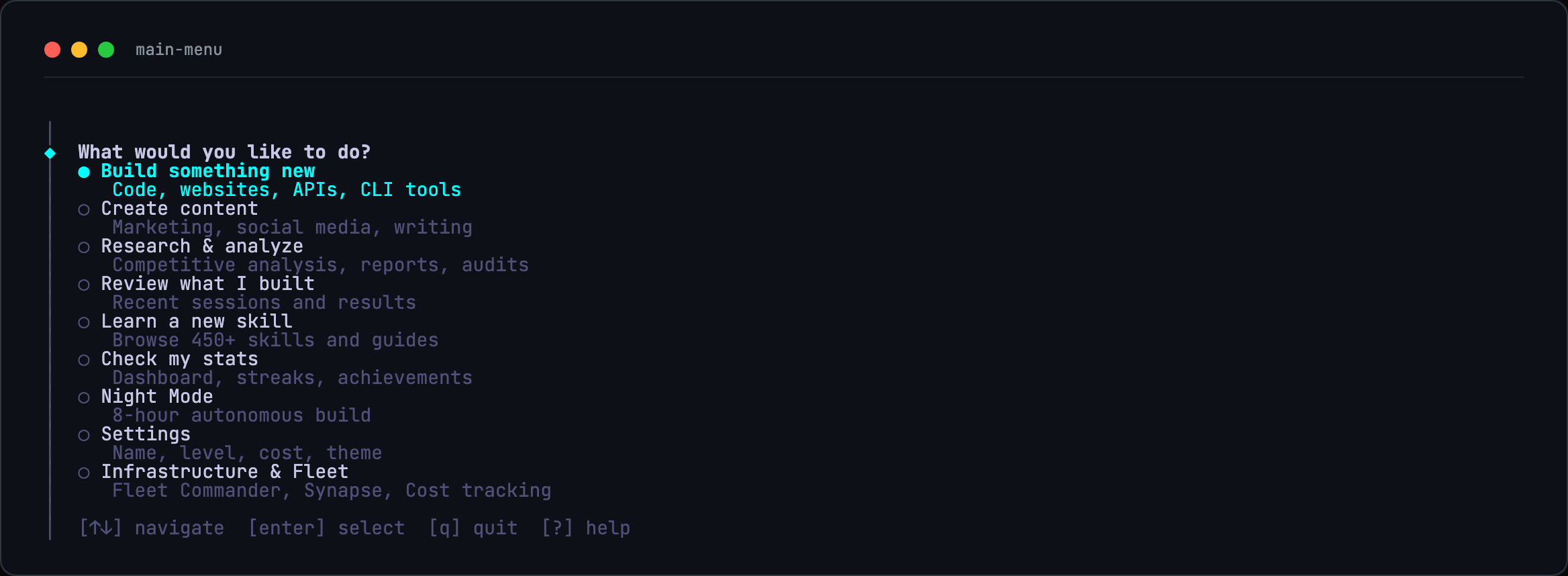
Main Menu — Arrow Keys, No Commands to Memorize
Cockpit Dashboard — Live Session Status
Context, rate limits, and budget meters in your terminal. Color-codes green → yellow → red as limits approach.


Rich footer bar — rainbow status line with live session meters:
━━ CCC5.1│🔥Opus4.8-1M│🔑gAA│🧠▐██45%░░▌│⏱️▐██░░▌6%│📅▐██░░▌34%│💰$2.34│⬆️640K⬇️694K│⏰8h0m│🎯502│📋CC-150│📂~/project
Stats Dashboard
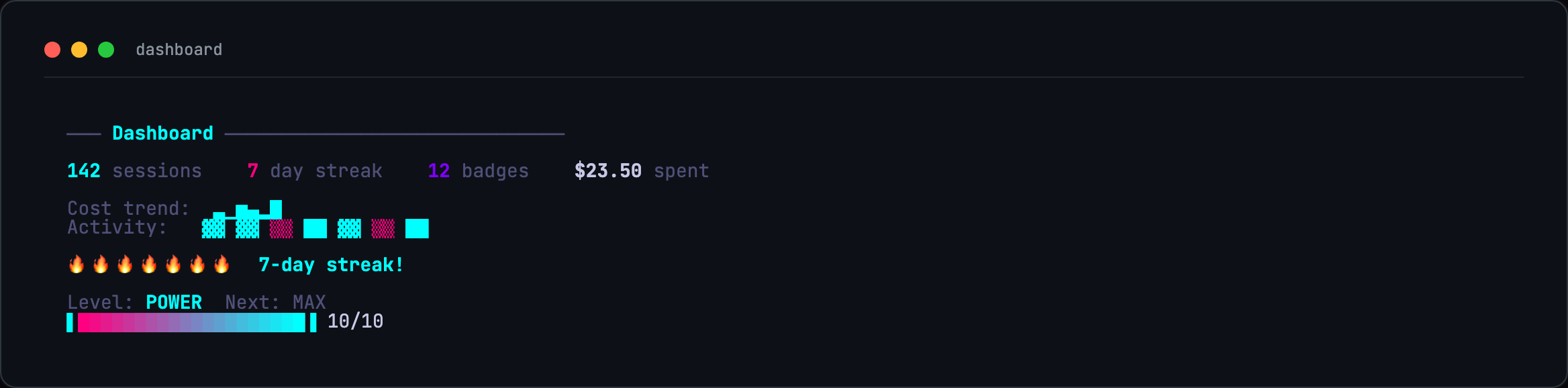
Sessions, streaks, badges, cost tracking, activity heatmap, level progression.
11 CCC Domains — One Skill Loads an Entire Specialty
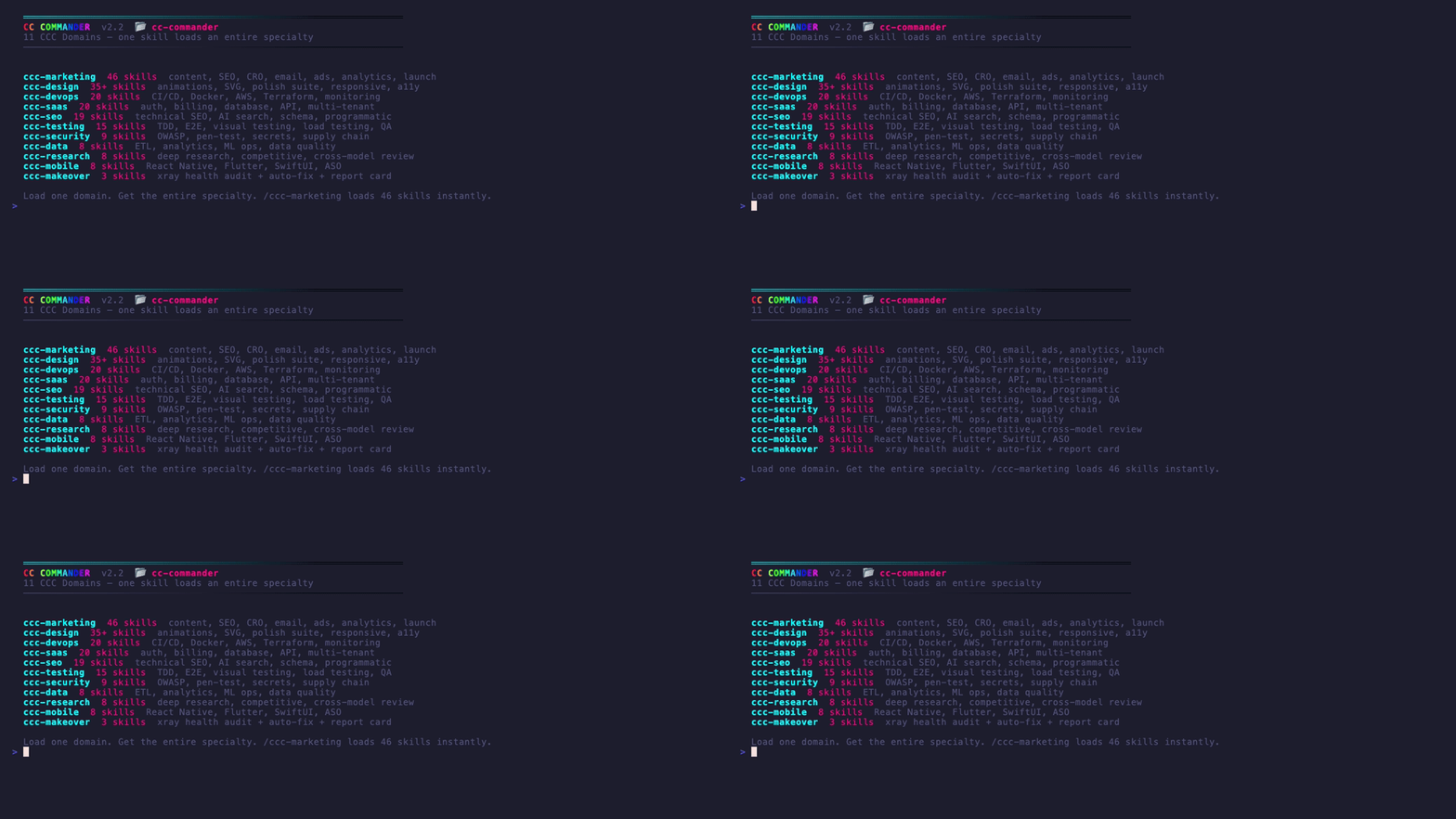
500+ Skills — Install Only What You Need

All recordings are real terminal output captured with vhs. No mockups.
📸 Screenshots
Desktop screenshots arriving with the v5.1.0 stable tag — see docs/screenshots/PLACEHOLDERS.md for in-progress capture briefs.
Intelligence Layer
Stock Claude Code is a blank terminal with amnesia. CCC remembers everything, learns from every session, and gets smarter the more you use it.
An AI project manager that thinks before it acts. Before dispatching a single token, CCC scores your task, reads your stack, pulls relevant lessons from past sessions, and selects the right model and budget automatically. No configuration. No flags. It just works.
How It Works
Four modules. Always running.
1. Weighted Complexity Scoring (dispatcher.js)
Every task scored 0–100 using 47 keyword signals, word count, and fuzzy regex matching:
"fix typo"             → score  0  → 10 turns, $1 budget, Haiku
"add dark mode"        → score 25  → 20 turns, $3 budget, Sonnet
"refactor auth module" → score 60  → 35 turns, $6 budget, Sonnet
"build SaaS platform"  → score 100 → 50 turns, $10 budget, Opus
File scope estimation adds 0–20 bonus points by scanning how many project files the task is likely to touch. Budget and turns auto-adjust — no manual flags needed.
2. Stack Detection (project-importer.js)
CCC reads your project before every dispatch: package.json, Dockerfile, go.mod, requirements.txt. Detects nextjs, react, vue, docker, python, rust, go, github-actions, orm, billing, testing. Reads current git branch + last 5 commit themes. Adds monorepo detection (workspaces, lerna, turbo, nx).
3. Skill Recommendations (skill-browser.js)
recommendSkills(task, techStack) combines three signals:
| Signal | Weight | What It Does |
|---|---|---|
| Stack match | 10 pts | Next.js project → nextjs-app-router ranks first |
| Keyword match | 2 pts/hit | "auth" task → auth, jwt, better-auth bubble up |
| Usage history | boost | Skills that worked for you rank higher over time |
Trending skills (7-day window) surface automatically. Skills that led to successful sessions compound their ranking advantage.
4. Knowledge Compounding (knowledge.js)
Every completed session extracts a lesson (keywords, category, stack, error patterns, success patterns) stored in ~/.claude/commander/. Searched before the next dispatch with time-decay relevance: < 7 days = 2x, < 30 days = 1.5x, older = 1x. Fuzzy keyword matching and cross-domain boosts (web↔react, api↔backend, testing↔bugfix) catch related concepts.
Smart retry handles failures automatically: rate limit → wait 60s + retry; context overflow → reduce turns to 60% + retry; budget exceeded → clear error with next steps.
Intelligence Analysis — Smart Dispatch in Action
Before dispatching a single token, CCC scores your task, reads your stack, and auto-configures the session.
  Task: "Add authentication with JWT and OAuth"

  Intelligence Analysis:
  ├─ Complexity Score: 72/100 (complex)
  ├─ Keyword signals:  +15 (auth) +15 (implement) +20 (production)
  ├─ Word count:       +10 (detailed description)
  ├─ Stack detected:   nextjs, react, tailwind
  └─ Related lessons:  2 found (JWT auth succeeded, OAuth2 pattern)

  Auto-configured dispatch:
     Model: opus  |  Turns: 35  |  Budget: $6
     Skills: nextjs-app-router, ccc-saas, auth-patterns
     Knowledge: 2 past lessons injected

  Dispatching... ████████████████████░░░░ 78%
Skill Recommendations — Ranked by Relevance
CCC ranks skills using your stack + task keywords + past usage. The right tools surface automatically.
  Recommended skills for your project:

  SCORE  SKILL                 WHY
  ─────────────────────────────────────────────
   20    nextjs-app-router     Stack match + keyword
   16    frontend-design       Stack match
   16    shadcn-ui             Stack match
   14    saas-scaffolder       Keyword: auth, billing
   12    tailwind-v4           Stack match
    8    ccc-testing           Always recommended

  ❯ Use top recommendation
    Browse all 459+ skills
    Search by keyword
    Back to main menu
Knowledge Compounding — Learning After Every Session
Every completed session extracts patterns and errors. The next dispatch is informed by everything that worked before.
  Session Complete — Knowledge Extracted

  Task:     "Add JWT authentication"
  Outcome:  Success
  Cost:     $4.12  |  Duration: 12m
  Category: api

  Patterns learned:
  ├─ bcrypt + JWT combo works well with Next.js
  ├─ httpOnly cookies for token storage
  ├─ middleware.ts matcher needs exact paths
  └─ next-auth conflicts with custom Prisma adapter

  Knowledge base: 47 lessons  |  12 categories
  Next dispatch will be 23% more informed.
Project Import — Stack Auto-Detection
CCC reads your project before every dispatch. No setup needed.
  Importing: ~/ccc-projects/my-saas-app

  Detected:
  ├─ CLAUDE.md           142 lines
  ├─ Tech stack:         nextjs, react, tailwind, prisma, stripe
  ├─ Monorepo:           No
  ├─ Git branch:         feature/checkout
  └─ Recent commits:     "add cart", "fix price calc", "stripe webhook"

  6 skills pre-selected for this stack
  3 relevant lessons from knowledge base

  ❯ Start building in this project
    Run /xray health audit first
    Back to main menu
The Net Effect
| Session | What Changed |
|---|---|
| 1 | Dispatches based on complexity score alone |
| 5 | Knows your stack, recommends proven skills |
| 20 | Has learned your patterns — feels like a PM who knows your codebase |
Token Optimization Stack — 5 Layers of Savings
| Layer | Tool | Savings |
|---|---|---|
| Tool output sandboxing | context-mode | 98% — SQLite + FTS5, BM25 snippets only |
| CLI output filtering | RTK | 99.5% — strips verbose shell output |
| Skill tiering | _tiers.json |
~10k tokens — 30 essential vs 459 full |
| Rate limit rotation | ClaudeSwap | 2 MAX accounts, drain-first strategy |
| Prompt caching | Extended TTL | 90% discount, 1hr cache window |
Features

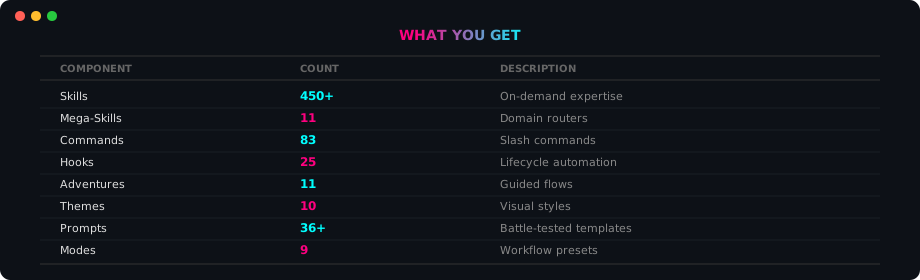
| Component | Count | What It Does |
|---|---|---|
| Skills | 502+ | On-demand expertise (deduplicated) |
| Plugin Skills | 71 | Desktop-first skills (13 /ccc-* workflows + 11 domain routers + 7 new channel/ECC/setup skills + Orchestrator/Executor + meta + vendor-sourced + session management) |
| Agents | 22 | Specialist sub-agent personas with distinct voice layers |
| Lifecycle Hooks | 23 × 39 handlers | SessionStart, UserPromptSubmit, PreToolUse, PostToolUse, Stop, Notification, PreCompact, SubagentStop, PermissionRequest |
| MCP Servers | 2 + 16 opt-in | Context7 + Sequential-Thinking bundled; 16 more opt-in via /ccc-connect (GitHub, Supabase, Figma, Playwright, Slack, Notion…) |
| CCC Domains | 11 | Domain routers with sub-skills |
| Commands | 83 | Slash commands (/ccc- prefix) |
| Hooks (JS) | 25 | Lifecycle automation (kit-native) |
| Adventures | 13 | Guided interactive flows |
| Vendor Packages | 19 | Best-in-class tools, auto-updated |
| Themes | 10 | Cyberpunk, Fire, Ocean, Aurora, Sunset, Monochrome, Rainbow, Dracula + more |
| Prompts | 36+ | Battle-tested templates |
| Modes | 9 | Workflow presets |
| Split Mode | tmux | Tabbed sessions — each task gets a window |
| Agent API | CLI | Headless dispatch for AI orchestrators |
| Infrastructure | 6 | Fleet, Synapse, Cost, AO, CloudCLI, Paperclip commands |
| Service Detector | auto | Probes 8 services + 4 CLIs on startup |
Every Path, Visualized
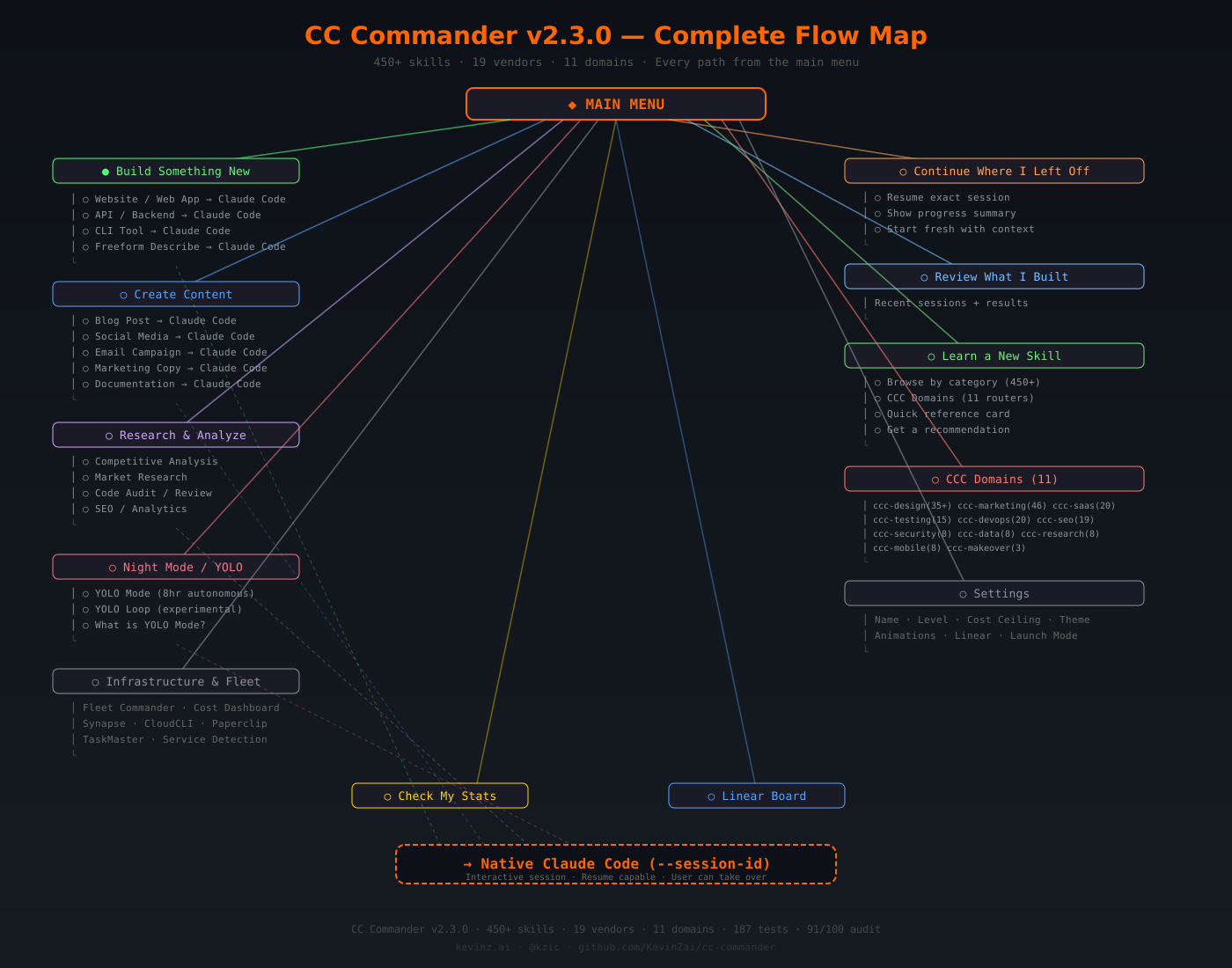
Every menu option, every sub-flow, every path to Claude Code — one diagram. View full size
Night Mode / YOLO — Autonomous Overnight Build

Start before bed. Wake up to shipped code.
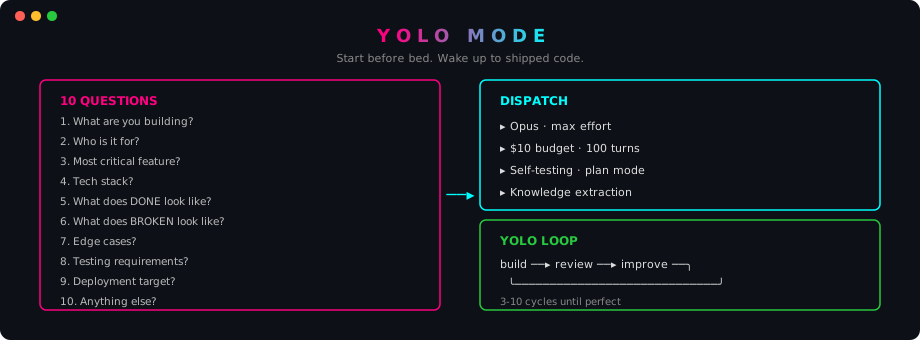
10 questions → Opus with max effort → $10 budget → 100 turns → self-testing loop.
  YOLO Mode — Autonomous Overnight Build

  What are we building tonight?
  > "Full e-commerce checkout with Stripe integration"

  Configuration:
  ├─ Model:       Opus (max reasoning)
  ├─ Budget:      $10 (hard cap)
  ├─ Max turns:   100
  ├─ Self-test:   Enabled (tests after each phase)
  ├─ Checkpoint:  Every 10 edits
  └─ Stop file:   ~/.claude/commander/yolo-stop

  Ready to run for up to 8 hours unattended.

  ❯ Start YOLO build
    Adjust settings
    Cancel

11 CCC Domains
Each domain is a router that dispatches to specialized sub-skills on demand.
| Domain | Skills | What's Inside |
|---|---|---|
| ccc-design | 41 | landing pages, UI audit, animation, responsive layout, color systems, typography, canvas design, wireframes, component library, accessibility, dark mode, micro-interactions, illustration, icon sets, design tokens, named-look design systems, video/HTML design capture |
| ccc-marketing | 45 | CRO, email campaigns, ad copy, social media, SEO content, blog posts, landing page copy, A/B testing, funnel optimization, lead magnets, newsletter, brand voice, press releases, case studies, video scripts |
| ccc-saas | 20 | auth systems, billing/Stripe, API design, database schema, multi-tenancy, onboarding flows, admin dashboards, role-based access, webhooks, rate limiting, usage tracking, feature flags |
| ccc-devops | 20 | GitHub Actions, Docker, AWS deploy, Terraform, monitoring, logging, CI/CD pipelines, Kubernetes, Nginx, SSL certs, environment management, health checks, rollback strategies |
| ccc-seo | 19 | meta tags, JSON-LD schema, sitemap, robots.txt, Core Web Vitals, internal linking, keyword research, content optimization, image SEO, page speed, structured data, canonical URLs |
| ccc-testing | 15 | Vitest, Playwright E2E, TDD workflow, snapshot testing, API testing, load testing, coverage reports, test fixtures, mock strategies, visual regression, accessibility testing |
| ccc-makeover | 3 | /xray project audit (health score 0-100, maturity 1-5), /makeover agent swarm execution, before/after report card |
| ccc-data | 8 | SQL optimization, data pipelines, analytics setup, data visualization, machine learning, reporting, data quality, vector search |
| ccc-security | 8 | OWASP top 10, secrets scanning, dependency audit, container security, penetration testing, CSP headers, rate limiting, auth hardening |
| ccc-research | 8 | competitive analysis, market research, user research, technology evaluation, trend analysis, SWOT, stakeholder interviews, data synthesis |
| ccc-mobile | 8 | React Native, Expo, mobile UI, push notifications, deep linking, app store optimization, offline-first, gesture handling |

19 Vendor Packages
CCC aggregates the best Claude Code tools as git submodules. Auto-updated weekly. 19 packages, 1,500+ vendor skills.
| Package | Stars | What You Get |
|---|---|---|
| Everything Claude Code | 120K+ | 156 skills, 72 commands, 38 agents, lifecycle hooks |
| gstack | 58K+ | CEO/eng plan review, office hours, QA — OpenClaw integration v2 |
| Superpowers | 29K+ | Forces structured thinking — /ccc-plan, /ccc-tdd, /ccc-verify |
| claude-code-best-practice | 26K+ | Reference architecture, Channels, Auto Mode |
| repomix | 22.8K+ | Pack codebases for AI (tree-sitter compression = 60% smaller) |
| oh-my-claudecode | 17K+ | HUD with worktree support, quota tracking, hyperlinks |
| Claude HUD | 15K+ | Real-time status display, offline cost tracking, git diffs |
| RTK | 14.6K+ | Token optimization (60-90% savings), 25 AWS subcommands |
| Compound Engineering | 11.5K+ | Knowledge compounding, mandatory code review enforcement |
| claude-skills | 8.6K+ | 223+ skills, 23 agents, prompt A/B testing |
| claude-mem | 46.7K+ | Knowledge Agents, persistent cross-session memory |
| claude-code-ultimate-guide | 2.7K+ | 219 templates, 271 quizzes, threat database |
| acpx | 1.8K+ | ACP protocol, Flows system, structured agent communication |
| claude-reflect | 860+ | Self-improving skills with reflection loops |
| Caliber | 300+ | Config scoring, drift detection |
| graphify | 17.5K+ | Any input → knowledge graph, clustered communities, HTML + JSON |
| UI/UX Pro Max | 62K+ | Design intelligence for professional UI/UX across platforms |
| claude-code-prompts | 142+ | Defensive prompt patterns, verification specialist |
| MengTo/Skills | 100+ | Web design + prompting — named-look design systems, video/HTML → prompt capture |

Smart Orchestrator
The smart orchestrator scores each tool: capability match (50%) + popularity (15%) + recency (15%) + your preference (20%) — then picks the best one for each phase.
  PHASE          BEST TOOL              FALLBACK
  ──────────────────────────────────────────────
  ▸ Clarify      /ccc-office-hours          Spec flow
  ▸ Decide       /plan-ceo-review       Plan mode
  ▸ Plan         /ce:plan               Claude plan
  ▸ Execute      /ce:work               Dispatch
  ▸ Review       /ce:review (6+ agents) /simplify
  ▸ Test         /ccc-qa (real browser)     /ccc-verify
  ▸ Learn        Knowledge engine       Always on
  ▸ Ship         /ship                  git commit
CCC learns from every session. Knowledge compounds over time.

XRay + Makeover
Audit any project. Fix it automatically.
/ccc-xray                    # Scan → health score 0-100
/ccc-makeover                # Agent swarm applies top fixes
| Dimension | Weight | What It Checks |
|---|---|---|
| Security | 25% | CVEs, secrets, .env tracking |
| Testing | 20% | Config, coverage, frameworks |
| Maintainability | 20% | Complexity, linting, duplication |
| Dependencies | 15% | Outdated, vulnerable |
| DevOps | 10% | CI presence, quality gates |
| Documentation | 10% | README, CLAUDE.md, inline docs |

Quick Start — Pick Your Path
One question: How are you using Claude?
Path A: Desktop Plugin (Recommended)
The primary way to use CCC. Works in Claude Desktop and any Claude Code session.
/plugin marketplace add KevinZai/commander
/plugin install commander
CCC appears as a plugin you can invoke immediately. Say "start ccc" or "what should I build" to begin.
What you get: 71 plugin skills, 22 specialist agents, 23 lifecycle hooks (39 handlers), 2 credential-free bundled MCP servers + 16 opt-in via /ccc-connect. Free for now.
Marketplace: commander-hub at KevinZai/commander
Path B: Claude Code (Slash Commands)
You want skills + commands inside Claude Code sessions.
curl -fsSL https://raw.githubusercontent.com/KevinZai/commander/main/install-remote.sh | bash
Then in any Claude Code session:
/ccc
Full interactive menu appears. Same features, no separate CLI needed.
What you get: All 459+ skills and commands, no extra CLI binary required.
Your First 60 Seconds
1. ccc → Main menu (14 options)
2. Pick "Build something new" → Choose project type
3. Answer 3 multiple-choice questions → CCC generates a plan
4. CCC dispatches Claude with the right model, budget, and skills
5. Session ends → CCC extracts lessons → gets smarter next time
No configuration. No YAML. No API keys. The Intelligence Layer handles everything.
CLI Installation (Legacy)
You use
claudein your terminal and prefer a standalone CLI.
Option 1 — One-liner install:
curl -fsSL https://raw.githubusercontent.com/KevinZai/commander/main/install-remote.sh | bash
Option 2 — npm:
npm install -g cc-commander
Then:
ccc
Arrow keys to navigate. Enter to select. That's it.
Update anytime:
ccc --update
Where files live:
- Source:
~/.cc-commander/(auto-created by installer) - Config:
~/.claude/(skills, commands, hooks, CLAUDE.md) - Binary:
ccc→ symlinked to source
Don't delete
~/.cc-commander/— theccccommand needs it.
What you get: Full CLI with tmux split mode, daemon, theme switching, and the cockpit dashboard.
CLI Reference
| Command | What It Does |
|---|---|
ccc |
Interactive mode (default — tmux tabbed) |
ccc --stats |
Sessions, streaks, level, cost |
ccc --test |
22-point self-test (verify install) |
ccc --update |
Pull latest + reinstall |
ccc --repair |
Reset corrupt state |
ccc --simple |
Menu-only, no tmux |
ccc --dispatch "task" |
Headless dispatch (for AI agents) |
ccc --skills |
Manage skill tiers (list, install, remove, tier) |
Split Mode
The default mode. Tabbed tmux sessions. Each task gets its own window.
CCC menu runs in tab 0. Each dispatched task opens a new tmux window where Claude works with full output visible.
| Key | Action |
|---|---|
Ctrl+A n |
Next tab |
Ctrl+A p |
Previous tab |
Ctrl+A 0 |
Back to CCC menu |
Ctrl+A q |
Quit session |
| Mouse click | Switch tabs |
Cancel Running Tasks
- During any build: Press
Escapeorqto kill the Claude process and return to menu - During YOLO loop:
touch ~/.claude/commander/yolo-stopto halt between cycles - In split mode: Switch to the Claude tab and
Ctrl+C
Daemon Mode
KAIROS-inspired persistent background agent. Monitors your project, processes queued tasks, and consolidates knowledge — all hands-free.
ccc --daemon                    # Start (runs in background)
ccc --queue "fix login bug"     # Add task to queue
ccc --queue-list                # Show pending tasks
ccc --daemon-stop               # Stop daemon
| Feature | What It Does |
|---|---|
| Tick loop (5 min) | Checks queue, git status, dispatches work |
| Dream mode (1 hr) | Consolidates knowledge, detects error patterns |
| Task queue | Priority-based, file-backed, auto-dispatch |
| Budget cap | 15-second limit per tick action |
Customize: --interval 120 (2 min ticks) · --tick-budget 30 · --dream 30 (30 min dreams)
Use Inside Claude Code
No CLI needed. Type /ccc in any Claude Code session for the full interactive menu.
/ccc              → Main menu (15 options with sub-menus)
/ccc xray         → Project health scan
/ccc makeover     → Auto-apply top fixes
/ccc refresh      → Update your CLAUDE.md from latest template
/ccc domains      → Browse 11 CCC domains
/ccc skills       → Browse 502+ skills
/ccc grill        → 7-question Socratic planning probe
/ccc infra        → Infrastructure sub-menu (Fleet, Synapse, Cost, AO, CloudCLI, Paperclip)
/ccc detect       → Probe all services and CLIs
Same choices, same sub-menus, same actions as the full CLI. Cancel anytime with "back" or Escape. Also works in Claude Desktop Cowork and VS Code / Cursor.
Agent-Friendly API
CCC is built to be controlled by AI agents — OpenClaw, Claude Code, or any orchestrator.
| Command | Output | Purpose |
|---|---|---|
ccc --dispatch "task" --json |
JSON | Run task headlessly |
ccc --list-skills --json |
JSON | All 459+ skills |
ccc --list-sessions --json |
JSON | Session history |
ccc --status |
JSON | Health check |
ccc --template |
text | Latest CLAUDE.md template |
Override flags: --model opus · --max-turns 50 · --budget 5 · --cwd /path
# OpenClaw agent dispatches a build
result=$(ccc --dispatch "Build auth with JWT" --json --model opus --budget 5)

# Claude Code agent checks available skills
ccc --list-skills --json | jq '.[] | select(.name | contains("auth"))'
Security
- No command injection — all shell calls use
execFileSyncwith array arguments - Auto-mode by default — dispatches use
--permission-mode auto, not--dangerously-skip-permissions - YOLO only skips — only YOLO/night mode uses skip-permissions (intentional, documented)
- Zero npm vulnerabilities — verified on every CI run
- PII scanning — CI blocks commits containing personal data patterns
- Error containment — every error returns to menu with error ID, never raw stack traces
- Pre-publish checks —
npm run prepublishOnlyruns all tests + lint before publish
Agent Bible
BIBLE-AGENT.md — 268-line machine-readable reference. Any AI agent reads this and can manage CCC immediately.
# Tell any agent:
"Read docs/BIBLE-AGENT.md from the cc-commander repo, then use the CLI API to manage this project."
Covers: CLI API, dispatch patterns, JSON schemas, skill catalog, level/model defaults, integration points.
The Kevin Z Method
7 rules from 200+ articles. 14 months of production.
- Plan before coding
- Context is milk — keep it fresh
- Verify, don't trust
- Subagents = fresh context
- CLAUDE.md is an investment
- Boring solutions win
- Operationalize every fix
Full methodology: BIBLE.md — 2000+ lines, 7 chapters, appendices.
For AI agents: BIBLE-AGENT.md — 268-line machine-readable version.
10 Themes
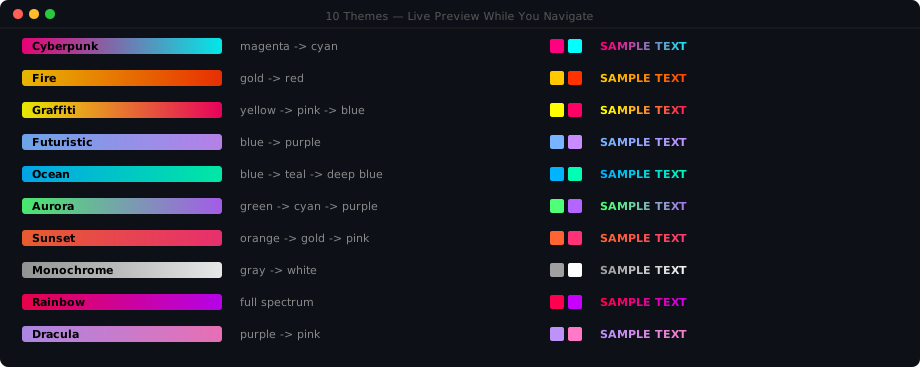
Cyberpunk, Fire, Ocean, Aurora, Sunset, Monochrome, Rainbow, Dracula, Graffiti, Futuristic. Live preview as you navigate. Switch anytime in Settings or type /ccc theme.
vs aider.chat — positioning
Both tools make you faster. They solve different problems.
| Dimension | aider | CC Commander |
|---|---|---|
| Surface | Terminal / Git | Claude Code Desktop + CLI + IDE |
| LLM | Any (OpenAI, Anthropic, local) | Claude-native (Sonnet / Opus / Haiku) |
| Core pattern | Pair programmer — you drive, aider edits | Guided PM — CCC plans, routes, dispatches |
| Primitives | Diff-based file editing + Git | Claude Agent SDK: skills, agents, hooks, MCP |
| Agent model | Single model, single context | 22 specialist sub-agent personas (brain/hands) |
| Git | Deep — commit messages, repo mapping | Lifecycle hooks + /ccc-ship pre-flight |
| Context | Repo map (tree-sitter, 15k tokens) | Session compounding + knowledge base |
| Cost | API pay-per-token | Free for now (affiliate + consulting model) |
| Install | pip install aider-chat |
Desktop plugin marketplace or curl | bash |
| Best at | Solo rapid edits, refactors, small files | Multi-phase features, reviews, fleet orchestration |
Aider is your pair programmer. CC Commander is your PM. They're complementary — use aider for solo rapid edits, CCC for multi-phase features that need structure.
Who Built This
CCC is built by Kevin Z (@kzic) — a non-technical entrepreneur and CEO of MyWiFi Networks (20+ years in tech, never wrote production code). He wanted to leverage Claude Code to its max capabilities without chasing plugins, reading changelogs, or memorizing commands. So he scanned every Claude Code article, plugin, and skill on the internet — 200+ sources — and distilled it into one self-learning AI project manager. Every feature was built with Claude Code itself. If a non-coder can build a 450+ skill toolkit with AI, imagine what you can build.
Acknowledgments
CCC aggregates 19 open-source packages. Full credits: ACKNOWLEDGMENTS.md
45+ ecosystem repos tracked: ECOSYSTEM.md
Share
If CC Commander helped you ship faster, share it:

License
MIT License for the full project. The Intelligence Layer (4 files) has an additional Commons Clause — free to use, not to sell.
All 19 vendor packages are permissive open-source (MIT, Apache-2.0, and CC-BY-SA-4.0).
Note: GitHub may show "Unknown" in the sidebar because some vendor submodules don't ship a LICENSE file in their repo root. Each vendor retains its upstream license — check the linked vendor repositories for specifics.
Contributing
skills/your-skill/SKILL.md        # Add a skill
commands/your-command.md           # Add a command
hooks/your-hook.js                 # Add a hook
commander/adventures/X.json        # Add a flow
CC Commander v6.5.0 · Kevin Zicherman · @kzic
Every Claude Code tool. One install. An AI brain that learns.
Install Now · Read the BIBLE · Agent Bible · Browse Skills · Ecosystem
Reviews (0)
Sign in to leave a review.
Leave a reviewNo results found