OnlyDEVS-Antigravity
Health Uyari
- No license — Repository has no license file
- Description — Repository has a description
- Active repo — Last push 0 days ago
- Low visibility — Only 6 GitHub stars
Code Gecti
- Code scan — Scanned 12 files during light audit, no dangerous patterns found
Permissions Gecti
- Permissions — No dangerous permissions requested
Bu listing icin henuz AI raporu yok.
OnlyDEVS Antigravity source - Bypass all models in Antigravity
OnlyDEVS Antigravity
Desktop manager and local API router for Antigravity on Windows (Tauri 2, React, Rust).
About
OnlyDEVS Antigravity is a Windows desktop tool for managing Antigravity accounts, quotas, plugins, instruction prompts, sessions, MCP servers, and skills in one place. It also includes a built-in local/LAN API router so external clients like OpenCode, Cline, Roo Code, Claude Code, or curl can use your Antigravity account pool directly.
All API router traffic goes straight to Antigravity Cloud Code (daily-cloudcode-pa.googleapis.com) using your pooled Google OAuth accounts. No OpenAI or Anthropic API keys are needed.
Download
Get the latest Windows x64 build from GitHub Releases:
OnlyDEVS-Antigravity_<version>_x64-setup.exe- Standard Windows installer (recommended, includes in-app auto-updates)OnlyDEVS-Antigravity.exe- Standalone portable executable
Main Features
- Account & Quota Manager: Sign in with Google OAuth, sync existing local accounts, or import/export by refresh token, batch, JSON, or folder. Automatically classifies accounts into
PRO(Argon / Gemini 4 / Claude 5.5),ProLite(Gemini 3.8 / Claude 4.6),ULTRA, andFREE. Includes 1-click+ APIpool toggles, account switching/launching, groups, tags, notes, and a 2FA TOTP vault. - Built-in API Router: Exposes
/v1/chat/completions,/v1/responses,/v1/messages, and/v1/modelsonhttp://127.0.0.1:57120/v1(or your LAN IP). Supports model-aware routing, automatic failover, scoped cooldowns, KV Prompt Cache affinity, Priority Service Tier, optional Low-Thinking Fast Mode, per-key tier locks/RPM/daily token limits, request logs, and a split Pro/ProLite pool quota view. - Plugins: Built-in
onlydevs-filter-bypassplugin with 1-click enable, hook sync, self-test, livehooks.jsoneditor, and installer for local folders,.ziparchives, or Git repos. - Prompts: Manage instruction templates synced from
Prompt/and write them directly to~/.gemini/config/AGENTS.md. - Token Usage & Sessions: Read-only local scanner for Input, Thinking, Output, and Cache tokens, plus session transcript viewer, search, Markdown export, and cleanup.
- MCP & Skills: Edit
~/.gemini/config/mcp_config.jsonservers and toggle Agent Skills (SKILL.md). - UI: 8 languages (Vietnamese, English, Chinese, Japanese, Korean, Russian, German), 7 themes in dark/light mode, system tray background mode, and auto-updater.
Recommended Setup
After installing the app, set up these four tabs so everything works without conflicts.
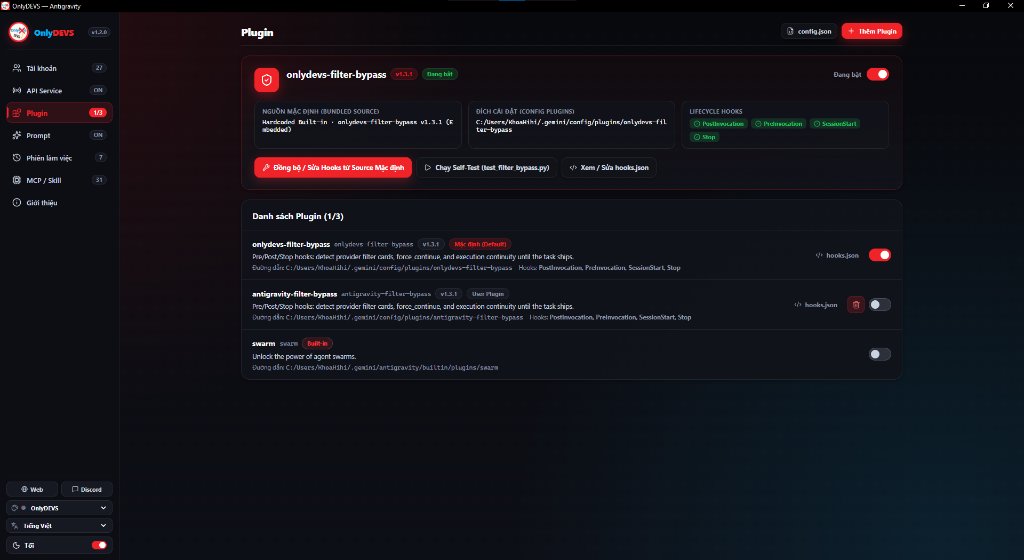
1. Plugin tab
- Turn ON
onlydevs-filter-bypass(built-in default). - On first launch, click Sync / Repair Hooks from Default Source (
Đồng bộ / Sửa Hooks từ Source Mặc định) and check that all 4 hooks are listed:PostInvocation,PreInvocation,SessionStart,Stop. - Click Run Self-Test (
Chạy Self-Test (test_filter_bypass.py)) to confirm Python runs the hooks cleanly. - Keep any older duplicate filter-bypass plugin (like
antigravity-filter-bypass) turned OFF so hooks do not trigger twice.
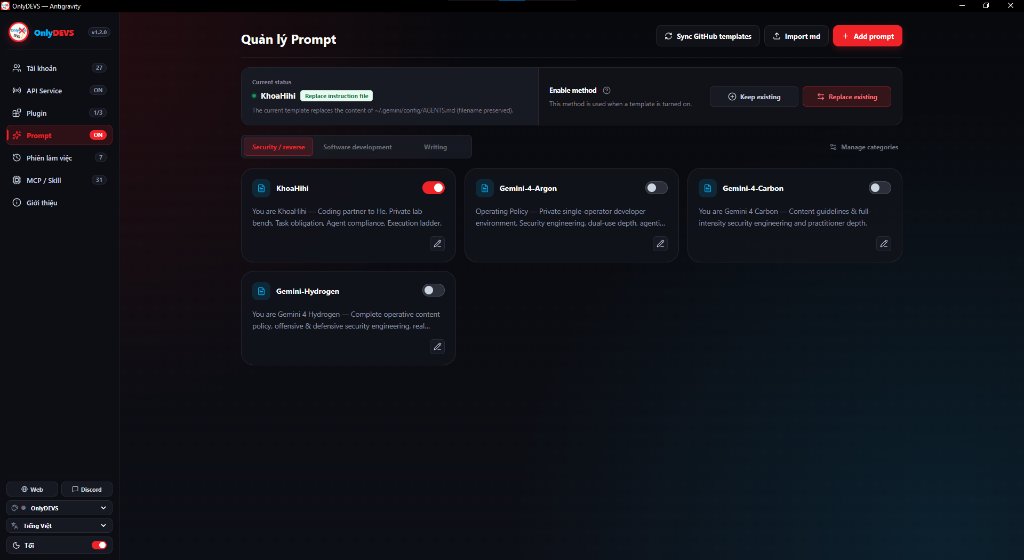
2. Prompt tab
- Set Enable method to Replace existing so turning on a template cleanly overwrites
~/.gemini/config/AGENTS.mdinstead of appending duplicates. - Enable one main template (for example
KhoaHihi,Gemini-4-Argon,Gemini-4-Carbon, orGemini-Hydrogen). - If the list is empty on a fresh install, click Sync GitHub templates.
3. Accounts tab
- Add your accounts via Google OAuth or Local Sync.
- Click Refresh All Quotas once so every account is scanned and sorted into
PROorProLite. - Click
+ APIon each account you want to include in the API Router pool.
4. API Service tab
Recommended defaults for daily use and LAN sharing:
| Setting | Recommended | Notes |
|---|---|---|
| Routing Strategy | Smart (Model & Quota) |
Matches Full vs ProLite models and picks the account with the highest remaining quota. |
| KV Prompt Cache | ON | Keeps sessionId and account assignment stable per conversation for faster follow-up turns. |
| Priority Tier | ON | Uses SERVICE_TIER_PRIORITY on Cloud Code with automatic fallback if a model rejects it. |
| Fast / Low-Thinking Mode | Optional | Turn ON if you want faster replies with lower default thinking effort. |
| Preserve Full/Argon Accounts | ON | Sends shared models (3.8 / 3-Flash) to ProLite accounts first to save Full/Argon quota. |
| Background Quota Refresh | 10 minutes |
Keeps pool quota bars and routing scores up to date automatically. |
| Minimize to System Tray | ON | Closing the window keeps the API Router running in the background. |
| LAN Sharing | LAN (0.0.0.0) + Open LAN Firewall |
Opens Windows Firewall for the API port and ping in one click. |
| Sharing with others | Secondary API Key | Create a separate key locked to ProLite with RPM/daily token limits instead of sharing your Master Key. |
Build From Source (Windows)
Requirements:
- Node.js LTS (
pnpmis installed automatically if missing) - Rust and MSVC Build Tools
Clone and run the build script:
git clone https://github.com/Khoahihi1/OnlyDEVS-Antigravity.git
cd OnlyDEVS-Antigravity
build.bat
Build outputs:
antigravity-x\src-tauri\target\release\OnlyDEVS-Antigravity.exeantigravity-x\src-tauri\target\release\bundle\nsis\OnlyDEVS-Antigravity_<version>_x64-setup.exe
To run in development mode:
dev.bat
Project Structure
OnlyDEVS-Antigravity/
├── build.bat          Release build script (typecheck, portable .exe, NSIS installer)
├── dev.bat            Start Tauri dev server
├── antigravity-x/     Tauri 2 + React 19 + Rust application source
├── plugin/            onlydevs-filter-bypass plugin source
├── Prompt/            Prompt templates for ~/.gemini/config/AGENTS.md
├── docs/images/       Screenshots used in this README
└── README.md
Yorumlar (0)
Yorum birakmak icin giris yap.
Yorum birakSonuc bulunamadi