contextOS
Health Uyari
- License — License: MIT
- Description — Repository has a description
- Active repo — Last push 0 days ago
- Low visibility — Only 6 GitHub stars
Code Basarisiz
- fs.rmSync — Destructive file system operation in bin/ctx.js
- os.homedir — User home directory access in bin/ctx.js
- process.env — Environment variable access in bin/ctx.js
Permissions Gecti
- Permissions — No dangerous permissions requested
Bu listing icin henuz AI raporu yok.
Task-aware AGENTS.md context injection and compliance reports for Codex, Claude Code, and Antigravity.
ContextOS
Codex ignores the middle of your AGENTS.md. ContextOS fixes that.
It ranks your project rules against the current prompt, injects the right ones at the moment the agent starts work, suggests relevant files/skills/workflows, and reports what the agent actually followed after the task.
WITHOUT ContextOS
  AGENTS.md is a long static blob
  important rules drift into the middle
  agent starts by grepping files and misses the repo contract

WITH ContextOS
  prompt -> score relevant AGENTS.md rules
         -> inject critical rules at top and bottom
         -> suggest files, skills, workflows
         -> report followed / ignored / unknown
Published package: @minhpnq1807/contextos
Demo
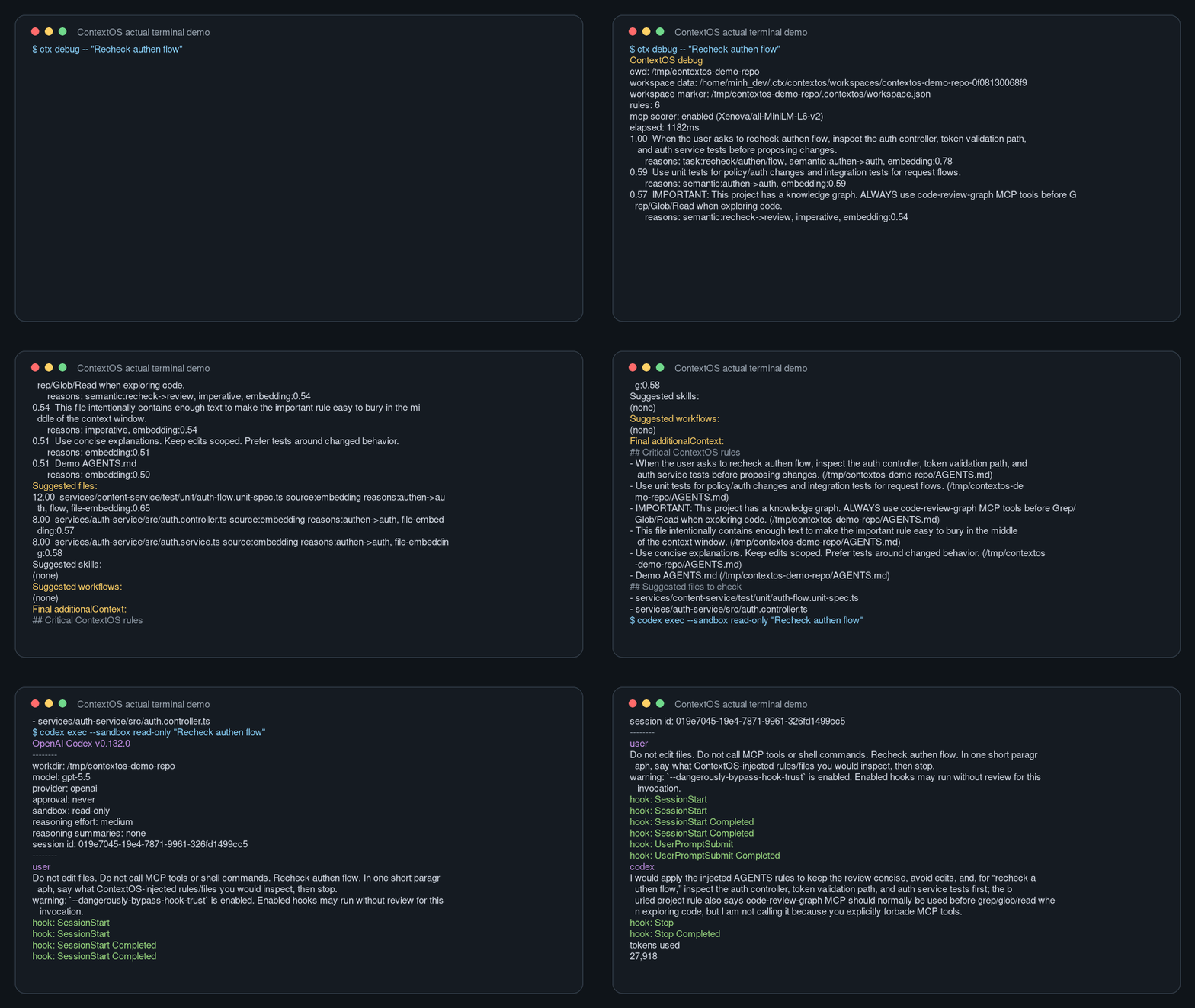
Example hook context injected before the agent works:
## Critical ContextOS rules
- IMPORTANT: This project has a knowledge graph. ALWAYS use code-review-graph MCP tools before Grep/Glob/Read.
- Use `query_graph` pattern="tests_for" to check coverage.

## Suggested files to check
- services/content-service/test/unit/creator-only.policy.unit-spec.ts
- services/content-service/test/integration/resource-upload.integration-spec.ts

## Suggested workflow for this task
- Primary Workflow: use for feature implementation, testing, review, and debugging
  chain: planner -> tester -> code-reviewer
After the task:
ContextOS report
Efficiency: 100%
Injected rules: 8
Rule outcomes: 8 followed, 0 ignored, 0 unknown
Runtime telemetry: code-review-graph, code-review-graph.query_graph_tool
Quick Install
npm install -g @minhpnq1807/contextos
ctx setup
No postinstall surprise: npm install only installs the CLI. Setup runs only when you call ctx setup.
Scriptable setup:
ctx setup --yes
ctx setup --yes --agents codex,claude,agy
No global install:
npm exec --yes --package=@minhpnq1807/contextos@latest -- ctx setup
npm exec --yes --package=@minhpnq1807/contextos@latest -- ctx-codex install
Codex-only:
ctx install
Claude Code and Antigravity:
ctx install claude
ctx install agy
Restart the agent after setup. Then use the agent normally.
Why
Developers put real operating instructions in AGENTS.md: use this graph tool before reading files, run these tests, follow this architecture boundary, avoid this migration path.
The problem is not that agents cannot read AGENTS.md. The problem is that large context windows bury the important rule in the middle, where attention is weak. ContextOS turns a static rules file into task-aware runtime context.
What ContextOS Does
| Layer | What happens |
|---|---|
| Hooks | Codex, Claude Code, and Antigravity hooks run before/after each task. |
| Scoring | Local MiniLM embeddings plus heuristics rank AGENTS.md rules by the prompt. |
| Injection | Critical rules are placed with primacy + recency, not buried in the middle. |
| Discovery | Relevant files, skills, and workflows are suggested before work starts. |
| Sync | Rules/MCP via Ruler, skills via skillshare, workflows via ContextOS. |
| Evidence | Stop hooks persist followed, ignored, unknown, and runtime telemetry for explicit reports. |
Quick Commands
| Command | Use it for |
|---|---|
ctx setup |
Recommended first-run install flow. |
ctx debug -- "Recheck authen flow" |
Preview what ContextOS would inject. |
ctx report |
Show the last task's compliance summary. |
ctx evidence |
Show why each rule was marked followed/ignored/unknown. |
ctx stats |
Show workspace-level usage and effectiveness metrics. |
ctx benchmark -- "task" |
Compare raw AGENTS.md ordering vs ContextOS scheduling. |
ctx sync --rules |
Sync AGENTS/Ruler/MCP config across agents. |
ctx sync --skills |
Sync skills across agents through skillshare. |
ctx sync --workflows |
Sync workflow markdown across Claude/Codex/Antigravity. |
60-Second Demo Script
- Start in a repo with an
AGENTS.mdthat contains a rule like:
Always use code-review-graph MCP tools before reading files.
- Install:
npm install -g @minhpnq1807/contextos
ctx setup --yes --agents codex
- Restart Codex and submit:
Recheck authen flow
Show the injected
hook context.Let the task finish, then run:
ctx report
ctx evidence
The demo should show one idea: ContextOS puts the right rule in front of the agent before work starts, then proves whether the rule was followed.
Detailed Install
From the package:
npm install -g @minhpnq1807/contextos
ctx install
Without a global install:
npx @minhpnq1807/contextos@latest install
From this repository during local development:
node bin/ctx.js install
Agent-specific installers:
ctx install codex
ctx install claude
ctx install agy
ctx install --agent codex
ctx install --agent claude
ctx install --agent agy
ctx install defaults to ctx install codex.
Codex
ctx install codex does these things:
- Copies this package into
$CODEX_HOME/marketplaces/contextos. - Registers and installs
ctx@contextosthrough Codex plugin marketplace commands. - Downloads and caches the required local MiniLM embedding model under
~/.ctx/contextos/models. - Warms
~/.ctx/contextos/embeddings.dbfor AGENTS rules and project file paths. - Registers the
ctx-mcpMCP server and merges ContextOS global hooks into$CODEX_HOME/hooks.json. - Wraps configured local MCP servers, except ContextOS' own
ctx-mcp, with a transparent telemetry proxy sotools/callevents can be measured. The original MCP command is preserved after the proxy separator and executed unchanged. - Detects available project graph backends and prints the selected strategy.
code-review-graphis active today; detectedcodegraphbackends are reported as adapter-pending until the integration contract is implemented. - Refreshes local
code-review-graphnode embeddings when the project already has.code-review-graph/graph.db. This is best-effort: install still succeeds when the graph runtime is unavailable.
Restart Codex after installing.
Claude Code
ctx install claude copies this package into ~/.ctx/contextos/agents/claude/contextos, merges ContextOS hooks into ~/.claude/settings.json, and registers ctx-mcp as a user-scoped Claude Code MCP server in ~/.claude.json.
Claude Code receives prompt context through UserPromptSubmit using hookSpecificOutput.additionalContext, then ContextOS writes the same local workspace report files used by ctx report, ctx evidence, and ctx stats.
Restart Claude Code after installing.
Antigravity
ctx install agy copies this package into ~/.ctx/contextos/agents/agy/contextos, writes a contextos hook group into ~/.gemini/config/hooks.json, and registers ctx-mcp in Antigravity MCP config locations:
~/.gemini/antigravity/mcp_config.json
~/.gemini/antigravity-cli/mcp_config.json
~/.gemini/config/mcp_config.json
The third path supports older Antigravity editor builds where @mcp reads the legacy Gemini config directory.
Antigravity does not use UserPromptSubmit; ContextOS injects context through PreInvocation as an ephemeralMessage. The Stop adapter stores the report locally, so use ctx report or ctx evidence after the task to inspect outcomes.
Restart Antigravity or agy after installing.
The embedding model is mandatory. ctx install checks ~/.ctx/contextos/models first and downloads the MiniLM model only when the required local files are missing. It intentionally fails if the model cannot be prepared, because otherwise the first prompt hook would have to cold-load or download the model.
During install, ContextOS prints a 0-100 progress indicator. The longest stage is usually embedding warmup; if the model is already cached, install skips the download and only refreshes vectors.
Verify the published package in any project:
npm exec --yes --package=@minhpnq1807/contextos@latest -- ctx --version
npm exec --yes --package=@minhpnq1807/contextos@latest -- ctx debug -- "Recheck authen flow"
Skill Sync
Use skillshare when you want Codex, Claude Code, and Antigravity to share one skills catalog:
ctx sync --skills
ContextOS checks for skillshare, initializes it when needed, backs up existing skills before collection, runs skillshare collect --all unless --no-collect is provided, then runs skillshare sync. After sync, ContextOS rebuilds skill embeddings so prompt-time skill discovery can rank the shared source immediately.
The shared source is:
~/.config/skillshare/skills/
Useful variants:
ctx sync --skills --dry-run
ctx sync --skills --no-collect
ctx sync --skills --no-embeddings
ctx sync --skills --verbose
ctx sync --skills --agents codex,claude
ctx sync --skills --agents codex,claude,agy
After this, ctx debug -- "task" and prompt hooks can suggest skills from ~/.config/skillshare/skills/ plus agent-specific skill folders.
Workflow Discovery
ContextOS can also sync Claude/Codex/Antigravity workflow markdown files and suggest the right workflow for the current task:
ctx sync --workflows
ctx sync --workflows --agents codex,claude,agy
ctx sync --workflows --dry-run
It scans project workflows first, then global workflows:
.claude/workflows/
.codex/workflows/
.gemini/workflows/
.gemini/antigravity/workflows/
.gemini/antigravity-cli/workflows/
~/.claude/workflows/
~/.codex/workflows/
~/.gemini/workflows/
~/.gemini/antigravity/workflows/
~/.gemini/antigravity-cli/workflows/
Workflow files do not need YAML frontmatter. ContextOS reads the top # heading, section headings, and referenced agent names such as planner, tester, code-reviewer, and docs-manager, then warms semantic embeddings. Prompt hooks inject a Suggested workflow for this task section only when a workflow is relevant enough.
ctx sync --workflows reads every known project/global workflow root, keeps the first workflow for each filename/name according to root priority, then copies that unique set to the selected global agent roots. This prevents duplicate primary-workflow suggestions when the same workflow exists in Claude, Codex, and Antigravity directories.
Modes
Injection mode is the default:
ctx install
In injection mode, ContextOS analyzes each prompt, stores runtime data, and returns task-relevant additionalContext to Codex. Codex may display that injected context in the UI.
Quiet mode:
ctx install --quiet
Quiet mode analyzes and measures prompts but returns an empty additionalContext, so Codex does not show a hook context block.
Explicit injection mode is also accepted:
ctx install --inject
Development copy mode:
ctx install --copy
Copies only the plugin payload into $CODEX_HOME/plugins/ctx. This is mostly for local experiments.
Ruler Sync
Use Ruler when the project wants one rule/MCP source of truth for multiple agents:
ctx sync --rules
Default agents are codex, claude, and agy (Antigravity). Ruler's official identifier is still antigravity, so ContextOS accepts both agy and antigravity and normalizes them before calling Ruler. You can target a subset:
ctx sync --rules --agents codex
ctx sync --rules --agents codex,claude
ctx sync --rules --agents codex,claude,agy
ctx sync --rules --agents codex,claude,antigravity
What it does:
- Checks that
ruleris installed. If it is missing, ContextOS asks before runningnpm install -g @intellectronica/ruler; use--yesfor non-interactive installs. - Runs
ruler initwhen.ruler/ruler.tomlis missing. - Adds
ctx-mcpto.ruler/ruler.tomlunder[mcp_servers.ctx-mcp]. - Imports existing MCP servers from Codex
~/.codex/config.tomland project.mcp.json, such ascode-review-graph,agentmemory, andmcp-rtk, into.ruler/ruler.toml. - Adds enabled Ruler agent entries for Codex, Claude Code, and Antigravity using merge strategy.
- Runs
ruler apply --agents .... - Mirrors the Ruler MCP server list into Antigravity app/CLI MCP configs because current Ruler versions do not emit every Antigravity MCP file consistently.
- Verifies that generated agent config contains
ctx-mcp.
Useful flags:
ctx sync --rules --dry-run
ctx sync --rules --force
ctx sync --rules --yes
ctx sync --rules --no-import-codex-mcp
ctx sync --rules is project-scoped. It writes .ruler/ruler.toml in the current project and lets Ruler generate agent files from that project source of truth. ContextOS runtime history still follows the project-path isolation model described below.
Upstream Passthrough
ContextOS exposes thin passthrough commands for Ruler and skillshare admin/debug workflows:
ctx ruler -- apply --agents codex,claude,antigravity
ctx ruler -- init
ctx skillshare -- status
ctx skillshare -- target list
ctx skillshare -- doctor
Everything after -- is forwarded unchanged to the upstream CLI. ContextOS does not reinterpret those args, and it preserves the upstream output and exit status. Use ctx sync --rules and ctx sync --skills for ContextOS-managed workflows; use passthrough when you need a native Ruler or skillshare command.
Troubleshooting
ctx-mcp bridge socket not found
Restart Codex after ctx install. The bridge socket is owned by the long-running ctx-mcp MCP server, so it exists only after Codex starts the server.
ContextOS model cache missing
Run:
ctx embeddings warm -- "Recheck authen flow"
Then restart Codex.
No report found
Run at least one Codex task with ContextOS enabled and let the task finish so the Stop hook can write last-report.json.
Average efficiency: unknown
ContextOS only reports efficiency when it has concrete evidence. Diff-based rules are measured from git diff/status. Runtime-only rules, such as tool usage order, are measured from local hook telemetry when Codex exposes tool or command metadata. If neither source proves the outcome, the rule remains unknown.
npm warn deprecated [email protected]
This warning comes from a transitive dependency in the local embedding/WASM stack. It does not block installation or runtime commands. ContextOS still runs normally if npm exits with code 0.
Commands
| Command | Meaning | Use when | Output / side effect |
|---|---|---|---|
ctx install |
Installs ContextOS into Codex with prompt context injection enabled. | Normal Codex setup after installing the npm package. | Same as ctx install codex. Standard installs sync the active Codex marketplace, rebuild file/import indexes, and refresh code-review-graph embeddings when available. |
ctx install codex |
Installs ContextOS into Codex. | You use the codex CLI. |
Copies the plugin into $CODEX_HOME/marketplaces/contextos, registers ctx@contextos, registers ctx-mcp, installs global hooks, downloads the embedding model, and warms caches. |
ctx install claude |
Installs ContextOS into Claude Code. | You use the claude CLI. |
Copies a stable package root to ~/.ctx/contextos/agents/claude/contextos, merges hooks into ~/.claude/settings.json, and registers ctx-mcp in ~/.claude.json. |
ctx install agy |
Installs ContextOS into Antigravity. | You use the agy CLI or Antigravity app/editor. |
Copies a stable package root to ~/.ctx/contextos/agents/agy/contextos, writes hooks to ~/.gemini/config/hooks.json, and registers ctx-mcp in Antigravity app, CLI, and legacy editor MCP config paths. |
ctx install --agent <name> |
Installs for a named agent. | You prefer explicit scripts. | Accepts codex, claude, or agy. |
ctx install --quiet |
Installs ContextOS in measurement-only mode. | You want reports and stats but do not want visible injected context. | Installs the same hooks, but prompt hooks return empty context. |
ctx install --inject |
Installs ContextOS with explicit injection mode. | You want to be explicit in scripts or docs. | Same runtime behavior as the default install mode; if combined with --quiet, --inject wins. |
ctx install --copy |
Copies only the plugin payload to $CODEX_HOME/plugins/ctx. |
Legacy local development or manual plugin experiments. | Does not sync the active marketplace, rebuild indexes, register MCP, or install global hooks. Prefer ctx refresh for active local updates. |
ctx setup |
Runs the first-run setup wizard. | You want the recommended onboarding flow after npm install -g @minhpnq1807/contextos. |
Installs selected agents, optionally syncs Ruler rules/MCP and skillshare skills, asks which prompt sections to show, then prints next steps. |
ctx setup --yes |
Runs setup with defaults non-interactively. | You want scriptable all-agent setup. | Uses codex,claude,agy, enables injection, syncs rules, syncs skills, and passes --yes to dependency setup prompts. |
ctx setup --agents <list> |
Runs setup for selected agents. | You want only part of the default set. | Accepts comma-separated codex, claude, agy, or antigravity. |
ctx setup --no-rules |
Skips Ruler sync during setup. | You only want hooks/MCP install and maybe skill sync. | Does not run ctx sync --rules. |
ctx setup --no-skills |
Skips skillshare sync during setup. | You do not want shared skills configured. | Does not run ctx sync --skills. |
ctx setup --quiet |
Runs setup in measurement-only mode. | You want reports/stats without visible injected prompt context. | Installs hooks with prompt context injection disabled. |
ctx debug -- "task" |
Runs the scheduler locally for a fake prompt. | You want to see which AGENTS.md rules and files ContextOS would inject before using Codex. | Prints rule scores, scoring reasons, suggested files, and final additionalContext. |
ctx report |
Shows the last Stop-hook compliance report for the current workspace. | An agent task has finished and you want the summary again. | Prints sectioned tables for summary, rule outcomes, suggested files, and runtime telemetry from ~/.ctx/contextos/workspaces/<workspace-id>/last-report.json. |
ctx evidence |
Shows detailed evidence behind the last report for the current workspace. | You want to inspect why a rule was marked followed, ignored, unknown, or unmeasurable. |
Prints a compact evidence table plus per-rule detail tables. |
ctx stats |
Shows aggregate runtime metrics for the current workspace. | You want to know whether ContextOS is active and useful over time. | Prints sectioned tables for prompt/report counts, injection rate, efficiency, rule outcomes, hook events, last prompt, and last report. |
ctx benchmark -- "task" |
Compares baseline AGENTS.md ordering with ContextOS task-aware scheduling. | You want a before/after signal for lost-in-the-middle risk. | Prints tables for parsed/actionable/filtered rules, baseline middle-risk, scheduled high/mid rules, recency reminder status, and top scored rules. |
ctx sync --rules |
Syncs project rules and MCP servers through Ruler. | You want Codex, Claude Code, and Antigravity to share one project rule/MCP source of truth. | Ensures .ruler/ruler.toml, injects ctx-mcp, imports existing MCP servers from Codex and project .mcp.json, runs ruler apply --agents codex,claude,antigravity, mirrors MCP servers to Antigravity MCP configs, and verifies generated config. |
ctx sync --rules --agents <list> |
Syncs only selected agents through Ruler. | You want to update one or two agents without touching the others. | Accepts comma-separated values such as codex, claude, agy, antigravity, or codex,claude,agy; agy is normalized to Ruler's antigravity. |
ctx sync --rules --dry-run |
Previews Ruler sync without writing files or running apply. | You want to inspect behavior before changing project config. | Prints the same flow with dry-run status. |
ctx sync --rules --force |
Rewrites ContextOS-owned Ruler sections. | You changed the ContextOS install path or need to refresh ctx-mcp. |
Removes and re-adds ContextOS-owned mcp, mcp_servers.ctx-mcp, and selected agent sections. |
ctx sync --rules --no-import-codex-mcp |
Skips Codex MCP import. | You only want ContextOS' own ctx-mcp in Ruler. |
Does not read ~/.codex/config.toml. |
ctx sync --skills |
Syncs agent skills through skillshare. | You want Codex, Claude Code, and Antigravity to share one skill source. | Installs or verifies skillshare, initializes it if needed, backs up and collects existing skills unless skipped, runs skillshare sync, and rebuilds ContextOS skill embeddings. |
ctx sync --skills --agents <list> |
Syncs skills only for selected agents. | You want to target a subset such as codex,claude or codex,claude,agy. |
Runs skillshare sync --agents <list> with agy normalized to antigravity, then refreshes skill embeddings. |
ctx sync --skills --dry-run |
Previews skillshare sync. | You want to inspect behavior before changing skill directories. | Runs skillshare sync --dry-run and skips embedding rebuild. |
ctx sync --skills --no-collect |
Skips collecting existing agent skills into skillshare. | You already manage ~/.config/skillshare/skills and only want to push it out. |
Initializes/syncs skillshare without running skillshare backup or skillshare collect --all. |
ctx sync --skills --no-embeddings |
Skips ContextOS skill embedding rebuild after skillshare sync. | You have a very large skill catalog and want sync to finish quickly. | Runs skillshare sync, then leaves embeddings to a later ctx embeddings warm -- "task" run. |
ctx sync --skills --verbose |
Shows native skillshare token budget warnings during sync. | You are diagnosing skillshare path overlap or always-loaded context size. | Omits ContextOS' default skillshare sync --quiet behavior. |
ctx sync --workflows |
Syncs and indexes agent workflow markdown files for prompt-time workflow suggestions. | You use .claude/workflows/, .codex/workflows/, or Antigravity workflow folders and want every agent to see the same deduped workflow set. |
Scans project/global workflow folders, dedupes by workflow name, copies unique workflows to selected global agent roots, warms workflow embeddings, and makes ctx debug/prompt hooks show relevant workflow hints. |
ctx sync --workflows --agents <list> |
Syncs workflows only for selected agents. | You want a subset such as codex,claude or codex,claude,agy. |
Accepts comma-separated codex, claude, agy, or antigravity; agy writes the Gemini/Antigravity workflow roots. |
ctx sync --workflows --dry-run |
Previews workflow sync without writing files. | You want to inspect source workflows and target roots first. | Prints planned sync/index output and skips copying target files. |
ctx skills |
Installs community skill libraries. | You want curated skills without running the full setup wizard. | Opens the community installer, uses a portable shell on Windows/Linux/macOS, repairs unsafe skill symlinks, and syncs installed skills to selected agents. |
ctx embeddings warm -- "task" |
Prepares local semantic embedding caches. | First install, CI smoke checks, or after changing AGENTS.md/project files/skills/workflows. | Loads/downloads Xenova/all-MiniLM-L6-v2 and writes rule, file-path, skill, and workflow vectors to ~/.ctx/contextos/embeddings.db. |
ctx --config |
Opens an interactive multi-select panel for prompt sections. | You want to reduce ContextOS prompt output noise. | Toggles critical rules, suggested files, suggested skills, and suggested workflows globally under ~/.ctx/contextos/output-config.json. |
ctx refresh |
Refreshes the active Codex marketplace plugin and rebuilds local indexes. | Local development updates or a stale file retrieval index. | Copies the current package to $CODEX_HOME/marketplaces/contextos, rebuilds file-path embeddings and import adjacency, and refreshes code-review-graph embeddings when available. |
ctx ruler -- <args> |
Forwards args to the installed ruler CLI. |
You need native Ruler commands such as init, apply, or revert. |
Preserves Ruler stdout/stderr and exit status. |
ctx skillshare -- <args> |
Forwards args to the installed skillshare CLI. |
You need native skillshare commands such as status, target list, doctor, push, or pull. |
Preserves skillshare stdout/stderr and exit status. |
ctx --version |
Prints the installed ContextOS CLI version. | You want to confirm which npm version is being executed. | Prints the version from package metadata. |
Do not run ctx install --agent codex|claude|agy in a shell. The | character is a pipe, so the shell will run ctx install --agent codex, pipe its output into claude, then pipe that into agy. Pick one command per agent instead.
Runtime Files
ContextOS writes shared caches to:
~/.ctx/contextos/
Runtime prompt/report files are isolated by workspace:
~/.ctx/contextos/workspaces/<workspace-id>/
Important files:
debug.log                 hook event log
ctx-mcp.sock              private hook bridge owned by ctx-mcp
last-prompt-context.json  latest scheduled context
last-report.json          latest compliance report
prompt-history.jsonl      prompt scheduling history
report-history.jsonl      report history
telemetry.jsonl           local runtime signals from hooks, tools, and commands
The workspace id is stored in the target repo at:
.contextos/workspace.json
ContextOS also adds .contextos/ to the repo .gitignore so the local marker is not pushed. If the marker cannot be written, ContextOS falls back to a deterministic id generated from the workspace real path.
Codex, Claude Code, and Antigravity all write prompt context, reports, evidence, stats, and telemetry through this same workspace id. The same project shares one ContextOS runtime history across agents; different project paths get different workspace directories. Claude Code hooks also use CLAUDE_PROJECT_DIR when the hook payload does not include cwd, and Antigravity uses workspacePath / workspacePaths when present.
These files are local telemetry only. Hooks do not make network calls.
Project Understanding
ContextOS does not try to replace code-review-graph. It uses it as the project-understanding layer when the target repo has already built a graph database.
For file suggestions, ContextOS now runs a local RAG-style retrieval pass:
prompt
  -> UserPromptSubmit hook calls ctx-mcp bridge
  -> ctx-mcp reads AGENTS.md and scores rules with local MiniLM
  -> query the persisted file-vector index in embeddings.db for semantic file candidates
  -> expand candidates through relative import graph links
  -> query code-review-graph semantic_search_nodes with seed entity names
  -> merge and deduplicate semantic, import-graph, and code-review-graph matches
  -> inject top suggested files with graph evidence reasons
This keeps the hook fast and local while still using graph semantics when available. The graph search path is visible in runtime data through file reasons such as graph:content-moderation.service.
Prompt scoring does not walk the repository for file candidates or import expansion. ctx install and ctx embeddings warm rebuild the persisted file-vector index and one-hop import adjacency index by walking source paths once; prompt hooks query those indexes directly. Rules, files, skills, and workflows are scored concurrently with Promise.all().
ctx embeddings warm automatically refreshes the active Codex marketplace payload before rebuilding indexes. Use ctx refresh when you want the same marketplace sync plus install-style file/import index and code-review-graph embedding refresh in one command.
If a prompt has no usable context candidates, the hook fails open without emitting an empty hook context block, records emptyContextReason in the workspace runtime file, and starts a detached autowarm rebuild with a cooldown. That background rebuild refreshes file vectors, skill/workflow vectors, import adjacency, and available code-review-graph node embeddings for the next prompt while keeping repository walking out of the current prompt hot path.
Use ctx --config to choose which prompt sections ContextOS injects. Interactive ctx setup now includes the same multi-select step, while ctx setup --yes keeps the current saved config for automation. The panel supports multiple selection with Space and persists the global choice in ~/.ctx/contextos/output-config.json. Disabling rules hides both critical and additional relevant rule sections; compliance metadata remains available for reports.
Injected prompt sections are intentionally compact: rules show only detected rule text, files show basenames without paths, skills show unique names as a comma-separated inline list without descriptions, and workflows show names with their agent chain. Stop hooks persist reports silently; run ctx report or ctx evidence when you want the detailed compliance output.
Codex may flatten newlines in its UserPromptSubmit hook (completed) preview. The injected additionalContext payload remains multiline; this is a Codex preview display limitation.
Skill ranking uses bounded project hints from root/workspace package.json files and known mobile config files such as app.json, app.config.*, and eas.json. This lets Expo/EAS tasks activate specialized skills without walking the source tree on every prompt.
After ctx refresh, ContextOS invalidates the private hook bridge socket so prompts fall back to direct scoring until Codex restarts the long-running ctx-mcp process. Hook clients also discard a same-inode socket if an older bridge revision is detected.
Configuration:
CONTEXTOS_GRAPH_RETRIEVAL=0       disable graph-backed file retrieval
CONTEXTOS_GRAPH_TIMEOUT_MS=80     graph lookup timeout
CONTEXTOS_CRG_PYTHON=/path/python Python with code_review_graph installed
CONTEXTOS_EMBEDDINGS=0            disable embedding rule scoring
CONTEXTOS_MCP_CONNECT_TIMEOUT_MS=100 stale ctx-mcp socket connect timeout
CONTEXTOS_MCP_BRIDGE_TIMEOUT_MS=2000 ctx-mcp hook bridge timeout
CONTEXTOS_HOOK_DEADLINE_MS=8500 hard fail-open deadline for prompt hooks
CONTEXTOS_DIRECT_FALLBACK_TIMEOUT_MS=6000 direct scoring timeout when the bridge is unavailable
CONTEXTOS_HOOK_EMBEDDING_TIMEOUT_MS=500 rule embedding timeout during hook direct fallback
CONTEXTOS_EMBEDDING_TIMEOUT_MS=800 embedding scoring timeout inside ctx-mcp/debug
CONTEXTOS_FILE_EMBEDDINGS=0       disable file-path embedding retrieval
CONTEXTOS_HOOK_FILE_EMBEDDING_TIMEOUT_MS=500 file retrieval timeout during hook direct fallback
CONTEXTOS_FILE_EMBEDDING_TIMEOUT_MS=1000 file-path embedding retrieval timeout
Hook Flow
Codex prompt
  -> UserPromptSubmit hook
  -> call ctx-mcp through private bridge
  -> ctx-mcp scores rules and relevant files
  -> write last-prompt-context.json
  -> return additionalContext unless quiet mode is enabled
  -> Codex runs task
  -> Stop hook
  -> read git diff/status
  -> measure rule evidence
  -> write last-report.json and report-history.jsonl
Rule Outcomes
ContextOS uses heuristic evidence collection from git diff/status plus local runtime telemetry.
followed = evidence in the diff suggests the rule was applied
ignored  = evidence in the diff suggests the rule was violated
unknown  = the rule was relevant, but the diff does not prove either way
unmeasurable = ContextOS lacks the required evidence source, such as git diff lines or runtime telemetry
For runtime-only rules, ContextOS also checks telemetry.jsonl for hook-visible tool names, MCP server names, command metadata, and ContextOS' own internal graph retrieval events. A rule like "use code-review-graph before reading files" can be marked followed when telemetry contains a matching code-review-graph signal, whether retrieval traveled through the MCP proxy or the local graph bridge.
ctx install wraps configured stdio MCP servers with a transparent proxy. Codex will show node .../proxy.js as the launched command because that is how stdio can be intercepted, but the original MCP command is kept after -- and executed unchanged, including RTK-managed commands. The proxy forwards MCP JSON-RPC unchanged and records tools/call requests such as code-review-graph.detect_changes_tool to workspace telemetry.
The local graph bridge calls code-review-graph.semantic_search_nodes directly for hook latency, so it bypasses the stdio proxy. ContextOS records these calls separately as InternalGraphRetrieval telemetry with source=graph-retriever. codegraph detection is already active, but the hybrid adapter remains pending until its MCP response schema is stable enough to merge symbol lookup context with code-review-graph blast-radius results.
Codex MCP config is parsed with smol-toml. ContextOS rewrites only the selected MCP server fields so comments, ordering, multiline arrays, and tool approval subsections are preserved.
Host/session setup rules such as "run shell commands as user X", sudo su - user, sudo -i -u user, and sudo -u user are filtered before scoring. They are not injected and do not count toward unknown outcomes because they describe the agent runtime environment rather than project behavior.
Development
Install dependencies:
npm install
Run tests:
npm test
Run MCP protocol and warm performance smoke:
npm run test:mcp
Validate plugin schema:
npm run validate:plugin
Check the npm package contents:
npm pack --dry-run
Smoke test prompt hook:
printf '%s' '{"prompt":"Recheck authen flow","cwd":"'$PWD'","hook_event_name":"UserPromptSubmit"}' \
  | node plugins/ctx/bin/on-prompt.js
Smoke test Stop hook:
printf '%s' '{"cwd":"'$PWD'","hook_event_name":"Stop"}' \
  | node plugins/ctx/bin/on-stop.js
Project Layout
bin/ctx.js                         CLI
plugins/ctx/hooks.json             plugin hook declaration
plugins/ctx/bin/                   hook entrypoints
plugins/ctx/mcp/server.js          ctx-mcp MCP server and hook bridge
plugins/ctx/lib/reader.js          AGENTS.md reader
plugins/ctx/lib/analyzer.js        rule/file scoring
plugins/ctx/lib/embedding-scorer.js local embedding rule scoring
plugins/ctx/lib/score-context.js   shared MCP scoring pipeline
plugins/ctx/lib/ctx-mcp-client.js  hook bridge client
plugins/ctx/lib/import-graph.js      relative import graph traversal
plugins/ctx/lib/graph-retriever.js code-review-graph retrieval bridge
plugins/ctx/lib/scheduler.js       context layout
plugins/ctx/lib/measure.js         diff-based compliance checks
plugins/ctx/lib/reporter.js        report/evidence formatting
plugins/ctx/lib/stats.js           runtime stats
plugins/ctx/lib/global-hooks.js    Codex global hook installer
test/                              unit tests
contextos-plan.jsx                 implementation plan/reference
Limitations
- Codex and Claude Code get prompt context through
additionalContext; Antigravity gets prompt context throughPreInvocationephemeralMessage. - File suggestions require local file-path embeddings or graph matches. ContextOS no longer falls back to filename heuristics when embedding caches are unavailable.
codegraphdetection is diagnostic only until thecodegraph_contextadapter contract is implemented.- Antigravity Stop hooks store reports locally, but they do not display the full report inline unless Antigravity adds a non-continuing Stop message surface.
- Local marketplace plugin hooks may not fire reliably in current Codex builds, so
ctx installalso installs global hooks. - Injection mode may show a visible hook context block in some agents.
- Quiet mode does not inject context into the model; it only records and measures.
- Compliance is heuristic and mostly based on git diff/status.
- Some rules can only be
unknownunless ContextOS records richer telemetry such as tool calls or shell command metadata.
Yorumlar (0)
Yorum birakmak icin giris yap.
Yorum birakSonuc bulunamadi