AspNetCoreWebApi
Health Uyari
- No license — Repository has no license file
- Description — Repository has a description
- Active repo — Last push 0 days ago
- Community trust — 13 GitHub stars
Code Basarisiz
- rm -rf — Recursive force deletion command in src/Web.Api.Infrastructure/DBInit.sh
Permissions Gecti
- Permissions — No dangerous permissions requested
Bu listing icin henuz AI raporu yok.
ASP.NET 11.0 Web API with GRPC and SignalR application using Clean Architecture. Includes Identity, JWT authentication w/ refresh tokens.
AspNetCoreWebApi
An ASP.NET 11.0 Web API, SignalR and GRPC project using Clean Architecture to quickly bootstrap new projects. Includes Identity, JWT authentication w/ refresh tokens. The design of the application is driven by both Domain-Driven-Design and Clean Architecture (https://blog.cleancoder.com/uncle-bob/2012/08/13/the-clean-architecture.html). It makes use of Command and Decorator pattern, and MediatR for in-process synchronous messaging. 320 test cases and counting!
Development environment
- Copy
nuget.config.FIXMEtonuget.config - Add
Usernameand access token from github Developer Settings
Database Setup
Uses PostgreSQL.
Install/update dotnet ef tool:
$ dotnet tool install --global dotnet-ef
$ dotnet tool update --global dotnet-ef
Either run the application /
Web.Api.Infrastructureproject and the DB will be automatically created or:Apply database migrations to create the db. From a command line within the
Web.Api.Infrastructureproject folder use the dotnet CLI to run :$ cd src/Web.Api.Infrastructure $ dotnet ef database update -c AppDbContext $ dotnet ef database update -c AppIdentityDbContext
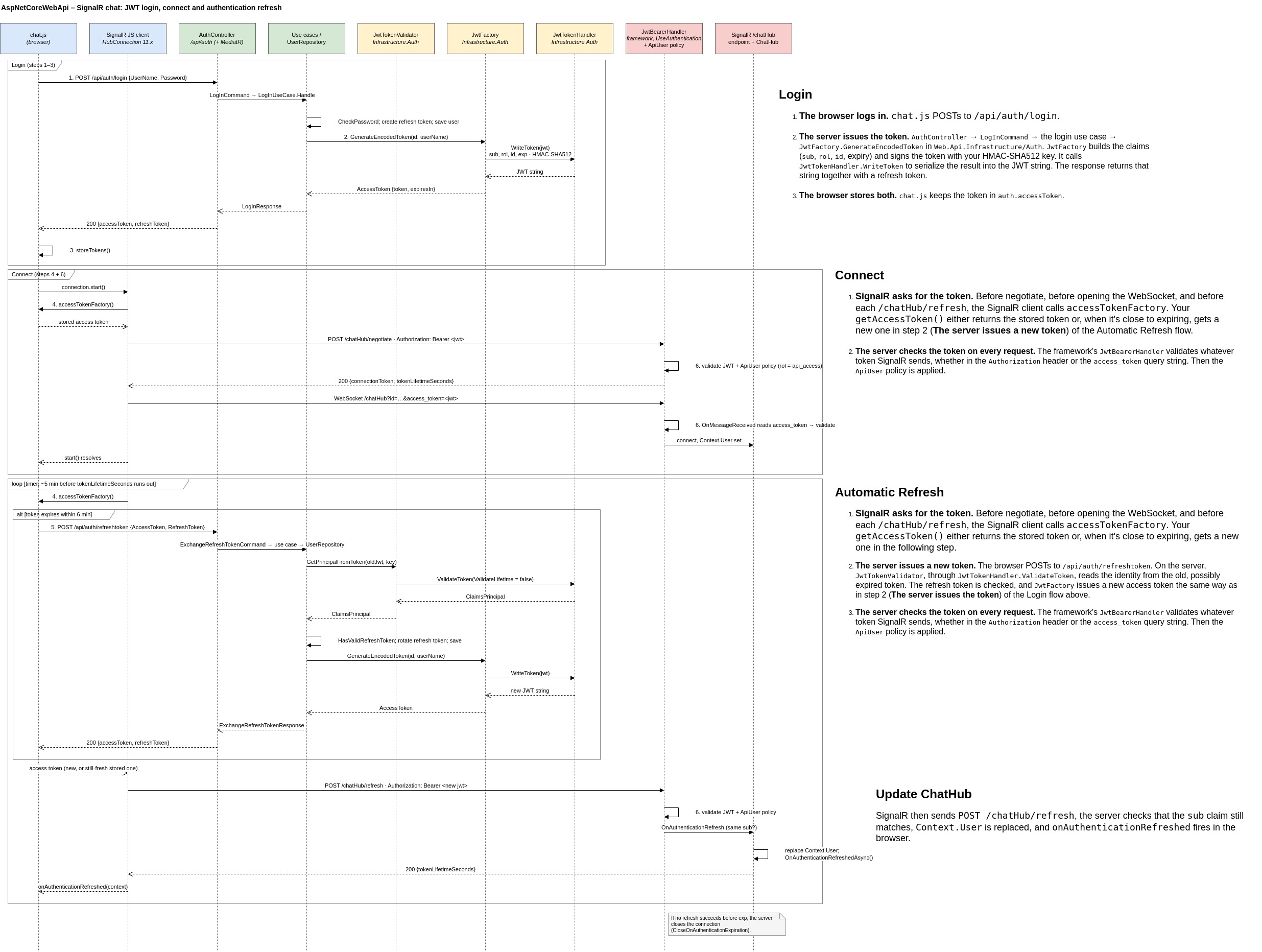
JWT login, connect and authenticaion refresh
Visual Studio
- Generate TLS cert and put the
localhost.pfxinto/tmp - Open the solution file
AspNetCoreWebApi.slnxand build/run.
Visual Studio Code
Ctrl+Shift+Bto build- Generate TLS cert and put the
localhost.pfxinto/tmp F5to start debug session
Client connection to HTTPS MCP server endpoint
- Copilot
npx @modelcontextprotocol/inspector
- Configure VS Code to ignore strict SSL errors specifically for its background processes:
- Open Settings (Ctrl+, or Cmd+,).
- Search for Http: Proxy Strict SSL.
- Uncheck the box to disable strict SSL verification.
- Environment variables:
export NODE_OPTIONS="--use-system-ca"
export NODE_TLS_REJECT_UNAUTHORIZED=0
export NODE_USE_SYSTEM_CA=1
Unit Testing
- Install .Net Core Test Explorer
echo fs.inotify.max_user_instances=524288 | sudo tee -a /etc/sysctl.conf && sudo sysctl -p- https://github.com/dotnet/aspnetcore/issues/8449
JWT Signing Key
The HMAC-SHA512 key that signs and validates JWTs (AuthSettings:SecretKey) is not stored in this repository.
- Development: if no key is configured, a random 64-byte key is generated on first run and kept outside the repository at
~/.local/share/AspNetCoreWebApi/jwt-signing-key(Linux) or%LOCALAPPDATA%\AspNetCoreWebApi\jwt-signing-key(Windows). Delete the file to get a new key. Alternatively:dotnet user-secrets set "AuthSettings:SecretKey" "<key>"fromsrc/Web.Api. - Every other environment: set the environment variable
AuthSettings__SecretKey(e.g. from a Kubernetes Secret or a vault). Startup fails if it is missing or shorter than 64 bytes. - Generate a key:
openssl rand -base64 64 | tr -d '\n'(Linux) or[Convert]::ToBase64String([Security.Cryptography.RandomNumberGenerator]::GetBytes(64))(PowerShell).
Refresh tokens are stored as SHA-512 hashes, are single-use (rotated on every exchange), and presenting an invalid refresh token with a valid access token revokes all of that user's refresh tokens. /api/auth/login, /api/auth/refreshtoken and the gRPC Auth service are rate limited per client IP.
Swagger Enabled
To explore and test the available APIs simply run the project and use the Swagger UI @ http://localhost:{port}/swagger/index.html
The available APIs include:
- POST
/api/accounts- Creates a new user. - POST
/api/auth/login- Authenticates a user. - POST
/api/auth/refreshtoken- Refreshes expired access tokens. - POST
/api/accounts/changepassword- Change password. - POST
/api/accounts/resetpassword- Reset password. - GET
/api/accounts/lock/{id}- Locks a user account id. - GET
/api/accounts/unlock/{id}- Unlocks a user account id. - DELETE
/api/accounts/{username}- Delete a user using username. - GET
/api/protected- Protected controller for testing role-based authorization.
Logs
- logs are available at
/var/log/aspnetcore/logYYYYMMDD_*
Windows 11
- Enter powershell:
powershell Get-Content -Path "c:\var\log\aspnetcore\logYYYYMMDD_<foo>" -Wait
Continuous Integration:
- Integrated with CircleCI
Kubernetes
- If ingress uses a prefix path, the prefix needs to be added as an environment variable
PATH_BASE(orappsettings.jsonmounted from ConfigMap) - Swagger does NOT work when the
PATH_BASEis not/due to an issued filed as https://github.com/dotnet/aspnetcore/issues/42559
gRPC
Postman
- Service Definition is only available in local development mode.
Example Messages:
Accounts/FindByUserName{ "value": "mickey" }Accounts/FindByEmail{ "value": "[email protected]" }Auth/Login:{ "userName": "mickey", "password": "" }
Yorumlar (0)
Yorum birakmak icin giris yap.
Yorum birakSonuc bulunamadi