blueprint
Health Warn
- License — License: MIT
- Description — Repository has a description
- Active repo — Last push 0 days ago
- Low visibility — Only 9 GitHub stars
Code Pass
- Code scan — Scanned 12 files during light audit, no dangerous patterns found
Permissions Pass
- Permissions — No dangerous permissions requested
No AI report is available for this listing yet.
Local studio to plan new products or scan existing repos: agent handoffs and codebase quality reports, on your machine.

blueprint studio
Plan before your AI agent builds. Scan what it already built.
Local studio for agent handoffs and codebase quality reports.
Specs and scans stay on your machine; AI calls go only to the provider you choose.
Website · Download · Overview · Contributing · Discussions


| Plan a new product | Architecture map | Scan an existing repo |
|---|---|---|
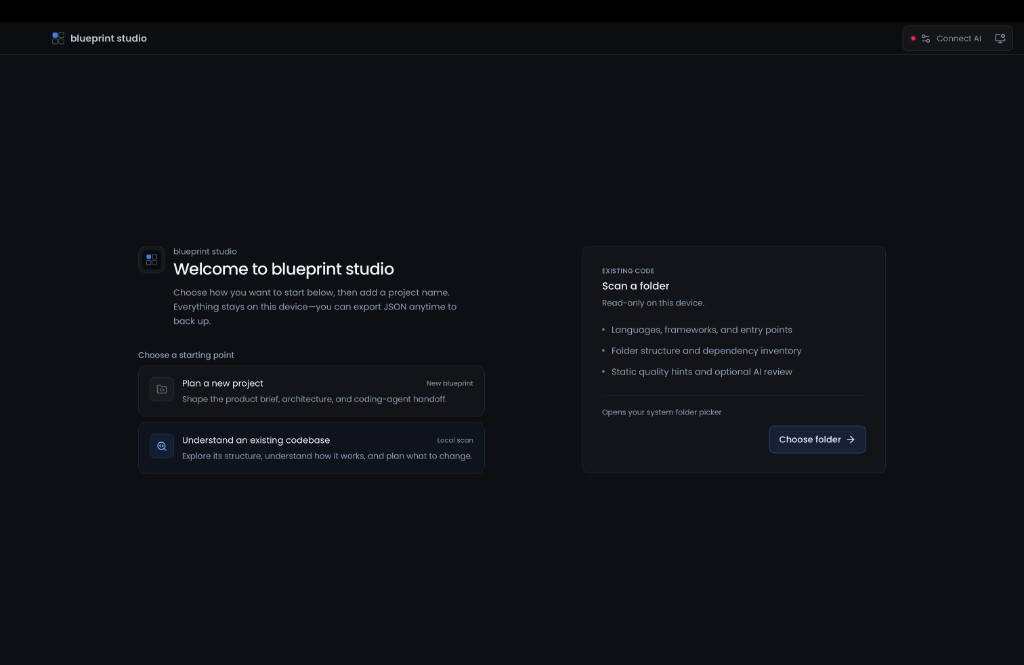 |
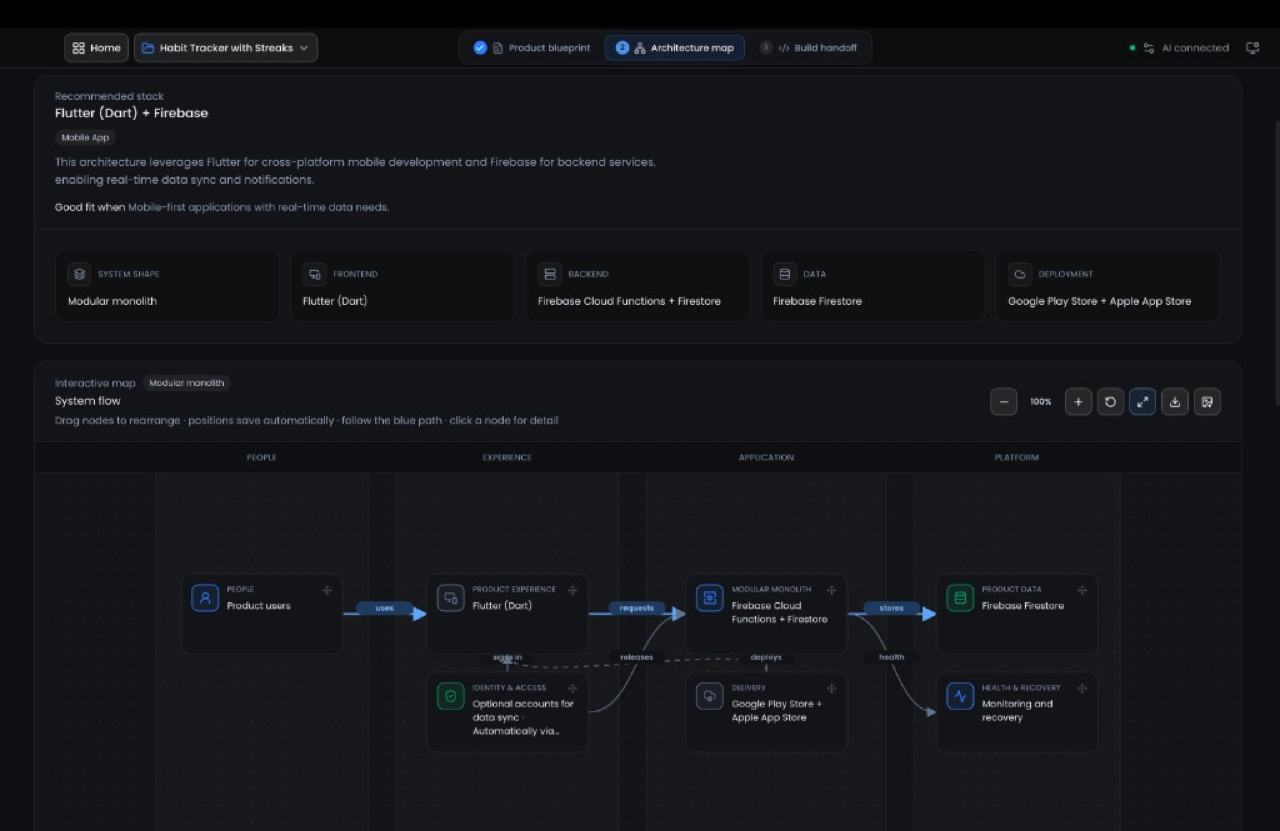 |
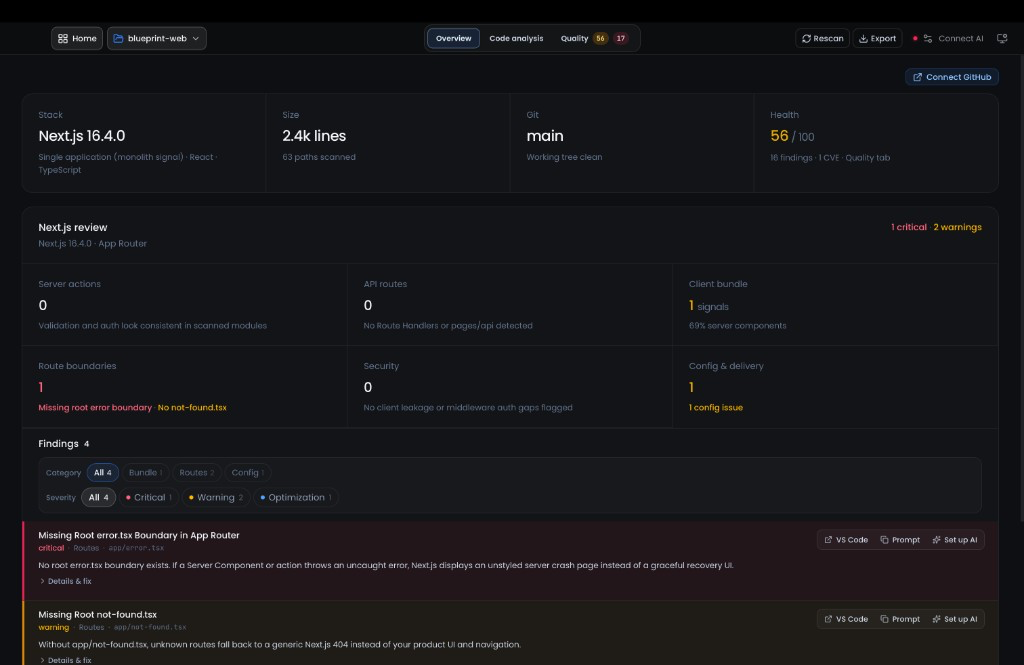 |
Works in the browser or as a desktop app (Tauri). Use desktop for reliable folder access and writing handoffs to disk. There is no hosted backend for your projects.
Why blueprint studio
- Plan, then hand off. Product brief → build questions → architecture map → editable agent handoff for Cursor, VS Code, Claude Code, Codex, JetBrains, and similar tools.
- Scan what you already have. Overview, tree, dependencies, scripts, health score, CVEs, and optional AI review on files you choose.
- Framework-aware depth. Deep profiles for Next.js, Remix, Expo / React Native, and Node.js (Express / Fastify / Koa / Hono / Nest / http).
- Open in your editor. Jump from findings to file and line in your preferred IDE (Cursor, VS Code, Windsurf, JetBrains, Zed, Sublime).
- Your AI, your keys. Optional providers (OpenAI, Anthropic, Gemini, Ollama, OpenRouter, Groq, DeepSeek, Mistral, xAI, Together, or a custom base URL). Requests go to your provider; blueprint studio does not proxy them.
- Local by default. Specs and scans stay on disk. AI calls go only to the provider you configure. No cloud sync of your projects.
Get started
For most users, the fastest path is:
- Download an installer from Releases.
- Open blueprint studio and create a project or scan a folder.
- For greenfield AI steps, configure a provider in Settings.
- Export a handoff zip, write files to disk, or browse findings and open them in your IDE.
Note: macOS builds are not Apple-notarized yet. After install you may need a one-line Terminal fix (details below the table).
| Platform | File to use |
|---|---|
| macOS Apple Silicon | .dmg with aarch64 in the name |
| macOS Intel | .dmg with x64 in the name |
| Windows | .msi or NSIS installer |
| Linux | .deb or .AppImage |
macOS: “damaged and can’t be opened”
After dragging the app to Applications:
xattr -cr "/Applications/blueprint studio.app"
Then open the app again (or right-click → Open). That clears the download quarantine flag; the app is not actually damaged.
You can also try the web app at blueprint-web-chi.vercel.app. Desktop is recommended for folder scans and handoff export to disk.
Local development
blueprint studio is a Vite + React frontend with a Tauri 2 desktop shell (Rust).
Requirements:
- Node.js 22 or newer (CI uses 22)
- Rust stable (for desktop)
- npm
npm install
npm run dev          # browser — http://localhost:5173
npm run tauri:dev    # desktop (alias: npm run app)
npm run tauri:build  # local installers
npm run build        # frontend only
On macOS, ./launch-desktop.sh opens the web UI in a standalone browser window.
Publishing a tag like v1.1.3 triggers the desktop release workflow for macOS, Windows, and Linux.
Repository map
| Path | What lives there |
|---|---|
src/ |
React UI, services, framework analyzers |
src/services/frameworks/ |
Deep brownfield profiles (Next.js, Remix, Expo, Node) |
src-tauri/ |
Tauri shell, IDE open, folder I/O, handoff export |
docs/ |
Contributor overview and notes |
.github/workflows/ |
Desktop build and release |
Privacy
- Specs and scan results stay local. Export/import JSON from the project menu to back up.
- Scans read files on disk; they are not uploaded to us.
- When you run AI review, only the source files you select (plus related static-finding notes and light project context) go to the provider you configured. The rest of the repo stays local. Greenfield AI steps send the brief and interview answers you enter, not a folder scan.
- GitHub / npm advisory features only use credentials or lockfile data you already opted into.
Contributing
Issues, pull requests, docs fixes, and new framework profiles are welcome.
Looking for a place to start? See issues labeled good first issue. Questions and ideas belong in Discussions.
- Read CONTRIBUTING.md before opening a pull request.
- See docs/overview.md for how the app is wired (contributor notes).
- CODE_OF_CONDUCT.md and SECURITY.md apply.
License
MIT. Fork, modify, and ship your own product (keep the license notice).
The name blueprint studio and blueprint-web-chi.vercel.app are the maintainer’s product. Forks are welcome; please use a different name and branding so users know who they are getting software from.
Reviews (0)
Sign in to leave a review.
Leave a reviewNo results found