harness-forge
Health Uyari
- License — License: MIT
- Description — Repository has a description
- Active repo — Last push 0 days ago
- Low visibility — Only 6 GitHub stars
Code Gecti
- Code scan — Scanned 12 files during light audit, no dangerous patterns found
Permissions Gecti
- Permissions — No dangerous permissions requested
Bu listing icin henuz AI raporu yok.
Use your Claude Code, Codex and OpenCode plugins and settings in DeepSeek Harness (DSH). 在 DeepSeek Harness 里使用你的 Claude Code、Codex 和 OpenCode 插件与设置。

Harness Forge
Use your Claude Code, Codex and OpenCode plugins and settings in DeepSeek Harness.


English · 中文
Why
Most plugin authors write for one harness. Harness Forge is a DeepSeek Harness (DSH) plugin that reads the plugins you already have and runs them in DSH:
- Claude Code fully: plugins, marketplaces, your
~/.claudeand a project's.claude/. - Straight from the internet: paste a Claude Code or Codex marketplace (
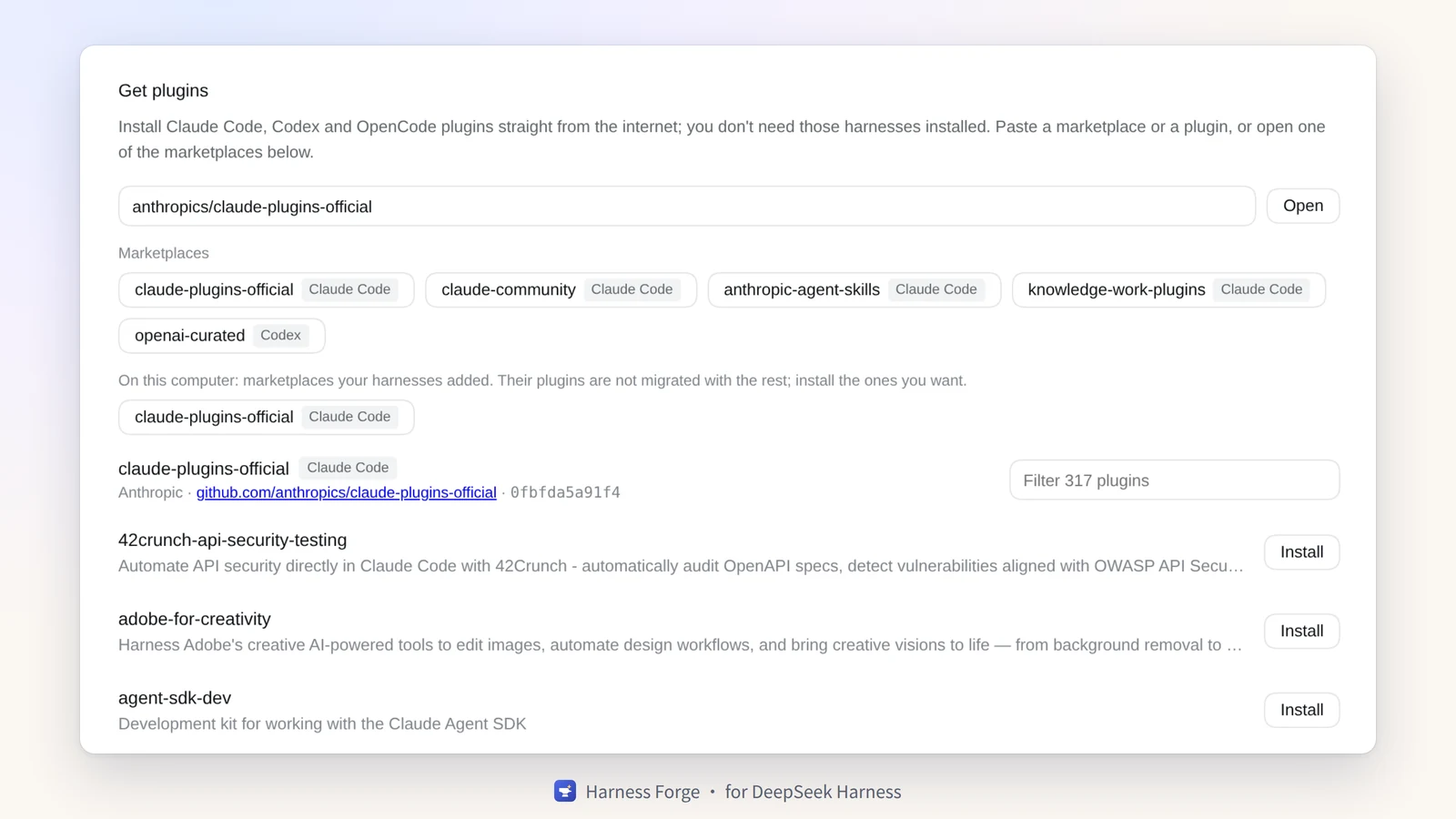
owner/repo, a git URL or amarketplace.jsonURL), a single plugin repository, or an OpenCode npm package, then confirm and install. You don't need the original harness. Anthropic's and OpenAI's marketplaces are listed ready to open. - Codex and OpenCode: plugins, your
~/.codex, OpenCode projects and code plugins. - Any harness that uses the common formats:
SKILL.mdskills, MCP JSON,AGENTS.md. Add a folder of skills (with an optional.mcp.json) to the plugin folders and it is read as one plugin; Gemini CLI's~/.gemini/skillsis listed by default. DSH already loads~/.agents/skillsitself.
It converts at run time through DSH's public extension points. Your original installation stays as it is, and Harness Forge never changes your DSH profile's configuration. Parts DSH has no equivalent for are listed with the reason, and Fill with AI can write an adapter for them.
Install
You need DSH 0.2.2-rc.3 or later and Node.js 22.19+ or 24+, on Windows, Linux or macOS.
In DSH, open Plugins › Add plugin, enter @kirkchinese/harness-forge and install. It goes into the profile you are using.
Or from a terminal, for the main profile that dsh web runs:
dsh plugin --profile web add @kirkchinese/harness-forge
then start DSH again. For another profile, put its name in place of web; the desktop app installs through Plugins › Add plugin only.
Quick start
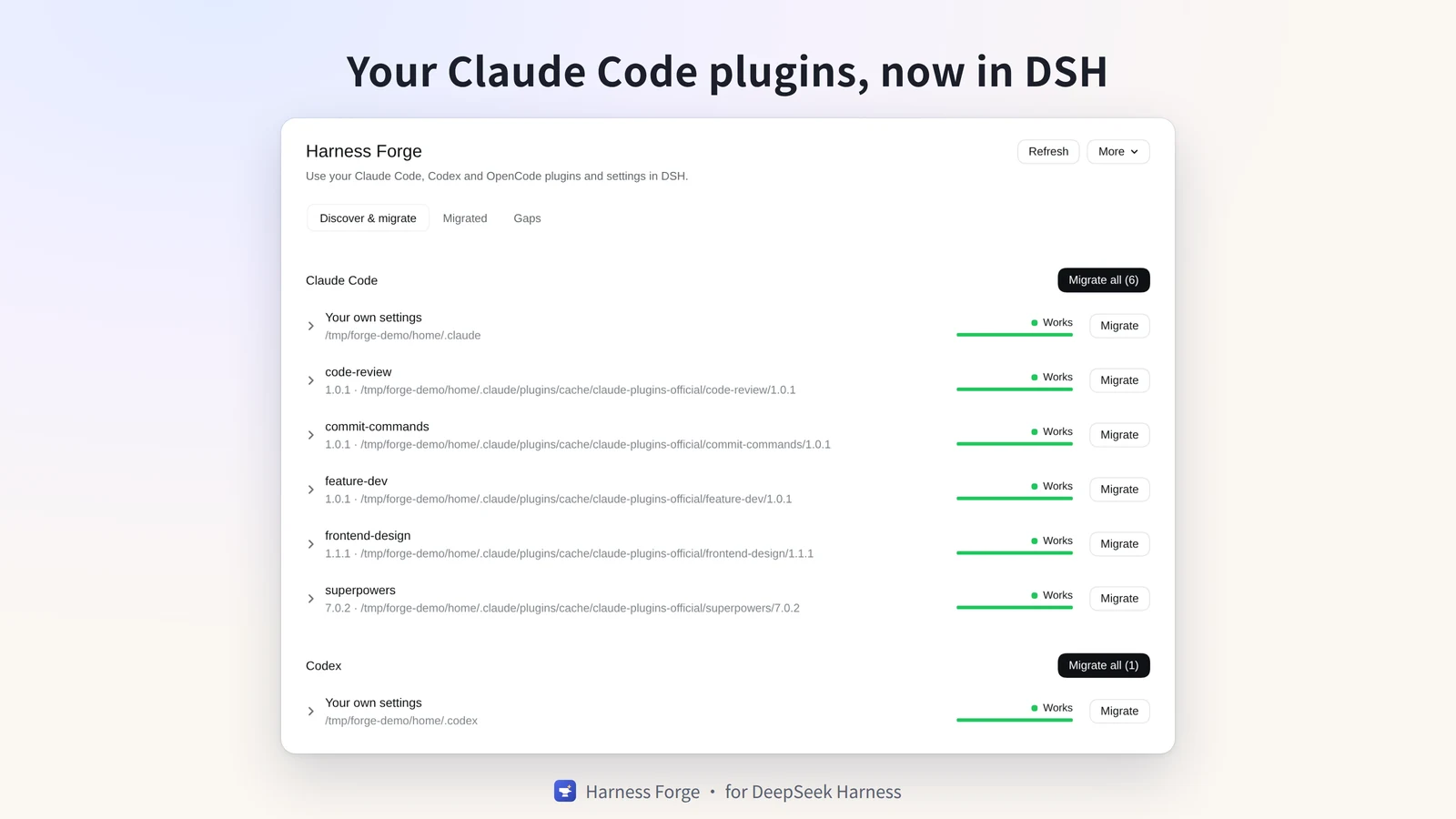
- Open Harness Forge in the DSH sidebar. Discover & migrate lists the Claude Code, Codex and OpenCode plugins found on this computer, plus your own settings. Each part is marked as working, partly working or not possible, with the reason.
- Migrate. Press Migrate all, or migrate one plugin at a time. You can switch single parts off or undo a migration later in Migrated.
No Claude Code here? Under Get plugins, open a marketplace such asanthropics/claude-plugins-official, or pasteowner/repoor an npm package, and install from the internet. - Work. Start a session. Skills are in the skill catalog, commands are in the
/menu, agents can take delegated tasks, and hooks fire on their events.
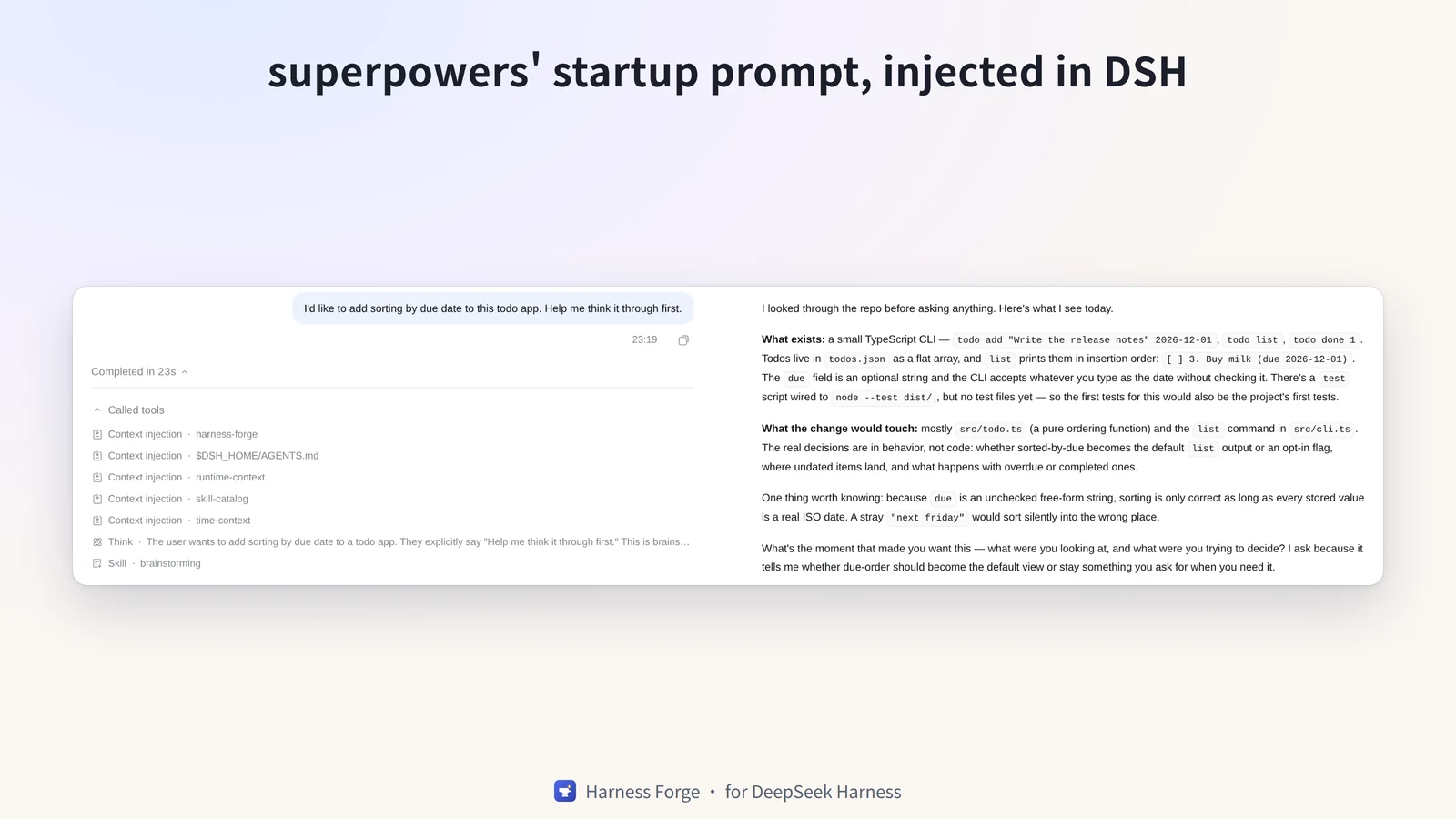
A real DSH session: superpowers, migrated from Claude Code. Its SessionStart hook injects the startup prompt, and the model loads the brainstorming skill on its own.
More in the quick start.
What carries over
| From the original harness | In DSH |
|---|---|
Skills (SKILL.md) |
In DSH's skill catalog, served from where they are installed. ${CLAUDE_SKILL_DIR}, ${CLAUDE_PLUGIN_ROOT} and !`command` are expanded; allowed-tools, model, effort and context: fork apply |
| Slash commands | /<plugin>-<command>. $ARGUMENTS, $0, named arguments, ! commands and @file work as in Claude Code. Codex prompts and OpenCode commands too |
| Subagents | DSH agent presets with their own prompt, tool list, model, skills, MCP servers and maxTurns, offered through one delegation tool |
| Hooks | Claude Code and Codex hooks from plugins, settings and skill/agent/command frontmatter, run by one broker. Matchers see the original tool names (Bash, Edit, …) |
| MCP servers | stdio, Streamable HTTP and SSE, with OAuth sign-in. Claude Code tool names are kept (mcp__plugin_<plugin>_<server>__<tool>) |
| Code plugins | Claude Code mods, and OpenCode plugins, each in its own Bun process |
| Your own setup | Skills, commands, agents, MCP servers, hooks, settings and permission rules from ~/.claude and ~/.codex, and a project's .claude/ |
| Instruction files | The ones DSH does not read itself: ~/.claude/CLAUDE.md, .claude/CLAUDE.md, @path imports, Codex's global AGENTS.md |
| Session history | Claude Code, Codex and OpenCode sessions, imported as DSH sessions you can continue |
What does not carry over
Every part that cannot fully run is shown in Gaps with its reason. The reasons come from these limits:
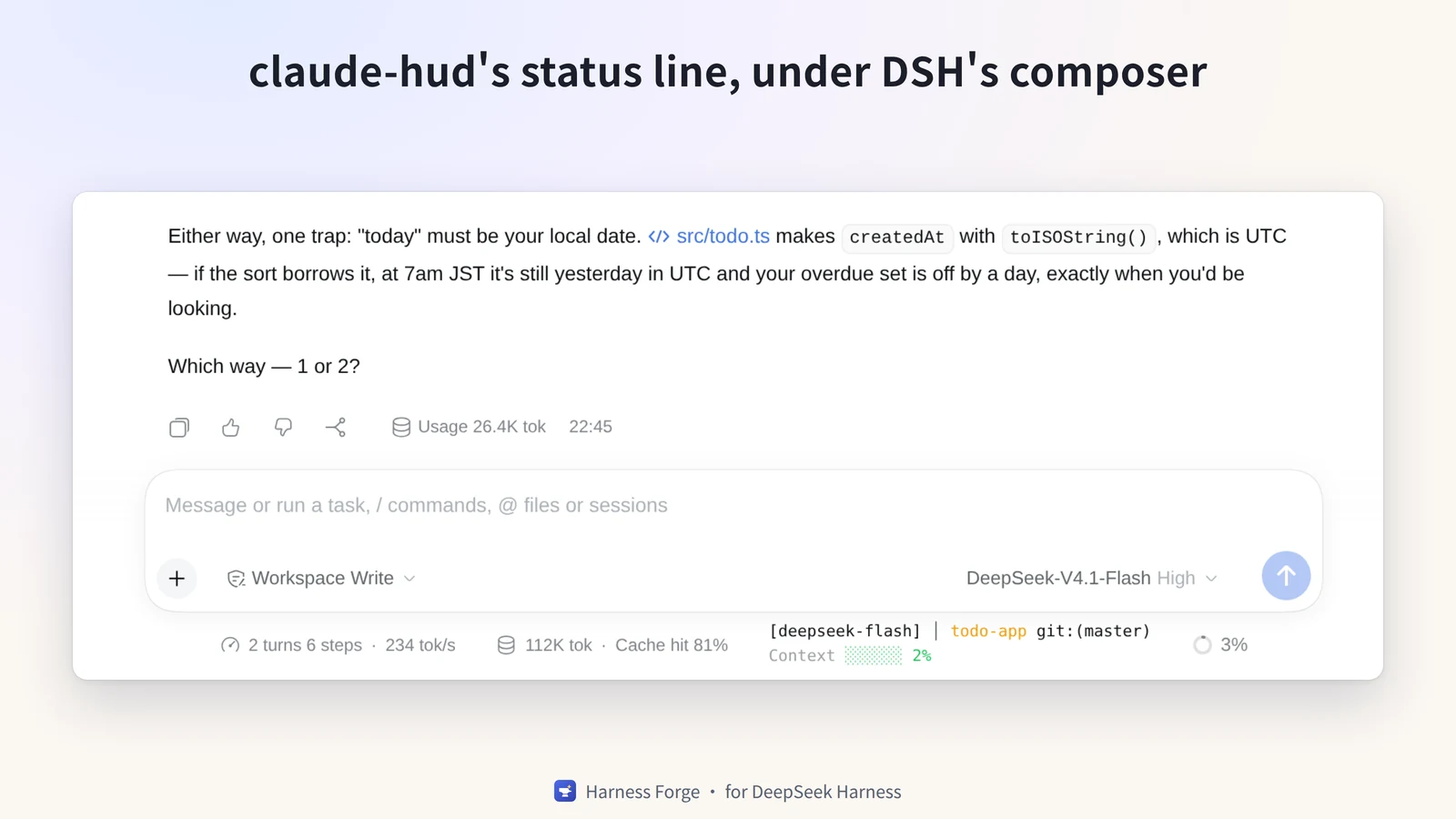
- UI surfaces (status lines, themes, workflows, monitors, MCP apps) have no direct DSH equivalent. Fill with AI can write one.
- Output styles are added to the system prompt. They cannot remove DSH's own coding instructions.
- Hook events DSH never raises do not fire.
PreCompact,PostCompact,NotificationandStopFailurehooks run after the fact and cannot block. - Hook handler types other than
command,http,mcp_tool,promptandagentstay inert. - Unmapped plugin parts: LSP servers,
bin/executables and install-timeuserConfigoptions are listed, not run. - Code plugins use a compatibility layer for their host API. A call outside the supported part of that API fails.
- Codex app connectors are hosted by OpenAI and only work signed in there. Nothing local can stand in for them.
- An MCP server whose transport cannot be determined is skipped.
Details in compatibility.
Fill with AI
Next to a gap an adapter could fill, Fill with AI writes a task brief for that part: the original's files, why it cannot run, the nearest DSH extension points and how to check the result. It then opens a session in DSH's own creation mode (agent preset cordis) with that brief. The agent there builds a local DSH plugin named dsh-adapter-<plugin>-<part> that calls the original plugin's code, installs it in your profile and checks it. Publishing it is up to you, under your own npm scope. See porting.
Rows
Harness Forge is one npm package with several plugin rows. Each row can be switched off on its own in DSH's Plugins page; a row that fails to start is logged and the others keep running. Every row needs the main Harness Forge row.
| Row | What it does |
|---|---|
Harness Forge (harness-forge) |
Discovery, migration, undo and removal; imported settings; /harness and the harness_* model tools |
| Skills | Imported SKILL.md skills and their frontmatter |
| Commands | Imported slash commands and Claude Code output styles (/output-style) |
| Agents | Imported agents as DSH agent presets |
| Hooks | Claude Code and Codex hooks, Codex notify and global instructions |
| MCP servers | Imported MCP servers and their sign-in |
| Claude Code mods | Claude Code mods, one engine per session |
| OpenCode plugins | OpenCode code plugins in Bun |
| Instructions | Instruction files DSH does not read itself; yields to Recollect when it is installed |
| Sessions | Importing Claude Code, Codex and OpenCode sessions |
| Porting | Fill with AI |
| Workbench | The Harness Forge page in the sidebar |
Turning a row off removes what it mounted; the parts it served show as inactive in the workbench. See architecture.
Works well with
Separate, optional DSH plugins. Harness Forge uses them when they are installed:
- Capability catalog (
@kirkchinese/dsh-capability-catalog): imported stdio MCP servers go through its compact index. - Recollect (
@kirkchinese/dsh-recollect): memory and instruction files; Harness Forge's Instructions row steps aside for it. - dsh-chat-import (
dsh-chat-import): imports conversations from Claude Code, Codex, OpenCode and 40+ other agents as DSH sessions you can continue. Harness Forge's session import steps aside for it; Install on the first-run banner or under More → Import sessions installs it through DSH's plugin manager.
Safety
Migrated hooks, MCP servers and plugin code run with your permissions, as they do in their original harness. Migrate only plugins you trust. Before a plugin from the internet is installed, Harness Forge shows its source, exact commit and parts, and warns about parts that run code. On Windows, hooks run in Git Bash (as in Claude Code); elsewhere in bash.
Documentation
Quick start · Compatibility · Porting · Architecture · Development · Changelog
Development
pnpm install
pnpm build       # core, plugin and the workbench bundle
pnpm typecheck
pnpm test
pnpm e2e         # real DSH on PATH, scripted model, in-repo fixtures
| Package | Role |
|---|---|
packages/core (@kirkchinese/harness-forge-core) |
Pure logic: dialect scanning, component model, planning, assessment, instruction discovery, session parsing, port briefs |
packages/plugin (@kirkchinese/harness-forge) |
The DSH plugin and its rows |
packages/testkit |
Private end-to-end smoke test |
See development. Issues and pull requests are welcome; for a plugin that does not work, name the plugin and what you expected.
License
Yorumlar (0)
Yorum birakmak icin giris yap.
Yorum birakSonuc bulunamadi