OmoiOS
Health Gecti
- License — License: Apache-2.0
- Description — Repository has a description
- Active repo — Last push 0 days ago
- Community trust — 43 GitHub stars
Code Basarisiz
- exec() — Shell command execution in .claude/skills/algorithmic-art/templates/generator_template.js
Permissions Gecti
- Permissions — No dangerous permissions requested
This tool is an open-source orchestration runtime that transforms project specifications into pull requests. It uses parallel AI agent swarms in isolated sandboxes to automate and manage development tasks based on your actual codebase.
Security Assessment
The overall security risk is Medium. The automated scan identified a failed check for shell command execution located inside a JavaScript template file (`.claude/skills/algorithmic-art/templates/generator_template.js`). While this is common for orchestration frameworks that spawn isolated sandboxes and execute code, it still poses a potential code injection risk if user inputs are not properly sanitized. No hardcoded secrets were detected, and the tool does not request explicitly dangerous permissions. However, given its architecture—reading your repository, making network requests to external AI models (like Claude), and dynamically executing code—administrators must strictly limit its network access and environment privileges.
Quality Assessment
The project demonstrates strong health and maintenance metrics. It is actively maintained, with repository pushes occurring as recently as today. It uses the permissive Apache 2.0 license, making it suitable for most open-source and commercial applications. Community trust is currently moderate but positive, with 43 GitHub stars. The documentation is comprehensive and clearly explains its complex task-DAG execution workflow.
Verdict
Use with caution: the active maintenance and open license are positive, but developers must rigorously sandbox the environment to mitigate the inherent risks of automated shell execution and external network requests.
Spec-driven multi-agent orchestration — autonomous development workforce powered by Claude & OpenHands







Open-source orchestration runtime that turns specs into PRs using parallel agent swarms in isolated sandboxes.
If you find OmoiOS useful, consider giving it a star — it helps others discover the project.
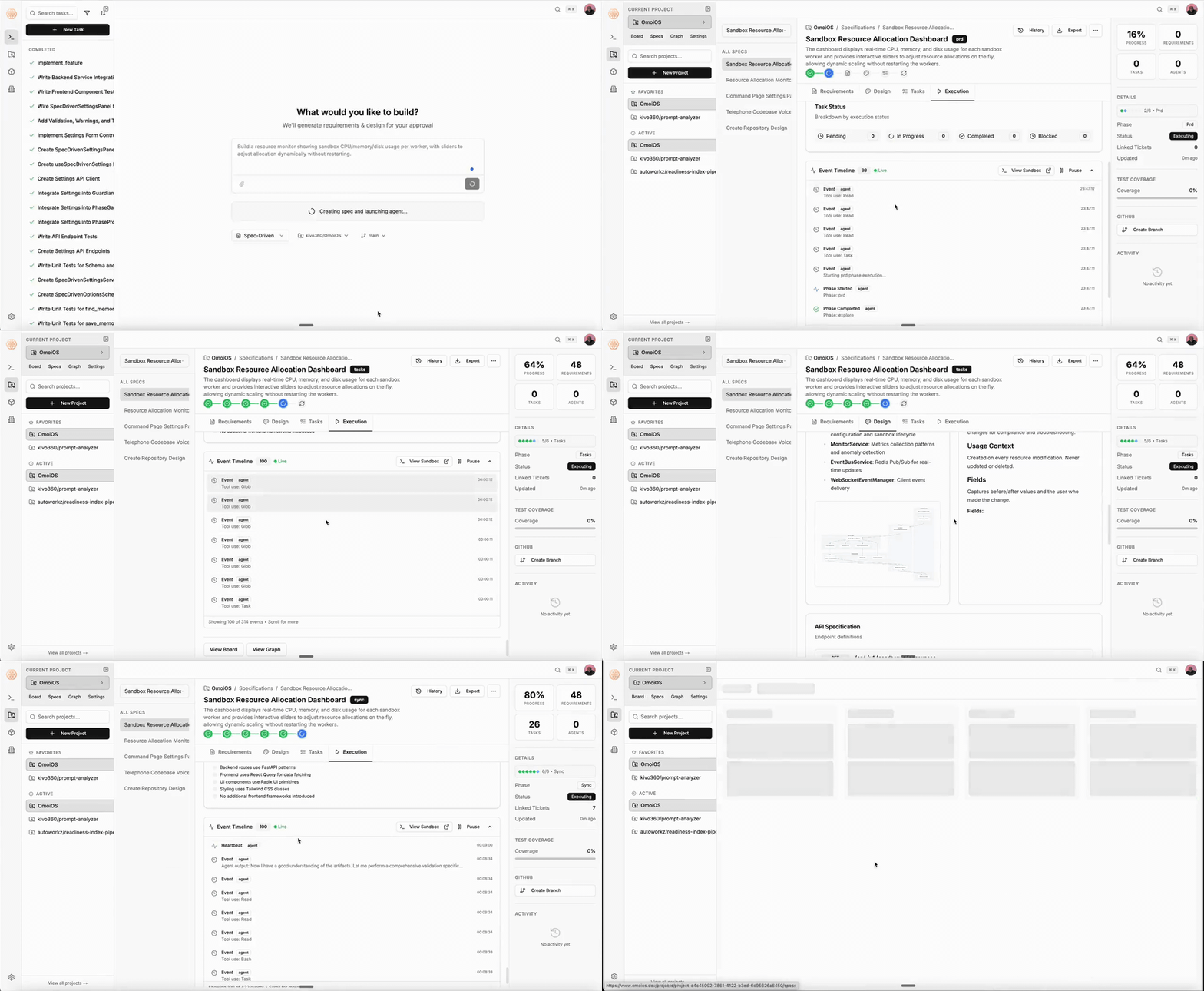
The Problem
AI coding agents are powerful individually, but using them at scale is a mess. You paste a prompt, wait, review, paste another prompt, fix what broke, repeat. There's no dependency awareness, no parallel execution, no structured handoff between tasks. Agents don't know what other agents are doing. When something fails, you're the orchestrator.
OmoiOS fixes this. It reads your existing codebase, generates specs from what's actually there, builds a task DAG with real dependencies, and runs agent swarms across isolated sandboxes until the work is done. A supervisor agent handles merges and keeps everything on track.
You describe what you want
    → OmoiOS explores your codebase
    → Generates specs (requirements, design, tasks)
    → Builds a dependency DAG
    → Spawns agents in isolated sandboxes
    → Agents execute in parallel, discover new work as they go
    → Supervisor agent merges code and steers stuck agents
    → PRs land on your repo
This isn't prompt chaining. It's a structured runtime for agent swarms — with dependency graphs, sandboxed execution, active supervision, and code that actually merges.
What Makes This Different
Specs from your actual code
OmoiOS doesn't generate generic plans. It reads your repo — file structure, patterns, dependencies — and generates specs grounded in what exists. The SpecStateMachine runs phases (Explore → Requirements → Design → Tasks) where each phase builds on real codebase context.
DAG-based execution, not a task queue
Tasks form a dependency graph (DependencyGraphService). Nothing executes until its dependencies are met. Critical path analysis determines what runs in parallel. This is how you get 5 agents working simultaneously without stepping on each other.
Every agent gets a sandbox
Each agent runs in an isolated Daytona container with its own Git branch, filesystem, and resources. No shared state. No interference. When agents finish, ConvergenceMergeService merges their branches in optimal order, using Claude to resolve conflicts.
Active supervision, not fire-and-forget
IntelligentGuardian analyzes every agent's trajectory every 60 seconds — scoring alignment, detecting drift, and injecting steering interventions mid-task. ConductorService monitors system-wide coherence, detects duplicate work, and coordinates across agents. Agents don't just run. They're watched.
Agents discover work as they go
During execution, agents find bugs, missing requirements, optimization opportunities. DiscoveryService spawns new tasks in the appropriate phase automatically. The DAG grows and adapts — workflows build themselves based on what agents actually encounter.
You approve at gates, not every step
Phase transitions have quality gates. You review at strategic points (phase completions, PRs). Everything between gates runs autonomously. You set direction — the swarm handles execution.
Code Assistant
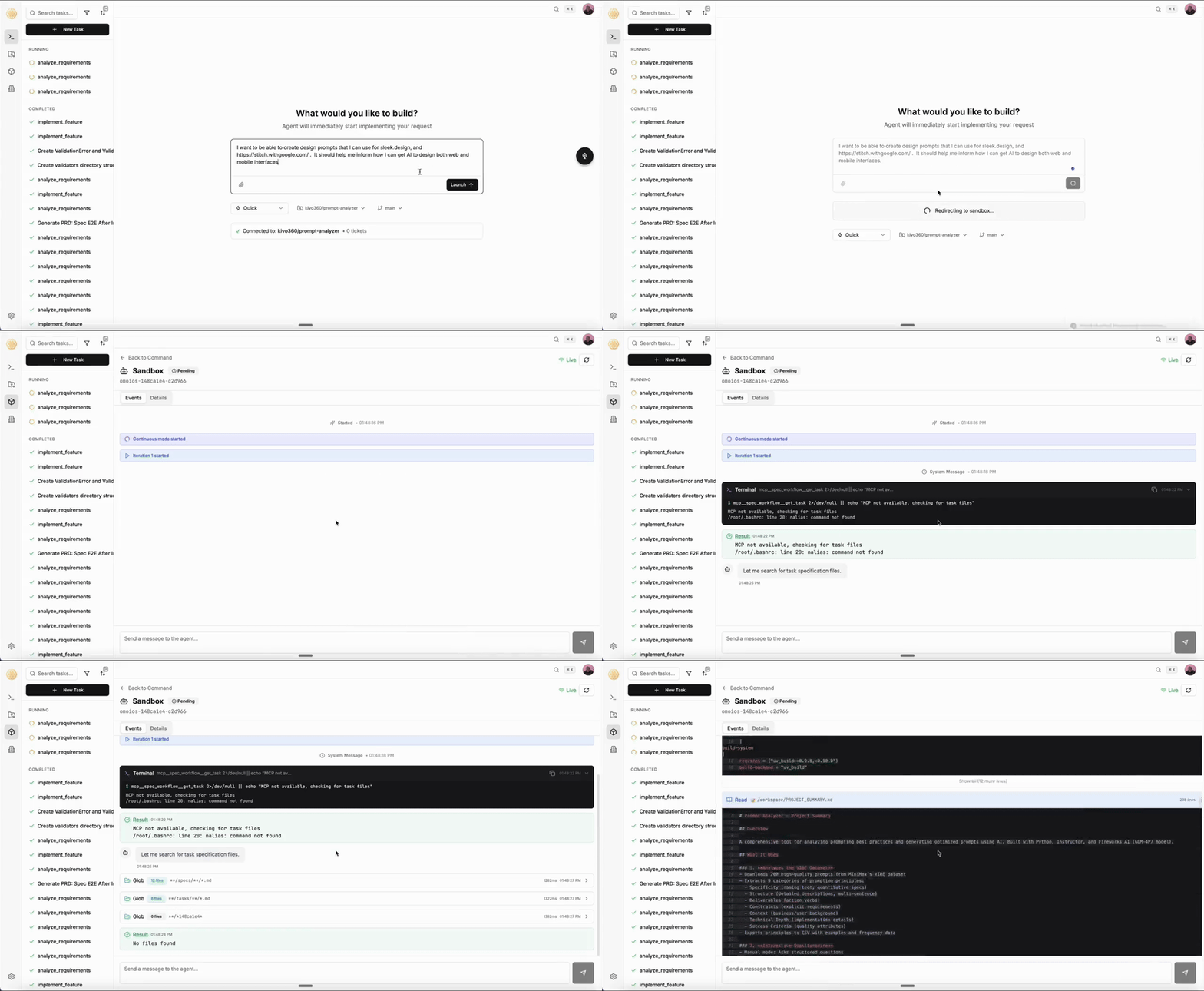
Beyond orchestrating agent swarms, OmoiOS includes a built-in code assistant that understands your entire codebase. Ask it anything — it explores your repo's structure, reads the actual code, and gives grounded answers. When it's time to build, it spawns isolated sandboxes and writes code for you.
Architecture
                    +---------------------------+
                    |    Frontend (Next.js 15)   |
                    |  Dashboard, Kanban Board,  |
                    |  Agent Monitor, Spec       |
                    |  Workspace, React Flow     |
                    +-------------+-------------+
                                  |
                          REST + WebSocket
                                  |
                    +-------------v-------------+
                    |    Backend (FastAPI)       |
                    |                           |
                    |  40+ Route Modules         |
                    |  100+ Service Modules      |
                    |  75+ SQLAlchemy Models      |
                    |                           |
                    |  --- Core Services ---     |
                    |  SpecStateMachine          |
                    |  OrchestratorWorker        |
                    |  TaskQueueService          |
                    |  IntelligentGuardian       |
                    |  ConductorService          |
                    |  DiscoveryService          |
                    |  EventBusService           |
                    |  MemoryService             |
                    |  BillingService            |
                    +---+-----------+--------+--+
                        |           |        |
                +-------v--+  +----v-----+  +--v--------+
                | Postgres  |  |  Redis   |  |  Daytona  |
                | 16 +      |  |  cache,  |  |  isolated |
                | pgvector  |  |  queue,  |  |  sandbox  |
                |           |  |  pubsub  |  |  exec     |
                +-----------+  +----------+  +-----------+
How a Feature Gets Built
1. You submit a feature request
   └→ API creates a Spec record

2. SpecStateMachine runs phases automatically:
   EXPLORE → REQUIREMENTS → DESIGN → TASKS → SYNC
   └→ Each phase produces versioned artifacts

3. TaskQueueService assigns work to agents
   └→ Priority-based, respects dependencies

4. OrchestratorWorker spawns isolated sandboxes
   └→ Each agent gets its own Daytona workspace + Git branch

5. Agents execute, discover, and adapt
   └→ Guardian monitors every 60s
   └→ Discovery creates new tasks when agents find issues
   └→ EventBus publishes progress via WebSocket

6. Phase gates validate quality
   └→ Human approval at strategic points

7. Code lands as PRs
   └→ Full traceability from spec to commit
Quick Start
Prerequisites
You need Docker, Python 3.12+, Node.js 22+, uv, pnpm, and just. Pick your platform below.
macOS# Docker Desktop
brew install --cask docker
# Python + Node.js
brew install [email protected] node
# uv (Python package manager)
curl -LsSf https://astral.sh/uv/install.sh | sh
# pnpm (Node.js package manager)
corepack enable && corepack prepare pnpm@latest --activate
# just (command runner)
brew install just
# Docker Engine
sudo apt-get update
sudo apt-get install -y ca-certificates curl gnupg
sudo install -m 0755 -d /etc/apt/keyrings
curl -fsSL https://download.docker.com/linux/ubuntu/gpg | sudo gpg --dearmor -o /etc/apt/keyrings/docker.gpg
sudo chmod a+r /etc/apt/keyrings/docker.gpg
echo "deb [arch=$(dpkg --print-architecture) signed-by=/etc/apt/keyrings/docker.gpg] https://download.docker.com/linux/ubuntu $(. /etc/os-release && echo "$VERSION_CODENAME") stable" | sudo tee /etc/apt/sources.list.d/docker.list > /dev/null
sudo apt-get update
sudo apt-get install -y docker-ce docker-ce-cli containerd.io docker-compose-plugin

# Add yourself to docker group (log out + in after this)
sudo usermod -aG docker $USER

# Python 3.12+
sudo apt-get install -y python3.12 python3.12-venv python3.12-dev

# Node.js 22+ (via NodeSource)
curl -fsSL https://deb.nodesource.com/setup_22.x | sudo -E bash -
sudo apt-get install -y nodejs

# uv (Python package manager)
curl -LsSf https://astral.sh/uv/install.sh | sh

# pnpm (Node.js package manager)
corepack enable && corepack prepare pnpm@latest --activate

# just (command runner) — pick one:
curl --proto '=https' --tlsv1.2 -sSf https://just.systems/install.sh | bash -s -- --to /usr/local/bin
# or: sudo snap install just --classic
# or: sudo apt install just  (if available on your release)
# Docker Engine
sudo dnf -y install dnf-plugins-core
sudo dnf config-manager --add-repo https://download.docker.com/linux/fedora/docker-ce.repo
sudo dnf install -y docker-ce docker-ce-cli containerd.io docker-compose-plugin
sudo systemctl start docker && sudo systemctl enable docker
sudo usermod -aG docker $USER

# Python 3.12+
sudo dnf install -y python3.12 python3.12-devel

# Node.js 22+ (via NodeSource)
curl -fsSL https://rpm.nodesource.com/setup_22.x | sudo bash -
sudo dnf install -y nodejs

# uv (Python package manager)
curl -LsSf https://astral.sh/uv/install.sh | sh

# pnpm (Node.js package manager)
corepack enable && corepack prepare pnpm@latest --activate

# just (command runner) — pick one:
curl --proto '=https' --tlsv1.2 -sSf https://just.systems/install.sh | bash -s -- --to /usr/local/bin
# or: sudo dnf install just
sudo pacman -S docker docker-compose python nodejs pnpm just
sudo systemctl start docker && sudo systemctl enable docker
sudo usermod -aG docker $USER

# uv (Python package manager)
curl -LsSf https://astral.sh/uv/install.sh | sh
# Install WSL2 + Ubuntu, then follow the Ubuntu instructions above
wsl --install

# Or native Windows:
winget install Docker.DockerDesktop
winget install Python.Python.3.12
winget install OpenJS.NodeJS
winget install --id Casey.Just --exact

# Then in PowerShell:
irm https://astral.sh/uv/install.ps1 | iex
corepack enable && corepack prepare pnpm@latest --activate
just
just is available in most package managers. If your platform wasn't listed above:
| Method | Command |
|---|---|
| Installer script | curl --proto '=https' --tlsv1.2 -sSf https://just.systems/install.sh | bash -s -- --to /usr/local/bin |
| Cargo | cargo install just |
| Conda | conda install -c conda-forge just |
| npm | npm install -g rust-just |
| pipx | pipx install rust-just |
| Snap | sudo snap install --edge --classic just |
| Nix | nix-env -iA nixpkgs.just |
| Chocolatey | choco install just |
| Scoop | scoop install just |
| FreeBSD | pkg install just |
Full list: github.com/casey/just — Packages
Verify everything is installed:
docker --version    # Docker 24+
python3 --version   # Python 3.12+
node --version      # Node.js 22+
uv --version        # uv 0.4+
pnpm --version      # pnpm 9+
just --version      # just 1.0+
Quickstart (Recommended)
One command sets up everything — env files, database services, dependencies, and migrations:
git clone https://github.com/kivo360/OmoiOS.git
cd OmoiOS

just quickstart
Then start developing:
just dev-all # Start API + frontend (http://localhost:3000)
Note: Edit
.env.localto add your API keys (LLM_API_KEY, etc.) for full functionality. The app runs without them but with reduced features.
After Quickstart
Once just quickstart completes, configure your environment:
# Edit .env.local with your API keys
# At minimum, set LLM_API_KEY for AI features to work:
$EDITOR .env.local
| Variable | Required | Purpose |
|---|---|---|
LLM_API_KEY |
For AI features | Fireworks AI or OpenAI-compatible key |
ANTHROPIC_API_KEY |
For agent execution | Claude Agent SDK key |
GITHUB_TOKEN |
For Git integration | GitHub personal access token |
DAYTONA_API_KEY |
For sandboxes | Daytona isolated workspace key |
All other features (dashboard, task management, API) work without any keys.
Running the Stack
# Start everything — API + frontend in one terminal
just dev-all

# Or start services individually in separate terminals:
just backend-api         # Backend API on http://localhost:18000
just frontend-dev        # Frontend on http://localhost:3000
just watch               # Backend with Docker hot-reload (alternative)
| Service | URL |
|---|---|
| Frontend | http://localhost:3000 |
| Backend API | http://localhost:18000 |
| API Docs (Swagger) | http://localhost:18000/docs |
| PostgreSQL | localhost:15432 |
| Redis | localhost:16379 |
All backend ports are offset by +10,000 to avoid conflicts with local services.
Troubleshooting
Docker permission denied (Linux)# Add yourself to the docker group and re-login
sudo usermod -aG docker $USER
newgrp docker
just status              # See what's running
just kill-port 18000     # Kill process on a specific port
just stop-all            # Stop all OmoiOS services
just docker-up           # Restart Postgres + Redis
just db-migrate          # Re-run migrations
just bootstrap           # Full environment health check
# Backend: clean reinstall
cd backend && uv sync --group test

# Frontend: clean reinstall
just frontend-clean-install
If you don't want to install Python/Node locally, the root docker-compose.yml builds everything:
cp .env.example .env.local
docker compose up        # Builds + runs all services
Development
Everyday Commands
just dev-all             # Start full stack
just test                # Run affected tests only (fast, ~10-30s)
just test-all            # Full test suite
just check               # Lint + format (auto-fix)
just status              # Check what's running
just stop-all            # Stop everything
Testing
just test                # Smart: only tests affected by your changes (testmon)
just test-all            # Full suite with coverage
just test-unit           # Unit tests only
just test-integration    # Integration tests only
just test-match "keyword"  # Run tests matching a keyword
just test-watch          # Watch mode — re-runs on file changes
Code Quality
just check               # Auto-fix lint issues + format (ruff)
just lint                # Lint only (no fixes)
just format              # Format only
just frontend-check      # Frontend format + type check
Pre-commit hooks enforce Ruff linting and formatting on every commit.
Database
just db-migrate                   # Apply all pending migrations
just db-revision "add user table" # Create a new migration
just db-history                   # View migration history
just db-downgrade                 # Rollback one migration
Tech Stack
| Layer | Technology | Purpose |
|---|---|---|
| Frontend | Next.js 15 (App Router) | Full dashboard with SSR |
| UI | ShadCN UI + Tailwind | Component library (Radix primitives) |
| State | Zustand + React Query | Client + server state management |
| Visualization | React Flow v12 | Dependency graphs + workflow DAGs |
| Terminal | xterm.js | Live agent workspace terminal |
| Backend | FastAPI 0.104+ | Async Python API framework |
| Database | PostgreSQL 16 + pgvector | Relational + vector search |
| Cache / Queue | Redis 7 + Taskiq | Caching, pub/sub, background jobs |
| ORM | SQLAlchemy 2.0+ | Async database access |
| LLM | Claude (Agent SDK) | AI agent backbone |
| Sandbox | Daytona | Isolated workspace execution |
| Auth | JWT + API Keys | Authentication + authorization |
| Observability | Sentry + OpenTelemetry + Logfire | Monitoring + tracing |
Project Structure
OmoiOS/
├── backend/                  # Python FastAPI backend
│   ├── omoi_os/
│   │   ├── api/routes/       # 40+ route modules
│   │   ├── models/           # 75+ SQLAlchemy model classes
│   │   ├── services/         # 100+ service modules
│   │   └── workers/          # Orchestrator + task workers
│   ├── migrations/versions/  # 70+ Alembic migrations
│   ├── config/               # YAML configs per environment
│   └── tests/                # 100+ test files (pytest)
│
├── frontend/                 # Next.js 15 frontend
│   ├── app/                  # 60+ App Router pages
│   ├── components/           # 130+ React components
│   ├── hooks/                # Custom hooks (WebSocket, API)
│   └── lib/                  # API client, utilities
│
├── subsystems/
│   └── spec-sandbox/         # Lightweight spec execution runtime
│
├── docs/                     # 30,000+ lines of documentation
├── containers/               # Docker configurations
├── scripts/                  # Development + deployment scripts
├── docker-compose.yml        # Full stack orchestration
├── Justfile                  # Task runner commands
├── ARCHITECTURE.md           # System architecture deep-dive
├── CONTRIBUTING.md           # Contribution guide
├── SECURITY.md               # Security policy
└── CHANGELOG.md              # Version history
Documentation
| Document | Description |
|---|---|
| Installation Runbook | Setup guide + contribution workflow |
| ARCHITECTURE.md | Complete system architecture (start here) |
| App Overview | Core features + system overview |
| Page Architecture | All frontend pages detailed |
| Frontend Architecture | Frontend patterns + components |
| Monitoring Architecture | Guardian + Conductor system |
| Backend Guide | Backend development reference |
| Document | Description |
|---|---|
| Planning System | Spec-Sandbox state machine, phase evaluators |
| Execution System | Orchestrator, Daytona sandboxes, agent workers |
| Discovery System | Adaptive workflow branching |
| Readjustment System | Guardian, Conductor, steering interventions |
| Frontend Architecture | Next.js 15 App Router, state management |
| Real-Time Events | Redis pub/sub, WebSocket forwarding |
| Auth & Security | JWT, OAuth, RBAC, API keys |
| Billing & Subscriptions | Stripe, tiers, cost tracking |
| MCP Integration | Model Context Protocol, circuit breakers |
| GitHub Integration | Branch management, PR workflows |
| Database Schema | PostgreSQL + pgvector, 75+ model classes |
| Configuration System | YAML + env, Pydantic validation |
| API Route Catalog | All FastAPI route modules |
| Integration Gaps | Known issues, resolved gaps |
| LLM Service Layer | LLM architecture, structured outputs |
| Service Catalog | All backend services cataloged |
Star History
Contributing
We welcome contributions. See CONTRIBUTING.md for setup instructions, coding standards, and PR process.
Quick version:
- Fork the repo
- Create a feature branch (
git checkout -b feature/amazing-feature) - Make your changes
- Run
just checkto verify quality - Submit a PR
Security
Found a vulnerability? Please report it responsibly. See SECURITY.md for our security policy and reporting process.
License
OmoiOS is licensed under the Apache License 2.0.
Go to sleep. Wake up to pull requests.
Yorumlar (0)
Yorum birakmak icin giris yap.
Yorum birakSonuc bulunamadi