reframe
Health Uyari
- License — License: NOASSERTION
- Description — Repository has a description
- Active repo — Last push 0 days ago
- Low visibility — Only 7 GitHub stars
Code Basarisiz
- exec() — Shell command execution in benchmark/examples/badge-pop/gsap.min.js
- exec() — Shell command execution in benchmark/examples/countdown/gsap.min.js
- exec() — Shell command execution in benchmark/harness/motion/calibrate.ts
Permissions Gecti
- Permissions — No dangerous permissions requested
Bu listing icin henuz AI raporu yok.
Declarative motion graphics AI can write, humans can tweak — edits survive AI regeneration. Deterministic mp4 from plain-data scenes. npm: reframe-video
reframe


Declarative motion graphics that AI can write, humans can tweak — and the
human's edits survive an AI regeneration.
At "prompt → mp4", reframe is on par with Hyperframes or a Remotion skill —
our own benchmark says exactly that, parity not superiority. The difference
starts on the second turn: what you get back is not freeform code but an
addressable document, so you can keep tweaking, regenerating, and scaling it
without your changes being silently lost.

Top: a scene with human overlay edits applied (brand color, retimed reveal,
watermark). Bottom: an AI fully regenerated the base scene — different
layout, different timing — and the same overlay reapplied by stable id.
4 edits survived; the one renamed node was reported as an orphan, never
silently dropped.

The demo above is a reframe scene
(examples/scenes/reframe-demo.ts) —
render it yourself: pnpm reframe render examples/scenes/reframe-demo.ts.
The loop
scene.ts  ──(written by you, or by an AI given `pnpm reframe guide`)──▶  IR (plain JSON data)
   │                                                                        │
   ▼                                                                        ▼
preview: scrub + knobs ──▶ edits recorded as an overlay JSON (non-destructive)
   │                                                                        │
   ▼                                                                        ▼
render: deterministic mp4 (same input → byte-identical frames)   ◀── overlay reapplies
                                                                     even after an AI
                                                                     regenerates the base
Everything is a pure function of time: evaluate(scene, t) — no wall clocks,
no randomness without a seed, scrubbing and distributed rendering for free.
Generative choreography at scale
The kind of scene that is hand-rolled timeline math in GSAP or per-elementinterpolate() plumbing in React is ~100 lines here, because the host
language generates the nodes, states, and phase-shifted behaviors — and the
output is still data: every dot, glyph, and moon keeps a stable id you can
tweak in the preview.
 bloom.ts — 300 dots on a golden-angle spiral: radial bloom, traveling breath wave, chromatic ripple, vortex collapse |
 wavefield.ts — physical interference: 1,152 phase-shifted oscillators on a 32×18 grid, second ripple source joins mid-scene |
 orbit.ts — nested transform composition: moons orbit planets orbit a sun, the whole system tilts — three nested groups, three linear tweens |
 typewave.ts — character-level kinetic type: cascade, standing wave, shatter with spin, and a second phrase assembling from the debris |
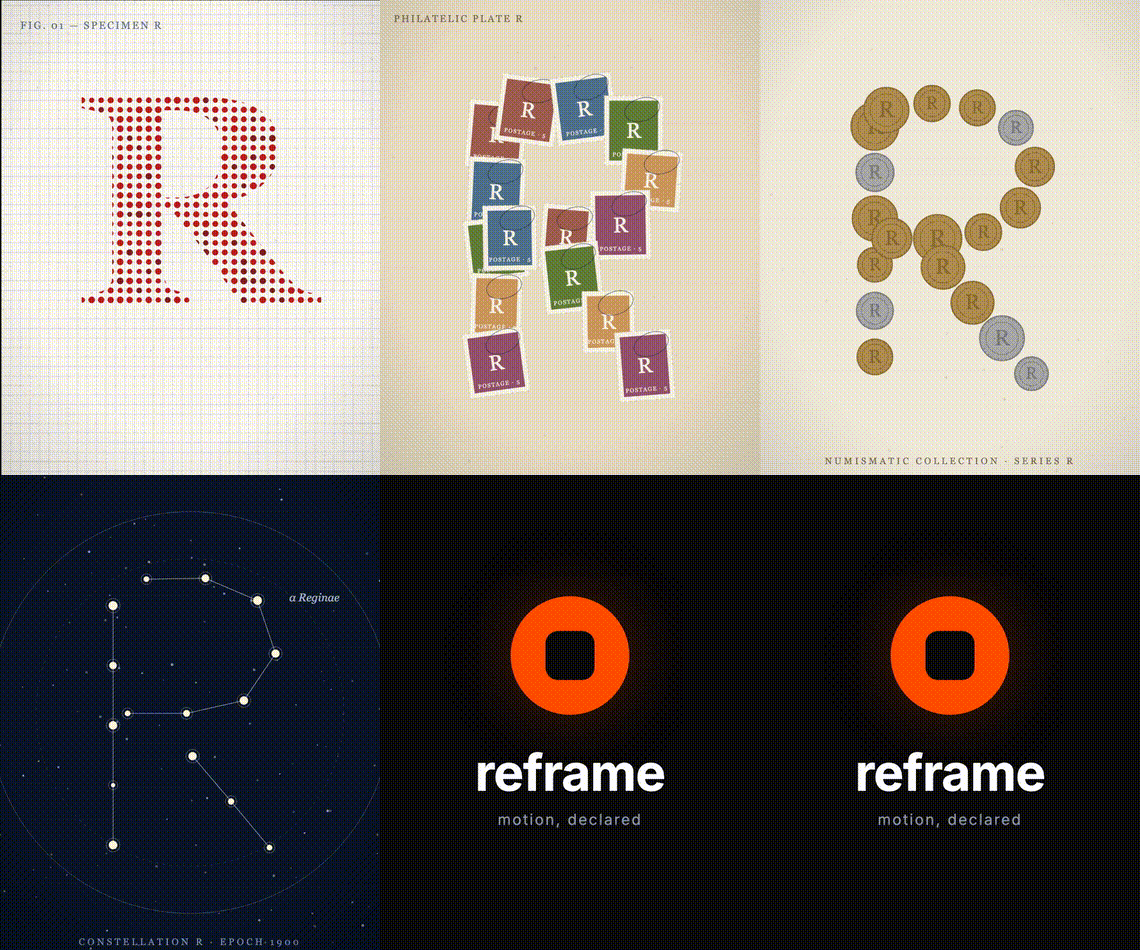 glyph-reveal.ts — the archival stop-motion format: AI-generated plates as image nodes, ~7fps hard cuts, push-in, camera shake, a tick per cut. Swap any plate from an overlay or batch row: nodes.frame-3.src |
Motion vocabulary: name a motion, don't keyframe it
Motion is hard to put into words and tedious to hand-key, so reframe ships a
small set of named motion presets: draw-bloom, punch-in, rise-settle,slide-bank, reveal-orbit, spin-forge. Each is a seeded generator, not a
canned template. The same name yields a family of distinct takes, and a seed
varies it within that family (an 8-seed spread stays measurably different yet
recognizably the same motion, gated in the tests).
motionPreset("spin-forge", { target: logo, energy: 0.8, seed: 3 })
energy (clean to springy) and speed are universal knobs. The preset emits a
beat you can retime, and a waypoint you drag on its path becomes an overlay edit
that survives a knob-driven regeneration: knobs regenerate the base, hand craft
persists. Two new primitives back it:
pathnode: a true vector SVG shape with aprogressdraw-on, so the
outline draws itself, stays crisp at any zoom, and recolors by animating fill.motionPath: drives a node's x/y along a Catmull-Rom curve (with tangentautoRotate), the curved motion straight tweens cannot do.
Turn any SVG into a share-worthy animated sting in one command, no clone needed
(a local file, or any of simple-icons' brands):
npx reframe-video logo react --motion spin-forge

Six real logos (React, Figma, Vercel, GitHub, Notion, Stripe), each a different
preset, one command each. Pulled from simple-icons by slug, or drop in your own .svg.
Device mockups: one call, a framed screen
Promo and product shots almost always need the app inside something — a phone, a
browser, a laptop. The tedious part was never the frame, it was getting the
screen clip right so content sits inside it. devicePreset bakes that in:
ten parametric vector frames, each with a clipped screen "content slot", so a
mockup is a single call.
devicePreset("phone", { id: "hero", content: [ /* ...your UI nodes */ ] })
Ten frames — phone, tablet, laptop, browser, watch, monitor, tv, foldable,
terminal, car — all pure primitives (no assets), deterministic, and additive
to the golden contract. deviceScreen, deviceScreenCenter, and deviceBounds
hand back the screen bounds and the frame footprint, so content scrolls inside
the clip and many devices tile onto a grid. The motion is yours: drive the
device group with tweens or a motionPreset, and the content scrolls because it
is clipped. See examples/scenes/device-presets.ts (three devices, a scrolling
feed) and device-teardown.ts (all ten, each with its own signature move).
Why not just Hyperframes / Remotion?
Because their output is arbitrary HTML/React — great to generate once,
impossible to safely operate on afterwards. reframe's output is data with
stable addresses, and everything below falls out of that one difference:
| the second turn | HTML / React output | reframe |
|---|---|---|
| "tweak just the color and timing" | edit code by hand, or re-prompt and hope nothing else changes (no visual editor is possible over arbitrary code) | turn knobs in the preview — no code |
| "now redesign it" after my tweaks | your hand edits live inside the code; regeneration overwrites them or you merge diffs — silent loss is the default | edits live in an overlay; they reapply onto the regenerated scene (measured 100% across 23 regenerations/turns), breaks are reported loudly |
| "make 50 personalized versions" | only what the author pre-parameterized (props) | any address, post-hoc: nodes.name.content |
| "is it wrong before I render?" | semantic failures are invisible until pixels (wrong text, off-frame) | structure validates pre-render with actionable errors; motion is computable from the IR |
If your video is fire-and-forget, use the simpler tool. If it's an asset that
will be tweaked, regenerated, and multiplied — that loop is what reframe is for.
Quickstart
No clone needed — reframe-video is on npm:
brew install ffmpeg                  # system dep (or apt install ffmpeg)
npx playwright install chromium      # one-time browser download
npx reframe-video new hello          # scaffold hello.ts in any directory
npx reframe-video render hello.ts    # → out/hello.mp4
Using Claude Code? Install the skill and just describe the video you want:
/plugin marketplace add kiyeonjeon21/reframe
/plugin install reframe@reframe
To hack on reframe itself, clone-based setup:
brew install ffmpeg                          # 0. system dep (or apt install ffmpeg)
pnpm install                                 # 1.
pnpm exec playwright install chromium        # 2. one-time browser download
pnpm reframe render examples/scenes/lower-third.ts   # 3. → out/lower-third.mp4
Then open the editor and render with your edits:
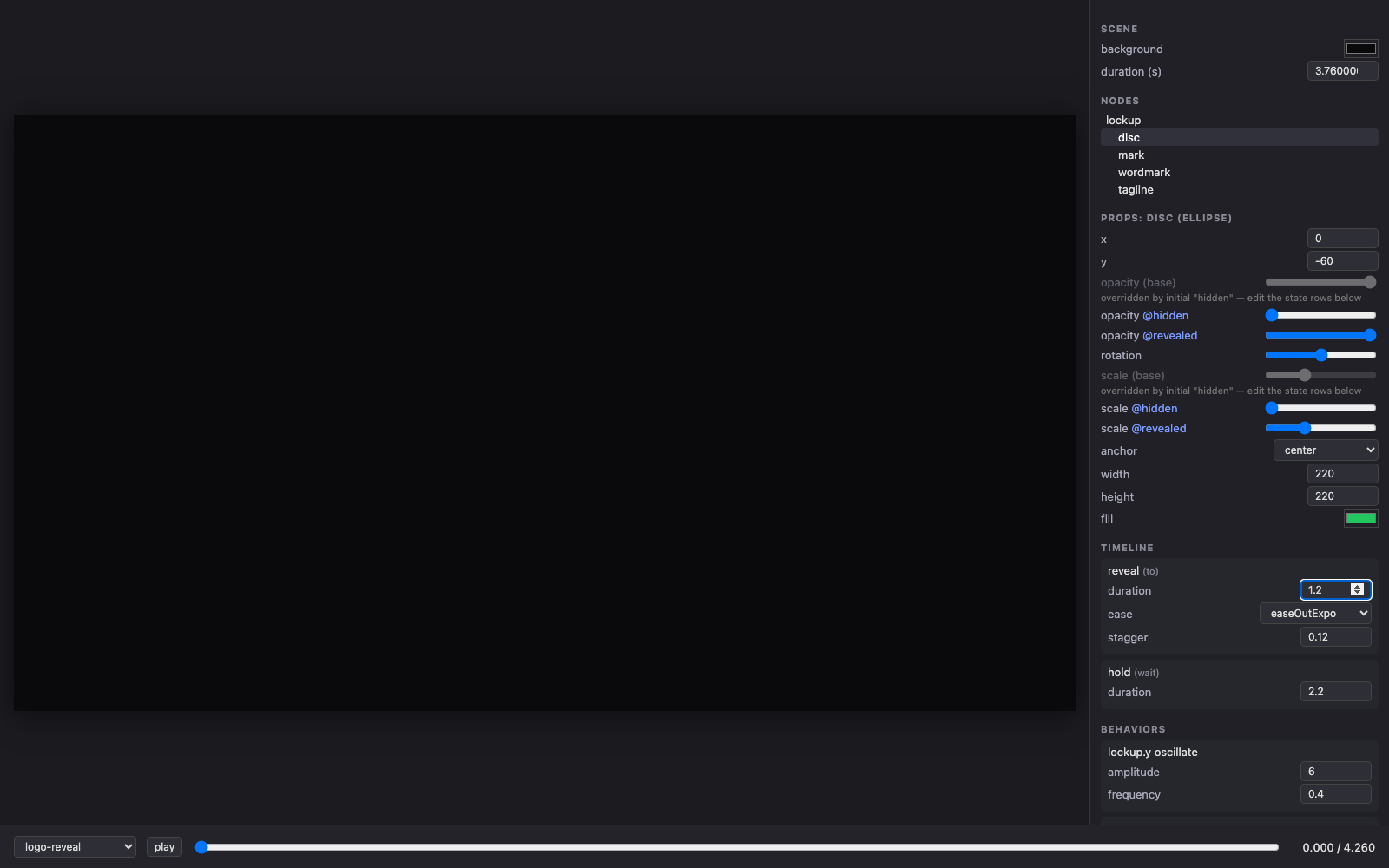
pnpm reframe preview     # scrub, play, and edit any scene with knobs
# → edits accumulate in an overlay; click "download", save to examples/overlays/
pnpm reframe render examples/scenes/logo-reveal.ts \
  --overlay examples/overlays/brand-edits.json
Saving edits: the preview never modifies your scene file. Edits live in
an overlay document — download it from the panel, then pass it to render
with--overlay. That same file keeps working after the scene is redesigned.
The edit-survival demo
pnpm reframe demo # renders out/demo-{1,2,3}-*.mp4
Renders the base scene, the base + a human overlay, and then an
AI-regenerated base + the same overlay. Watch the console: surviving edits
apply, the deliberately renamed node orphans loudly with a diagnosis. This is
the project's core claim, reproducible in one command. (Measured with real
agents: 100% id/state/label retention across 8 regenerations —benchmark/regen/REGEN-ANALYSIS.md.)
Sound that follows the motion
Because choreography is data, audio cues anchor to timeline labels, not
to seconds on a waveform:
audio: {
  bgm: { synth: "ambient-pad", gain: 0.3, duck: { depth: 0.5 } },
  cues: [{ at: "enter", sfx: "whoosh" }, { at: "shatter", offset: 0.18, sfx: "thud" }],
}
Retime a step with an overlay — or let an AI regenerate the scene — and the
sound design moves with it (verified: a +1.8s hold patch shifted the anchored
cues by exactly +1.8s). SFX are procedurally synthesized (deterministic, zero
assets) with CC0 samples in assets/sfx/ for organic sounds like real
mechanical keypresses; the bed auto-ducks under cues. --no-audio to skip.
Batch rendering: data in, videos out
A scene is a template; every data row becomes an overlay. Row keys are
overlay addresses — no new schema:
// examples/data/team.json
[{ "_name": "alice",
   "nodes.name.content": "Alice Park",
   "nodes.role.content": "Chief Technology Officer",
   "nodes.bar.fill": "#00C2A8" }, ...]
pnpm reframe batch examples/scenes/lower-third.ts examples/data/team.json
# → out/batch/alice.mp4, ben.mp4, ... + batch-report.json
Rows render in parallel; a row with a bad address renders with a loud orphan
warning instead of killing the batch. CSV works too (headers = addresses).
This is N-personalized deterministic videos from one template — the workflow
real-time runtimes like Rive structurally don't cover.
Writing a scene
import { scene, text, seq, to, wait } from "@reframe/core";

export default scene({
  id: "hello",
  size: { width: 1920, height: 1080 },
  fps: 30,
  background: "#101014",
  nodes: [
    text({ id: "title", x: 960, y: 540, anchor: "center",
      content: "Hello", fontFamily: "Inter", fontSize: 120, fontWeight: 800, fill: "#FFF" }),
  ],
  // base props are the finished design; states are sparse overrides
  states: {
    hidden: { title: { opacity: 0, y: 580 } },
    shown:  { title: { opacity: 1, y: 540 } },
  },
  initial: "hidden",
  // labels are stable addresses for overlay timing edits
  timeline: seq(
    to("shown", { duration: 0.6, ease: "easeOutCubic", label: "enter" }),
    wait(2, "hold"),
  ),
});
Scaffold one with pnpm reframe new my-scene. Full syntax (node types,
states, timeline operators, behaviors): pnpm reframe guide — the same
~1,700-token guide that lets an LLM write valid scenes on the first try
(33/33 first-attempt renders in our benchmark).
A scene is a single self-contained file, not an app: it can live in any
directory — no package.json or node_modules next to it. render bundles it
on the fly (resolving @reframe/core and any relative imports beside it), andpreview lists scenes from the directory you launched it in alongside the
repo's examples/scenes/. Keep overlays and batch data files right next to
your scene.
CLI
| command | what it does |
|---|---|
pnpm reframe render <scene.ts|.json|.html> [--overlay f]... [-o out] |
deterministic mp4 (mode inferred from extension; output defaults to out/) |
pnpm reframe batch <scene.ts> <data.json|csv> [-o dir] [--overlay f]... |
one mp4 per data row (rows = overlays), parallel, with a per-row report |
pnpm reframe preview |
scrub/play/edit UI; edits export as overlay JSON |
pnpm reframe new <name> |
scaffold a documented starter scene |
pnpm reframe motion <mp4|framesDir> |
calibrated motion profile (speeds, easing, discontinuities) |
pnpm reframe trace <ref.mp4> [--apply scene.ts] |
extract a video's motion structure (a MotionSketch); --apply emits a timeline that re-tells it on your own nodes |
pnpm reframe guide [--regen] |
print the authoring guide / the regeneration contract |
pnpm reframe demo |
the edit-survival demo above |
How edits survive regeneration
Overlays address the scene by node id, state name, and timeline label —
never by position or index. When an AI regenerates a scene it follows one
contract (docs/regen-contract.md, or pnpm reframe guide --regen): keep
those names stable for every concept that survives the redesign. When the
contract is broken anyway, composeScene skips the affected edits and reports
them with a diagnosis naming the likely rename. The failure hierarchy:
- Contract followed (the measured common case) → edits survive.
- Contract broken → loud orphan report.
- Never: silent edit loss, or a render failure caused by base drift.
Repo map
| path | what |
|---|---|
packages/core |
the eDSL, IR, determinism kernel, overlay composition — zero deps |
packages/renderer-canvas |
DisplayList → Canvas 2D (browser + capture shared) |
packages/render-cli |
Playwright capture + ffmpeg encode; also renders arbitrary HTML/GSAP deterministically via a virtual clock |
packages/preview |
the Vite editor |
examples/ |
scenes, overlays, the edit-survival demo |
benchmark/ |
measurement artifacts, not product code: LLM generation benchmark (RESULTS/ANALYSIS.md), regeneration-contract experiment (regen/), calibrated motion profiler (harness/motion/, MOTION.md) |
Requirements & troubleshooting
- Node ≥ 20, pnpm ≥ 9, ffmpeg on PATH.
Executable doesn't exist at …/ms-playwright/…→ runpnpm exec playwright install chromium(the workspace blocks postinstall
scripts, so the browser is not fetched automatically).spawn ffmpeg ENOENT→ install ffmpeg (step 0).- Fonts: only Inter 400/700/800 are bundled; other families silently fall back.
- A scene importing npm packages beyond
@reframe/coreonly bundles if those
packages are resolvable from the scene's directory — scenes are meant to be
dependency-free documents.
Status
Early alpha (reframe-video on npm, Claude Code skill in this repo). The
research phase is closed: every design hypothesis is measured, not assumed —
LLM generation parity with HTML+GSAP, deterministic byte-identical rendering,
edit survival across AI regeneration, and a five-turn natural-language
iteration loop with zero silent edit loss. Receipts: benchmark/ANALYSIS.md,benchmark/MOTION.md, benchmark/regen/REGEN-ANALYSIS.md,benchmark/nl-loop/NL-LOOP.md. What "alpha" means honestly: it has not met
strangers yet — surface area is intentionally small (6 node types, one font,
Canvas 2D) and the IR/overlay schema has no compatibility promise before 1.0.
Yorumlar (0)
Yorum birakmak icin giris yap.
Yorum birakSonuc bulunamadi