kmux
Health Warn
- License — License: MIT
- Description — Repository has a description
- Active repo — Last push 0 days ago
- Low visibility — Only 6 GitHub stars
Code Warn
- process.env — Environment variable access in apps/desktop/build/custom-mac-artifact-notarize.cjs
- process.env — Environment variable access in apps/desktop/build/custom-mac-sign.cjs
- process.env — Environment variable access in apps/desktop/src/main/antigravityIntegration.test.ts
- process.env — Environment variable access in apps/desktop/src/main/antigravityIntegration.ts
Permissions Pass
- Permissions — No dangerous permissions requested
No AI report is available for this listing yet.
A modern terminal multiplexer designed for the AI era. Effortlessly orchestrate, monitor, and run coding agents like Claude Code and Aider in parallel.
kmux
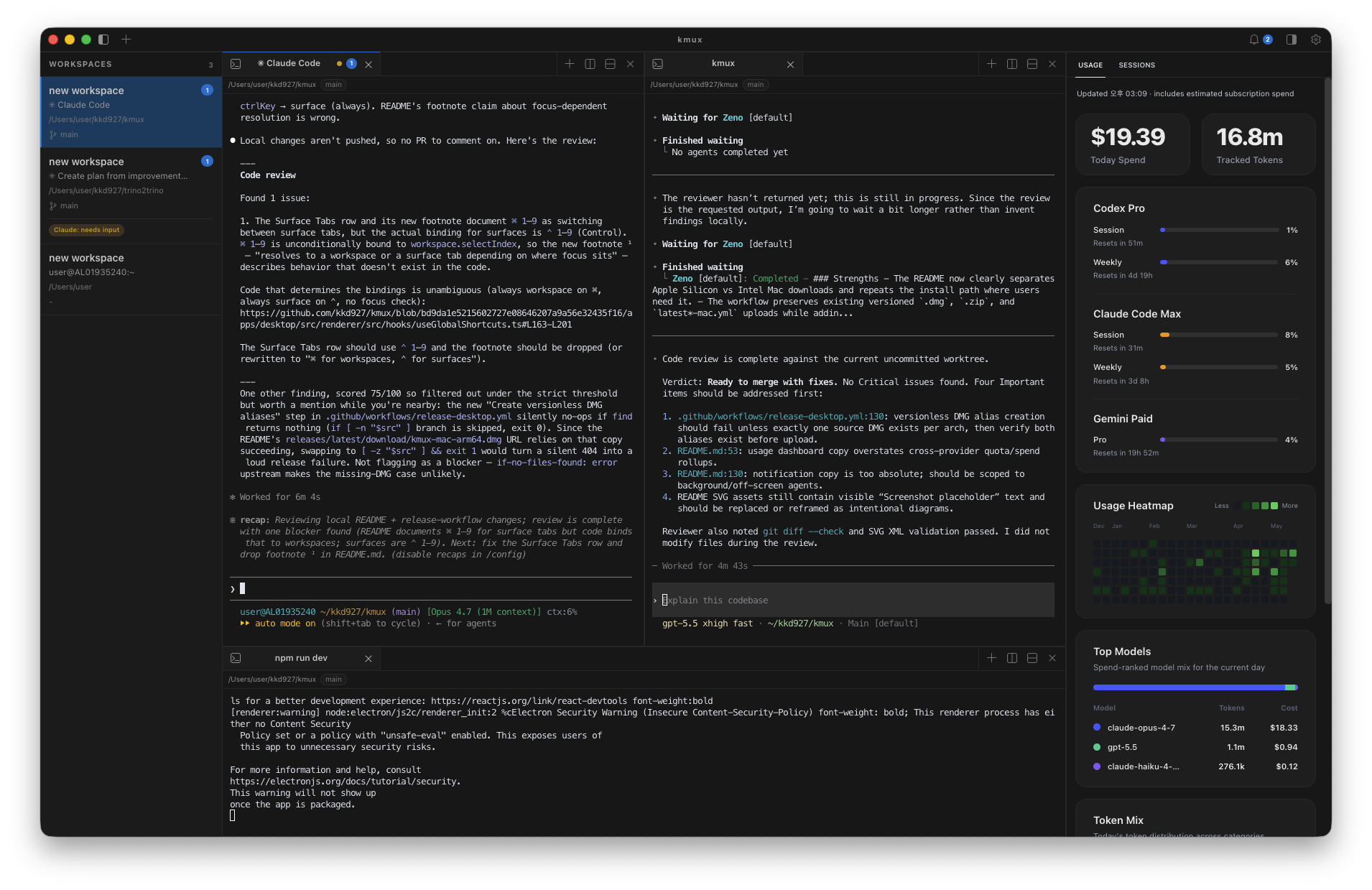
Run Claude Code, Codex CLI, Gemini CLI, and Antigravity CLI side-by-side — without losing track of any of them.
A macOS workspace for AI coding agents: parallel sessions, integrated usage, instant resume, worktree-safe branches.




English | 日本語 | 简体中文 | 한국어 | Español


✨ Why kmux?
If you've started leaning on Claude Code, Codex CLI, Gemini CLI, and Antigravity CLI for real work, you've already hit the friction: multiple terminals, multiple agent surfaces, separate session histories, and no good way to keep them from stepping on each other inside the same repo.
kmux is a macOS workspace built around exactly that workflow:
- Park each agent in its own workspace and run them in parallel
- Get native macOS notifications when any agent needs input or finishes
- Track combined usage and remaining session budgets in one sidebar
- Jump back into any past Claude/Codex/Gemini/Antigravity session with one click
- Spin up a
git worktreeso two agents can edit the same repo on different branches safely
It's keyboard-first by design — every workflow is reachable from the home row — but that's how it gets out of your way, not the headline.
🚀 Highlights
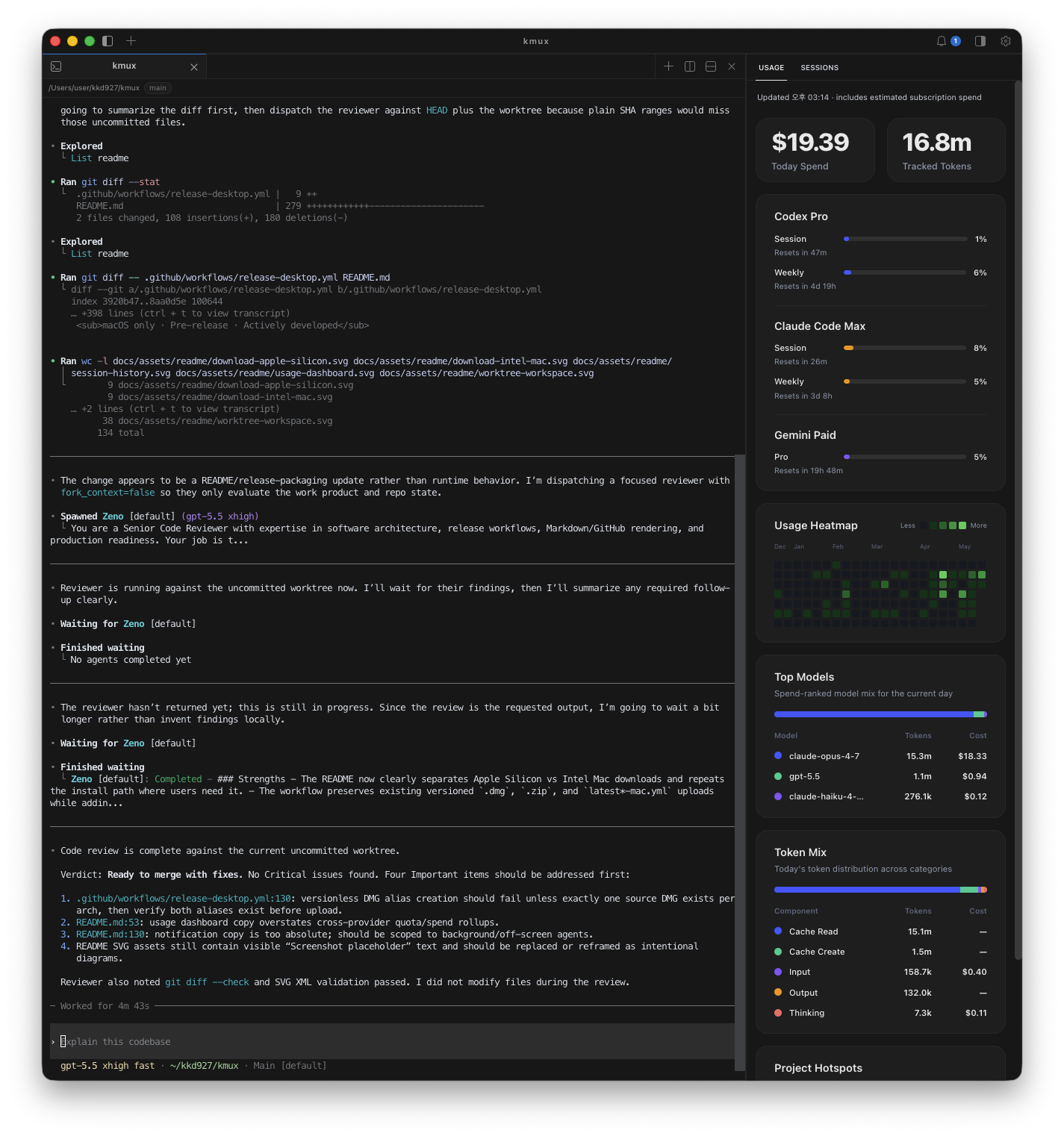
📊 Unified Usage DashboardTrack Claude Code, Codex CLI, Gemini CLI, and Antigravity CLI side-by-side in one right-sidebar panel. Usage and state roll up from each provider's local records where available, while lifecycle hooks stay focused on live status and notifications. A daily heatmap, today's spend, top-spending models, and per-project hotspots round out the view, replacing a stack of |
|
|
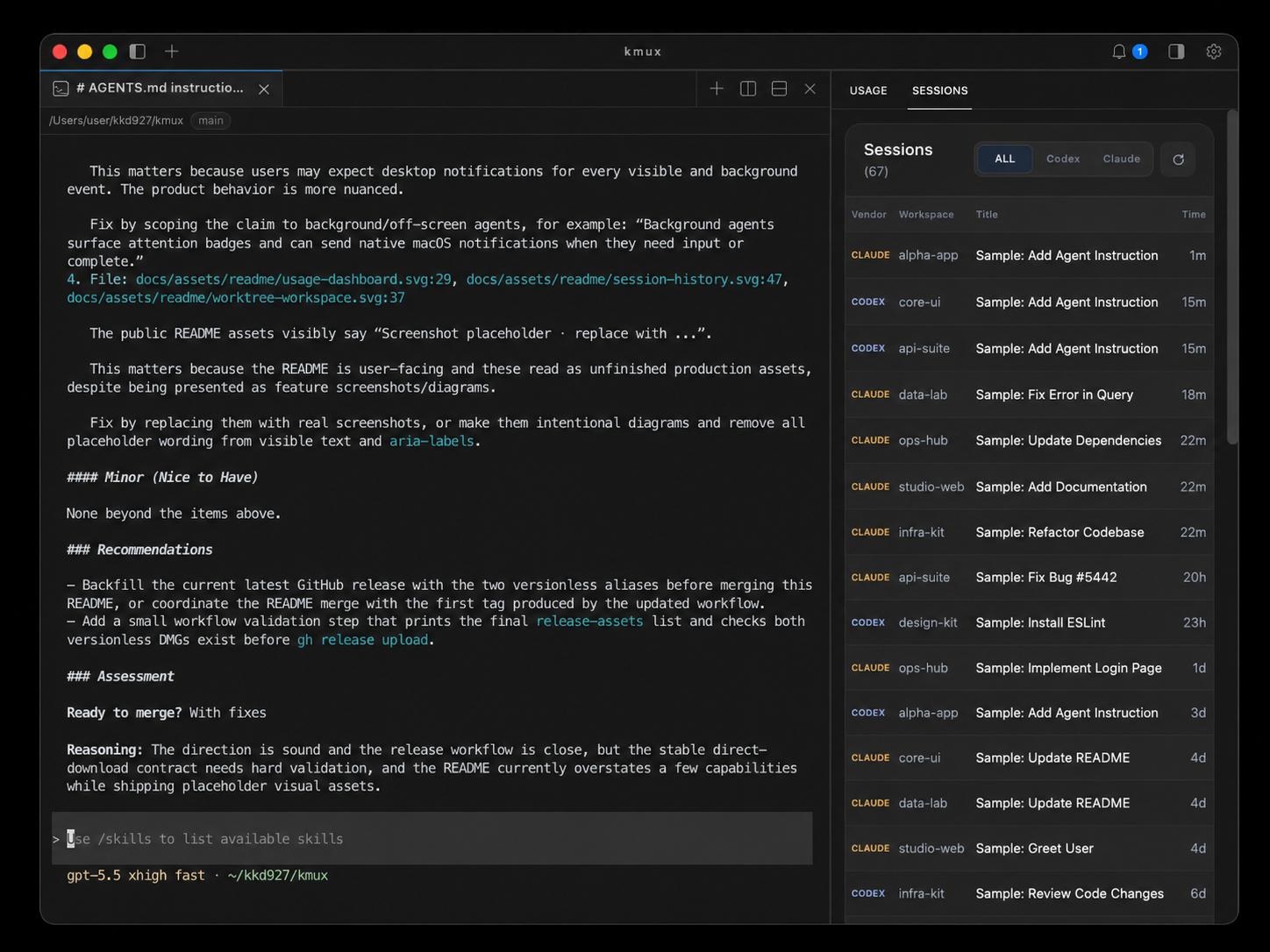
🕘 Cross-Agent Session Historykmux indexes local session records for all four agents — Claude ( Click any row to resume that session. kmux focuses an existing surface for the same |
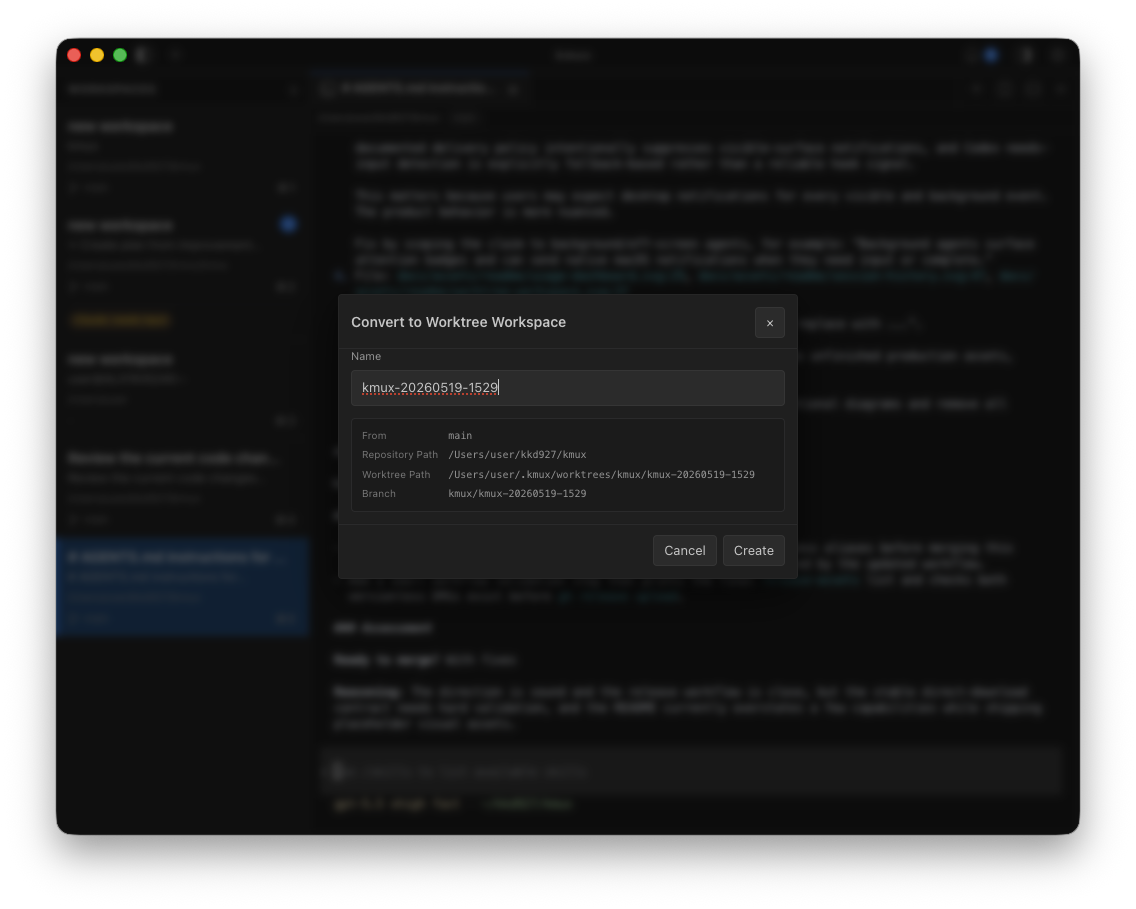
🌳 Worktree WorkspacesRight-click any workspace → Convert to Worktree Workspace to lock it onto a fresh kmux tracks the worktree lifecycle — branch name, dirty state, and removal, including a confirmation prompt before deleting a worktree with uncommitted changes — so the working copy never gets orphaned. |
|
Everything else you'd expect from a serious terminal
- Split panes & surface tabs — group server, logs, and agent shells in one pane
- Smart sidebar — auto-detected
cwd, git branch, active ports, and unread badges per workspace - Workspace persistence — full layout restore on app launch
- Command palette (
⌘ ⇧ P), terminal search (⌘ F), vim-style copy mode - Native macOS look — proper title-bar integration, dark palette, retina-tuned rendering
📦 Install
- Click the button that matches your Mac (M1/M2/M3/M4 → Apple Silicon, older Intel Macs → Intel)
- Open the downloaded
.dmgand drag kmux into yourApplicationsfolder - On first launch, macOS may ask you to confirm — click Open
🏁 Quick Start
- Launch kmux and press
⌘ Nto create a workspace - Inside it, run your agent —
claude,codex,gemini, oragy - Toggle the sidebar with
⌘ Bto see the Usage and Sessions panels - Press
⌘ Nagain to park another agent in its own workspace — or right-click a workspace → Convert to Worktree Workspace if both should touch the same repo - When an agent needs input or finishes, a native macOS notification fires and the workspace picks up an attention badge
⌨️ Keyboard Shortcuts
Every shortcut here is also reachable from the command palette (
⌘ ⇧ P).
Workspaces
| Shortcut | Action |
|---|---|
⌘ N |
New workspace |
⌘ ] |
Next workspace |
⌘ [ |
Previous workspace |
⌘ 1–9 |
Switch to workspace by number |
⌘ ⇧ R |
Rename workspace |
⌘ ⇧ W |
Close workspace |
⌘ B |
Toggle sidebar |
Panes
| Shortcut | Action |
|---|---|
⌘ D |
Split right (vertical) |
⌘ ⇧ D |
Split down (horizontal) |
⌥ ⌘ ← → ↑ ↓ |
Focus pane directionally |
⌥ ⇧ ⌘ ← → ↑ ↓ |
Resize pane |
⌥ ⌘ K |
Close pane |
Surface Tabs
| Shortcut | Action |
|---|---|
⌘ T |
New surface tab |
⌃ Tab |
Next surface |
⌃ ⇧ Tab |
Previous surface |
⌃ 1–9 |
Switch to surface by number |
⌘ W |
Close surface |
⌃ ⌘ W |
Close other surfaces |
Terminal & Utilities
| Shortcut | Action |
|---|---|
⌘ ⇧ P |
Command palette |
⌘ F |
Search in terminal |
⌘ G / ⌘ ⇧ G |
Find next / previous |
⌘ C / ⌘ V |
Copy / paste |
⌘ ⇧ M |
Vim-style copy mode |
⌘ I |
Toggle notifications |
⌘ ⇧ U |
Toggle usage dashboard |
⌘ , |
Open settings |
📚 Resources
| 📖 Product Spec | docs/product-spec.md — full feature spec, including automation socket & CLI |
| 🏗️ Architecture ADR | docs/adr/0002-electron-xterm-mvp-architecture.md |
| 🛠️ Development Guide | docs/development.md — build from source, dev loop, debugging |
| 🤝 Contributing | CONTRIBUTING.md |
| 📜 Code of Conduct | CODE_OF_CONDUCT.md |
| 🔒 Security Policy | SECURITY.md |
kmux — your AI coding agents, side-by-side.
macOS only · Pre-release · Actively developed
Reviews (0)
Sign in to leave a review.
Leave a reviewNo results found