agent-center
Health Uyari
- License — License: MIT
- Description — Repository has a description
- Active repo — Last push 0 days ago
- Low visibility — Only 5 GitHub stars
Code Gecti
- Code scan — Scanned 12 files during light audit, no dangerous patterns found
Permissions Gecti
- Permissions — No dangerous permissions requested
Bu listing icin henuz AI raporu yok.
An Orca plugin that shows your coding agents as characters in a room per project
Agent Center: Tavern & Auto-Battler
A tavern for every project in Orca, where your coding
agents hang out as characters acting out their work, and an idle auto-battler that runs on what
they do.
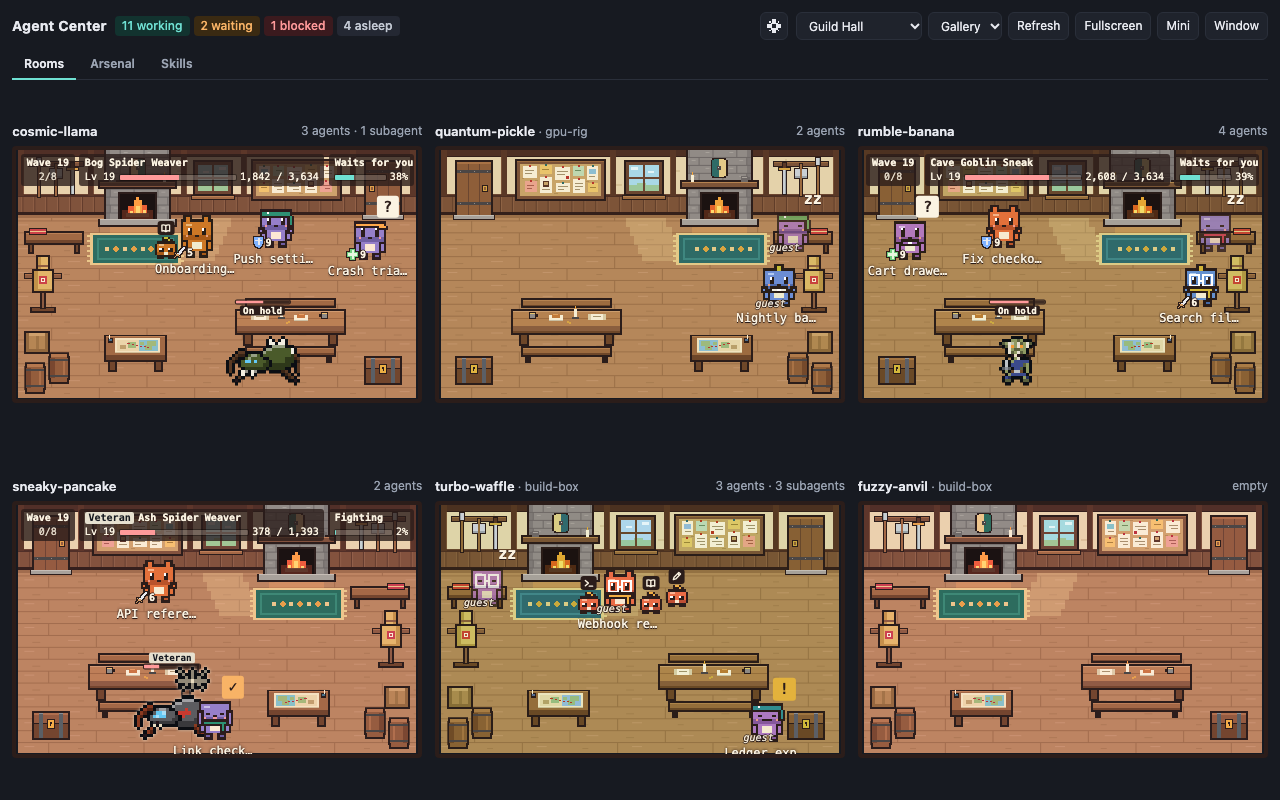
Two ways to use it
| Just watch | Play |
|---|---|
 |
|
| The default. The rooms are a live picture of your agents and nothing else. No numbers, no progress, nothing to manage. One glance tells you who is busy, who is waiting on you and who has gone quiet. | Game mode. The same rooms become an auto-battler. Every agent is a character with a class and a level, the agents working in a room fight its monsters, the idle ones gather, and the loot buys gear. It plays by itself while you work. |
Game mode is off until you turn it on. Turning it off brings the plain rooms back and keeps
your progress for next time.
The rooms
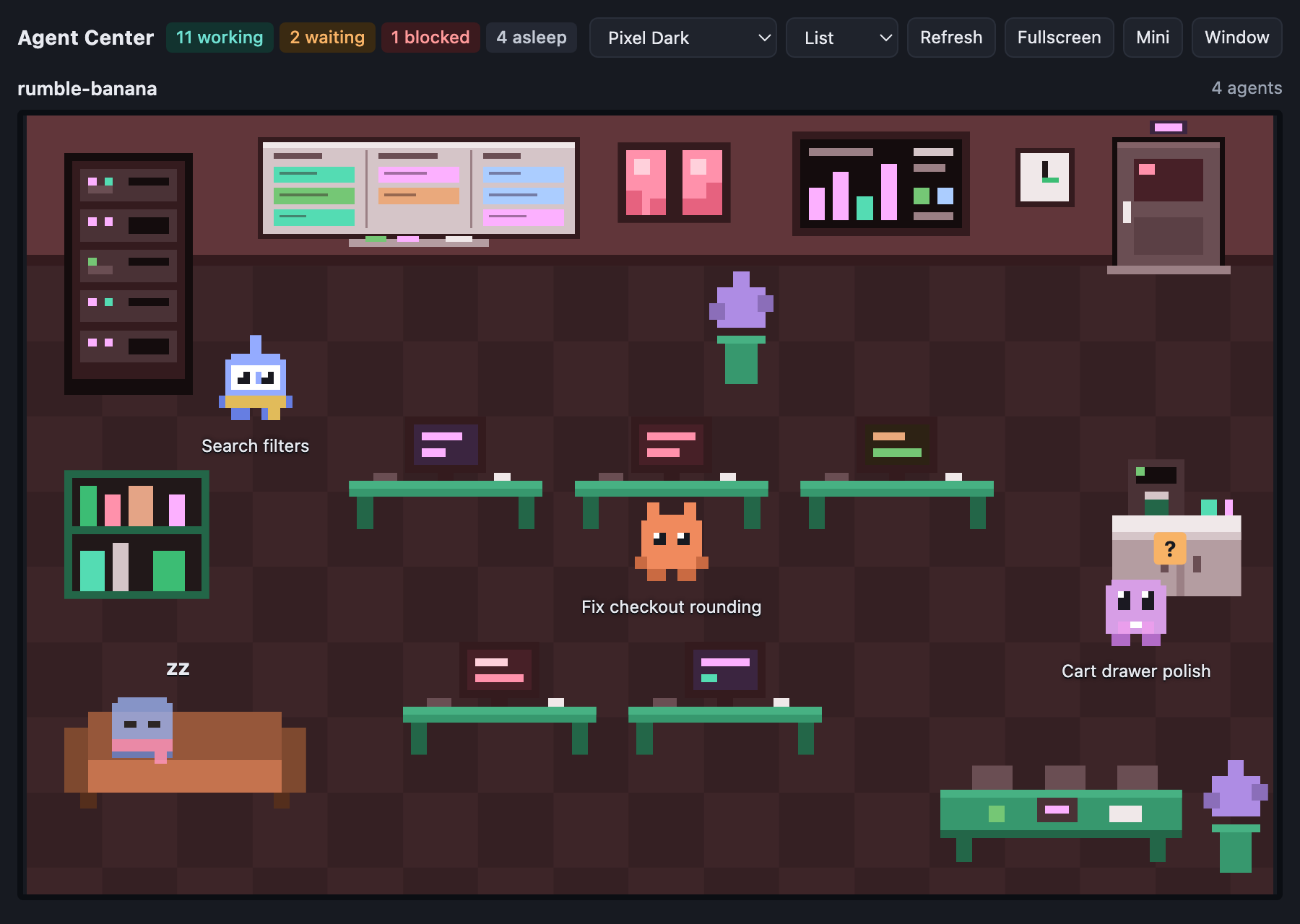
An agent editing files sits at a desk. One searching the codebase walks to the bookshelf. One
running a command stands at the server rack. When it needs you, it stops and raises a ?. When
it is blocked, it stands under the build dashboard with a !. When it is done, it falls
asleep on the sofa. Subagents appear beside the agent that called them as its familiars, small companions in
its colours, and vanish when they finish.
One glance tells you which of your projects are busy, which are waiting on you, and which have
gone quiet, across every machine Orca is connected to.
- One room per project. Worktrees of the same repository share a room, and so does a
repository cloned inside another one's folder. The room title shows the project and the host
it runs on. - Activity, not just status. Characters follow the tool their agent is using: writing,
reading, running commands, delegating, waiting, blocked, done. - Subagents. Every subagent is a familiar of the agent that called it: a small creature drawn
by the room's theme, in that agent's colours. Familiars stay at their agent's side and follow
it across the room, and a small icon over each shows what it is doing. Hover or click one for
its name. An agent with more than six shows six and a "+N". - Finished, not seen yet. An agent that finishes stays up with a "✓" and keeps
celebrating for as long as Orca shows its bell. It goes to sleep once you have opened its
terminal. - Emotes. Now and then a character plays a short move that fits what it is doing and the
room it is in: a spell cast over a long command, a stretch at the desk, a little dance on
finishing. Never all at once, and not at all if your system asks for reduced motion. - Agents that were already running. The plugin reads what is open in Orca when it starts,
so the rooms are populated from the first second. - Every host. Agents on paired machines get rooms too.
- Everyone looks different. Each agent gets its own outfit and tint, and each room its own
colour, so you can tell them apart. They stay the same across restarts. - Themes. Three ship with the plugin, each room can pick its own, and adding one is a
folder with a few files. - Anywhere on screen. A sidebar panel, a tab next to your terminals, a detached window,
fullscreen on a spare monitor or tablet, or a small always-on-top window.
Game mode: the auto-battler
You do not play it so much as feed it. Your agents do their work, and the work is what moves
the game: no clicking is needed, and nothing is lost by ignoring it for a day.
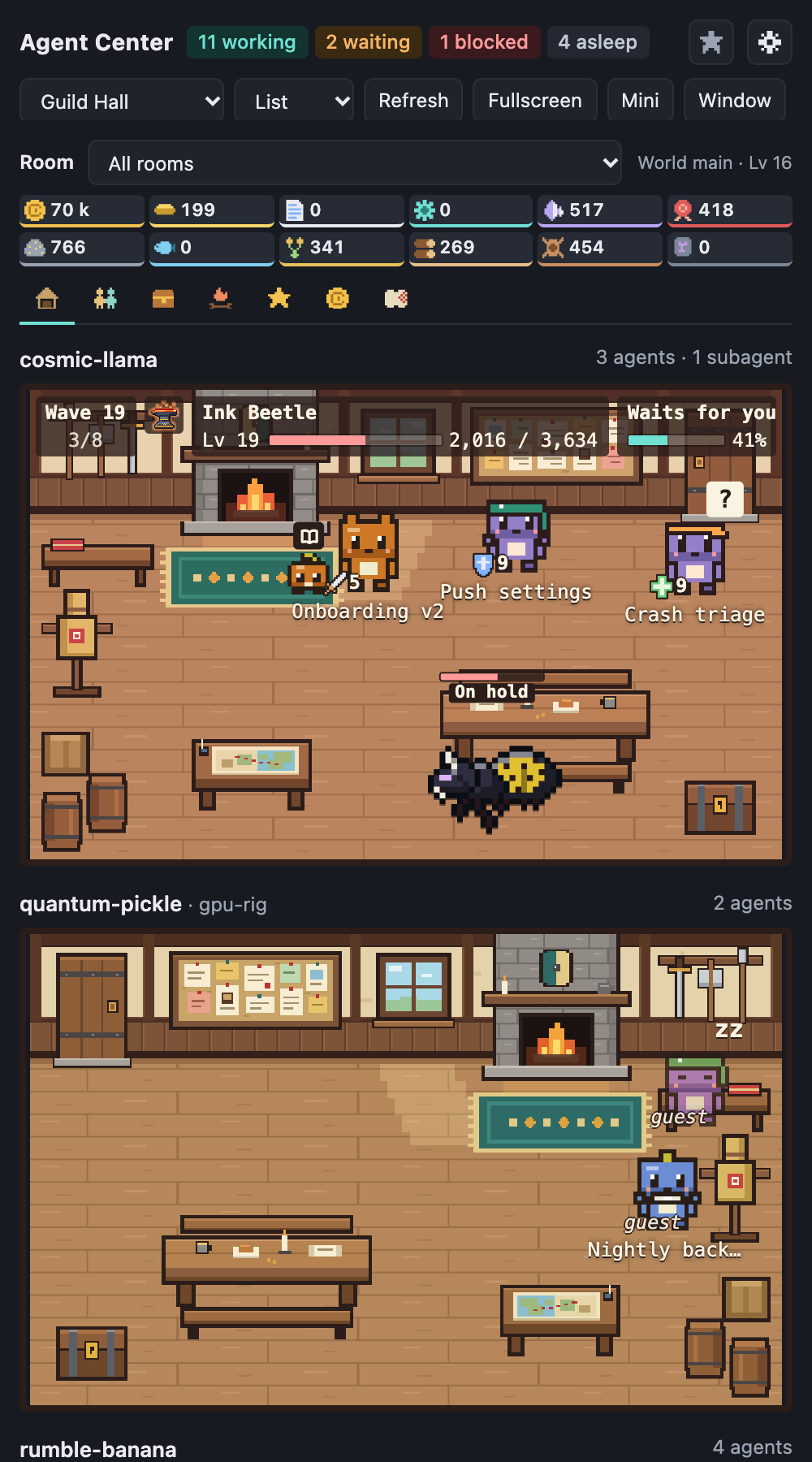
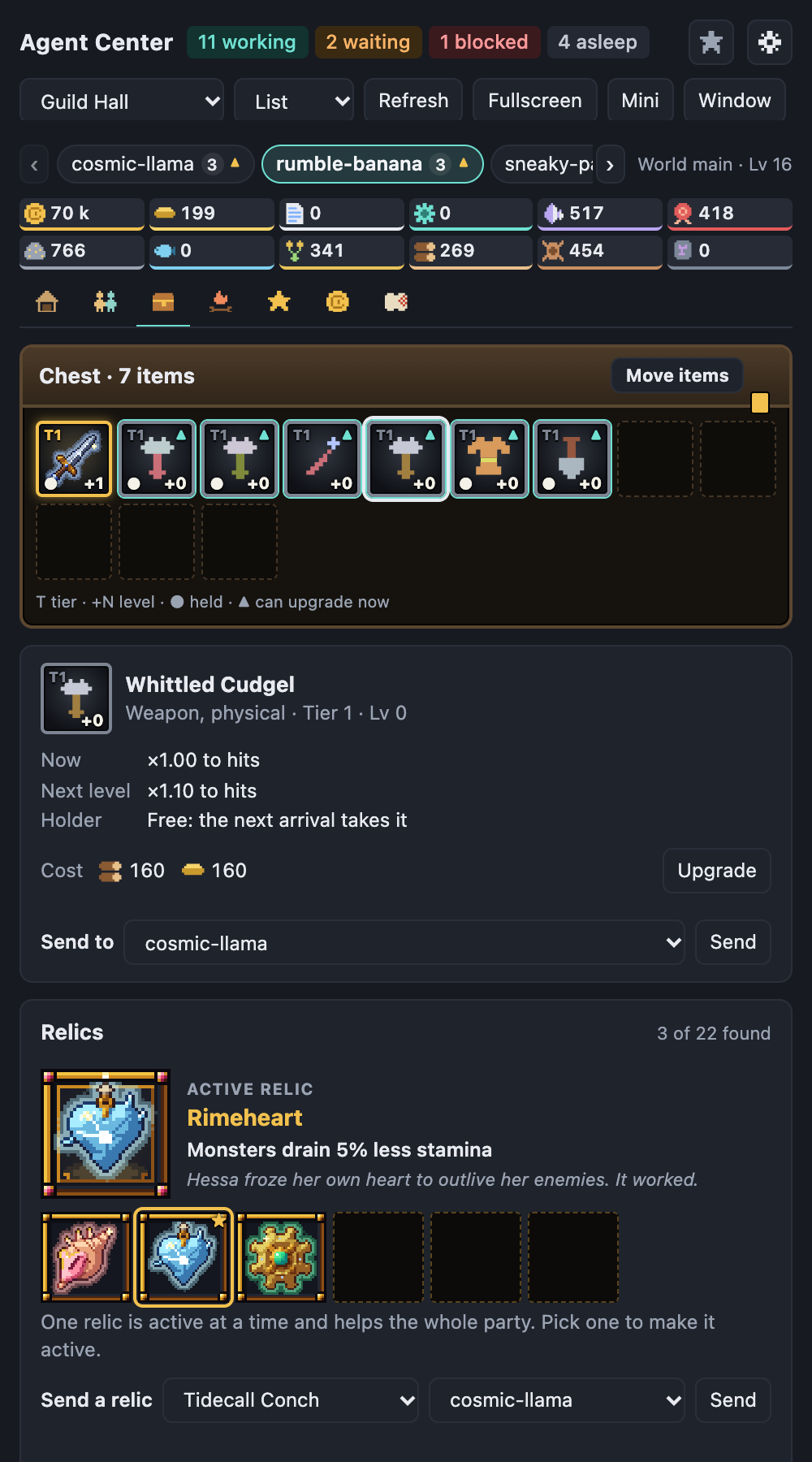
| Rooms | Chest | Skills | Market |
|---|---|---|---|
 |
 |
 |
 |
How it plays
- Every agent is a character. A session gets a class when it first works (Fighter, Mage,
Guardian or Healer, picked to balance its room's party), then levels up and grows seven
attributes as it spends tokens. Click a character to see its sheet. - Each room is a party fighting waves. The agents working in a room fight its monster.
Every kill moves the wave on, every tenth wave brings a boss, and a party that runs out of
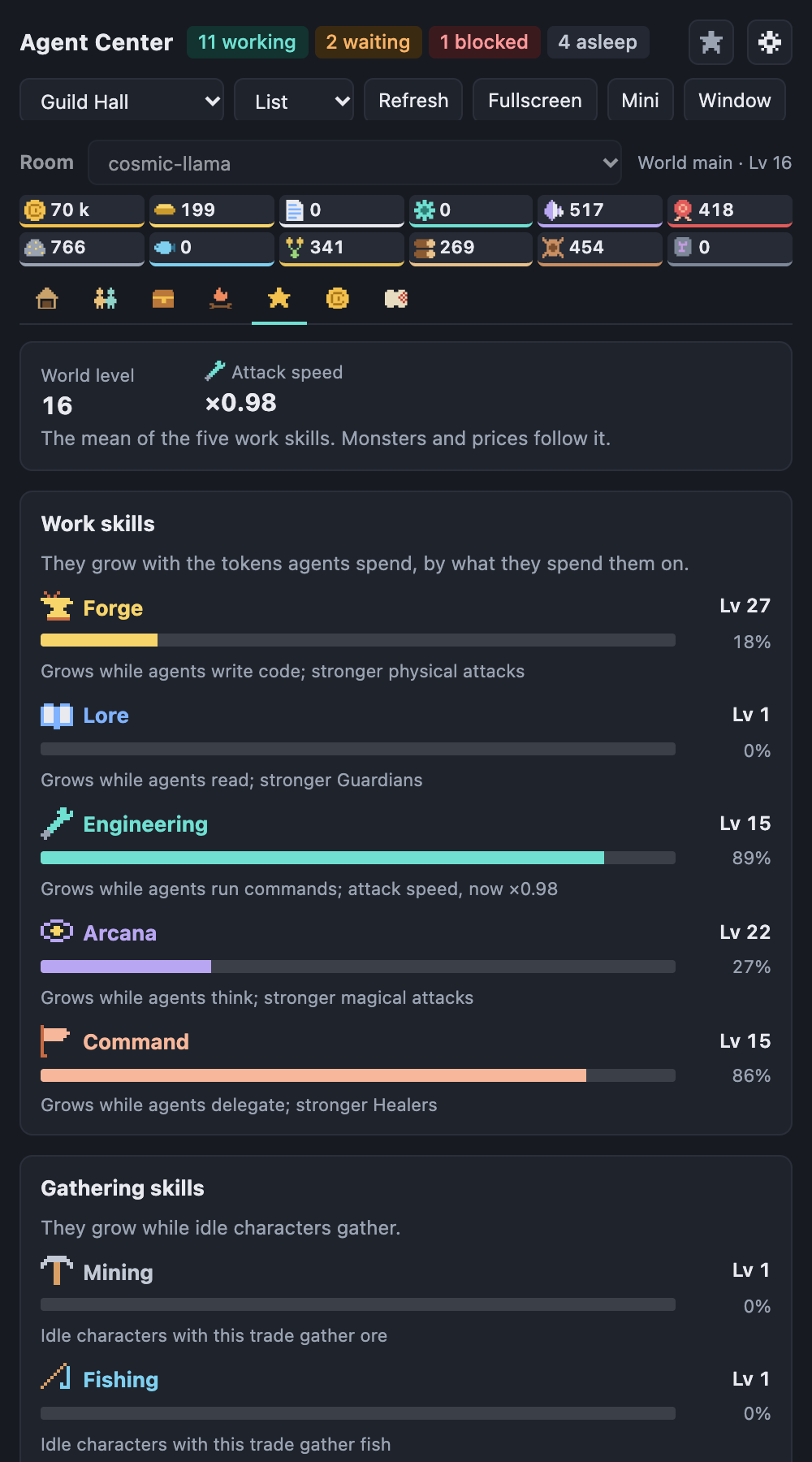
stamina rests before it goes again. When an agent stops to wait for you, its party holds. - What your agents do decides what grows. Writing code raises Forge, reading raises Lore,
running commands raises Engineering, thinking raises Arcana and delegating raises Command.
Each one makes a different part of the party stronger, and together they set the world level
that monsters and prices follow. - Idle agents gather. A character whose agent has finished takes a trade (mining, fishing,
farming, woodcutting, hunting or runecraft) and brings materials home. The game picks one for
each character (Auto); on the Party tab you can set what everyone in a room
gathers, or what one character gathers, which wins over the room's choice. - Loot, a chest and upgrades. Monsters drop materials and gear. Each room has a chest;
a new character takes the best free item of each slot by itself. On the Party tab, click a
character's slot to choose another item from the chest (or swap with whoever holds it); a
slot chosen by hand stays as chosen until you set it back to Auto, and Best gear for
everyone here re-picks every other slot. Materials upgrade items and
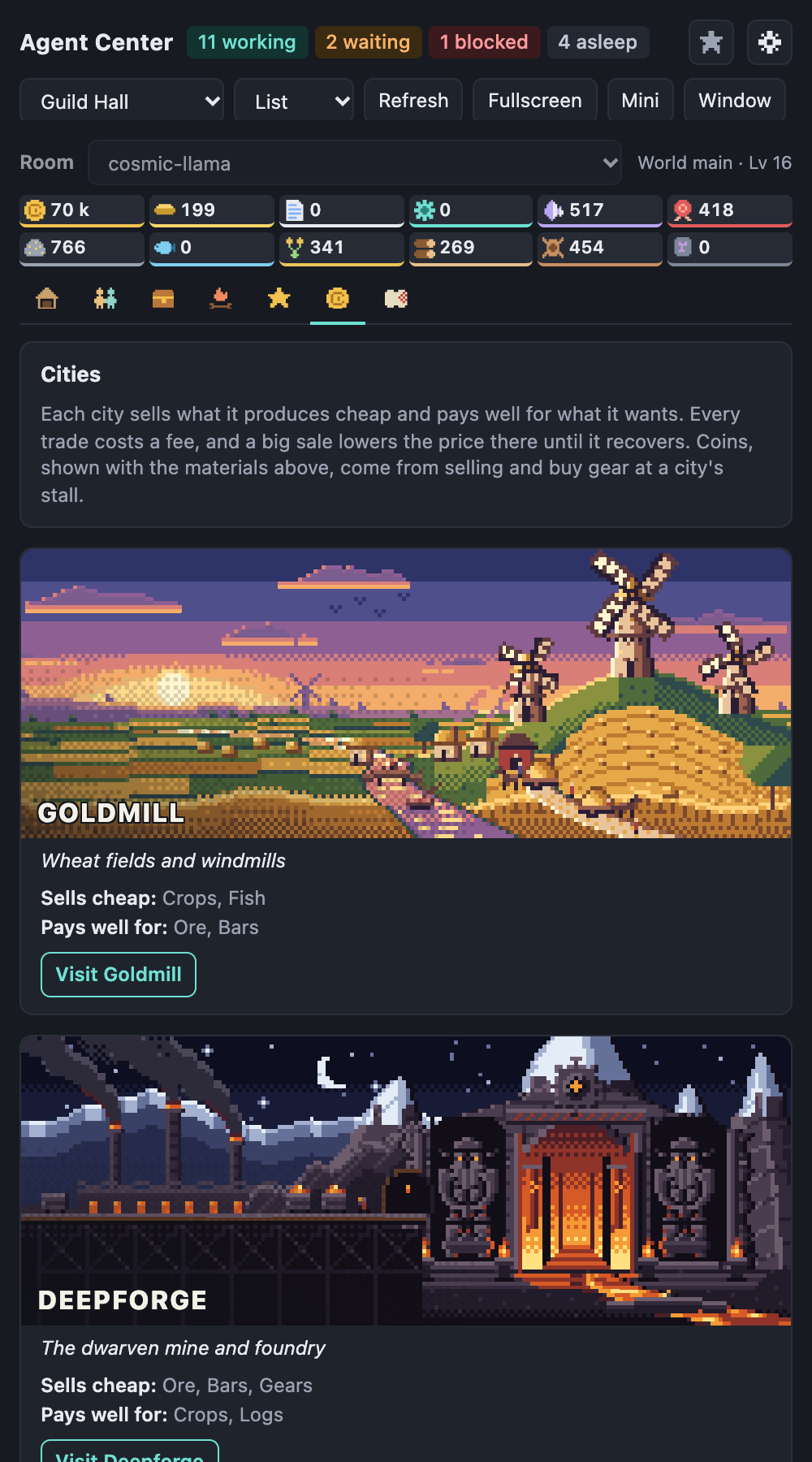
buy upgrades for the whole party, by hand or with auto-spend. - A market with five cities. Materials that pile up can be sold for coins or traded for
ones you lack, in cities that open as the world grows: Goldmill, Deepforge, Brinehaven,
Tallwood and Runespire. Each sells what it produces and pays best for what it wants; every
trade costs a fee and a big sale lowers the price until it recovers, so trading never makes
money out of nothing. Coins buy gear at a city's stall, new every day. Nothing is traded
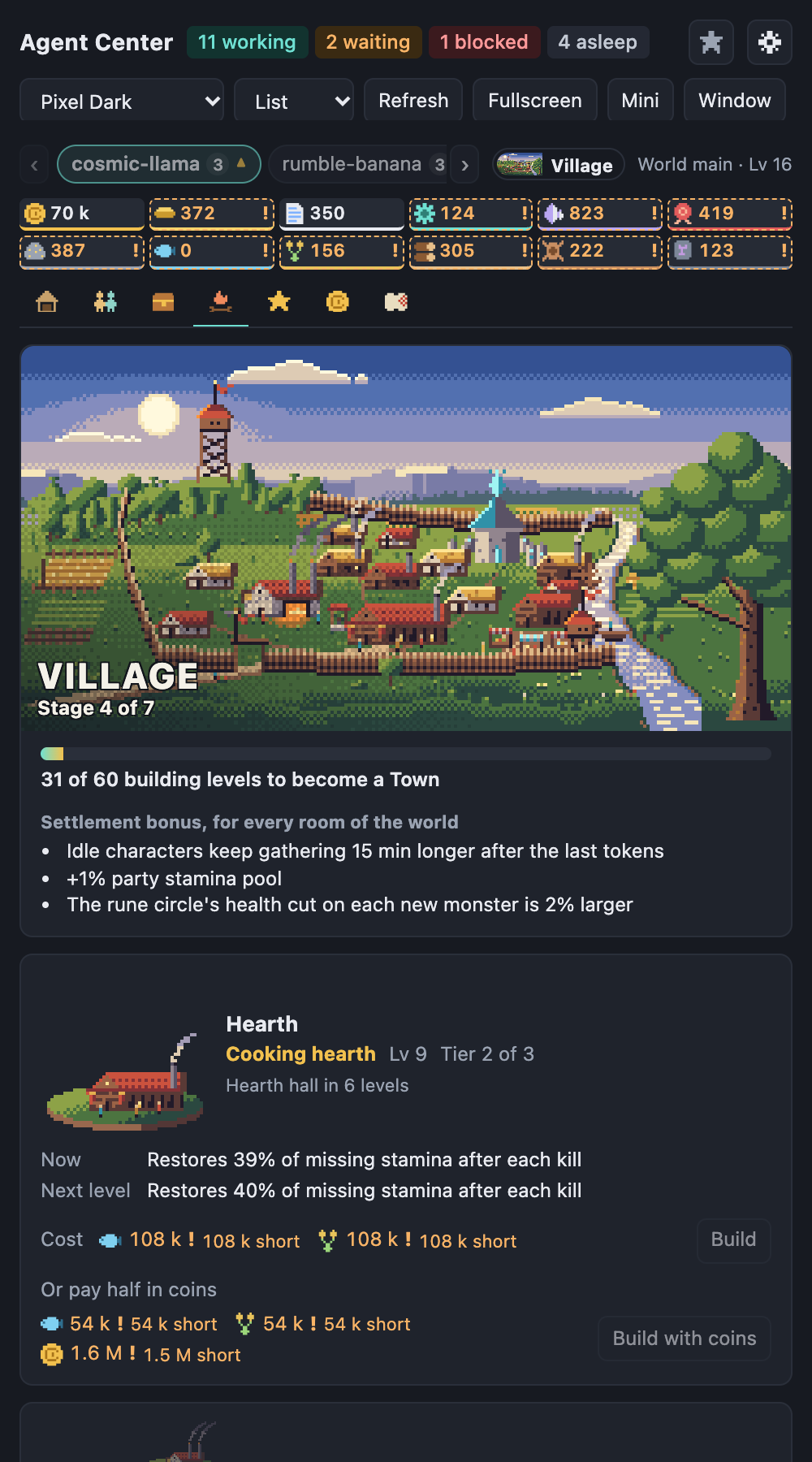
unless you do it. - A settlement that grows. The Camp tab is your world's settlement. Its five buildings are
the party's group upgrades: the Hearth (stamina after each kill), the Workshop (cheaper item
upgrades), the Sanctum (weaker monsters), and, as the settlement grows, the Storehouse (a lower
market fee) and the Defences (lighter monster strikes). Each grows through three tiers with its
own picture, and every building level counts towards the next of seven stages, from a Camp by
the river to a Citadel, each with a new picture and a small bonus for the whole world. From a
building's second tier half its price can be paid in coins; materials alone always do too.
Past the Citadel, renovation stars keep counting. A small badge above the tabs shows the stage. - Sessions retire. Close a terminal and its character retires into the room's hall, leaves
its gear in the chest for the next one and adds a small bonus to the room's gathering for
good. - Worlds keep things apart. Progress belongs to a world, a group of rooms you choose. Put
work and side projects in different worlds, or leave a room out of the game altogether. - No level cap. At level 99 a skill can be prestiged for a star and started again, stronger.
- Legendary loot. Bosses leave relics that help a room's whole party (one is active at a
time; pick it on the Chest tab), and some named bosses guard a relic or a legendary weapon,
outfit or tool of their own, with a buff for the character that holds it. A room's first boss
always leaves a relic, and a city's stall sells one of its two relics now and then, for coins.
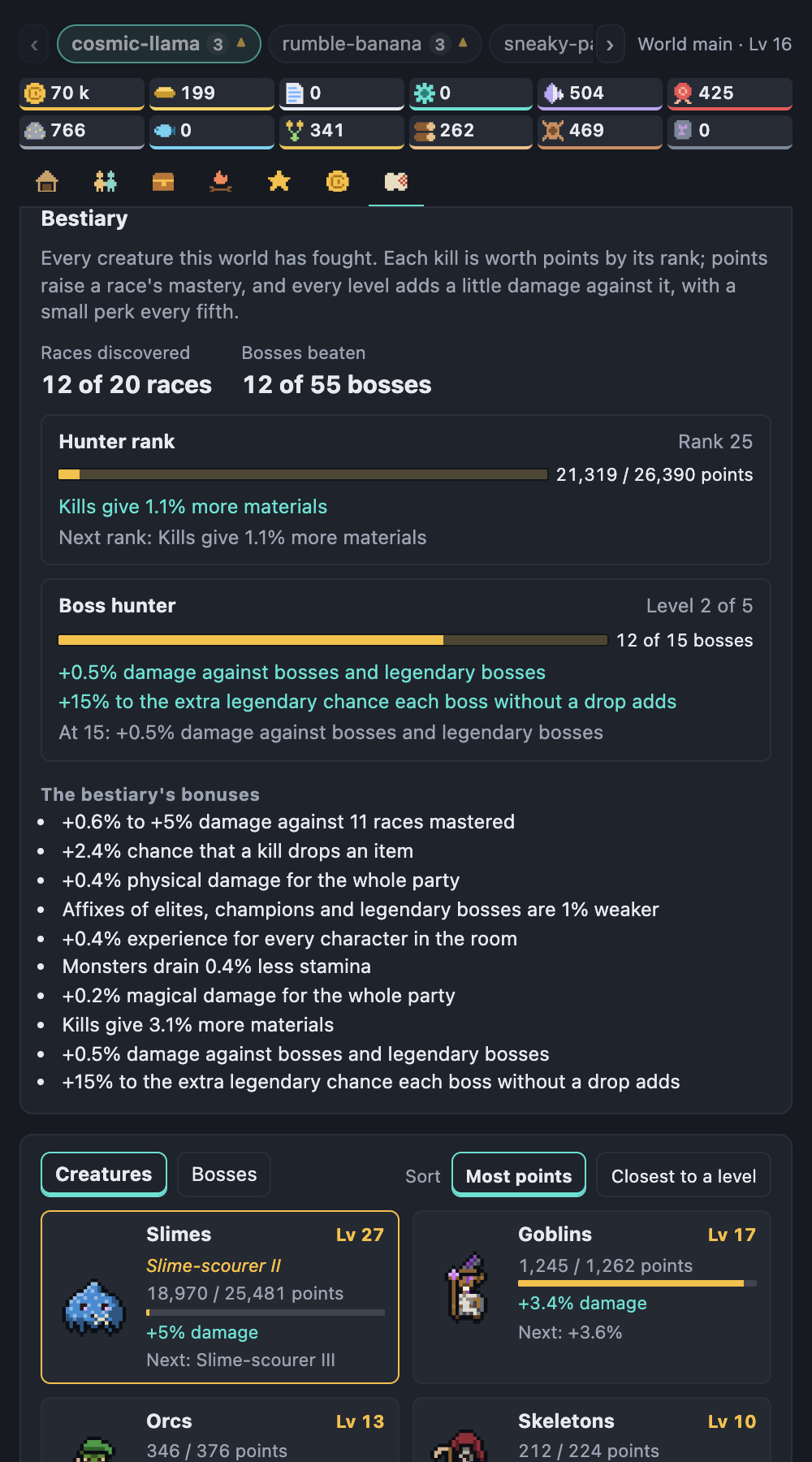
They are a bonus on top: a full set adds well under a fifth to a party. - A bestiary. Each world keeps a book of every creature it has fought: the World tab
shows the races met and the bosses beaten (unknown ones as a dark silhouette and "???"). Every
kill is worth points by its rank, and points raise a race's level on a long ladder, quickly at
first and slower later, without end: each level adds a little damage against that race, every
fifth a small perk, and past level 25 a race earns titles. A hunter rank counts every point,
and beating more different bosses levels a boss hunter track. It is a small bonus too: a whole
bestiary adds under a tenth to a party.
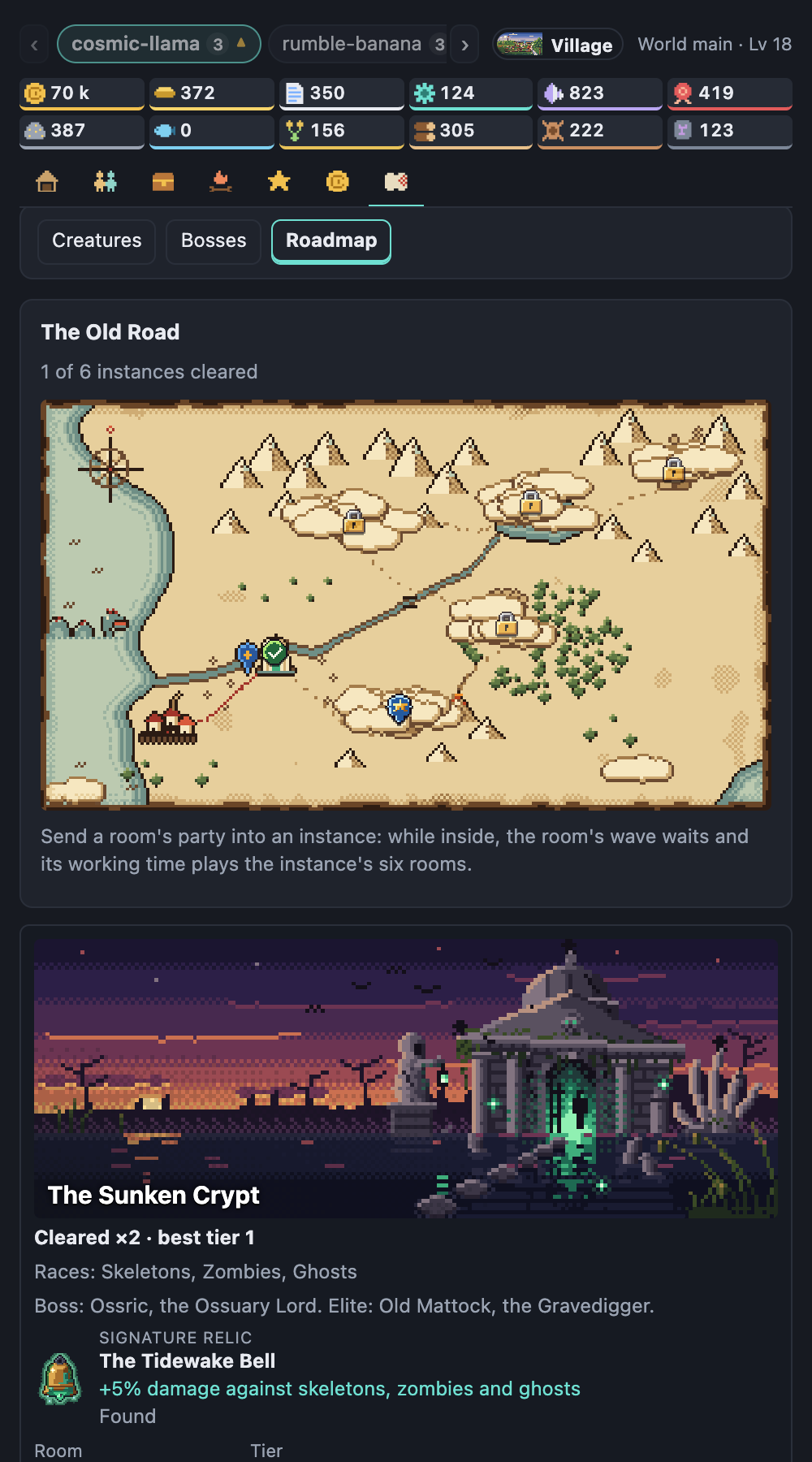
- Instances. A road of six dungeons opens as the world grows, one after another, from a
sunken crypt to a dragon's spire. Send a room's party into one from the World tab's Roadmap:
while inside, the room's wave waits and its working time plays the instance's six rooms (an
entrance, a hall, a trap or puzzle, an elite's chamber, a vault where you pick one of two boons,
and a named boss), and the room shows the instance's banner behind its characters. The first
clear of each gives a signature relic; every clear pays a purse and a chance at the boss's own
item. Repeat runs climb tiers with no end, each harder, richer and with its own twist. A run
that fails just ends, keeping what it found; an hour inside pays about what an hour on the
waves does.
The bestiary
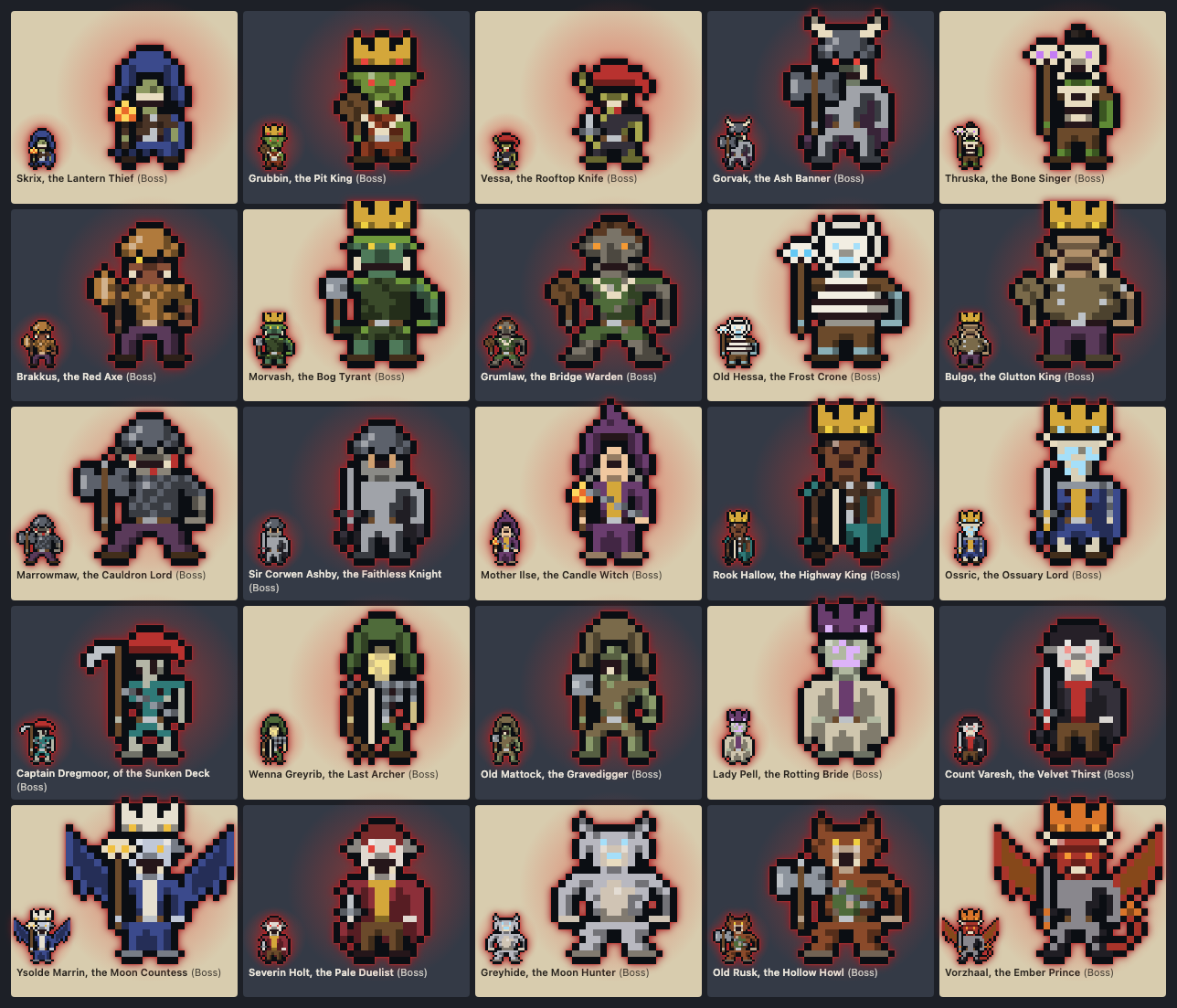
- 20 races, from goblins, orcs and trolls to dragons, golems and wood wardens. A monster is
put together from separate parts (head, body, legs, outfit, headgear, what it holds, colours),
so two of the same race rarely look alike, and its name says what it is: a "Moss Troll
Brute", an "Ashen Skeleton Archer". - 55 named bosses, each with a fixed look and a name of its own. A room meets all of them
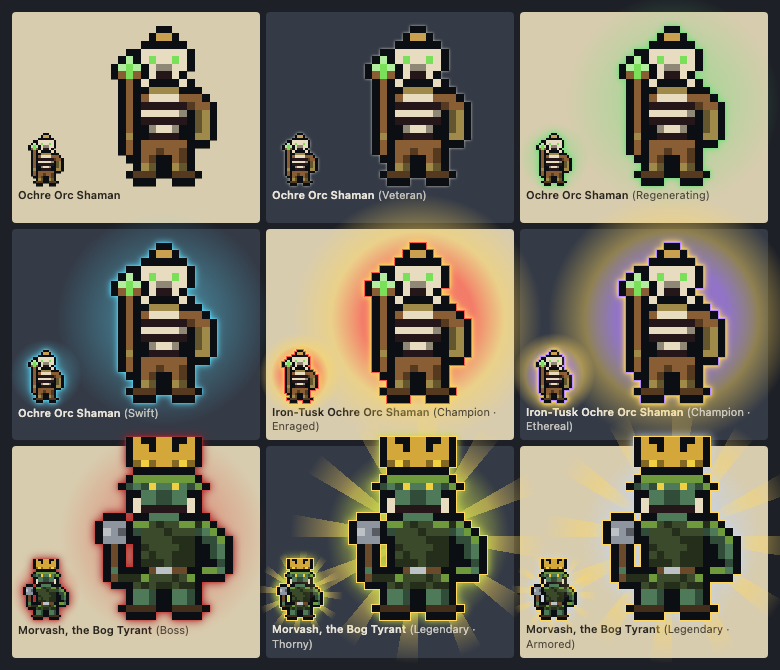
before any comes back. - Ranks you can read by the glow. Most monsters are plain. A veteran has a faint outline,
an elite a halo in the colour of its special trait, a champion a stronger one, a boss a red
aura, and now and then a boss arrives legendary, in gold. The rarer the rank, the tougher the
fight and the better the reward. - A room's theme adds a few monsters of its own on top.
- The party can travel. Turn on New scene after each monster in the game's settings
and every room that plays without a theme of its own moves on to another theme each time its
monster dies, its party walking in as the old scene fades away. Each room goes through every
theme before it sees one again, its monsters come from the scene it is in, and every surface
shows the same scene. With only one theme installed it does nothing.
Turning it on
Open Orca's Settings, go to Plugins, then Agent Center, and turn on Game mode. The panel
gains seven tabs: Rooms, Party, Chest, Camp, Skills, Market and World (the
bestiary's creatures and bosses, and the Roadmap of instances), under a
row of room chips and a strip with the world's coins and materials. One click on a chip picks the
room that Party and Chest show (and the world of the others), and on Rooms it can show one room
alone. Each chip shows the room's characters, a dot while its party fights and a triangle when
an upgrade is ready (and a small gate while its party is inside an instance); the arrow keys move along the row, and [ and ] pick the room before or
after from anywhere in the game. A long row scrolls sideways, and from eight rooms a More…
list reaches any of them. In the Chest tab, any item can be sent to another room of the same
world: from its detail (Send to), several at once with Move items, or by dragging its slot
onto a room's chip; taking one from a character asks first, and that character picks the next
best. A relic that is not active can be sent from the Relics card. On the Party tab each character shows its agent's
sprite as its room draws it; a click on it opens the room with that agent selected. In a narrow
panel the tabs show their icons only. The cog in the panel's header opens the game's own
settings: auto-spend (it never spends coins), New scene after each monster (off by default; see "The party can
travel" above), worlds and the save file.
Game mode: keep conversation titles keeps a finished session's title on its retired
character; it is off by default. Everything the game keeps stays on your computer. The full
rules and numbers are in docs/GAME.md.
Good to know
Where the tokens come from:
- Estimated, on today's Orca. Released Orca versions do not give plugins the tokens a
session spent. There, progress is estimated from how long each agent works and how many tool
calls it makes; it is not measured. Each agent is one character for as long as its terminal is
open, on this computer and on paired machines alike. A paired machine's agents are estimated
from its snapshots alone, so more coarsely, and earn nothing while the machine cannot be
reached. No new permission is asked for: the estimate uses only what the plugin already sees. - Real totals, once Orca provides them. When Orca offers its Agent Session History to
plugins and the session history permission (history:read) is granted, the game switches by
itself to the real token totals. This version of the plugin does not ask for that permission
yet.
The game's state says which one it is using (tokenSource). How the estimate is computed is in
docs/GAME.md.
To keep a copy of the game or carry it to another computer, open the game settings (the cog)
and use Save file: Export downloads the game as a JSON file and also shows it as text to
copy, since Orca's panel may block the download; Import takes such a file, chosen or pasted,
and replaces the whole game on this computer after asking. Token counts are not in the file, so
counting starts again from the import. The file is private: it holds your projects' folder
paths, the names of paired machines, session ids and, when titles are kept, conversation
titles. Do not attach it to a public bug report.
A room that is no longer on screen keeps its chest and retirees. The Chest tab
lists them under Chests left behind for the chosen room's world; Move here moves them
into that room after asking. Nothing moves by itself.
Themes
Each room can use a different theme. The selector at the top sets the default, used by every
room that has not picked its own; hover a room's title to give that room its own.
Pick Random as the default to give each of those rooms a different theme instead of one
shared look. In game mode, New scene after each monster moves those rooms (under Random or
any other default) to a new theme with every kill instead. The choice comes from the room itself, so a room keeps its theme across restarts
and looks the same in the panel, the tab and the external view. Rooms are spread over the
themes as evenly as possible; opening a new project or adding a theme can move some of them.
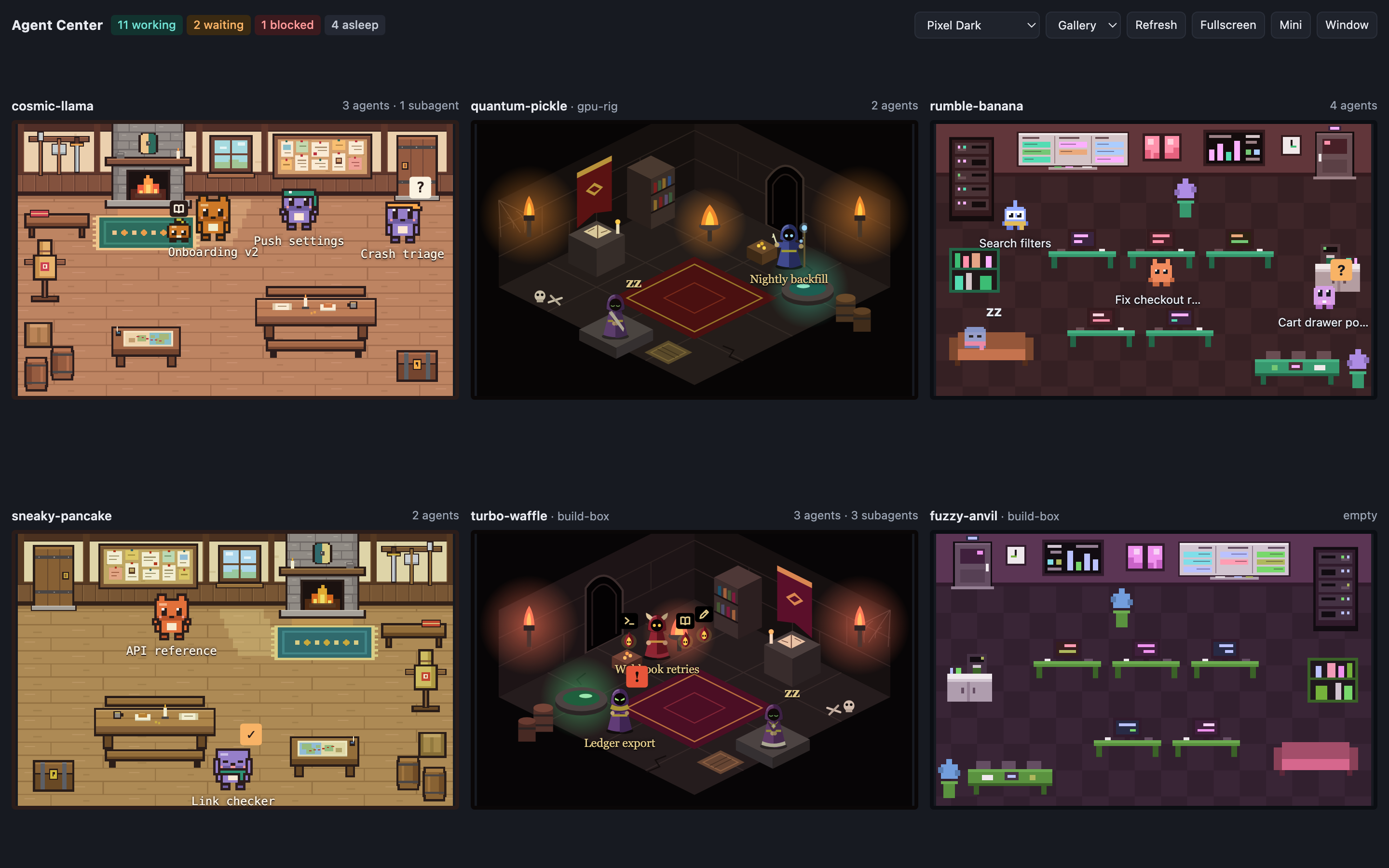
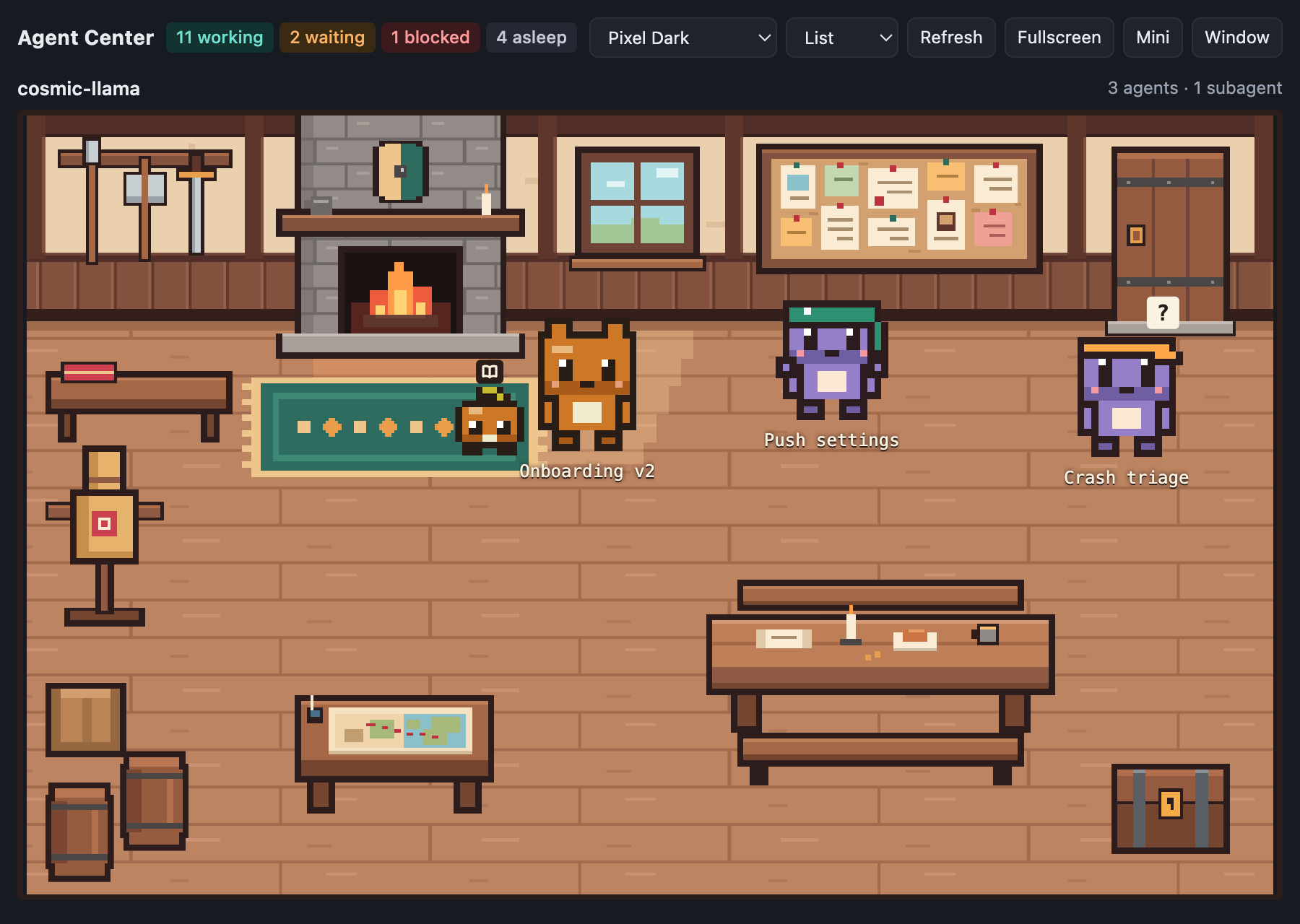
| Pixel Dark | Guild Hall | Gothic Dungeon |
|---|---|---|
 |
 |
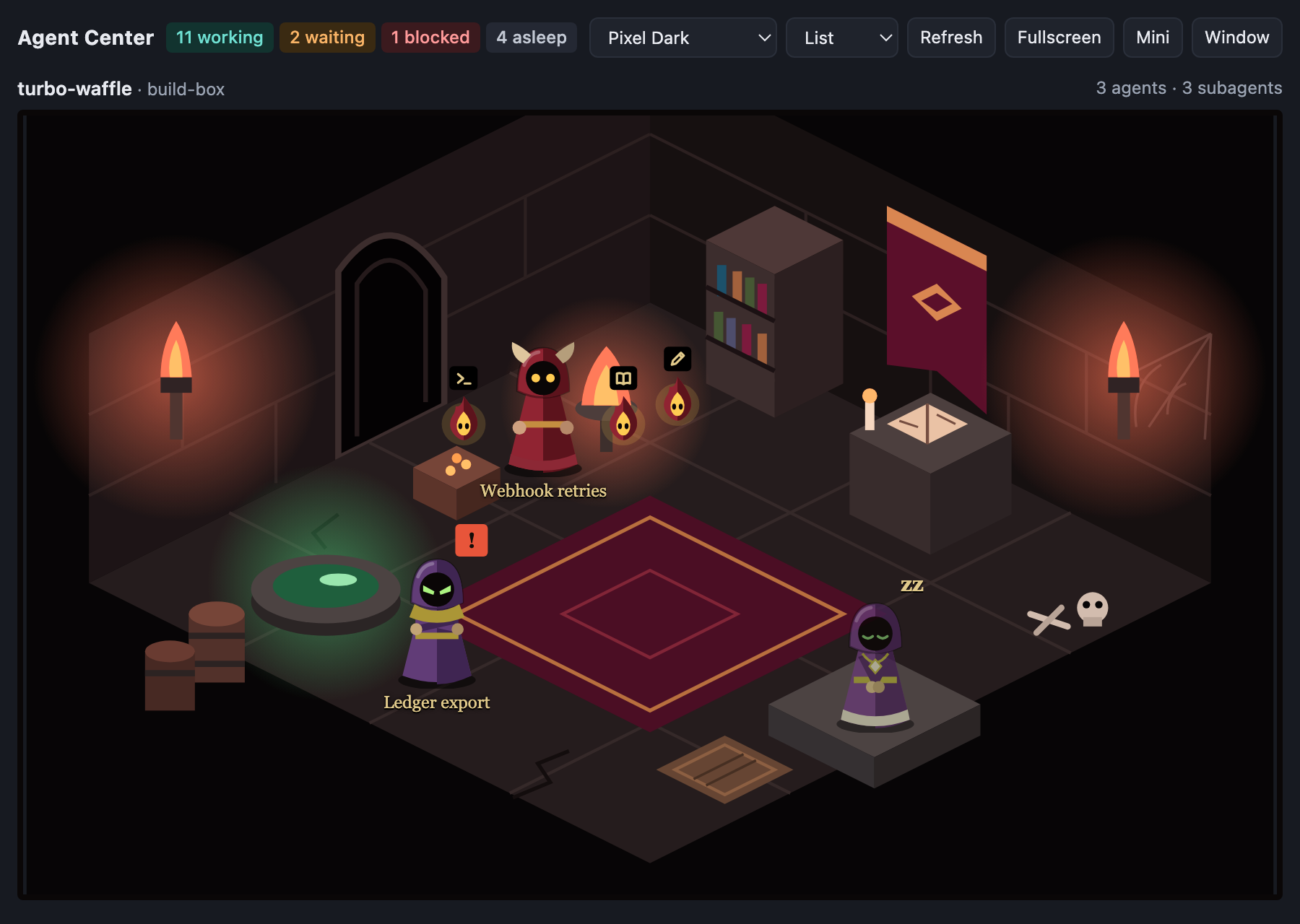 |
| A dark pixel-art office that blends into Orca. | A warm timber guild hall with a quest board, a fireplace and chunky outlined characters. | A torch-lit stone crypt with hooded figures. |
Want another look? A theme is a folder with a scenery, a sprite sheet and a small JSON file.
Copy themes/_template, run node scripts/demo.mjs <your-theme> and draw: the quick start in
THEMES.md has the six steps.
Views
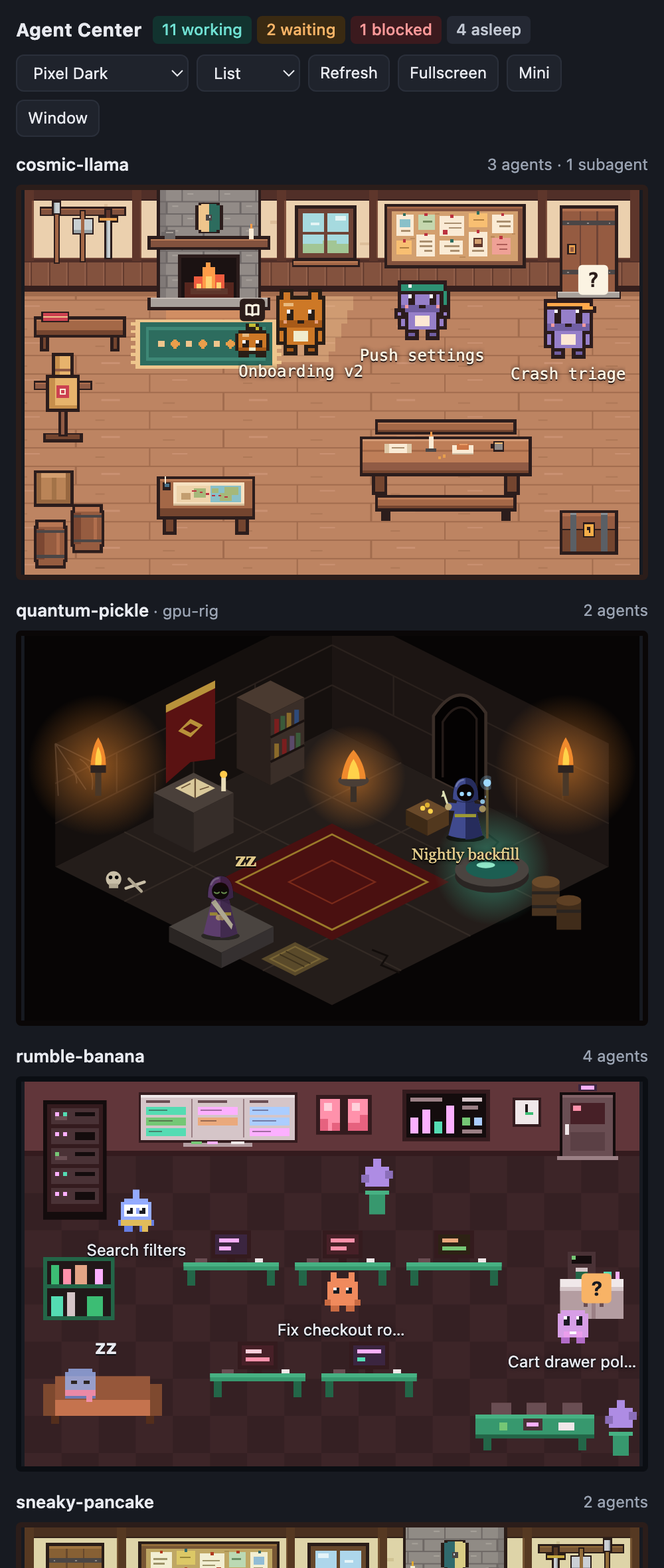
- Gallery fits every visible room in the space there is, with no scrolling. Good for a
second monitor. - List gives each room the full width and scrolls. Good for the sidebar.
- Pin a room in Gallery to show it large, with the others in a strip below. Hover the
room's title and click pin; click unpin to go back.
The panel, the tab and the external view each remember their own choice.
The star at the right of the title opens the project's GitHub page, in case you want to leave a
star.
Rooms you do not care about can be hidden: hover the title and click hide. Hidden rooms are
listed at the bottom, one click away.
Where it shows up
| Place | How to open it |
|---|---|
| Orca's sidebar | the Agent Center panel; Collapse leaves only the counters |
| A tab, next to the terminals | the tabs' + menu, Agent Center |
| Status bar | the item with the agent count shows or hides the sidebar |
| Detached window | Pop out opens the external view in your browser; there, Window |
| Fullscreen on another monitor | in the external view, Fullscreen |
| Mini, always on top | in the external view, Mini (Chrome or Edge) |
The external view is a local page the plugin serves at http://127.0.0.1:47600/, or on the next
free port when that one is taken; Pop out in the panel opens the right address. It takes a
few address options, handy for a wall display:
?view=galleryor?view=liststarts in that view.?only=<text>shows only the rooms whose project or host contains the text.?emotes=offkeeps the characters from emoting;?emotes=fastmakes them emote every few
seconds, which is how you preview a theme's emotes.
To open it on a tablet on the same network, turn on Open to the local network in the plugin
settings and use the computer's IP address, or its name ending in .local, with the same port.
That option has no password, so anyone on the network can see your project, folder and agent
names and change the themes. In game mode they can watch the game but not play it: every game
control (spending, prestige, worlds, reset, auto-spend, keeping titles, export and import) works
only on the computer that runs Orca, and such a page shows View only. SECURITY.md
lists everything the page shows.
Install
Find Agent Center: Tavern & Auto-Battler in Orca's plugin directory, or open its page:
https://orca.dev/plugins/klausbegnis/agent-center.
To run it from a checkout instead:
git clone https://github.com/klausbegnis/agent-center.git
orca plugin dev load ./agent-center
Orca lists what the plugin asks for and waits for your approval, because it runs its own code
and opens a local port. It needs Orca 1.4.248 or later.
Try it without Orca
node scripts/demo.mjs
Opens the external view with a set of made-up projects and agents that keep working, delegating
and finishing. It is also the fastest way to see a theme while you draw it. The screenshots on
this page come from it.
GAME=1 node scripts/demo.mjs
Turns game mode on with a made-up stream of tokens. Add FREEZE=1 for a fixed save after a day
of play.
GAME=1 TRAVEL=1 node scripts/demo.mjs random
Also turns on New scene after each monster, so each room changes scene with every kill. Namerandom or a theme: without one, every demo room has a theme of its own and stays put.
How it works
Two small programs that share one object, the view state:
- The worker (
src/, Node, inside Orca) listens to Orca's agent events and tool hooks,
reads what is already running through theorcaCLI, and turns it all into rooms, agents and
activities.src/domain/holds that logic with no I/O;src/worker.mjsonly wires parts
together. - The scene engine (
ui/, in the browser) draws the view state. It knows no theme: it
readsthemes/<id>/theme.jsonand draws what the file describes. The same engine runs in the
panel, the tab and the external view.
There is no build step and there are no dependencies: the code runs as written.
npm run verify
Runs the static checks and the unit tests. npm test and npm run check run each alone.
Contributing
Contributions are welcome.
- CONTRIBUTING.md takes you from a clone to a merged pull request.
- rules/ holds the short rules the code follows, one file per area.
- docs/MAINTAINING.md says how issues are triaged and pull requests
merged. - CHANGELOG.md lists what changed.
Known limits
- Per-tool activity comes from Orca's tool hooks, which do not cover agents on SSH or WSL hosts
today. Those characters only show the overall state. Subagents come from the hooks too, and
from Orca's snapshot where it lists them (subagentson their agent in newer Orca releases,
or child entries in older ones), which also covers paired machines. - With active subagents Orca does not say whose tool a call is. The plugin gives it to the most
recent subagent, which is an approximation. - The mapped tool names are Claude Code's and a few of Codex's. An unknown tool shows as
"thinking". - Agents on paired machines come without a conversation title, so they are labelled with the
start of their last prompt. - Reading through the CLI relies on the plugin's "runs its own code" grant rather than a
dedicated capability. It only reads, apart from showing a terminal tab when you click
"Open workspace". - After Orca restarts, it stops tracking the sessions that were already running until they are
started again. The plugin still shows them, recognised by their terminal title, but only as
working or done: there is no per-tool activity, bell or familiar for them. - Game mode's progress is an estimate on every released Orca: working time and tool calls stand
in for tokens, and a conversation cleared in the same terminal goes on as the same character.
See docs/GAME.md. - On the estimate, which work skill a minute trains is itself estimated: it follows the agent's
recent tools, and the time of agents whose tools are not visible (untracked sessions, paired
machines, long gaps without a tool) follows the mix the world's other agents were seen using,
or a default mix for coding work. The Skills tab says which applies. - On the estimate, an agent on a paired machine is seen only through its machine's snapshot
every 15 seconds and no tool call of it is counted: its working time is sampled, and each
working minute is paid at an assumed pace of tool calls. A long-running command there is
overpaid like anywhere else. - With real token totals, game mode counts only sessions on this computer: Orca's session
history does not cover paired machines, and leaves subagents out. Agents on paired machines
then join their room's fight as guests with no token count, and a room whose only agents are
guests does not join the game. Under the Random theme the game uses its generic monsters,
except in rooms that travel with New scene after each monster, whose monsters come from
their scene. - With New scene after each monster, adding or removing a theme changes the order the rooms
travel in, and the monster standing when the setting is turned on keeps its look until it
dies. - macOS and Linux are what it is tested on. On Windows the plugin loads, but it does not find
the Orca CLI yet, so agents that were already running, paired machines, the bell and "Open
workspace" on a terminal are missing.
Licence
Yorumlar (0)
Yorum birakmak icin giris yap.
Yorum birakSonuc bulunamadi