modular-context-obsidian-plugin
Health Uyari
- No license — Repository has no license file
- Description — Repository has a description
- Active repo — Last push 0 days ago
- Community trust — 76 GitHub stars
Code Uyari
- process.env — Environment variable access in packages/app/src/main/index.ts
- process.env — Environment variable access in packages/app/src/main/ipc-handlers.ts
Permissions Gecti
- Permissions — No dangerous permissions requested
This MCP server and Obsidian plugin turns a local Obsidian vault into a structured knowledge base for LLMs. It also provides a multi-account gateway to Gmail and Google Calendar via native tools for Claude Code.
Security Assessment
The tool accesses highly sensitive data, including local Obsidian notes, emails, and calendar events. Network requests are necessary for its core functionality, specifically to communicate with Google Workspace APIs using OAuth 2.0. Fortunately, the documentation claims that authentication tokens are encrypted via the OS keychain (Electron `safeStorage`), and a rule-based scan found no hardcoded secrets or dangerous execution permissions. The codebase does read environment variables (likely for local OAuth configurations), which is standard but warrants awareness. Overall risk is rated Medium due to the required scope of access to personal accounts and local files, despite strong local-first encryption claims.
Quality Assessment
The project is actively maintained, with its most recent push happening today. It has garnered 76 GitHub stars, indicating a fair level of community validation and trust. However, the repository lacks a formal license file. While the README displays a license badge, the missing dedicated file means there are no explicit legal terms granting usage rights, which could be a blocker for commercial or enterprise use.
Verdict
Use with caution. The plugin offers a secure local-first architecture for managing sensitive Google and Obsidian data, but the lack of an explicit open-source license introduces potential legal ambiguity.
Modular Context | Karpathy LLM Knowledge Base + Gmail & G-Cal — multi-account MCP server for Claude Code, encrypted local-first
Modular Context | Karpathy LLM Knowledge Base + Gmail & G-Cal
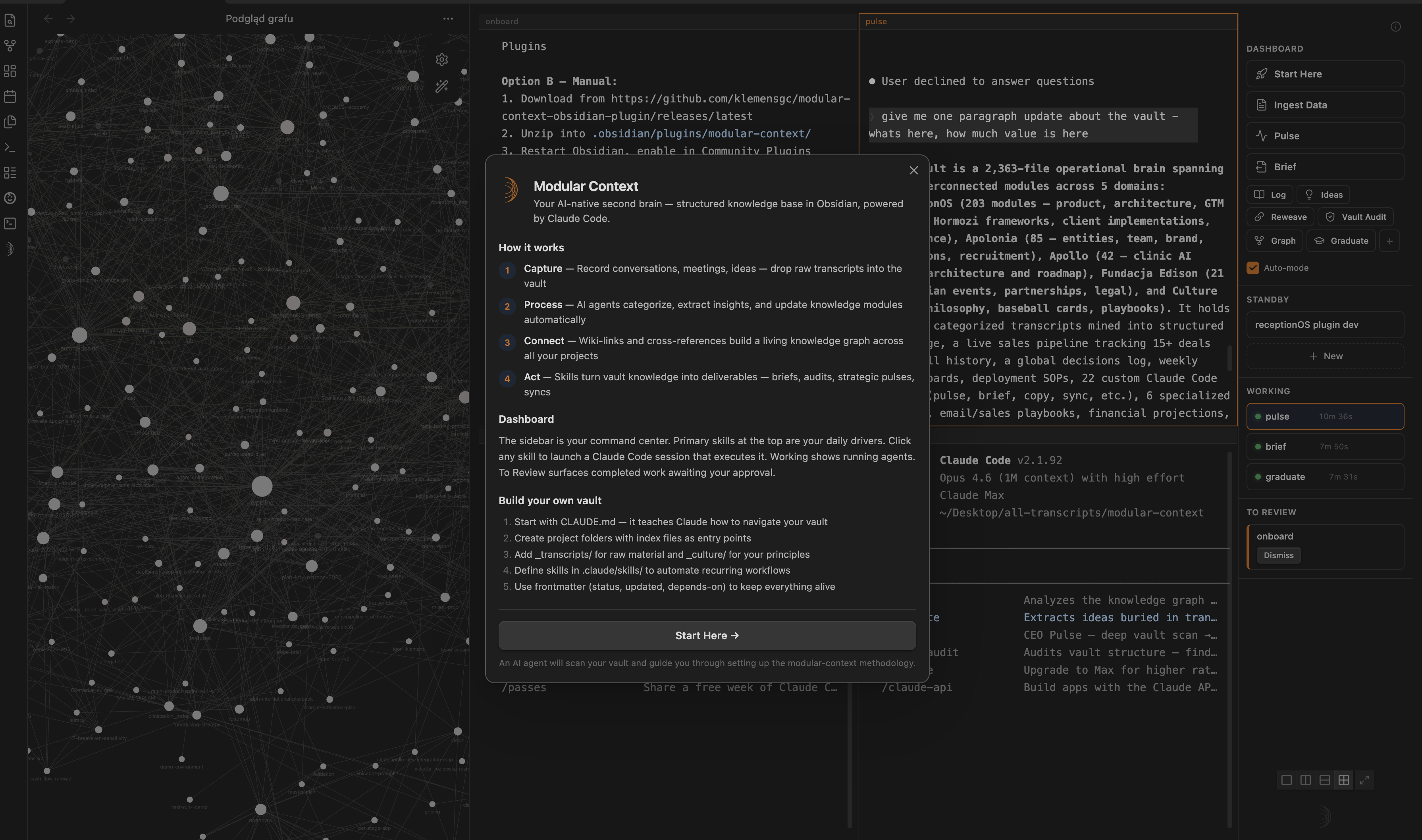
Your Obsidian vault as LLM-native knowledge base + multi-account Gmail & Calendar exposed as MCP tools for Claude Code. Local-first, encrypted, no telemetry.




What is this?
Two things in one plugin:
LLM Knowledge Base — Your Obsidian vault structured as Sources → Wiki → Schema (Karpathy-aligned framing). Multi-terminal Claude Code + Codex with skills sidebar, agent tracking, session glyphs. Your second brain seen by LLMs as a first-class context.
G-Suite MCP Server — Multi-account Gmail + Calendar exposed as 10 native tools for Claude Code (
gmail_search,gmail_send,calendar_freebusy, …). OAuth 2.0 + PKCE desktop flow, tokens encrypted via ElectronsafeStorage(OS keychain), no telemetry, no cloud.
One install, one onboarding, two productivity frontiers.
Architecture
                    🦀  LLM KNOWLEDGE BASE
                    ┌────────────────────────┐
                    │   Sources · Wiki ·     │
                    │   Schema  (vault)      │
                    └───────┬────────▲───────┘
                            │        │
                 feed every │        │ write digest /
                 new session│        │ synthesise back
                            ▼        │
           ╔═════════════════════════╧════════════════════╗
           ║     🦀  CLAUDE CODE  (sessions · terminals)  ║
           ║                                              ║
           ║     ⟲  inbox digest loop                     ║
           ║     ⟲  meeting prep loop                     ║
           ║     ⟲  synthesise-files loop                 ║
           ╚═══════════╦════════════════════╦═════════════╝
                       │                    │
                pulls  │                    │  pushes
                       ▼                    ▼
           ┌──────────────────────────────────────────┐
           │   🦀  mcp-google   (stdio · Node)        │
           └───────────┬──────────────────────┬───────┘
                       ▼                      ▼
                    🦀  GOOGLE WORKSPACE (multi-account)
                    ├─ Gmail   ✓    ← read   → send/draft/label
                    ├─ GCal    ✓    ← list   → create/update/delete
                    ├─ Docs    ⋯  coming soon
                    └─ Drive   ⋯  coming soon

        ── configured by ──▶  🦀  Modular Context Plugin
                               (infra · OAuth · sidecar)
Architecture decisions (ADRs in _workspace/2026-04/w3/google-workspace/adrs/):
- ADR-001 — Hybrid OAuth: Quick Connect (shared client) + BYO (user-provided client)
- ADR-002 — Electron
safeStoragetoken storage (OS keychain) - ADR-003 + addendum — MCP server stdio lifecycle + plaintext credentials sidecar
- ADR-005 — Multi-account storage model (per-account folder + index)
Features
LLM Knowledge Base
- Multi-terminal split layouts — single, side-by-side, stacked, 2×2, 2×3, 2×4. Up to 8 sessions.
- Claude Code + Codex — toggle AI provider in settings; auto-launch on new terminal.
- Skills sidebar — 3 primary skills (full-width), rest in secondary grid. One-click launches.
- Agent tracker — Working / To Review / Standby states per session.
- Session glyphs — unique geometric shape per terminal. Skills inherit their icon.
- Compact mode — 48px icon-only sidebar, maximum terminal real estate.
- Fullscreen overlay — terminal fills Obsidian; sidebar docks right.
Escto exit. - Real PTY — zsh in a pseudo-terminal, not a basic runner.
- Wiki-link autocomplete —
[[inside terminal searches vault notes. - Drag-and-drop — Finder / Obsidian → terminal as shell-escaped paths.
- Session persistence — tab names, glyphs, layouts survive restarts.
- Smart Session Restore — on reopen, picker modal classifies saved sessions (Needs attention / Idle / Archive) instead of silent auto-resume. You choose what materializes — no accidental skill re-runs.
- Auto-onboarding — first install triggers a setup agent that scaffolds your vault.
G-Suite MCP Server (v2.0 stable)
- Multi-account — unlimited Google accounts in parallel (Testing mode: up to 100 test users per account)
- 10 tools for Claude Code (Gmail + Calendar — see table below)
- Zero telemetry — no metrics, no crash reports, no external calls beyond OAuth + Google API
- Local-first — tokens encrypted via OS keychain (macOS Keychain / Windows DPAPI / Linux libsecret via
libsecret) - Auto-refresh — 50-minute timer per account, 5-minute expiry buffer
- Error taxonomy —
TOKEN_EXPIRED,ACCOUNT_NOT_FOUND,SCOPE_OUTDATED,RATE_LIMITED,PERMISSION_DENIED,QUOTA_EXCEEDED,NETWORK_ERROR - Hot reload — server re-reads credentials per tool call, zero-downtime refresh
3 primary skills (post-onboarding)
| Skill | Purpose | Uses |
|---|---|---|
| Synthesise Files | Turn raw files (transcripts, notes, backlog) into vault modules — categorize, tag, update, reweave neighbors | Your vault, optional _transcripts-backlog/ |
| WhatsApp Digest | Analyze WhatsApp groups for action items, blindspots, staleness vs vault | macOS WhatsApp.app |
| Gmail + Calendar | Inbox sweep, stale follow-ups, calendar gap analysis, meeting prep | MCP tools below |
All three write artifacts to _workspace/{YYYY-MM}/w{N}/. Secondary skills (Pulse, Brief, Log, Reweave, Graph, Graduate, Ideas, Vault-Audit) available in sidebar grid.
10 MCP tools
Gmail (4)
| Tool | Purpose |
|---|---|
gmail_search |
Query with Gmail syntax (is:unread, from:X, after:2026-04-01). Optional body extraction. |
gmail_draft |
Create draft — not sent. User opens webUrl in Gmail UI to send. |
gmail_send |
Send immediately. Skip draft for trusted, scripted sends. |
gmail_modify_labels |
Add/remove labels — system presets (INBOX, UNREAD, STARRED, IMPORTANT, SPAM, TRASH) + custom labels by name. |
Calendar (6)
| Tool | Purpose |
|---|---|
calendar_list_calendars |
Enumerate all calendars user has access to. |
calendar_list_events |
Events in time range. |
calendar_create_event |
Create event (sendUpdates: "none" default — no auto-invite spam). |
calendar_update_event |
Patch existing (only provided fields changed). |
calendar_delete_event |
Delete. |
calendar_freebusy |
Query busy windows across multiple calendars — ideal for "find time to meet". |
Every tool accepts optional account param (email, case-insensitive). Omit → primary account. Unknown email → ACCOUNT_NOT_FOUND error.
OAuth scopes required: gmail.modify, calendar, plus OIDC openid email profile.
Install
Plugin
Requires Obsidian ≥ 0.15 and macOS (Linux + Windows may work; untested).
Via BRAT (Beta Reviewer plugin, recommended for now):
- Install BRAT from Community Plugins
Cmd+P→ "BRAT: Add a beta plugin" →klemensgc/modular-context-obsidian-plugin- Enable in Settings → Community plugins
Manual:
- Download
main.js,manifest.json,styles.css,mcp-server.jsfrom latest release - Copy to
<vault>/.obsidian/plugins/modular-context/ - Enable plugin in Settings → Community plugins → Modular Context
MCP server
Auto-installed on first Google Workspace: Connect. Plugin copies bundled binary to ~/.modular-context/mcp-google/dist/index.js (~100 MB one-time).
Repo structure
Monorepo with three packages:
modular-context-obsidian-plugin/
├── packages/
│   ├── plugin/        ← Obsidian plugin (main.ts, manifest, features + MCP client glue)
│   ├── mcp-google/    ← standalone MCP server (Gmail + Calendar tools, 10 tools, Node)
│   ├── shared/        ← portable types + AgentTracker + PTY helper + UI primitives
│   └── app/           ← experimental standalone Electron app (WIP, not shipped)
├── README.md          ← you are here
├── banner.png
└── package.json       ← monorepo scripts (build:shared → build:mcp-google → build:plugin)
- packages/plugin/CHANGELOG.md — user-facing release notes (v1.0 → v2.0)
- packages/plugin/RELEASE-v2.0.0.md — v2.0 release highlights
- packages/mcp-google/README.md — MCP server docs (10 tools, accounts, env contract)
- packages/mcp-google/CHANGELOG.md — MCP server version history
- Skill library: separate repo klemensgc/modular-context-skills — plugin auto-syncs
Connect Google Workspace (6 steps)
Create GCP OAuth Client
- Google Cloud Console → new project (e.g.
modular-context-gcp) - Enable APIs: Gmail API, Google Calendar API
- OAuth consent screen → External, Testing mode → add scopes:
gmail.modify,calendar, plusopenid,email,profile - Add yourself as test user
- Create credentials → OAuth 2.0 Client ID → Desktop app
- Copy Client ID + Client Secret
- Google Cloud Console → new project (e.g.
Fill
.env.localin the plugin's build folder:GOOGLE_OAUTH_CLIENT_ID=... GOOGLE_OAUTH_CLIENT_SECRET=...Rebuild (
npm run buildinpackages/plugin) if self-building. Pre-built release uses the shared Quick Connect client.Reload plugin —
Cmd+P→ "Reload app without saving"Connect —
Cmd+P→ "Google Workspace: Connect (or add account)" → browser OAuth → authorize → doneAdd more accounts — "Google Workspace: Add another account" any time
The plugin writes .mcp.json to your vault root + per-account sidecars to ~/.modular-context/mcp-google/accounts/{filename}/. Restart Claude Code session to pick up the MCP server.
Plugin commands
| Command | Purpose |
|---|---|
Google Workspace: Connect (or add account) |
Launch OAuth flow for new/additional account |
Google Workspace: Add another account |
Alias for above — clearer intent |
Google Workspace: Reconnect (upgrade scopes) |
Nuke tokens, re-auth all accounts with current scope set |
Google Workspace: Disconnect all accounts |
Remove all credentials + .mcp.json entry |
Google Workspace: Status |
List connected accounts, expiry times, scope status |
Google Workspace: Show MCP server logs |
Open ~/.modular-context/mcp-google/logs/server.log |
Plus 5+ non-Google commands for terminal / skill management. See Command Palette.
Security
- Tokens encrypted via Electron
safeStorage(OS keychain). Never leave disk in plaintext. - Credentials sidecar for MCP server: plaintext JSON at
0600perms in user-scope folder (comparable to~/.aws/credentials,~/.config/gcloud/). Plugin may re-encrypt in v2.1 (see ADR-003 addendum). - No telemetry. No crash reports. No metrics. Zero phone-home.
- Logs scrub tokens, emails, subjects via regex on every line.
- Multi-account isolation. Each account has separate credentials; MCP server honors
accountparam strictly.
Full threat model in ADR-003-addendum-shared-state.md.
What's new in v2.0
- 3 primary skills reorganization —
Synthesise Files(was "Ingest Data"),WhatsApp Digest,Gmail + Calendar - New
gsuite-analysisskill — orchestrates 10 MCP tools with 4 playbook patterns - Graduated v1.5 / v1.6 / v1.7 beta milestones: OAuth + storage + MCP server + multi-account + full control
- OAuth scope upgrade:
gmail.modify+calendarfull (replacesgmail.readonly,gmail.send,calendar.events) mcp-google-workspace@ 1.1.0 stable (from 1.1.0-beta.1)- New tools:
gmail_send,gmail_modify_labels,calendar_list_calendars,calendar_update_event,calendar_delete_event,calendar_freebusy - Smart Session Restore Picker — replaces silent auto-resume on plugin reopen. Modal classifies saved sessions into Needs attention / Idle / Archive buckets; you pick what materializes. No accidental skill re-runs, no hidden respawns.
Full list in packages/plugin/CHANGELOG.md.
Troubleshooting
| Issue | Fix |
|---|---|
| Notice: "Reconnect required for {email}" | Google Workspace: Reconnect (upgrade scopes) — scopes changed |
TOKEN_EXPIRED from MCP tool |
User revoked access or refresh token rotated — Reconnect |
ACCOUNT_NOT_FOUND |
Account not connected — Add another account |
| MCP server not visible in Claude Code | Restart Claude Code session. .mcp.json loaded at session start. |
| Plugin reloaded but old behavior | Hard reload: Cmd+P → "Reload app without saving" (not just disable+enable) |
| Server logs empty | Normal — server only runs when Claude Code calls a tool. Not a daemon. |
Contributing
Plugin: modular-context-obsidian-plugin
Skills library: modular-context-skills (separate repo, auto-synced)
PRs welcome. Issues welcome. No support contract, but I read everything.
License
MIT © klemensgc / receptionOS
Yorumlar (0)
Yorum birakmak icin giris yap.
Yorum birakSonuc bulunamadi