usage_kun
Health Uyari
- License — License: MIT
- Description — Repository has a description
- Active repo — Last push 0 days ago
- Low visibility — Only 5 GitHub stars
Code Basarisiz
- rm -rf — Recursive force deletion command in Scripts/package_app.sh
- rm -rf — Recursive force deletion command in Scripts/package_release_zip.sh
Permissions Gecti
- Permissions — No dangerous permissions requested
Bu listing icin henuz AI raporu yok.
Privacy-first macOS menu bar and Windows x64 tray app to monitor Claude Code, Codex, and optional Gemini quota from Antigravity, with compact desktop meters.
usage-kun
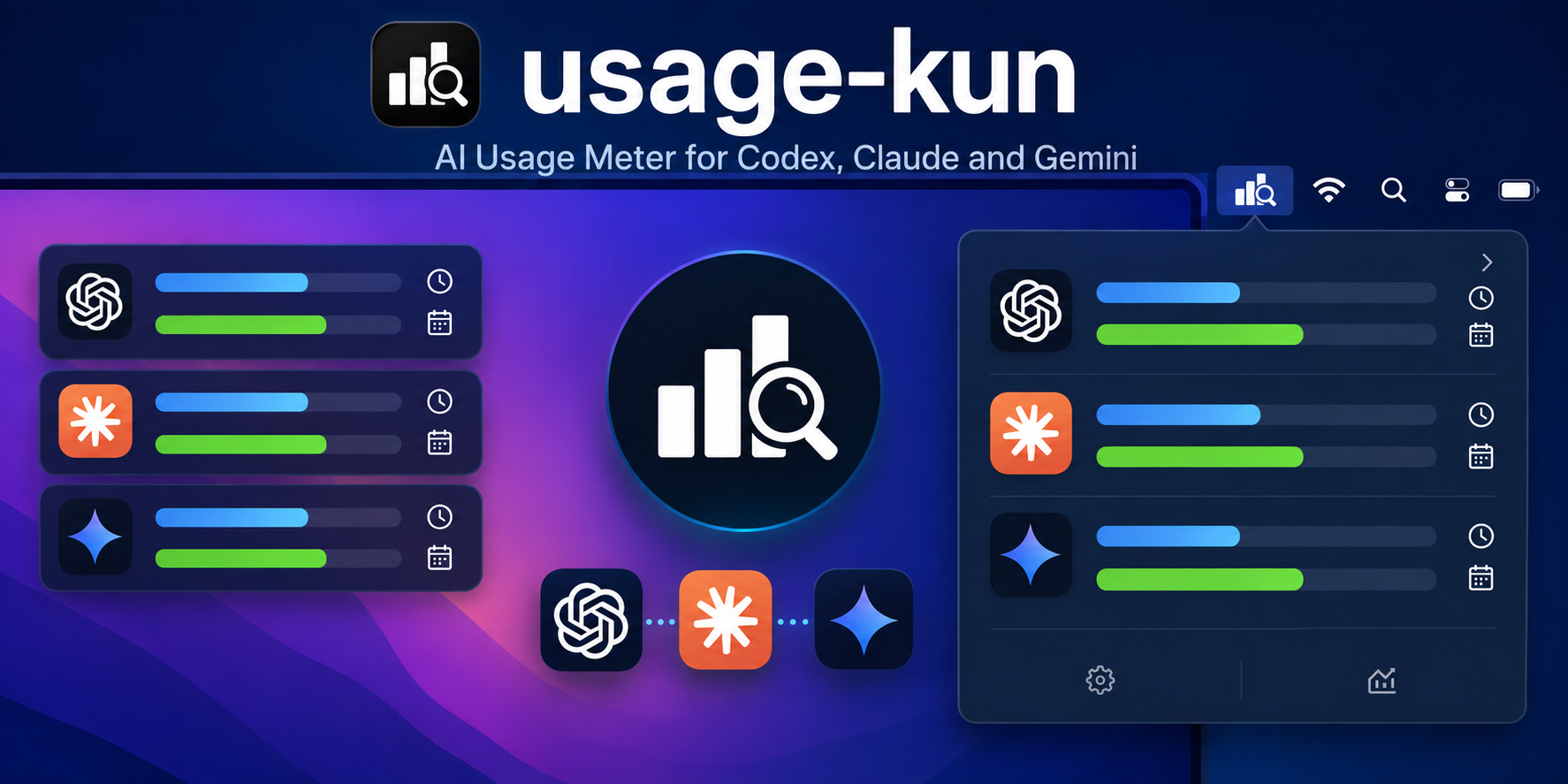

English | 日本語
usage-kun is a small, privacy-first macOS menu bar and Windows system-tray app for keeping Codex, Claude, and optional Gemini (Antigravity) usage visible while you work.
It is built as a personal utility: a compact usage meter rather than a full analytics dashboard. It reads local CLI usage data by default and can optionally reuse Claude Code / Codex CLI sign-in tokens in read-only mode for official quota numbers. Codex labels follow the actual limit duration, including 5-hour and weekly limits. It does not store, refresh, or log those tokens.
Gemini support reads the 5-hour and weekly quota shown in Models & Usage > Gemini Models inside the Antigravity IDE. Enable it in Settings while Antigravity is open and signed in on the same computer. This is Antigravity's Gemini quota, not Gemini app usage or Gemini API billing.
This project is not affiliated with, endorsed by, or sponsored by OpenAI, Anthropic, or any other provider.
Downloads
The latest version is v0.4.2. Windows support is limited to Intel / AMD PCs (x64). Windows ARM, including Windows on Apple Silicon Macs, is no longer supported. macOS support, including Apple Silicon, is unchanged. Gemini (Antigravity) is available on macOS since v0.4.0 and Windows since v0.4.1.
Choose your platform from the latest release:
| Platform | ZIP |
|---|---|
| macOS (Apple Silicon) | UsageKun-macOS.zip |
| Windows (Intel / AMD, x64) | UsageKun-Windows-x64.zip |
For Windows, follow Install On Windows below. The ZIP includes the .NET runtime; no SDK or separate runtime installation is needed. Download the app ZIP from the table above or Assets on the release page. Code > Download ZIP and Source code contain development source files.
Setup: Windows / macOS / Gemini.
The screenshots below show an earlier macOS version with Codex and Claude. The current version also supports Gemini (Antigravity).
Screenshots
usage-kun is designed to stay visible without becoming a dashboard. Click the menu bar icon in the top-right of macOS to open the popover, keep the pinned home meter at the top-left of the desktop, and use Settings to choose which of Codex, Claude, and Gemini (Antigravity) to show.
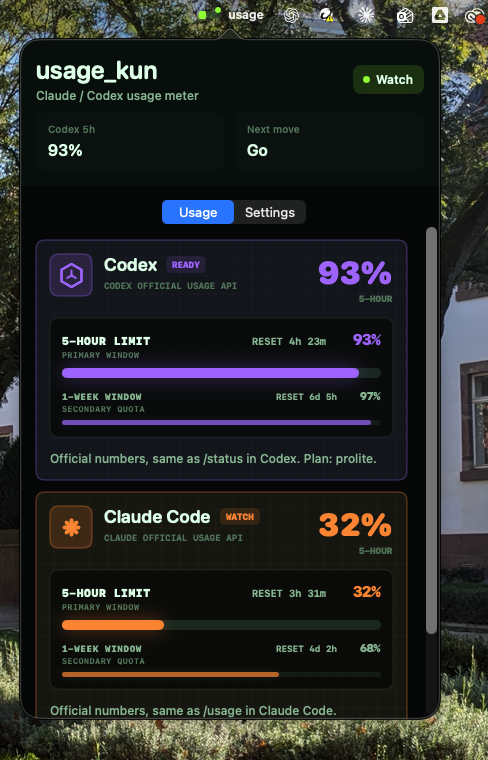
Menu bar popover opened from the top-right macOS icon.
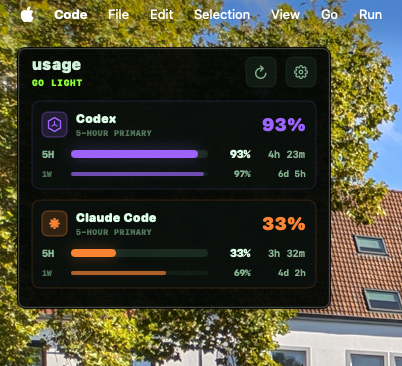
Pinned home meter at the top-left of the desktop.
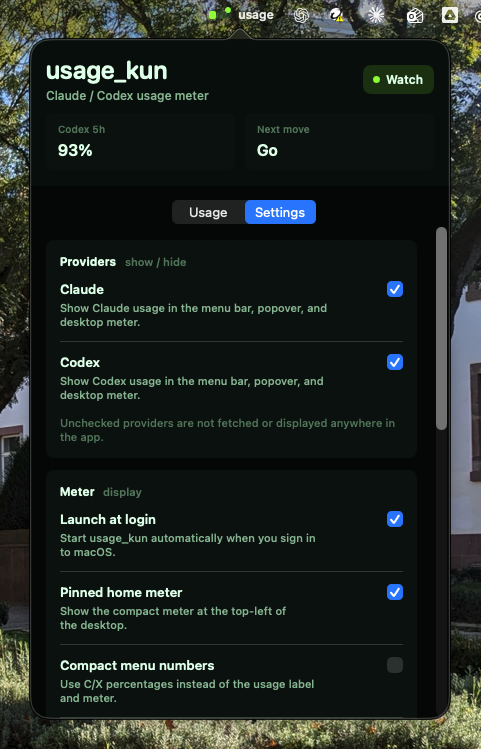
Settings screen with provider checkboxes for Codex-only, Claude-only, or both-provider display.
Features
- Native macOS menu bar app built with SwiftPM, AppKit, and SwiftUI, and native Windows system-tray app built with .NET 8 and WPF
- Compact macOS menu bar popover and Windows tray controls
- Optional pinned desktop widget on macOS and draggable floating meter on Windows
- Duration-aware Codex quota labels, including weekly-only plans, plus Claude Code quota bars
- Optional Gemini 5-hour and weekly quota, including reset times, from the running Antigravity IDE
- Per-provider checkboxes for Claude, Codex, and Gemini (Antigravity)
- Local-log usage estimates when official sync is unavailable
- Optional official usage sync for Claude Code and Codex CLI sign-ins
- Low-usage and reset notifications for the packaged macOS app
- Read-only token reuse with no token persistence, refresh, or credential logging
- No telemetry and no bundled analytics
Requirements
- macOS 14 or newer (Apple Silicon release ZIP), or Windows 10/11 (Intel / AMD, x64 only)
- Intel Mac users can build from source.
- For official Claude / Codex sync: an existing CLI sign-in on the same OS where usage-kun runs
- For Gemini: the Antigravity IDE running and signed in under the same OS user; enable Gemini in usage-kun Settings
- Source builds only: Swift 6 or newer and Xcode Command Line Tools on macOS; .NET 8 SDK on Windows
Quick Start
Install From The Release ZIP
On macOS:
- Download the latest
UsageKun-macOS.zipfrom Releases. - Unzip it and move
UsageKun.appto/Applications(or anywhere you like). - Open
UsageKun.app. - To use official quotas, sign in to Claude Code or Codex on this Mac, then enable Claude official usage or Codex official usage under Settings > Official usage. For Gemini, see Enable Gemini (Antigravity).
First Launch: "Apple could not verify UsageKun is free of malware"
On first launch, macOS blocks the app with a dialog like:
Apple could not verify "UsageKun" is free of malware that may harm your Mac or compromise your privacy.
This is expected and does not mean the download is broken. The app is signed but not notarized by Apple (notarization requires a paid Apple Developer account), so macOS cannot vouch for it automatically. You only need to approve it once:
- In the warning dialog, click Done (do NOT click "Move to Trash").
- Open System Settings > Privacy & Security.
- Scroll down to the Security section. You will see a message saying "UsageKun" was blocked.
- Click Open Anyway next to that message.
- In the confirmation dialog, click Open Anyway again and authenticate with Touch ID or your password.
The app opens normally from then on; the warning does not come back until you download a new version.
Alternatively, you can clear the quarantine flag from Terminal instead (same effect, no dialogs):
xattr -d com.apple.quarantine /Applications/UsageKun.app
If you prefer not to trust a downloaded binary at all, build it yourself from source below — the result is identical and needs no Gatekeeper approval.
Install On Windows
- Open Windows Settings > System > About and check System type. An Intel / AMD PC with an x64-based processor is required. Windows ARM is unsupported, including Windows running on an Apple Silicon Mac.
- Download UsageKun-Windows-x64.zip.
- Right-click the downloaded ZIP, select Extract All..., and keep the extracted files together in a folder where you want to use the app.
- Open that folder and double-click
UsageKun.exe. No installer or separate .NET installation is required. The app appears in the system tray near the clock; expand the hidden icons if needed. - Right-click the usage-kun tray icon and choose Settings.... Under Providers, select the providers you use.
- For official Claude / Codex quotas, first sign in to Claude Code or Codex inside Windows. Under Sync sources, check Official Claude usage sync (opt-in) and/or Official Codex usage sync (opt-in), then click Save. Sign-ins on the Mac host are not reused by a Windows VM.
- To add Gemini, follow the steps below. Use Refresh now from the tray menu to update the meter. You can change Start with Windows in Settings to control automatic startup, then click Save.
See the Windows guide for more setup details and platform limitations.
Enable Gemini (Antigravity)
- Open Antigravity and sign in on the same OS and user account where usage-kun is running. Keep the IDE open.
- In usage-kun, enable Gemini:
| Platform | Settings |
|---|---|
| macOS | Turn on Settings > Providers > Gemini (Antigravity). This enables both display and quota reading; changes save automatically. |
| Windows | Check Providers > Show Gemini (Antigravity) and Sync sources > Read Gemini quota from Antigravity (opt-in), then click Save. |
- Refresh usage-kun. The Gemini card shows the remaining 5-hour and weekly quota from Antigravity's Models & Usage > Gemini Models, with reset times when available.
Gemini is off by default. If quota is unavailable, open Models & Usage in Antigravity and refresh usage-kun again. Missing values remain unknown; they are not shown as 0% remaining. You do not need to enter Antigravity authentication tokens in usage-kun.
Run From Source
Run from source on macOS:
swift run
Build the app bundle:
./Scripts/package_app.sh
open UsageKun.app
Run the lightweight core check:
swift build
swift run UsageKunCoreCheck
This repository includes UsageKunCoreCheck because some Command Line Tools only environments do not provide a working XCTest or Swift Testing setup.
To inspect the local Claude 5-hour estimate and calibration details:
swift run UsageKunCoreCheck --claude-estimate
For Windows source builds and checks, see Windows: Build and check.
Updating An Existing Install
Updates are installed manually; the app does not download or install them automatically. Your settings and calibration data are stored separately from the app, so no settings export or migration is needed. On macOS, keep ~/.codex, ~/.claude, ~/.claude.json, and ~/Library/Application Support/usage_kun. On Windows, keep %USERPROFILE%\.codex, %USERPROFILE%\.claude, %USERPROFILE%\.claude.json, and %APPDATA%\usage_kun. These contain the existing CLI sign-in/log data, plan information, and app preferences used after updating.
If You Installed From Git
On macOS, from the repository directory you already cloned:
cd usage_kun
git pull
./Scripts/package_app.sh
open UsageKun.app
package_app.sh rebuilds the release executable, stops a running UsageKun process if one is active, and replaces the local UsageKun.app bundle.
If You Used GitHub Download ZIP
On macOS, download the latest source ZIP from GitHub, unzip it, open Terminal in the unzipped usage_kun folder, and run:
./Scripts/package_app.sh
open UsageKun.app
If You Used The Release ZIP
On macOS:
- Download the latest
UsageKun-macOS.zipfrom Releases. - Quit the old usage-kun app from the menu bar.
- Unzip
UsageKun-macOS.zip. - Replace your old
UsageKun.appwith the new one at the same location, such as/Applications/UsageKun.app. - Open the new
UsageKun.appand refresh the meter. Your existing provider and sync settings are retained.
If you want to move the app to a different location, first turn off Settings > Meter > Launch at login in the old app. Quit it, move the new app, then open it and turn Launch at login back on if desired. If macOS requests approval, allow usage-kun in System Settings > General > Login Items.
On first launch of the new version, macOS may show the "could not verify" warning again; approve it the same way as in First Launch. If official Claude sync is enabled, macOS may ask for Claude Code Keychain access again after the update.
If You Used The Release ZIP (Windows)
- On an Intel / AMD Windows PC (x64), download the latest
UsageKun-Windows-x64.zipfrom Releases. Windows ARM installations have no supported update from v0.4.2 onward; the x64 ZIP is not a supported replacement on Windows ARM. - Right-click the existing tray icon and choose Quit usage_kun.
- Use Extract All... to unpack the new ZIP, then replace the complete app contents in your existing app folder with the extracted files. Keeping the same folder preserves existing shortcut and startup paths. No installer or uninstall step is required.
- Run
UsageKun.exefrom that folder, then choose Refresh now from the tray menu. Your saved settings and calibration remain in%APPDATA%\usage_kun.
If you move the app to a different folder, update your shortcuts. Open the new UsageKun.exe, then open Settings > Behavior, check Start with Windows if desired, and click Save so startup uses the new location.
Data Sources
usage-kun uses a staged data model:
- Local logs: reads known Claude Code and Codex local usage logs for estimates.
- Official usage sync: opt-in only; reuses CLI sign-ins on the same OS in read-only mode to fetch official quota numbers and limit durations. Available on macOS and Windows.
- Claude calibration: when official Claude sync succeeds, usage-kun can calibrate the local Claude 5-hour cap estimate for later fallback use.
- Gemini (Antigravity): opt-in only; reads the running IDE's local quota service for Gemini Models 5-hour and weekly remaining usage and reset times. It does not read Gemini app usage or Gemini API billing, or substitute CLI logs or another provider's quota when unavailable.
See docs/providers.md for details.
Privacy Model
- No telemetry.
- No cloud sync.
- No analytics SDK.
- No conversation content display.
- No automatic browser cookie reading.
- CLI sign-in tokens are not refreshed, copied, stored by this app, or logged.
- Antigravity's temporary credential is used only with its local service and is never saved or logged.
- No Admin API keys or manual cookie headers are collected in this release.
See PRIVACY.md for the full privacy note.
Repository Layout
Sources/UsageKun/
  main.swift
  Services/
    LaunchAtLoginService.swift
    UsageNotifier.swift
  Views/

Sources/UsageKunCore/
  Config/
    AppConfig.swift
    ClaudeCalibrationStore.swift
  OnboardingDetector.swift
  Providers/
    AntigravityUsageService.swift
    CLIOAuthUsageService.swift
    LocalLogUsageService.swift
  UsageNotificationPlanner.swift
  UsageSnapshot.swift
  UsageService.swift

Tests/UsageKunCoreCheck/
  main.swift

Windows/
  UsageKun.Windows.sln
  src/
    UsageKun.App/
    UsageKun.Core/
  tests/
    UsageKun.Core.Check/
    UsageKun.UI.Check/

assets/screenshots/
  pinned-desktop-meter.png
  menu-bar-popover.png
  settings-providers.png

assets/
  usage-kun-thumbnail.png
  usage-kun-icon.png

Packaging/
  AppIcon.icns
  Info.plist

Scripts/
  package_app.sh
  package_release_zip.sh
  package_windows.ps1
  preflight_publication.sh
Why Another Usage Meter?
There are already several AI usage monitors and menu bar utilities. usage-kun exists as a small, auditable implementation tuned for one workflow: keep Claude, Codex, and optional Gemini (Antigravity) limits visible without opening a dashboard, while keeping authentication handling explicit and local.
The emphasis is on:
- local-first behavior
- clear provider boundaries
- small native macOS and Windows UI
- readable Swift and C# code
- privacy-first credential handling
Limitations
- Official usage endpoints can change without notice.
- Claude local-log quota estimates are best-effort. They deduplicate repeated JSONL rows by
requestIdandmessage.id, and can self-calibrate after opt-in official Claude usage sync succeeds. - Official sync requires existing Claude Code / Codex CLI sign-in state on the same OS where usage-kun runs.
- Gemini requires the running, signed-in Antigravity IDE. Its local API may change, and unavailable quota stays unknown.
- Notifications are intended for the packaged macOS
UsageKun.appbuild; Windows toast notifications are not implemented. - The macOS app is ad-hoc signed but not notarized, so first launch of a downloaded copy needs a one-time Gatekeeper approval. The Windows executable is unsigned.
- Windows reads Codex live quota from
logs_2.sqliteand session JSONL logs; auxiliary token/thread statistics fromstate_5.sqliteare not implemented. See the Windows guide for Windows validation status.
Release History
v0.4.2
- Limit Windows support and downloads to Intel / AMD PCs (x64); end Windows ARM support, including Windows on Apple Silicon Macs.
- Fix stale Windows Codex usage by also reading the local live quota database and selecting the newest valid General rate-limit record across it and session logs; model-specific limits no longer overwrite that quota.
- Keep macOS behavior and Apple Silicon support unchanged, and clarify update steps for existing Windows and macOS installations.
Details: docs/release-notes-v0.4.2.md
v0.4.1
- Publish native Windows x64 and ARM64 downloads with official Claude / Codex usage sync and Gemini quota from Antigravity. Windows ARM support ended in v0.4.2.
- Add Windows build, core checks, WPF integration checks, and packaging to CI.
- Keep macOS behavior from v0.4.0 and align the release version.
Details: docs/release-notes-v0.4.1.md
v0.4.0
- Add optional Gemini (Antigravity) quota display on macOS.
- Fix pinned widget refresh/settings controls; Settings opens in its own window.
- Show Codex 1W or 5H labels according to the actual limit duration.
Details: docs/release-notes-v0.4.0.md
v0.3.1
Responsive layout polish.
- Published the provider-aware variable sizing behavior as a patch release.
- The popover and pinned home meter automatically use a smaller height in Claude-only or Codex-only mode, and expand again when both providers are visible.
- The header metric and desktop status label follow the currently visible provider set instead of leaving empty two-provider spacing.
Details: docs/release-notes-v0.3.1.md
v0.3.0
Per-provider visibility.
- Added Settings > Providers with Claude and Codex checkboxes. Only checked providers are shown in the menu bar, popover, and desktop meter; unchecked providers are not fetched at all. Both are checked by default.
- Added the Usage Kun app icon to the packaged macOS app and refreshed the README screenshots for the popover, pinned home meter, and provider settings.
- Resized the popover and pinned home meter automatically for Claude-only or Codex-only display, and made the header metric follow the visible provider.
Details: docs/release-notes-v0.3.0.md
v0.2.2
Plan-detection fixes for the local estimates.
- Fixed Max 20x plans being treated as Max 5x in the local Claude estimate (usage was overstated ~4x). Detection now reads the rate-limit tier fields in
~/.claude.json, where the 5x/20x distinction actually lives. - Added a "Claude plan" setting (Auto / Pro / Max 5x / Max 20x) for when auto-detection is wrong. Local estimate only; official sync is always exact.
- The Codex live rate-limit reader no longer requires the primary window to be exactly 300 minutes.
Details: docs/release-notes-v0.2.2.md
v0.2.1
Packaging and hardening fixes; no feature changes.
- Fixed the release zip shipping an app whose incomplete signature made Gatekeeper reject downloaded copies as "damaged". The bundle is now fully ad-hoc signed with sealed resources and verified during packaging.
- Stopped archiving extended attributes as AppleDouble
._*files in the release zip. - Codex local databases are now opened with
sqlite3 -readonly -batch. - Restricted the CI workflow token to read-only access.
- Documented release-zip installation and the one-time Gatekeeper approval.
Details: docs/release-notes-v0.2.1.md
v0.2.0
This update turns usage-kun into a clearer quota monitor for both short and weekly windows.
- Added first-class 5-hour and 1-week usage windows for Claude Code and Codex.
- Redesigned the pinned desktop meter and menu bar popover with primary and secondary quota bars.
- Kept the menu bar compact as
usageplus a remaining-usage meter. - Added one-click onboarding for official CLI usage sync.
- Added optional low-usage and reset notifications for the packaged app.
- Removed retired Admin API and Cookie/OAuth code paths.
- Added publication preflight checks for local-only files, build output, app bundles, and release artifacts.
Full notes: docs/release-notes-v0.2.0.md
v0.1.1
This update focused on making Claude Code 5-hour estimates more reliable while preserving the existing Codex behavior.
- Improved Claude local-log accuracy by deduplicating repeated JSONL usage rows with the
(requestId, message.id)pair. - Recalibrated initial Claude 5-hour caps for deduplicated weighted tokens.
- Added automatic Claude cap calibration after opt-in official Claude usage sync succeeds.
- Added
swift run UsageKunCoreCheck --claude-estimatefor checking the local Claude estimate. - Fixed Claude cost estimation for Opus, Fable, Mythos, and cache-write token handling.
Full notes: docs/release-notes-v0.1.1.md
v0.1.0
Initial public release.
- Native macOS menu bar usage meter for Claude and Codex.
- Optional pinned desktop widget.
- Local-first usage display.
- Privacy-first credential handling and no telemetry.
Development
On macOS:
swift build
swift run UsageKunCoreCheck
Package a release-style app bundle:
./Scripts/package_app.sh
Run the publication preflight:
./Scripts/preflight_publication.sh
Build a local release zip:
./Scripts/package_release_zip.sh
For Windows build, core checks, WPF checks, and packaging commands, see Windows: Build and check.
License
MIT. See LICENSE.
Yorumlar (0)
Yorum birakmak icin giris yap.
Yorum birakSonuc bulunamadi