skill-buddy
Health Pass
- License — License: MIT
- Description — Repository has a description
- Active repo — Last push 0 days ago
- Community trust — 56 GitHub stars
Code Warn
- process.env — Environment variable access in .github/workflows/release.yml
- fs module — File system access in .github/workflows/release.yml
- process.env — Environment variable access in apps/desktop/e2e/git-backup.spec.ts
- process.env — Environment variable access in apps/desktop/e2e/mcp-management.spec.ts
- process.env — Environment variable access in apps/desktop/e2e/preset-management.spec.ts
Permissions Pass
- Permissions — No dangerous permissions requested
No AI report is available for this listing yet.
AI Skills Buddy, A desktop workspace for managing, installing, and synchronizing Skills and MCP Servers across AI agents.

SkillBuddy
A desktop workspace for managing, installing, and synchronizing Skills and MCP Servers across AI agents.
English · 简体中文



SkillBuddy brings Skills and MCP configurations scattered across different AI coding tools into one interface. It can inspect local installations, distribute content across platforms, resolve drift, discover resources from public marketplaces, and manage reviewed team assets through Git repositories.
Screenshots
The screenshots below show complete application windows and the main SkillBuddy workflows. The Skills page supports both list and tiled grid views.
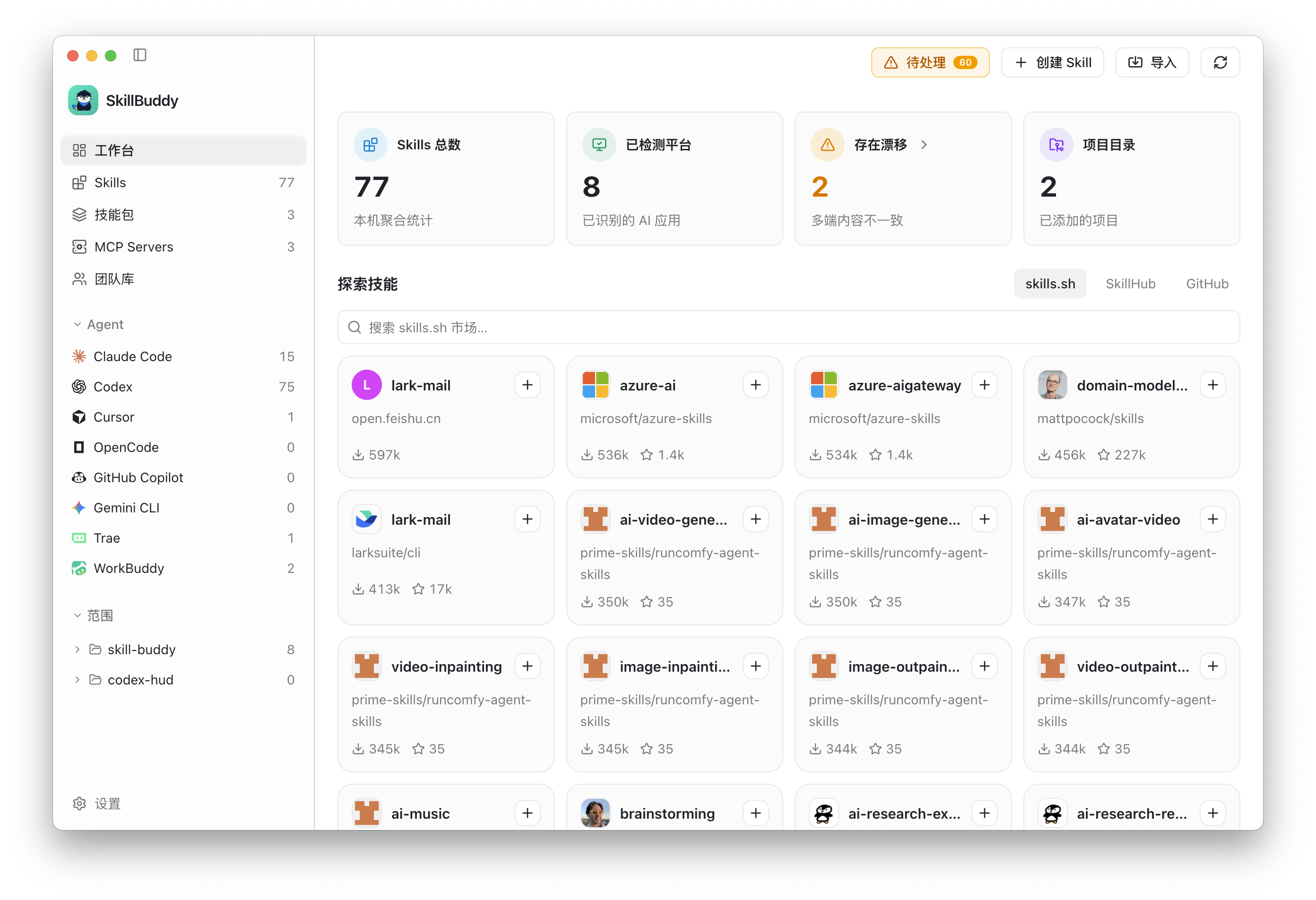
Dashboard: local inventory, detected agents, drift warnings, and marketplace discovery.
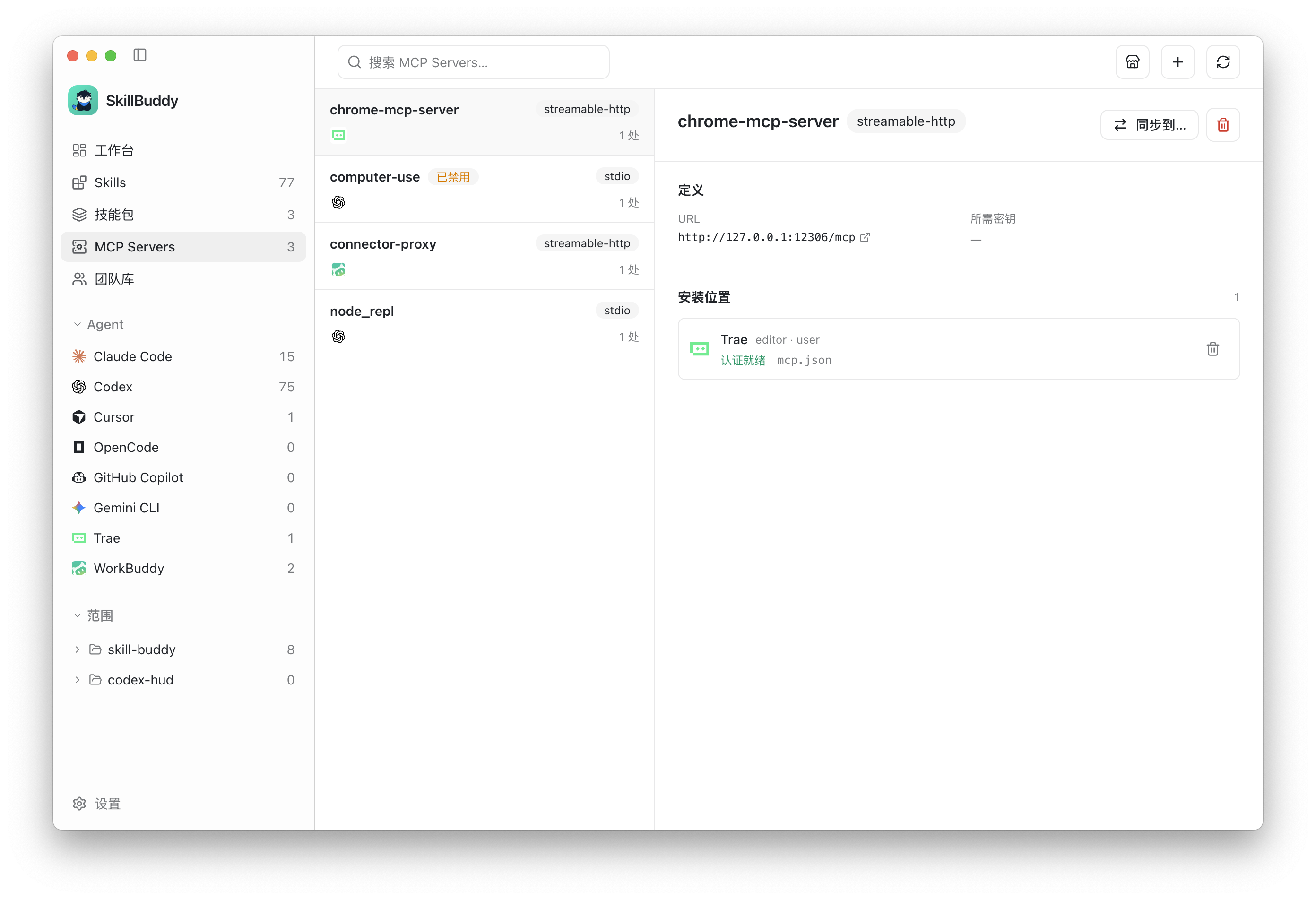
MCP Servers: inspect definitions, transports, installation targets, and runtime status.
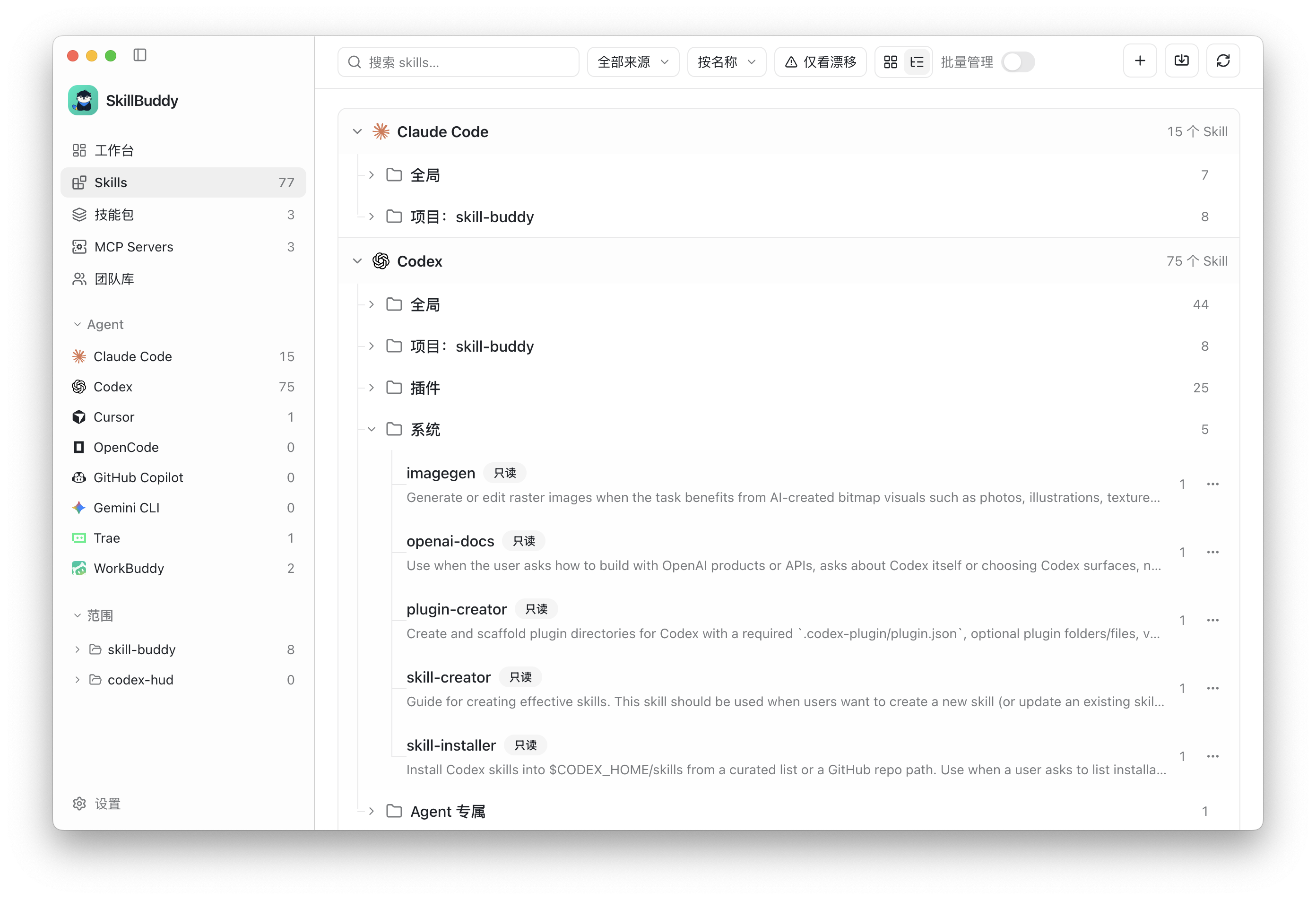
Skills inventory: browse Skills by Agent, global scope, project scope, plugins, and system resources.
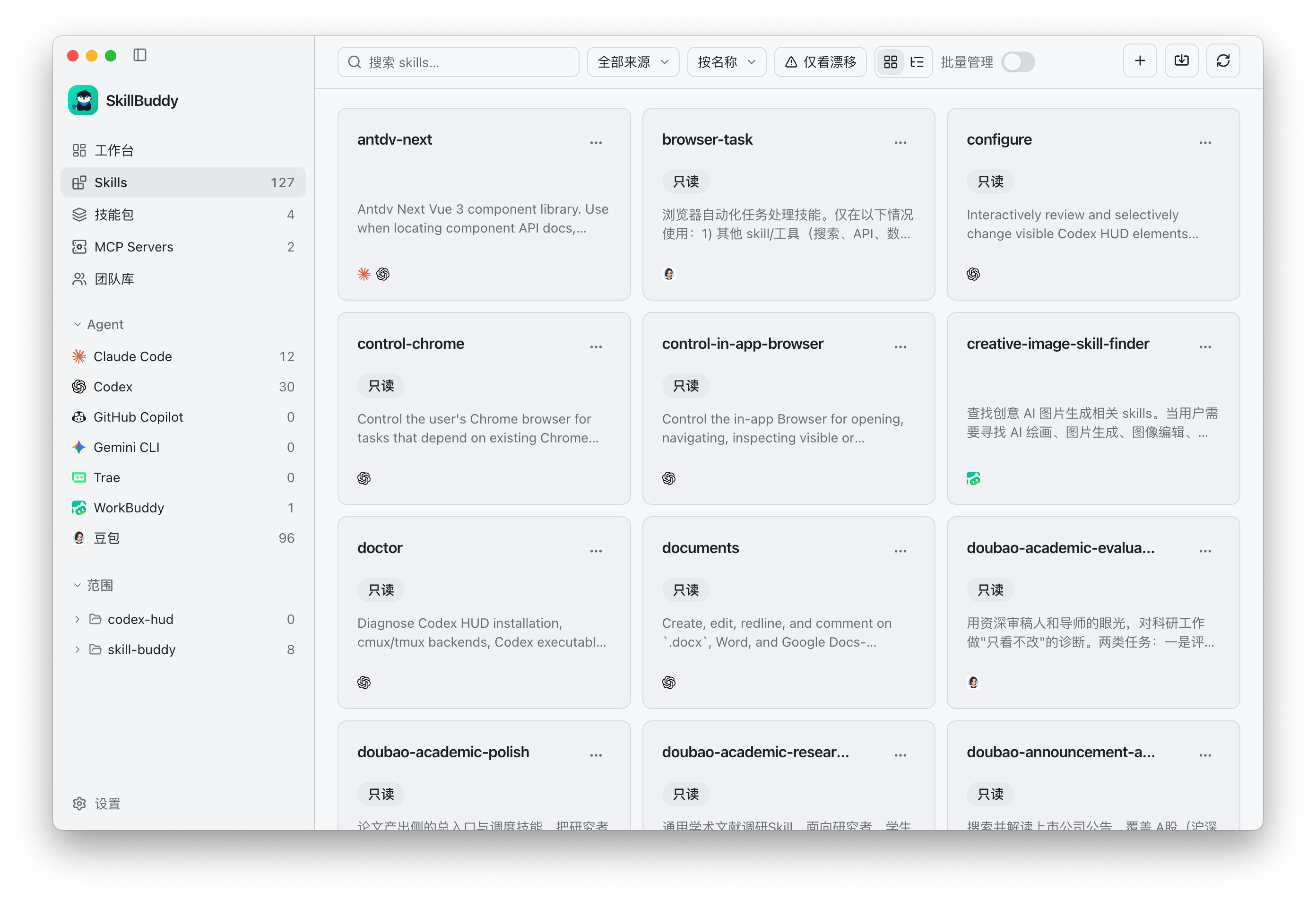
Skills grid view: scan skill names, sources, and summaries in tiled cards.
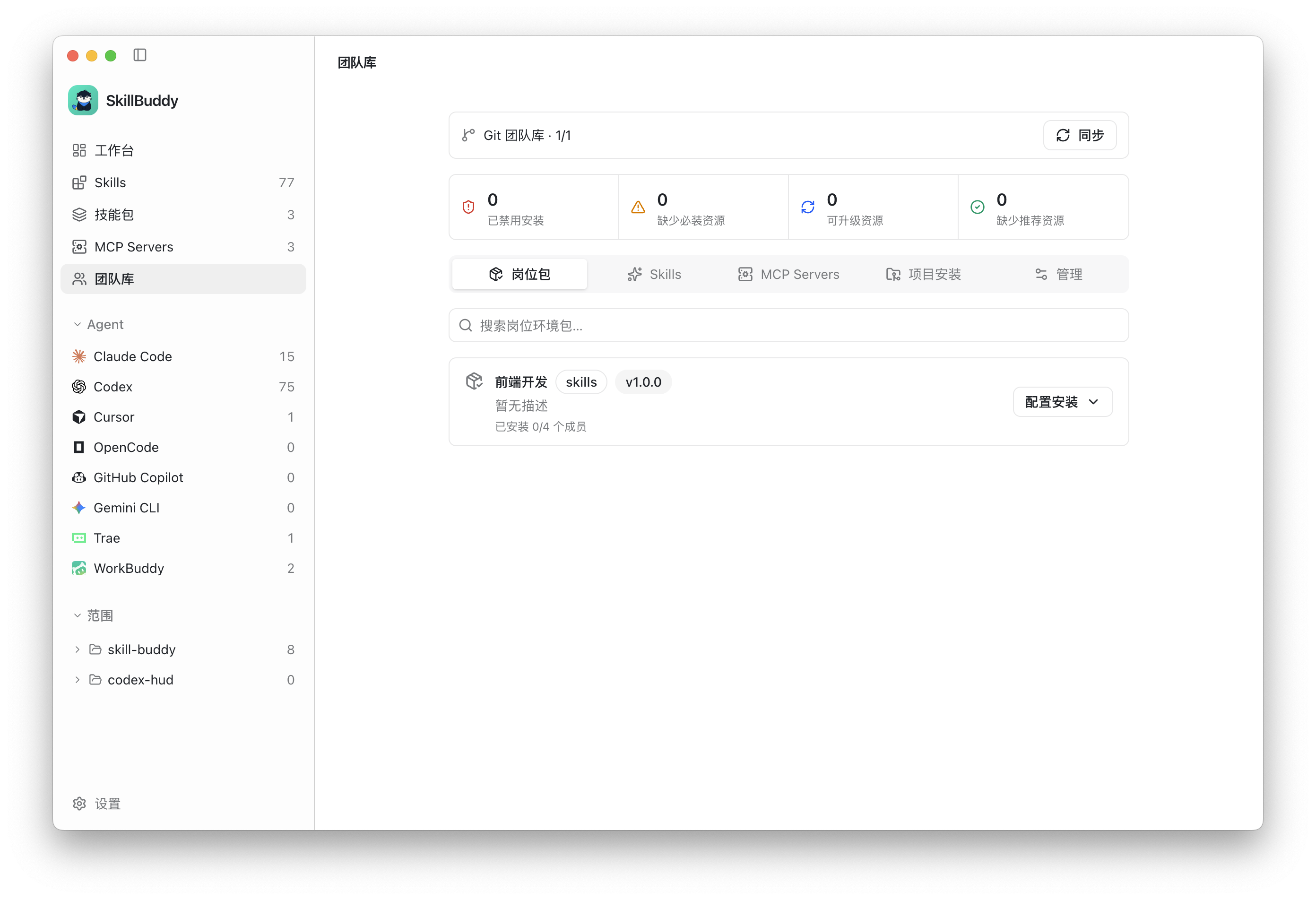
Team library: sync Git-managed resources, review policy status, and configure role bundles.
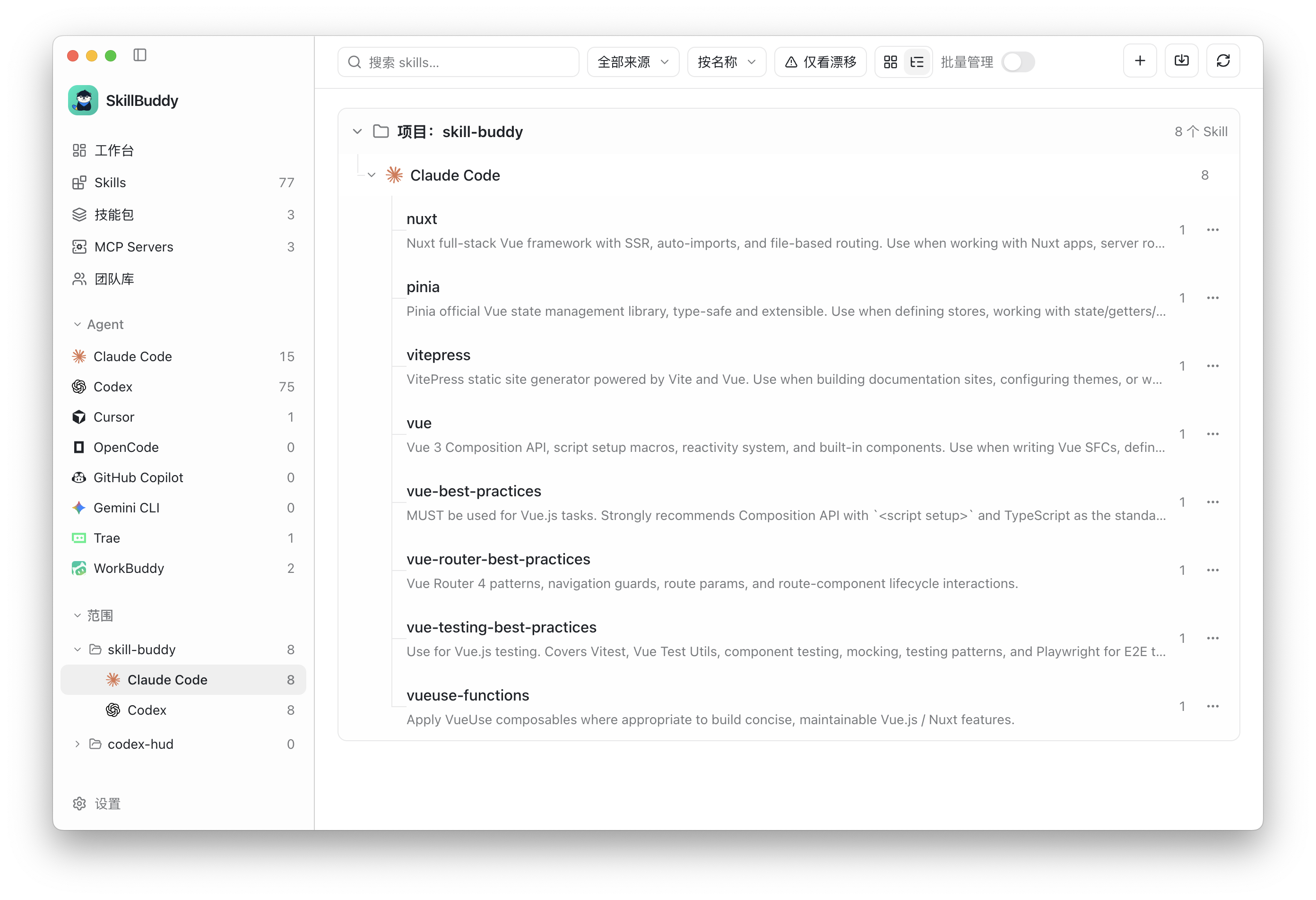
Project Skills: inspect project-local resources and compare their installation across Agents.
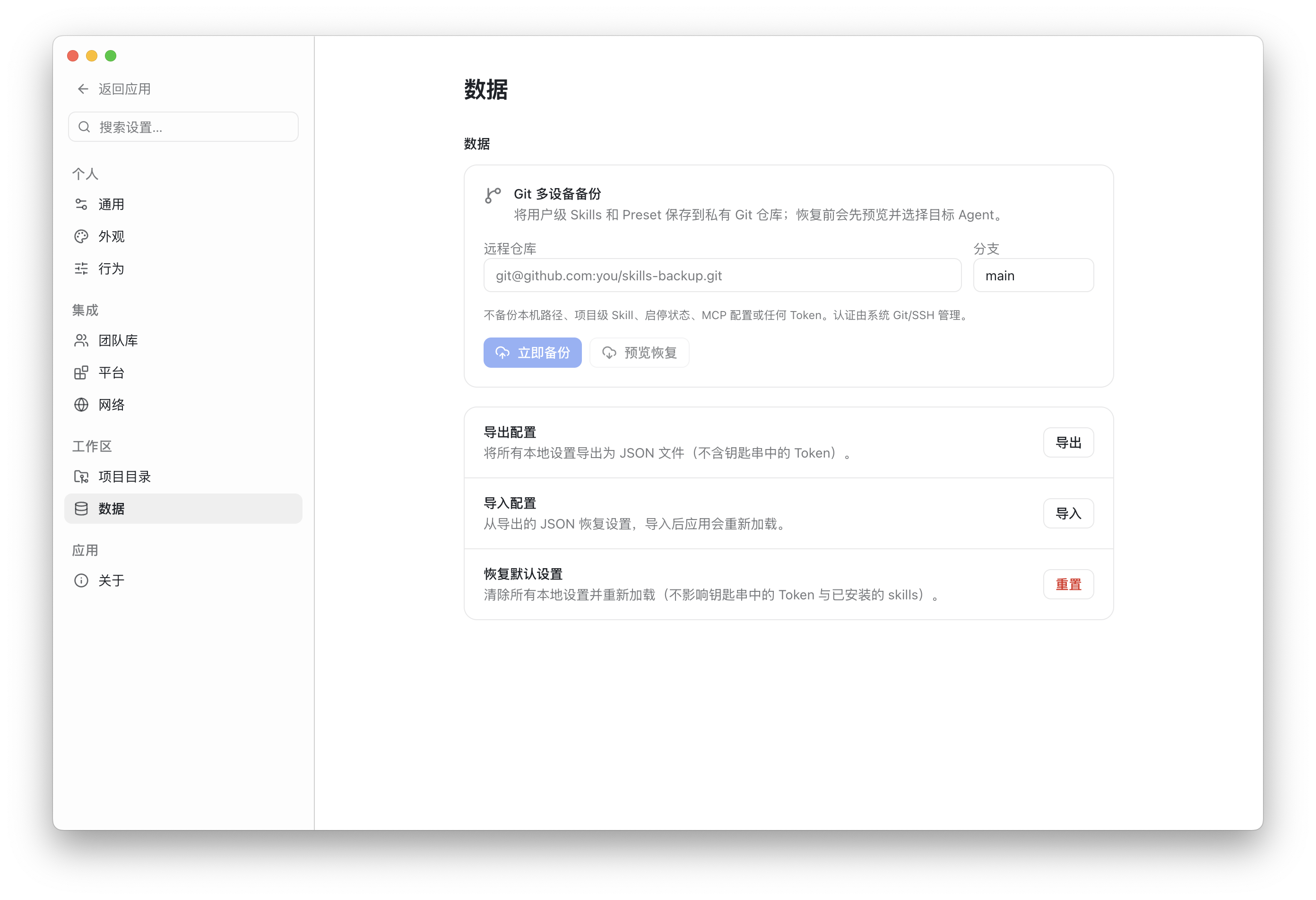
Data: back up user Skills and Presets to Git, export settings, or restore a previous configuration.
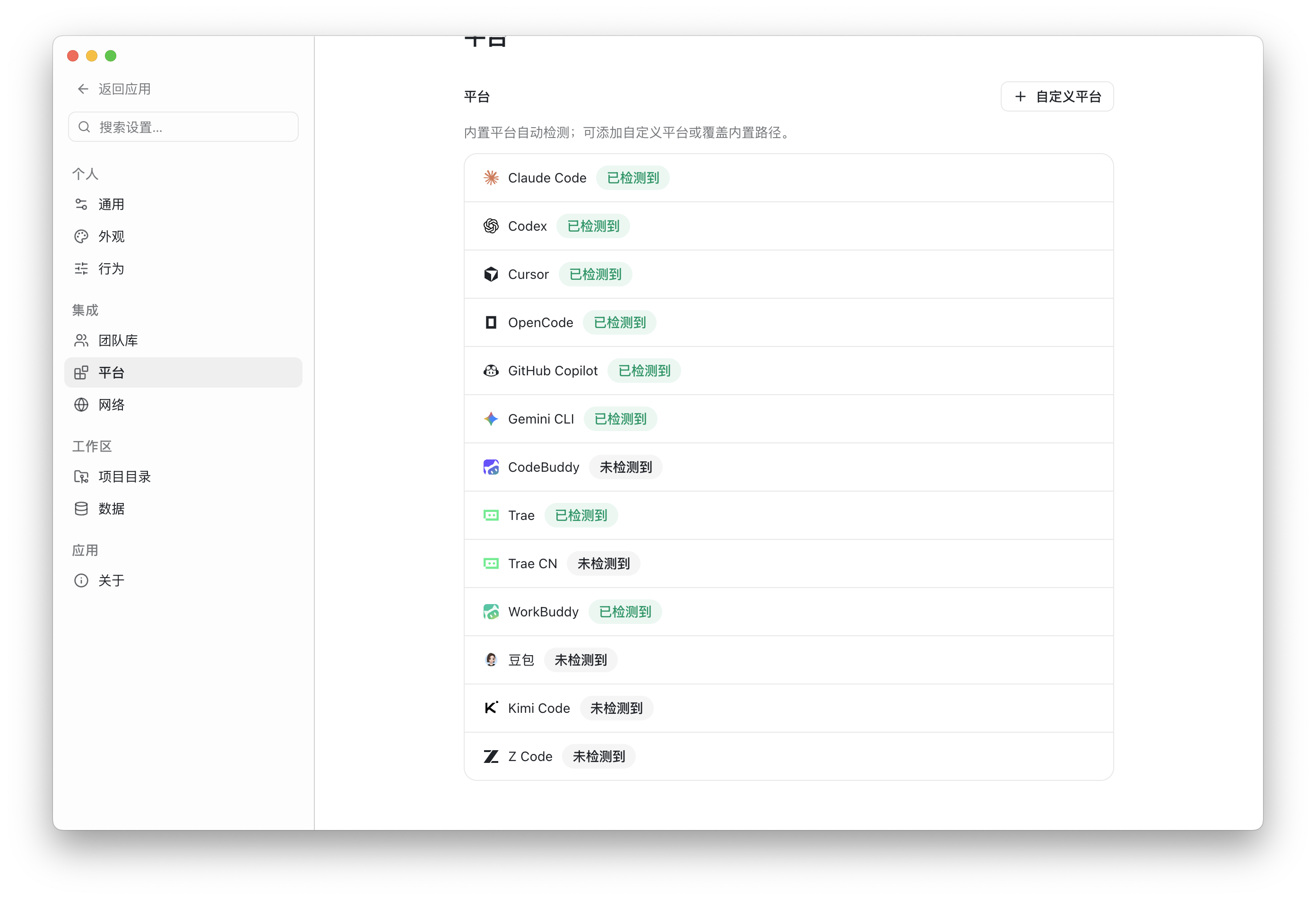
Platforms: review detected Agent integrations and add custom platform paths.
Highlights
- Unified inventory: automatically discover and aggregate Skills and MCP Servers across agents.
- Cross-platform installation: install one Skill into multiple user-level or project-level targets.
- Drift detection and synchronization: compare conflicting copies and synchronize from a selected baseline.
- Enable, disable, and uninstall: manage writable Skills, with trash and undo support for removal.
- Skill discovery: search skills.sh, SkillHub, and GitHub, then inspect content and resources before installation.
- MCP discovery and change plans: find MCP Servers, validate target capabilities, and preview exact writes.
- Presets and bundles: save reusable Skill sets for batch installation, toggling, import, and export.
- Private Git backup: back up user-level Skills and Presets, then preview restore operations on another device.
- Git team libraries: manage reviewed Skills, MCP definitions, role bundles, and policies through protected branches and PRs/MRs.
- Project compliance: declare project requirements in
.skillbuddy/team.yamland detect missing, outdated, blocked, or unresolved resources. - Custom platforms: add another agent by configuring its detection, user, and project paths.
- Bilingual UI: Simplified Chinese and English are built in.
Supported Agents
SkillBuddy includes built-in Skill directory conventions for:
| Agent | User scope | Project scope |
|---|---|---|
| Claude Code | ✓ | ✓ |
| Codex | ✓ | ✓ |
| Cursor | ✓ | ✓ |
| OpenCode | ✓ | ✓ |
| GitHub Copilot | ✓ | ✓ |
| Gemini CLI | ✓ | ✓ |
| CodeBuddy | ✓ | ✓ |
| Trae / Trae CN | ✓ | ✓ |
| WorkBuddy | ✓ | - |
| Doubao | ✓ | - |
| Kimi Code | ✓ | ✓ |
| Z Code | ✓ | ✓ |
MCP formats, scopes, and capabilities vary by platform. SkillBuddy displays the detected configuration surfaces and validates every planned change before applying it. Some conventions still need broader real-device feedback; see Platform conventions.
System Support
The SkillBuddy desktop application currently provides the following build targets:
| Operating system | Architecture | Minimum version | Support status |
|---|---|---|---|
| macOS | Apple Silicon (arm64) |
macOS 11 Big Sur | Supported, DMG and ZIP |
| macOS | Intel (x64) |
macOS 11 Big Sur | Supported, DMG and ZIP |
| Windows | x64 |
Windows 10 or later | Supported, NSIS installer and ZIP |
| Windows | arm64 |
Windows 11 | Preview build, NSIS installer and ZIP; real-device verification pending |
| Linux | x64 |
Modern desktop distribution | Supported, AppImage, DEB, and RPM |
| Linux | arm64 |
Modern desktop distribution | Preview build, AppImage, DEB, and RPM; real-device verification pending |
Release assets use the SkillBuddy-v<version>-<system>-<architecture>.<extension> naming convention.
- macOS arm64/x64:
SkillBuddy-v<version>-macos-<architecture>.dmgand.zip - Windows x64/arm64:
SkillBuddy-v<version>-windows-<architecture>.exeand.zip - Linux x64/arm64:
SkillBuddy-v<version>-linux-<architecture>.AppImage,.deb, and.rpm(x86_64for x64 builds)
Download
Download the installer for your system from:
macOS First Launch
The macOS installer uses a complete ad-hoc signature and is not notarized with an Apple Developer ID. Gatekeeper may block it because it is not from an identified developer. After moving the app to Applications, open it once, then go to System Settings → Privacy & Security → Security and click Open Anyway. Confirm the prompt to launch SkillBuddy. You can also control-click the app and choose Open. If the security approval button does not appear, use the following fallback for an installer downloaded from the official GitHub Release:
xattr -dr com.apple.quarantine /Applications/SkillBuddy.app
open /Applications/SkillBuddy.app
The xattr command only removes the download quarantine attribute and should be used as a last resort. If macOS reports that the app is damaged, do not bypass the warning: download a current installer because that indicates an invalid or incomplete app signature.
The self-hosted Registry service and CLI are separate optional components and are not included in the desktop installer.
SkillBuddy reads the local directories already used by your agents. Installation, synchronization, toggling, and removal only affect targets explicitly selected in the interface.
Team Workflow
A team can use Git as the source of truth for content, versions, permissions, and audit history:
- Maintainers edit Skills, MCP definitions, bundles, and policies on isolated
skillbuddy/<id>branches. - File lists, validation results, and diffs can be reviewed before publishing.
- GitHub contributions use
ghto create Pull Requests; GitLab contributions useglabto create Merge Requests. - Regular members browse and install only content that has already been merged.
- Private repository authentication stays with system Git, SSH Agent, or the credential manager. SkillBuddy does not store repository passwords.
See Git team libraries for repository formats and the complete workflow.
Security and Privacy
- SkillBuddy scans and manages local files by default and does not require a SkillBuddy account.
- An optional GitHub token can raise marketplace API limits and is stored through the system secure storage.
- MCP definitions must not contain plaintext tokens, passwords, or API keys. Use environment-variable or secret references.
- Git backup excludes MCP configuration, tokens, absolute machine paths, project-level Skills, and enablement state.
- Read-only system, administrator, and plugin Skills cannot be edited or removed.
- Main-process path validation prevents writes outside managed roots and rejects symlink escapes.
Repository Layout
skill-buddy/
├── apps/
│   ├── desktop/       # Electron + Vue 3 desktop app
│   └── registry/      # Optional self-hosted Fastify + SQLite registry
├── packages/
│   ├── core/          # Canonical models, scanning, aggregation, adapters, and validation
│   └── cli/           # skm command-line interface
└── docs/              # Design, platform, registry, and team-library documentation
The desktop team workflow uses Git team libraries and does not depend on the Registry. The Registry and CLI remain available in the monorepo as optional self-hosting and automation components.
Development
Requirements:
- Node.js 22 or later
- pnpm 10 or later
- Git
pnpm install
pnpm dev
Common commands:
pnpm build       # Build every workspace package
pnpm test        # Run unit tests
pnpm test:e2e    # Build and run Electron end-to-end tests
pnpm typecheck   # Type-check the complete repository
Contributing
Issues and Pull Requests are welcome. Before submitting a change, please try to:
- Include the affected platform, scope, and reproduction steps.
- Add coverage for shared logic when appropriate.
- Run the type checks or tests relevant to the change.
- Avoid committing real tokens, local paths, or private team content.
License
SkillBuddy is released under the MIT License.
Reviews (0)
Sign in to leave a review.
Leave a reviewNo results found