architecture-diagram-skill
Health Pass
- License — License: MIT
- Description — Repository has a description
- Active repo — Last push 0 days ago
- Community trust — 11 GitHub stars
Code Warn
- process.env — Environment variable access in skills/architecture-diagram/references/screenshot.js
- fs module — File system access in skills/architecture-diagram/references/screenshot.js
Permissions Pass
- Permissions — No dangerous permissions requested
No AI report is available for this listing yet.
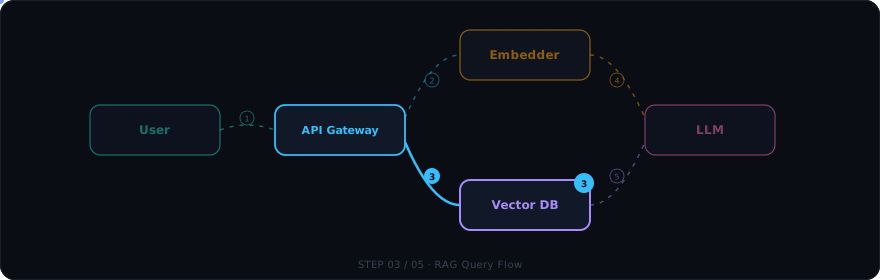
Build click-through, animated system architecture diagrams as a single HTML file. Drop it into a workshop, design review, or onboarding doc and let people watch the data flow instead of reading static boxes-and-arrows.
Interactive Architecture Diagrams
Agent Skill for Claude Code · Gemini CLI · GitHub Copilot CLI · OpenCode · Cursor
Build click-through, animated system architecture diagrams as a single HTML file.
No build step. No dependencies. One file you can email, host, or open locally.
Install · Try It · Examples · Skill Spec
Build click-through, animated system architecture diagrams as a single HTML file. Drop it into a workshop, design review, or onboarding doc and let people watch the data flow instead of reading static boxes-and-arrows.
This is an Agent Skill — a folder of instructions any compatible AI coding agent loads on demand. When you ask for an architecture diagram, this skill takes over and produces a self-contained architecture.html plus a companion architecture.md description. Works with Claude Code, Gemini CLI, GitHub Copilot CLI, OpenCode, Cursor, and any tool supporting the SKILL.md standard.
What you get
Each generated diagram includes:
- Named flows — pick a scenario tab (
RAG Query,Login,Ingest, …) and watch it play out step by step - Animated data packets glowing along quadratic-curve wires between services
- Side panel showing the current step's payload, description, and metadata chips (latency, auth headers, ports)
- Mode toggles — switch between
offline/online,dev/prod, orv1/v2to swap node labels, ports, and payloads in place - Drag-and-drop nodes — reposition any tile by dragging; snaps to grid, wires redraw live, layout saved to localStorage
- Player controls — play/pause/step, keyboard shortcuts, visual progress bar
- Dark/light theme toggle — switch with one click or press
T(preference saved in localStorage) - Fullscreen mode — press
Fto expand the canvas for presentations;Escapeto exit
No build step. No dependencies. One HTML file you can email, host, or open locally.
Battle-tested on a public RAG workshop (Eskadra Bielik) and several internal design reviews.
When to use this skill
| Situation | Use this? |
|---|---|
| "Show me how the auth flow works" (interactive, for a workshop) | Yes |
| "Design the RAG pipeline before we build it" (planning a new service) | Yes |
| "Build an architecture mockup we can iterate on with the team" | Yes |
| "Visualize our microservices and how they communicate" | Yes |
| "Map out the CI/CD pipeline for onboarding docs" | Yes |
| "Show the data flow through our ETL pipeline" | Yes |
| "Draw a sequence diagram for this PR" (static, lives in markdown) | No — a Mermaid sequence diagram inline is simpler |
| "I just need a static boxes-and-arrows topology" (no flows/steps) | No — a Mermaid flowchart is enough |
The differentiator is interactivity + sequenced data flow. If the value is "click through it and watch what happens," this skill applies.
Use cases
- System architecture — map services, databases, queues, and external APIs; watch requests flow between them step by step
- Data pipelines & ETL — show how data moves from ingestion through transformation to storage, with payload previews at each stage
- Agentic / RAG flows — visualize LLM chains, tool calls, retrieval-augmented generation, and multi-agent orchestration
- Microservices communication — trace requests through API gateways, service mesh, event buses, and worker queues
- CI/CD pipelines — walk through build, test, deploy, and rollback stages with environment toggles (staging/prod)
- Auth & security flows — OAuth2, SAML, mTLS handshakes, token refresh cycles with the full redirect dance
- Onboarding diagrams — give new team members a clickable walkthrough of "how does X actually work here"
- Design reviews — present a proposed architecture before building it; iterate on the diagram with stakeholders
- Workshop materials — let attendees click through a system at their own pace instead of watching static slides
Install
Claude Code — Plugin Marketplace (recommended)
/plugin marketplace add konraddzbik/architecture-diagram-skill
/plugin install architecture-diagram
That's it. The skill activates automatically whenever you ask for an architecture diagram, system flow, RAG pipeline, etc.
Claude Code — manual clone
Personal install (available in all your projects):
git clone https://github.com/konraddzbik/architecture-diagram-skill \
  ~/.claude/skills/architecture-diagram
Project install (committed to a repo, shared with your team):
git clone https://github.com/konraddzbik/architecture-diagram-skill \
  .claude/skills/architecture-diagram
Gemini CLI (recommended: one command)
gemini skills install https://github.com/konraddzbik/architecture-diagram-skill
This installs to ~/.gemini/skills/ (user-level, all projects). To install for just the current project:
gemini skills install https://github.com/konraddzbik/architecture-diagram-skill --scope workspace
Verify it loaded:
gemini skills list
If you're already in a session, reload without restarting:
/skills reload
Manual install (Gemini CLI)
Personal install — available in all your projects:
git clone https://github.com/konraddzbik/architecture-diagram-skill /tmp/arch-skill
cp -r /tmp/arch-skill/skills/architecture-diagram ~/.gemini/skills/architecture-diagram
Project install — committed to a repo, shared with your team:
git clone https://github.com/konraddzbik/architecture-diagram-skill /tmp/arch-skill
cp -r /tmp/arch-skill/skills/architecture-diagram .gemini/skills/architecture-diagram
Or use the cross-tool .agents/skills/ path (works in Gemini CLI, OpenCode, and other compatible tools):
git clone https://github.com/konraddzbik/architecture-diagram-skill /tmp/arch-skill
cp -r /tmp/arch-skill/skills/architecture-diagram .agents/skills/architecture-diagram
GitHub Copilot CLI
Requires GitHub CLI ≥ 2.90.0:
gh skill install konraddzbik/architecture-diagram-skill architecture-diagram
The skill is installed to .github/skills/ in your current project by default. To install it globally for all projects:
gh skill install konraddzbik/architecture-diagram-skill architecture-diagram --scope user
If you're already in a copilot session, reload without restarting:
/skills reload
Manual install (Copilot CLI)
Personal install — available in all your projects:
git clone https://github.com/konraddzbik/architecture-diagram-skill /tmp/arch-skill
cp -r /tmp/arch-skill/skills/architecture-diagram ~/.copilot/skills/architecture-diagram
Project install — committed to a repo, shared with your team:
git clone https://github.com/konraddzbik/architecture-diagram-skill /tmp/arch-skill
cp -r /tmp/arch-skill/skills/architecture-diagram .github/skills/architecture-diagram
OpenCode
Project install — committed to a repo, shared with your team:
git clone https://github.com/konraddzbik/architecture-diagram-skill /tmp/arch-skill
cp -r /tmp/arch-skill/skills/architecture-diagram .opencode/skills/architecture-diagram
Personal install — available in all your projects:
git clone https://github.com/konraddzbik/architecture-diagram-skill ~/.config/opencode/skills/architecture-diagram
Or use the Claude-compatible path (OpenCode reads .claude/skills/ too):
git clone https://github.com/konraddzbik/architecture-diagram-skill ~/.claude/skills/architecture-diagram
The skill activates automatically when you ask for an architecture diagram, system flow, RAG pipeline, etc.
Claude.ai (web / desktop / mobile)
- Download this repo as a ZIP: Code → Download ZIP (or
git cloneand zip the folder) - In Claude, go to Settings → Capabilities → Skills → Upload skill
- Upload the ZIP
- Toggle the skill on in your skills list
Try it
Once installed, just describe what you want. If you don't know where to start, just type:
Prepare an architecture view of this repository.
Claude will generate an architecture.html and architecture.md in your working directory. Open the HTML in a browser to see the interactive diagram — or ask Claude to show the results right in the terminal.
The skill triggers on phrases like architecture diagram, system flow, RAG flow, agentic flow, service map, or the Polish equivalents (diagram architektury, klikany diagram).
Example prompts
OAuth2 login flow
Build an interactive architecture diagram for an OAuth2 login flow with PKCE. Show the redirect dance between client, authorization server, and resource API step by step. Include a dev/prod mode toggle.
RAG pipeline design
I'm designing a RAG pipeline with embedding retrieval, a reranker, and an LLM. Show me a click-through diagram I can use in a design review. Toggle between offline (Docker, local Qdrant) and online (Cloud Run, BigQuery) modes.
Event-driven microservices
Visualize an event-driven order system: API gateway → Kafka → three consumers (inventory, billing, notifications). Toggle between synchronous (REST fallback) and asynchronous (Kafka) modes.
CI/CD pipeline
Show our CI/CD pipeline: GitHub push → GitHub Actions → build → test → deploy to staging → approval gate → deploy to prod. Toggle between staging and production environments.
Data ingestion pipeline
Visualize a data pipeline: webhook events → SQS → Lambda → transform → write to Postgres + push to Elasticsearch. Show the happy path and the dead-letter-queue retry flow.
Multi-agent system
Draw an agentic AI system: user query → orchestrator agent → tool-calling agent (search, calculator, code exec) → synthesis agent → response. Show how context flows between agents.
Microservices with service mesh
Map our microservices: mobile app → API gateway → user service, product service, order service. Each talks to its own DB. Show the checkout flow and the search flow with an Istio service mesh.
If you upload an existing SOLUTION.md, OpenAPI spec, or README first, the skill will extract services, ports, and operations from it before asking clarifying questions — so the more architecture context you give it, the less it asks.
What's inside
architecture-diagram-skill/
├── .claude-plugin/
│   ├── marketplace.json              # Plugin marketplace manifest
│   └── plugin.json                   # Plugin metadata
├── skills/
│   └── architecture-diagram/
│       ├── SKILL.md                  # Instructions Claude reads when activated
│       ├── assets/
│       │   ├── template.html         # The drop-in diagram template (CSS + JS + SVG)
│       │   └── css-tokens.css        # Standalone color/typography tokens for restyling
│       ├── examples/
│       │   ├── rag-eskadra-bielik.json   # Real RAG system, 5 flows, offline/online modes
│       │   ├── auth-oauth2.json          # OAuth2 + session flow, dev/prod modes
│       │   ├── event-driven.json         # Kafka fan-out, sync vs async modes
│       │   ├── cicd-pipeline.json        # GitHub Actions deploy, staging/prod modes
│       │   └── agentic-tool-calling.json # Multi-agent AI with tool calls
│       └── references/
│           ├── flow-design-patterns.md   # Layout heuristics, naming, sequencing
│           ├── component-library.md      # Copy-paste node snippets
│           └── screenshot.js             # Optional puppeteer-based layout spot-check
├── README.md
├── LICENSE
└── .gitignore
The HTML template is the heart of the skill — Claude copies it and edits only two regions: the nodes block (HTML) and the flows object (JS). Everything else (player, side panel, animations, wire renderer) just works.
Demo
Template content:
Dark theme:
Customizing
- Light or dark theme: every diagram ships with a built-in toggle (moon/sun icon, or press
T). The preference is saved in localStorage. To make light the default, ask Claude to addclass="light"to the<body>tag. - Rearrange nodes: drag any node to reposition it. Positions snap to a 32px grid and are saved to localStorage. Press
Rto reset to original positions. - Fullscreen presentations: press
Fto expand the canvas full-screen. PressEscapeto exit. - Restyle to your brand: point Claude at
assets/css-tokens.cssand ask it to swap the palette. The tokens are standalone — splice them into the template and you're done. - Add a new node role: there are six color-coded roles built in (
user,orch,compute,embed,vector,seed). Add a CSS variable for a seventh if you must, but keep the count ≤ 6 or the legend becomes hard to read. - Different output language: the skill works in English and Polish. Ask in your preferred language and the labels, descriptions, and companion markdown will match.
Known limits
- The diagram is a single HTML file — no live data, no real backend. It's a didactic tool, not a monitoring dashboard.
- Designed for ≤ 12 nodes per diagram. Beyond that, wire crossings get hard to avoid even with careful layout.
- The skill produces two artifacts by default (
.htmland.md). If you only want the HTML, say so explicitly.
Contributing
Found a bug, a layout pattern that doesn't work, or have an example system you'd like added? PRs welcome — especially new entries in examples/ showing real-world topologies.
When proposing changes to SKILL.md itself, please test that the description still triggers on the original phrases (architecture diagram, RAG flow, etc.) and doesn't over-trigger on static-diagram requests.
License
MIT — see LICENSE.
Credits
Built by @konraddzbik. Inspired by the design constraints of running real workshops where attendees need to see a system, not just read about it.
If you publish a diagram built with this skill, a link back is appreciated but not required.
Reviews (0)
Sign in to leave a review.
Leave a reviewNo results found