kookr
Health Uyari
- License — License: Apache-2.0
- Description — Repository has a description
- Active repo — Last push 0 days ago
- Low visibility — Only 5 GitHub stars
Code Basarisiz
- rm -rf — Recursive force deletion command in .claude/hooks-tests/check-portability.test.sh
- rm -rf — Recursive force deletion command in .claude/hooks-tests/check-shell-portability.test.sh
Permissions Gecti
- Permissions — No dangerous permissions requested
Bu listing icin henuz AI raporu yok.
A smart attention router for developers running multiple AI coding agents.
A smart attention router for developers running multiple AI coding agents.






You run several Claude Code, Codex CLI, or Grok Build agents in parallel. One loops on the same failing test. Another is waiting on a permission question. A third finished and needs review.
Kookr watches the agents, explains what needs attention, and routes you to the most urgent one.
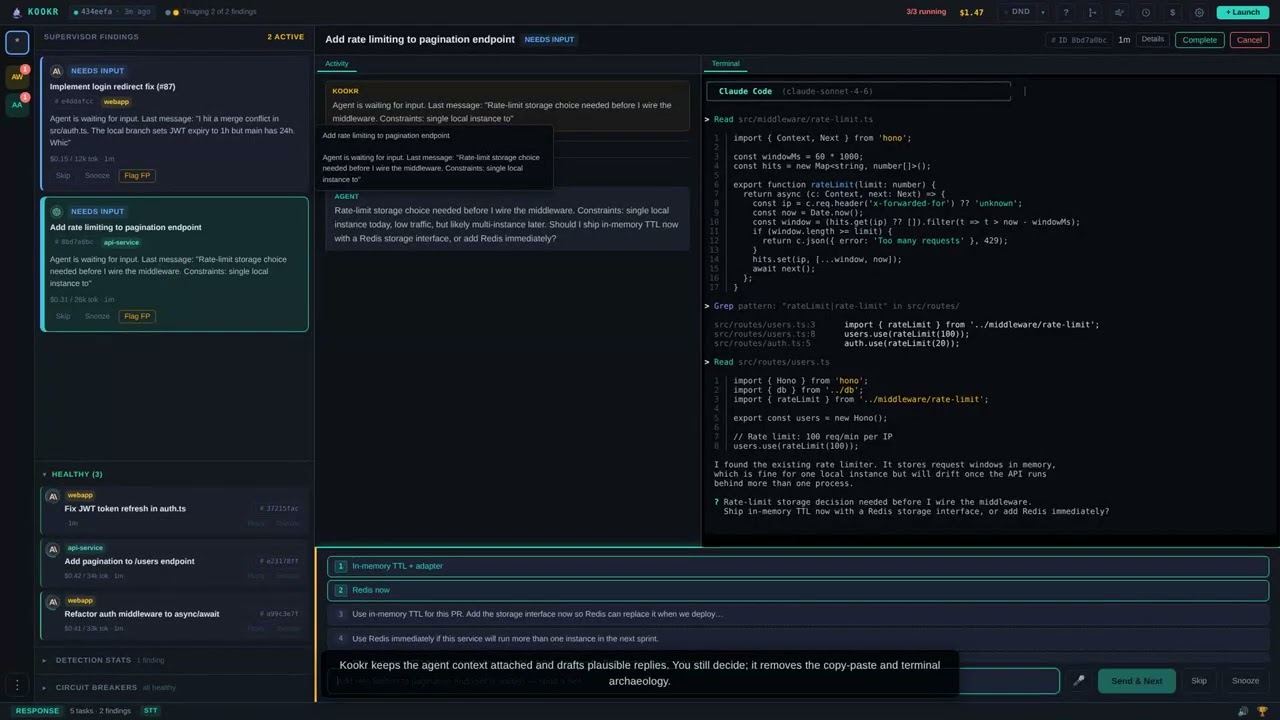
Watch the narrated demo video on YouTube
What Kookr Does
- Monitors agent sessions in real time through agent hooks (the event callbacks a
coding-agent CLI fires when it stops or asks for permission), transcripts, and managed
terminal sessions. - Detects common blockers such as permission prompts, repeated errors, idle/stopped agents, and stuck work.
- Routes your attention to the agent that most needs a human response.
- Lets you reply from one dashboard without switching terminals.
- Runs locally on your machine, with optional integrations for AI suggestions, speech, Telegram, GitHub state, schedules, and playbooks.
Quick Start
git clone https://github.com/kookr-ai/kookr.git
cd kookr
pnpm install
pnpm prod:setup
pnpm prod:update
Open http://localhost:4800.
Just want a look first? Run pnpm dev:demo for a no-install populated dashboard (fake backend on 4801, Vite on 5173 — open http://127.0.0.1:5173). See Getting Started.
Use the production-style instance for normal Kookr usage. It runs from the sibling ../kookr-prod worktree, so it stays stable while you edit this checkout or run another dev server to test changes.
Use pnpm dev only when you are actively developing Kookr and need hot reload on your modifications. Dev mode runs on 4801 with Vite on 5173; because it restarts and can break while source changes are being applied, it is a poor supervisor for real agent work. The usual contributor setup is stable Kookr on 4800 plus a separate pnpm dev instance for live verification.
Prerequisites: git, Node.js >=22, pnpm >=10, and build tools for native modules — including python3, which node-gyp/node-pty need and which build-essential does not include. Claude Code is only required when you want Kookr to launch Claude Code agents; install it with curl -fsSL https://claude.ai/install.sh | bash, then authenticate once with claude /login (or export ANTHROPIC_API_KEY) so launches can start — see Claude Code Setup.
Works with Codex CLI via a maintained fork that adds the Claude-compatible hooks Kookr depends on. See Codex CLI Setup.
Works with Grok Build via the official grok CLI. Install @xai-official/grok and run grok login --device-code. See Getting Started.
If setup fails, run:
pnpm run doctor
For operating-system install commands and first-agent walkthroughs, see Getting Started.
First Agent
In the dashboard, click Launch, choose a working directory, and enter a task prompt (the Manual tab offers a few sample prompts that fill the box without launching). Kookr starts the agent in a persistent dtach session — a small Unix tool, in the family of screen and tmux, that keeps the agent process alive independently of your browser or terminal — then streams that terminal and queues findings when the agent needs attention.
Terminal users can launch a task from any project:
kookr spawn "review the diff since origin/main and summarize risks"
The dashboard Launch button needs no extra setup. For terminal launches, put kookr on your PATH once with a one-time pnpm build && pnpm link --global (see CLI Reference); otherwise the first kookr spawn reports command not found.
See CLI Reference for kookr spawn, kookr status, and related commands.
Where To Go Next
| I want to... | Read |
|---|---|
| Install Kookr and run the first agent | Getting Started |
| Use the dashboard day to day | User Guide |
| Configure optional features | Configuration |
| Fix setup or runtime issues | Troubleshooting |
| Develop Kookr itself | Development |
| Understand test suites and coverage reports | Testing |
| Understand the system design | Architecture |
| See all API endpoints | API Reference |
| Understand playbook discovery | Playbook Scoping |
| Install or inspect the toolkit plugin | Kookr Toolkit |
Core Features
- Real-time monitoring for Claude Code, Codex CLI, and Grok Build agents (Codex CLI requires the maintained
jeanibarz/codex#feat/claude-compatfork) - Anomaly detection and prioritized findings
- Quick replies and response suggestions
- Live terminal access through xterm.js and dtach
- Multi-project tracking
- Project, user, and bundled playbooks
- Scheduled tasks
- GitHub PR, CI, and review awareness
- Cost tracking and session reflection
- Optional speech and Telegram integrations
Why Kookr?
Running one AI coding agent is simple. Running five creates a new coordination problem: you need to know which agent is blocked, which one is wasting budget, and which one can keep working without you.
Kookr is built for that supervision loop:
- Local-first: no telemetry, no cloud service required, state stored under
~/.kookr/. - Multi-agent native: one dashboard for parallel Claude Code, Codex CLI, and Grok Build sessions.
- Action-oriented: findings are ordered by urgency and paired with the terminal context you need to respond.
- Extensible: hooks, playbooks, skills, and a Claude Code plugin are part of the repo.
Architecture In One Screen
Browser dashboard
  -> Hono HTTP/WebSocket server
  -> Core monitor, anomaly detector, attention queue, task store
  -> Local dtach backend plus Claude Code / Codex CLI / Grok Build adapters
  -> Managed AI agent sessions
Agents run in interactive dtach sessions. Kookr watches hook events, terminal output, transcripts, GitHub state, and task metadata, then turns that signal into a small queue of findings.
Read Architecture and ADR-014 for the full design.
Documentation
The top-level README is intentionally short. Detailed documentation lives under docs/:
- Features - user-facing capabilities
- Requirements - structured acceptance criteria
- Architecture - system design and module structure
- System Models - context, containers, sequences, and state machines
- Roadmap - current direction
- ADRs - durable architecture decisions
Community
- Bug reports and feature requests: GitHub issues
- Contributing: CONTRIBUTING.md
- Security disclosures: GitHub Security Advisories and SECURITY.md
- License: Apache 2.0
Kookr collects no telemetry. Optional features that call network services are disabled by default and documented in Configuration.
Star History
License
Kookr is licensed under the Apache License 2.0. See NOTICE for required attribution.
Copyright 2026 Jean Ibarz.
Yorumlar (0)
Yorum birakmak icin giris yap.
Yorum birakSonuc bulunamadi