roundtable
Health Gecti
- License — License: MIT
- Description — Repository has a description
- Active repo — Last push 0 days ago
- Community trust — 14 GitHub stars
Code Uyari
- process.env — Environment variable access in .github/workflows/ci.yml
- process.env — Environment variable access in playwright.config.ts
Permissions Gecti
- Permissions — No dangerous permissions requested
Bu listing icin henuz AI raporu yok.
Watch your Claude Code agents work as a pixel-art office. Replay any second of a session exactly, see what every agent cost. Read-only, 100% local, never calls an API.
Roundtable

A read-only observer for Claude Code. It tails the JSONL transcripts the CLI already writes under~/.claude and draws the session as a live pixel-art office: every agent is a person at a desk who
thinks, runs tools, walks over to somebody to deliver a result, argues about a verdict, and walks
out through the door when they finish. The same events are in a group chat beside the room, in
words.
Three things it does that a session viewer usually does not:
- Deterministic replay. Click any second on the timeline and the room rebuilds exactly as it
stood — the same events replayed into the same simulation, not an approximation of it. - Per-agent token and cost accounting. Every agent carries its own token total, cache included,
and a cost estimate from published list prices. - Strictly read-only. It never writes to
~/.claude, never calls an API, and opens no outbound
connection at all.SECURITY.mdnames the file and the mechanism behind each of those — and the
residual risks they do not cover.
It is for anyone who runs Claude Code with subagents and wants to see what the fan-out is actually
doing: who is working, who is waiting, and who is spending the tokens.
npm install
npm start
Node 22.12 or newer. Written and used on Windows — see Platforms before you assume
anything about the other two.
See it first
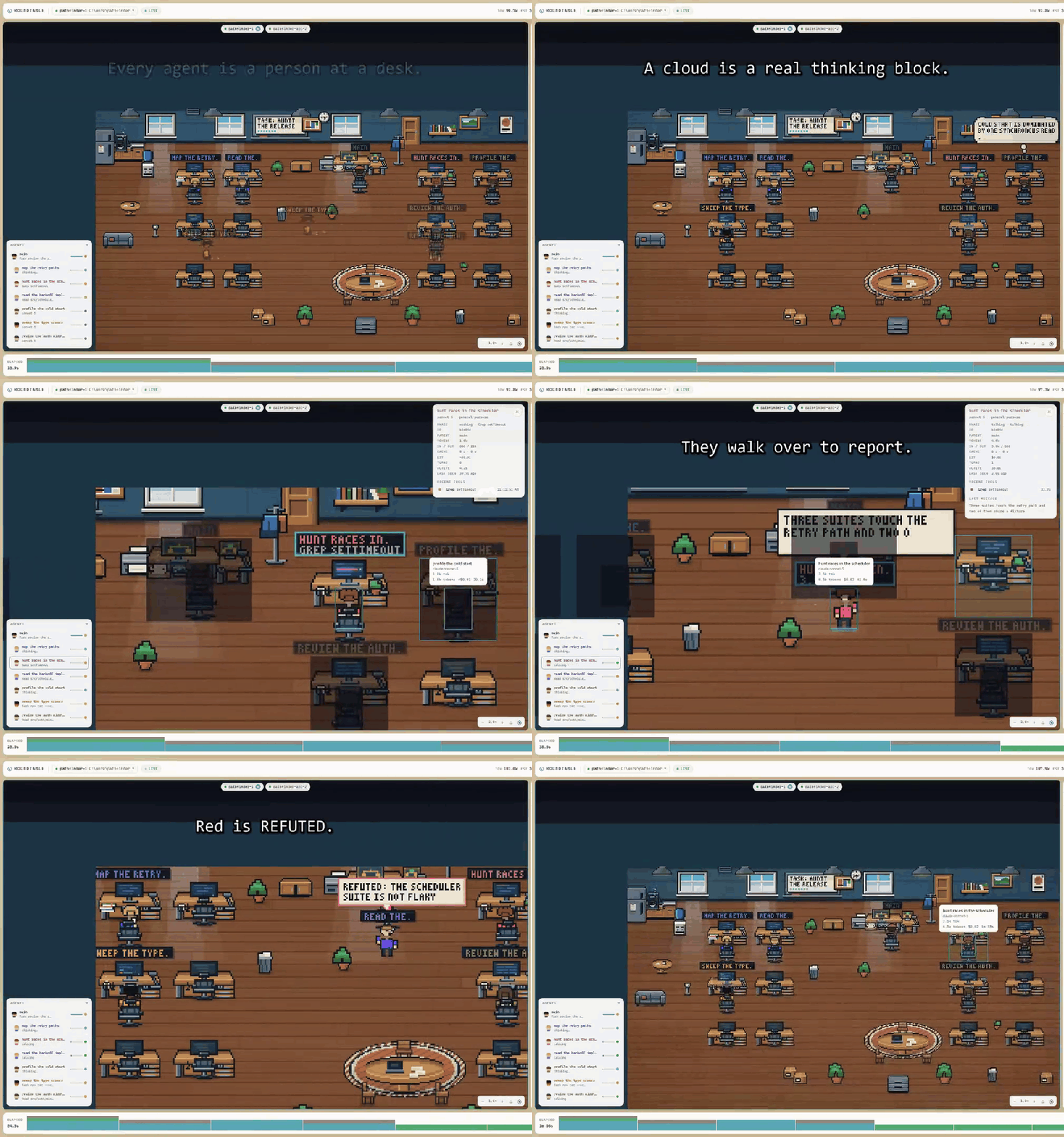
That is fourteen seconds of it. ▶ the whole thing, 52 seconds —
no narration, and it carries the parts a loop cannot: the timeline rewinding the room to an earlier
second, two sessions in tabs, and the per-agent token and cost breakdown. Captions are burned in,
and media/roundtable-trailer.srt has them as text.
Every frame is the real application driven by real events — only the content of the transcripts is
synthetic, so that no private session appears in it. scripts/promo/ is the harness that filmed it.
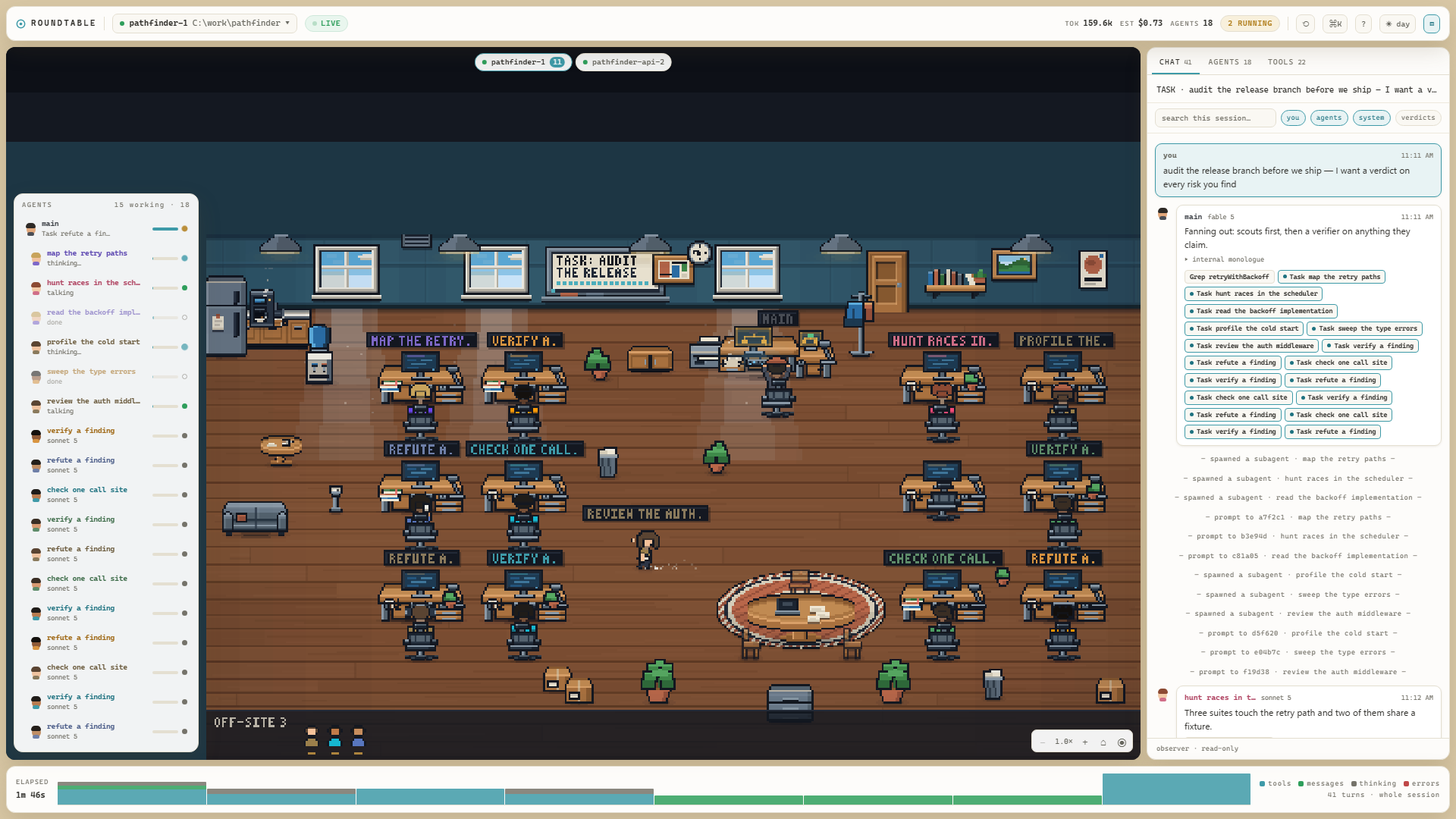
npm start is the whole thing. It opens http://localhost:5173 and starts showing whatever
session ran most recently. If you have a session running right now, you are watching it live.
If you don't have Claude Code, or nothing is running
npm run demo
An office with nobody in it is what an idle machine honestly looks like, and it is a poor way to
find out what this does. npm run demo writes a synthetic ~/.claude root under your temp
directory and points the observer at that instead: agents arrive, work, report to each other, hand
down verdicts, fill the desks past the point where there are chairs, and go home — and then it
keeps going, so the room is still moving when you come back to it.
Nothing about it is faked except the transcripts. The lines go to disk and come back through the
same watcher, parser, normalizer, socket and store as a real session, and the hub's timing is left
at its shipped defaults. It never reads your own ~/.claude, so no prompt, path or project name of
yours can appear in it. Ctrl+C deletes the staged root on the way out.
Platforms
Node 22.12 or newer. Beyond that, the honest position:
| Windows | where it was written and where it has actually been used |
| macOS, Linux | CI runs the type check, the unit suite and the production build on both, on Node 22 and 24. Nobody has reported opening the room on either. |
Those are different claims and the difference matters. A green CI badge says the code compiles and
the suite passes on all three; it is not a report from somebody who watched the office draw itself.
Two things in server/hub.ts branch on the platform — path comparison is case-insensitive on
Windows, and the file watcher polls there by default, because fs.watch is least reliable across
Windows drive types. Every unit test forces polling on, so the fs.watch path that macOS and Linux
use by default is precisely the thing the matrix does not exercise.
If you run it on macOS or Linux, an issue saying what happened is genuinely useful — working or
not. That is the gap.
The desktop icon — Windows only
npm run desktop
Puts a Claude Agents shortcut on the Desktop. Clicking it starts the observer if it is not
already up, opens the room in your browser, brings Claude Code up to date, and hands the window over
to a Claude session — so one click gets you both halves of what you were going to open anyway.
This one is Windows-only and not portable in principle: it writes a .lnk through theWScript.Shell COM object and points it at pwsh through the WindowsApps execution alias. There is
no macOS or Linux equivalent, and nothing else needs one — npm start is the way in on every
platform.
Clicking it twice is safe: the servers are only started when nothing is listening on their ports, so
a second click just opens another tab and another session. The servers get their own minimized
window called Roundtable servers, which is where to look if something does not come up and what to
close when you are finished.
The session starts in your home directory, because that is where sessions normally run and so it is
the one the observer opens on. $StartIn at the top of desktop\claude-agents.ps1 changes that.desktop\claude-agents.ps1 -SkipClaude does everything except open the session, which is how to
check the shortcut without spending one.
The icon is drawn by scripts/desktopIcon.mjs rather than checked in as an opaque binary — edit the
geometry there and re-run npm run desktop. If you move or rename the project, re-run it too: the
shortcut points into the checkout.
What you are looking at
┌──────────────────────────────────────────────────────────┬──────────────┐
│ ROUNDTABLE  ▾ session   ● LIVE      TOK  EST  AGENTS  ⟲ ⌘K ◐ ▤        │
├──────────────────────────────────────────────────────────┼──────────────┤
│                                                          │  CHAT        │
│   the office — one person per agent                      │  AGENTS      │
│                                                          │  TOOLS       │
│   ┌─────────┐                                            │              │
│   │ AGENTS  │  roster rail: who is here, what they are   │  the same    │
│   │  ·····  │  doing, how many tokens they have spent    │  events, in  │
│   └─────────┘                                            │  words       │
├──────────────────────────────────────────────────────────┴──────────────┤
│ ELAPSED  ▁▃▅▂▇▃▁▂▅▃▁  activity, one bar per second — click to rewind     │
└─────────────────────────────────────────────────────────────────────────┘
The room. Each agent walks in through the door and takes a desk. Working at a desk means a tool
is running; a thought bubble is a real thinking block; walking to someone and speaking is that
agent reporting a result. A red bubble is a REFUTED verdict, a green one CONFIRMED. When an
agent finishes it gives up its chair — so somebody waiting outside can have it — walks to the door
and leaves. So the room is always only the people still working, and the desks that are free are
free because somebody actually finished. Whoever has left is still in the AGENTS panel with
their tokens, their cost and everything they said.
If one of them turns out not to have finished after all — which happens, because a background agent
is reported done the moment it is launched — it walks back in through the door and takes a desk
again.
If more agents are running than the room has chairs, the extra ones appear as small heads along the
bottom. They are real: you can hover, tab to and click them.
The top bar. TOK is every token the session has billed, cache included. EST is a cost
estimate from published list prices — a ≥ in front means some model in the session has no rate
card in shared/models.ts, so the figure is a floor rather than a total.
The timeline. One bar per second of the session. Click one — or tab to it and use the arrow
keys — and the whole room rewinds to that moment and stops. The office is deterministic, so this
rebuilds the room as it actually stood, not an approximation. Press Escape or the RESUME LIVE
button in the top bar to come back to now.
More than one session at a time
When two or more sessions are running, a strip of tabs appears over the room, one per session.
Clicking a tab shows that session's room, roster, feed and totals. Nothing is thrown away when you
switch: every room keeps running in the background, so switching back is instant and complete.
"Running" is the same thing the dot in the picker means — the CLI has the session registered and
something touched it inside the last 90 seconds. A tab carries a count only when that session has
agents actually working, so a busy session and an idle one are still told apart at a glance. With
one session running, or none, there is no strip at all; there would be nothing to choose between.
New sessions are picked up automatically. The hub sweeps for them every few seconds — start a
session in another window and its tab appears on its own. The ⟲ button in the top bar asks it to
look now rather than on its own schedule; it is there so you do not have to wonder whether it is
working.
To watch a session that is not running — anything you have ever run on this machine — use the
session picker in the top bar, or press ⌘K and start typing its name.
Keys
⌘K / Ctrl+K |
command palette — every action, plus every agent and session by name |
1 2 3 |
chat / agents / tools panel |
B |
show or hide the side panel |
T |
day → night → follow the system |
Escape |
close the palette, then resume live, then clear the selection |
| arrows | pan the room; + / - zoom; Home re-centres |
| arrows on the timeline | move along it; Enter rewinds the room to that second |
Clicking a person focuses them: the feed filters to their turns and everyone outside their spawn
tree dims. Clicking the whiteboard opens the session's feed; clicking the roundtable filters
the feed to just the verdicts agents gave each other.
If something looks wrong
OFFLINE in the top bar. The hub is not running. npm start runs both halves; if you started
only Vite, the page has nothing to connect to.
"port 7411 is already in use". Roundtable is already running in another terminal. Openhttp://localhost:5173 instead of starting a second copy.
Vite refuses to start because 5173 is busy. That is deliberate. The hub only accepts WebSocket
connections from localhost:5173 and :4173 — that check is the only thing stopping any other page
you have open from reading your transcripts. If Vite quietly moved to 5174 the app would look
completely normal and never connect.
The feed says lines were dropped, or that the tail is incomplete. Both are true statements, not
glitches: a transcript line over 1 MiB cannot be parsed and is stepped over (any tool call answered
on such a line will never show a result), and a very large transcript is still being read. The feed
says so rather than quietly showing you less than there is.
Development
npm run dev          # same as start, without opening a browser
npm test             # the unit suite — ~15s, binds nothing
npx tsc --noEmit     # types
npx vite build       # the client, built the way a user would get it
npm run e2e          # Playwright — needs 7411 and 5173 free, so stop `npm start` first
npm run room         # render the office to .preview/room-{day,night,spawn}.png
npm run room:bless   # accept a deliberate visual change as the new baseline
npm run e2e starts its own hub on 7411, so it cannot run at the same time as the app. Stop the app
by port, not by killing the npm wrapper — the two servers outlive it.
npm run room:bless rewrites the visual baseline that tests/room.test.ts hashes against. Look
at the PNGs before you bless them — a hash can tell you the room changed, never that it is still
right, and blessing without looking turns a regression into the baseline. CONTRIBUTING.md has the
rest of the loop, and docs/pixel-contract.md is binding for anything under src/office/pixel/.
CI (.github/workflows/ci.yml) runs the typecheck, the unit tests and the build on Ubuntu, macOS
and Windows × Node 22 and 24 for every push to main and every pull request. The Playwright job is
manual-only and has never been observed to pass on a runner; the workflow says so where it is
defined rather than leaving you to find out.
Architecture, in one paragraph: server/tail.ts tails each JSONL file by byte offset →server/parse.ts tolerantly parses a line → server/normalize.ts turns it into typed events →server/hub.ts watches the filesystem, derives cross-file events like "that subagent finished", and
broadcasts over a loopback WebSocket gated on Origin → src/ws.ts batches frames → src/store.ts
folds them into one RtState per session → the panels render that, while src/office/mapping.ts
turns the same events into commands for the deterministic simulation in src/office/engine.ts,
which src/office/pixel/scene.ts paints into a 480×270 buffer. shared/ holds the wire types and
is the only thing both halves import.
The rest of it
CONTRIBUTING.md |
how to run it, the checks, the visual-regression loop, and what will get a PR sent back |
SECURITY.md |
what "read-only" is enforced by, file and mechanism — and the residual risks, including the one the Origin gate deliberately leaves open |
CHANGELOG.md |
everything so far, as one unreleased 0.1.0 |
docs/pixel-contract.md |
binding for anything under src/office/pixel/ |
LICENSE |
MIT |
Yorumlar (0)
Yorum birakmak icin giris yap.
Yorum birakSonuc bulunamadi