seshat-runtime
Health Warn
- License — License: Apache-2.0
- Description — Repository has a description
- Active repo — Last push 0 days ago
- Low visibility — Only 5 GitHub stars
Code Pass
- Code scan — Scanned 12 files during light audit, no dangerous patterns found
Permissions Pass
- Permissions — No dangerous permissions requested
No AI report is available for this listing yet.
Open-source Go agent runtime for autonomous AI systems and multi-agent automation. MCP, RAG, 15+ LLM providers and 60+ built-in tools in a single binary.
Open-source Go agent runtime for governed, multi-provider, self-hostable execution
Built for serious agent work today, with a larger open-source vision behind it.
🌐 Website · 📚 Documentation · ⬇️ Installation · 💬 Discussions · 🐛 Issues · 🖥️ SeshatOS





Seshat Runtime
What Seshat Is Today
Seshat is an open-source Go agent runtime for people who need more than a chat shell and less vendor lock-in than a closed assistant.
Its current wedge is concrete:
- governed multi-turn agent execution
- tools, files, sandboxed bash, web, browser, MCP, RAG, and skills
- multi-provider routing with self-hosted and local-first deployment options
- persistent sessions, permissions, recovery, and audit-friendly behavior
- CLI/TUI, gRPC, and Go SDK surfaces on the same runtime core
If you want the class of tool people reach for in products like Claude Code, but open, written in Go, multi-provider, and deployable under your own rules, this is the project.
Why This Exists
Most of the market still splits into two weak extremes:
- chat products that answer well but do not own serious execution
- low-level frameworks that are flexible but too fragmented, too provider-shaped, or too awkward to ship as a real runtime
Seshat is the missing middle layer: an execution runtime that can actually run agents, call tools, hold sessions, enforce permissions, recover from failures, and stay usable as infrastructure.
The Broader Open-Source Direction
The project still keeps a broader ambition, and that matters for the community.
Seshat is not only about making one strong solo agent. The longer-term direction is organized agentic work: explicit roles, mission memory, structured coordination, durable teams, and an open foundation that others can extend through skills, MCP servers, SDK integrations, and domain-specific workflows.
That larger vision belongs in the docs and in open-source discussion because contributors need the map, not only the current feature list.
- Product and runtime direction: https://seshat-ai.com/en/docs/learn/vision
- Runtime concepts and architecture: https://seshat-ai.com/en/docs/concepts/what-is-seshat
- Technical bets behind the project: https://seshat-ai.com/en/docs/learn/technical-hypotheses
- Why the runtime is written in Go: https://seshat-ai.com/en/docs/learn/why-go
Runtime First, Platform Above It
Seshat is the runtime layer.
Use this repository if you want to:
- run agents locally or self-host them under your own control
- embed the runtime inside a Go application or internal system
- extend providers, tools, permissions, MCP integration, or runtime behavior
If you want a ready-to-use product built on this engine, see SeshatOS (local-first desktop app and backend) or SeshatCloud (multi-tenant server and admin console for organizations).
🖥️ Terminal UI
seshat chat drops you into a full-featured terminal interface built for long-running agent sessions.
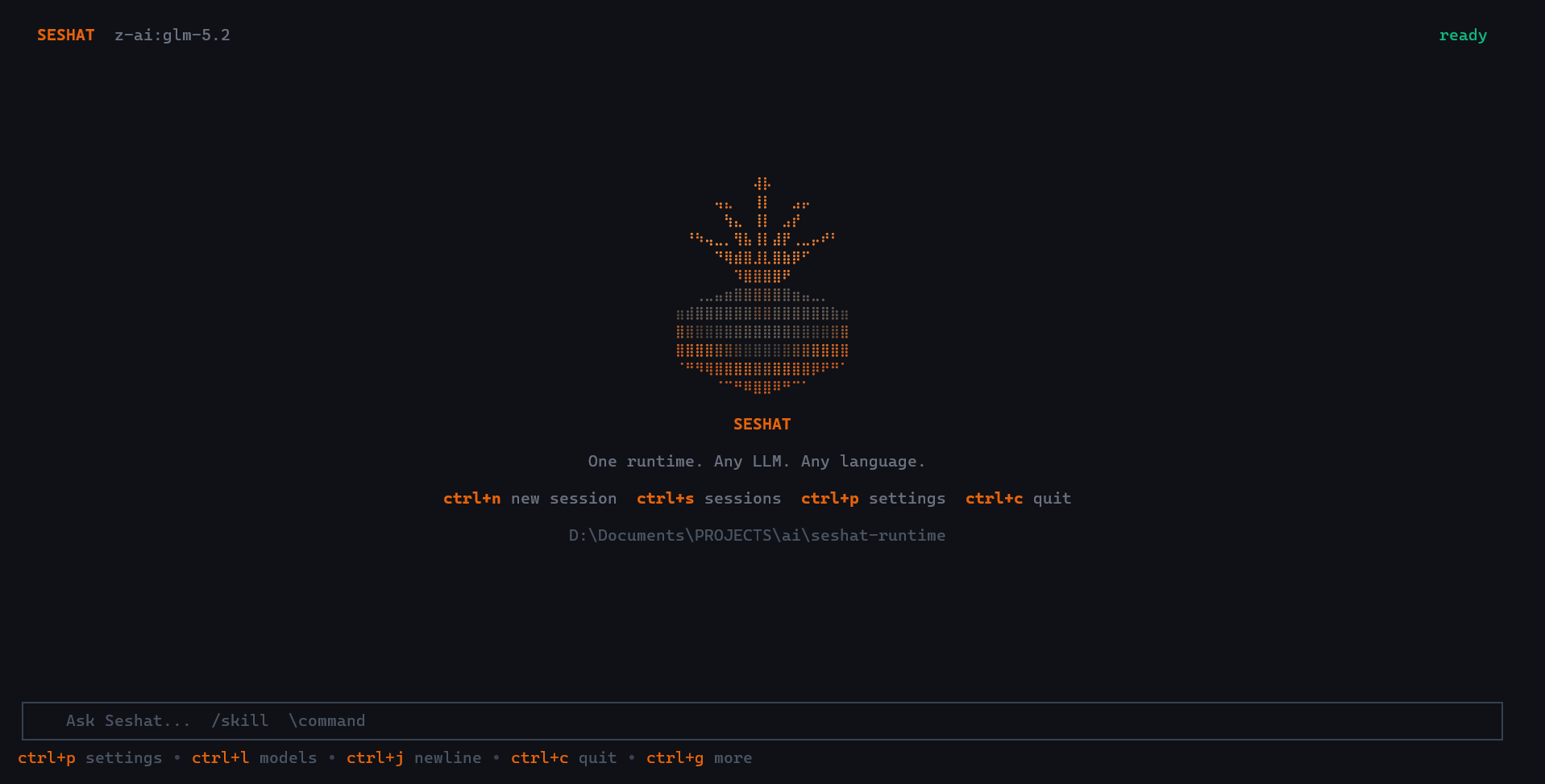
Welcome — up and running in 10 seconds |

Settings panel — every shortcut, one keystroke away ( ctrl+p)
|

Model selection — switch across 20+ models in 2 keystrokes |

Provider config — API keys encrypted, scoped per provider |

Agent at work — full reasoning trace, thinking blocks + tool calls |

Streaming results — streamed responses with markdown + tool timings |
Keyboard shortcuts:
ctrl+psettings ·ctrl+mmodels ·ctrl+ssessions ·ctrl+,providers ·ctrl+nnew session ·ctrl+ttasks ·ctrl+ucopy last response ·ctrl+ytoggle yolo ·ctrl+oopen editor ·ctrl+ghelp ·ctrl+cquit
Clipboard note (Linux): selection copy works best when
wl-clipboard(Wayland) orxclip/xsel(X11) is installed. Without a system clipboard backend, Seshat can request terminal clipboard access but cannot guarantee a real system copy.
Compaction note: transcript compaction is automatic today. A dedicated manual compact action is planned for the TUI once the runtime exposes a real manual-compaction hook.
🌐 The Seshat Ecosystem
seshat is the headless runtime: pure Go, no UI, no users, no billing. It is the foundation everything else builds on.
Products built on seshat
| seshat (this repo) | SeshatOS | SeshatCloud | |
|---|---|---|---|
| What it is | Go runtime + SDK + CLI/TUI + gRPC | Local-first desktop app and backend | Multi-tenant server and admin console |
| Stack | Go | Go + TypeScript/React/Electron | Go + TypeScript/React (+ a Python service for document intelligence) |
| License | Apache-2.0 | Apache-2.0 + Commons Clause (source-available) | Source-available (draft) |
| Who it's for | Developers embedding agents in their own apps | Individuals and small teams who self-host | Organizations that need central administration |
| Status | Stable, in production use | Under construction (chat-first desktop rebuild) | Server side solid, not yet a packaged offer |
Both products consume seshat through pkg/* only. seshat knows nothing about them.
The commercial activity around Seshat (AI consulting and integration, plus the products above) is presented at seshat-ai.com.
🤝 Contribution split
| If you want to... | Contribute to... |
|---|---|
| Improve execution speed, reduce latency, optimize the agent loop | seshat (Go) |
| Add a new LLM provider or tool | seshat (Go) |
| Expose new capabilities in the SDK or gRPC API | seshat (Go) |
| Improve the desktop app or local backend | SeshatOS |
| Work on organizations, IAM, or scheduled automation | SeshatCloud |
The engine is intentionally kept minimal and fast. If you need something from the SDK that is not exposed yet, open an issue and we will prioritize it.
📦 Installation
The full guide is on the website: Installation — seshat-ai.com. It covers the install script and what it does, its options, the Go toolchain, building from source and using Seshat as a library. The commands below are the short version.
End users — one command, fully configured:
curl -fsSL https://raw.githubusercontent.com/KPO-Tech/seshat/main/scripts/install.sh | bash
Downloads the right binary for your platform, adds it to your PATH, and leaves the runtime directory (~/.config/seshat-cli/) ready. The DB and sessions are created on first run.
Options:
VERSION=v0.1.0 bash <(curl -fsSL ...) # pin a specific version
Developers — Go toolchain:
# Install the CLI binary
go install github.com/KPO-Tech/seshat/cmd/cli@latest
SDK — embed in your Go application:
go get github.com/KPO-Tech/seshat@latest
🔀 Three Ways to Use It
1. 💻 CLI — seshat
An AI agent in your terminal. Multi-provider, local-first, skills-aware. Guide: Using the CLI.
Install
# End users — full setup in one command:
curl -fsSL https://raw.githubusercontent.com/KPO-Tech/seshat/main/scripts/install.sh | bash

# Developers — binary only via Go toolchain:
go install github.com/KPO-Tech/seshat/cmd/cli@latest
Configure a provider
seshat config --provider anthropic --api-key sk-ant-...
seshat config --model anthropic:claude-sonnet-4-20250514
seshat config --print
Run
seshat chat                                            # interactive TUI session
seshat chat --resume <session-id>                      # resume a specific session
seshat chat --continue                                 # resume the most recent session
seshat run "list all TODO comments in this codebase"   # one-shot task
seshat sessions list                                   # browse past sessions
seshat version                                         # print installed version
seshat help                                            # full command reference
Sessions are persisted locally in SQLite. Skills are loaded from .seshat/skills/ in your project. The full tool set is available: file edits, sandboxed bash, web search, browser, MCP servers, sub-agents.
2. 🌐 gRPC Server
Run seshat as a gRPC service and generate clients for any language. Reference: gRPC API.
# Development
ANTHROPIC_API_KEY=sk-ant-... go run ./cmd/grpc

# From build
ANTHROPIC_API_KEY=sk-ant-... ./bin/seshat-grpc
Server starts on :50051. The contract lives in pkg/grpc/proto/seshat.proto. Generate a client for Python, TypeScript, Java, Rust, or any gRPC-supported language:
# Python
python -m grpc_tools.protoc -I pkg/grpc/proto --python_out=. --grpc_python_out=. seshat.proto

# TypeScript
npx grpc-tools --js_out=. --grpc_out=. pkg/grpc/proto/seshat.proto
One runtime. Every language.
3. 📦 Go SDK
Embed the full runtime in your own Go application. Reference: Go SDK, with the events and hooks and the integration guide.
go get github.com/KPO-Tech/seshat/pkg/sdk
import "github.com/KPO-Tech/seshat/pkg/sdk"

client, err := sdk.NewClient(&sdk.ClientConfig{
    APIKey: os.Getenv("ANTHROPIC_API_KEY"),
    Model:  sdk.ModelIdentifier{Provider: "anthropic", Model: "claude-sonnet-4-20250514"},
})
if err != nil {
    log.Fatal(err)
}
defer client.Close()

session, _ := client.CreateSession(ctx)
resp, _ := session.SubmitMessage(ctx, "Write a Go HTTP handler for /health")
fmt.Println(resp.Content)
📊 How Seshat Compares
| Feature | seshat | Claude Agent SDK | OpenAI Agents SDK | LangGraph | CrewAI |
|---|---|---|---|---|---|
| Language | Go | Python/TS | Python | Python | Python |
| Single binary (no deps) | ✅ | ❌ | ❌ | ❌ | ❌ |
| CLI included | ✅ | ❌ | ❌ | ❌ | ❌ |
| gRPC server (any language) | ✅ | ❌ | ❌ | ❌ | ❌ |
| Multi-provider | ✅ (15) | ❌ Claude only | ❌ OpenAI only | ✅ | ✅ |
| MCP client | ✅ | ✅ | ✅ | Partial | ❌ |
| Sandboxed bash (Landlock) | ✅ | ✅ | ❌ | ❌ | ❌ |
| Skills system | ✅ | ❌ | ❌ | ❌ | ❌ |
| Built-in RAG | ✅ | ❌ | ❌ | ❌ | ❌ |
| Browser automation | ✅ | ✅ | ❌ | ❌ | ❌ |
| Session persistence | ✅ | ❌ | ❌ | ✅ | ❌ |
| OTel tracing | ✅ | ❌ | ❌ | ✅ | ❌ |
| Open-source license | Apache 2.0 | MIT | MIT | MIT | Apache 2.0 |
✨ Capabilities
| Capability | Details |
|---|---|
| 🌍 Multi-provider | 15 providers: Anthropic, OpenAI, Gemini, Mistral, DeepSeek, Ollama, OpenRouter, AWS Bedrock, GCP Vertex, Azure Foundry, Codex, MiniMax, Z.ai, OpenCode, Cloudflare Workers AI |
| 🛠️ 60+ built-in tools | File read/write/patch, bash (Landlock sandbox), web search, web fetch, browser (Playwright), grep/glob, LSP, sub-agents, RAG, tasks, memory, worktree, notebooks, image generation, TTS/STT |
| 🔌 MCP client | Universal MCP client: plug in any MCP server (GitHub, Postgres, Slack, Docker, Notion, ...) |
| ⚡ Skills | Markdown instruction files injected into the system prompt: encode your team's conventions and domain expertise |
| 🎯 Execution modes | execute (default), plan (review before act), pair_programming (collaborative) |
| 🔒 Permission engine | Per-tool deny rules, auto-mode LLM classifier, configurable per session (auto / acceptEdits / onRequest / bypass / never) |
| 💾 Session persistence | SQLite-backed multi-turn sessions, resumable across restarts |
| 📡 Streaming | Text chunks + structured runtime events (tool calls, plan events, permission requests, token usage) |
| 🧠 Long-context compaction | Automatic context compression when approaching the model's window (configurable threshold) |
| 📉 Observability | Prometheus metrics + OpenTelemetry tracing (OTLP gRPC export, no-op when endpoint not set) |
🗂️ Repository Structure
seshat/
├── cmd/
│   ├── cli/              ← seshat CLI entrypoint (TUI + one-shot commands)
│   └── grpc/             ← gRPC server entrypoint
├── pkg/                  ← public API (safe to import from outside)
│   ├── sdk/              ← Go SDK: Client, sessions, streaming, callbacks
│   ├── types/            ← shared types: Message, ToolUse, TokenUsage, ...
│   ├── agent/            ← agent definitions, built-in registry
│   ├── providers/        ← LLM provider abstraction, routing, fallback
│   ├── mcp/              ← MCP client: stdio, SSE, HTTP transports
│   ├── rag/              ← chunking, embedding, hybrid vector search
│   ├── skills/           ← skill loading, frontmatter parsing, injection
│   ├── memory/           ← in-session state, compaction strategies
│   ├── web/              ← web search, fetch, browser (Playwright)
│   ├── storage/          ← artifact store: S3, local filesystem
│   ├── vector/           ← vector DB abstraction
│   ├── contract/         ← Tool interface, CallResult, registry
│   ├── auth/             ← provider auth abstraction, OAuth device flow
│   ├── workspace/        ← sandbox path resolution, workspace layout
│   ├── monitoring/       ← Prometheus metrics, OTel spans
│   ├── grpc/             ← proto definitions and generated code
│   └── config/           ← app-level config from env
└── internal/             ← private implementation (do not import directly)
SeshatOS, SeshatCloud and any third-party consumer must import
pkg/*only, neverinternal/*.
🌐 Supported Providers
| Provider ID | Service | Auth |
|---|---|---|
anthropic |
Anthropic | ANTHROPIC_API_KEY |
openai |
OpenAI | OPENAI_API_KEY |
gemini |
Google Gemini | GOOGLE_API_KEY |
mistral |
Mistral AI | MISTRAL_API_KEY |
deepseek |
DeepSeek | DEEPSEEK_API_KEY |
ollama |
Ollama (local) | none |
openrouter |
OpenRouter | OPENROUTER_API_KEY |
bedrock |
AWS Bedrock | AWS_ACCESS_KEY_ID + region |
vertex |
GCP Vertex AI | ANTHROPIC_VERTEX_PROJECT_ID + region |
foundry |
Azure AI Foundry | ANTHROPIC_FOUNDRY_API_KEY |
codex |
ChatGPT Pro (OAuth) | device-code flow |
minimax |
MiniMax | MINIMAX_API_KEY |
z-ai |
Z.ai | Z_AI_API_KEY |
opencode |
OpenCode Zen | OPENCODE_API_KEY |
workers-ai |
Cloudflare Workers AI | CLOUDFLARE_API_KEY |
Full model listings and capabilities: docs/providers.md.
🚀 Quick Start
# 1. Install
curl -fsSL https://raw.githubusercontent.com/KPO-Tech/seshat/main/scripts/install.sh | bash

# Reload your shell (or open a new terminal) if prompted, then:

# 2. Configure your provider
seshat config --provider anthropic --api-key sk-ant-...
seshat config --model anthropic:claude-sonnet-4-20250514

# 3. Start chatting
seshat chat                          # new session (opens TUI)
seshat chat --continue               # resume last session
seshat chat --resume <session-id>    # resume a specific session
seshat run "list all TODO comments in this codebase"  # one-shot task
No API key? Use Ollama for free local inference:
seshat config --provider ollama --model ollama:llama3.2
(requires Ollama running locally)
Developers building from source: see the Development section below.
The same steps are on seshat-ai.com: the Quick start (resuming a session, the shortcuts of the terminal interface), Configuration (the command line, the environment variables, the providers) and Your first agent (running a task, adding a skill, calling the runtime from your own code).
⚡ Skills
Skills are Markdown files that encode expertise injected into the agent's system prompt at runtime.
.seshat/skills/
  go-conventions.md     # "always use context.Context as the first parameter..."
  git-workflow.md       # "never commit to main, always open a PR, squash before merge..."
  security-rules.md     # "never log secrets, validate all external input at boundaries..."
The official skill collection is seshat-skills, installable from any URL directly from the CLI.
🔌 MCP
Any MCP server is immediately usable — no additional development needed.
client, _ := sdk.NewClient(&sdk.ClientConfig{
    MCPServers: []sdk.MCPServerConfig{
        {Name: "github",   Command: "npx", Args: []string{"-y", "@modelcontextprotocol/server-github"}},
        {Name: "postgres", Command: "npx", Args: []string{"-y", "@modelcontextprotocol/server-postgres", "postgresql://..."}},
        {Name: "slack",    Command: "npx", Args: []string{"-y", "@modelcontextprotocol/server-slack"}},
    },
})
🏗️ Architecture
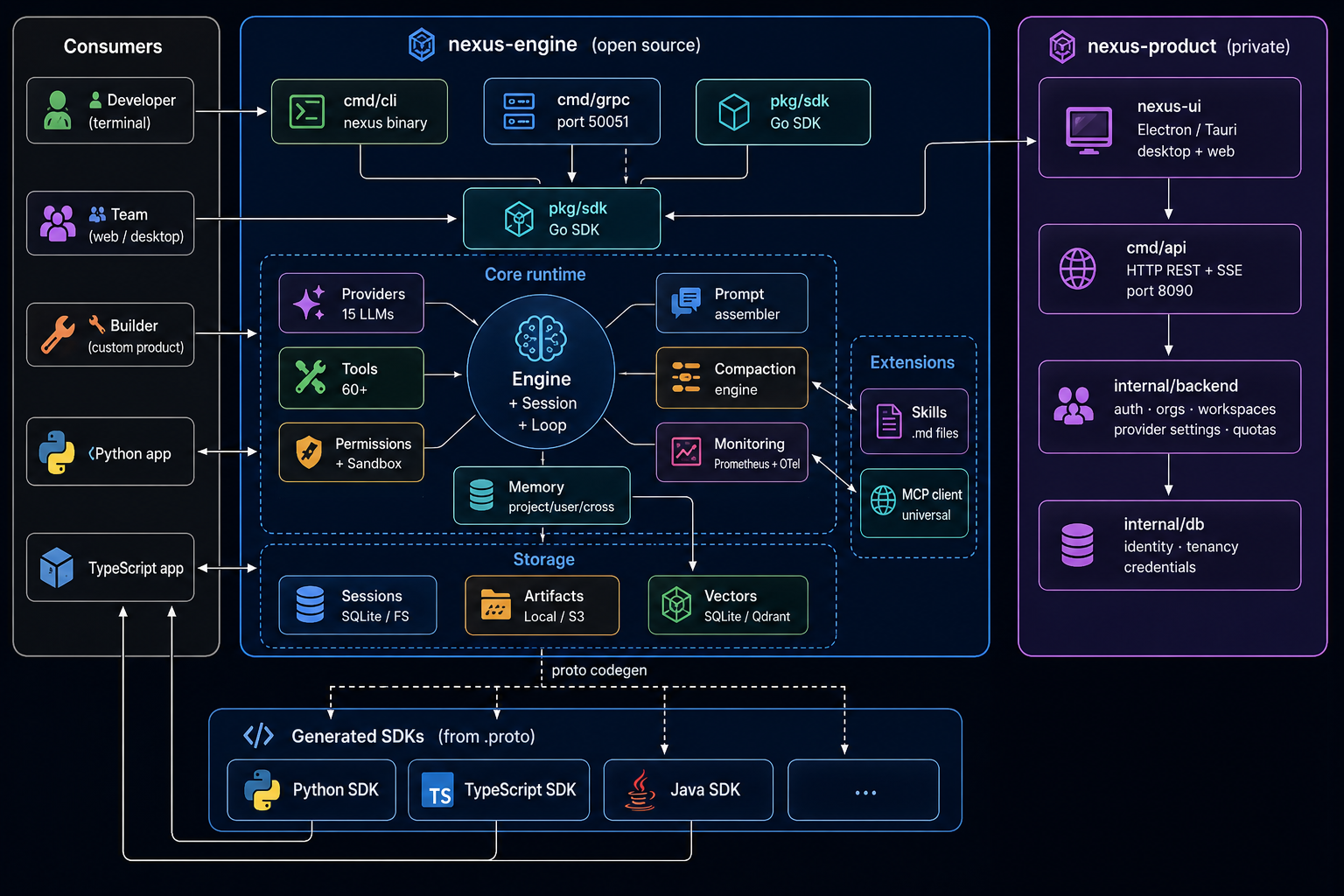
Full architecture diagrams (Mermaid): docs/vision/diagrams.md.
📖 Documentation
| Doc | What it covers |
|---|---|
| Vision & Roadmap | Project idea, design principles, Level 1->2->3 roadmap |
| Architecture | System design, layer diagrams, query loop state machine |
| SDK Guide | ClientConfig, sessions, streaming, callbacks, MCP |
| Tools | Built-in tools reference, permission pipeline |
| Providers | Multi-provider routing, retry, circuit breaker |
| Prompt System | Section assembly, stage overlays, cache control |
| Skills | Skills system, loading order, injection |
| Transports & Setup | gRPC setup, proto codegen, env vars |
| Multi-Agent Teams | Agent profiles, mailbox, dispatcher, TeamBus |
| Memory and Compaction | Session memory, context compaction, memory tool |
| MCP Client | MCP protocol, transports, server configuration |
| RAG System | Chunking, embeddings, hybrid search, document ingestion |
| Planning Mode | Execution modes: execute, plan, pair-programming |
🛠️ Development
First-time setup (build from source)
# Linux / macOS — installs all dependencies, builds, wires git hooks
git clone https://github.com/KPO-Tech/seshat
cd seshat
make setup

# Windows (PowerShell — make is not available by default on Windows)
powershell -ExecutionPolicy Bypass -File scripts\setup.ps1
make setup handles everything: Go version check, ripgrep, and the final build. Binaries land in bin/.
Daily commands
make build           # build CLI and gRPC binaries to bin/
make test            # run all tests
make test-race       # run tests with race detector
make lint            # golangci-lint
make fmt             # gofmt
make hooks           # (re-)install git pre-commit hooks
make clean           # remove bin/
make clean-runtime   # erase runtime data (~/.config/seshat-cli)
make clean-all       # both
Runtime data directory
Seshat stores sessions and config under a platform-appropriate directory:
| OS | Default path |
|---|---|
| Linux | ~/.config/seshat-cli/ (respects $XDG_CONFIG_HOME) |
| macOS | ~/.config/seshat-cli/ |
| Windows | %APPDATA%\seshat-cli\ |
Override with SESHAT_RUNTIME_ROOT=/your/path seshat chat.
Runtime dependencies
ripgrep — the
globandgreptools requireripgrep(rg). Included inmake setup; install separately withmake install-deps.
A document-reader service (optional) — for scans and complex layouts, run seshat-intelligence (or any compatible service) yourself and set
DOCUMENT_READER_URL. The built-in reader needs nothing installed.
OS compatibility
Linux — primary development and testing platform. Fully supported.
macOS — code is written to support macOS and basic testing has been done, but macOS support is not yet fully validated. If you hit an issue, please open a report.
Windows — PowerShell setup script included and paths are handled (
%APPDATA%), but Windows support has not been tested yet. Contributions and test reports welcome.
See CONTRIBUTING.md for the full contribution guide.
🔒 Security
To report a vulnerability, see SECURITY.md.
📄 License
Apache 2.0. The terminal UI (internal/seshattui) was built from Crush and stays subject to its FSL-1.1-MIT licence: see NOTICE and docs/licensing.md.
Reviews (0)
Sign in to leave a review.
Leave a reviewNo results found