switchyard
Health Uyari
- License — License: MIT
- Description — Repository has a description
- Active repo — Last push 0 days ago
- Low visibility — Only 9 GitHub stars
Code Uyari
- process.env — Environment variable access in deepseek.ts
- network request — Outbound network request in deepseek.ts
- network request — Outbound network request in docker-compose.yml
- process.env — Environment variable access in examples/direct-api/fetch-example.ts
- network request — Outbound network request in examples/direct-api/fetch-example.ts
- process.env — Environment variable access in examples/direct-api/ofetch-example.ts
Permissions Gecti
- Permissions — No dangerous permissions requested
Bu listing icin henuz AI raporu yok.
Local LLM gateway for coding agents: one OpenAI- and Anthropic-compatible endpoint in front of 25+ model providers, with smart routing, a decision model that picks the best model per request, native tool calling and ~90% fewer input tokens for agents like Claude Code, Codex and OpenCode.
Switchyard
A local LLM gateway for coding agents.
One OpenAI- and Anthropic-compatible endpoint in front of 25+ model providers — with smart routing, a decision model that picks the right model for each request, native tool calling and token-saving for agents like Claude Code, Codex, OpenCode and pi.





Quick start · Agents · Providers · Routing · Images · API · Desktop app

flowchart LR
  A["Claude Code · Codex · OpenCode · pi · Continue · Cline · any OpenAI client"] -->|"/v1/chat/completions · /v1/messages · /v1/responses"| S(("Switchyard<br/>localhost:3260"))
  S --> R{"router<br/>fallback · race · decide"}
  R --> W["Web chats<br/>DeepSeek · Qwen · GLM · Kimi · Arena"]
  R --> P["API providers<br/>NVIDIA · OpenRouter · Groq · Gemini · Cerebras · Mistral · Ollama · Kilo · Cloudflare · …"]
Why
- One endpoint, many models. Point any agent at
http://localhost:3260and usemodel=auto— Switchyard picks a working model, and falls back to the next one when a provider is down, rate-limited or out of quota. - Built for coding agents. Tool calls are passed natively to providers that support them and emulated (with repair of broken JSON and vendor markup) for the rest, so agents keep working across models.
- Fewer tokens. Tool output is compacted, unneeded tools are dropped per task, and shell commands can run through rtk. On a benchmark bug-fix task the agent's input went from ~69k to ~7k tokens with the same result (how it was measured).
- Routing that thinks.
autocan race several models, or ask a decision model which model fits the request — a big model for a refactor, a fast one for small talk. - Images both ways. Send screenshots and charts to vision-capable models, or generate images through an OpenAI-compatible Images API.
- Desktop app. Manage keys, browser accounts, routing and see every request — Linux, macOS and Windows installers.
Quick start
git clone https://github.com/kravchenski/switchyard.git
cd switchyard
bun install
bun run start          # http://localhost:3260
Add a few free keys (see Providers) or sign in to a web chat, then:
curl http://localhost:3260/v1/chat/completions \
  -H "Content-Type: application/json" \
  -d '{"model": "auto", "messages": [{"role": "user", "content": "Hello!"}]}'
bun run account shows every provider, whether it is connected and the command that connects it.
Use it with your agent
| Agent | Setup |
|---|---|
| Claude Code | ANTHROPIC_BASE_URL=http://localhost:3260 ANTHROPIC_AUTH_TOKEN=<GATEWAY_API_KEY or any text> ANTHROPIC_MODEL=auto claude |
| OpenCode, pi, Continue, Hermes, Aider, Cline | bun run setup:agents writes their configs (details) |
| Codex | OpenAI Responses API at http://localhost:3260/v1/responses |
| Anything OpenAI-compatible | base URL http://localhost:3260/v1, model auto or any id from /v1/models |
A bearer token is only required when GATEWAY_API_KEY is set.
Providers
All providers below have free tiers or work through your own signed-in web accounts.
| Provider | Models | How to connect |
|---|---|---|
| DeepSeek (web) | deepseek-default, deepseek-reasoner, deepseek-expert, deepseek-search; takes images |
bun run auth:deepseek |
| Qwen, GLM, Kimi, Arena (web) | qwen-chat, glm-chat, kimi-chat, arena-chat and every model those sites offer, e.g. glm-chat/glm-5.3, kimi-chat/k3, arena-chat/claude-sonnet-4-6; take images |
your signed-in browser: bun run account open <url> |
| NVIDIA | every chat model your key can use (nvidia/*, deepseek-ai/*, moonshotai/*, meta/*, …) |
NVIDIA_API_KEY |
| OpenRouter | free models, openrouter/<model>:free |
OPENROUTER_API_KEY |
| Groq, Gemini, Cerebras, Mistral, SambaNova | free-tier chat models, groq/<model>, gemini/<model>, … |
<PROVIDER>_API_KEY |
| GitHub Models, Hugging Face, Zhipu BigModel, Cohere, Aion Labs, LLM7.io | free-tier models under their prefix | <PROVIDER>_API_KEY |
| Z.AI, Ollama Cloud, OpenCode Zen | free flash GLM, Ollama Cloud models, free Zen models | <PROVIDER>_API_KEY |
| Cloudflare Workers AI | cloudflare/@cf/<model>, 10,000 free neurons a day |
CLOUDFLARE_API_KEY + CLOUDFLARE_ACCOUNT_ID |
| Kilo Gateway, OVHcloud AI Endpoints | free models; work even without a key | optional key |
| xKiro | third-party gateway, free models only, off in auto until enabled |
XKIRO_API_KEY |
- Keys go in
.env(see.env.example) or are saved encrypted withbun run account add <provider> --api-key/ the desktop app. - Several keys per provider:
GROQ_API_KEY=k1,k2,k3or["k1","k2"]. Switchyard sticks to the key that works and switches to the next one in the same request when a key is rate-limited, out of quota or rejected. - Several web accounts: each is its own browser profile; requests rotate between the signed-in ones (
bun run account profile add,connect,status). - Models a key cannot use are detected and hidden;
bun run models:probemeasures which models answer and how fast.
Routing
model=auto walks a chain built from measured latency and success. Tune it with bun run account auto or on the desktop Settings page:
| Option | Values | What it does |
|---|---|---|
--focus |
general, coding, reasoning, fast |
prefer models made for the task |
--mode |
fallback (default) |
try the chain one model at a time |
race |
send to the first three models at once, keep the fastest answer | |
decide |
a decision model reads the request and picks the best model; the rest stays as fallback |
Requests that carry tools prefer strong models with native tool calling; plain chat keeps the usual order. Every decision — skipped candidates and why, each attempt, latency, the pick — is visible at GET /v1/gateway/decisions.
Coding agent optimizations
For requests that carry tools (switch each with bun run account auto --<option> on|off):
| Option | Default | What it does |
|---|---|---|
--compact |
on | Trims tool output the agent sends back: colours, progress bars, repeated and near-identical lines go; long output keeps its start, end and every error or warning. |
--tools |
on | With more than 15 tools, keeps only the ones the task needs (core and already used tools always stay). |
--rtk |
off | Runs the agent's shell commands through the installed rtk (git status → rtk git status) while the model keeps seeing its own commands. |
How it was measured. The same agent (pi, nemotron-3-super) fixed the same bug — a discount rate broken by one commit in a 22-commit history, with a test suite that prints 16 KB of debug logs. Summing the context sent to the model over the whole task: ~69k tokens with the options off, ~7k with them on; both runs fixed the bug. It is one task on one model, so treat it as an illustration, not a guarantee.
The headers x-gateway-compacted, x-gateway-tools and x-gateway-rtk show what was saved on each request.
Images
Vision. Put images in a message (OpenAI image_url parts, data URLs or links) and send it to a model that can see: the web chats (qwen-chat, glm-chat, kimi-chat, arena-chat) attach them through each site's own upload, DeepSeek through its file upload, and vision-capable API models get them directly.
Generation. POST /v1/images/generations (OpenAI Images API) with qwen-chat/image (your Qwen Chat, up to 2688×1536), cloudflare/@cf/<model> (FLUX, SDXL) or pollinations/<model> (no key, watermarked). Without a model the first available one is used.
API
| Method | Endpoint | Description |
|---|---|---|
POST |
/v1/chat/completions |
OpenAI Chat Completions, streaming and tools |
POST |
/v1/messages |
Anthropic Messages |
POST |
/v1/responses |
OpenAI Responses |
GET |
/v1/models |
All available models, auto first |
POST |
/v1/images/generations · GET /v1/images/models |
Image generation |
POST |
/v1/decisions (also /v1/systemone) |
Decision API in TypeSafe's System One shape: choice / noul / boolean questions answered with probabilities |
GET |
/v1/gateway/decisions |
Recent routing decisions |
GET |
/v1/gateway/status |
Providers, accounts, models, recent requests |
POST |
/v1/gateway/providers/:id/check |
Check which models a provider key can use |
GET |
/metrics |
Prometheus metrics |
GET |
/health |
Liveness |
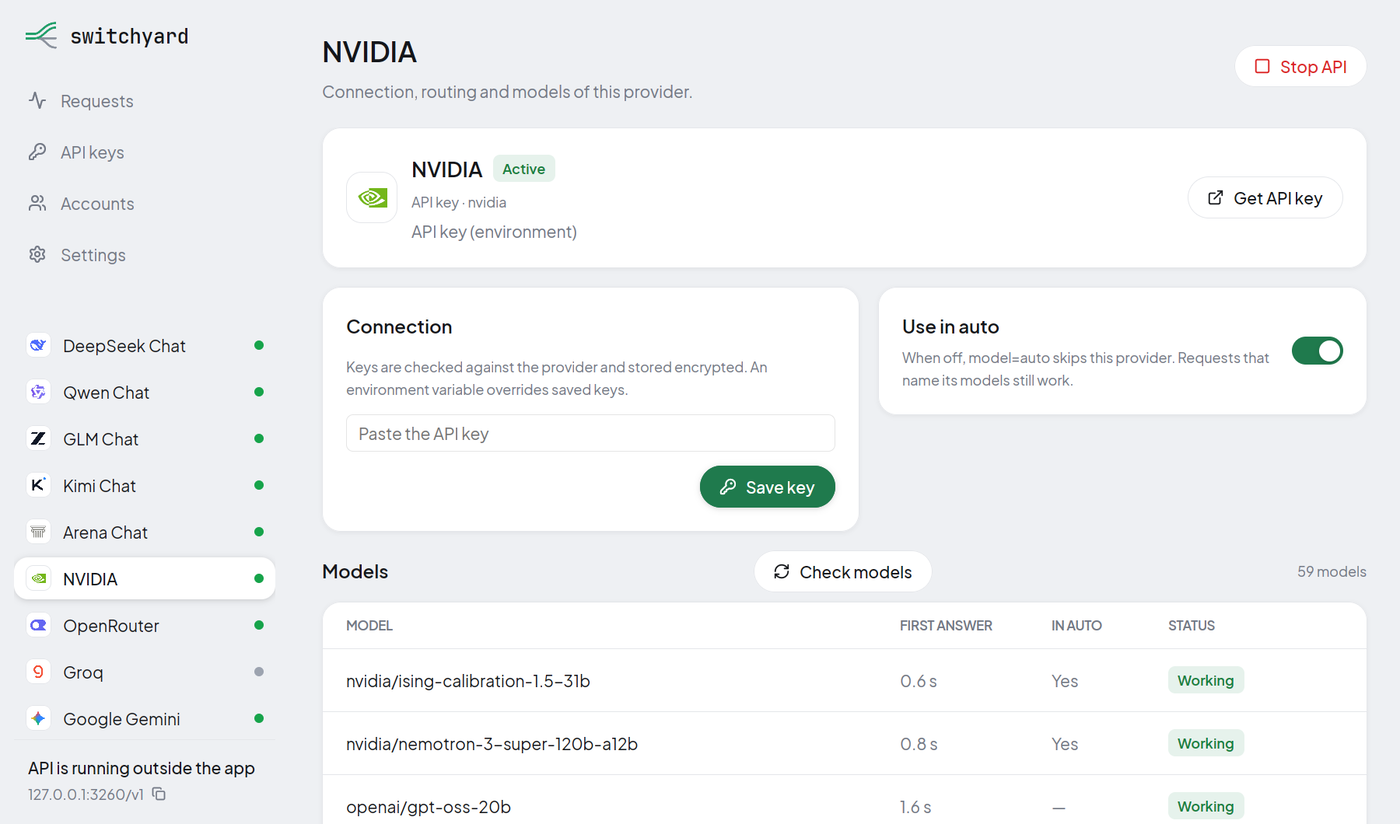
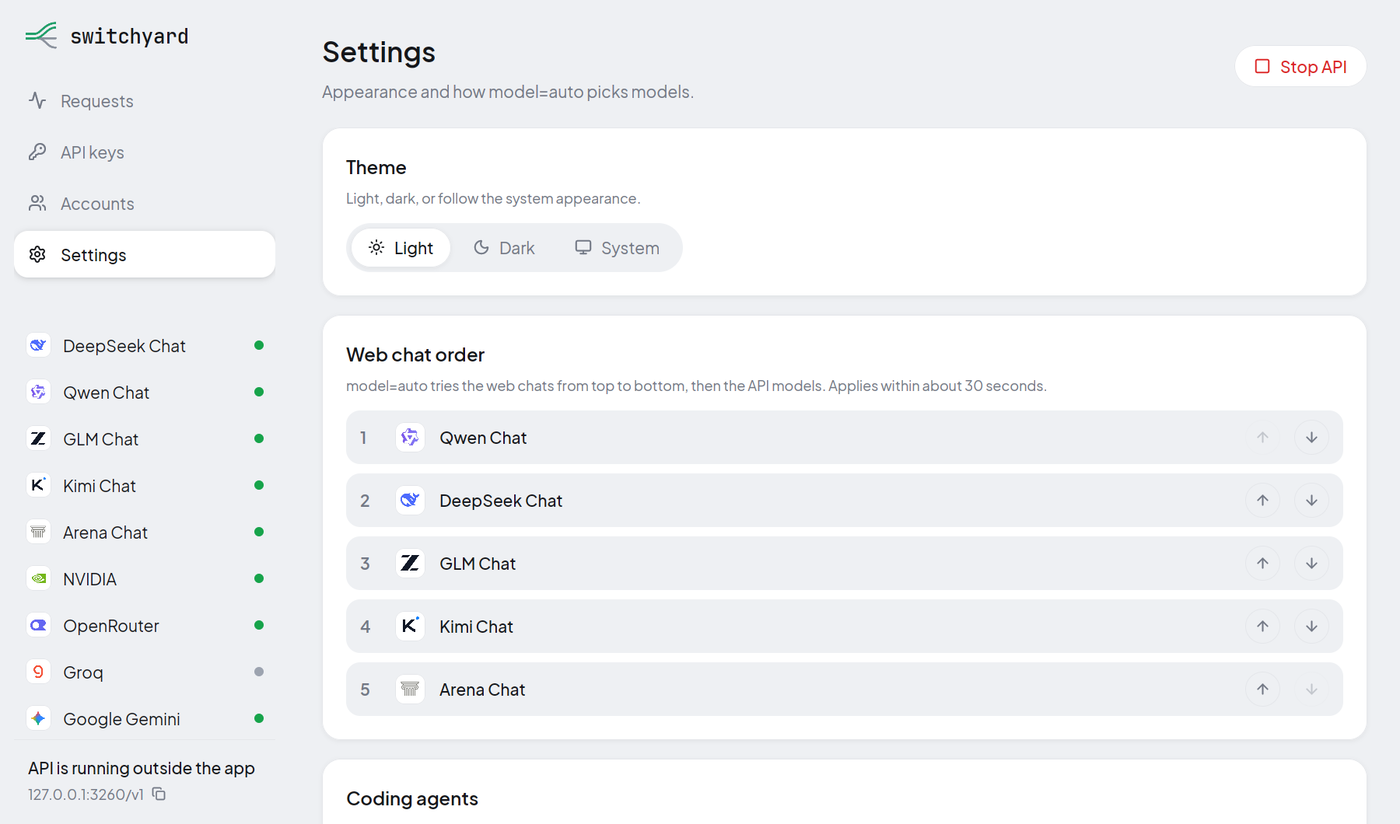
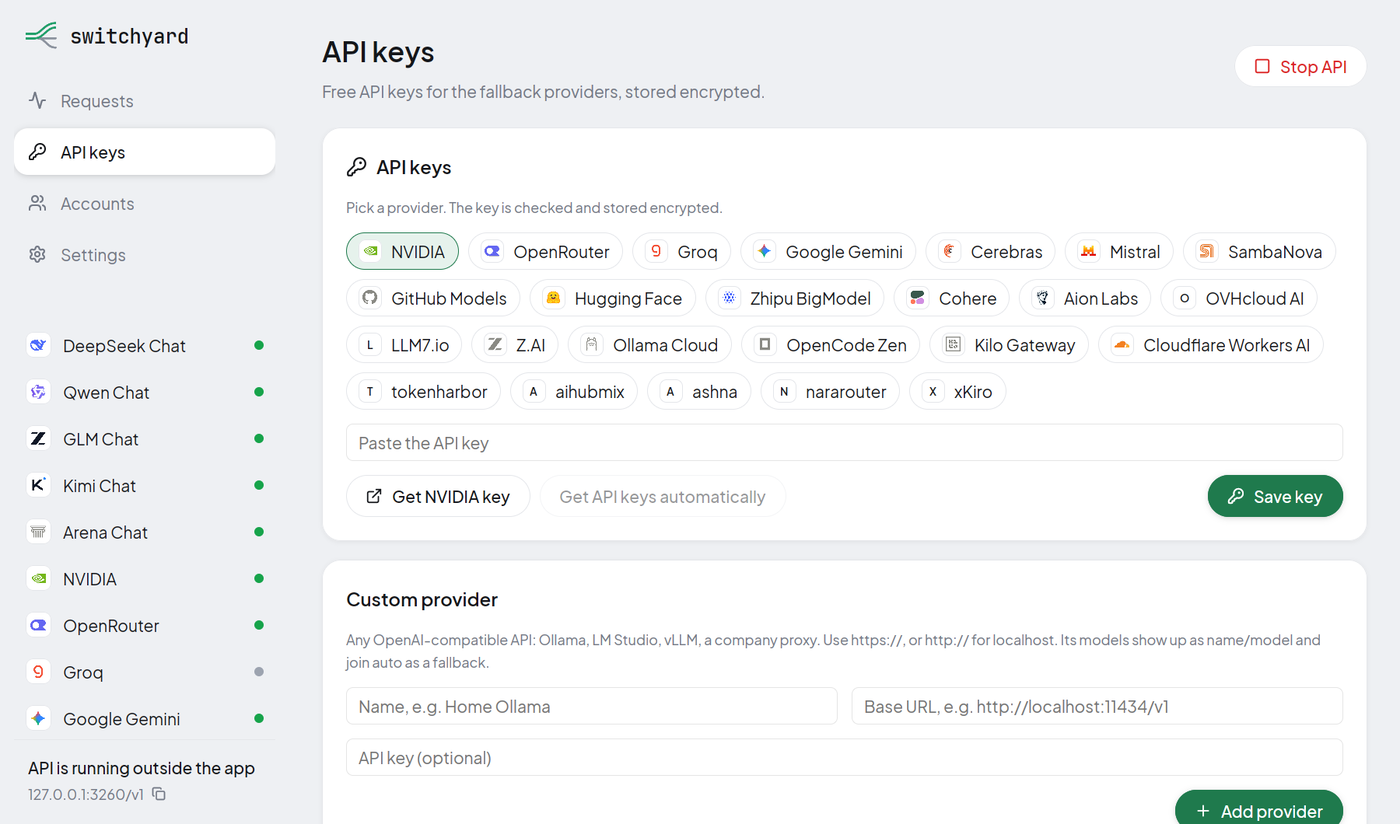
Desktop app
A native app (Rust + GPUI) to start and stop the gateway, add API keys and browser accounts, switch providers in or out of auto, choose the routing mode and agent options, and watch requests and model health. Installers for Linux (.deb), macOS (.dmg) and Windows (.exe) are attached to every release; they bundle the gateway, so Bun is not needed. Chrome or Chromium is needed for the web chats. The installers are not code-signed yet.

| Provider models and health | Routing and agent options |
|---|---|
 |
 |
| Web chat accounts | API keys for 20+ providers |
 |
 |
Configuration
| Variable | Default | Description |
|---|---|---|
UNIFIED_PORT |
3260 |
Server port |
HOST |
0.0.0.0 |
Bind address |
GATEWAY_API_KEY |
— | Require this bearer token on every request except /health |
<PROVIDER>_API_KEY |
— | One key or a list per provider (see .env.example) |
AUTO_MODELS |
— | Fixed auto chain instead of the measured one |
ACCOUNTS_SECRET |
OS keyring | Encrypts the saved keys in session/credentials.enc; bun run account init keeps it in the keyring |
Docker
docker compose up -d
Runs the gateway on 127.0.0.1:3260 with .env and the session/, data/ and logs/ folders mounted. Connect accounts on the host first.
Development
bun run dev       # watch mode
bun run ci        # build check, strict typecheck, tests
cd desktop && cargo run
src/
  unified/server.ts   gateway: routes, agent pipeline, images, decisions
  core/               router, decision engine, model stats, key pools, agent optimizations
  providers/          catalog of API providers, web chats, DeepSeek, image providers
  browser/            Playwright-driven browser sessions for the web chats
  cli/                accounts CLI and agent setup
desktop/              Rust + GPUI desktop app
Versions follow Conventional Commits via release-please; every release publishes a Docker image and the desktop installers.
Responsible use
Web chat providers are used through your own signed-in accounts and their normal web flows; Switchyard does not bypass captchas or anti-bot checks, and verifications are left to you in the browser window. Follow each service's terms, and keep in mind that requests sent through third-party providers leave your machine.
License
MIT © 2026 kravchenski
Yorumlar (0)
Yorum birakmak icin giris yap.
Yorum birakSonuc bulunamadi