agent-trace
Health Uyari
- License — License: MIT
- Description — Repository has a description
- Active repo — Last push 0 days ago
- Low visibility — Only 8 GitHub stars
Code Gecti
- Code scan — Scanned 12 files during light audit, no dangerous patterns found
Permissions Gecti
- Permissions — No dangerous permissions requested
Bu listing icin henuz AI raporu yok.
Agent trace: a prompt-flow pane mod for Claude Code
agent-trace
See exactly what Claude Code does after you send a prompt.
▶ Watch the demo (3 min)
agent-trace adds a pane beside the chat that lists every step Claude takes: each model request, tool call and subagent, with how long it took, how many tokens it used and what it cost. Use it to find what's slow, what's expensive and what failed.
Works in the terminal, Claude Desktop's Code tab and the VS Code extension.
claude plugin marketplace add krika2810/agent-trace
claude plugin install agent-trace@agent-trace
[!IMPORTANT]
Mods run inside Claude Code with your user permissions. They can see session events, start processes, access files, and make network requests. Read the source before installing any mod, including this one.
[!NOTE]
Costs are API-rate estimates, not a bill. On a Claude plan (Pro, Max, Team) you aren't charged these amounts. Read them as "what this would cost on the API", useful for comparing prompts.
Views
Inspect
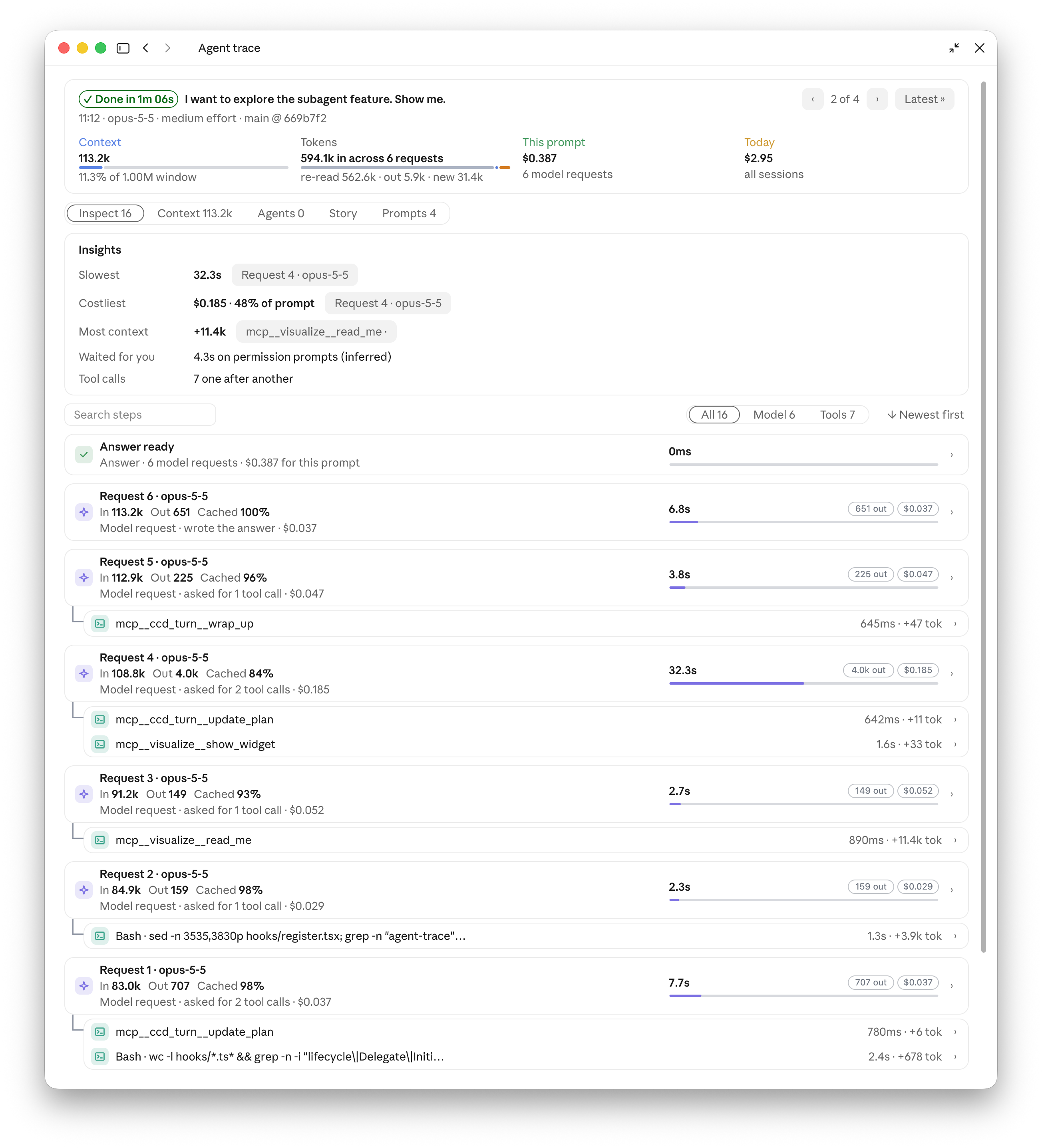
One card per step, with its time, tokens and cost, and tool calls nested under the request that asked for them. Insights at the top point out the slowest step, the costliest request and low cache hits. A Problems chip appears when a step fails or is blocked, and opens those steps.
Hook events
Every hook that fires, by type (UserPromptSubmit, PreToolUse, PostToolUse, Notification, Stop and the rest), for this prompt or the whole session. Inspect lays them on the prompt's timeline, lists a tool call's hooks under it with what they decided and how long they took, and rolls the session up by prompt, by event type and by hook.
Parallel tool calls
Tool calls that ran at the same time are marked parallel 1 of 3, 2 of 3 and so on, each with its own time and the tokens it added. Insights counts how many ran in parallel and in how many batches.
Context
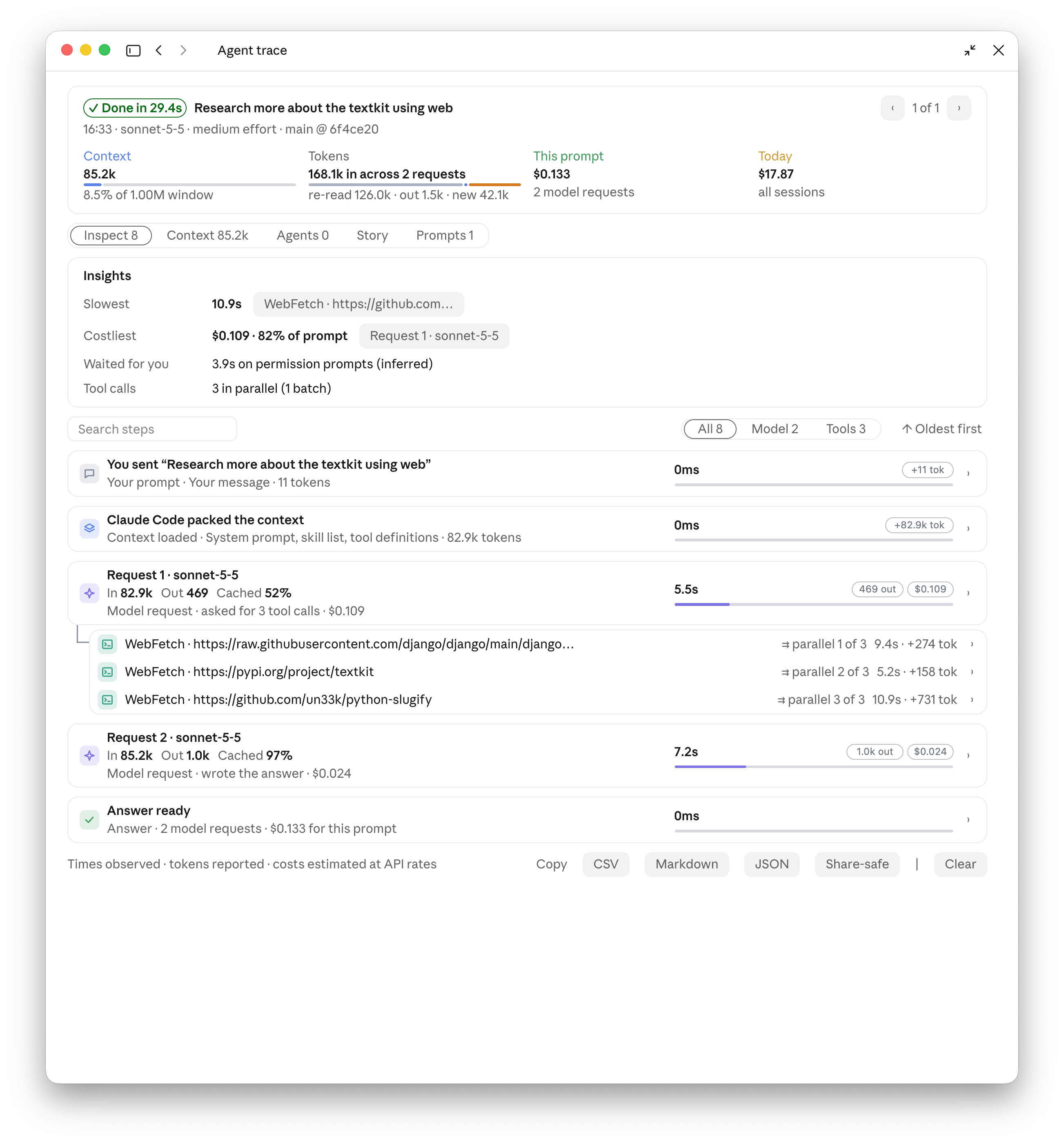
What the latest request sent, as a funnel ordered largest part first (system prompt, tool definitions, memory, skills, tool results, conversation), measured against your model's context window. Open a part to see its largest items.
Agents
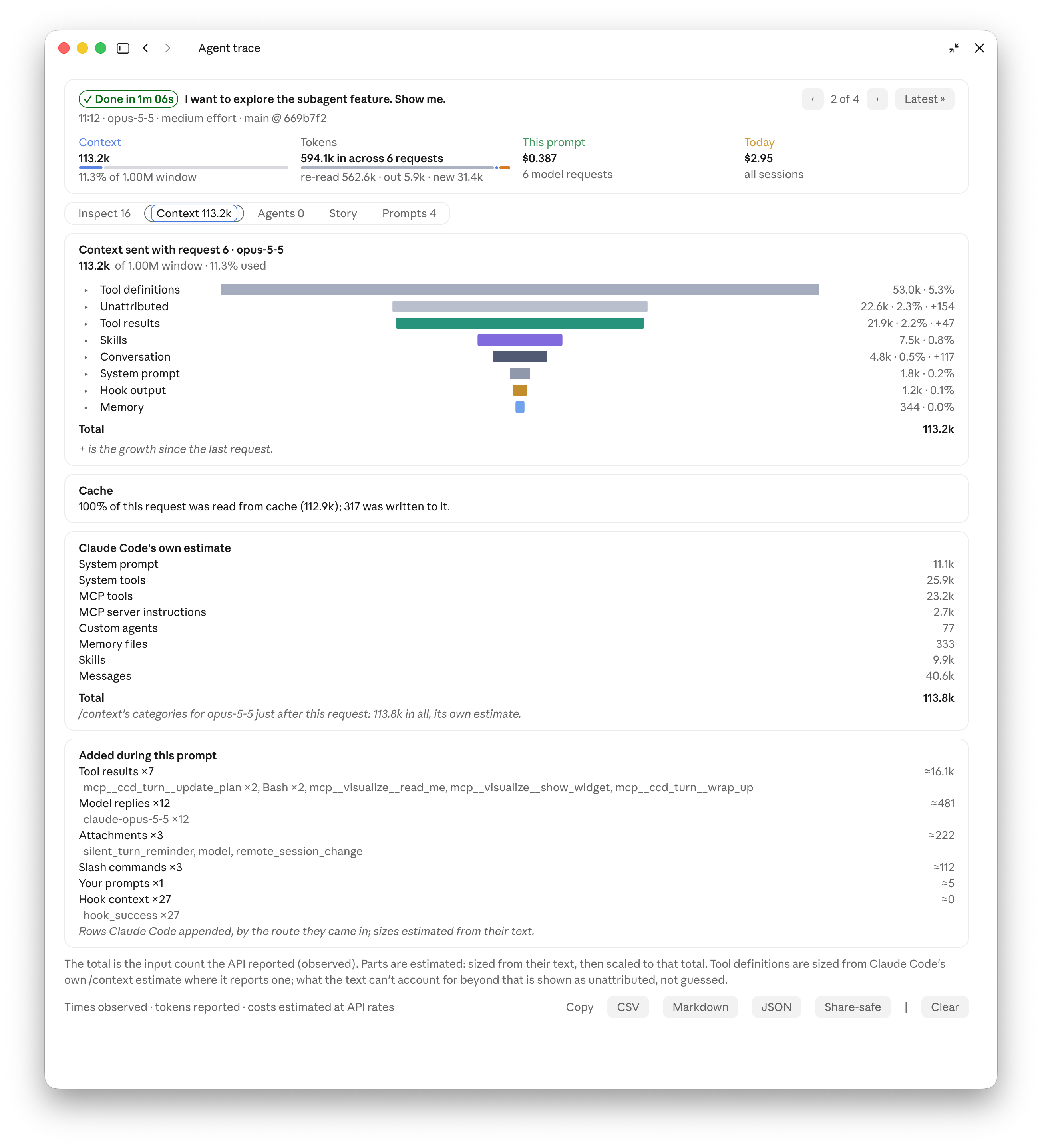
The main agent and every subagent it started. Each subagent shows a live five-stage lifecycle (Delegate, Initialize, Run, Hand back, Cost), and the view lists background commands too.
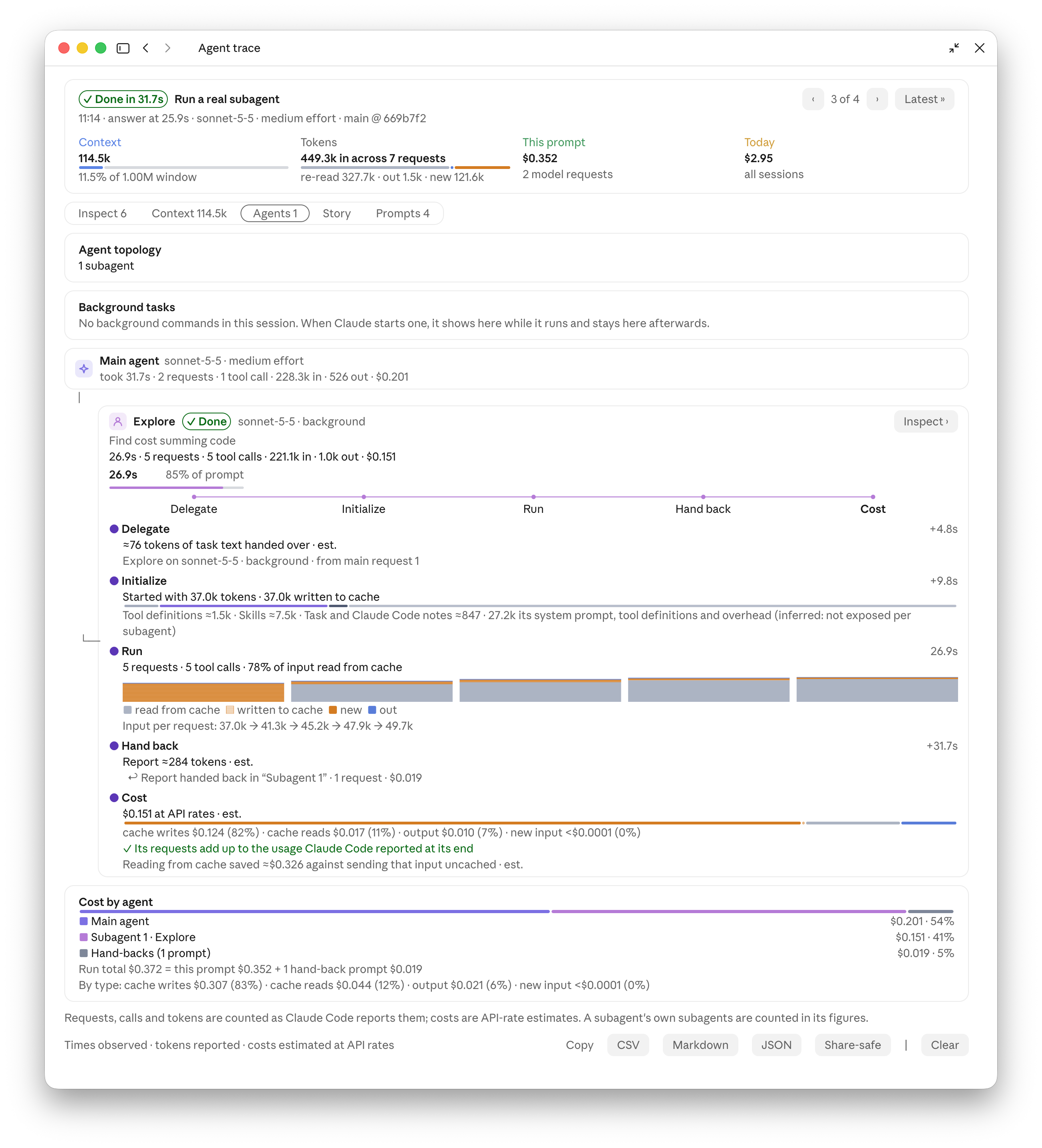
Story
The prompt told in plain sentences, each with its time. It is written from the recorded steps alone, without asking a model, and copies as Markdown.
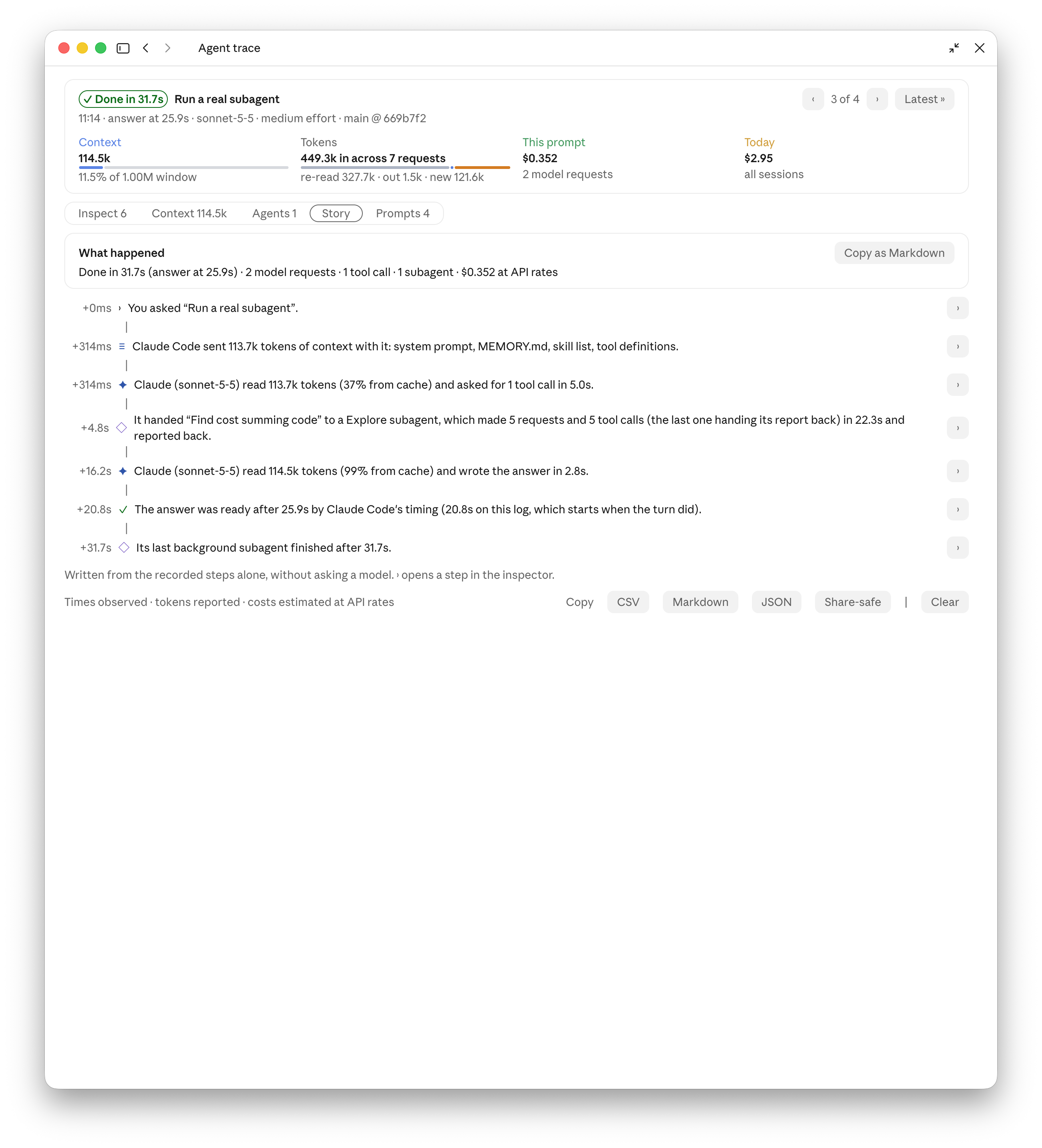
Prompts
This session's prompts with their cost and time, and your earlier sessions, saved on this computer. Open an earlier session to see its whole trace.
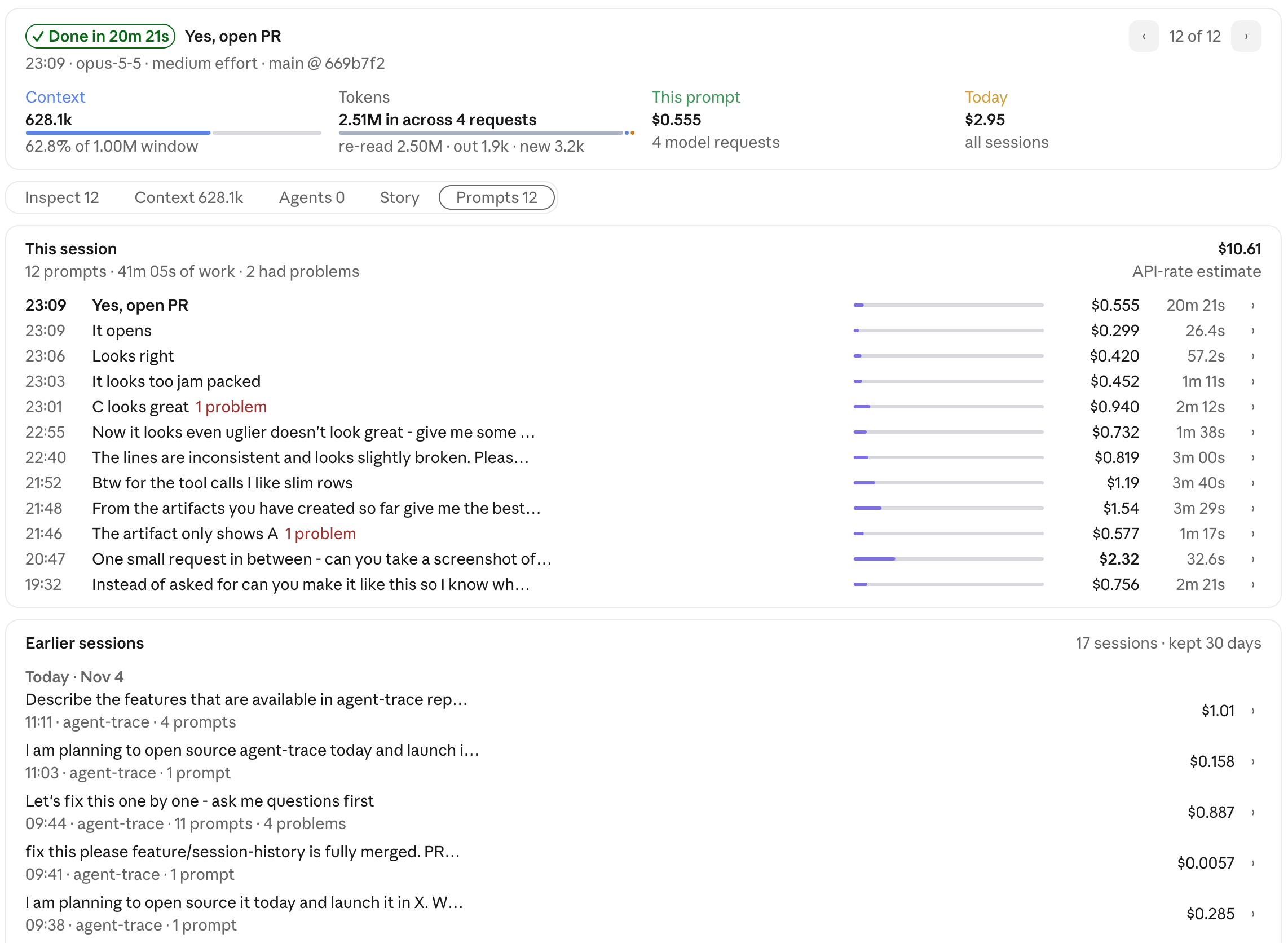
Analytics
Patterns across the whole session, or across every saved session. It starts with what stands out, then lists repeated tool calls (the same call with the same input and no edit between, with the tokens it re-added, flagged as a likely loop at five or more in a prompt), cost by prompt, context over the session, tools, where the time went, what went wrong, what it produced and who spent it. All sessions adds spend per day, the costliest sessions, and spend by project and by model.
Copy
The footer copies a whole run as CSV, Markdown or JSON to the clipboard. It is share-safe by default: commands, tool output and the final answer are left out, and credentials, emails and home folders are masked.
The screenshots show the pane in Claude Desktop. Exact spacing and colors vary by surface and theme.
Read the full guide: every figure, the cost model, retention and privacy.
What is a mod?
A mod is a Claude Code plugin with TypeScript event handlers. Claude Code calls them when something happens: a session starts, a prompt is submitted, Claude calls a tool, a subagent starts, part of the interface is rendered. agent-trace listens to those events, records each step, and draws the pane.
Requirements
- Claude Code 2.1.275 or newer
- Git, so Claude Code can clone the marketplace
- Python 3, for the Today figure (the rest of the pane works without it)
Check your version with claude --version, or enter /status in the desktop Code tab.
Quick start
1. Add the marketplace
claude plugin marketplace add krika2810/agent-trace
Or, in a Claude Code session:
/plugin marketplace add krika2810/agent-trace
2. Install the mod
claude plugin install agent-trace@agent-trace
Inside a session, use /plugin install agent-trace@agent-trace.
3. Load it
Start a new session, or enter /reload-plugins in an open one. The pane opens on its own, or run /agent-trace. /agent-trace clear resets it.
Terminal and desktop local sessions share user-scoped plugins, so one install covers both.
Develop locally
No Node.js, bundler or dependency install is needed. Claude Code loads the TypeScript directly and supplies the test runner.
git clone https://github.com/krika2810/agent-trace.git
cd agent-trace
claude plugin validate .
claude plugin test .
python3 -I tests/test_today_cost.py
claude --plugin-dir .
--plugin-dir reloads the hooks after each change. The Python tests use made-up logs in a temporary folder and never read your session logs.
Anatomy
agent-trace/
├── .claude-plugin/
│   ├── plugin.json        # mod manifest
│   └── marketplace.json   # makes the repo installable as a marketplace
├── hooks/
│   ├── hooks.json
│   ├── register.tsx       # event handlers and the pane
│   ├── history.ts         # saves a session's trace to one file
│   ├── ledger.ts          # sorts the context into parts
│   ├── pricing.ts         # the one API-rate price table
│   └── report.ts          # CSV, Markdown and JSON exports
├── scripts/
│   └── today_cost.py      # sums today's cost from local session logs
├── tests/
│   ├── flow.test.tsx
│   └── test_today_cost.py
└── types/index.d.ts
Updating
claude plugin update agent-trace@agent-trace
Then start a new session or enter /reload-plugins.
Disable or uninstall
Open /plugin, select the Installed tab, and disable or uninstall it. From the shell:
claude plugin disable agent-trace@agent-trace
claude plugin uninstall agent-trace@agent-trace
Troubleshooting
The pane doesn't appear. Check claude --version, confirm the mod is enabled in /plugin, enter /reload-plugins, and run /agent-trace. Make sure the workspace is trusted, Claude Code wasn't started with --safe-mode or --bare, and disableAllHooks is off.
Today shows –. Python 3 isn't on your PATH, or the session logs couldn't be read. Tracing carries on without it.
Security and privacy
Claude Code mods are not sandboxed. Run claude plugin validate . to see the hooks and API calls, then read the source.
- agent-trace makes no network requests. It runs
gitin your repository (branch, commit, changed lines),python3for Today, andmkdirandrmfor its saved history. - Each session's trace is saved as one JSON file in
~/.claude/agent-trace/history/. It includes commands, file paths and short input and output previews. Credentials, emails and home folders are masked first, on a best-effort basis. Files are deleted after 30 days, and/agent-trace cleardeletes them all. - Exports are share-safe by default. Masking is pattern matching, so read an export before you share it.
Full details are in the guide.
Contributing
Bug reports, ideas and pull requests are welcome.
- Found a bug or have an idea? Open an issue. For a bug, include your Claude Code version, the surface (terminal, Desktop or VS Code) and a screenshot if you can.
- Want to change the code? For anything bigger than a small fix, open an issue first so we can agree on the approach.
Raise a pull request
Click Fork at the top of this page, then clone your fork:
git clone https://github.com/<your-username>/agent-trace.git
cd agent-trace
git checkout -b my-change
Make your change and try it in a live session:
claude --plugin-dir .Run the checks:
claude plugin validate .
claude plugin test .
python3 -I tests/test_today_cost.py
Commit, push your branch, and open the pull request:
git commit -am "Describe the change"
git push -u origin my-change
GitHub then shows a Compare & pull request button on your fork. Or, with the GitHub CLI, run
gh pr create.
In the pull request, say what changed and why. For a change to the pane, add a before and after screenshot. Every pull request is reviewed before it's merged.
Documentation
License
Yorumlar (0)
Yorum birakmak icin giris yap.
Yorum birakSonuc bulunamadi