clawpypaste
Health Warn
- License — License: MIT
- Description — Repository has a description
- Active repo — Last push 0 days ago
- Low visibility — Only 6 GitHub stars
Code Fail
- rm -rf — Recursive force deletion command in build-app.sh
- rm -rf — Recursive force deletion command in release.sh
Permissions Pass
- Permissions — No dangerous permissions requested
No AI report is available for this listing yet.
Copy anything out of Claude Code and paste it into Slack, Docs, or email looking right. macOS menu bar app.
🦀 clawpypaste
Copy anything out of Claude Code and paste it into Slack, Docs, or email looking right.
Tables land as real tables. Markdown lands as formatting, not **asterisks**. Code, tool output, paths and URLs are one click away — no more mouse-selecting across wrapped terminal lines.
brew install --cask krisbradley/tap/clawpypaste
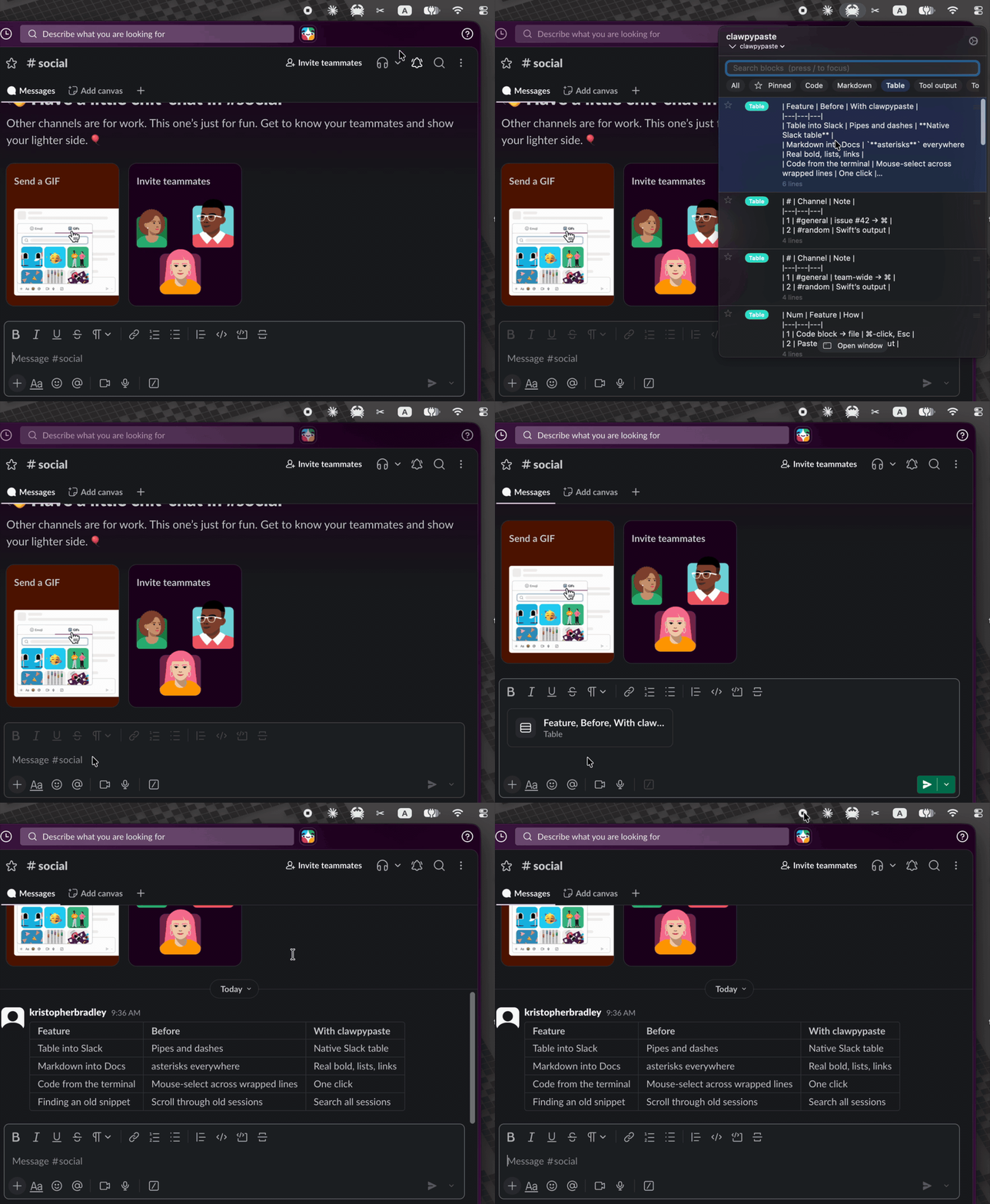
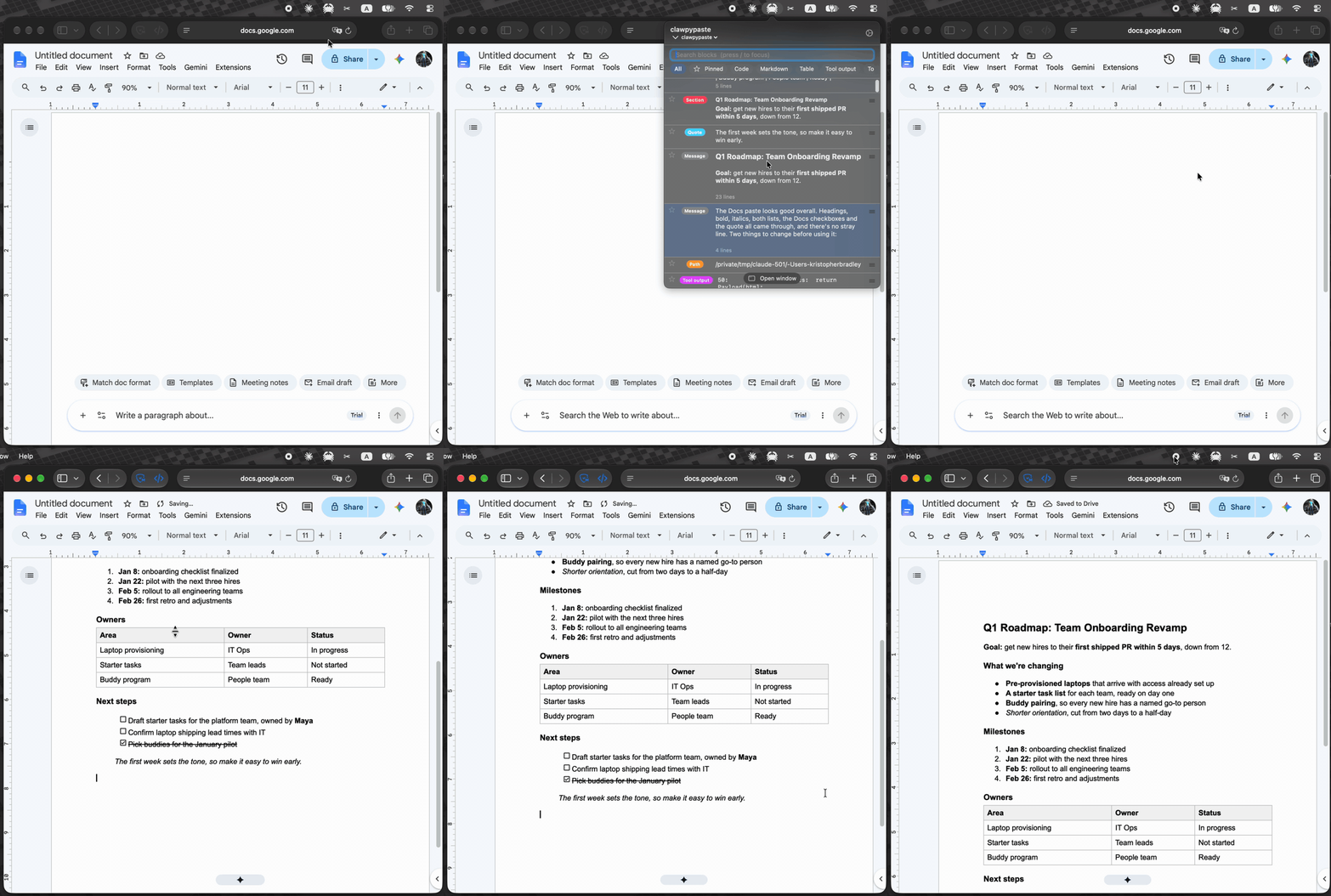
- Paste-ready everywhere — one click gives Slack a native table, Google Docs formatted tables and real checklists, Mail a styled table. Raw markdown is still a right-click away.
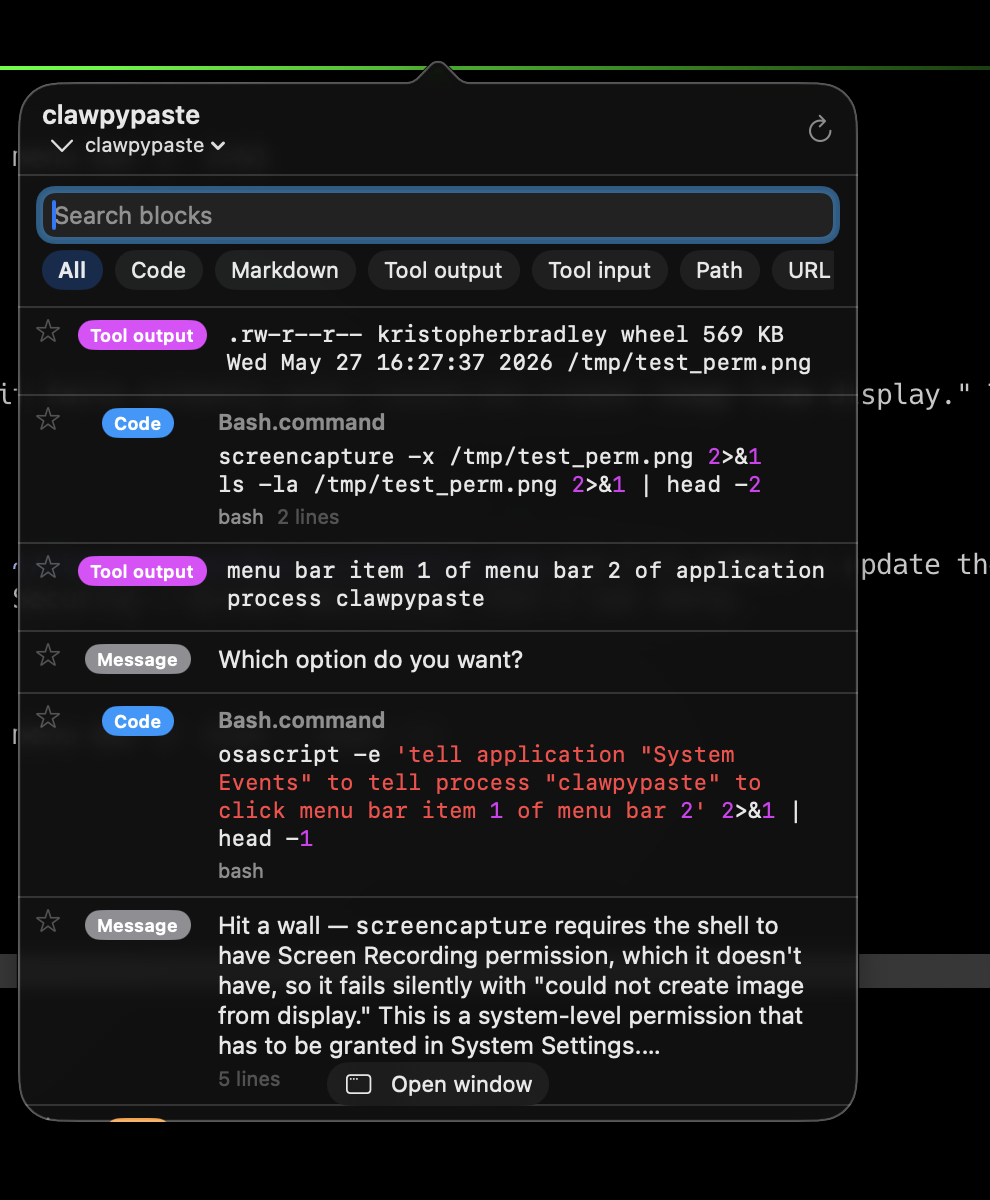
- Every block, one click — fenced code, tool output, file paths, URLs, quotes, whole messages, from your active session.
- All your sessions — switch sessions from the menu bar and search across every past session.
- Snippet library — star blocks to pin them, name them, find them later.
- Stays out of the way — a menu bar app that reads the session files Claude Code already writes. No plugins, no terminal scraping, no accessibility prompts for the basics.
Install
macOS 13 (Ventura) or newer, Apple Silicon or Intel (universal binary). Notarized & signed with Developer ID — no Gatekeeper warnings.
Homebrew (recommended)
brew install --cask krisbradley/tap/clawpypaste
open /Applications/clawpypaste.app
The cask installs clawpypaste.app into /Applications and symlinks the binary as /opt/homebrew/bin/clawpypaste (or /usr/local/bin/clawpypaste on Intel) so you can use the CLI from any shell.
Direct download
Download clawpypaste.dmg from the latest release, open it, and drag clawpypaste into Applications. (A notarized clawpypaste.zip is there too.)
From source
Requires the Swift toolchain (xcode-select --install is enough).
git clone https://github.com/krisbradley/clawpypaste.git
cd clawpypaste
make install
This builds + signs + installs to /Applications/clawpypaste.app and symlinks clawpypaste onto your PATH.
Launch at login
After installing by any of the methods above:
clawpypaste --enable-login
Or right-click the menu bar 🦀 → Launch at login.
Usage
| Action | How |
|---|---|
| Open the popover | Click the 🦀 in the menu bar, or press ⌃⌥V |
| Move selection | ↑ / ↓ (Shift+arrow jumps by 10) |
| Copy selected block | Return (popover auto-dismisses) |
| Default copy format | Tables copy as rich table + TSV, markdown prose as rich text + clean plain text; Slack gets its own table form automatically when Slack was frontmost; raw markdown is right-click → Copy markdown (switch in Preferences → Behavior → Default copy) |
| Copy the Nth visible block | ⌘1–⌘9 |
| Paste straight into the app you came from | ⌘Return |
| Preview the full block | Space (Esc / Space closes, Return copies) |
| Select several blocks | ⌘-click each, then Return (or the bar's Copy for…) to copy them as one, in click order |
| Show only pinned blocks (snippet library) | Pinned chip in the filter bar |
| Focus search field | / |
| Drag a block to another app | Click-and-hold, then drag — carries the same rich formatting as a click; code blocks and tables dropped on Finder become files |
| Pin / unpin | Click the star, or right-click → Pin |
| Switch session | Click the session name in the header |
| Browse history across sessions | Session menu → All sessions (history) |
| Open detached window | Right-click 🦀 → "Open window" |
| Update the app | Click the ⬇ badge in the header when one appears (checks GitHub every 6h; brew installs get brew upgrade in a Terminal, direct installs get the release page) |
| Quit | Right-click 🦀 → "Quit" |
Right-click any block for…
- Edit and copy… — open the content in a TextEditor sheet; edit then copy
- Fill in values… — when the block contains
{{placeholder}}tokens, opens a labeled form to substitute values before copying - Copy for Slack / Docs / Email / Copy markdown — on tables and markdown prose. For Docs pastes styled text and real tables (with bold/code/links in cells) into Docs, Word, Pages, Notes, and Mail. For Slack pastes a real Slack table with plain cells and links spelled out as
text (url)(Slack drops in-cell formatting), and styled prose. For Email uses inline styles so Gmail/Mail/Outlook keep table borders and code fonts. Markdown is the raw source - Copy as image — renders the block as a clean card image (code, tables, prose) for places that mangle text
- Save as … — save to disk with a sensible name (
snippet.swift,table.tsv, or the original file name from Write/Edit) - Copy as pretty JSON — when the block parses as JSON
- Wrap as code fence — wrap a non-code block as
```langfor posting elsewhere - Copy command (without !) — on Claude Code
!commandshebang lines, drops the leading!so the bare command lands on the clipboard - Run in new Terminal — on bash/sh/zsh code blocks and
!commandshebang lines, opens a fresh Terminal.app or iTerm2 window (pick in Preferences → Terminal) and runs the command there; destructive-looking commands (rm -rf,sudo,git push --force, pipe-to-shell, …) ask for confirmation first - Copy diff result (applied code) — on
```diffblocks / unified diffs, drops removed lines and diff metadata and strips the+/context markers so you get the final code - Copy without quote marks (>) — on blockquote-style content, strips the leading
>markers (nested quotes too) - Reveal in Finder / Open in editor — on any block whose content is an existing file path (trailing
:line:colsuffixes are handled) - Copy humanized — on prose blocks with AI-typical punctuation or phrases (strips em-dashes, smart quotes, "Certainly!", "I hope this helps!", etc.)
- Inject into Claude prompt — pastes the block into whatever app was focused before the popover opened (requires Accessibility permission on first use)
- Pin / Unpin
CLI
The same binary doubles as a CLI for shell scripts:
clawpypaste last [kind]      # print the most recent block (optionally of a kind) to stdout
clawpypaste search <query>   # list blocks containing the query
clawpypaste paste <id>       # copy a specific block to the clipboard
clawpypaste image <id> [out] # render a block to a PNG card (same as Copy as image)
clawpypaste list [kind]      # list all blocks (id, kind, lines, preview)
clawpypaste kinds            # list valid kind names
clawpypaste --enable-login   # register as a Login Item
Example: vim "$(clawpypaste last code > /tmp/snippet && echo /tmp/snippet)" — drop the most recent code block into a file and open it.
Block kinds
| Kind | Source | Default copy | Special copy-as |
|---|---|---|---|
| Code | Fenced code in assistant text, Write/Edit content for non-prose files, Bash commands | Raw text | — |
| Markdown | ```md fences, Write/Edit to .md/.txt/README | Raw markdown | Rich text (Docs/Word) / Humanized (if AI punct) |
| Table | Pipe-delimited tables | Raw markdown | Markdown / TSV (Slack) / CSV / Rich text (Docs/Word) |
| Tool output | Result of any tool call | Raw text | Pretty JSON (if applicable) |
| Tool input | Other tool inputs (queries, prompts) | Raw text | — |
| Path | File paths in prose (/Users/...) |
Raw path | — |
| URL | http(s) URLs in prose |
Raw URL | — |
| Message | Whole assistant message | Raw markdown | Rich text (Docs/Word) / Humanized (if AI punct) |
| Section | Markdown section under a heading | Raw markdown | Rich text (Docs/Word) |
| Quote | Markdown blockquotes (> lines) in prose |
Quoted text (> markers stripped) |
Rich text (Docs/Word) |
How it works
Claude Code writes every session to a JSONL file under ~/.claude/projects/<encoded-project-dir>/<uuid>.jsonl. Each line is a typed record: a user message, an assistant message with content blocks (text / thinking / tool_use), a tool result, or metadata like custom-title / agent-color.
clawpypaste:
- Finds the active session — newest mtime under
~/.claude/projects/(or whichever you switched to via the session menu) - Watches the file with a
DispatchSourcefor incremental writes - Re-parses on change (debounced 150ms) into typed
SessionRecords - Extracts blocks by walking each record: code fences, markdown tables, file paths and URLs in prose, markdown sections, tool inputs/outputs, whole assistant messages
- Dedupes by content hash so the same block doesn't appear twice
- Renders in SwiftUI inside an
NSPopover, with syntax highlighting for code and inline-markdown rendering for prose
History mode lazily extends the same pipeline across every JSONL under ~/.claude/projects/, caching per file by mtime so reopens are cheap.
The Carbon RegisterEventHotKey API powers the global ⌃⌥V hotkey. SMAppService.mainApp powers Launch at Login. CGEvent powers the "Inject into Claude prompt" paste (the only feature that requires Accessibility permission).
Development
make run             # swift run (no .app bundle, no signing)
make build           # build signed .app bundle
make install         # build + drop in /Applications + symlink CLI + launch
make clean           # remove build artifacts
make uninstall       # remove installed app + disable login item + remove CLI symlink

# debug parsing without the GUI
clawpypaste dump
Releases are cut by ./release.sh (builds, signs with Developer ID, notarizes, staples, zips).
License
MIT. See LICENSE.
Reviews (0)
Sign in to leave a review.
Leave a reviewNo results found