tokenstash
Health Gecti
- License — License: MIT
- Description — Repository has a description
- Active repo — Last push 0 days ago
- Community trust — 15 GitHub stars
Code Basarisiz
- child_process — Shell command execution capability in npm/tokenstash/bin/tokenstash.js
- process.env — Environment variable access in npm/tokenstash/bin/tokenstash.js
Permissions Gecti
- Permissions — No dangerous permissions requested
Bu listing icin henuz AI raporu yok.
Your agent asks you for a key once. Never again — in any project, in any agent.
tokenstash
Paste a key once. Approve each directory. Keep secrets out of status output.
A local credential broker for coding agents. When your agent needs an API key, it asks tokenstash instead of asking you to paste it into the chat. The key goes into your project's env file, and the agent gets back a status line instead of the key.
Download · Security · Changelog



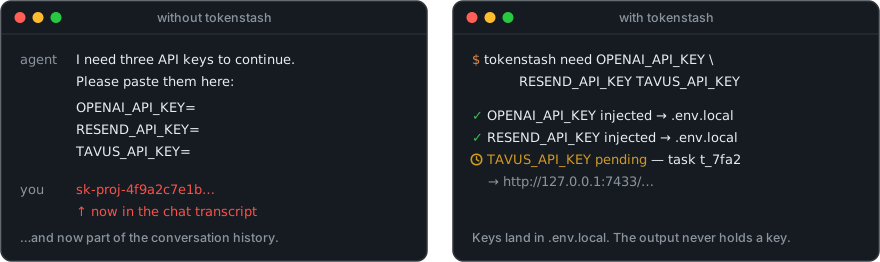
Install
brew install krishhgg/tokenstash/tokenstash
# or
npm install -g tokenstash
# or
uv tool install tokenstash
Then, once:
tokenstash init
init picks your OS keychain and installs the tokenstash skill for the agents it finds: Claude Code, Codex, Gemini CLI and Cursor. Agents run the CLI, and nothing is added to your AGENTS.md or CLAUDE.md. macOS and Linux; Windows is not supported yet.
bun add -g tokenstash
pnpm add -g tokenstash
pipx install tokenstash
cargo install --locked --git https://github.com/krishhgg/tokenstash tokenstash
Prebuilt binaries for macOS (Apple Silicon, Intel) and Linux (x64, arm64; static, any distribution) are on the latest release, with sha256 files and a build attestation you can check with gh attestation verify tokenstash-<platform>.tar.gz --repo krishhgg/tokenstash. The npm and PyPI packages carry the same binary and run no install scripts.
How it works
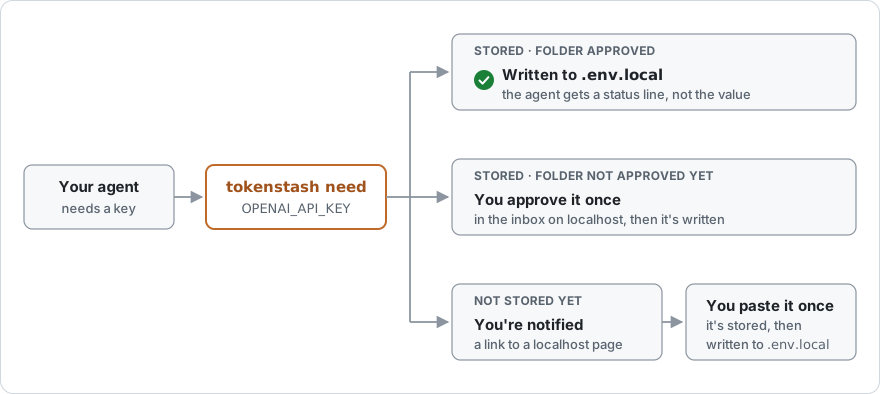
When the agent needs a key, it runs tokenstash need OPENAI_API_KEY. There are three outcomes:
- You have the key and this folder is approved: it's written to
.env.localand the agent carries on. - You have the key but this folder hasn't been approved: you get a notification. Open it, see exactly which keys would go into which file, and approve once.
- You don't have the key yet: you get a notification and a link to a page tokenstash serves on localhost, with the provider's signup link and the steps. Paste the key there once; it's stored in your OS keychain, and every later project can get it from there.
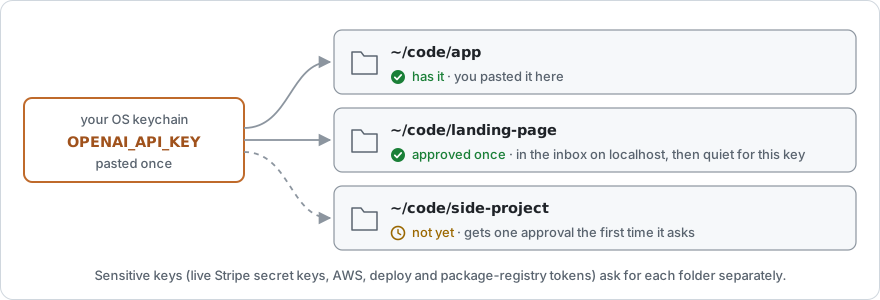
- Approval is per folder, and you choose how wide. The first time a folder asks for keys you already have, you get three choices: Allow these (just the listed keys), Allow these + any non-sensitive key here (also future registry-known, non-sensitive keys), or Deny (remembered for 24 hours by default).
- Sensitive keys always ask. Live Stripe secret keys, AWS credentials, deploy and package-registry tokens, and any key tokenstash doesn't recognise get their own approval in each folder. The broad choice never covers them.
- Local secrets are generated, not asked for.
AUTH_SECRET,JWT_SECRET,SESSION_SECRETand similar are created by tokenstash, one per folder. - Keys can be re-checked with the provider. Keys whose provider supports an unattended check are re-checked before delivery when a check is due. A rejected key becomes a "replace this key" request; if the provider can't be reached, the key is delivered unchecked.
Where your key goes
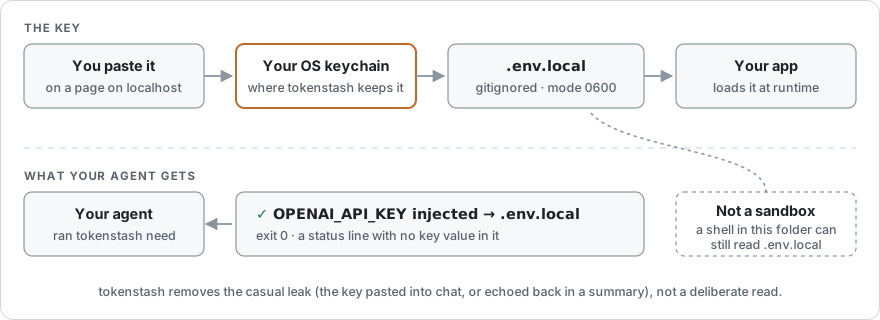
The value goes from the page you paste it on, to your OS keychain, to the project's .env.local (mode 0600, and added to .gitignore). need reports back with an exit code and a line like ✓ OPENAI_API_KEY injected → .env.local, without the value, so delivering a key doesn't put it into the chat, a summary, or the conversation history. scripts/leak-test.sh runs the real binary with a canary key on every commit and fails if the canary appears on any of the surfaces it checks.
Your app loads .env.local the way it already would: frameworks such as Next.js read it on their own; for anything else, use your runtime's dotenv support, or start the program with tokenstash run --.
It's not a sandbox. An agent with a shell in an approved folder can read .env.local, just as it could without tokenstash, and anything you type into a request's note or answer field goes back to the agent as text. What goes away is the casual leak: the key pasted into chat or echoed back in a summary. The details are under Security details below and in SECURITY.md.
Using it
After tokenstash init, each agent has the tokenstash skill: it sees a one-line description of it in every session, and loads the full instructions (how to request a key, what each result means, how to debug tokenstash itself) when code needs a key. You can also run it yourself:
tokenstash need OPENAI_API_KEY RESEND_API_KEY   # write the keys you have; ask for the rest
tokenstash run -- npm run dev                   # load .env.local, and ask for a key the program says is missing
tokenstash open                                 # the inbox: everything waiting on you
tokenstash doctor                               # check the setup
Automatic, or only when you say so
By default the agent loads the skill on its own when code needs a key. All it carries into every session is the skill's one-line description; the instructions load only when they are used. If you would rather nothing happen until you ask:
tokenstash init --mode explicit
This installs the same skill marked for you to invoke: /tokenstash OPENAI_API_KEY in Claude Code and Cursor, $tokenstash in Codex. Gemini CLI reads the same skill as Codex and asks you before it loads any skill. Typed bare, it requests whatever the current task needs, and it covers the rest of that task: a key the work turns out to need later goes through it too. The value still goes to .env.local and never into the chat. In a session where you don't invoke it, Claude Code, Cursor and Codex do not see tokenstash at all, so the agent will ask you for keys the way it always did. tokenstash init --mode auto switches back, doctor shows the mode, and init --undo removes either.
Agents that prefer MCP can have it too: tokenstash init --mcp also registers tokenstash as an MCP server with each agent (auto mode only), and --no-mcp takes it out again. Earlier versions registered the server and wrote a section into ~/.codex/AGENTS.md by default; init now takes both out unless you ask for the server.
Uninstall
- Take tokenstash out of your agents:
tokenstash init --undo(or ask your agent: you confirm the card). It removes the skill filesinitwrote, and from shared configs (~/.claude.json,~/.codex/config.toml, anAGENTS.md) it takes out only tokenstash's entry, putting back whatever was there under that name before. Anything else you added to those files sinceinitstays. - Optionally, remove your stored keys and data: expand the section below. Do this after step 1, since the data directory holds the copies
init --undorestores from. - Remove the program:
brew uninstall tokenstash, ornpm uninstall -g tokenstash,uv tool uninstall tokenstash,pipx uninstall tokenstash.
Do this for the default data directory and for every TOKENSTASH_HOME you have used; each one has its own keychain entries.
- Run
tokenstash list, withTOKENSTASH_HOMEset for a custom home and kept set for the next commands. It shows every key in that home's index, with its identity; generated secrets likeAUTH_SECREThave one identity per folder. Remove each withtokenstash forget NAME --identity IDENTITY. Then runtokenstash doctorand note the stash backend it shows. - Stop any program you started with
tokenstash run, close your agent sessions, then stop any tokenstash still running, for example withpkill -x tokenstash(which stops it for every home). A background inbox only exits on its own after 30 idle minutes with nothing waiting, and never if it was started with--keep. - Clear what the index didn't know about: a key whose index was lost earlier is still in the OS store. Search for
tokenstashin Keychain Access on macOS or Passwords and Keys (Seahorse) on Linux, and delete tokenstash's entries; their service istokenstashfor the default home, ortokenstash-and eight hex characters for a custom one. On Linux you can also runsecret-tool clear service tokenstashfor the default home; it skips entries in a locked keyring, so unlock it in Passwords and Keys first. Ifdoctorshowedkeyutils, the keys are in the kernel keyring and are gone after a reboot. - Delete the data directory:
~/.config/tokenstashon Linux ($XDG_CONFIG_HOME/tokenstashif you set it),~/Library/Application Support/tokenstashon macOS, and anyTOKENSTASH_HOMEdirectory you used.
Keys already written into projects' .env.local files stay there until you delete them.
More
Command overview| Command | What it does |
|---|---|
tokenstash need NAME… [--blocking] |
Write keys to the env file, or ask for them. Exit 0 written · 10 waiting on you · 20 denied · 30 expired · 1 error |
tokenstash ask "title" [--url URL] [--step STEP…] |
Ask you to do something only a person can do (a DNS record, a dashboard toggle, an OAuth consent screen) |
tokenstash open · tasks · answer [ID] |
See what's waiting on you and answer it, in the inbox or from the terminal |
tokenstash list · forget NAME [--identity ID] · rotate NAME |
Manage stored keys (never shows values) |
tokenstash bind NAME --identity ID |
Use a different identity (say, work) for one key in this folder |
tokenstash check · report-bad NAME |
Check keys with their providers; tell tokenstash a provider rejected one |
tokenstash workspaces [list|revoke DIR|forget DIR] |
Which folders are approved for which keys; take a folder's approvals away |
tokenstash export · import BUNDLE |
Move your stash to another machine in a passphrase-encrypted bundle |
tokenstash run -- COMMAND |
Run a program with .env.local loaded; see below |
tokenstash remote [tailscale|off] |
Open the inbox from your other devices over Tailscale |
tokenstash init [--mode auto|explicit] [--mcp] [--undo] · doctor · audit · registry |
Install or remove the agent skill, automatic or on your command only, and optionally the MCP server; check the setup; see every delivery; list known providers |
tokenstash mcp · inbox |
The MCP server (after init --mcp) and the inbox (started for you) |
tokenstash run loads .env.local into the program's environment. If the program exits with an error and its output names a registry-known variable that isn't set, tokenstash asks for it and restarts the program once it arrives. A key requested this way needs your approval each time, even in an approved folder, since the program's output chose it.
You never need a terminal: everything you decide is on a card in your browser. When you ask your agent to replace or forget a key, use another identity in a project, ask again for a key you declined, or change how agents reach tokenstash, it runs the command and you confirm the card it files; nothing changes before you do. Approving, opening the full inbox and moving the stash between machines stay yours alone, and list, audit and check show an agent only its own folder. The details are in SECURITY.md.
With init --mcp, agents that speak MCP also get six tools: secrets_request, secrets_list, secrets_report_invalid, human_request, task_check and task_list. The MCP server only acts for the folder your agent opened.
config.toml lives in the data directory: ~/.config/tokenstash/ on Linux and ~/Library/Application Support/tokenstash/ on macOS, or wherever TOKENSTASH_HOME points. Every setting is optional.
| Setting | Default | |
|---|---|---|
env_file |
.env.local |
the file keys are written to, relative to the project root |
inbox_port |
7433 |
the localhost port the inbox uses |
task_ttl_hours |
24 |
how long a request stays open, and how long a denial is remembered |
stash_backend |
auto |
keyring (OS keychain), keyutils (Linux kernel keyring; cleared on reboot), insecure-file (plaintext, for CI only) |
notifications |
true |
desktop notifications |
verify_every |
24h |
how often a key is re-checked with its provider: <n>h, <n>m, always or never |
agent_mode |
auto |
auto: agents load the skill when code needs a key; explicit: only when you invoke it. Set with init --mode |
mcp |
false |
whether init registers the MCP server. Set with init --mcp / --no-mcp |
The project is the git checkout you're in, so in a monorepo apps/web and apps/api share one .env.local at the repo root. A folder that isn't a checkout is its own project.
From another computer: the inbox runs on the machine tokenstash runs on, at 127.0.0.1. If you reach that machine over Tailscale, tokenstash remote tailscale (your agent can run it) makes the inbox answer on its Tailscale address too, and every link point there; a link opened on any of your devices signed in to the same Tailscale account opens as you and can approve, and nothing else on the tailnet gets an answer. Without Tailscale, forward port 7433 over SSH.
In a container without a keychain, set TOKENSTASH_STASH=insecure-file (plaintext) or run tokenstash on the host.
- Delivery output never holds the key.
needandsecrets_requestreturn a status without the value.tokenstash run --is different by nature: it passes the program's own output through, with best-effort redaction of stored values. - What you type goes back to the agent. A note or reason on a request, and the answer to an
ask, reach the agent as text. Never put a key there. - The link an agent prints opens one request. It can answer or decline that request and nothing else. Approving a folder, or confirming a change an agent asked for, needs your own inbox link, which reaches you only through the desktop notification (a card's "Send the link to my desktop" button sends it again) or
tokenstash open. - Some places never receive a key: your home directory itself,
/, shared temporary directories, and tool and credential directories (~/.ssh,~/.aws,~/.claude, …). - A folder that already has the value needs no approval. If its own untracked
.env.localalready holds the same value for a non-sensitive registry key, that delivery goes ahead without a card. - "A person at a terminal" is a heuristic. An agent that fakes a terminal, or a process reading your keychain as you, is outside what tokenstash can stop. It guards the line between the agent's tools and you, not between programs running as you.
What's in scope, what isn't, and how to report a problem: SECURITY.md.
What it isn'tNot a vault: for that, use 1Password or Infisical. Not a proxy: tokenstash is never in the path of your API requests. Not discovery: it never reads gh, aws, Claude Code or Codex credentials. Not a sandbox: see Where your key goes.
crates/core/registry/providers.json has one entry per key: its name, the provider, the signup page, the steps, the key's format, and an optional liveness check. Pull requests welcome; see CONTRIBUTING.md and the registry verification record. How well agents actually follow tokenstash's instructions is measured in docs/agent-conformance.md.
License
MIT
Yorumlar (0)
Yorum birakmak icin giris yap.
Yorum birakSonuc bulunamadi