OpenSidebar
Health Uyari
- License — License: MIT
- Description — Repository has a description
- Active repo — Last push 0 days ago
- Low visibility — Only 5 GitHub stars
Code Gecti
- Code scan — Scanned 12 files during light audit, no dangerous patterns found
Permissions Gecti
- Permissions — No dangerous permissions requested
Bu listing icin henuz AI raporu yok.
Agentic Browser Extension
OpenSidebar
An open-source AI agent in your Chrome side panel.
Describe a task; it sees the page, clicks, types, and carries work across tabs.



Customer tour · Developer tour · Install · Docs · Contribute
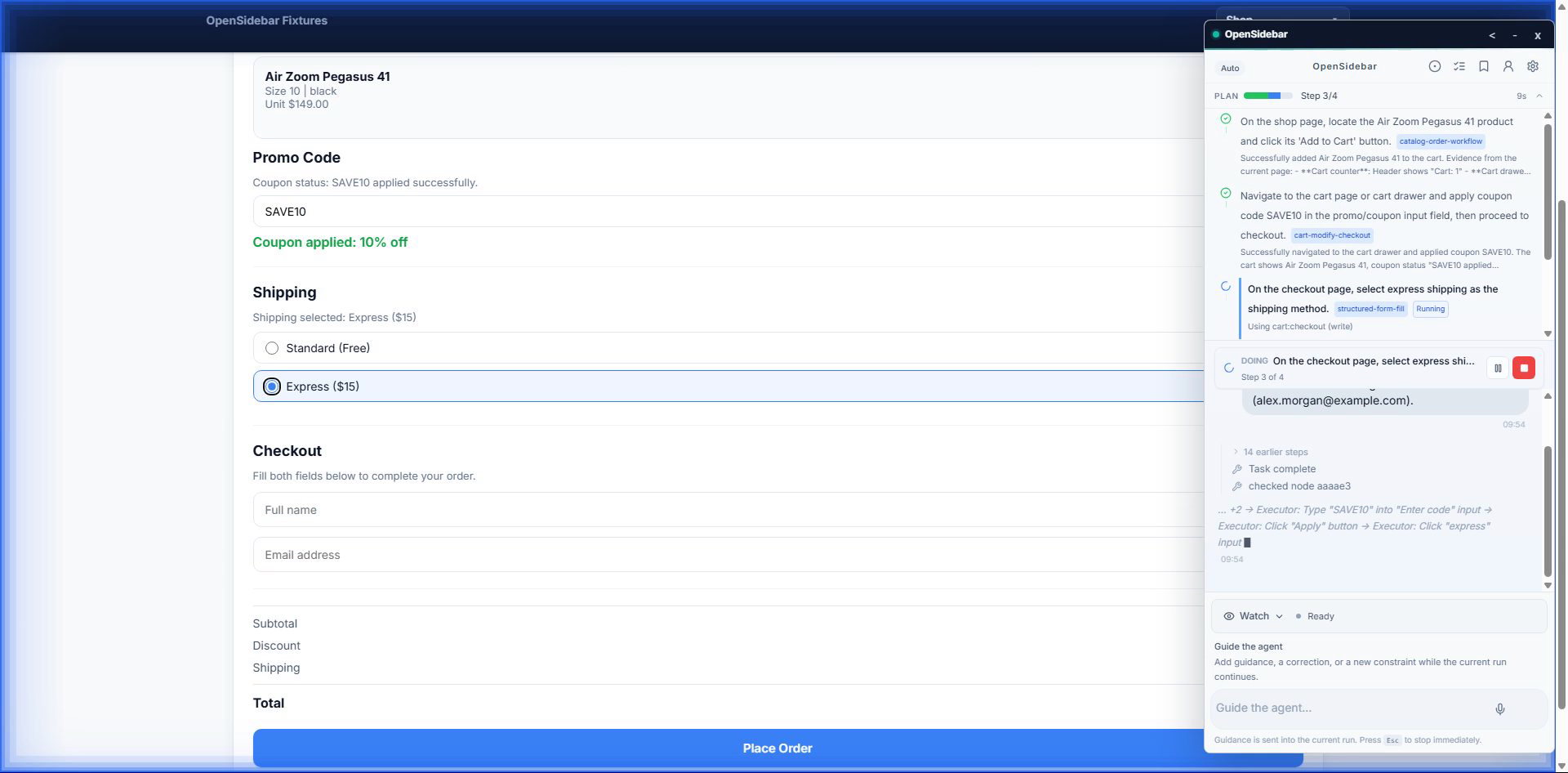
For people who want work done
OpenSidebar can:
- complete multi-step browser tasks such as forms, checkouts, and cross-page research;
- read information on one page and use it on another;
- watch a page and report when something changes;
- pause before consequential actions so you can review them;
- use OpenRouter by default, or the supported Fireworks stack.
It is bring-your-own-key software: there is no OpenSidebar subscription,
hosted model relay, analytics client, or first-party telemetry upload endpoint
in the published build. Optional reliability summaries stay local in Chrome.
Page context goes only to the model provider you configure. See
Privacy, Security, and
Known limitations before using it on sensitive
sites.
Watch the concise customer tour.
Install
Install the signed release from the
Chrome Web Store,
or build the current source locally:
git clone https://github.com/krisshkodrani/OpenSidebar.git
cd OpenSidebar
corepack enable
corepack pnpm install
corepack pnpm run dist
Then open chrome://extensions, enable Developer mode, choose Load
unpacked, and select dist/. Open the side panel and add an OpenRouter key
in Settings (recommended), or use the supported Fireworks stack. The current
provider matrix is maintained in docs/providers.md.
For developers
OpenSidebar is a Manifest V3 extension with a boundary-first runtime:
apps/extension/src/backgroundcontains orchestration, the agent loop,
browser tools, checkpoints, skills, and model clients.apps/extension/src/contentcontains the page bridge and content script.apps/extension/src/sidepanelcontains the environment-agnostic React UI.apps/extension/src/overlayprovides the reusable in-page test harness.apps/extension/src/trace-viewerprovides local run replay and analysis.apps/extension/testscontains focused runtime tests and browser E2E coverage.
The planner, executor, verifier, and optional judge have distinct roles. Runs
produce inspectable evidence: plans, actions, verification, approvals, and cost
remain attached to the task. Watch the
developer tour, then read the
architecture overview and
runtime boundaries.
The release-verified BYOK modes are OpenRouter (recommended and default) and
Fireworks.
Development
Use the Corepack-managed pnpm version pinned by the repository:
corepack enable
corepack pnpm install
pnpm run dev
pnpm run dev keeps a loadable development extension in dist-dev/ and serves
the local trace viewer at http://127.0.0.1:7589/viewer. Reload the unpacked
extension after a build; use pnpm run dev:hmr when you only need fast
side-panel UI iteration.
Common checks:
pnpm test
pnpm run lint
pnpm run typecheck
pnpm run verify
pnpm run release:verify
pnpm run release:package
Browser E2E runs are staged from cheaper, high-signal checks to harder runtime
work:
pnpm run test:e2e:smoke
pnpm run test:e2e:interactions
pnpm run test:e2e:runtime
pnpm run test:e2e
Generated reports and release media belong under .artifacts/; stable product
and engineering documentation belongs under docs/.
Contributing
Start with the contributing guide. It explains the preferred
change seams, owner- and RFC-gated areas, testing expectations, and pull request
template. Before opening a PR, run:
pnpm run verify
Normal CI runs on pull requests with read-only repository permissions and no
provider API keys. AI review is never automatic; only a maintainer can request
it. For vulnerabilities, follow the private-reporting guidance in
SECURITY.md rather than publishing sensitive details in an issue
or pull request.
Observability
Every agent session can be inspected locally:
pnpm run dev
Open http://127.0.0.1:7589/viewer. The viewer replays the plan, turns, browser
actions, verification, judge evidence, and cost. Read the
trace viewer architecture for storage,
retention, adjudication, and maintenance commands.
Documentation
- Getting started
- Contributing
- Developer guide
- Architecture overview
- Runtime boundaries
- Agent loop
- Tools reference
- Personal profile
- Providers
- Release checklist
- Roadmap
- Engineering RFCs
- Security policy
- Code of Conduct
License
MIT. See LICENSE.
Yorumlar (0)
Yorum birakmak icin giris yap.
Yorum birakSonuc bulunamadi