herdr-scope
Health Uyari
- License — License: MIT
- Description — Repository has a description
- Active repo — Last push 0 days ago
- Low visibility — Only 8 GitHub stars
Code Basarisiz
- rm -rf — Recursive force deletion command in .github/workflows/ci.yml
- rm -rf — Recursive force deletion command in .github/workflows/release.yml
- rm -rf — Recursive force deletion command in docs/demo/record.sh
- rm -rf — Recursive force deletion command in scripts/build.sh
- network request — Outbound network request in scripts/build.sh
Permissions Gecti
- Permissions — No dangerous permissions requested
Bu listing icin henuz AI raporu yok.
A sidebar for Herdr: which agent is working, which one waits on you, and which is done, grouped by project.
Herdr Scope


Features • Install • Keys • Configuration • Troubleshooting • Development • License
A sidebar for Herdr that shows which agent is working, which one waits on
you, and which finished while you were away. It only watches and paints: it never starts,
prompts or stops an agent.
Features
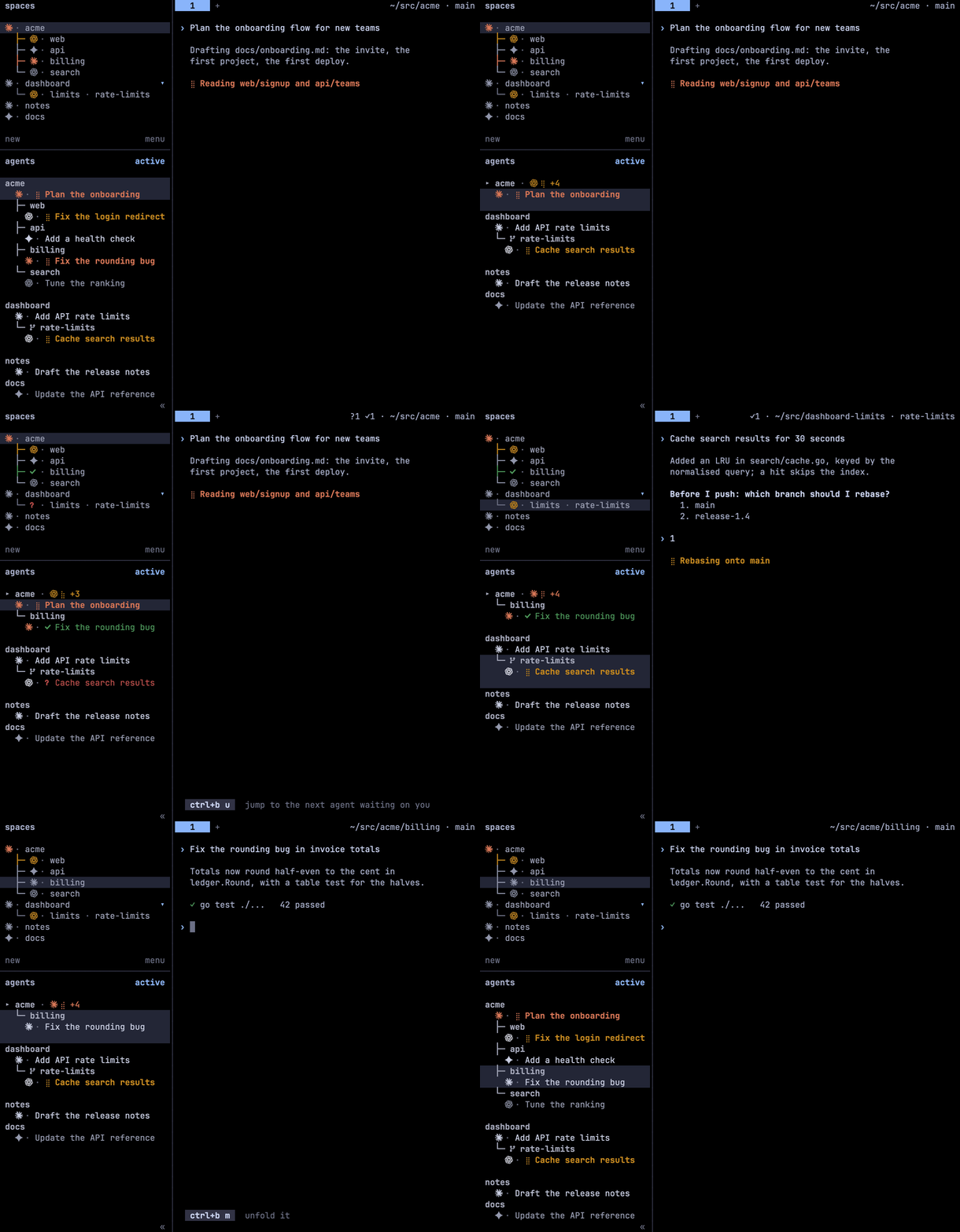
- State at a glance: a spinner while an agent works, a red
?when it asks, a green✓
held until you look, and idle rows that fade with age. - Grouped by project: worktrees and nested folders hang under their repository, the
busiest group comes first, and workspaces with one agent follow without blank rows. - Vendor marks: 27 agents, each with its own mark and colour, from the icon font or plain
Unicode. - Jump:
prefix+ugoes to the next agent waiting on you. - Fold and filter: fold a folder to one line, or show only the workspace you are in.
- Tab bar:
?1 ✓2before the path, and a waiting tab's name ends with its mark. - Settings popup: every option is validated and applied without a restart.
- Light: one Go binary and one daemon per session. Nothing goes over the network.
| State | Row |
|---|---|
| working | braille spinner, title in the vendor's colour |
| waiting on you | red, the ? pulses |
| done | green ✓, until you focus the pane |
| idle | fresh → plain → stale; a stale row dims |
Install
herdr plugin install kriuchkov/herdr-scope --ref release
The release branch carries prebuilt binaries for macOS, Linux and Windows. Without --ref,
as the plugin catalog installs it, Herdr builds from source
with Go 1.26+. Without Go, it downloads the release binary and checks its checksum. Setup
adds Scope's blocks to Herdr's config.toml between HERDR-SCOPE markers and installs the
icon font for your user. It requires Herdr 0.9+ (protocol 22).
[!IMPORTANT]
If the sidebar has not changed, start the daemon:herdr plugin action invoke kriuchkov.herdr-scope.state-start.
Never runherdr server stopto restart anything: it ends every pane.
To update, restart the daemon after updating the plugin. To uninstall, run these in order;
your config.toml comes back byte for byte:
herdr plugin update kriuchkov.herdr-scope                              # update
herdr plugin action invoke kriuchkov.herdr-scope.state-start

herdr plugin action invoke kriuchkov.herdr-scope.unconfigure           # uninstall
herdr plugin action invoke kriuchkov.herdr-scope.uninstall-font
herdr plugin uninstall kriuchkov.herdr-scope
Keys
Scope binds no keys itself. Copy the ready snippet into Herdr'sconfig.toml, one [[keys.command]] per row (bin/herdr-scope configure --keys prints the
same):
| Key | Action | Does |
|---|---|---|
prefix+u |
jump |
the next agent waiting on you: questions first, then unseen results |
prefix+a |
view-flip |
order: active ↔ recent |
prefix+f |
view-here |
only this workspace ↔ all |
prefix+m |
fold |
fold ↔ unfold this folder; agents waiting on you, or alone in it, stay visible |
prefix+, |
settings |
the settings popup (prefix+comma in config.toml) |
Configuration
prefix+, opens the popup: ↑↓ select, ←→ change, s save. A save is validated and
applied at once. The most used options:
| Option | Default | Values |
|---|---|---|
layout |
classic |
classic (§ · ✓ title) or compact (§ ✓ title, denser) |
order |
active |
active by activity, recent, here (this workspace), off (Herdr's) |
variant |
auto |
font icons, text (plain Unicode), none; auto picks what the terminal can draw |
show_age |
waiting |
? 4m, ✓ 12m on rows waiting on you; all or off |
done_hold |
until_seen |
keep the ✓ until you look, or for a duration ("30s") |
mark_tabs |
true |
end a waiting tab's name with ? or ✓ |
nest_folders |
true |
hang a workspace opened inside another one's folder under it |
Every option and the file format are covered in docs/configuration.md.
Troubleshooting
bin/herdr-scope doctor    # binary, protocol, socket, config, font, sidebar
bin/herdr-scope status    # daemon, connection, agents, last frame
- Boxes instead of logos. Ghostty and kitty draw the icons once the font is installed.
iTerm2, Terminal.app and Windows Terminal need them in their own font:herdr-scope font patch <font>.ttf, then pick the… Herdrcopy in the profile
(dist/JetBrainsMonoHerdr-Regular.ttfis a ready-made one). Or setvariant = "text". - Rows unreadable on a light terminal. Scope colours its rows for Herdr's theme, not for the
desktop. Set a light theme:[theme] name = "catppuccin-latte". - A block was skipped. Your
config.tomlalready declares[theme.custom]or[ui.sidebar.*], and TOML allows a table only once. Merge them by hand.
The daemon logs to scope.log in the plugin's state directory. The log holds ids and
statuses, never prompts or titles. Like any Herdr plugin, Scope runs as you, unsandboxed.
Development
make build     # bin/herdr-scope; the next state-start restarts the daemon on it
make race      # unit, contract and golden tests
make lint      # golangci-lint for darwin and windows
make golden    # rewrite tests/golden after an intended change to the look
From a checkout: make build && herdr plugin link . (plugin link runs no build step).
Architecture, Herdr protocol notes,
design decisions. docs/demo/record.sh re-records the GIF.
License
MIT, see LICENSE. The icon font is forked from qintmb/herdr-icon-agent-ui (MIT),
and vendor marks belong to their owners. Details are in
THIRD_PARTY_NOTICES.md.
Yorumlar (0)
Yorum birakmak icin giris yap.
Yorum birakSonuc bulunamadi