fastaf-ide
Health Uyari
- License — License: Apache-2.0
- Description — Repository has a description
- Active repo — Last push 0 days ago
- Low visibility — Only 6 GitHub stars
Code Basarisiz
- rm -rf — Recursive force deletion command in .github/workflows/nightly.yml
- rm -rf — Recursive force deletion command in .github/workflows/release.yml
Permissions Gecti
- Permissions — No dangerous permissions requested
Bu listing icin henuz AI raporu yok.
FastAF: the voice-first Agentic Development Environment (ADE). Talk to Claude Code and Codex across all your terminals at once. A local AI writes the prompts, drives the agents and tells you when they're done. On-device Whisper + Kokoro voice, native Rust + Tauri, ~300 MB idle.
FastAF
Voice to action. The voice-first Agentic Development Environment.
Talk to every Claude Code and Codex session at once. A local AI writes the prompts, drives the agents, and tells you when they're done.
Free and open source (Apache 2.0) · macOS, Windows and Linux · no account, no telemetry









Voice to action • All Features • Why FastAF • Plugin API • Docs
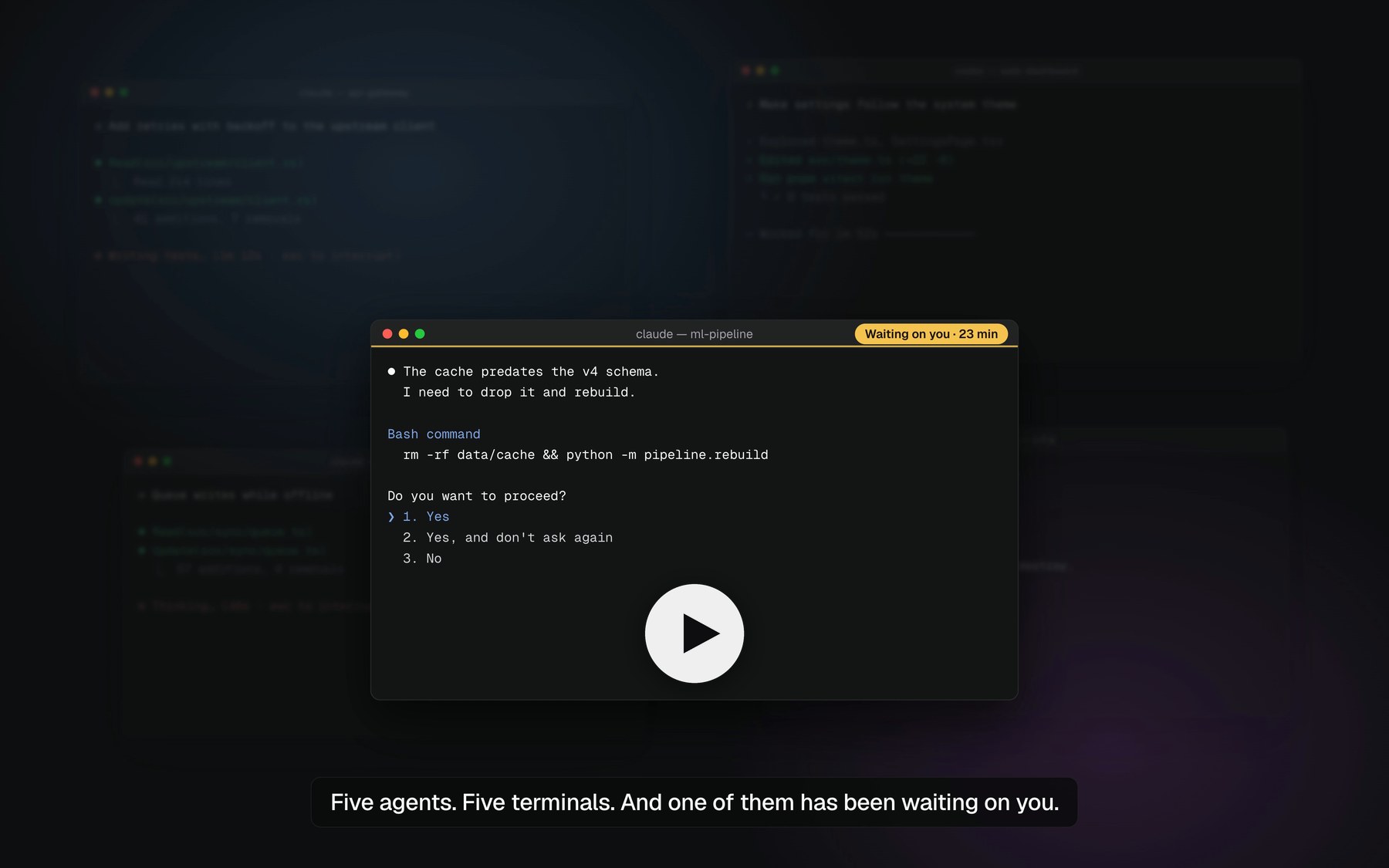
Watch the 90-second launch video on YouTube.
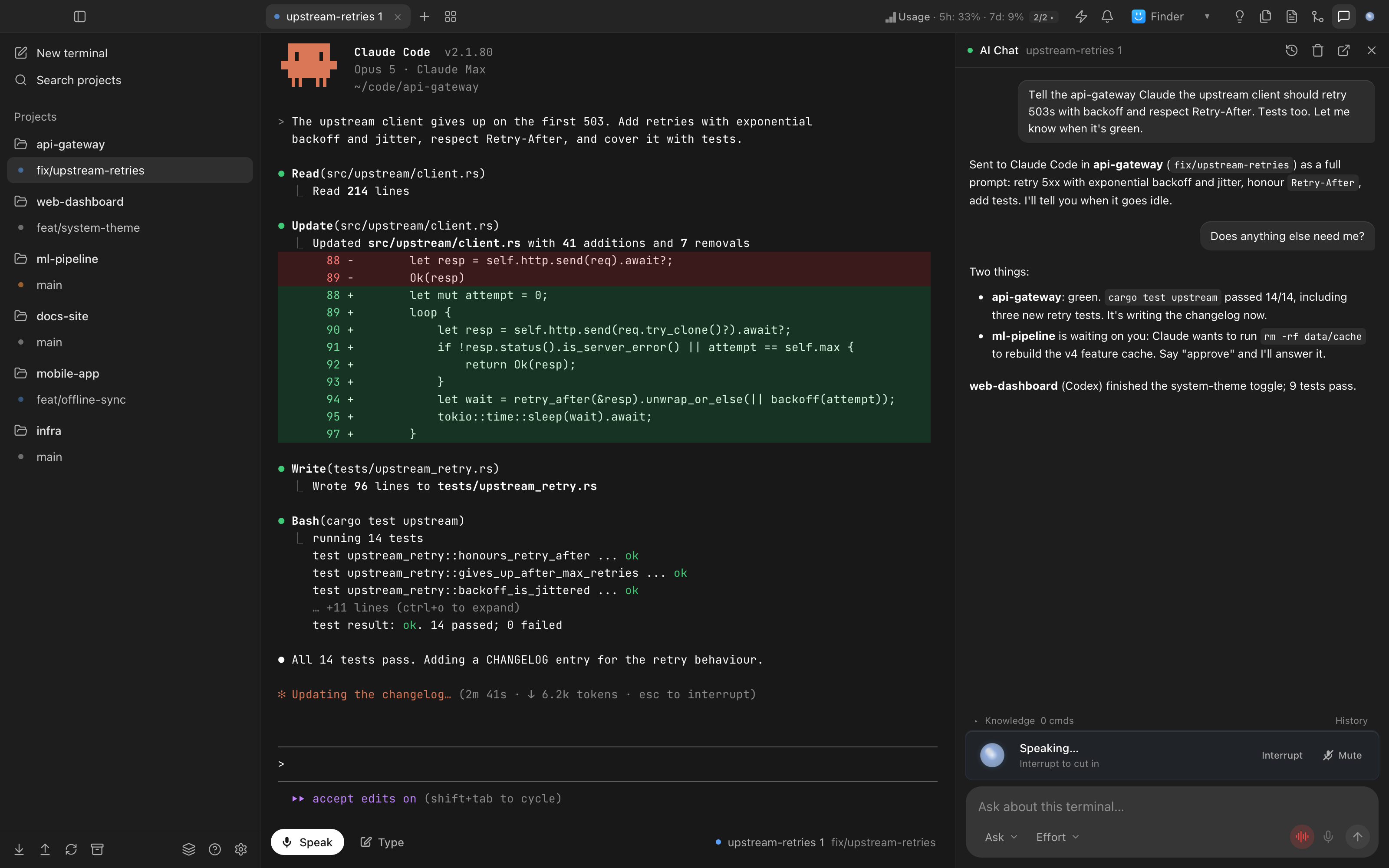
Claude Code works on a branch while the voice agent reads out where every agent stands: one is done, one is waiting for your approval.
Install on macOS (Apple Silicon): download the latest .dmg, open it and drag FastAF to Applications. It is signed and notarized by Apple, so it opens like any other app.
Windows and Linux builds (.exe, .deb, .rpm, .AppImage) are on the Releases page.
🎤 Voice to action
Stop typing prompts into five terminals. Say what you want. FastAF's voice agent hears you, writes the prompt, hands it to Claude Code, Codex or whichever agent fits the job, and tells you out loud when the work is done.
  you speak ──► Whisper, on-device ──► your AI model (local Ollama, or any provider)
                                          │  writes the prompt, picks the terminal
                                          ▼
                    Claude Code · Codex · any agent, in every terminal you run
                                          │  waits until each one goes idle
                                          ▼
                     answers out loud (Kokoro, on-device) + tab badge + notification
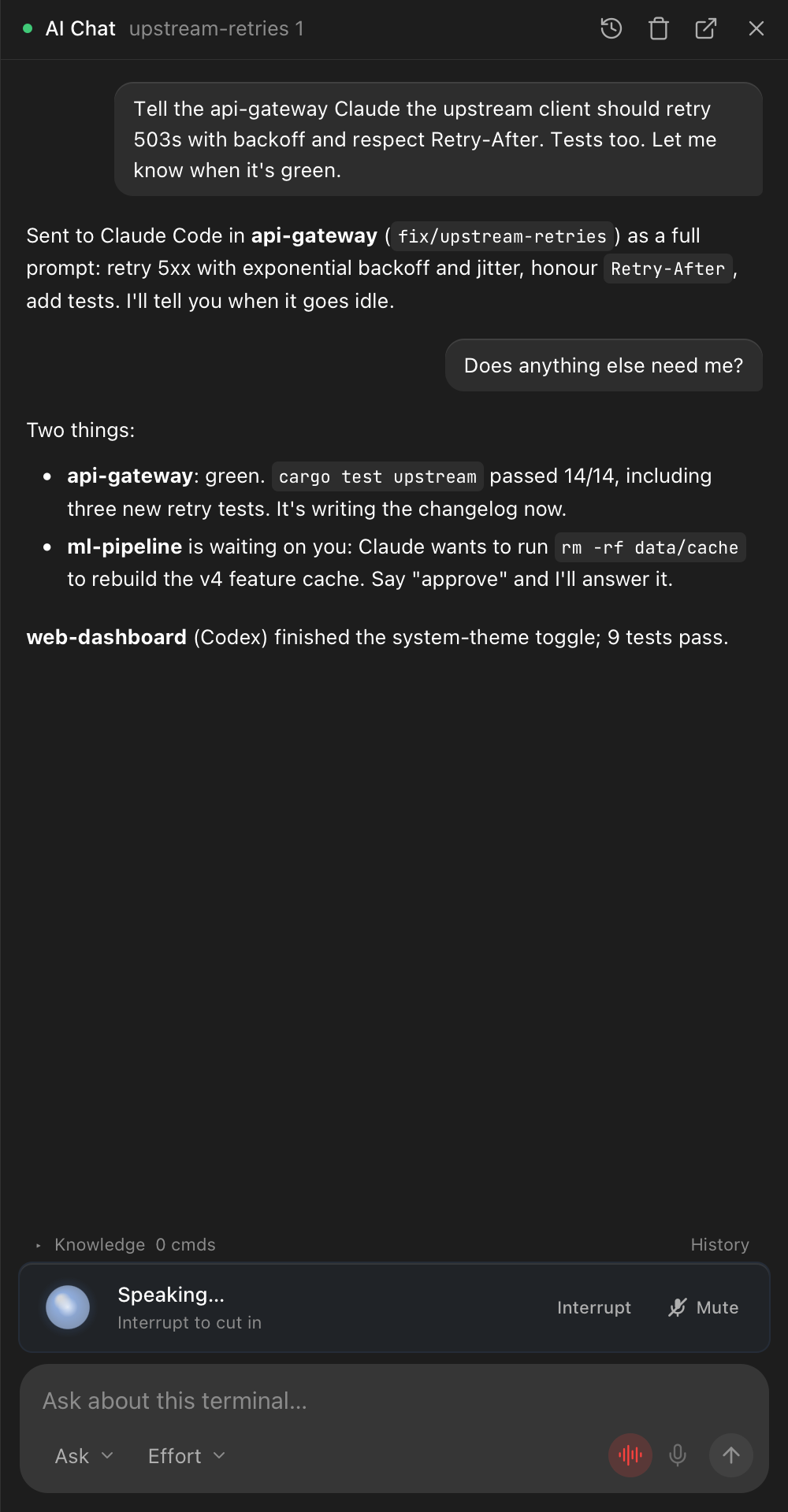
- Speak to the terminal in front of you. A Dictate / Type bar sits under the terminal column, aimed at the active terminal. Press Dictate, say the task, watch the words appear, and Enter hands it to that terminal's agent with the agent's own Enter handling.
- Or talk it through. Press the Talk orb in the middle of that bar (or
Cmd+Alt+V) and hold a hands-free conversation. The bar becomes the conversation: your words and FastAF's as live captions, a chip for each thing it does in a terminal, and how many agents are working or waiting on you. No push-to-talk, no typing, no copy-paste between windows. - It speaks first. When an agent in another terminal stops on a question or finishes, FastAF says so out loud. Answer a yes-or-no with one word, or one click, without leaving the terminal you are in.
- A local model runs the show. Point the agent at Ollama and the whole loop runs on your machine: speech in, reasoning, speech out. Or plug in Anthropic, OpenAI, OpenRouter or any compatible endpoint.
- Many terminals, one conversation. The agent sees every live session, spawns new ones, sends each one its prompt and reads back the result, across repos and branches.
- It writes the prompts. Describe the goal in plain speech. The agent turns it into a precise prompt for Claude Code or Codex.
- Get told when it's done. The agent waits for each coding agent to go idle, then speaks the answer. Tab badges, sounds and desktop notifications flag finished, waiting and rate-limited sessions even when you aren't listening.
- Hands-free and interruptible. Voice-activity turn detection, barge-in to cut the agent off mid-sentence, OS echo cancellation on macOS, and mute without ending the session.
- Or just dictate. A push-to-talk hotkey types straight into the focused terminal or input field.
One window for every agent
FastAF 2.0 borrows the shape of OpenAI's Codex app and keeps the terminals at the centre.
- Tabs in the title bar. Terminal tabs sit as pills in the title bar, next to usage, notifications and the panel toggles. No tab strip and no status bar, so the terminal gets the room.
- Projects at a glance. The sidebar lists your repos with their branches underneath, and each branch has one dot that shows what its agent is doing: working, waiting for you, or done.
- Start from a sentence. With no tab open, the window asks "What should we build?". Type or speak a task, pick Claude Code or Codex CLI, and a terminal opens on the current branch with the agent already working on it.
- Two looks. New installs open in Codex Dark, a charcoal theme that matches the Codex app. Cursor Dark keeps 1.8's jet-black glass. Both are in Settings › Appearance.
⚡ Why FastAF?
Most AI editors are Electron apps wearing a trench coat — every window is a full Chromium, so an editor like Cursor or VS Code can idle at 2–3 GB of RAM before you've even opened a file.
FastAF is native Rust on Tauri. No bundled browser — it uses your OS's webview for the UI and a Rust core for everything that matters: PTYs, Git, the filesystem, agent hooks.
| FastAF | Typical Electron AI editor | |
|---|---|---|
| Idle memory | ~300 MB | 2–3 GB |
| Engine | Native Rust + OS webview | Bundled Chromium per window |
| Terminal rendering | Custom canvas grid, no DOM per cell | xterm.js in a Chromium <webview> |
| Cold start | Instant | Spin up a browser first |
Figures are measured idle-ish RSS with several repos/sessions open on this machine — exact numbers vary by OS and workload, but the order-of-magnitude gap is the whole point.
Multiview — a 3×3 wall of live terminals
Stop hopping terminal-by-terminal, project-by-project. Multiview (Cmd+Alt+M) tiles every live terminal — across every repo and branch — into one auto-adjusting grid: up to 9 sessions in a 3×3 layout, with a "+N more" overflow pill once you're running more than that.
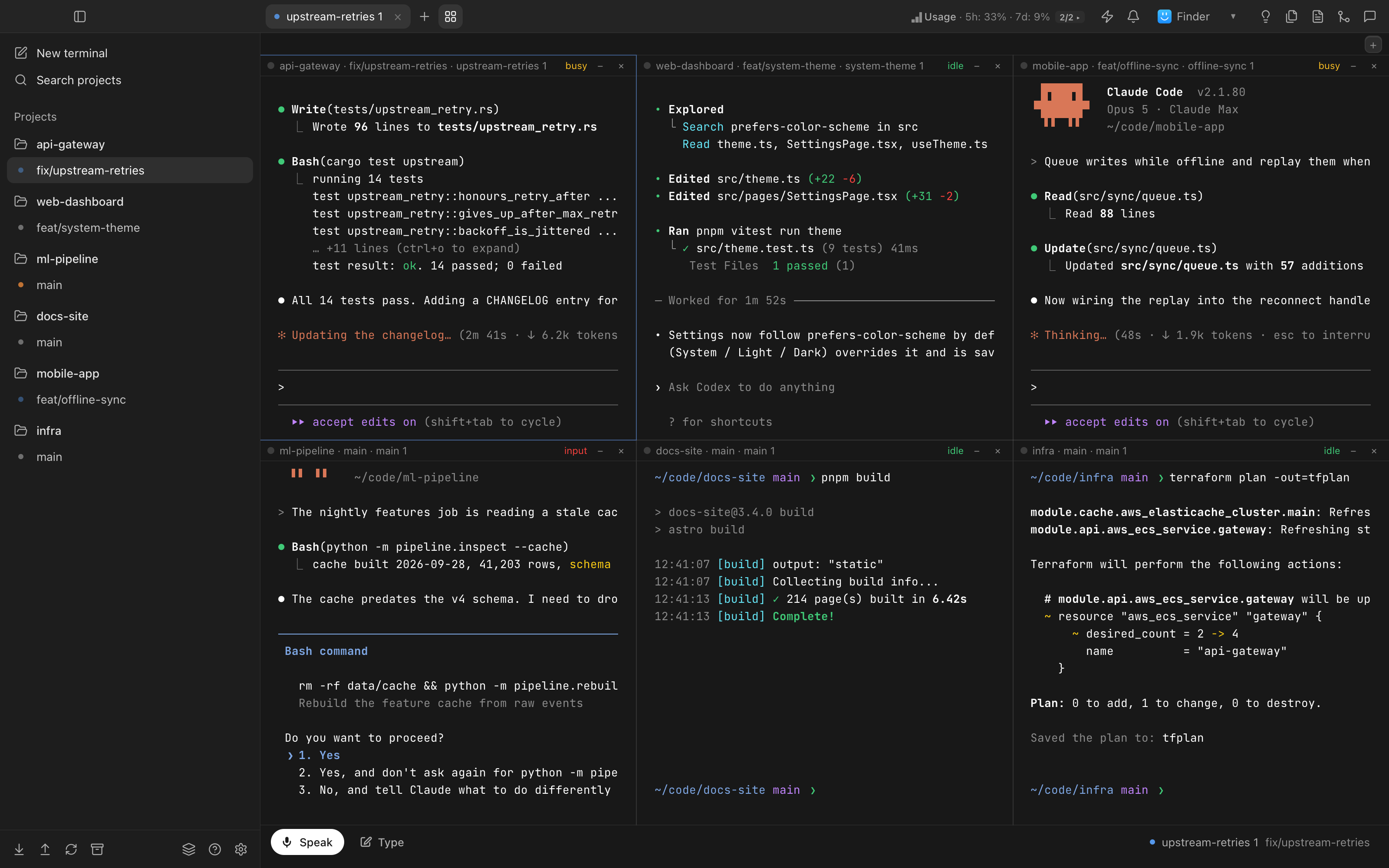
- Click a tile to type in it in place — no need to fully switch
- Double-click a tile's header to snap it back to full-size
- Drag the split bars between tiles to resize them
- The grid reflows automatically as you add or close terminals (1 → 1×1, 4 → 2×2, 9 → 3×3, and everything in between)
It's not a second terminal engine bolted on top: every session is already permanently mounted in the background, so the grid is just an honest visibility flip — no duplicate PTYs spun up, no extra memory per tile you're watching.
The problem
You're running Claude Code in one terminal, Gemini CLI in another, Codex in a third. One hit a rate limit 10 minutes ago and you didn't notice. Another is waiting for a Y/N confirmation. You switch between windows and still lose track.
The more sessions you run, the worse it gets. The tooling doesn't understand what's happening inside the terminal.
The solution
FastAF is a voice-first Agentic Development Environment (ADE), not an IDE with a chat box bolted on. You direct the work by voice; agents do it. Agents, code, diffs, PRs, CI status, and usage analytics live in one window. No context switching. No lost threads.
Agent-native means the agents are not an afterthought. Voice control, rate limit detection, question recognition, session-aware resume, and usage tracking are core — not plugins.
What makes it different
Run many AI sessions in parallel
Launch Claude Code on five branches at once — or mix agents. Each session runs in its own Git worktree — no context collision, no stash conflicts, no "which terminal was that?" moments.
- Up to 50 terminal sessions running simultaneously
- Each session works on its own isolated copy of the repo
- Activity dashboard showing every session at a glance
Agent observability — not just terminals
FastAF auto-detects 10 AI coding agents (Claude Code, Codex CLI, Gemini CLI, Amp, Cursor Agent, OpenCode, Droid, Goose, Grok, pi) and understands what they're doing:
- Rate limit detection — Provider-specific patterns with countdown timers per session.
- Question detection — Y/N prompts, numbered options, inquirer-style menus. Tab indicator, notification sound, keyboard overlay.
- Usage tracking — Provider-aware Claude, Codex, and Grok limits with color-coded thresholds and native dashboards; Gemini remains terminal-detection only until it exposes a stable account quota API.
- Activity dashboard — Every session at a glance: agent type, status (working / waiting / rate-limited / idle), last activity.
- Session-aware resume — Auto-discovers agent session IDs from disk (Claude Code, Gemini CLI, Codex CLI, Grok). Resume exactly where you left off.
No other tool knows that your agent is stuck.
Progress — what happened while you were away
Every project gets an append-only journal. Agents write two kinds of entry — done when the work they announced is finished, blocked when they cannot continue without you — and FastAF writes a third, intent, read off the agent's own intent: marker, so an agent that never calls the tool still leaves a trail of what it set out to do.
- MCP
progresstool —type,text, and an optional free-textstep. One call appends the entry and raises the toast. - Toolbar bell with the number of entries that arrived since your last visit; the dialog freezes the last-visit divider so it never moves under the line you are reading.
- Blocked entries in red, a blocked-only filter, per-entry deletion. No pause, no clear, no correction — you read it and delete what you do not want to keep.
- Nothing is written inside your repositories — one SQLite database in FastAF's configuration directory, with the project as a column. No
.tuicdirectory, nothing for Git to ignore, no file-watcher event. - A worktree files under its parent project, so a repository and its worktrees show one history.
- One global switch plus a per-agent override; off globally removes the tool from every agent's tool list.
Git worktrees, fully managed
Click a branch in the sidebar. FastAF auto-creates a git worktree — a fully isolated copy of the repo. The terminal opens inside it. Switch to another branch: your previous terminals are preserved. Switch back: they're exactly as you left them.
- Automatic worktree creation on branch click
- Worktree Manager — PR status, dirty file counts, last commit at a glance
- Post-merge cleanup dialog — delete branch, archive worktree in one click
- Configurable base branch, setup scripts, auto-fetch intervals
See what your agents changed — without leaving
The feedback loop happens in the same window:
- Git Panel — Staging, inline commit, blame with age heatmap, canvas commit graph, stashes, branches with ahead/behind counts.
- Diff views — Side-by-side, unified, or scroll-all-files. Word-level highlighting, hunk and line-level restore.
- PR management — Merge via GitHub API with auto-detected merge method. Post-merge cleanup.
- Multiple GitHub accounts — Run more than one github.com login and any number of GitHub Enterprise Server accounts side by side. Bind each repo to the account that monitors it; ambiguous repos ask instead of guessing. Every account polls independently — a rate limit on one never stalls the others.
- GitHub Issues — Filter by assigned/created/mentioned, labels with colors, close/reopen.
- CI Auto-Heal — When CI fails, FastAF fetches failure logs and injects them into the agent for automatic fix.
- Built-in code editor — Syntax highlighting, find/replace, disk conflict detection, a VS Code-style change-overview ruler, and a Cmd/Ctrl+hover go-to-definition affordance.
- File browser — Directory tree, content search (grep), git status indicators.
Built-in AI Chat & autonomous agent
A conversational AI companion that sees your terminal as you see it. Speak or type. Ask about errors, get code suggestions, or let the autonomous agent take the wheel and drive your terminals directly.
- Voice orb: talk to it hands-free and hear it answer (Voice to action)
- Multi-provider: Ollama (local, free), Anthropic, OpenAI, OpenRouter, or any compatible endpoint
- Cross-session orchestration: list, spawn and drive other terminals, wait for an agent to go idle, read the result
- Autonomous AI Agent (ReAct loop) with 30+ tools: read screen, send input, edit files, search code, run commands
- Session knowledge: the agent learns from your terminal history — commands, errors, fix patterns
- Live cost tracking: prompt/completion tokens and estimated cost per turn
- Per-terminal chat state, conversation history, detachable panel for multi-monitor
MCP Proxy Hub — one connection for all your tools
Aggregate all your MCP servers into a single endpoint. Claude Code, Cursor, VS Code — each agent connects once and gets access to every upstream tool.
- Auto-configures Claude Code, Cursor, Windsurf, VS Code, Zed, Amp, Gemini, Codex, Grok, OpenCode, Droid, Goose, and pi
- Circuit breakers, health checks, hot-reload per upstream
- Credential management via OS keyring, OAuth 2.1 support
- Tool filtering: whitelist or blacklist per upstream server
Control from anywhere
A mobile companion PWA lets you monitor agents from your phone, answer questions with one tap, and track rate limits in real time.
- QR code scan for instant LAN connection
- Tailscale auto-HTTPS or E2E-encrypted cloud relay — no VPN or port forwarding
- Live WebSocket output, suggest follow-up chips, slash menu
tuic-remote headless daemon (beta) — Run the backend where the code is: a Linux build host, a server, any machine with no desktop environment. Pure Rust binary, no Tauri and no GUI, serving the same HTTP/WebSocket API as the desktop app. Point a desktop FastAF at it and its repositories, terminals and agents behave like local ones.
- Published for Linux x64/ARM64, macOS ARM and Windows x64 — together with
tuic-bridge, which gives the agents running on that machine the fulltuicommanderMCP tool surface - Every TCP request is authenticated: the headless build has no loopback bypass, so an SSH tunnel does not make the daemon local.
GET /healthis the only unauthenticated route --instance <id>for a fully isolated configuration directory and keyring vault- Default port 9877 (
TUIC_PORTto override), optional manual TLS
Remote Access → • tuic-remote setup →
Agents that coordinate
Agent Teams — Claude Code's sub-agents run as native FastAF tabs instead of tmux panes. Full session awareness, output parsing, and question detection for each sub-agent.
Inter-agent messaging — When multiple agents work in parallel, they discover peers, send messages, and receive push notifications through FastAF as the coordination hub.
Automate repetitive workflows
30 built-in Smart Prompts turn common tasks into one-click operations: Smart Commit, Review Changes, Create PR, Fix CI, and more. Context variables like branch, diff, and PR data are resolved automatically.
- Inject mode (PTY write), headless mode (subprocess), or shell script mode (direct execution)
- 35 context variables auto-resolved from git, GitHub, terminal, and file context
- Create your own prompts with the same variable system
Talk to your agents: on-device voice
Voice is the front door to FastAF, and all of it runs on your machine: speech-to-text, turn detection and the spoken reply. No cloud speech service and no API keys. Pair it with a local Ollama model and no data leaves your machine.
- Speech in: whisper-rs, GPU-accelerated on macOS (Metal), Windows and Linux (Vulkan, CPU when no driver is present)
- Speech out: Kokoro text-to-speech with selectable voices and speed
- Turn-taking: Silero voice-activity detection, barge-in, echo cancellation, mute without hanging up
- Voice agent: hands-free conversation with the AI agent, which drives your terminals (Voice to action)
- Dictation: push-to-talk hotkey, text injected into the active terminal or focused input
- 10 local models from Small (488 MB) to Large V2 (3 GB): Medium, Large V3 Turbo (1.6 GB), and Q5/Q8 quantized builds of both (Turbo Q5 is 574 MB)
Extend everything
Plugin system — Obsidian-style plugins with hot reload:
- 5 capability tiers from read-only watchers to scoped Tauri invoke
- TUIC SDK v1.0:
tuic.activeRepo,tuic.toast,tuic.onRepoChangeand more - Terminal output watchers with regex triggers
- Status bar tickers, custom panels, notification contributions
- Install from a folder or
.zip
Built to be scripted — CLI, HTTP, and MCP control surface
FastAF isn't a black box. Everything you click, you can also drive from a script, another tool, or an AI agent.
fastafCLI companion — Open files with cursor goto (fastaf src/main.rs:42:8), manage sessions (ls/new/kill/send), orchestrate agents (spawn/ls/send), plus a tmux-compatibility alias mode. Installs from Settings, auto-updates on launch.- HTTP API — REST + WebSocket + SSE on a local port: list/create/close sessions, stream live output, spawn agents, read terminal grids and scrollback, query process CPU/RSS. Script TUIC from anything that can hit a socket.
- MCP control surface — TUIC is itself an MCP server. Connected agents get
session,agent,repo,ui, andprogresstools — includingdrive_agent(atomic send → wait-for-idle → read) and delta cursors that return only new output. (Distinct from the MCP Proxy Hub above, which aggregates your upstream servers.) - Custom "Open in…" launchers — Define your own editor/tool commands with placeholder tokens:
{file},{repo},{fileDir},{cwd},{home},{line},{column}. iTerm2, Tower, and the full JetBrains family ship built in.
CLI guide → • HTTP API → • MCP server →
How it compares
| Capability | Ghostty / Kitty | Warp | Cursor IDE | Claude Desktop | FastAF |
|---|---|---|---|---|---|
| Voice to action (speak, agents act) | No | No | No | No | Voice agent drives your terminals |
| Idle memory | ~50–150 MB | ~300–600 MB | 2–3 GB | 1–2 GB | ~300 MB |
| Terminal sessions | Yes | Yes | Yes | No | Yes (50) |
| Multi-terminal grid view | No | No | No | No | Multiview — 3×3, all repos at once |
| AI coding agents | No | Partial | Built-in | Built-in | Any agent (11 detected) |
| Parallel agents | No | No | Limited | No | Unlimited |
| Git worktree orchestration | No | No | No | No | Automatic |
| Agent observability | No | No | No | No | Real-time |
| Global Workspace | No | No | Yes | No | Multi-repo |
| Usage dashboard | No | No | No | Basic | Full (heatmap, per-project) |
| Remote access (phone/tablet) | No | No | No | Mobile app | PWA + E2E relay |
| Voice dictation | No | No | Extension | Built-in | Local Whisper + Kokoro |
| MCP Proxy Hub | No | No | No | No | Built-in |
| Plugin system | No | No | Extensions | No | Hot reload + SDK |
| GitHub Issues & PR management | No | No | Extension | No | Built-in |
| Multi-account & Enterprise GitHub | No | No | No | No | github.com + GHE |
| Built-in AI Chat | No | Built-in | Built-in | Built-in | Multi-provider (beta) |
| CI Auto-Heal | No | No | No | No | Built-in |
Terminal features — 50 sessions, splits, detach, find, persistence
- Up to 50 concurrent PTY sessions, each with independent zoom (8–32px)
- Multiview (
Cmd+Alt+M): grid of every live terminal across every repo and branch, up to 9 tiles + overflow, drag-resizable, click to type in place, double-click to jump full-size - Split panes: vertical (
Cmd+\) or horizontal (Cmd+Alt+\), up to 4 panes, drag-resize - Drag to select text even over apps that capture the mouse (vim, htop, agent TUIs) — a plain click still reaches the app
- Detachable tabs: float any terminal into its own OS window, re-attaches on close
- Find in terminal (
Cmd+F): regex, case-sensitive, whole word, match navigation - Cross-terminal search: type
~in command palette to search all open terminal buffers - Session persistence: terminals survive restarts with lazy restore on branch click
- Tab management: reorder by drag, rename by double-click, reopen last 10 closed tabs
- Tab status dots: idle, busy, done, unseen, question, error
- Copy on select, configurable bell (visual/sound/both), scroll shortcuts
- International keyboard support, Kitty keyboard protocol
- 11 bundled monospace fonts (JetBrains Mono, Fira Code, Hack, Cascadia Code, and more)
- Auto-create worktrees per branch with configurable base branch and setup scripts
- Worktree Manager (
Cmd+Shift+W): all worktrees across all repos, orphan detection, batch operations - Git Panel (
Cmd+Shift+D): staging, commit, log with canvas commit graph, stashes, branches, blame with age heatmap - PR management: merge via GitHub API, auto-detect merge method, post-merge cleanup dialog
- Multi-account GitHub: multiple github.com logins + GitHub Enterprise Server accounts (PAT), per-repo account bindings with an ambiguity chooser, isolated per-account polling/rate-limits/circuit-breaker
- GitHub Issues: filter by assigned/created/mentioned, labels with colors, close/reopen
- Auto-delete branch on PR close, CI Auto-Heal, PR notifications
- Repository groups: named, colored, collapsible, drag-and-drop reordering
- Park repos: temporarily hide repos you're not using
- Quick branch switcher: hold
Cmd+Ctrl, press1-9to switch instantly - Auto-fetch on configurable interval
- Smart Prompts (
Cmd+Shift+K): 30 built-in AI automation prompts with auto-resolved context variables - Command palette (
Cmd+P): fuzzy search all actions, files (!), file contents (?), terminal buffers (~) - Configurable keybindings with chord support and conflict detection
- Claude Usage Dashboard: rate limits, 7-day chart, 52-week heatmap, per-project breakdown
- Prompt library (
Cmd+K): saved prompts with variable substitution - IDE launchers: open in VS Code, Cursor, Zed, JetBrains, iTerm2, Tower, or any detected tool — plus user-defined custom launchers with
{file}/{repo}/{line}/{column}tokens - Ideas panel (
Cmd+Alt+N): quick notes with image paste and send-to-terminal - Voice agent: hands-free talk with the AI agent, spoken replies, barge-in (see Voice to action)
- Voice dictation: streaming on-device Whisper with partial results
- Focus mode (
Cmd+Alt+Enter): maximize active tab, hide sidebar and panels - Project Progress: append-only per-project journal of agent
done/blockedreports plus capturedintent:markers, with a toolbar bell for unseen entries
fastafCLI: file open with cursor goto, session/agent orchestration, tmux-compat alias mode, auto-update- HTTP API (REST + WebSocket + SSE): sessions, live output stream, agent spawn, terminal grid/scrollback ops, process stats
- MCP control surface:
session/agent/repo/ui/progresstools,drive_agentatomic send→wait→read, delta cursors for incremental reads tuic-remoteheadless daemon (beta): same HTTP/WebSocket API with no Tauri and no GUI,tuic-bridgefor the agents on that machine, isolated--instanceconfig + keyring, authenticated on every TCP request- Custom launchers: user-defined exec + args with
{file}/{repo}/{fileDir}/{cwd}/{home}/{line}/{column}placeholder tokens - Command blocks: terminal output segmented per prompt+output cycle — semantic scrollbar marks, fold (
Cmd+Shift+.), block search (Cmd+Shift+B), navigate (Cmd+Shift+Up/Down) - Generators (command palette): Password, UUID v4/v7, ULID, CUID2, JWT secret, TOTP secret, Nano ID, Slug, Ed25519 keypair — generated natively in Rust
- Process Manager: CPU% and RSS for TUIC and every child process tree, with a self-contained HTML monitor
- Runtime diagnostics: CPU-spike watchdog, FD/thread-leak detection, health snapshots via the local logs endpoint
- Auto-standby: SIGSTOP idle + unfocused PTY groups after N minutes, SIGCONT on focus or agent message
Full feature reference: docs/FEATURES.md
Installation
macOS (Apple Silicon)
Download the latest .dmg, open it and drag FastAF.app to Applications.
Builds from v1.8.7 on are signed with a Developer ID and notarized by Apple, so they
open like any other app.
Or install from the shell (macOS and Linux):
curl -fsSL https://raw.githubusercontent.com/ksg98/fastaf-ide/main/website/public/install.sh | sh
On macOS the installer never replaces the app with a bundle it has not checked.
It downloads and unpacks into a private temporary directory, then runscodesign --verify --deep --strict and requires a Developer ID Application
signature with TeamIdentifier NH9933XQGX (FastAF's). Only then does it stage
the bundle next to the target, move the installed /Applications/FastAF.app
aside (to .FastAF.app.previous), move the new one in, and delete the old one
last. If a check fails it stops with "Nothing was installed." and the installed
app is untouched; if the final move fails, it puts the previous app back and says
so ("The previous version was restored."). On Linux it installs the .deb, .rpm or AppImage.
Pass a version (sh -s 2.0.4) to pin one, or nightly for the nightly build.TUICOMMANDER_HOME=<dir> installs somewhere other than /Applications.
The macOS app requires macOS 12 Monterey or later, with system WebKit updated to Safari 17.4 or later for Mermaid diagrams. Windows uses WebView2; Linux uses WebKitGTK.
Other platforms
Grab the .deb, .rpm, .AppImage or .exe from
Releases. There is currently no
macOS Intel (x86_64) build — on an Intel Mac, build from source.
Build from source
Prerequisites: Node.js 24+, Rust toolchain, Tauri CLI
pnpm install
pnpm tauri dev      # Development with hot reload
pnpm tauri build    # Production build
pnpm test               # Run tests
See docs/guides/development-setup.md for platform-specific instructions.
Plugins
Plugins live in the plugins/ folder of FastAF's config directory. On macOS that is:
~/Library/Application Support/com.tuic.commander/plugins/
Two plugins are built into the app: Plan Tracker and Stories Ticker. They are TypeScript modules compiled with FastAF, so nothing is copied into the folder above.
FastAF ships no other plugin. There is no work-item provider for the Tasks panel and no plugin registry. Tasks appears once you install a work-item provider plugin. Install any plugin from a folder or a .zip in Settings → Manage plugins, or copy it into the folder above.
Built with
Rust + Tauri v2 backend, SolidJS UI, native terminal via alacritty_terminal + canvas rendering, whisper-rs speech-to-text, Kokoro text-to-speech and Silero VAD on ONNX Runtime, Vite + LightningCSS build. ~300 MB idle RAM with several repos/sessions open — no bundled Chromium.
Documentation
| Getting Started | First-run guide |
| Features | Complete feature reference with all keyboard shortcuts |
| AI Agents | Agent detection, rate limits, question detection |
| Project Progress | The per-project journal agents report into |
| Remote Access | Mobile PWA, SSH tunnels, remote connections, tuic-remote daemon |
| Plugin API | Build plugins for FastAF |
| HTTP API | REST/WebSocket/SSE endpoints |
| Architecture | System design and component overview |
| Development Setup | Build from source |
| Modes | Desktop, browser, mobile, and remote daemon |
| Troubleshooting | Common setup and runtime problems |
Apache 2.0 licensed. Zero telemetry. Runs locally.
Acknowledgements
FastAF is based on TUICommander by sstraus — all credit for the core architecture to that project.
License
Apache 2.0 © 2026 Stefano Straus
See NOTICE and THIRD_PARTY_NOTICES.md for attributions and third-party licenses. Both ship inside the app with LICENSE; open them from Help → Licenses.
Yorumlar (0)
Yorum birakmak icin giris yap.
Yorum birakSonuc bulunamadi