telegram-notification-mcp
Health Gecti
- License — License: MIT
- Description — Repository has a description
- Active repo — Last push 0 days ago
- Community trust — 22 GitHub stars
Code Uyari
- network request — Outbound network request in src/index.ts
Permissions Gecti
- Permissions — No dangerous permissions requested
Bu listing icin henuz AI raporu yok.
Simple MCP server to send you notifications on telegram
Telegram Notification MCP Server

An MCP (Model Context Protocol) server that sends notifications to Telegram when Claude Code completes tasks. Built with TypeScript using the Cloudflare Agents SDK and deployable on Cloudflare Workers.
📢 Prefer Discord? Check out Discord Notification MCP for Discord notifications instead.
Features
- 🤖 MCP Tool: Provides a
send_telegram_messagetool for sending notifications - 🚀 Cloudflare Workers: Runs serverless with global distribution
- 🔐 Authenticated: Requires a bearer token stored as a Cloudflare secret
- 🌐 Streamable HTTP: Uses the current stateless MCP transport
- 💬 Message Formatting: Supports Markdown and HTML formatting
- 📝 Formatting: Supports Markdown and HTML message formatting
Architecture
This server implements the MCP specification using Cloudflare's Agents SDK:
- POST /mcp: Stateless Streamable HTTP endpoint for MCP communication
- GET /sse: Returns
410 Gone; legacy SSE clients must migrate to/mcp - Built with TypeScript, MCP SDK, and Cloudflare Agents SDK
- Proper JSON-RPC 2.0 error handling
- Node.js compatibility mode enabled
Setup
Prerequisites
- Telegram Bot: Create a bot via @BotFather and get your bot token
- Chat ID: Get your chat ID by sending a message to your bot and visiting:
https://api.telegram.org/bot<YOUR_BOT_TOKEN>/getUpdates - Cloudflare Account: Sign up at cloudflare.com
Installation
- Clone this repository
- Install dependencies:
pnpm install
Configuration
Create a
.dev.varsfile from the example:cp .dev.vars.example .dev.varsThen edit
.dev.varswith your bot token and chat ID. This file is used for both local development and deployment.For production deployment, generate an MCP bearer token and set up Cloudflare secrets:
openssl rand -hex 32 pnpm exec wrangler secret put BOT_TOKEN pnpm exec wrangler secret put DEFAULT_CHAT_ID # Optional pnpm exec wrangler secret put MCP_AUTH_TOKENNote: The DEFAULT_CHAT_ID is optional. If not set, you must provide a chat_id parameter when calling the
send_telegram_messagetool.Update
wrangler.tomlwith your worker name if desired
Deployment
Deploy to Cloudflare Workers:
Deploy using Wrangler:
# First set secrets
pnpm exec wrangler secret put BOT_TOKEN
pnpm exec wrangler secret put DEFAULT_CHAT_ID  # Optional

# Then deploy
pnpm run deploy
Alternative: Continuous Deployment
You can also set up continuous deployment directly from the cloudflare dashboard. Learn more about git integration with cloudflare
Claude Code Configuration
Add the MCP server to Claude Code using Streamable HTTP and the same bearer token:
# For production deployment
claude mcp add --scope user --transport http \
  --header "Authorization: Bearer <MCP_AUTH_TOKEN>" \
  telegram-notify https://your-worker-name.workers.dev/mcp

# For local development
claude mcp add --transport http \
  --header "Authorization: Bearer <MCP_AUTH_TOKEN>" \
  telegram-notify http://localhost:8787/mcp
The token is client access to the MCP endpoint, not the Telegram bot token. Never put the bot token in Claude's MCP configuration.
You can verify the configuration with:
claude mcp list
Usage
Once configured, Claude Code can send notifications to your Telegram whenever you need them.
Available Tool
send_telegram_message: Send a notification message to Telegram
text(required): The message text to sendchat_id(optional): Telegram chat ID (uses DEFAULT_CHAT_ID if not provided)parse_mode(optional): "Markdown" or "HTML" for message formattingdisable_notification(optional): Send message silently
Example usage:
// Uses DEFAULT_CHAT_ID from environment
await send_telegram_message({ text: "Task completed!" })

// Send to specific chat (overrides DEFAULT_CHAT_ID)
await send_telegram_message({ text: "Hello!", chat_id: "123456789" })

// Send with Markdown formatting
await send_telegram_message({
  text: "*Bold* and _italic_ text",
  parse_mode: "Markdown"
})
When You'll Get Notifications
Claude Code sends notifications when:
- You explicitly ask: "notify me when done" or "let me know on Telegram"
- Errors occur during execution
- Important milestones are reached
- User input or intervention is needed
Example Scenarios
# You say: "Deploy to production and notify me when done"
# Result: 🤖 Claude Code Notification
#         Deployment completed successfully! The app is now live.

# You say: "Run all tests and let me know the results"
# Result: 🤖 Claude Code Notification
#         All tests passed! 52/52 tests successful.

# You say: "Process this data and notify me if there are any errors"
# Result: 🤖 Claude Code Notification
#         Error: Failed to process row 451 - invalid date format
Example Notifications
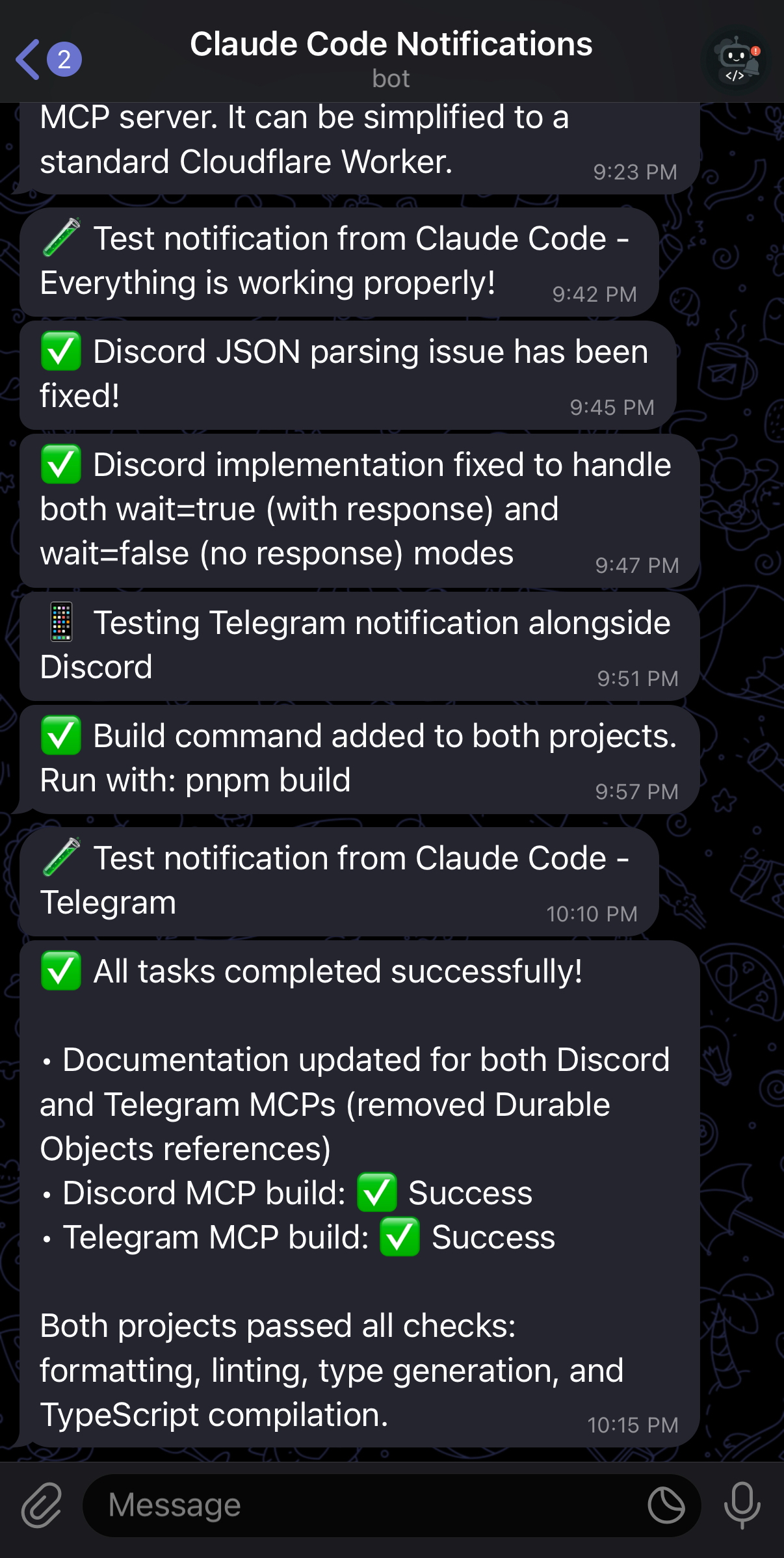
Example of Telegram notifications from Claude Code
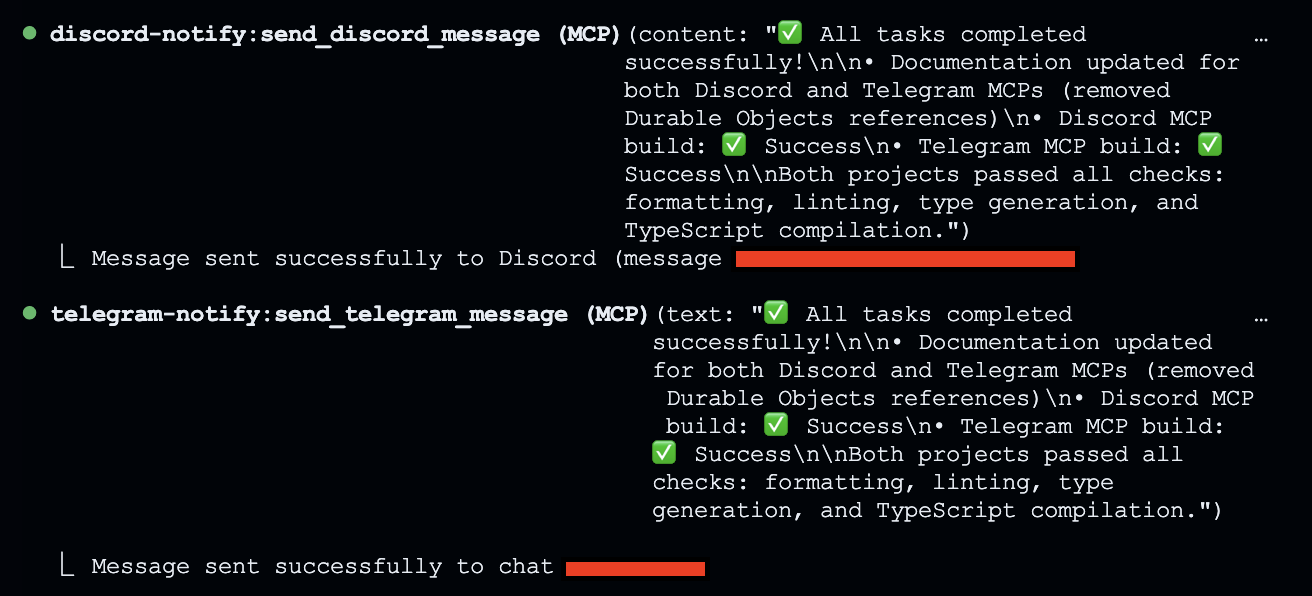
Claude Code sending notifications during task completion
CLAUDE.md Examples
To encourage Claude Code to use Telegram notifications effectively, add these to your CLAUDE.md:
# Telegram Notifications

Use the mcp__telegram-notify__send_telegram_message tool to send notifications to Telegram.

- Always send a Telegram notification when:
  - A task is fully complete
  - You need user input to continue
  - An error occurs that requires user attention
  - The user explicitly asks for a notification (e.g., "notify me", "send me a message", "let me know")

- Include relevant details in notifications:
  - For builds/tests: success/failure status and counts
  - For errors: the specific error message and file location

- Use concise, informative messages like:
  - "✅ Build completed successfully (2m 34s)"
  - "❌ Tests failed: 3/52 failing in auth.test.ts"
  - "⚠️ Need permission to modify /etc/hosts"
Development
Run locally:
# Start local development server
pnpm dev
For local development, Wrangler will automatically load environment variables from your .dev.vars file.
Run all checks before deployment:
pnpm build
This command runs:
pnpm format- Format code with Biomepnpm lint:fix- Fix linting issuespnpm cf-typegen- Generate Cloudflare typespnpm type-check- Check TypeScript types
Test the server:
# An unauthenticated request must return HTTP 401
curl -i http://localhost:8787/mcp

# Claude Code performs the authenticated MCP handshake and health check
claude mcp list
Debugging
Testing Authentication
You can verify that the endpoint rejects requests without its bearer token:
curl -i http://localhost:8787/mcp
This should return 401 Unauthorized. Then use claude mcp list to verify an authenticated client connection.
Common Issues
401 Unauthorized: Confirm the client's
Authorization: Bearer ...header matches theMCP_AUTH_TOKENCloudflare secret.MCP reconnects or times out: Confirm the client uses HTTP transport and the
/mcpendpoint, not the retired/sseendpoint.Telegram notifications not sent: Verify your
BOT_TOKENandDEFAULT_CHAT_IDare correctly set in the Worker environment.
Technical Details
- Language: TypeScript (ES2021 target)
- Runtime: Cloudflare Workers with Node.js compatibility
- Protocol: MCP (Model Context Protocol)
- Transport: Stateless Streamable HTTP
- Observability: Enabled for monitoring
References
This project was built following these guides:
- Build a Remote MCP server - Cloudflare Agents
- Model Context Protocol (MCP) - Cloudflare Agents
- MCP Transport Methods - Cloudflare Agents
- Cloudflare MCP Template (remote-mcp-authless)
License
MIT
Yorumlar (0)
Yorum birakmak icin giris yap.
Yorum birakSonuc bulunamadi