mcp-vision-bridge
Health Uyari
- License — License: MIT
- Description — Repository has a description
- Active repo — Last push 0 days ago
- Low visibility — Only 8 GitHub stars
Code Basarisiz
- os.homedir — User home directory access in hooks/vision-capture.mjs
- process.env — Environment variable access in hooks/vision-capture.mjs
Permissions Gecti
- Permissions — No dangerous permissions requested
Bu listing icin henuz AI raporu yok.
MCP server that gives text-only LLM coding agents vision — analyze images via any multimodal model (mimo, Claude, Gemini, OpenAI-compatible). Works with Claude Code, Codex, Kimi, opencode, PI.
👁️ mcp-vision-bridge


Give your text-only coding agent eyes.
DeepSeek V4 Flash writes great code — but it can't see the error dialog, the broken UI, or the screenshot you just pasted. This MCP server gives any text-only agent vision by routing images through a multimodal model of your choice.
Works with Claude Code · Codex · opencode · Kimi · PI · Cursor and any MCP client.
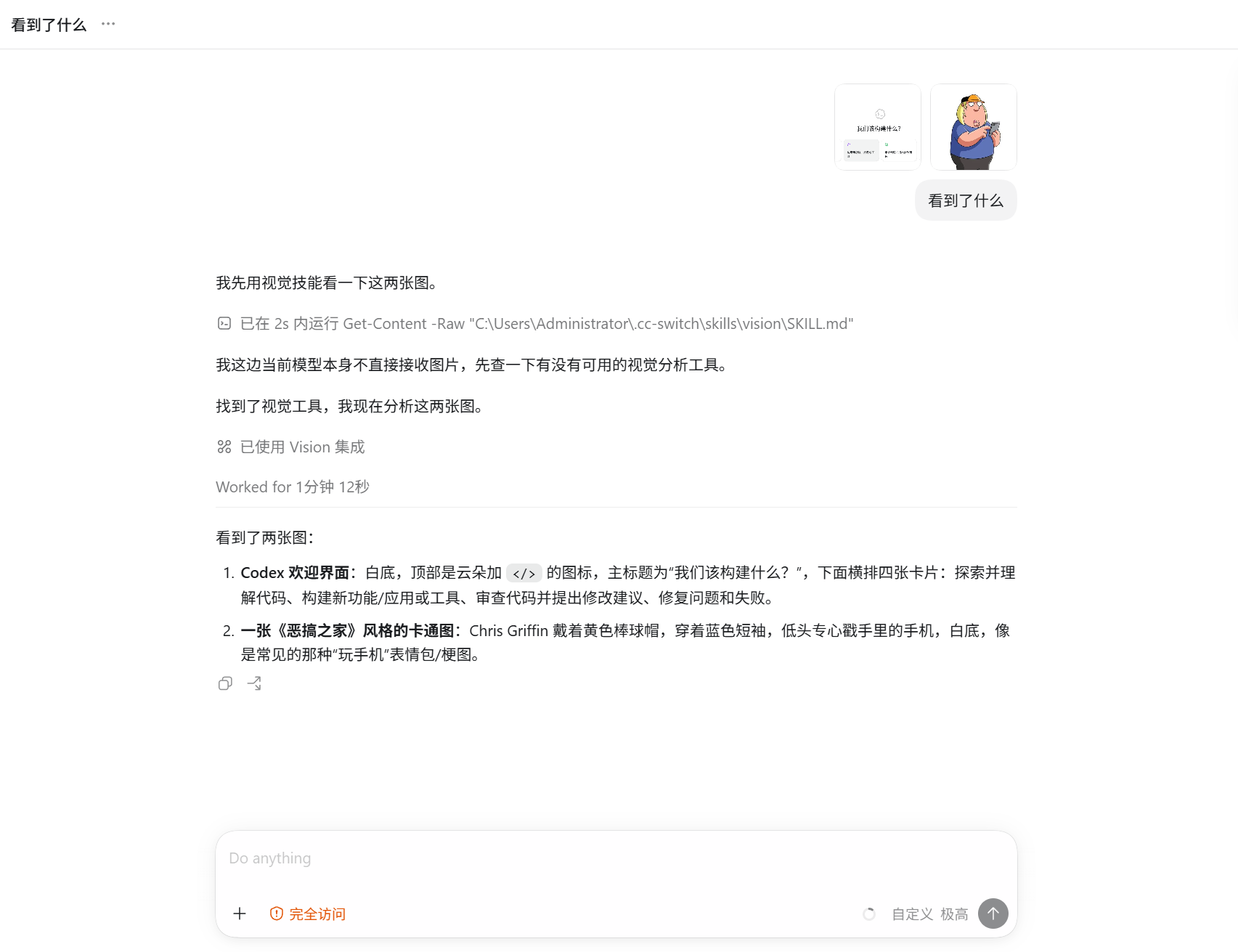
Why you need this
Your agent can't see. You paste a screenshot → "I can't see images." You
transcribe the error by hand. With this, the agent calls one tool and gets a
complete text description — verbatim text, layout, colors, anomalies — and can
debug, fix, and explain.
Not a vision model. It's a bridge: it sends your image to a multimodal
model you already pay for (mimo, Claude, Gemini, GPT-4o, Qwen-VL…) and returns
a detailed description. No images ever enter your agent's context.
🚀 Install (pick your agent — that's the whole setup)
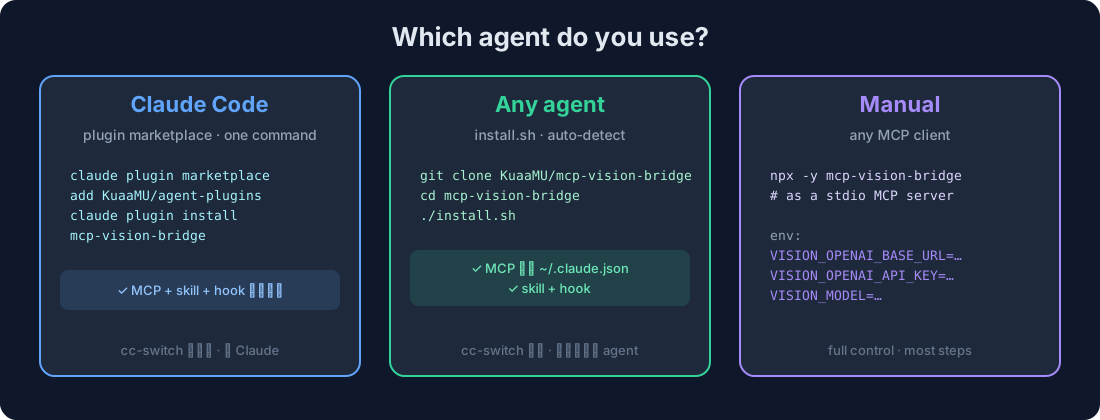
Claude Code (one command)
claude plugin marketplace add KuaaMU/agent-plugins
claude plugin install mcp-vision-bridge
That's it — the plugin bundles the MCP server + vision skill + auto-loop hook. Claude Code will prompt you for your vision endpoint, API key, and model once.
Auto-updating: the MCP server self-syncs the bundled skill + hook into
~/.claude/on startup, so every restart pulls the latest version along with
the npm package. SetVISION_NO_SYNC=1to disable auto-sync.
Prefer to manage it in cc-switch (see it + sync to Codex/opencode/Gemini)? Use the installer below instead.
Codex / Reasonix / opencode / Kimi / anything else (one command)
git clone https://github.com/KuaaMU/mcp-vision-bridge && cd mcp-vision-bridge
./install.sh                     # auto-detects your agent
./install.sh claude | reasonix | codex | opencode | kimi if it doesn't auto-detect. You'll be asked for three values: endpoint, key, model.
Reasonix reads the same .mcp.json as Claude Code, so ./install.sh reasonix
(or a manual .mcp.json with the vision server) works — pasted images land in.reasonix/attachments/ and image="recent" finds them.
Manual (no install script)
Add this as a stdio MCP server in your agent:
{
  "command": "npx",
  "args": ["-y", "mcp-vision-bridge"],
  "env": {
    "VISION_OPENAI_BASE_URL": "https://your-endpoint/v1",
    "VISION_OPENAI_API_KEY": "sk-your-key",
    "VISION_MODEL": "your-vision-model"
  }
}
Requires Node.js ≥ 18.
🎯 Use
After install, restart your agent, then:
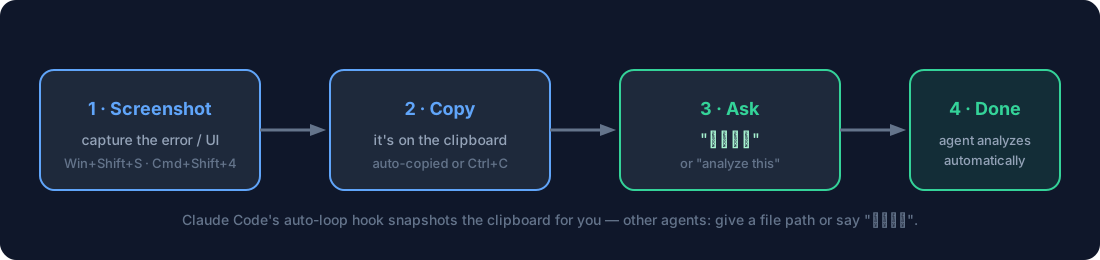
Best way — drag the image file into the chat. Dragging an image file into
any agent (TUI or GUI) inserts its real path, which analyze_image accepts
directly — works identically in Claude Code, Cowork, Codex, opencode, PI, and
more. No clipboard, no paste quirks.
- Drag an image file into the input box (or Ctrl+V in Claude Code / Cowork)
- Say "看看这个" (or "analyze this", "what's the error?")
- Your agent calls
analyze_image→ the vision model describes it in detail
Paste 3 images? The hook reads your session transcript (lossless, multi-image).image="recent" auto-finds pasted images across Claude Code CLI, Reasonix,
Cowork, and Codex — no clipboard needed. If a desktop GUI doesn't register a
paste (it can fail silently), just drag the file in — a path always works.
The one tool
Agent docs → README_AGENT.md (tool contract, source choice, error handling).
analyze_image(
  image   = "path | URL | clipboard | recent | session | data:URI",  // single, or
             ["path","path",...]                                      // several in one call
  task    = "describe | ocr | ui | layout | qa",   // or use prompt:
  prompt  = "What error is on screen?",
  detail  = "high" | "low",
  save_to = "optional file for long output"
)
image— local path, http(s) URL,"clipboard","recent"(most recent
pasted image in this session),"session"(every image pasted in this
session, analyzed in one call), a base64 data URI, or an array of these
to analyze multiple images at once (e.g. "compare these two").task— prompt presets for common jobs;ocrasks the vision model to
extract text,uispecs a screen, etc. (There's no bundled OCR engine — the
model itself does the reading.)prompt— free-form question (overridestask). Pass the user's actual
question here — the vision model answers what you ask, so a specific question
("what error is shown?") beats a genericdescribe.
How pasted images are discovered
Pasting an image into a coding agent stores it somewhere. image="recent" /"session" find it automatically — no clipboard, no manual paths:
| Agent | Where pasted images land | Auto-found? |
|---|---|---|
| Claude Code CLI/TUI | ~/.claude/image-cache/<uuid>/N.png (paste with Alt+V) |
✅ |
| Reasonix | ~/.reasonix/sessions/ + project .reasonix/attachments/ |
✅ |
| opencode | ~/.local/share/opencode/opencode.db (SQLite part table, Node ≥ 22.5) |
✅ |
| Cowork (Claude-3p desktop) | %LOCALAPPDATA%\Claude-3p\...\uploads\*_image.png |
✅ |
| Codex | ~/.codex/attachments/<session>/image-*.png |
✅ |
| Grok Build | ~/.grok/sessions/*/*/images/ |
✅ |
Windows clipboard reality: in Explorer, "copy file" (Ctrl+C) puts a file
list on the clipboard — not image bytes. So pasting a local image into a CLI
only works if you copy the image content (screenshot tool, browser "copy
image"). Otherwise just paste the file path —analyze_imagereads it directly.
Architecture
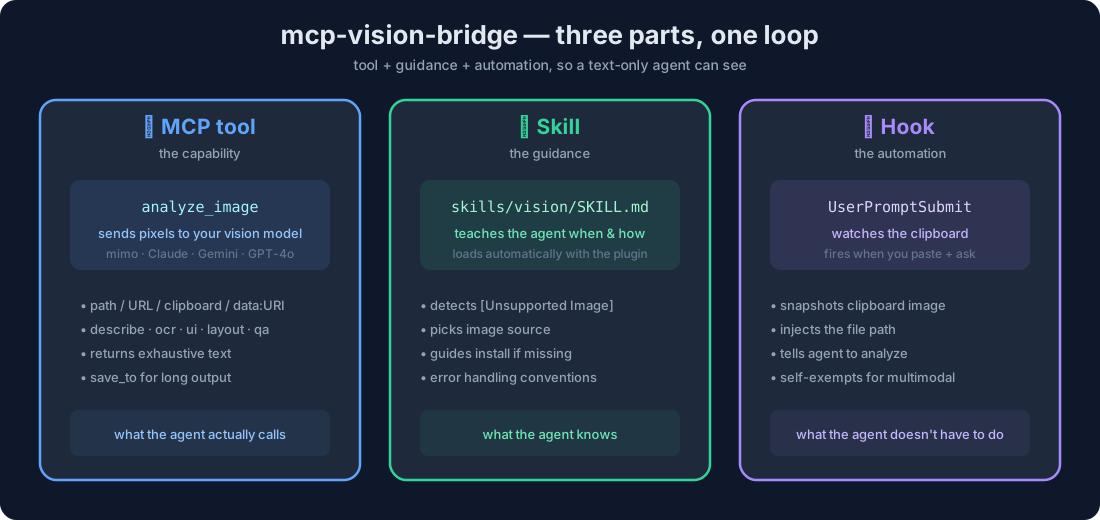
Three parts that close the loop for a text-only agent:
- MCP tool (
analyze_image) — the capability. Sends pixels to your vision model, returns text. - Skill (
skills/vision/) — the guidance. Tells the agent when and how to call it. - Hook (
UserPromptSubmit) — the automation. Captures a pasted image from the session transcript and triggers the call for you.
Install them all with the plugin (Claude Code) or install.sh (any agent).
How it works
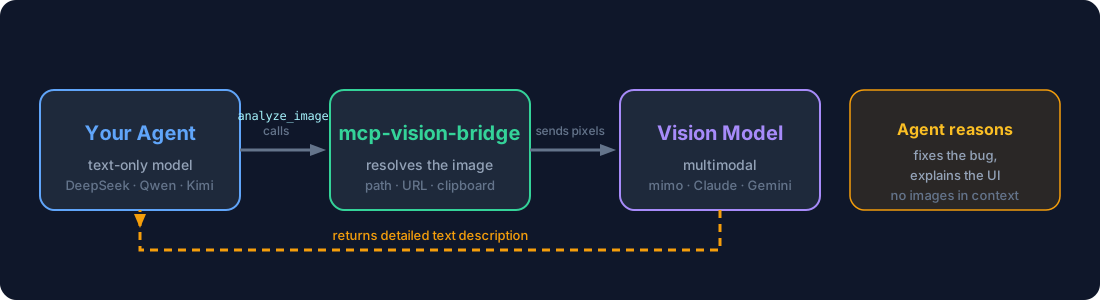
Pure text in, pure text out. The server never interprets the image — it fetches
the bytes and lets your vision model do the seeing.
Configuration
All via environment variables (the MCP reads them from your agent's server config).
| Variable | When | Example |
|---|---|---|
VISION_OPENAI_BASE_URL |
OpenAI-compatible | https://opencode.ai/zen/go/v1 |
VISION_OPENAI_API_KEY |
OpenAI-compatible | sk-... |
VISION_MODEL |
always | mimo-v2.5, gpt-4o, qwen-vl-max |
VISION_PROVIDER |
non-openai | anthropic | gemini |
VISION_ANTHROPIC_API_KEY |
anthropic | sk-ant-... |
VISION_GEMINI_API_KEY |
gemini | AIza... |
VISION_MAX_TOKENS |
optional | 4096 per image — multi-image multiplies it ×N (each image keeps its own budget, capped 32000) so detailed descriptions aren't truncated |
VISION_TIMEOUT_MS |
optional | 30000 |
VISION_BLOCK_PRIVATE_URLS |
optional | true to block localhost fetches |
Development
npm install
npm run build          # tsc → dist/
npm test               # vitest
npm run test:e2e       # stdio pipeline against a mock provider
Layout: src/ (server), skills/vision/ (skill), hooks/ (auto-loop hook),install.sh (installer), examples/ (per-agent templates).
Release: bump the version in package.json, push, thengit tag vX.Y.Z && git push origin vX.Y.Z — GitHub Actions runs tests and
publishes to npm automatically.
Security
- Keys live in env/config only — never in tool arguments.
- Optional SSRF guard for URL sources.
- Images go only to your configured vision provider.
License
Yorumlar (0)
Yorum birakmak icin giris yap.
Yorum birakSonuc bulunamadi