motiscope
Health Gecti
- License — License: MIT
- Description — Repository has a description
- Active repo — Last push 0 days ago
- Community trust — 96 GitHub stars
Code Gecti
- Code scan — Scanned 12 files during light audit, no dangerous patterns found
Permissions Gecti
- Permissions — No dangerous permissions requested
Bu listing icin henuz AI raporu yok.
Recreate any web animation from a screen recording. A motion-design plugin: analyzes motion (timing, easing, stagger, loops) and rebuilds it as GSAP / CSS / Framer Motion / Lottie code.
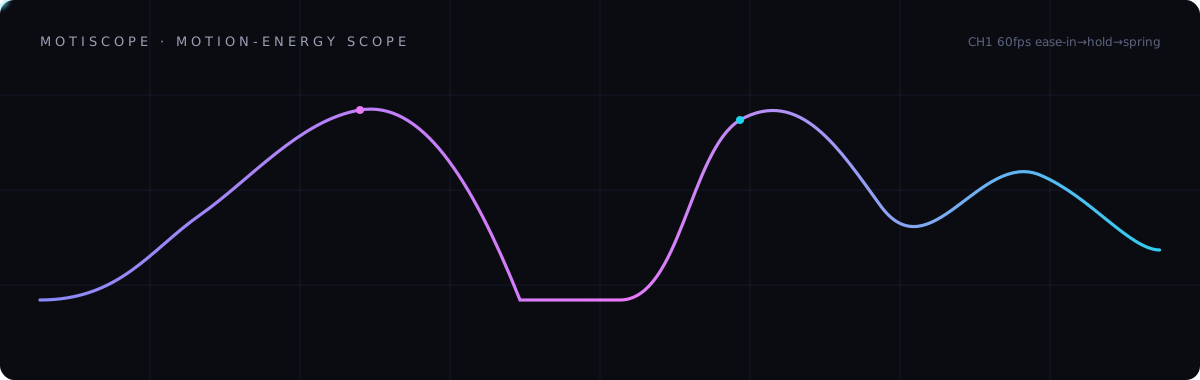
motiscope
See the motion, recreate the animation.
Drop a screen recording of an animation — get working GSAP / CSS / Framer Motion / Lottie code.





🔗 Live site · Quickstart · Install · Platforms · How it works
A motion-design tool for coding agents. Pure Python (standard library) + ffmpeg.
No cloud, no npm, no accounts required. Ships as a Claude Code plugin, and as
portable agent skills for Codex, Cursor, and anything that reads AGENTS.md.
"I want this animation on my site." — drop the clip, run
/motiscope:analyze,
then/motiscope:recreate gsap.
Demo — original → recreated

Left: the original. Right: recreated with motiscope. (one clip, so the beats stay in sync)
motiscope measured the motion of the tomato — a 4.45s clock, the wake-and-wave beats,
and the easing curve of each. The banana is an original character built on that
measured motion: an 11 KB animated SVG. The timing transfers; the artwork doesn't have to.
Original animation from SVGator's website-animation examples
— all credit to the original creator. → full example ·
gallery
Ambient geometric loop — fifteen tiles, one beat

Left: the original. Right: recreated with motiscope.
Fifteen tiles spin, scroll and ripple. motiscope measured a 0.75s master beat — burst
peaks at 0.317 / 1.067 / 1.817s, agreeing to ±0.02s across three independent tiles — and an
easing whose peak angular speed is 3.6× the mean, far sharper than a stock ease-in-out.
The result is 14 KB of animated SVG with no JavaScript. Only the palette changed.
The whole-frame summary said linear. Per tile it isn't — the velocity drops to near zero
and ramps again. That's the point: the report gives you the timing, you read the frames.
→ Live recreation ·
raw analysis + build script ·
original on SVGator
How it works

motiscope does the one thing a vision model can't do from a screenshot — measure
time — and hands everything else to the model:
- The numbers measure the WHEN. A dense per-frame motion-energy curve (native
fps, effectively free) plus ffmpeg signal analysis (scdet,freezedetect,blackdetect,siti,signalstats) give the exact timing: durations, the
per-segment easing curve (a realcubic-bezierfitted from the velocity
profile), beat/segment boundaries, stagger timing, and loop period. A still has no
time axis — so this is the part that can't be guessed. It's the moat. - The frames carry the WHAT. motiscope curates the keyframes that matter (chosen
by the motion signal) and hands them to the model. Claude reads them with full
vision to identify the elements and what kind of animation each is — fade, slide,
scale, mask reveal, path draw, morph, 3D flip, text effect, whatever it sees.
motiscope deliberately does not classify animation types — the model is better
at that than any hand-coded taxonomy, so there's no fixed list to box you in.
So: measured timing + curated frames → the model recreates it. motiscope is a
precise stopwatch and a smart frame-picker; the intelligence is Claude's.
Want the real mechanism? How it works
walks through the motion-energy curve, why the hold threshold is anchored to the 75th
percentile instead of the peak, and how easing is recovered by integrating speed — with
figures drawn from real pipeline output, and ground-truth clips you can run yourself.
Exact constants: docs/how-it-works.md.
The motions it reads & rebuilds
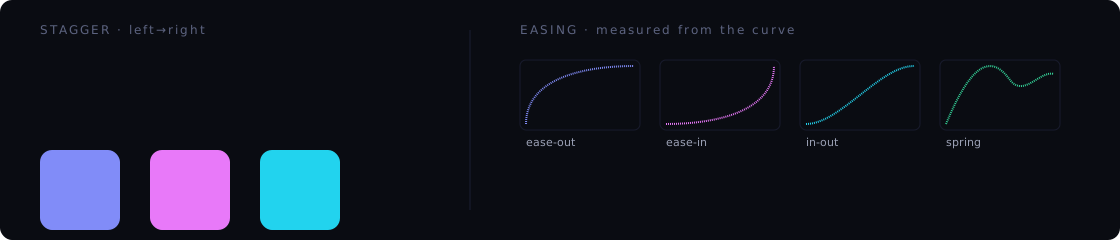
Staggered entrances, easing curves, holds, fades, loops — read off the energy curve
and rebuilt as code. (These figures are animated SVGs — the same kind of motion
motiscope recreates.)
Install
Claude Code — install the plugin; it bundles everything:
/plugin marketplace add github:KumarSashank/motiscope
/plugin install motiscope@motiscope
Codex, Cursor, or any other agent — install the CLI, then teach your agent:
git clone https://github.com/KumarSashank/motiscope.git ~/.motiscope
~/.motiscope/install.sh      # one symlink into ~/.local/bin, no sudo

motiscope install codex      # -> ~/.agents/skills/
motiscope install cursor     # -> ./.cursor/skills/ + rules
motiscope install agents     # -> a marked block in ./AGENTS.md
motiscope install list       # every target
Requires ffmpeg + ffprobe (and python3). Run motiscope doctor — or/motiscope:doctor in Claude Code — to check and, with your consent, install them.
New here? See QUICKSTART.md. Full matrix and version caveats:
PLATFORMS.md.
Usage
/motiscope:doctor                      # verify deps, scaffold config (first run)
/motiscope:analyze animations/hero.mp4 # analyze a recording -> animation spec
/motiscope:recreate gsap               # emit GSAP code (or css | framer | lottie)
Or just drop a recording into an animations/ folder in your project and run/motiscope:analyze — it will find it.
Local files only. Supported: .mp4 .mov .webm .mkv .m4v .avi .gif. To capture a
web animation, screen-record it and save the file.
Commands
| Command | What it does |
|---|---|
/motiscope:analyze [path] [notes] |
Extract the motion analysis + curated frames, then characterize the animation as a spec. |
/motiscope:recreate [gsap|css|framer|lottie] [out-dir] |
Turn the spec into runnable code for a target framework. |
/motiscope:rebuild-site [path] [gsap|css|framer] |
Rebuild a whole landing page from a walkthrough recording — sections, copy, design system, scroll animations, and generated assets. |
/motiscope:doctor |
Verify ffmpeg/ffprobe; scaffold ~/.config/motiscope/{config.json,.env}. |
Outside Claude Code the same four workflows are skills named motiscope-analyze,motiscope-recreate, motiscope-rebuild-site, motiscope-doctor (Codex mentions them
with $name, Cursor with /name), and the measurement runs as motiscope analyze ....
In Claude Code, GSAP output leans on the official GSAP skills (timeline / core /
scrolltrigger / react / utils) for idiomatic results; elsewhere the workflow carries the
equivalent guidance inline.
Controlling frames & token cost
Only the curated frames the model sees cost tokens (~300–400 each); the numeric
analysis is free. Frame count tracks motion complexity, capped by a preset — it
does not grow with video length (a 10s clip typically yields ~10 frames).
| Preset | Frame cap | Resolution | Use when |
|---|---|---|---|
draft |
12 | 512px | quick look, tight budget |
balanced (default) |
32 (usually 8–20 after dedup) | 640px | most cases |
detailed |
48 | 960px | dense sequences / reading text |
landing |
44 | 1280px | web/landing walkthroughs — cover each section + its motion |
- Focus a section of a longer video:
--start 0:12 --end 0:15(timestamps come
back in absolute source time). - Sample fast content densely:
--fps 20lays a uniform backbone (a frame every
~50ms) across the window; near-identical frames still collapse unless--no-dedup. - Auto-decompose (default for clips ≥8s with ≥2 motion beats): finds the beats,
drills each motion segment densely, and skips holds — the budget follows the motion.
Frames are allocated per beat by motion magnitude (a fast/intense beat gets more
frames than a slow one). Force with--decompose/ disable with--no-decompose. - Loop detection: looping animations are detected (energy-curve autocorrelation)
and reported with a period, so recreation can setrepeat/yoyo.
Small elements register correctly: the primary motion signal is localized (built
from the most-active regions), so a small button/card/icon moving on a large page is
detected as real motion rather than washing out in a whole-frame average.
Output layout
Per-video working files land in a gitignored .motiscope/<slug>/:
.motiscope/<slug>/
  manifest.json   # video meta + timeline + frame index (machine artifact)
  motion.json     # raw motion timeline: energy curve, grid, segments, beats, signals
  report.md       # human-readable summary (energy sparkline, segment table)
  frames/         # curated PNGs, e.g. frame_003_t0.42s_keypose.png
Recreated code is written to motiscope-output/<target>/ by default.
Asset generation (optional)
If a recreation needs an image, recreate will ask whether to point at your own file,
generate one, or use a placeholder. Image generation is real via the gemini /imagen provider (Imagen through the Gemini API) — set GEMINI_API_KEY in~/.config/motiscope/.env (mode 0600; keys are never printed, written into generated
code, or committed). Other providers (video, and other image backends) still write a
labeled placeholder until wired.
python3 scripts/assetgen.py generate --type image --provider gemini \
  --prompt "cinematic hands holding a phone, dark teal grade" --out hero.png --aspect-ratio 16:9
Provider slots: image — gemini/imagen (implemented), OpenAI, Stability, Replicate,
fal; video — Runway, Replicate, fal.
Limitations (measured vs. estimated)
- Measured (reliable): duration, fps, segment boundaries, easing shape,
hold/fade detection, stagger direction, loop period. - Estimated (from frames): which elements move, transform magnitudes (px / scale
/ rotation / opacity), colors under compression, exact overshoot, spring stiffness. - Not recoverable from frames: exact cubic-bezier control points (only the class),
sub-pixel / sub-frame motion, true 3D / z-order, authored Lottie vector data. For
production Lottie, author in After Effects. - A very gentle ease-in's opening can read as a short hold because sub-pixel
motion is invisible in the analysis thumbnails — the dominant easing is still
recovered; check the first frames.
For best results: capture at a high frame rate and avoid heavy compression.
Development
See CONTRIBUTING.md. Run the test suite:
python3 -m unittest tests.test_analyze_motion tests.test_integrations \
                tests.test_docs_constants tests.test_site_meta
skills/*/SKILL.md is the single source of truth for the workflows; everything underintegrations/ is generated from it by scripts/build_integrations.py, and CI fails if
the two drift apart. See PLATFORMS.md.
Credits & license
MIT. See LICENSE. motiscope adapts frame-analysis techniques from two MIT
projects — claude-video and
claude-video-vision — with
gratitude; see ATTRIBUTION.md.
Yorumlar (0)
Yorum birakmak icin giris yap.
Yorum birakSonuc bulunamadi