flimsy
Health Gecti
- License — License: MIT
- Description — Repository has a description
- Active repo — Last push 0 days ago
- Community trust — 14 GitHub stars
Code Gecti
- Code scan — Scanned 12 files during light audit, no dangerous patterns found
Permissions Gecti
- Permissions — No dangerous permissions requested
Bu listing icin henuz AI raporu yok.
Local-first visual studio for React, Next.js, Vue, Svelte, Astro, Solid & HTML that syncs Tailwind edits directly into your source code via AST.

Flimsy
Direct visual-to-code synchronization for modern frontend frameworks and Tailwind CSS.
If you can visually fix a UI faster than explaining the fix to an LLM, Flimsy belongs in your workflow.



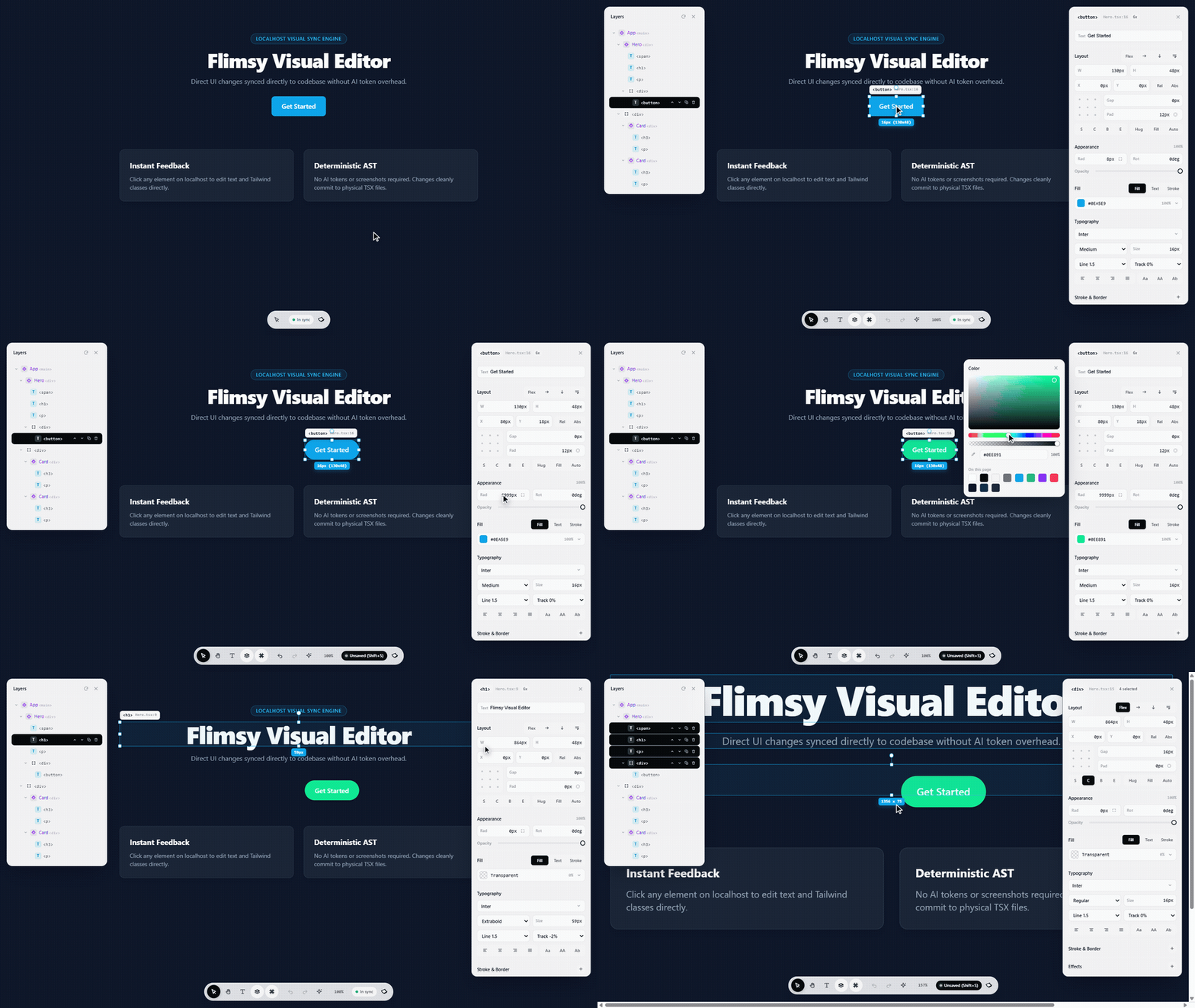
Flimsy embeds an isolated, glassmorphic visual studio directly on your running Vite localhost server. Move, resize, scale, style, duplicate, and reparent React/Tailwind elements directly in the browser, preview the exact diff, and write deterministic AST changes straight back into your .tsx source files with zero AI token overhead.
Key Capabilities
- Multi-Language Frontend Support: Works deterministically across React, Next.js, Preact, SolidJS, Qwik, Vue JSX (
.tsx/.jsxwithclassNameandclass), Vue SFC (.vue), Svelte (.svelte), Astro (.astro), and Vanilla HTML / Angular / HTMX / Alpine (.html/.htm). - Insert & Delete Elements From Scratch: Drop new starter elements (
Box,Text,Button,Image)InsideorAfterany container from the+dock popover (I) or Layers panel, and write clean syntax-validated markup straight into your source files. - Responsive Viewport & State Variant Editing: Switch between
Full,Tablet (768px), andMobile (390px)preview frames and targetBase,sm:,md:,lg:,hover:,focus:, anddark:Tailwind variants with live optimistic preview and variant-isolated reconciliation. - Zero AI Tokens for Standard Visual Edits: Writes directly to your source files via deterministic AST & span reconciliation (
recast+magic-string), preserving formatting, comments, directives, and dynamic expressions. - Figma-Style Direct Manipulation: Freeform canvas drag-to-move (
Rel/Abs), 8-point resize with aspect-ratio lock (Shift), Canva/Figma corner text scaling, rotation handle,Altdistance measurement guides, andAlt + Draglive DOM reparenting. - Viewport Zoom & Pan Camera: Smooth cursor-anchored zoom (
Ctrl + Scroll/ pinch,25%–300%) and canvas panning (Space + Drag, Hand toolH, middle-mouse drag) without polluting user source code. - Multi-Select & Group Copy/Paste: Marquee select,
Shift + Click, orCtrl + Ato select sibling elements/frames, then drag, style, orCtrl + C/Ctrl + Vcloned JSX cleanly into target.tsxfiles. - Full Visual Studio Controls: 2D HSV rainbow color picker with alpha + eyedropper (Fill, Text, Stroke), searchable Google Fonts picker, Auto Layout alignment matrix, individual border sides & corners, opacity, and collapsible Layers tree with drag-and-drop reparenting.
- Isolated Shadow DOM & Tailwind Reconciliation: Mounted in an open Shadow DOM so Flimsy styles never leak into your app; works seamlessly with
cn(),clsx(), and template literalclassNameexpressions. - Optional Zero-Token AI Assist: Collapsible offline heuristic presets plus one-click context-aware prompt packaging for Cursor, Claude Code, or other coding agents.
Installation & Quickstart
Option 1: Zero-Install CLI (npx)
Run Flimsy inside any existing React + Vite + Tailwind project:
npx flimsy-dev@latest dev
Useful CLI flags:
npx flimsy-dev@latest dev --open        # Automatically launch browser
npx flimsy-dev@latest dev --port 5173   # Custom Vite dev port
npx flimsy-dev@latest dev --host        # Expose server on local network
npx flimsy-dev@latest --version       # Check CLI version
Option 2: Install as a Dev Dependency (npm / pnpm)
Install the unified flimsy-dev package (includes CLI, Vite plugin, and AST engine):
npm install -D flimsy-dev
# or
pnpm add -D flimsy-dev
Register the plugin in vite.config.ts:
import { defineConfig } from 'vite';
import react from '@vitejs/plugin-react';
import { flimsy } from 'flimsy-dev/vite';

export default defineConfig({
  plugins: [
    flimsy(),
    react(),
  ],
});
Start your normal Vite dev server:
npm run dev
Option 2b: Next.js Integration (flimsy-dev/next)
Wrap your next.config.mjs (or next.config.ts) — works with both Webpack and Turbopack in development, and becomes a zero-byte no-op during next build:
import { withFlimsy } from 'flimsy-dev/next';

/** @type {import('next').NextConfig} */
const nextConfig = {};

export default withFlimsy(nextConfig);
Option 3: Optional MCP Server (Manual First, AI When Needed)
Flimsy ships an opt-in, zero-bloat stdio MCP server (flimsy-dev mcp) for Cursor, Claude Code, or Antigravity when you want an AI agent to inspect or edit the exact element you selected in the browser:
{
  "mcpServers": {
    "flimsy": {
      "command": "npx",
      "args": ["-y", "flimsy-dev@latest", "mcp", "--root", "/path/to/your/project"]
    }
  }
}
Exposed MCP tools:
flimsy_get_selection— Reads the currently selected element(s) from your live Flimsy browser session (file, line, column, JSX snippet, Tailwind classes, text), or inspects any explicit{ file, line, col }.flimsy_update_classes— Reconciles Tailwind classes deterministically via Flimsy AST (preservingcn(),clsx(), and formatting).flimsy_update_text— Updates element text content while preserving inline JSX expressions.flimsy_paste_elements— Inserts validated JSX snippetsafterorinsidea target element.flimsy_insert_element— Creates and inserts starter elements (box,text,button,image)inside,after, orbeforea target element across JSX, Vue, Svelte, Astro, and HTML.flimsy_delete_element— Deletes the selected or targeted element with pre-write syntax validation.
Option 4: Install Agent Skill (npx skills)
Teach Claude Code, Cursor, Codex, or Antigravity how to launch Flimsy and consume live browser selections:
npx skills add kuroi17/flimsy
Shortcuts & Studio Controls
| Shortcut / Action | Behavior |
|---|---|
Alt + X |
Toggle visual inspection mode on or off anywhere on the page. |
V / H / I |
Switch between Select cursor (V), Hand pan tool (H), or Insert Element popover (I). |
Space + Drag / Middle-Click |
Temporarily pan the viewport horizontally and vertically. |
Ctrl + Scroll / Pinch |
Zoom in or out anchored to the cursor (25%–300%). |
Ctrl + = / Ctrl + - / Ctrl + 0 |
Zoom in, zoom out, or reset viewport to 100%. |
Drag Element (Shift lock) |
Move selected element(s) on canvas (Rel translate or Abs left/top). |
Alt + Drag Element |
Live canvas DOM reparenting (move before, after, or inside a container). |
Corner Drag (Shift ratio) |
Resize boxes or pull text corners to scale font size directly. |
Arrow Keys (Shift 10px) |
Nudge selected element(s) by 1px or 10px. |
Alt + Hover |
Show pixel distance measurement guides to surrounding elements. |
Shift + Click / Marquee Drag |
Select multiple elements for batch styling, dragging, or copy/paste. |
Ctrl + A / Cmd + A |
Select all sibling elements in the current container (press again to expand up). |
Ctrl + C / Ctrl + V |
Copy and paste selected element(s) as clean JSX synced into .tsx via HMR. |
Ctrl + D / Delete |
Duplicate or delete selected JSX element directly in AST. |
Double-Click |
Edit element text inline (contentEditable) on the live page. |
Shift + S / Ctrl + S |
Commit all pending visual edits atomically to .tsx source files. |
Ctrl + Z / Ctrl + Y |
Undo or redo visual changes in the current session. |
Esc |
Close active popover, deselect element(s), or exit inspect mode. |
Privacy & Local-First Guarantee
- 100% Local-First: Source AST reads and writes happen strictly on your local machine.
- Zero Telemetry: Flimsy makes zero external tracking, analytics, or network requests.
- Production-Safe: The Vite plugin only runs during local development (
apply: 'serve'). Runningvite buildbundles zero bytes of Flimsy runtime scripts ordata-flimsy-*attributes.
Architecture
Published as one unified npm package (flimsy-dev) bundling:
- CLI Runner (
npx flimsy-dev dev): Zero-config development launcher (packages/cli). - Vite Plugin (
flimsy-dev/vite): Development server plugin, Shadow DOM visual studio, and live sync API (packages/vite-plugin). - AST Sync Engine: JSX source coordinate injector (
magic-string), deterministic file reconciler (recast), snippet extractor, and external edit conflict guard (packages/core).
Contributing
Contributions are welcome — bug reports, framework edge cases, and focused PRs help make Flimsy sharper for everyone.
git clone https://github.com/kuroi17/flimsy.git
cd flimsy
pnpm install
pnpm run build
pnpm test
See CONTRIBUTING.md for the monorepo layout and PR guidelines, or open an issue on GitHub Issues.
License
MIT — kuroi17
Yorumlar (0)
Yorum birakmak icin giris yap.
Yorum birakSonuc bulunamadi