linctl
Health Warn
- License — License: MIT
- Description — Repository has a description
- Active repo — Last push 0 days ago
- Low visibility — Only 6 GitHub stars
Code Pass
- Code scan — Scanned 12 files during light audit, no dangerous patterns found
Permissions Pass
- Permissions — No dangerous permissions requested
No AI report is available for this listing yet.
A Go CLI for Linear with target-pinned guarded writes: every write re-resolves the active token and fails closed on org/team mismatch, with no bypass flag
linctl


Reads everywhere. Writes fail closed. No standing context cost.
Your agent's Linear MCP server loads its tool definitions into every session before it does any
work, on the order of ~13k tokens (measured).[^mcp] linctl is one binary with no standing
context: only a command's output costs tokens, and reads need no pin. Every write re-resolves the
active token and fails closed when the resolved org/team doesn't match the target pinned for
the repo, so a stale or wrong token can't quietly land issues in the wrong team. There is no
bypass flag.

linctl issue list --mine --state started     # read anything
linctl issue create --title "Spike: exports" # write only inside the pinned target
🔒 How writes stay safe
linctl's vocabulary deliberately separates reads from writes:
- Pinned Target — the org/team/(optional project) a repo declares in
.linctl.toml
as the only allowed destination for writes. - Resolved Target — the org/team/project proven from the active token at command time.
- Target Mismatch — when the two disagree. For a guarded write this is a hard stop,
never a prompt or a warning.
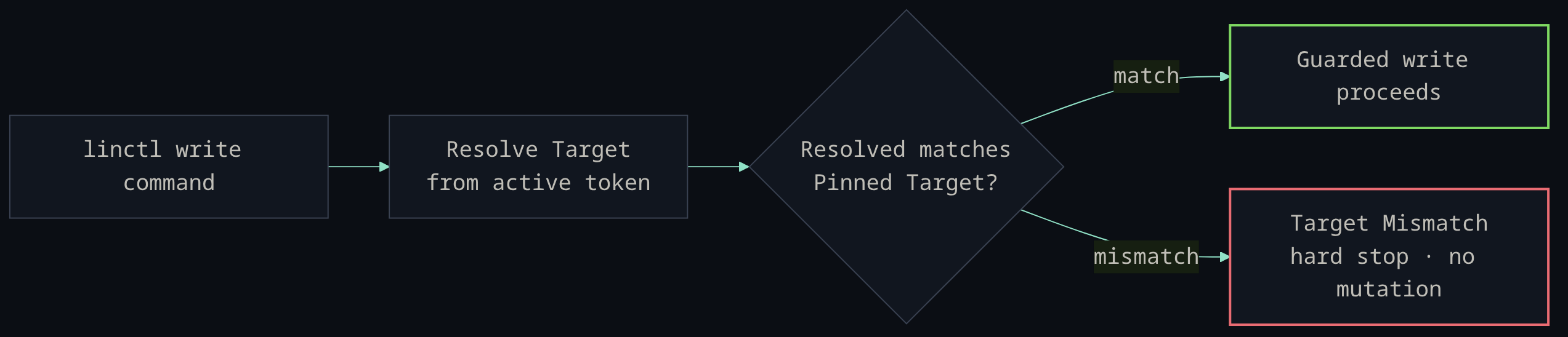
The guard checks the token, not just the file. An agent that edits .linctl.toml to
point at another org still can't write there unless the token it holds also resolves to
that org. Team-scoped creates compare org + team (the entity does not exist yet);
resource-scoped updates and archives resolve the existing entity first, then compare the
pinned project_id when one is configured. There is no bypass flag — --org,--team, --team-id, and --project set the pinned target, they do not relax the guard. Seedocs/adr/0001-target-pinned-linear-writes.md.
flowchart LR
    A[linctl write command] --> B[Resolve Target<br/>from active token]
    B --> C{Resolved matches<br/>Pinned Target?}
    C -->|match| D[Guarded write proceeds]
    C -->|mismatch| E[Target Mismatch<br/>hard stop · no mutation]
🤖 Agent-first
linctl is built to be driven by an LLM agent from a Bash tool, with deterministic output
and no standing context cost:
- No MCP tax. The Linear MCP server loads ~13k tokens of tool definitions into every
session before any work.[^mcp] linctl loads none —linctl usagereturns a compact,
on-demand reference (~400 tokens) andlinctl <group> --helpcovers the rest. - Structured output.
--json/--compact/--fields/--id-onlygive stable,
pipeable shapes; diagnostics go to stderr so stdout stays clean. - Drop-in skill.
skills/linctl/SKILL.mdteaches an agent to
drive linctl and ships anAGENTS.mdsnippet for consuming repos. Verify a checkout with
no credentials viabash skills/linctl/scripts/linctl-offline-smoke.sh, or do a read-only
token check viabash skills/linctl/scripts/linctl-smoke.sh.
⚡ Quickstart
Install
# Homebrew cask (macOS)
brew install --cask KyaniteHQ/linctl/linctl

# Go toolchain (macOS / Linux / Windows)
go install github.com/KyaniteHQ/linctl/cmd/linctl@latest
linctl --version && linctl usage # zero-config smoke check — no token required
Prebuilt binaries (darwin/linux/windows × amd64/arm64) and checksums are attached to
every release.
git clone https://github.com/KyaniteHQ/linctl.git && cd linctl
go install ./cmd/linctl
linctl --version
Use your platform or distro package manager to install Go first. If you install
Go manually from go.dev/dl, verify the published checksum and follow Go's
platform-specific instructions instead of replacing a managed /usr/local/go.
Configure
Pin the target in .linctl.toml at the repo root, then supply a token by environment.
export LINCTL_TOKEN="lin_api_..." # or LINEAR_API_KEY; never commit a token
.linctl.toml example + credential precedence
[target]
org_id     = "linear-org-id"
team_key   = "LIT"
team_id    = "linear-team-id"
project_id = "optional-linear-project-id"   # omit for team-scoped writes
Credential precedence is LINCTL_TOKEN → LINEAR_API_KEY → a token in.linctl.toml / ~/.config/linctl/config.toml. A repo .linctl.toml overlays the
global config.
First commands
linctl usage              # orientation — no token required
linctl target --json      # confirm the active token's org / team / project
linctl doctor             # config, token, and target health
linctl issue list --mine  # your issues in the pinned team
📖 Command reference
Across 60 top-level command groups, linctl maps the Linear schema. The most-used ones are below; the
exhaustive catalog with GraphQL backing lives in docs/domain-map.md,
and linctl <group> --help lists every subcommand.
Context & health
linctl target --json          # resolved org/team/project for the active token
linctl doctor                 # config / token / target health report
linctl current                # the issue for the current git branch
linctl next --dry-run         # preview the top-ranked unblocked issue
Issues — reads, rich list filters, and guarded writes. Related: issue-relation, comment, agent-session.
linctl issue list --state started --mine --limit 20
linctl issue get LIT-123 --json
linctl issue deps LIT-123                       # parent / children / blocks / blocked-by
linctl issue search "flaky export test"
linctl issue create --title "Spike: exports" --assignee <user-id> --label <label-id> --estimate 3
linctl issue link https://example.com/spec LIT-123   # attach a URL (guarded)
Projects — reads plus create/update/archive. Related: project-update, project-status, project-label, project-relation.
linctl project list --limit 20
linctl project get <project-id> --json
linctl project issues <project-id>
linctl project-milestone list <project-id>
Cycles & sprints — cycle writes the schema entity; sprint is a read-only report alias.
linctl cycle list
linctl sprint current                           # active cycle for the team
linctl sprint report <cycle-id>
Planning — Initiatives are the current strategic surface; roadmap* is legacy read-only.
linctl initiative list
linctl initiative projects <initiative-id>
linctl initiative-to-project list
Teams, users & org
linctl team list
linctl team members <team-id>
linctl user me
linctl organization teams
Search
linctl search issues "rate limit"
linctl semantic-search "exports are slow" --limit 20
Releases — release, release-note, release-pipeline, release-stage, issue-to-release, external-link.
linctl release list
linctl release-pipeline list
Customers — customer, customer-need, customer-status, customer-tier.
linctl customer list
linctl customer-need list
Metadata & more — most groups support list/get plus entity-specific reads:label, document, template, workflow-state, time-schedule, notification,triage-responsibility, sla-configuration, rate-limit, application, audit-entry,agent-activity, agent-session, agent-skill, external-user, custom-view,favorite, emoji, attachment. Run linctl <group> --help or seedocs/domain-map.md.
🧰 Output & scripting
Output controls are global flags — combine them with any command.
| Flag | Effect |
|---|---|
--json / --compact |
JSON output; --compact makes it single-line |
--fields a,b.c |
project JSON to an allowlist of (dot-path) keys |
--id-only |
emit only the Linear id, for $(...) chaining |
--quiet |
suppress output on a successful write |
--fail-on-empty |
exit non-zero when a list result is empty (monitors) |
--sort FIELD --order asc|desc |
deterministic list ordering |
--format minimal|compact|full |
human (non-JSON) output detail |
--profile / --org / --team / --team-id / --project |
config profile and target overrides |
--timeout 30s |
per-request timeout |
--debug |
structured diagnostics to stderr (LINCTL_DEBUG_JSON=1 for JSON) |
linctl issue list --json --compact --fields identifier,title,state
id=$(linctl --id-only issue create --title "task"); linctl issue start "$id"
linctl issue list --fail-on-empty --sort title --order asc
Stable JSON shapes for parsing are documented inskills/linctl/references/json-output.md.
✍️ Guarded writes
Every mutation is checked against the pinned target before it runs. Coverage:
- Issues —
create(with--assignee,--label,--due-date,--estimate,--parentfor sub-issues, templates, and guardedimport),update/--append,start,comment,reply,close,done,nextstart, andlink(attach a URL). - Issue relations —
relate,unrelate. - Comments —
update,delete. - Projects —
create,update,archive. Project updates —create. - Documents —
create,update. - Cycles —
create,update,archive. - Project milestones —
create,update.
--estimate is validated against the team's estimation config; --parent confirms the
parent belongs to the pinned target. For test runs, create namespaced throwaway resources
(linctl-it-<runid>) and clean them up — close disposable issues, archive disposable
projects.
🔧 Development
go run github.com/go-task/task/v3/cmd/task@latest ci        # generate-check → vet → test → build → lint → actionlint → vuln
go run github.com/go-task/task/v3/cmd/task@latest coverage  # 100% hand-written statement coverage
internal/client/generated.go is generated by genqlient frominternal/client/operations/*.graphql; CI fails on drift, so run go generate ./... and
commit it after changing operations. Integration tests and the live smoke harness hit a
disposable Linear org and never run under plain go test:
LINCTL_TEST_TOKEN=<token> go test -count=1 -tags=integration ./internal/client
go run github.com/go-task/task/v3/cmd/task@latest live-smoke
Contributor workflow and the release process are inCONTRIBUTING.md; domain vocabulary is in CONTEXT.md;
command-to-GraphQL mapping and named test scenarios are under docs/.
📄 License
MIT © 2026 KyaniteHQ
[^mcp]: Measured against the official Linear MCP server's tools/list: 38 tools, ~10.2k tokens compact and ~15.3k pretty-printed (tiktoken o200k_base), loaded before any work. The common ~13k is a midpoint; where you land depends on how your client serializes the schema and the Linear server version.
Reviews (0)
Sign in to leave a review.
Leave a reviewNo results found