cc-desktop-mod
Health Uyari
- License — License: MIT
- Description — Repository has a description
- Active repo — Last push 0 days ago
- Low visibility — Only 5 GitHub stars
Code Basarisiz
- exec() — Shell command execution in desk-asana/hooks/asana.ts
- network request — Outbound network request in desk-asana/hooks/register.tsx
- exec() — Shell command execution in desk-asana/hooks/shared/markdown.tsx
Permissions Gecti
- Permissions — No dangerous permissions requested
Bu listing icin henuz AI raporu yok.
Claude Code plugin (mod) that makes the Claude Code terminal UI look like the Claude desktop app: prompt bubbles, markdown tables, mermaid diagrams, folded tool calls, subagent cards, diff pane and context meter.
cc-desktop-mod: Claude desktop look for the Claude Code terminal
English | 한국어
desk-look is a Claude Code plugin (mod) that makes the Claude Code CLI terminal UI look and work like the Code tab of the Claude desktop app.
It is a Claude Code function-hook plugin: the engine stays as it is, and only the way things are drawn on screen changes. Nothing changes in the Code tab of the desktop app (the desktop surface).
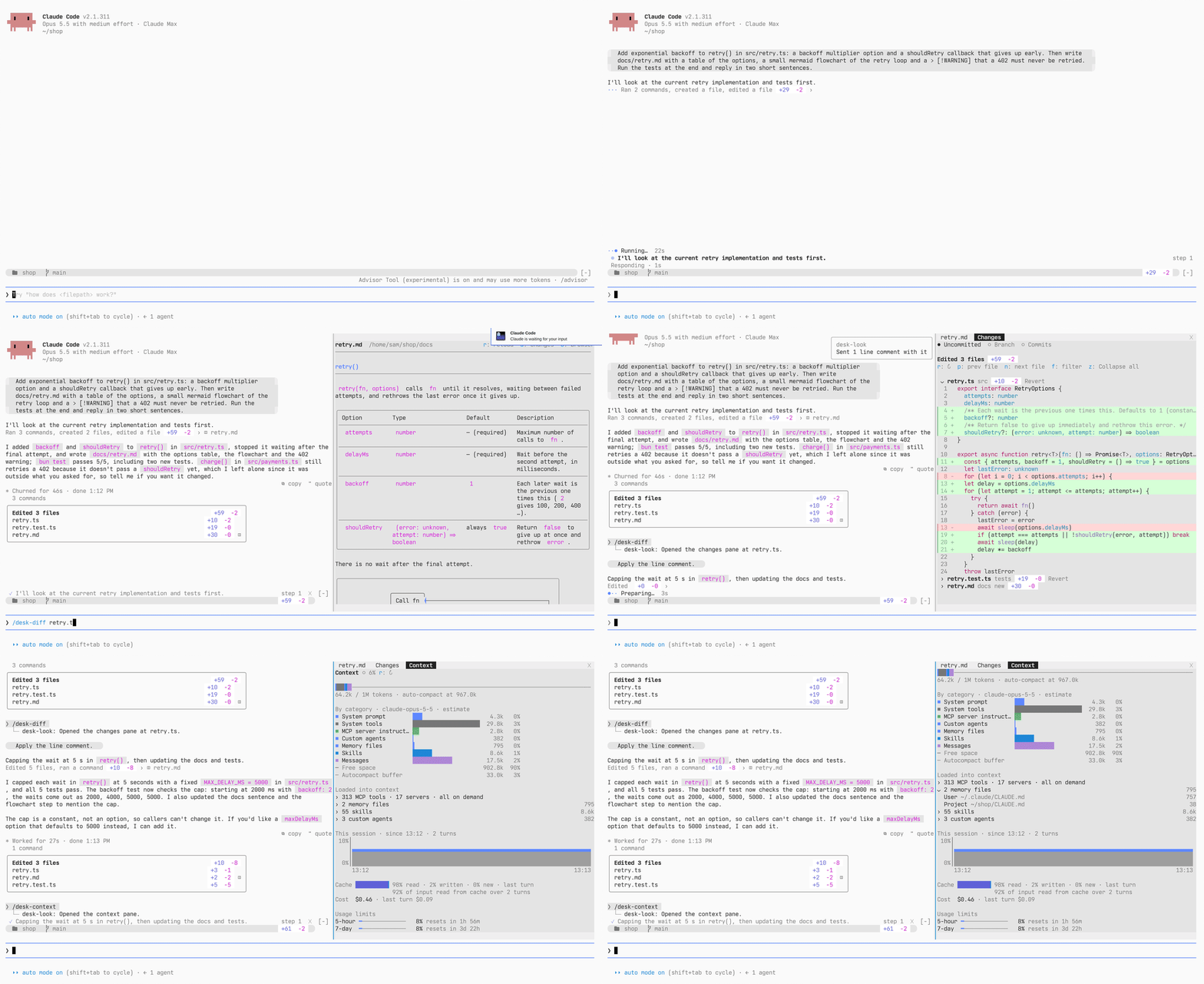
At a glance
- A transcript that reads like the desktop app: prompt bubbles, desktop-style markdown with full-width tables, mermaid diagrams and alert boxes, tool calls folded into one clickable line, a card per subagent, a plan card, a question card, and a card of the files each turn edited
- A status band above the prompt: repo, branch and
+N −M, plus chips for the pull request's checks, context usage, running background tasks and, with desk-slack, unread Slack messages, and a progress band that shows the current step and what runs now - Seven side panes, each opened by a command or by clicking a chip: diffs (
/desk-diff), what ran this turn (/desk-activity), background tasks (/desk-tasks), the pull request (/desk-pr), Markdown preview (/desk-preview), context and usage limits (/desk-context) and recent sessions (/desk-sessions) - Diff line comments: click a line number in
/desk-diffto comment on a line or a range; the comments go to Claude with your next prompt - Markdown preview: a document Claude writes in a turn opens in the preview pane when the turn ends
- GitHub and GitLab: PRs through
gh, merge requests throughglab - Asana and Slack panes as two more plugins from the same marketplace, desk-asana and desk-slack: install only the ones you use, so desk-look itself makes no network request of its own and calls no MCP server
- English or Korean labels, following Claude Code's own language setting by default
Commands
/desk-diff [file|branch|commits]: Diff pane: uncommitted changes, the whole branch, or per commit/desk-activity: What ran this turn: time bars and the flow of Claude's notes and calls/desk-tasks [number]: Background tasks pane: agents, background shells and monitors/desk-pr: The current branch's pull request or merge request, with a merge button/desk-preview [file]: Markdown preview pane: a document drawn like the transcript/desk-context: Context breakdown, what is loaded into it, how it filled this session, cache, cost and usage limits/desk-sessions [number]: Recent sessions by project, with search; switch to one/desk-fold: Fold the open panes away to give the conversation the width; run it again to unfold them at the same scroll position/desk-quote: Put the text you selected in the conversation into the prompt as a>quote, to ask about it. If you were already writing, the quote goes above your draft (after any earlier quotes) and the caret stays where you were typing. In the prompt,>lines (typed, pasted or inserted) look like quotes: the mark dimmed, the text italic and muted/desk-update: Update desk-look, and desk-asana and desk-slack if installed, to the latest version
The pane commands run at once even while Claude is working: they open the pane without queueing or stopping the turn.
The transcript
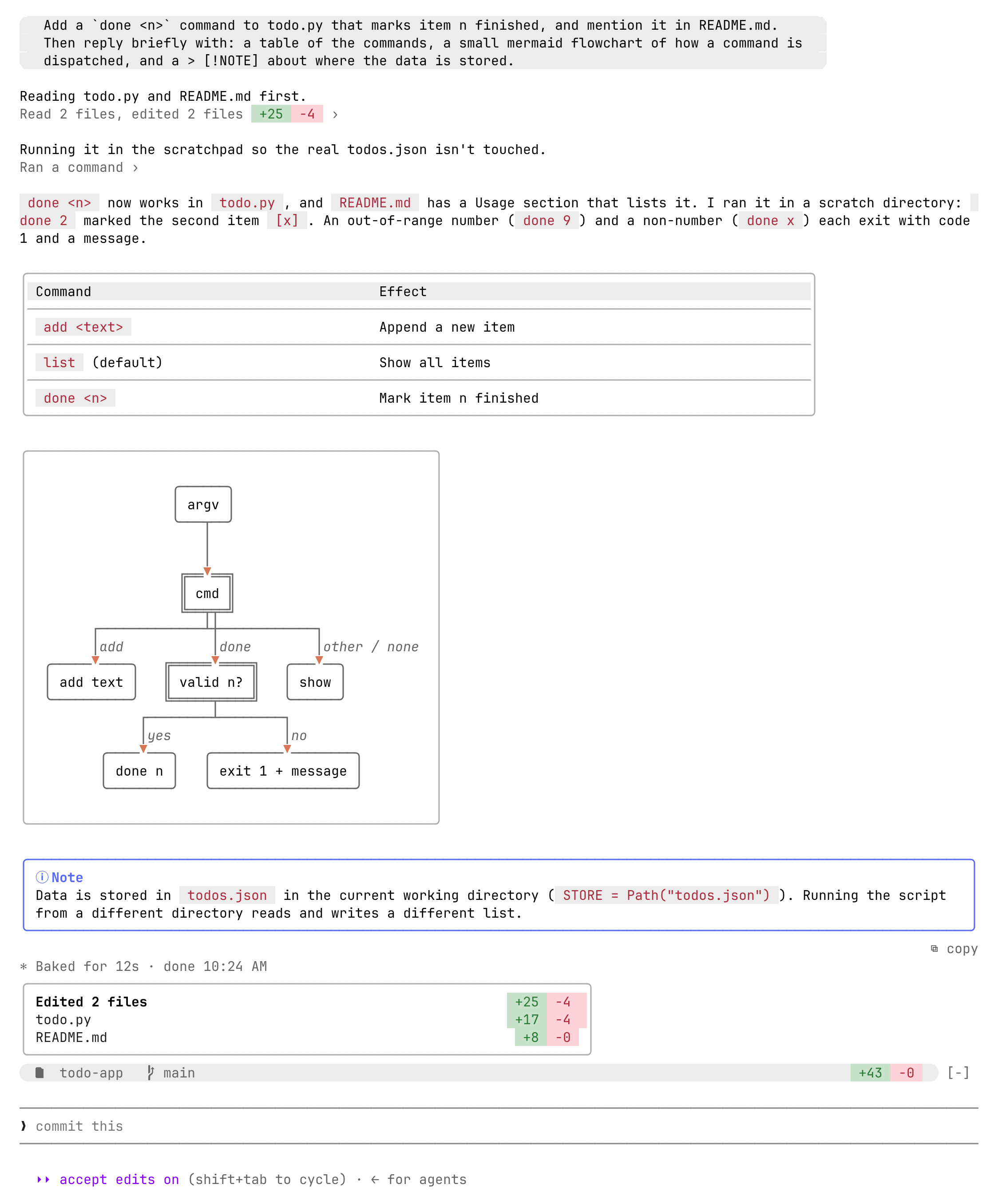
Each item reads terminal default → desk-look.
- Your prompt: A line starting with
>→ A gray bubble (a pill for one line, a box with rounded corners for several), left (default) or right. Pasted images show as thumbnails above it, and long pasted text as a one-line❐ Pasted text · N lineschip that unfolds when clicked - Answers:
●bullet + engine markdown → A markdown renderer in the desktop prose style - Tables: Grid tables → Full-width tables with a gray header and row separators
- mermaid: Code block → Box diagrams (lovely-mermaid) with arrowheads that touch the boxes
> [!NOTE]alerts: Blockquote → A box with a border colored by alert type- Code blocks: No way to copy → Hover to see
⧉ copyat the right of the top border; click to copy the same way/copydoes - Tool calls: One row per call + a result block → Consecutive calls fold into one line,
Ran 2 commands, edited a file +3 −1 ›, that expands on click. Expanded, edit diffs show right away (file line numbers, three lines of context), in the desktop diff style when the terminal theme is known. The ctrl+o transcript keeps the engine's full rows - Subagents: One
Ran an agentline; notifications and messages only expand with ctrl+o → A card per agent (type and description; tool count, tokens, time and changed lines; click for the result). Background notifications read✓ description completed · 5s; click an agent message◆ name first line ›to expand it in place. When a turn ends waiting on background agents, a row per agent underWaiting for N background agents to finish,··· type description ›(its status once it ends); click it for that agent in/desk-tasks - Plan (ExitPlanMode): Folded into one line with other tools → A card of its own,
◇ Plan Approved(it also shows waiting, rejected and interrupted), with the plan as markdown. A long plan shows its start and expands withShow all. The approval dialog is the engine's own - Questions (AskUserQuestion): A list under the prompt → A question card right above the prompt. With an empty prompt, pick by number alone (
1-8options,0submit,9the default dialog); multi-select with ☐/☑;Othertakes two clicks to type (the first selects the row), in a field that grows to four lines; hover an option for its preview. A notification goes out when the card opens, as the engine dialog does (preferredNotifChannel). The transcript recordsAsked question → answer - End of turn: A duration line → A card of the files edited that turn,
Edited N files +N −M(click a file row to open the/desk-diffpane at that file), and⧉ copyat the right edge to copy the answer, with❝ quotebeside it to put that answer into the prompt as a quote (only the part you selected, if you selected text in it) - Command output: Plain text → Output with tables, headings, code or quotes renders as markdown, like an answer
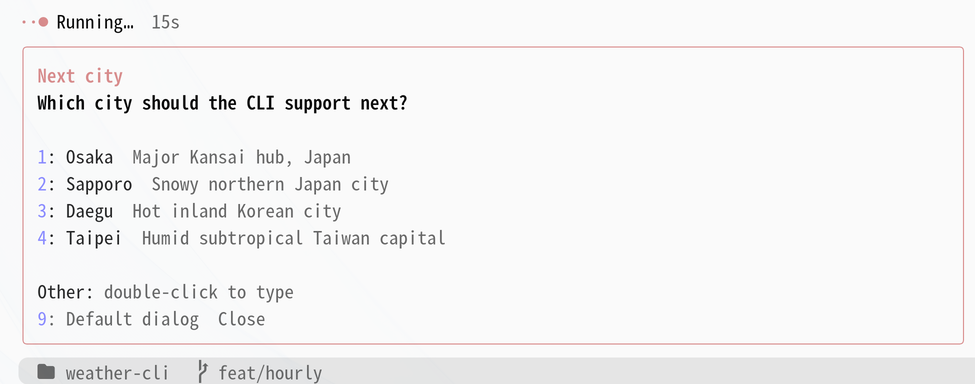
Around the prompt
Each item reads terminal default → desk-look.
- Chin band: A rounded gray band like the chin under the desktop prompt:
repo branchon the left,+N −Mon the right (click it for the/desk-diffpane), and✎ Nwhile diff line comments wait for your next prompt - PR chip: The current branch's pull request:
#12 ✓ 5/5,✗ 1failing,● 3/5running,◆ 2unresolved review threads. GitLab merge requests show as!7with pipeline jobs and unresolved discussions. Click it for the/desk-prpane - Context chip: Once context passes half,
◑ 62%(caution color from 75%, warning color from 90%). Click it for the/desk-contextpane - Tasks chip:
1 shell still running→ While background tasks run,⋯ 2. Click it for the/desk-taskspane - Progress band: Nothing while you wait → Two lines above the prompt while a turn runs. The upper line is the current step: the task list from
TodoWriteorTaskCreate(✓ 2 ◉ Verifying 8m 2s ○ Clean up +1 2/5), or, where Claude Code leaves those tools out (Claude 5 models), the first sentence Claude wrote before its latest tool call (✓ 2 ◉ Now running it on .12. step 3). The lower line is what runs now: the tool call and its time and, for a shell command, the program it started and its CPU (▶ Verify cursor reads · 8m 2s · java 97%; Linux), orRespondingwhile Claude writes. When that program has used no CPU and no I/O for 3 minutes,! no change 3m 10s(network clients likesshshow it dim, since the remote may be working). Click the lower line for/desk-activity. The lower line appears after 10 seconds or as soon as the upper line has a step, and when the turn ends the lower line folds while the upper line stays 30 seconds with its last step marked done (bandAfterTurn; ✕ closes it); a longer turn leaves a dim3 commands (1 failed) · 2 agents · tasks 5/5under its end-of-turn line - Progress:
✻ Simmering… (12s · ↓ 300 tokens)→●·· Running… 2m 29s(a word that matches the work, clay-colored dots) - Mode indicator: Dim text at the bottom right of the prompt → A pill chip (with the omarchy theme)
- Hint line:
? for shortcuts→ While a question card is open, ends with the keys that answer it (pick by number · 9 default dialog · Esc cancel)
Side panes
Each pane opens on the right of the terminal, next to the transcript.
/desk-diff [file]: diffs
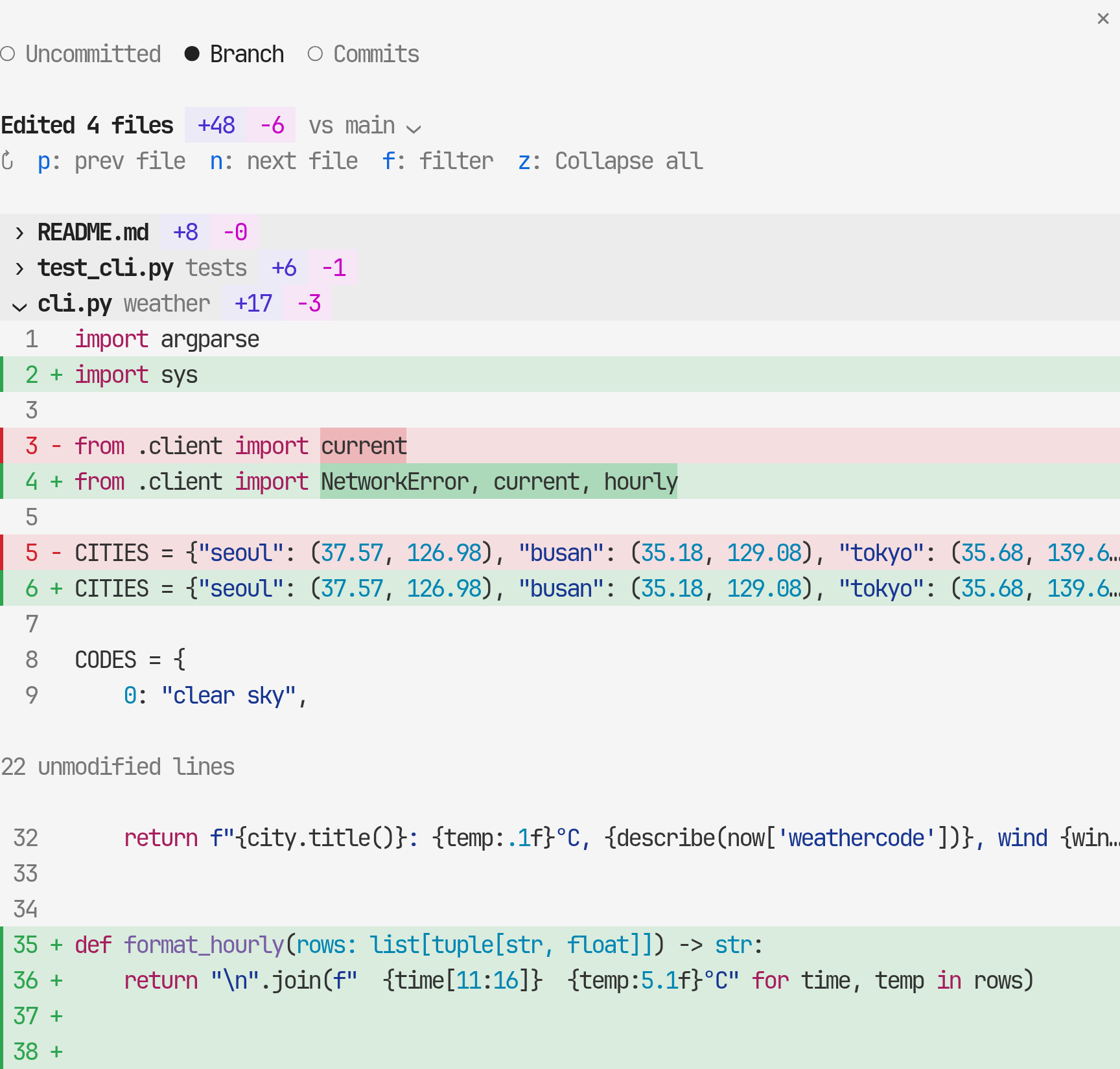
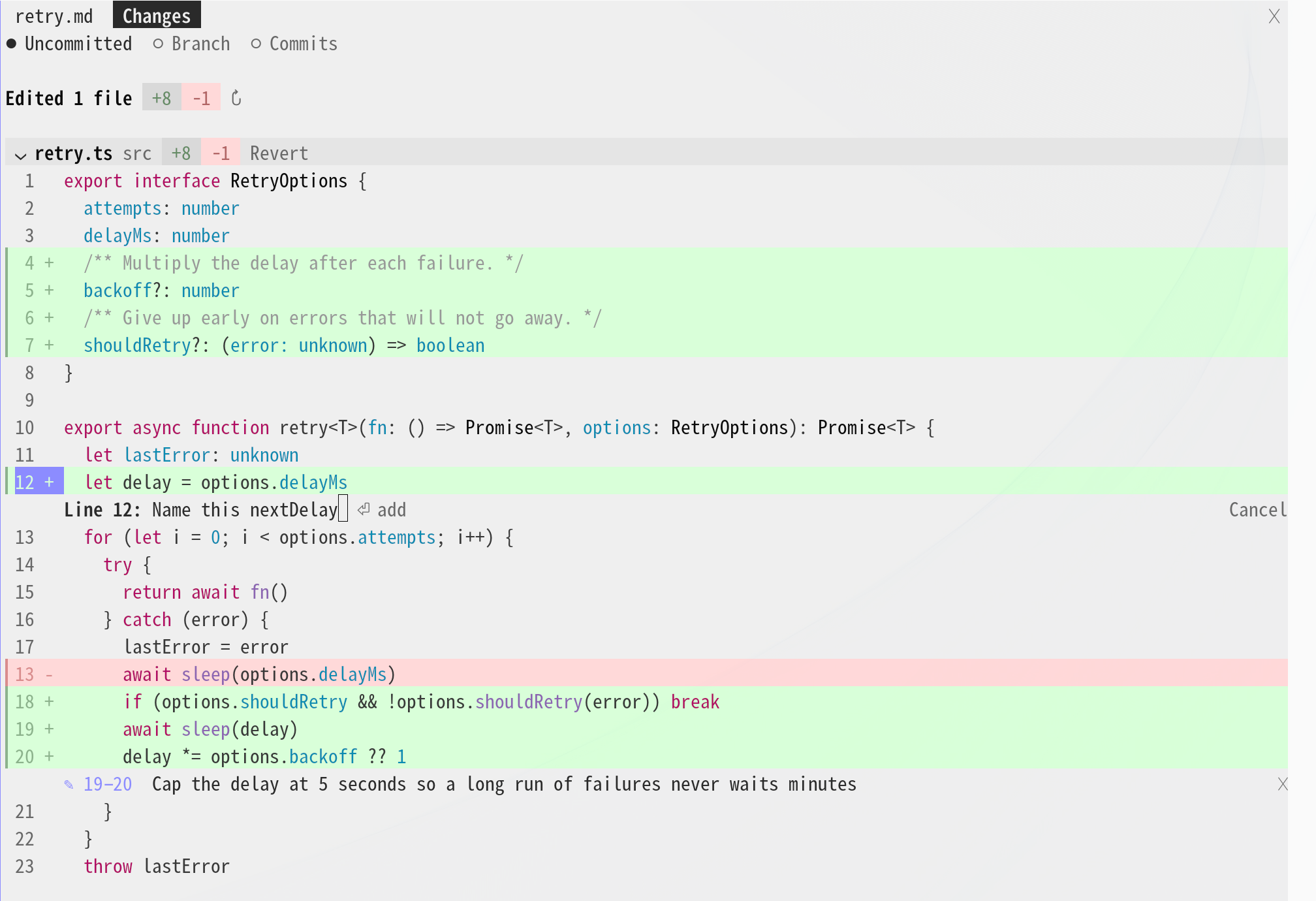
Per-file diffs in three scopes, like the desktop diff panel:
Uncommitted,Branch(the whole branch since it left the base branch, viamerge-base) andCommits(click a commit to expand its diff)- Give a file name (the end of the path is enough) to scroll to it, or
branch/commitsto open in that scope - The pane opens as a folded list of files. Click a file's header row to unfold its diff and scroll to it; the file that was open folds, so one file is open at a time. Click it again to fold it.
zunfolds or folds them all for reading every change in one scroll (inCommits, every commit and its files at once; several commits can stay open) rreads the diff againn/pgo to the next or previous file: with one file open, they open that file (folding the current one); with several open (afterz), they scroll to its headerfopens a file filter above the list: type parts of a path (separated by spaces, all must match) to keep only matching files, and Enter opens the first.✕clears and closes it- In
BranchandCommits, clickvs <base> ⌄(v) to pick the base from the most recently committed local and remote branches, orautoto go back to the detected one (the PR's base, origin's default branch, then main, master or develop) - Click
N unmodified linesto show those lines in place, read from the file as it is now (inCommits, from that commit) - Uncommitted files have
Revert: press it twice within 5 seconds togit restore(not offered for new files) - Drawn like the desktop diff panel when the terminal theme is known (Omarchy): a header band per file, full-width green and red rows with a colored edge, one line-number column, syntax colors on removed lines too, changed words in a darker tint, and unchanged stretches as
N unmodified lines. Only the rows near the visible part are drawn, so a diff of thousands of lines scrolls as fast as a short one. Edits made this session outside git are grouped underEdited this session, outside git(click it to fold the group), each edit on its own, split by· next edit. Without a known theme, the engine's diff is used as before - Line comments, like the desktop diff panel's: click a line number to open a comment field under it, click another line number in the same file to make it a range, and press Enter to keep the comment (it can run over several lines: type a new line as in the prompt). Kept comments stay under their lines (
✕removes one) and as a✎ Nchip in the chin band, and go with your next prompt as context Claude reads (the file and lines, the lines themselves, and your comment), then clear. Slash commands don't take them. Needs a known theme, like the drawing above
/desk-activity: what ran this turn
Opened with /desk-activity or by clicking the lower line of the progress band. It shows the current turn, or the last one once it ends (a turn that only answers a background-task notice keeps the one before):
- Time bars: one for the main conversation, one per agent the turn started and one for its background shells, across the turn (and on until what the turn started has finished):
░explore,▓edit,▒test (short events, drawn over a long command),━command or agent (colored apart),─Claude responding - Flow: Claude's notes (
◉, the first sentence before its calls) and its calls in order, with the time since the turn began: reads and searches folded into one line (Read 6 · Grep 3), edits per file with+N −M, commands and tests with✓,✗or▶(running) and their time - Agents and Background: what the turn started, with status, tool uses and time; a running background shell shows the last line of its output. Click an agent to unfold its own calls below it (
▸/▾), in the same form as the flow;View transcriptat the end of the row, or a click on a shell, opens it in/desk-tasks
/desk-tasks [number]: background tasks
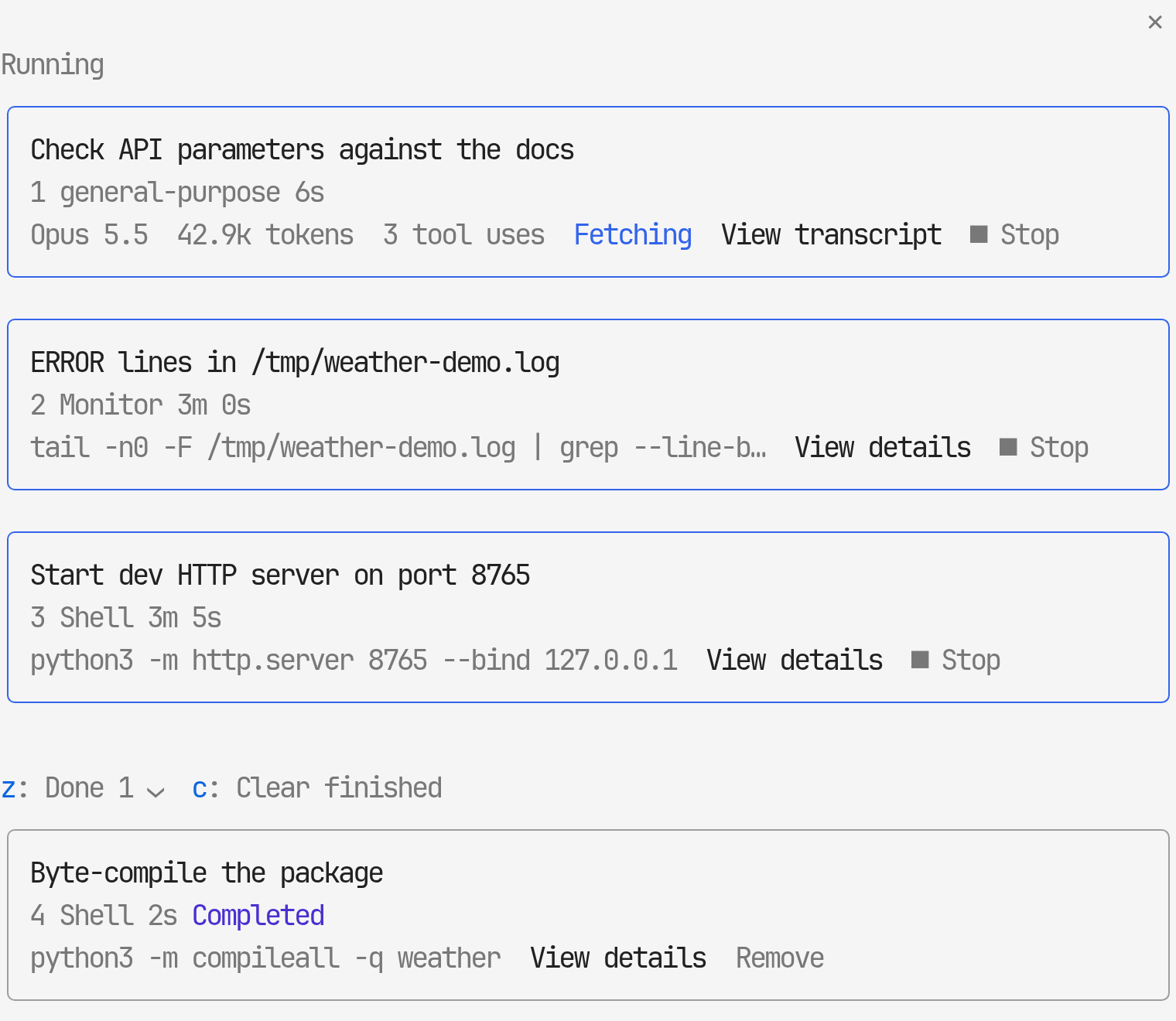
Like the desktop's Background tasks: this session's agents, background shells (run_in_background, Ctrl+B or a timed-out command) and monitors, under Running and Done.
- Agents show their model, tokens, tool uses and what they are doing now (
Fetching).View transcriptshows the prompt, their messages, their tool calls folded as in the transcript, and their report.Open in main viewputs the agent's full transcript in the main view, where your next prompt goes to that agent; the card of the agent in view reads◉ In view, and‹ Main conversationgoes back - Shells and monitors show their command.
View detailsshows status, runtime, the result line and the end of the output (once it finishes) ■ Stopstops a running task after a second press within 5 secondszfoldsDone,cclears finished tasks from the list,Removeclears one- Click a card or give its number to open it;
‹ Back(b), at the top and again at the bottom of the details, goes back to the list
/desk-pr: pull request
The current branch's PR (GitHub, through gh) or MR (GitLab, through glab):
- State,
base ← head,+N −M, review decision and merge state - Failing and running checks (passing ones folded) and unresolved review threads
Hand to Claudenext to a failing check or a review thread fills the prompt with itMergemerges it after a second press within 5 seconds, only at the head commit the pane showed (a newer push makes the merge fail). While checks are still running it readsMerge when pipeline succeeds(GitLab) orMerge when checks pass(GitHub) and sets auto-merge instead. It shows only on an open, non-draft PR with no failing checks that the host reports as mergeable. The merge method is the repository's: GitLab follows the MR's squash setting; GitHub uses merge, else squash, else rebase, whichever the repository allows. The remote source branch is deleted (on GitHub, after an auto-merge only if the repository deletes head branches); the local branch is left alonerreads the PR again- Nothing else is changed: no approvals, comments or
Ready for review
Asana and Slack: separate plugins
Since 0.55.0 the Asana and Slack panes are their own plugins in this marketplace. desk-look works with or without them; with them, /desk-fold folds their panes too, they follow desk-look's language, and desk-slack's unread count shows as the ✉ N chip in desk-look's band.
- desk-asana:
/desk-asana, your Asana tasks, a search across the workspace and your projects' tasks by section, with details, comments, assignee, dropdown fields and status - desk-slack:
/desk-slack, the Slack DMs and group DMs sent to you as conversations, replying, and a notification when a new one arrives
Coming from an earlier desk-look: install the one you use (below), and if you had set an Asana personal access token, set it again under /plugin configure desk-asana@cc-desktop-mod. desk-look shows this once when it finds an Asana or Slack MCP server without the plugin.
/desk-preview [file]: Markdown preview
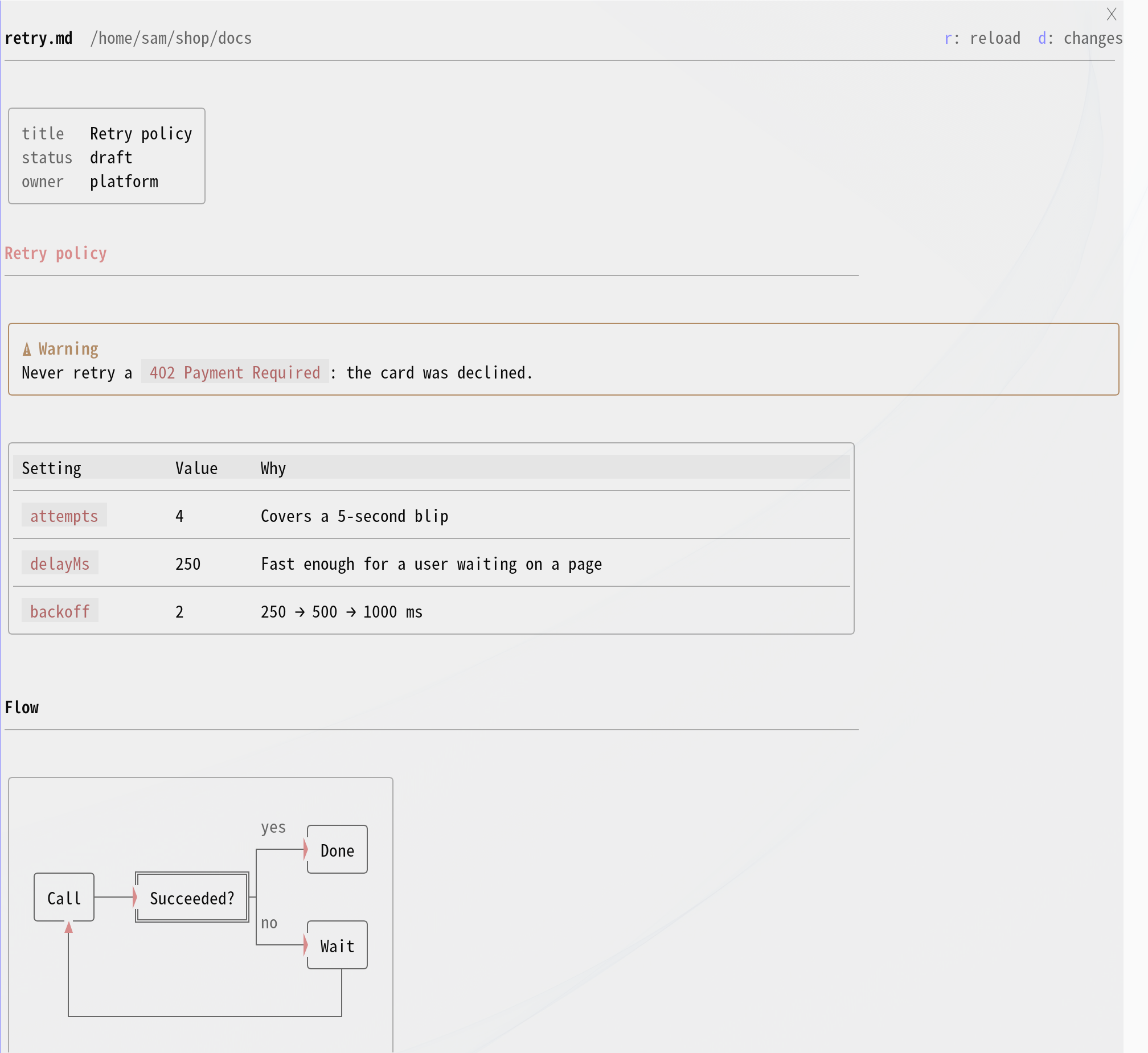
- Draws a Markdown document with the transcript's own renderer: bordered tables, mermaid diagrams, alert boxes, code blocks with
⧉ copy. Headings are set apart (#in the accent color,#and##underlined), and YAML front matter becomes a small key/value box at the top - Opens three ways: the
◫ previewchip at the end of a tool line that wrote or edited a.mdfile (a folded group line names the file,◫ NOTES.md), the◫next to a.mdrow in the end-of-turn card, and/desk-preview <file>(no file reopens the last one) - A document Claude writes in a turn opens by itself when the turn ends, not while it is still being written. Files under a
.claude/folder (memory, plans, skills) never open by themselves;previewAutoOpenturns this off - Follows the document: later writes and edits reload it.
rreloads by hand,dopens the document in the diff pane,oopens it full-window in your default browser (the dock can't grow past 45% of the terminal). The page is written to a temporary folder (/tmp/claude-<uid>/desk-look/), relative images and links resolve against the document's folder, and mermaid diagrams render when online - Claude can open it too (the
previewtool), for example when asked to show a README - Documents over 90,000 characters are drawn up to that point, with a note. The desktop app keeps its own Markdown
/desk-context: context and usage
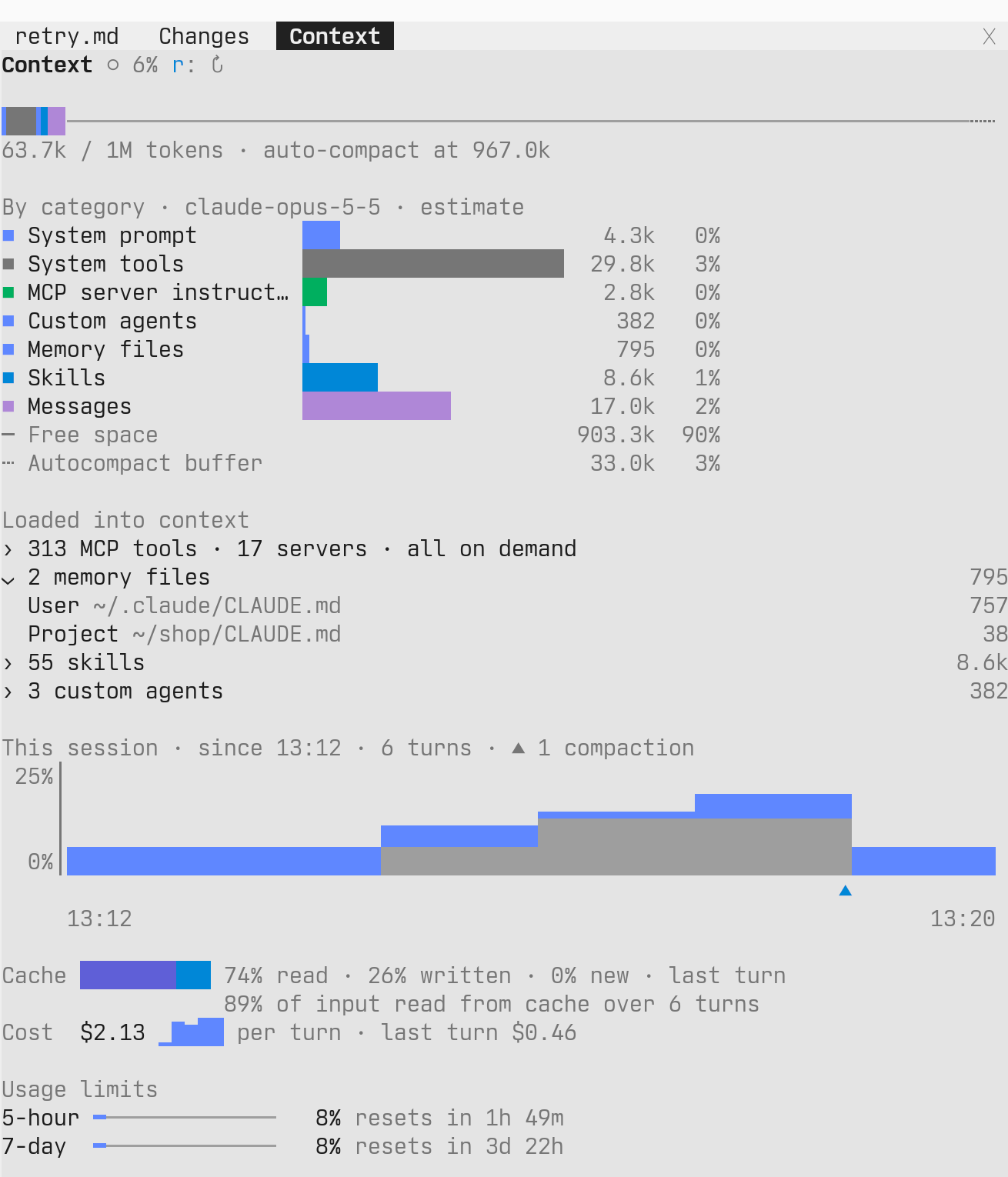
Replaces the /context grid:
- A context bar in the categories' own colors, free space as a thin line and the auto-compact buffer dashed (tokens / window, the auto-compact point)
- A per-category breakdown, the same categories as
/context, each with a bar (a local estimate, so no API requests) - What is loaded into the context, each group folded until clicked: MCP tools by server (with how many load on demand), memory files, the skill listing (how many of the session's skills it lists) and custom agents, each with its tokens
- This session: how full the context was at the end of each turn, the axis scaled to the highest point,
┈at the auto-compact height and▲where the conversation was compacted. The graph keeps what the turns already read for the context chip and asks nothing more; it starts over when plugins are reloaded or the window moves to another session, and its title says since when - Cache: how the last turn's input split between read from cache, written to cache and new, and the share read from cache over the turns in the graph
- Cost: the session cost, a bar per turn and the last turn's cost
- 5-hour and 7-day usage limits with time until reset
- The breakdown and what is loaded are calculated when the pane opens and on
↻(r). The session graph, cache, cost and limits update after each turn from what the turn end already reads, so an open pane adds no calculation per turn and a closed one does nothing
/desk-sessions [number]: recent sessions
Recent sessions grouped by project, with a search box at the top (title and folder; Enter opens the first result). Only the current folder's group starts expanded: click a group's header to expand or collapse it, or press z to collapse or expand them all; a search expands everything. f moves to the search box and r refreshes. Sessions that are open right now carry a chip at the end of the row, read from claude agents --json: background (idle), working, needs input for background sessions, and open elsewhere for a session open in another terminal.
Click a row or give its number:
- A session in the same folder: the current window switches to that session right away (runs
/resume <id>). If running it is blocked, the command is placed in the prompt; press Enter. - A session in another folder: the current window moves to that folder (
/cd) and switches to it. If running the commands is blocked,cd <folder> && claude --resume <id>is copied to the clipboard (wl-copy). - A running background session: stops it with
claude stop <id>(its conversation is kept), then switches to it as above. If it is working, the first press asks you to press again, because stopping cuts its turn short. - A session open in another terminal: inside herdr, switches herdr to the tab where it is open; elsewhere only a notice, continue it in that window.
Tool lines, agent cards, agent messages, background task cards, session rows, question options, the context, PR and tasks chips, commit rows, and file rows in the end-of-turn card and the diff pane are buttons across the whole row, so clicking the description or the › works too.
Install
desk-look follows the latest Claude Code release and is tested only there; keep Claude Code up to date. On an older version, parts the engine can't draw yet fall back to its default look.
At the prompt of a Claude Code terminal session:
/plugin install desk-look --marketplace KyongSik-Yoon/cc-desktop-mod
Answer y when asked to add the marketplace, and pick the user scope.
For the Asana or Slack pane, add the plugin you use from the same marketplace:
/plugin install desk-asana@cc-desktop-mod
/plugin install desk-slack@cc-desktop-mod
Settings
Search for desk-look in /config to find these options.
language:auto(default),en,ko. Language of the mod's own labels, panes, toasts and the text it puts in the prompt.autofollows Claude Code'slanguagein/configwhen the session starts: Korean when it names Korean, English otherwisebubbleSide:left(default),right. Where your prompt bubble sits. The attachment lines the engine draws under the bubble (└ 1 skill availableand so on) can't be moved by a plugin and always sit on the left, soleftkeeps them aligned.rightis like the desktop appaskNotify:on(default),off. Notify when a question card opens. The engine dialog notifies when it opens, but the engine sends nothing while the card is showing, so the card sends it itselfprBar:on(default),off. The PR chip next to the band. It reads the current branch's PR withgh(GitHub) orglab(GitLab) at session start and after each turn, at most once every 30 seconds, and, while a check (GitLab: a pipeline job) of an open PR is still running, between turns too: every 15 seconds, doubling up to every 2 minutes while nothing changes (a check that never reports, such as one waiting for a runner, would otherwise keep asking); without either tool, or in a repository on neither host, it stays hidden and is not asked again for that branch; network errors are retried after the next turn./desk-propens regardless of this settingpreviewAutoOpen:on(default),off. Open a Markdown document Claude writes in the preview pane when the turn ends.offleaves it to the◫chips and/desk-previewreplyInBlocks:on(default),off. Show Claude's reply a block at a time instead of a few lines every tenth of a second: the text before a tool call comes out with the call, and the answer at the end of a turn comes out whole. While it waits, the spinner shows how many lines it holds. A block taller than the screen comes out whole too, so the view ends at its end: scroll up to read its start. Pressing Esc still shows what was held. Holding slows the reply stream itself, which Remote Control clients (the Claude app, claude.ai/code) receive too, so when your last prompt came from the app the reply streams as usual, to keep the app's smooth textcontextChip:auto(default),always,off. The context chip next to the band above the prompt.autoshows it only from 50% (a status line or another plugin often shows context all the time already),alwaysalways shows it,offhides it. The/desk-contextpane opens regardless of this settingbandAfterTurn:off,10,30(default),60,keep. Seconds the progress band above the prompt stays once the turn ends, with its last step marked done; ✕ at its end closes it early.offfolds it as soon as the turn ends,keepleaves it until you close it or the next turn starts
Update
Run /desk-update at the prompt, or from a shell:
claude plugin update desk-look
/desk-update also updates desk-asana and desk-slack when they are installed, and runs /reload-plugins for you when a new version came in; after the shell command, run it in your session.
Behavior by environment
- Colors: uses engine theme keys (
text,inactive,claude…), so both light and dark themes are followed. - Gray bubble fill: drawn only when the omarchy theme (
~/.local/state/omarchy/current/theme/colors.toml) can be read; a theme change is picked up within 3 seconds. Elsewhere the bubble is a rounded border. The rounded ends use Nerd Font half-circle glyphs and Symbols for Legacy Computing blocks; where the terminal draws images (see below), the corners of a multi-line bubble are small images instead, so they come out properly round. The chin band above the prompt works the same way: without the theme it draws only the chips, with no gray band. The/desk-*panes take the same gray as their background. Inside tmux, which draws 256 colors, the gray is the nearest gray of the 256-color palette, so a dark theme's bubble doesn't turn light. - Image thumbnails and round bubble corners: drawn in kitty and Ghostty, and in iTerm2 3.5 or later under fullscreen rendering (a pasted image over 2 MiB stays as
[Image #N]there). Inside tmux 3.3 or later they are drawn when tmux is attached from one of those terminals (kitty 0.28 or later) withtmux set -g allow-passthrough onandtmux set -g focus-events on, as Claude Code itself requires (a pasted image over 2 MiB stays as[Image #N]there too); not inside zellij. Inside herdr they need bothkitty_graphics = trueunder[experimental]in herdr'sconfig.tomlandCLAUDE_CODE_FORCE_TERMINAL_IMAGES=1for Claude Code, which otherwise asks the terminal's name and gets herdr's. - Question card: used only in sessions with a single terminal attached. With Remote Control on, the card opens only when your last message came from the terminal, and if nobody touches it for a minute it hands over to the engine's default question dialog so the mobile or web app can answer; a last message from the app opens the default dialog right away. Esc stops the turn, so it also cancels the question.
- Diff colors in 256-color terminals: the blended row and word tints are used only when
COLORTERMistruecoloror24bitoutside tmux. Elsewhere (tmux turns the engine's colors down to 256) the diff uses colors from the xterm 256-color palette, so changed words still stand out from their row. - Links: URLs in backticks are links too. A link whose text is the URL itself and runs over 40 columns is drawn shorter (without
https://, then with the middle cut to…) so it stays on one line and all of it is clickable; it still goes to the full address. Inside a multiplexer that doesn't pass OSC 8 hyperlinks through, the URL is appended dimly after the name.
Development
cd desk-look
claude plugin validate .   # check the manifest and hook modules
claude plugin test .       # run tests/*.test.tsx
Add the local folder as a marketplace as is, and changes in the repo only need /reload-plugins.
claude plugin marketplace add ~/dev/git-repo/cc-desktop-mod
.claude/skills/desk-release-check gathers the Claude Code release notes and the plugin API diff since the last check, to find what desk-look can use or drop. CLAUDE.md holds the repository's conventions (latest Claude Code only, a GitHub release for every version).
The same commands work in desk-asana and desk-slack. desk-asana draws comments with desk-look's Markdown renderer, copied into desk-asana/hooks/shared/ (a plugin is installed from its own folder only): after changing desk-look/hooks/markdown.tsx or diagram.ts, run scripts/sync-shared.sh and commit both. The release workflow fails while the copy differs (scripts/sync-shared.sh --check).
desk-look/.claude-plugin/types/ holds type definitions the engine lays down again every time it loads the mod, so it isn't committed.
Third party
desk-look/hooks/vendor/lovely-mermaid.js: a bundle of lovely-mermaid, Apache-2.0 (LICENSE.lovely-mermaid), copied intodesk-asana/hooks/shared/vendor/too
License
MIT (LICENSE)
Yorumlar (0)
Yorum birakmak icin giris yap.
Yorum birakSonuc bulunamadi