OpenLocalServer
Health Gecti
- License — License: GPL-3.0
- Description — Repository has a description
- Active repo — Last push 0 days ago
- Community trust — 13 GitHub stars
Code Gecti
- Code scan — Scanned 12 files during light audit, no dangerous patterns found
Permissions Gecti
- Permissions — No dangerous permissions requested
Bu listing icin henuz AI raporu yok.
Free, open-source local dev environment for Windows: runtimes, sites, databases, trusted HTTPS, Docker, MCP server
OLS (Open Local Server)
A free, open-source local development environment manager for Windows — runtimes, sites, databases, and trusted HTTPS, without touching your system by hand.





OLS (Open Local Server) is an all-in-one local development environment for Windows engineered for native performance, broad runtime coverage, complete version flexibility, and full extensibility. Every project gets isolated runtimes, its own local domain, and trusted local HTTPS without manual system configuration or virtual machine overhead.
One core engine (ols-core) powers four interfaces:
- Desktop GUI (
OLS.exe): Modern, borderless window with rich real-time monitoring and controls. - CLI (
olsc.exe): Fast command-line interface with a lightweight background daemon. - Model Context Protocol (
ols-mcp.exe): Stdio MCP server allowing AI coding assistants (Claude Desktop, Cursor, VS Code, LM Studio) to inspect and control your local environment. - Local HTTP API (
127.0.0.1:7420): Scoped JSON API for local tooling and scripting.
Free, open source, and unlimited sites. No telemetry by default.
A free, open-source alternative to ServBay for Windows, with the same all-in-one approach: web servers, databases, runtimes, local domains, and trusted HTTPS managed from one app.
Why I built it
I found plenty of free tools, but none had everything I wanted in one place. So I built one that does — first of all for myself. It is not made for profit, just to have the tool I wanted and to share it. It is and will stay completely free.
It is actively developed, so feedback, suggestions, and bug reports are very welcome.
Contents
- Download
- Tour
- Features
- Getting Started
- Usage
- Troubleshooting & Manual Runtimes
- Project Structure
- Built for AI, Built to be Forked
- Contributing
- Third-Party Notices
- License
📥 Download
Grab the latest installer (OLS-2.10.0-setup.exe) from the Releases page.
- What ships in the installer: The desktop app (
OLS.exe), the CLI (olsc.exe), the elevated helper service (ols-helper.exe), the MCP server (ols-mcp.exe), and the CPU limiter (cpulimit.exe). - Runtimes are downloaded on demand: The app itself does not bundle third-party runtimes or databases. You download only the runtimes (PHP, Node.js, Python), web servers (Nginx, Apache, Caddy), and databases (MariaDB, PostgreSQL, MongoDB, Redis) you need with SHA-256 verification, or point OLS to existing installations already on your computer. If an automatic download fails or you are offline, see Troubleshooting & Manual Runtimes.
- SmartScreen notice: Until the installer binary is code-signed, Windows SmartScreen may display a warning. Click More info, then Run anyway.
📸 Tour
Screenshots captured directly from the running app, showing Dark and Light themes side by side.
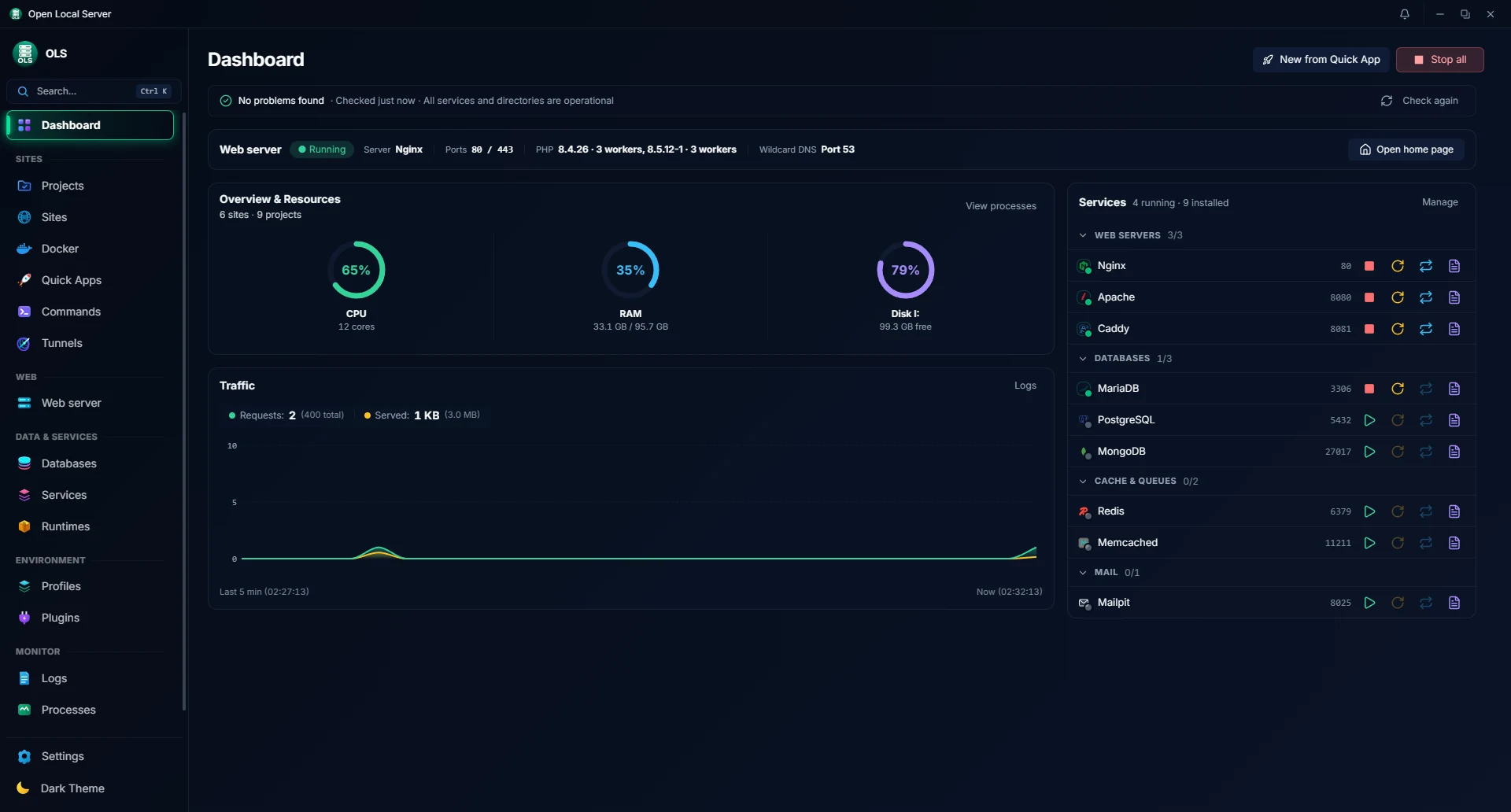
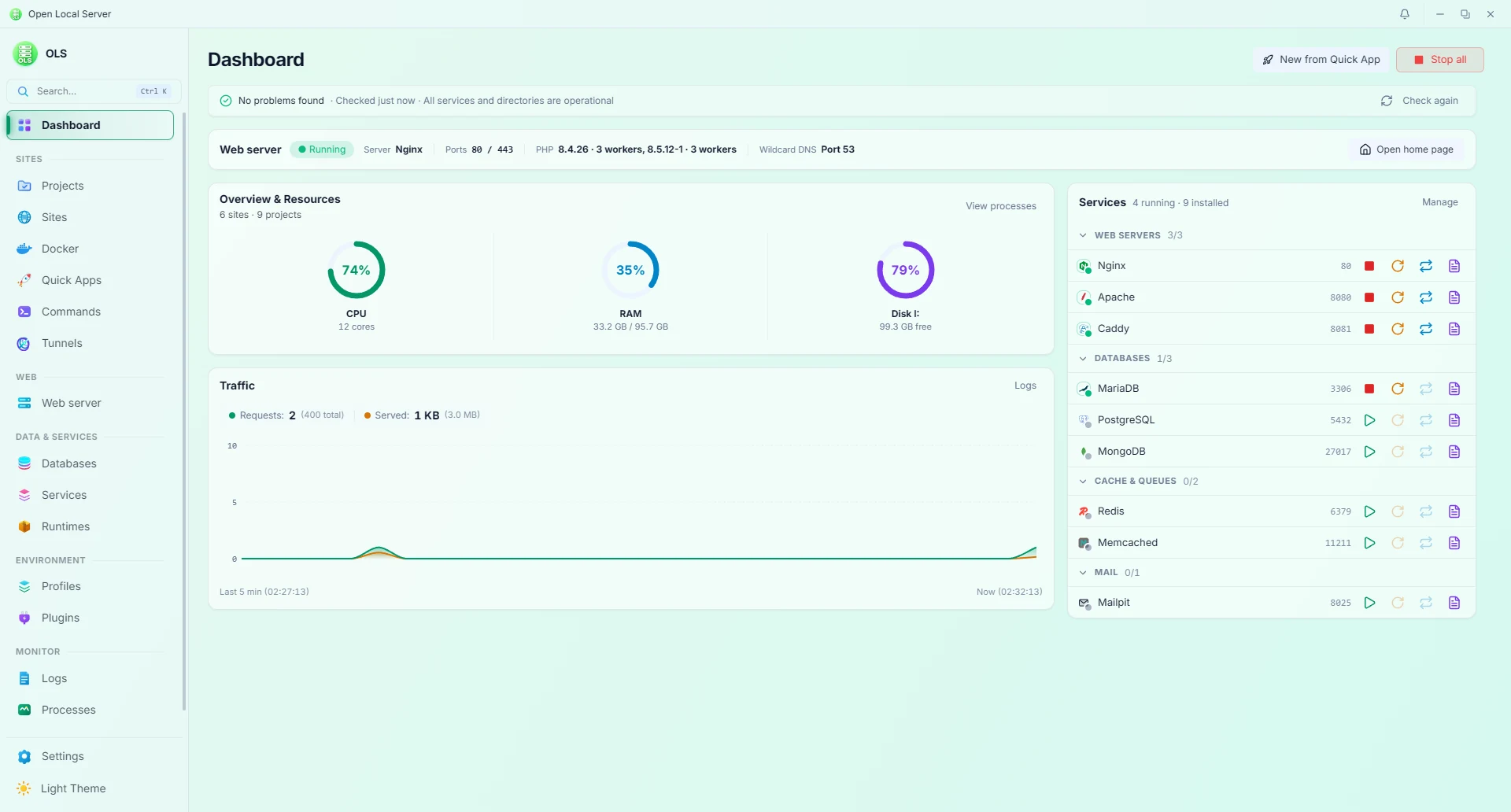
Dashboard — health, services, diagnostics, and traffic graph at a glance (Dark & Light)
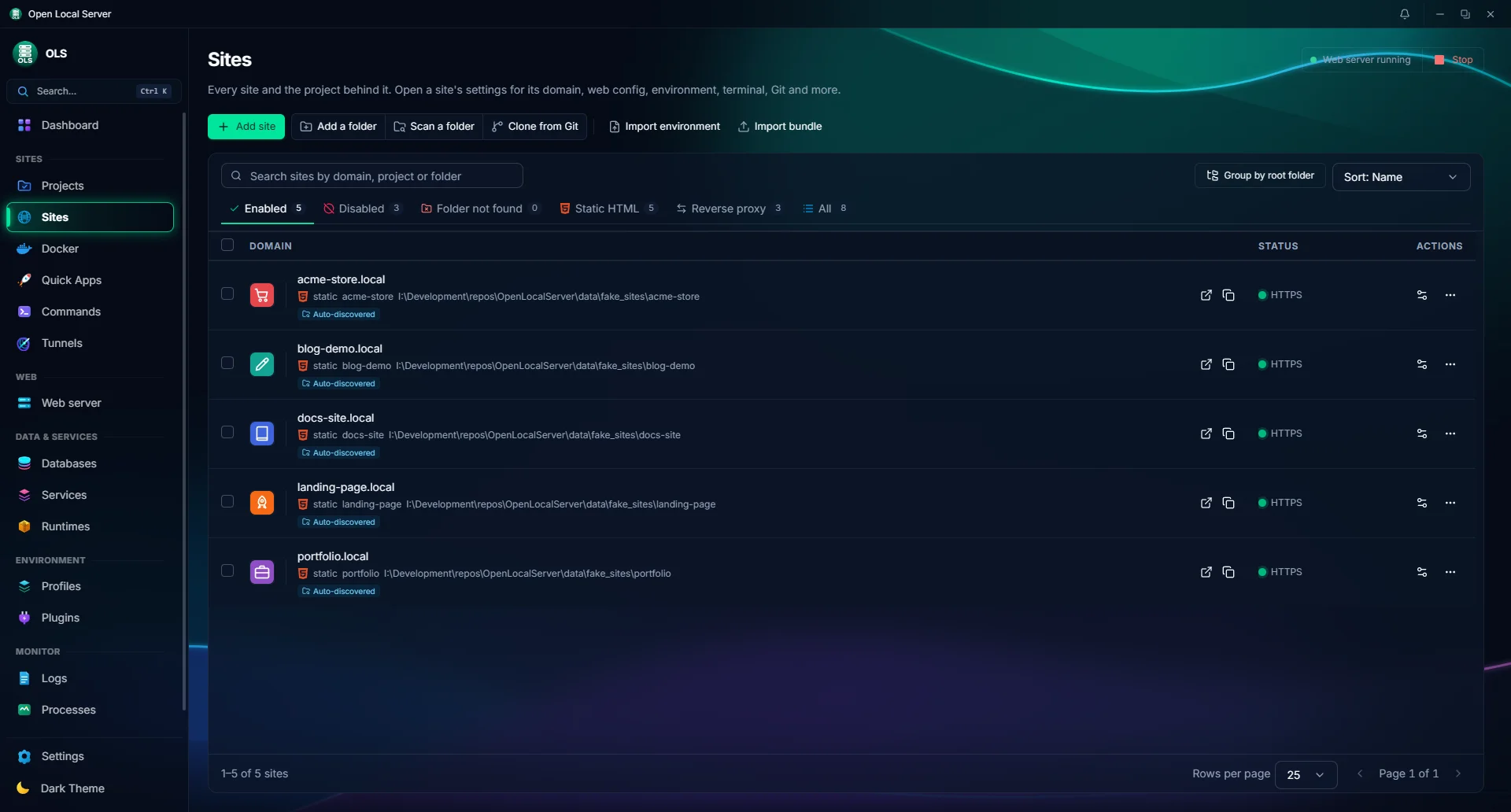
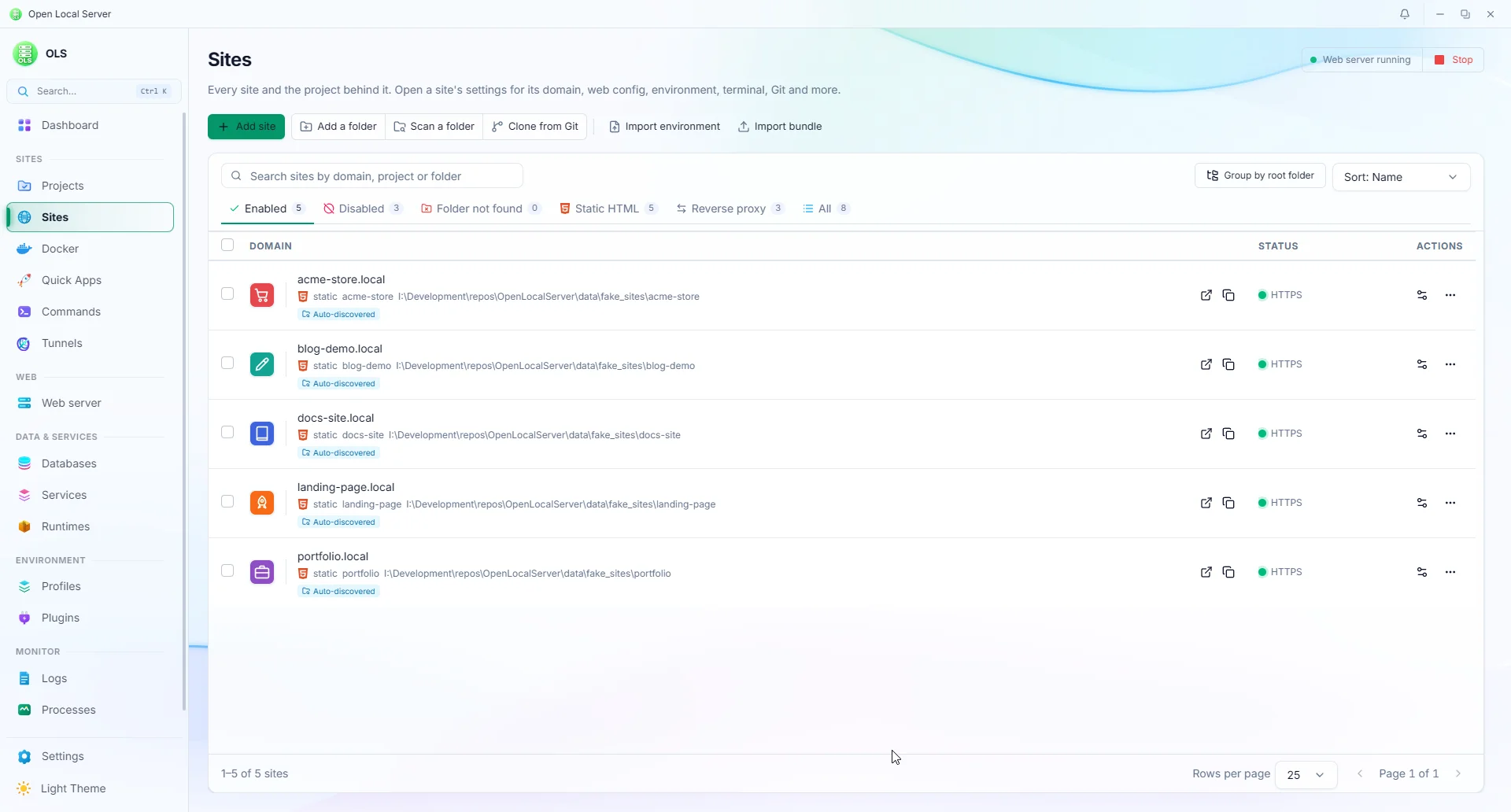
Sites — domains, per-site PHP/Node/Python, HTTPS, status tabs, and site branding (Dark & Light)
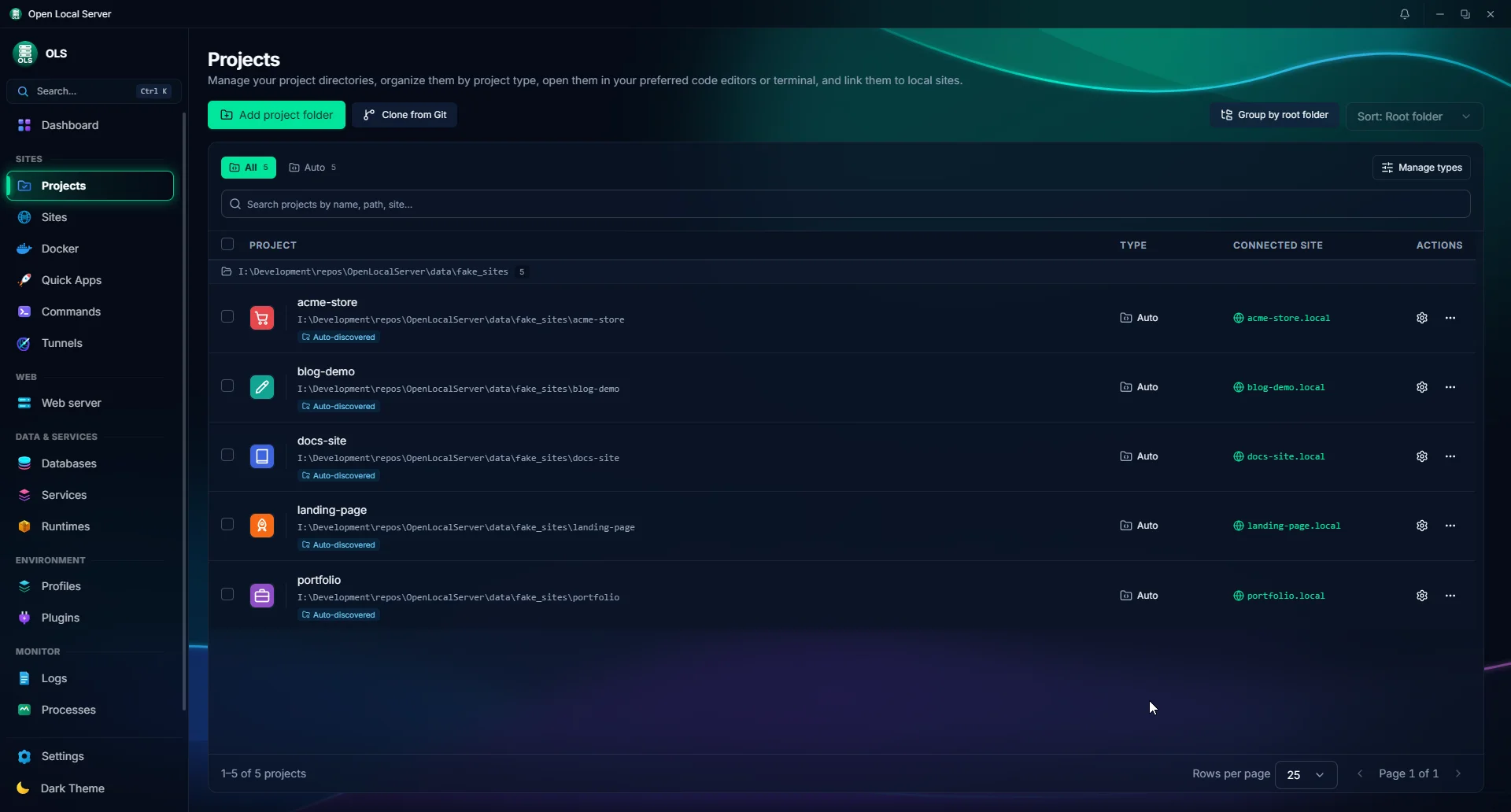
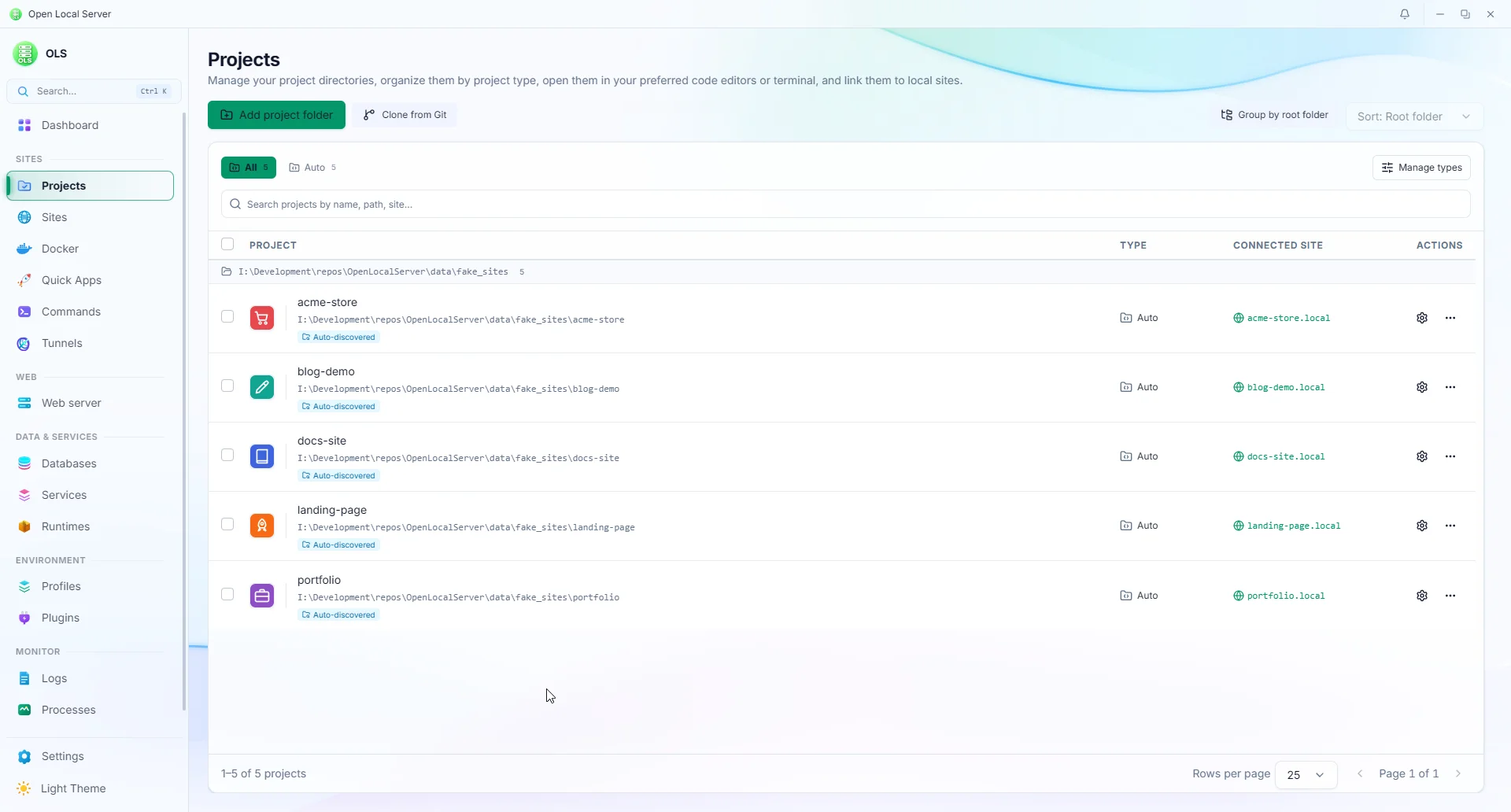
Projects — project directories, project types, connected local sites, project paths, and project management (Dark & Light)
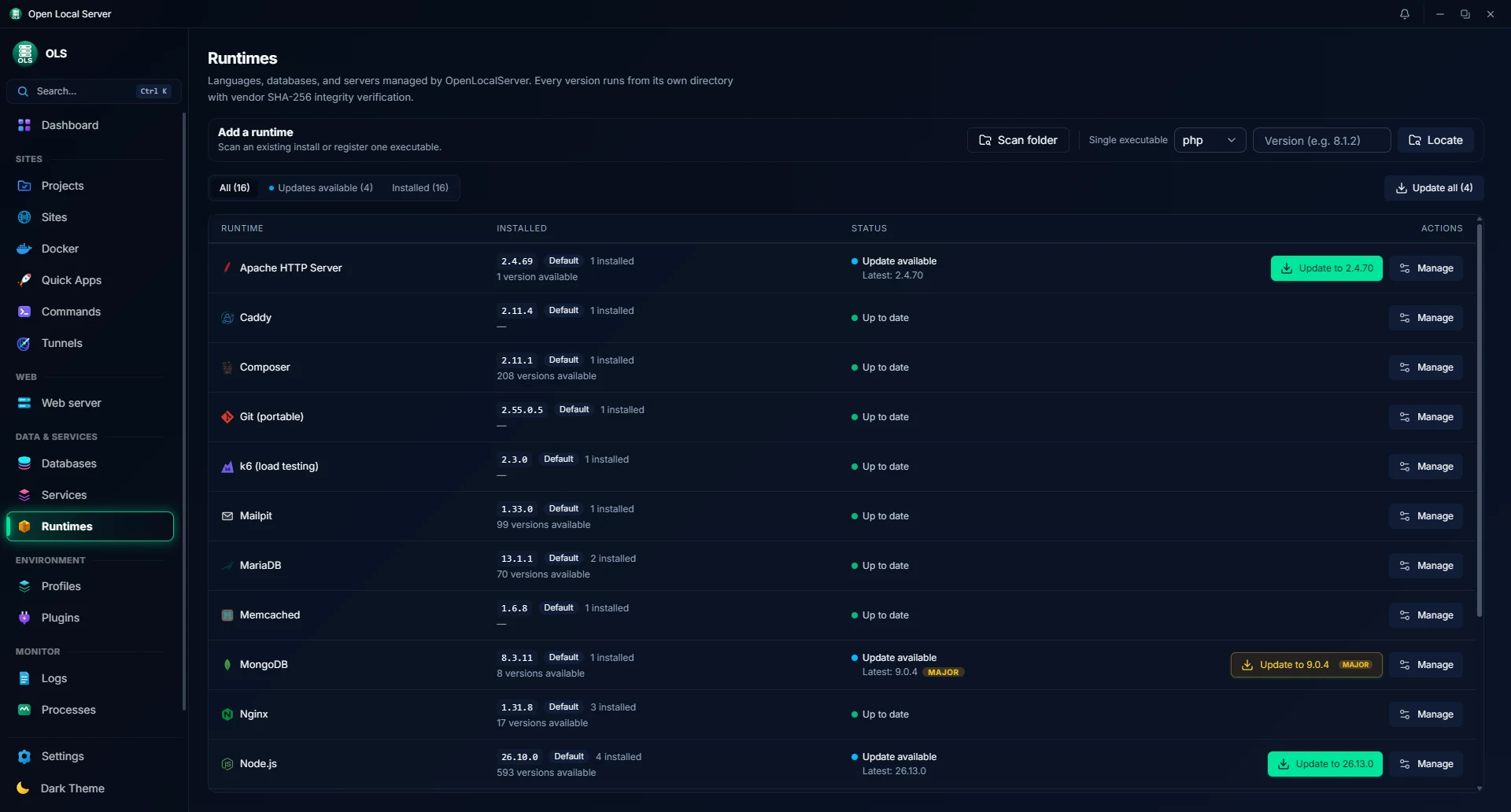
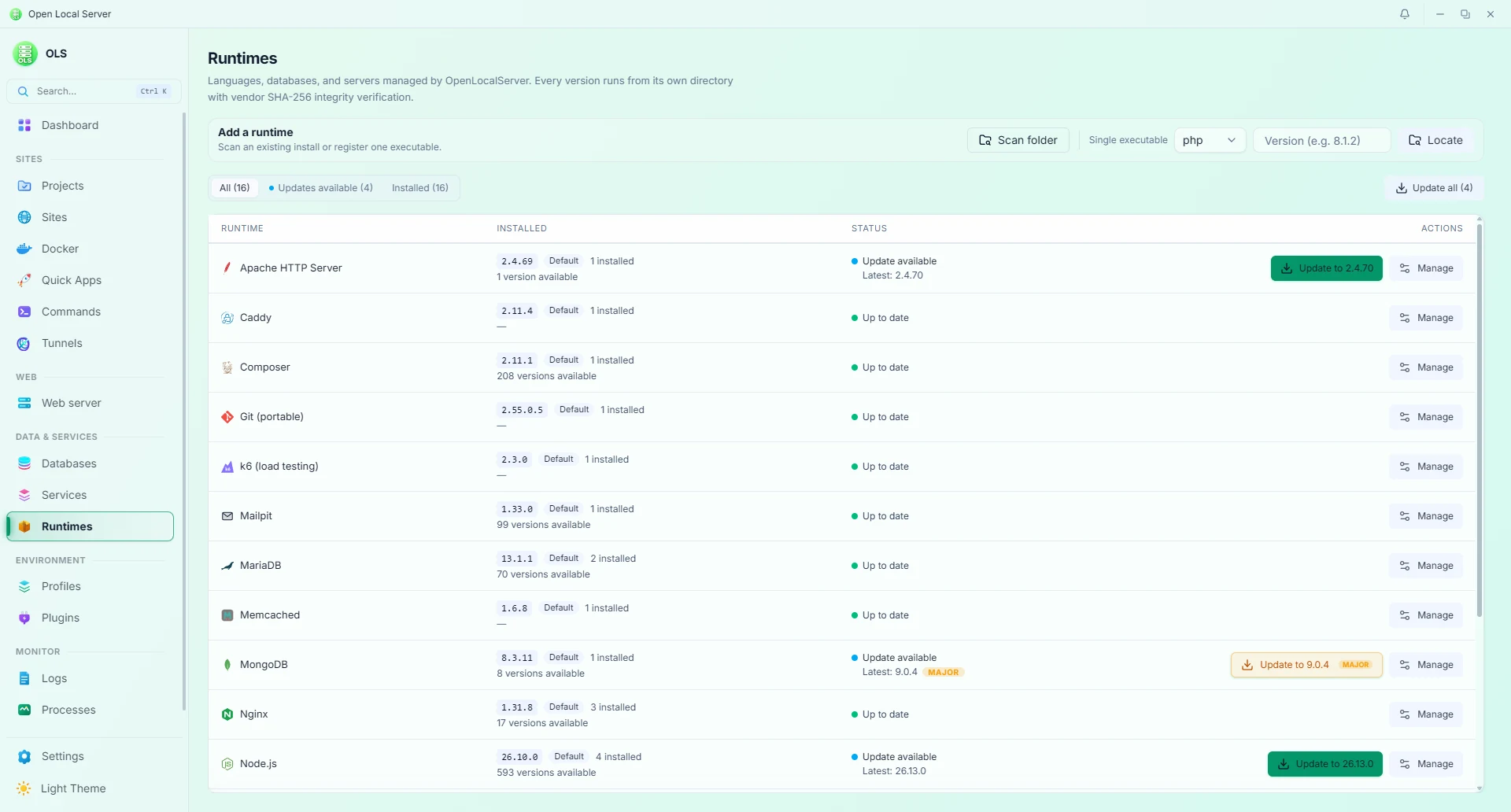
Runtimes — side-by-side versions, extensions, and global defaults (Dark & Light)
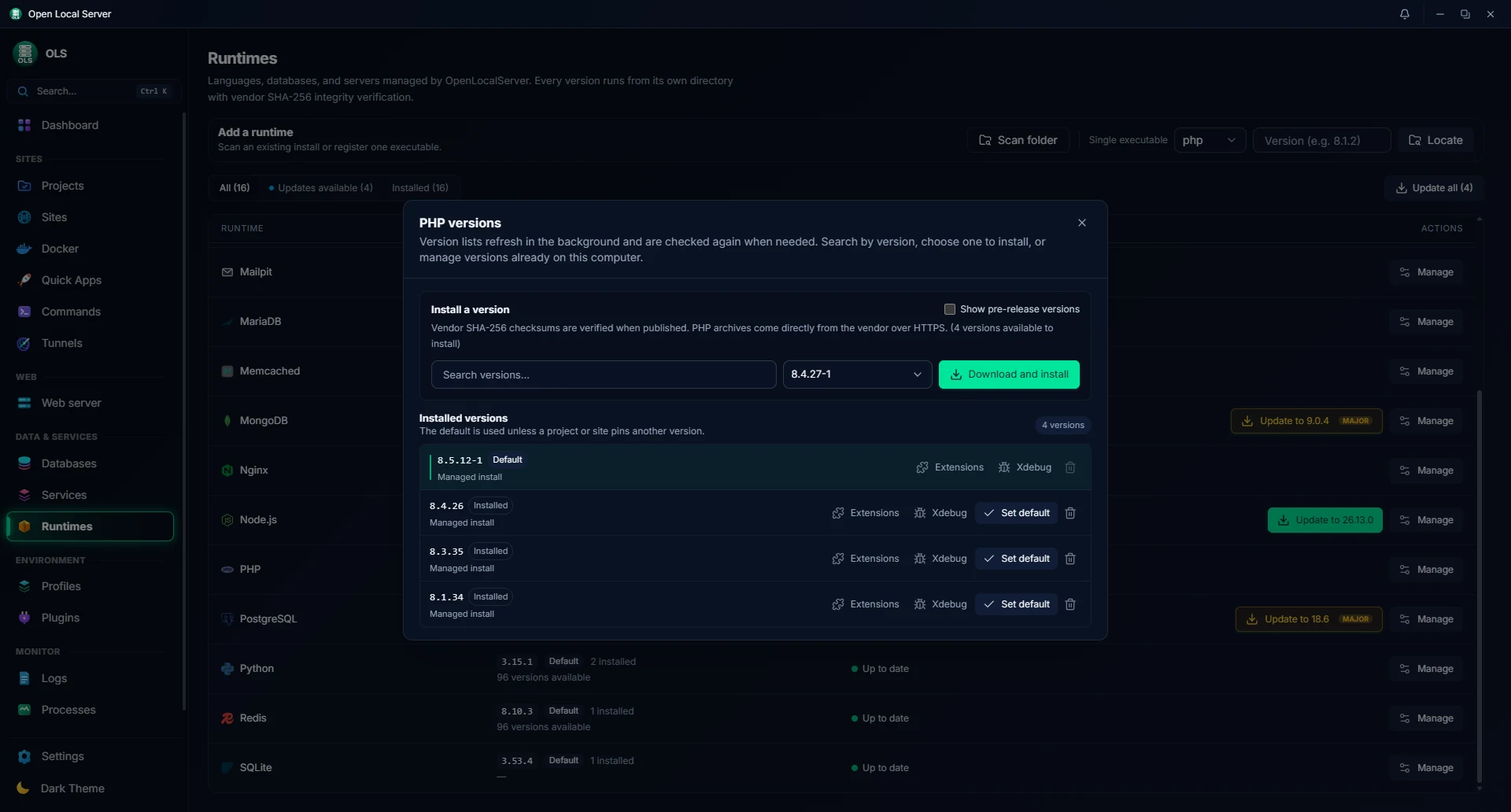
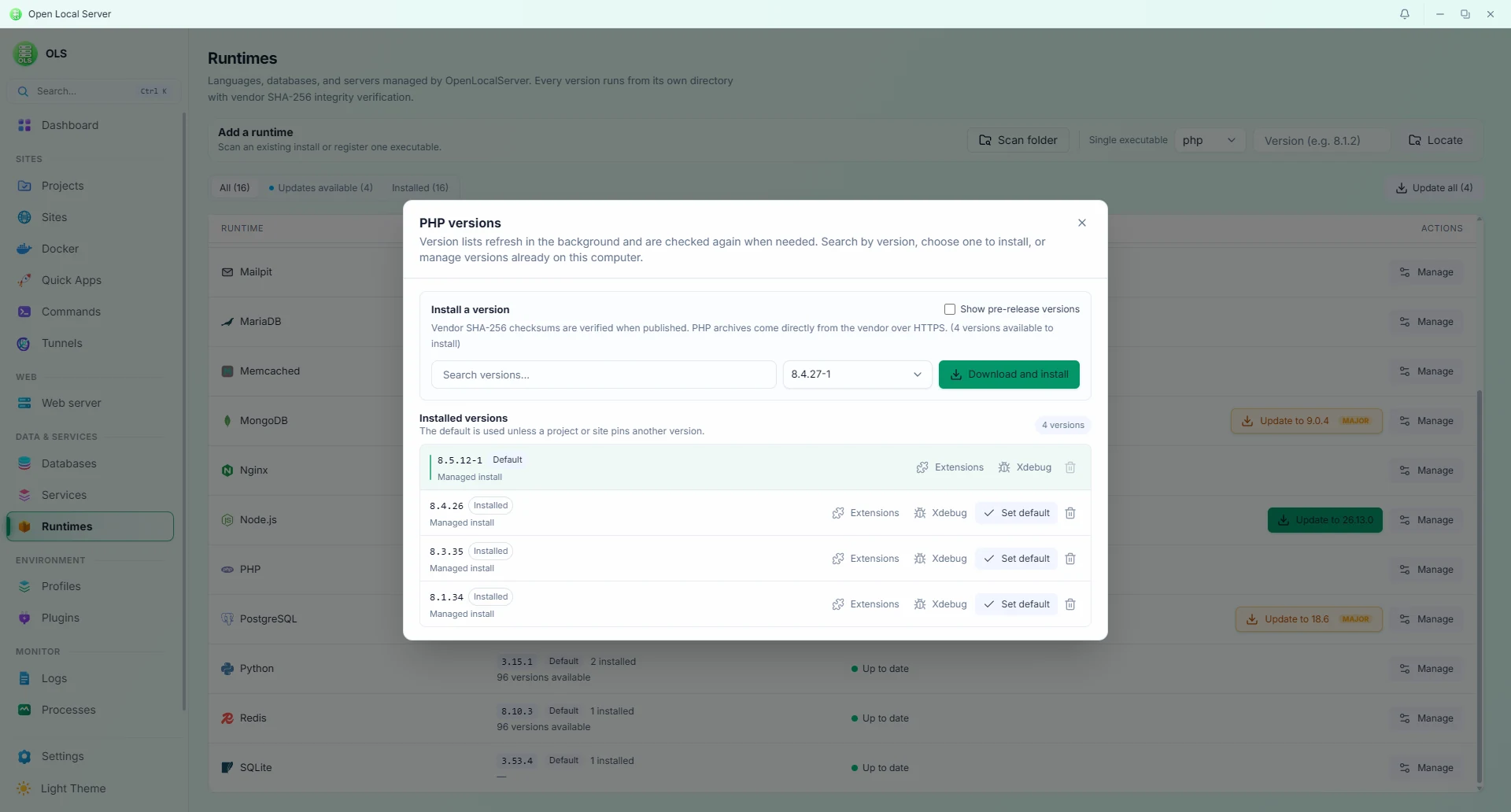
Version Manager — search, install, and manage runtime versions (Dark & Light)
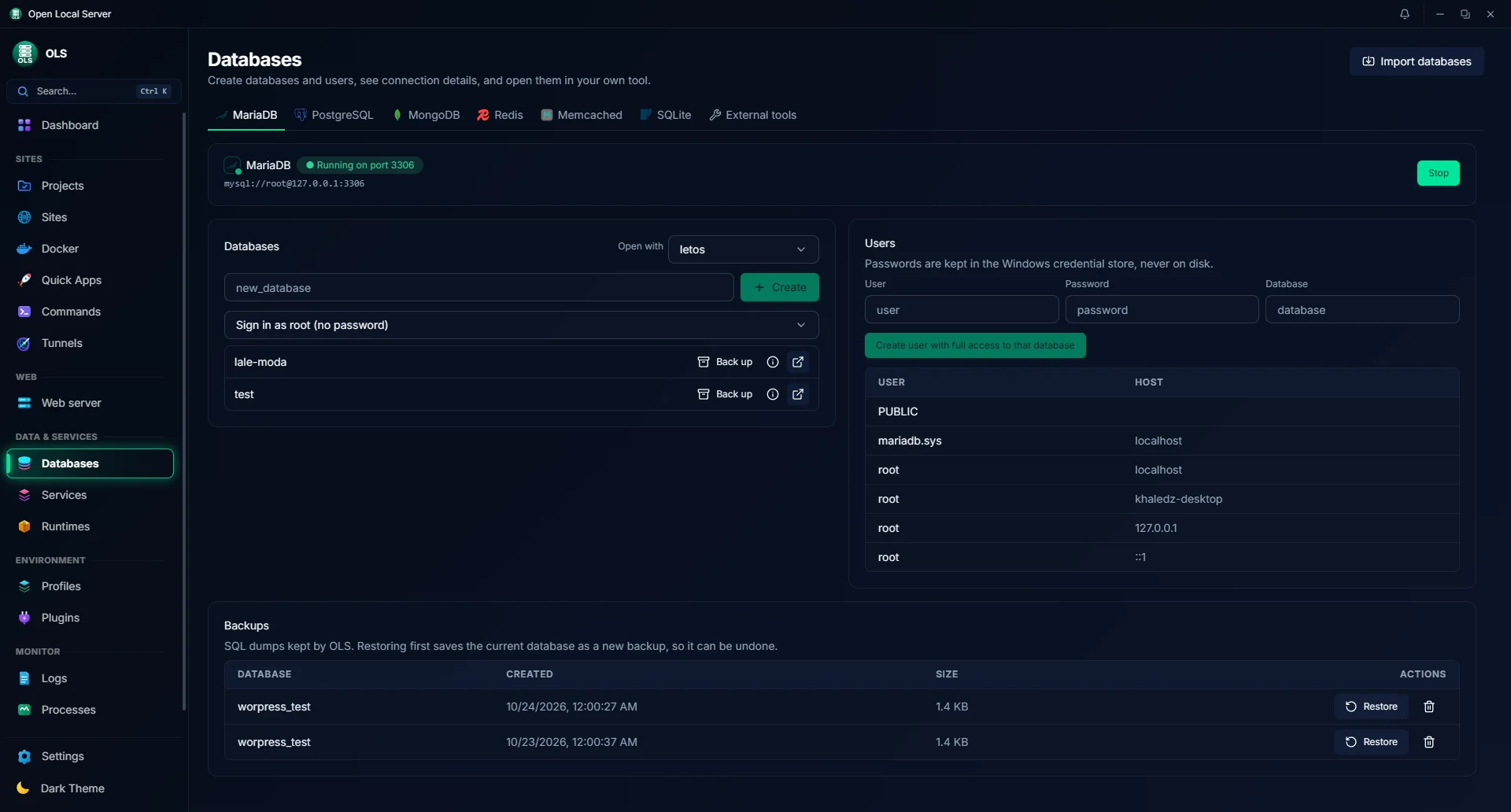
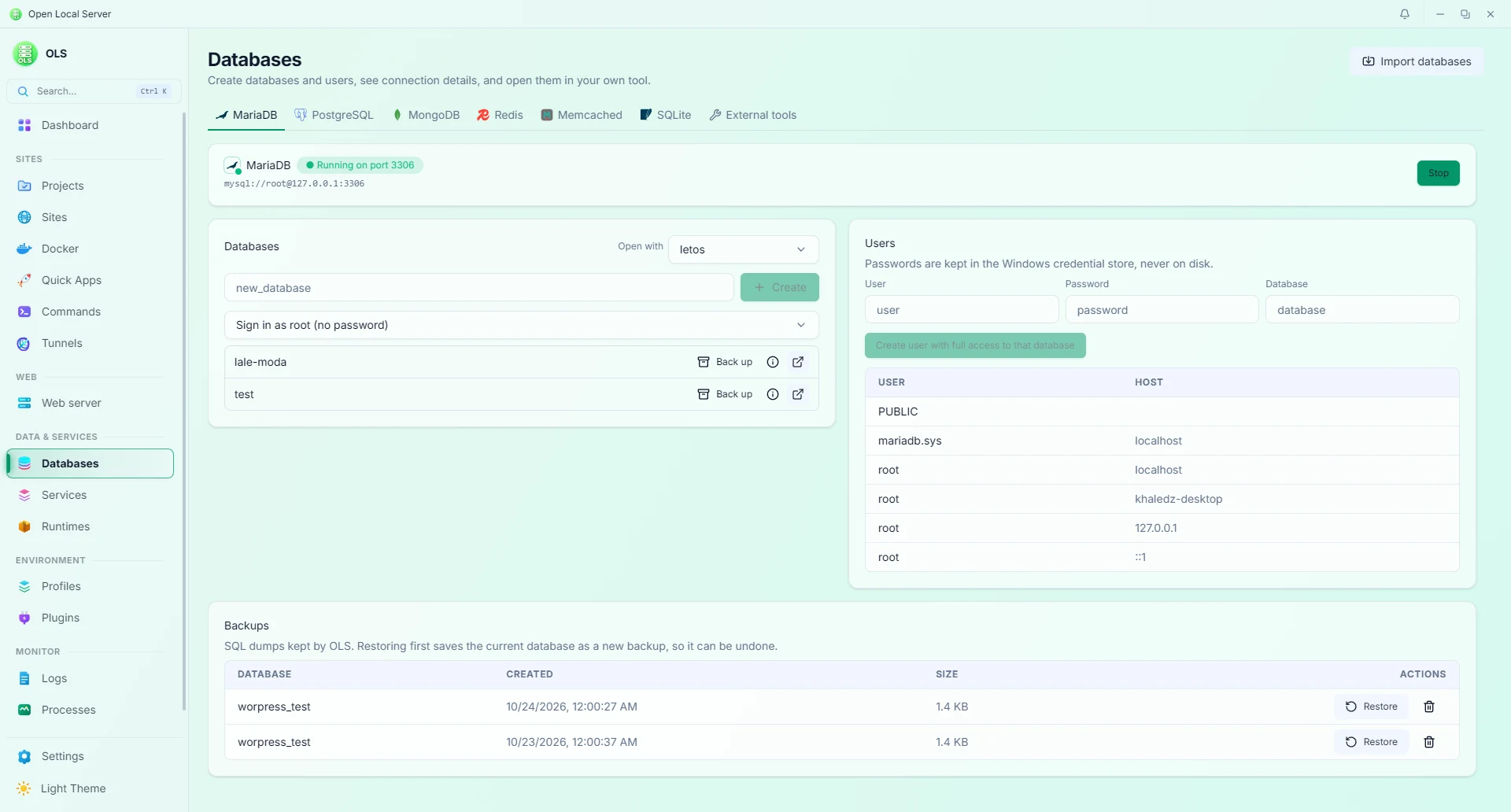
Databases — engines, users, backups, table inspection, and SQL tools (Dark & Light)
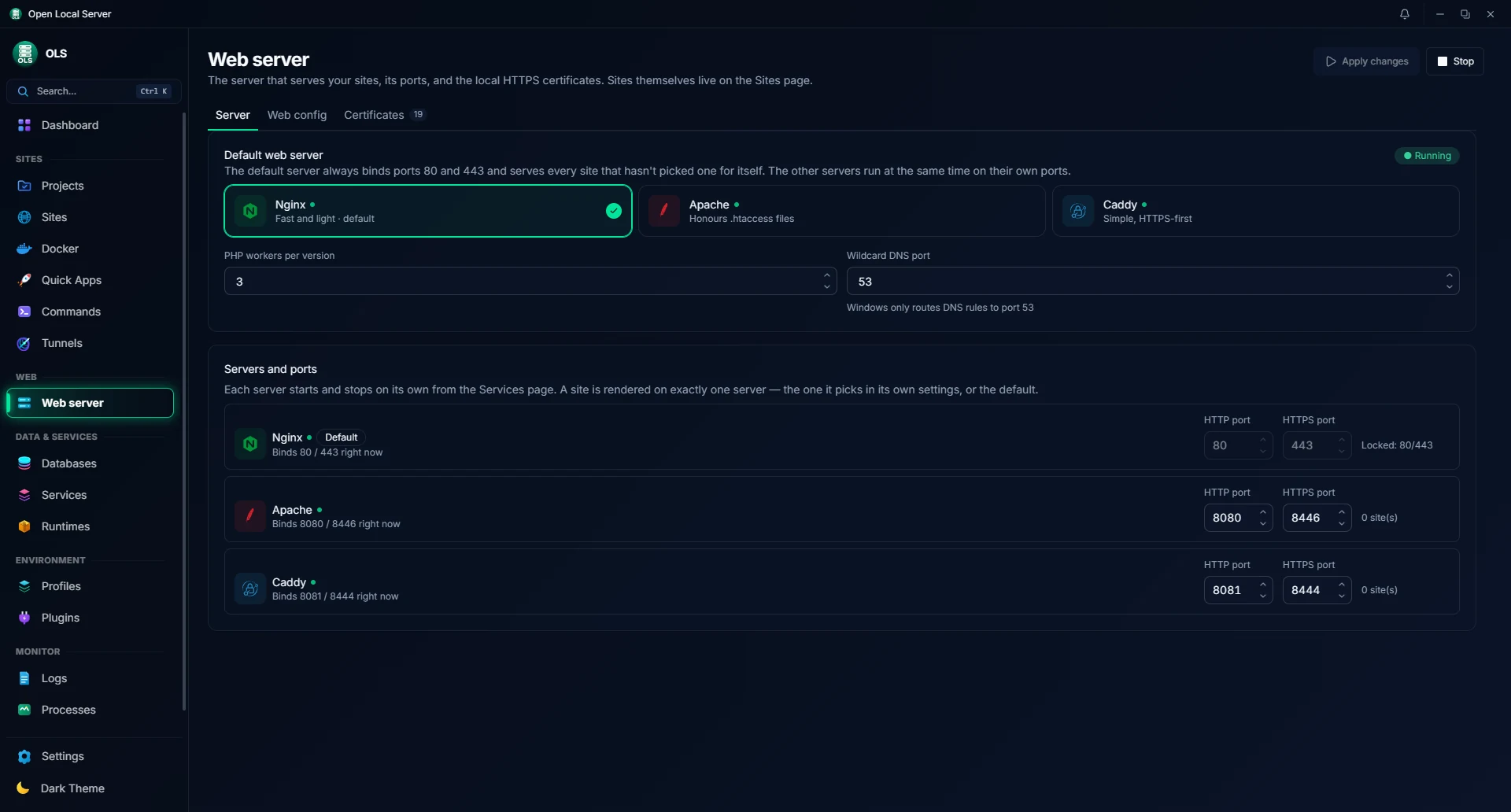
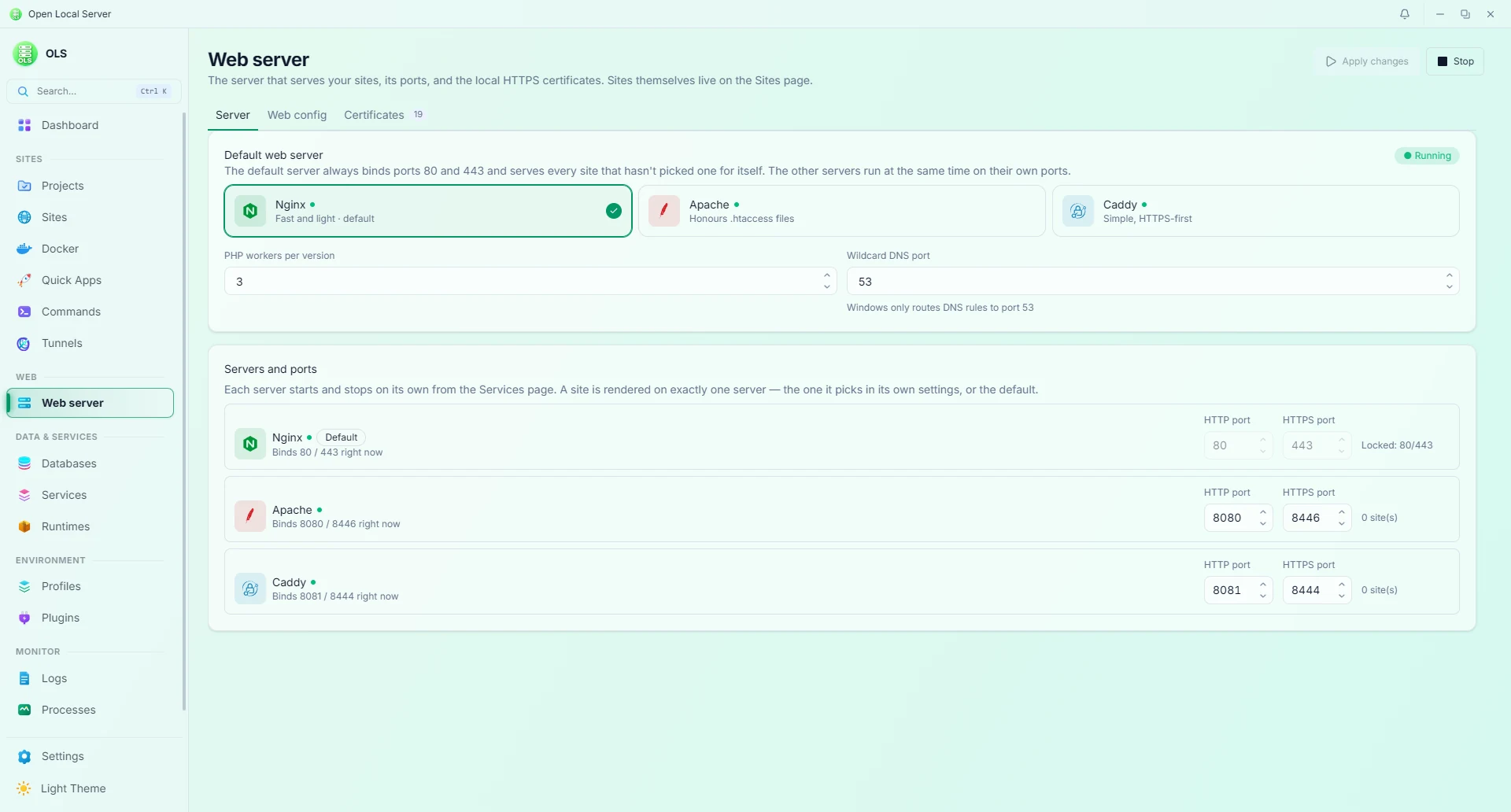
Web Server — live switching (Nginx / Apache / Caddy), syntax validation, and config history (Dark & Light)
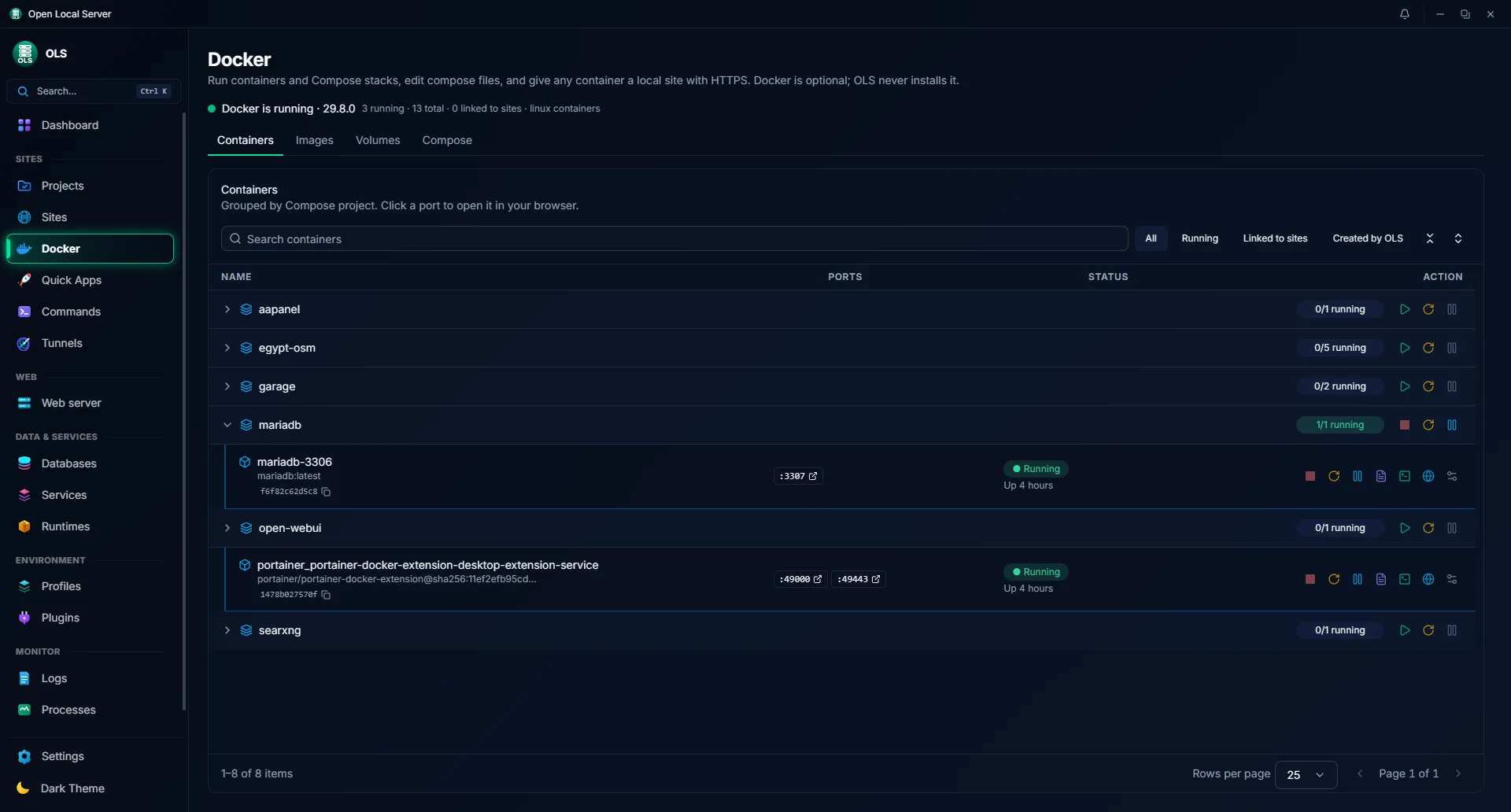
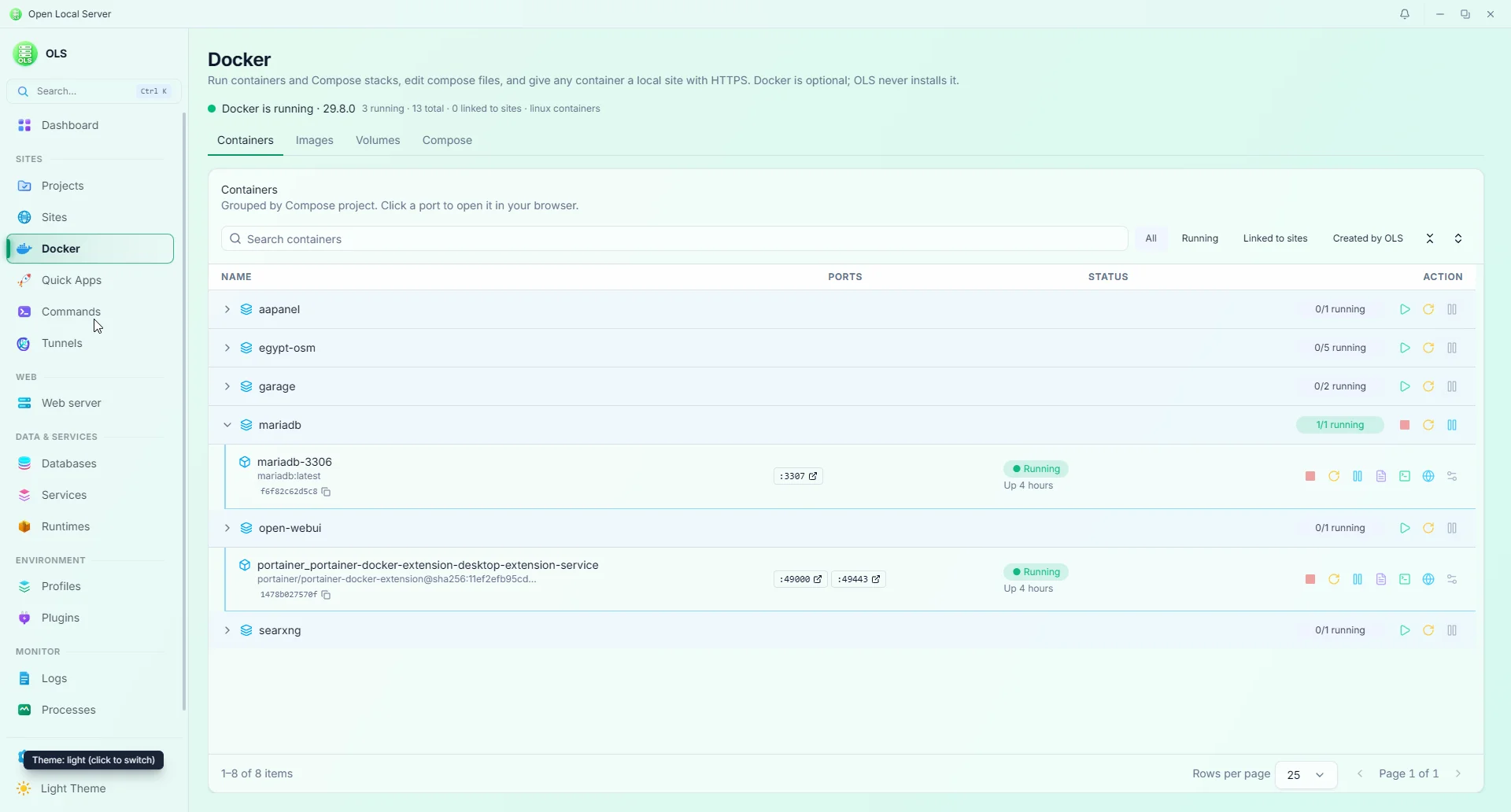
Docker — containers grouped by Compose project, ports, linked sites, logs, settings, and Create site (Dark & Light)
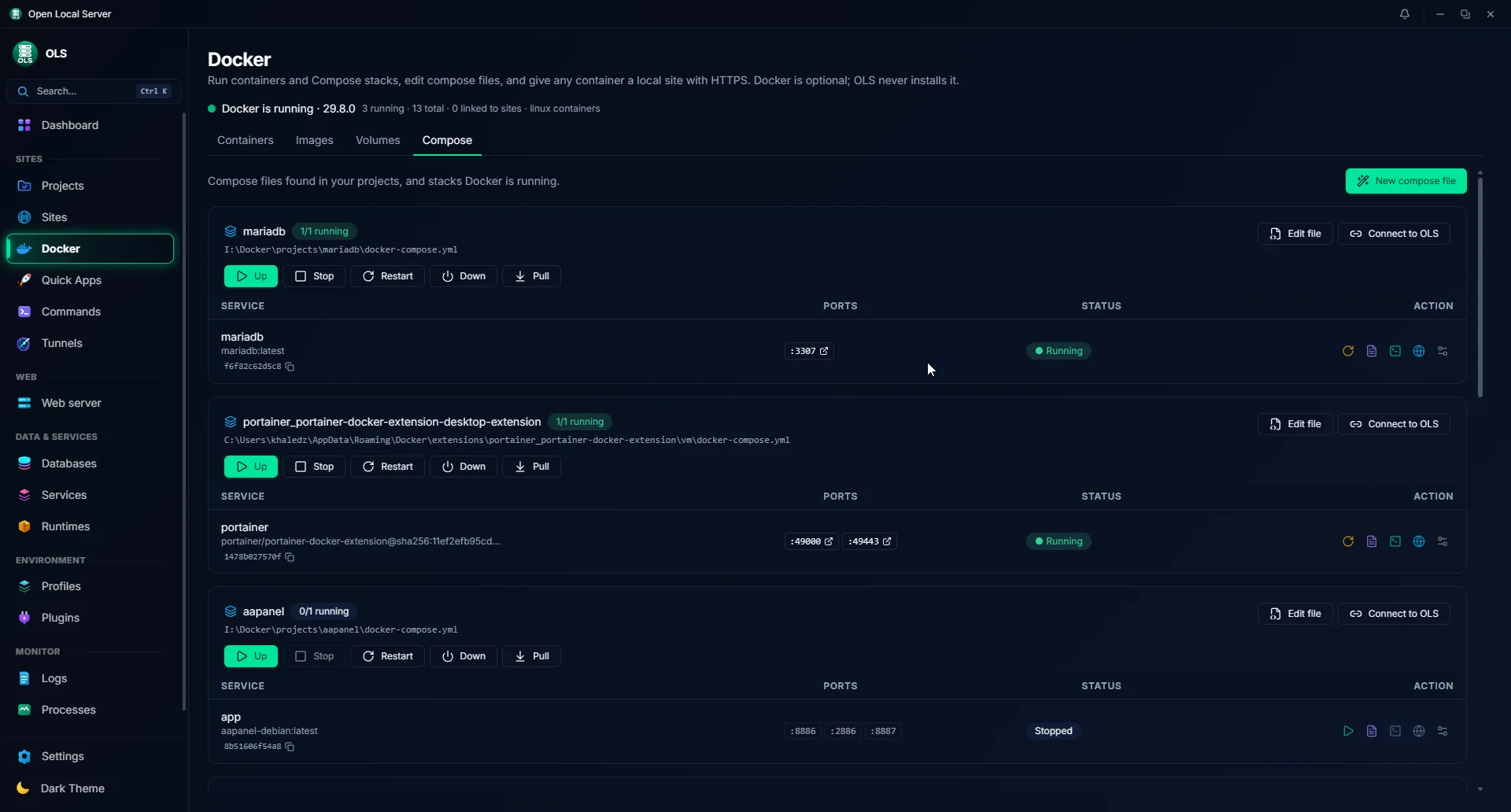
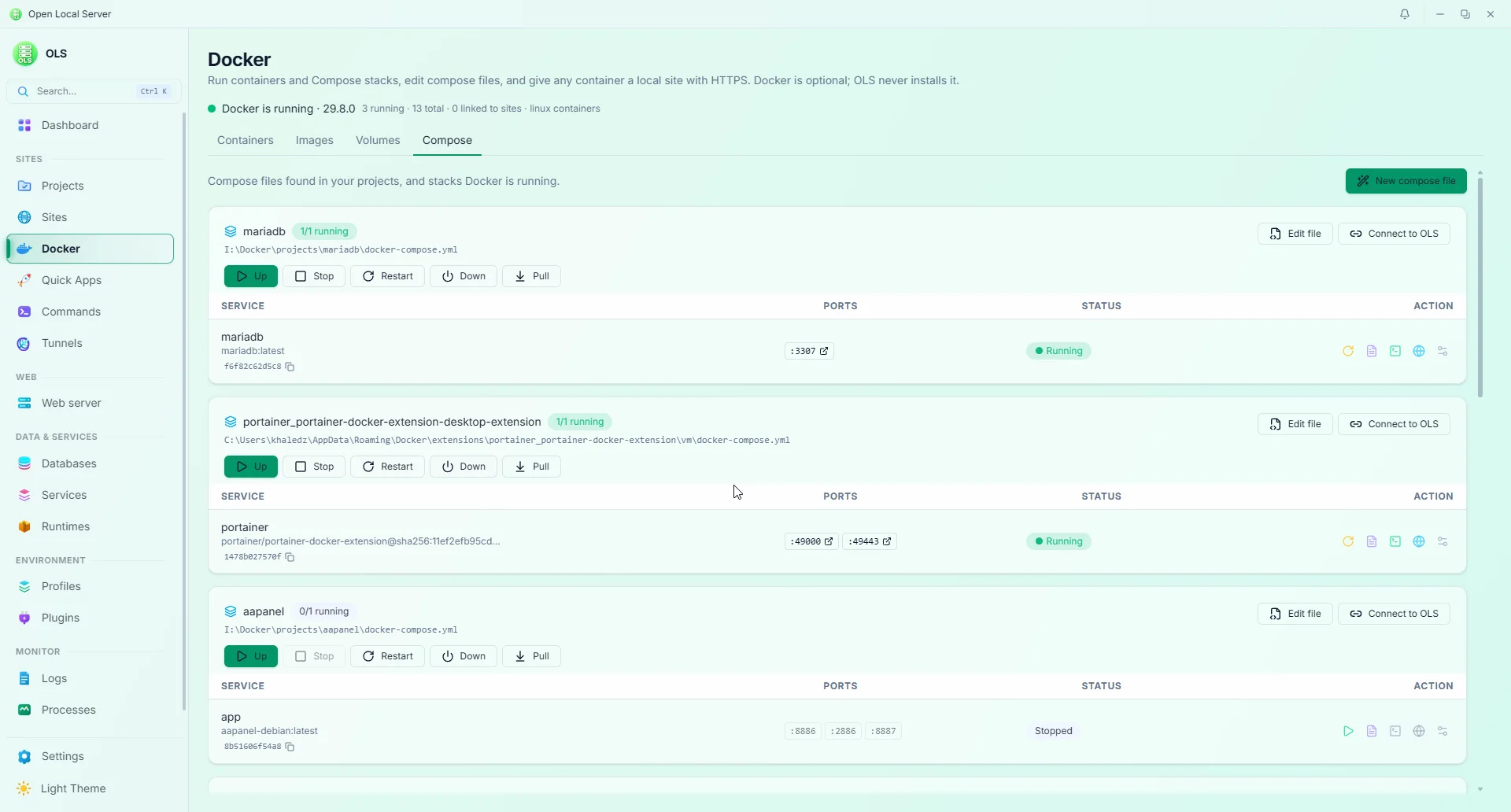
Compose — stacks from your projects with Up / Stop / Restart / Down / Pull, Edit file, Connect to OLS, and Passwords (Dark & Light)
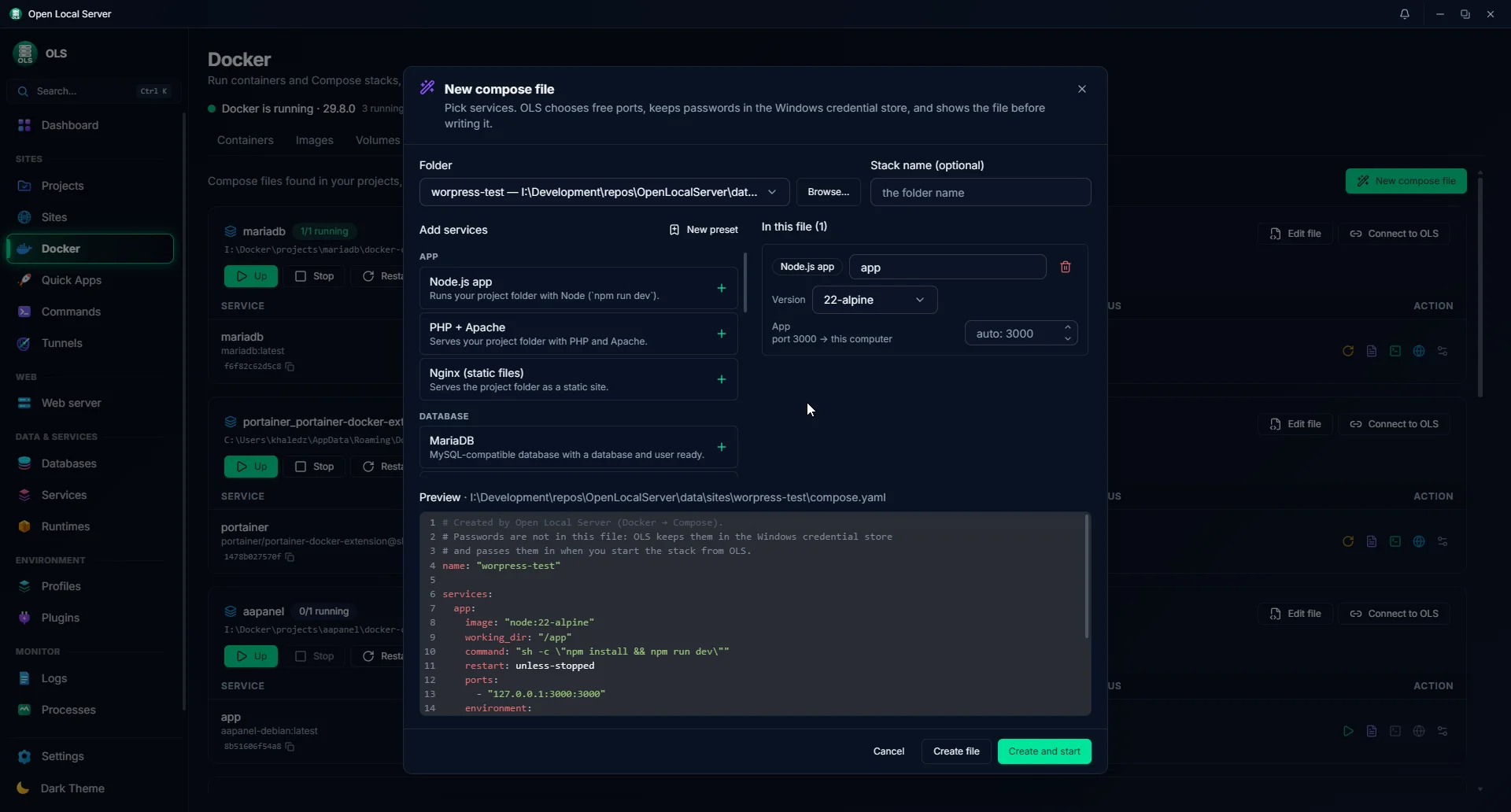
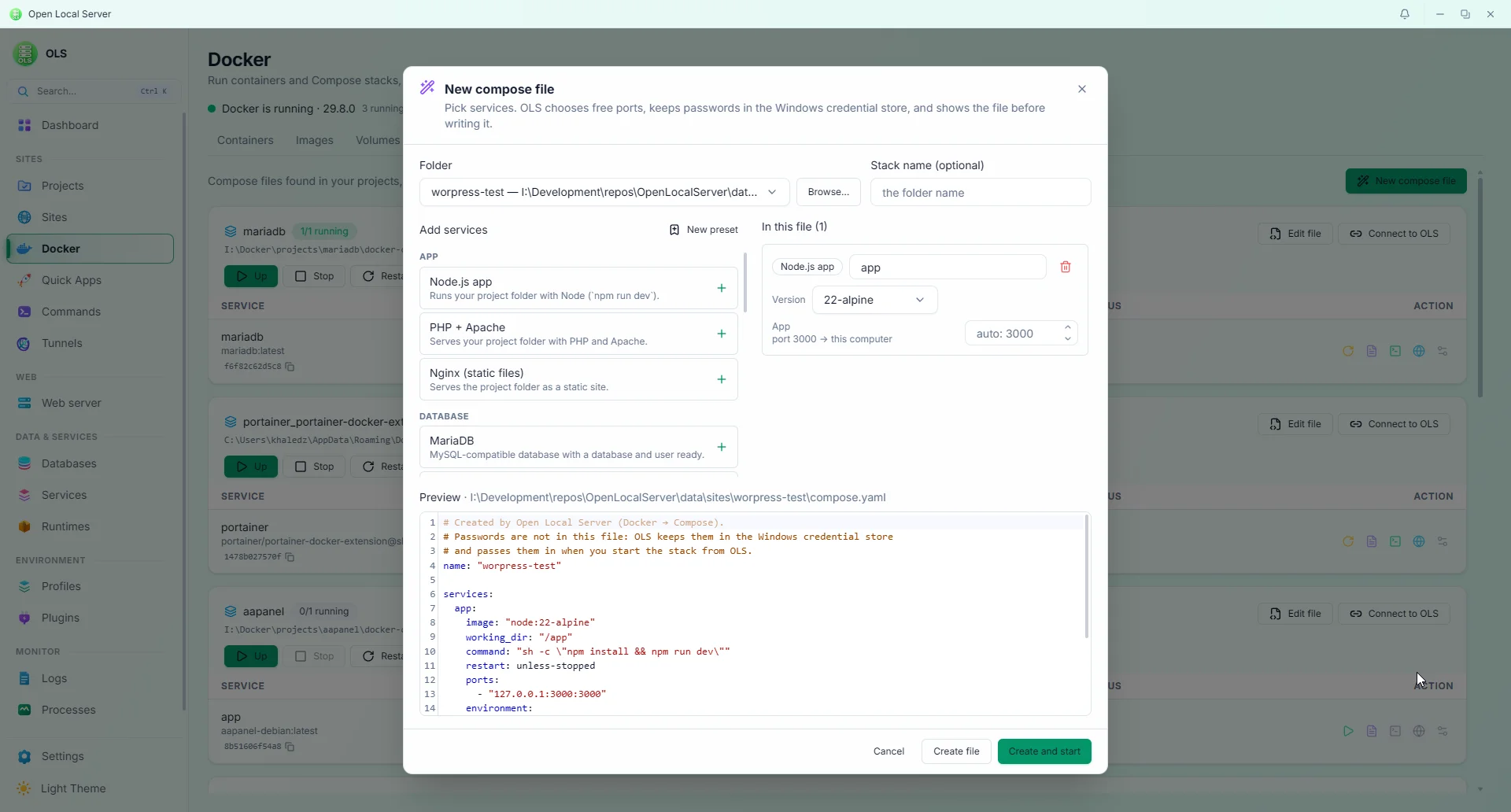
Compose builder — pick services or your own presets; free ports and stored passwords are handled for you, with a preview of the file (Dark & Light)
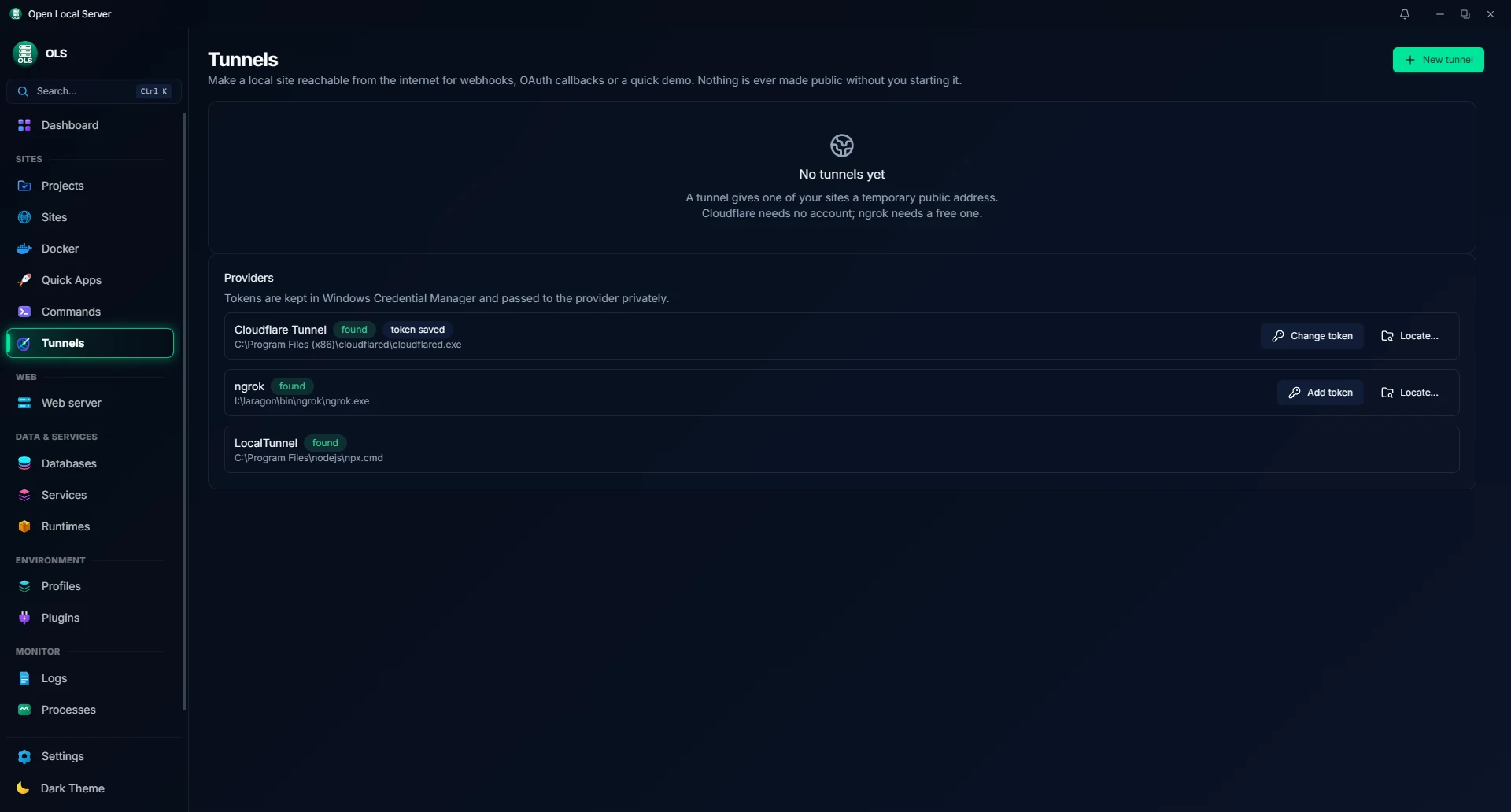
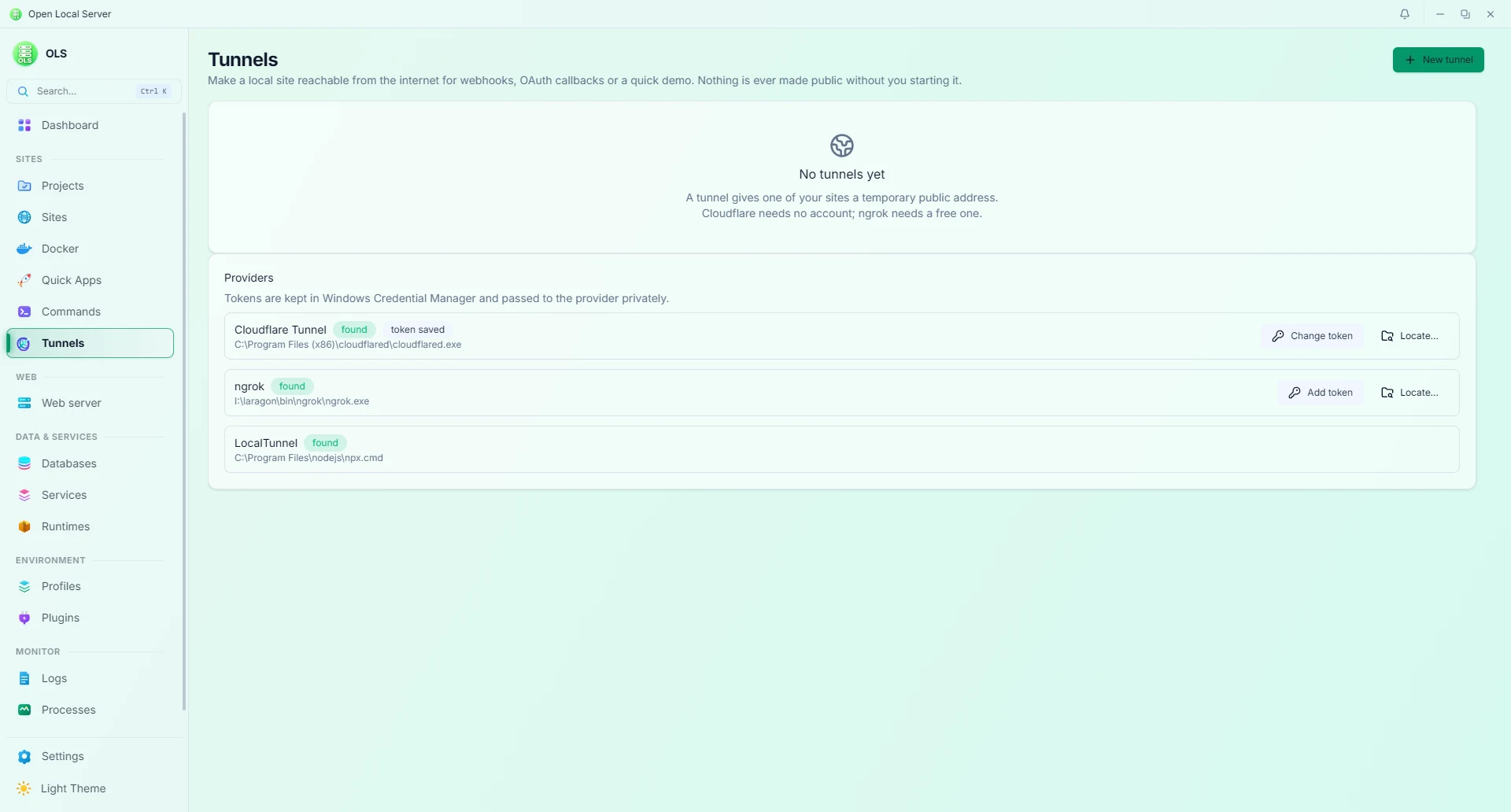
Tunnels — share a local site publicly, inspect traffic, and replay requests (Dark & Light)
✨ Features
📦 Runtimes & Toolchain
- Side-by-side versions per runtime with a dedicated Version Manager dialog: search, install, default badge, and per-version file path display.
- Not limited to specific versions: OLS is not tied to a fixed lineup. Run any version of any runtime and any database server — install it from the Version Manager, drop it in manually, or register your own build. Nothing is hardcoded to particular versions.
- Built-in catalog (one-click installs):
- PHP: NTS 8.1–8.5 with per-version extensions, Xdebug 3 configuration, PECL package support, and per-version
overrides.ini/conf.d/*.inifiles merged into the generatedphp.iniso your own directives survive restarts. - Node.js: corepack support (npm, pnpm, yarn); releases from the official Node.js catalog can be installed from the Version Manager.
- Python: embedded packages installable from the catalog, plus automated detection of system Python (3.7–3.15) and local virtual environments (
.venv,venv). Supervised background dev server processes (uvicorn,flask,django,waitress,streamlit). - Tooling: Composer 2.10, portable Git 2.55, and k6 2.3 load testing.
- PHP: NTS 8.1–8.5 with per-version extensions, Xdebug 3 configuration, PECL package support, and per-version
- Online catalogs per runtime with vendor-published sources, 24-hour caching, background refresh, and SHA-256 verification on all downloads with atomic extraction. In-flight downloads can be paused, resumed, or cancelled.
- Safe updates: Pre-releases are hidden unless you switch the channel in Manage, Node.js follows LTS, a major-version jump asks for confirmation first, and Update all updates every runtime with a newer version in one go.
- Bring your own: Scan folders for existing PHP installations (e.g. Laragon, XAMPP), or register custom executables (PHP, Node, Python) by locating the file.
- Manual runtime drop-in & offline installation: Drop any runtime into
<install dir>/data/runtimes/<id>/<version>/or cache archive into<install dir>/data/cache/. See the Troubleshooting & Manual Runtime Guide. - Resolution order: Project manifest pin > auto-detected from project files > global default. Changing a global default never touches existing project configurations.
🌐 Sites, Web Servers & HTTPS
- Multiple ways to add a site: Start from a new folder or an existing unconnected project, add a project root folder to detect its subfolders, clone directly from a Git repository, or scaffold with searchable Quick Apps. The project's detected document root (e.g.
public/) is used automatically. - Explorer right-click submenu: Right-click a folder → Show more options → Open Local Server → Add folder, Set up, Ignore project, or Ignore site. Turn it on in Settings with Add to Explorer (Repair and Remove are there too).
- Automatic document root & welcome page: When creating a new site, OLS automatically creates the document root folder and generates a default welcome file (
index.htmlorindex.php) if none exists. - Site status tabs & filtering: Dedicated Enabled, Disabled, Folder not found, and All tabs with quick counts and distinct colored status indicators. The Folder not found tab isolates missing directories and offline drives, providing a 1-click Locate button to re-point moved folders.
- Multi-domain project rows & context menu: Multiple domains sharing a project folder group into a single project row with primary domain focus and interactive extra-domain pills. Right-clicking any site row opens a cursor-positioned actions menu with smart viewport clamping and smooth internal scrolling.
- Hide, remove, or safely delete: Each site row offers Hide (with Undo), Remove from list, and Safe delete, which moves the folder into an
ols_excluded_sitessubfolder (with automatic name collision resolution) instead of deleting it from disk. Configurable ignored folders (projects.ignored_folders) in Settings. - Ignore markers: Drop
.ols_ignore_mein a folder to hide both the project and its site, or.ols_ignore_siteto hide and deactivate only the site while the project stays listed. OLS watches for these files and updates right away; Projects offers Unignore site. - Live Site Health Check: Runs DNS, TCP, TLS, certificate, trust, and HTTP checks and shows each stage as it completes.
- WordPress core repair: Restores missing WordPress core files, checked against WordPress.org checksums, with an offline cache.
- Site branding & icons: Custom site logos in table rows via local image upload with automatic WebP optimization, or a bundled offline catalog of 410 Font Awesome Free icons in 17 categories (CMS, frameworks, dev tools, cloud, OS, social, business, food, travel, health, education, games, and more; a searchable category list beside the grid, a searchable dropdown on narrow pickers) with swatch and custom color pickers. Icons ship inside the app and are never downloaded.
- Unlimited sites & domains: Any domain name plus wildcard subdomains; automatic
<folder>.<tld>naming with a configurable top-level domain (local, test, localhost, or custom); static sites; reverse proxies to anyhost:port. Run on a domain, onlocalhost/<prefix>, or both simultaneously. - Multi-interface web binding (
0.0.0.0&127.0.0.1): Web servers bind across all local network interfaces, supporting LAN access and router port forwarding. - Trusted local HTTPS: Built-in on-device Certificate Authority (CA), 397-day leaf certificates, automated renewal under 30 days, and SAN-aware reuse.
- Public HTTPS options: Per domain, use the local CA, your own certificate and key, or a free Let's Encrypt certificate (ACME HTTP-01) for public hostnames reachable on port 80.
- Per-site PHP version & per-site web server: Each site can run on its own PHP version and web server (Nginx, Apache, or Caddy); unpinned sites cleanly follow global defaults.
- Web server lineup:
- Nginx 1.28 & 1.30, Apache 2.4 (2.4.69), and Caddy 2.11 (2.11.4) with generated configurations.
- Caddy uses a stable localhost admin address derived from its install path, avoiding port 20019 collisions.
- Managed, Advanced, and Manual modes; validate-before-reload with automatic rollback; drift detection; config revision history with diff and restore.
- Built-in
.htaccesseditor for Apache sites.
- Zero-prompt DNS: Built-in wildcard DNS for
.test,.localhost, and.internal; elevated helper service for hosts file and NRPT rules (no repeated UAC popups). - Custom domains, site broadcast & Dynamic DNS (DDNS): Support for 12+ DNS providers (Cloudflare, DuckDNS, No-IP, Dynu, ClouDNS, HE.net, Route53, Namecheap, GoDaddy, Porkbun, DigitalOcean, and custom webhooks) with auto-sync and IP change detection.
- Site Broadcast panel: Live broadcast status and 1-click public URL copying integrated into the Site Domains panel.
- Router & port forwarding troubleshooting: Guides for resolving HTTP Error 522 and CGNAT restrictions.
🧩 Projects & Reproducible Environments
- Projects page: Browse, search, and manage local project folders with or without a site. Projects stay standalone by default and can be connected to a site later. Missing and offline folders are flagged with a Locate action.
- Project types: 17 built-in presets (Laravel, Symfony, WordPress, PHP, Python, Django, Flask, FastAPI, Node.js, Next.js, React, Vue, Go, .NET, Java, Static HTML, Other) plus Tauri auto-detection. Create, rename, delete, reorder, and pin your own custom types; a one-line filter bar collapses extras into a searchable "+N more" popover.
- Add folders your way: Drag folders onto the Projects page, use the Explorer submenu, or let OLS discover new folders in your project roots.
- Open in your editor: Auto-detects VS Code, VSCodium, Cursor, Windsurf, Trae, Zed, Sublime Text, Notepad++, and JetBrains IDEs (PhpStorm, WebStorm, IntelliJ IDEA, PyCharm, Rider, GoLand). Add custom editor paths and choose which ones appear under Settings → Editors.
- Tray shortcuts: The tray menu has a Projects submenu (open folder or editor in one click) and creates Quick Apps from your favorites.
- Auto-detection: Framework and version detection from
composer.json,package.json,manage.py, and project markers. - Manifests (
.openlocalserver/*.yaml): Declarative environment specifications, services, custom commands, and lock files. - 14-step setup pipeline: Resolve → plan → conflict report → dry-run → apply, fully journaled with automatic rollback on failure and file locking.
- Profiles & snapshots: Development, Testing, Debugging, and Demo profiles; point-in-time snapshots and backups (zip, clone, import/export); lossless
.enveditor preserving comments, key order, and CRLF line endings. - Automatic backups: Optional scheduled project snapshots and database dumps with per-site period and retention settings. Off by default, and only automatic backups are ever pruned.
- Encrypted site bundles: Export and import settings,
.envfiles, database dumps, and project files with optional Argon2id + ChaCha20-Poly1305 password encryption. Importing onto an existing site takes a snapshot first, and long exports and imports run as background tasks you can watch. - WordPress one-click admin login: WordPress projects get a WP Admin action that signs you in with a short-lived token, so no password is needed, shown, or changed.
- Quick Apps: 13 built-in application recipes (Laravel, Symfony, WordPress, Express, React/Vite, Vue, Next.js, Django, FastAPI, static HTML…) — parameter validation → plan review → execution with step history.
- Quick Commands: Auto-discovered Composer, npm, and manage.py scripts with 1-click execution and terminal ring buffer, plus preconfigured commands for Laravel, Node, and Python.
- Portable by design: Paths inside the install folder are stored relative, so you can rename the install folder or move it to another drive and every app-owned site keeps working.
🗄️ Databases & Services
- Engines: MariaDB (11.4 & 11.8), PostgreSQL (17.6), MongoDB (8.3), Redis (
redis-windows8.10), Memcached (1.6), Mailpit (1.31), SQLite (3.53). - Database inspection & SQL execution: Table listing and direct SQL command execution (
SELECT,INSERT,UPDATE,CREATE TABLE, etc.) across MariaDB/MySQL, PostgreSQL, and SQLite with client binary fallback (mariadb.exe,mysql.exe,psql.exe,sqlite3.exe). - Database & user management: Create databases and users, view connection strings, perform point-in-time backups and restores (safety copy created first), SQLite
.backupand integrity checks. - External tools gallery (
Databases → External tools): Auto-detects HeidiSQL, DBeaver, pgAdmin 4, DB Browser for SQLite, Letos DB Browser, NoSQLBooster for MongoDB, and Tiny RDM, or add your own tool. A visual arguments editor supports per-engine arguments, placeholder chips ({host},{port},{database},{path},{uri}), and a live command preview. Export and import tool setups as JSON without machine paths. - Import databases from several sources: Import from installed OLS MariaDB versions, Laragon, XAMPP, WampServer, other detected MySQL/MariaDB installs, or any data folder you browse to, in the order you choose. No manual SQL dump needed, and the source data folder is never changed.
- Conflict handling: When a database already exists, choose Skip existing (default), Replace existing (SQL safety backup first, restored if the import fails), or Rename incoming. Interrupted imports are recovered or rolled back on next start.
- Service lifecycle & mail capture: Background service supervision with TCP health checks, Mailpit outgoing mail capture per framework with
.envconfiguration diffs. - Custom services: Start, stop, and watch any program like a built-in service, with its own arguments, port, and health check (never run through a shell).
- Resource limits: Per-service limits on memory, CPU allocation, and process counts.
🐳 Docker
Docker is optional: OLS never installs it, and nothing Docker-related runs until you open the Docker page (under Sites).
- Status & containers: Docker's status and version, one-click Start Docker (Docker Desktop), and every container grouped by Compose project with filters (running, linked to sites, created by OLS). Start, stop, restart, pause and resume; click a port to open it; read the last 500 log lines (secrets redacted); open a shell inside a running container; copy a container's ID.
- Container settings: Image, command, ports, mounts, networks, labels and health, with password-like environment values hidden. Rename, change the restart policy, and set memory and CPU limits without restarting; edit environment variables (the container is recreated with its data kept, and restored if anything fails); remove a container (named volumes are kept).
- Images, volumes & cleanup: Images and Volumes tabs with sizes and what uses them, pull and run images, remove images and unused volumes, and a disk-usage bar with Reclaim space that previews exactly what a cleanup removes before it does (unused volumes are opt-in). Searchable, filterable, paginated lists.
- Compose stacks: Compose files found in your project folders plus stacks Docker is running. Up, Stop, Restart, Down (volumes kept), Pull and Build run as background tasks with live output and a Stop button.
- Compose editor: Edit a compose file in the built-in YAML editor. Check runs OLS's own rules (YAML, missing images, two services on one port, unpinned versions, passwords written in the file) and then Docker's
docker compose config; Save keeps a backup of the previous file. - Compose builder: Create a
compose.yamlby picking services — MariaDB, MySQL, PostgreSQL, MongoDB, Redis, Memcached, RabbitMQ, Meilisearch, Mailpit, Adminer, phpMyAdmin, PHP + Apache, Node.js, Nginx — or any image. Free ports are picked on127.0.0.1, passwords are generated into Windows Credential Manager and written to the file only as${OLS_SECRET_*}variables, and the exact file is shown before it is written. - Your own presets: Save your own services (image, versions, ports, environment with secret values, volumes, command) under My presets, or turn any image into a preset with Save as preset.
- Connect to OLS: One switch per stack lets its containers open your OLS sites by name, trust OLS's local HTTPS certificate (the certificate only, mounted read-only), and reach OLS's MariaDB, Redis and Mailpit through
host.docker.internal. OLS adds a generated override when it runs the stack; your compose file is not changed. - A site for any container: Create site gives a container a local domain with trusted HTTPS (a reverse proxy to its published port). If the container comes back on another port, the site follows it.
📊 Dashboard & Monitoring
- Consolidated Missing Folder Alerts: Collapses missing directories and offline external drives into a single summary card on the Dashboard with batch actions (1-click Manage in Sites, Ignore all / Unignore all).
- Disconnected Drive Detection & Deduplication: Accurately distinguishes missing project folders from offline external drives (
D:\, USB, network shares) instead of claiming deletion, and deduplicates physical paths. - Services card: Built-in services grouped by category (web servers, databases, cache & queues, mail) — start, stop, restart, reload, and logs color-coded per action with unavailable actions flattened.
- Ports tab: Clear rows per server (icon, name, HTTP, HTTPS, site count) with fixed-width port inputs; active default servers keep their 80/443 ports protected from accidental edits.
- Custom input steppers: Ports, worker counts, and memory limits use rounded in-app stepper chevrons with arrow key support.
- Overview: Active sites and projects counts, resource usage donuts (CPU, RAM, disk), and a 30-bucket web traffic graph with hover inspector.
- Diagnostics & Doctor: Detailed findings formatted as Problem / Cause / Fix, safe 1-click auto-repair, ignore rules, and redacted support bundle generation.
- Live System Tray Synchronization: Real-time tray icon tooltip (
OpenLocalServer — X of Y running) updating dynamically as sites and services change state, with dynamic green/red status marks across tray and taskbar. - Sidebar you choose:
Settings → Sidebarhides pages you don't use. Dashboard, Projects, Sites, Web server, Databases, Services, Runtimes and Settings always stay, and hidden pages still open from search. - Appearance & Aurora Themes: Flowing Dark Aurora and Light Aurora ambient backgrounds, multi-color SVG gradient icons across sidebar and settings navigation, and token-based appearance customization (presets, WCAG 2.1 contrast math, custom accent colors). Light and dark mode each keep their own background; a gradient set in one mode is adapted for the other until you set it.
- Notifications: Grouped toasts that pause on hover, live progress for background work, condition banners that clear themselves, and a notification history. Reversible actions use Undo instead of confirmation dialogs.
- Shared Save bar: One fixed Save/Discard bar for unsaved settings and site changes, with
Ctrl+S. - Unified logs viewer: Multi-source severity-aware log viewer with real-time tailing, search, level filtering, clipboard copy, and export.
- Processes & Background Tasks: Process supervisor with CPU/RAM metrics and per-site usage rollups. Background Tasks is a paginated table with live steps and progress, keeps recent site-operation history across restarts, groups repeats, and asks before clearing history.
- In-App User Manual & Release Notes: Full documentation and release notes viewer embedded under
Settings → User Manual. - Command palette (
Ctrl+Shift+P) & Global search (Ctrl+K).
🔗 Sharing & Tunnels
- Supported providers: Cloudflare Tunnel (
cloudflared), ngrok, LocalTunnel, and Tailscale. - Security controls: Public exposure confirmation gate, optional basic password protection, public status badge, and 1-click stop.
- Real-time traffic inspector: Forwarding proxy, redacted request log (500-request ring buffer), request replay, and webhook tester. Captures standard HTTP requests while streaming WebSockets and chunked data directly through.
Note on tunnel binaries: Tunnel executables are found on your system, not downloaded by OLS. Ensure
cloudflaredorngrokis installed and available on yourPATH(e.g. viawinget install Cloudflare.cloudflared). ngrok authtokens are stored securely in Windows Credential Manager.
🤖 MCP Server, CLI & API
Model Context Protocol (MCP) Server (
ols-mcp): Native stdio MCP server shipping directly with OLS (ols-mcp.exe). Allows LLM hosts (Claude Desktop, Cursor, VS Code, LM Studio) to inspect and control OLS through JSON-RPC 2.0 tools:- Domains & Sites:
ols_list_domains,ols_get_domain,ols_add_domain,ols_update_domain,ols_remove_domain,ols_set_domain_enabled,ols_restart_site_app,ols_get_sites_dir. - Projects & Editors:
ols_list_projects,ols_add_project,ols_update_project,ols_inspect_project_folder,ols_inspect_site_folder(detects frameworks, virtualenvs, entry scripts, and start commands),ols_list_project_types,ols_add_custom_project_type,ols_rename_custom_project_type,ols_remove_custom_project_type,ols_list_editors. - Runtimes:
ols_list_runtimes,ols_install_runtime,ols_refresh_runtimes. - Services & Tunnels:
ols_list_services,ols_start_service,ols_stop_service,ols_restart_service,ols_list_tunnels,ols_start_tunnel,ols_stop_tunnel. - Databases & Tables:
ols_list_databases,ols_create_database,ols_list_tables,ols_execute_sql(also callable asols_query_database). - Web Server, Commands & Tasks:
ols_apply_web,ols_validate_web,ols_run_command,ols_list_tasks. - Docker:
ols_docker_status,ols_docker_start,ols_docker_list_containers,ols_docker_container_action,ols_docker_container_logs,ols_docker_container_details,ols_docker_container_update,ols_docker_create_site,ols_docker_compose_list,ols_docker_compose_check,ols_docker_compose_action,ols_docker_compose_connect,ols_docker_compose_presets,ols_docker_compose_create. No tool removes or renames containers, andols_docker_compose_createnever replaces an existing file. - Hidden sites:
ols_unignore_sitebrings back a site hidden with.ols_ignore_site. - Optional token auth: Set a bearer token with an expiry in Settings (kept in the OS keyring) and pass it to
ols-mcpas--tokenorOLS_MCP_TOKEN. - See docs/MCP.md for full configuration examples and tool schemas.
Heads-up: MCP tools can create, change, and remove sites and run SQL against your local databases. Only connect AI hosts you trust.
- Domains & Sites:
Command Line (
olsc):- Drive OLS from any shell:
olsc setup,olsc doctor,olsc repair,olsc status,olsc start,olsc stop,olsc restart. - Full subcommands:
project(incl.ignore,unignore,ignore-site,unignore-site),runtime,php,service,domain,certificate,tunnel,worker,snapshot,quick-app,quick-command,plugin,catalog,api,update,shell-menu,support-bundle,network,test load(k6),search,guide. - Optional log assistant:
olsc ai(off until you turn it on; bring your own model via LM Studio, Ollama, Hugging Face, OpenRouter, or any OpenAI-compatible server). - Background daemon: Automatically runs in the background (
olsc daemon) when the GUI is closed.
- Drive OLS from any shell:
Local HTTP API (
127.0.0.1:7420): Bearer token authenticated JSON API mirroringCoreCommandoperations with read-only and operate scopes. See docs/API.md.Automation tools: Background queue workers (max 16, Procfile.dev import), scheduled cron tasks (1-minute tick, overlap protection, built-in cron editor), portable-pty terminal shells, and Git repository management.
Extensibility & Plugins: Declarative
plugin.yamlextensions via minisign-signed catalogs, re-verified on every load. See docs/PLUGINS.md.Signed self-updater: Update manifests and installers are signature- and SHA-256-verified before anything is replaced.
🚀 Getting Started
Most users only need the installer from the Download section. The instructions below are for building OLS from source.
Prerequisites
| Requirement | Version | Notes |
|---|---|---|
| Windows | 10 / 11 (64-bit) | Windows-only |
| Rust | Stable (1.75+) | Installed via rustup |
| Node.js | 22 LTS or newer | UI compilation |
| Tauri Prerequisites | — | Microsoft C++ Build Tools (MSVC), WebView2 runtime |
| Inno Setup | 6 or 7 | Required only for building the setup installer |
Install Dependencies
# Install Rust toolchain (if not already installed)
winget install Rustlang.Rustup

# Install Node.js LTS (v22+)
winget install OpenJS.NodeJS.LTS --version 22

# Install UI packages
cd ui
npm install
cd ..
Run Locally (Dev)
# From the repository root — builds ols-helper and launches Tauri + Vite
.\scripts\dev.bat
This launches the desktop app with hot module reloading (Vite server running on http://localhost:1420).
Build for Production
# 1. Quality gates (must pass cleanly)
cargo fmt --all
cargo clippy -p ols-core -p ols-helper --all-targets
cargo test -p ols-core -p ols-helper

# 2. Build and validate UI
cd ui
npm run lint
npm run build
cd ..

# 3. Build complete installer (staged executables, embedded icons, Inno Setup)
scripts\build-installer.bat full
The resulting installer package will be output to release\<version>\OLS-<version>-setup.exe.
💻 Usage
Register a Project and Go Live
# Clone any PHP, Node, or Python project
git clone https://github.com/example/my-laravel-app.git
cd my-laravel-app

# Set up environment: runtimes → DB → domain → DNS → SSL → mail → workers
olsc setup

# Or preview the setup plan without making any changes
olsc setup --dry-run

# Run health diagnostics and automatically resolve safe issues
olsc doctor
olsc repair
Daily CLI Commands
olsc status                                              # View services, sites, runtimes, and health
olsc start                                               # Start the web server and enabled services
olsc stop                                                # Stop all web servers, services, workers, and tunnels
olsc restart                                             # Restart running services and servers

olsc project list                                        # List registered projects
olsc service list                                        # List background services (MariaDB, PostgreSQL, Redis, Mailpit...)
olsc runtime list                                        # List installed and available runtimes

olsc tunnel list                                         # List configured public tunnels
olsc tunnel start <name> --yes                           # Start a tunnel by name or project
olsc worker start <project>                              # Start background queue workers for a project
olsc snapshot create <project> --label "pre-migration"   # Create a point-in-time project snapshot
olsc search "mailpit"                                    # Search across projects, configs, services, and logs
olsc guide                                               # Display the comprehensive user manual
AI Integration with MCP
You can connect your preferred AI coding assistant to OLS using the bundled ols-mcp.exe binary. For example, in Claude Desktop (claude_desktop_config.json) or Cursor:
{
  "mcpServers": {
    "ols": {
      "command": "C:\\OpenLocalServer\\ols-mcp.exe"
    }
  }
}
Once connected, you can ask your AI assistant natural questions:
- "List all my running sites and database services."
- "Create a new site called
api.testpointing toC:\sites\apiusing PHP 8.4." - "Create a MariaDB database named
shop_dband list its tables." - "Inspect the folder
C:\projects\fastapi-appand configure a supervised site."
Typical Flow in GUI
- Add Site: Register an existing folder, auto-scan a project root, or clone from Git. Frameworks and entry points are detected automatically.
- Setup: Review the 14-step environment plan and click Apply (with automatic rollback on error).
- Open Site: Click the domain link to open
https://myapp.testwith trusted local SSL. - Develop: Use the built-in
.enveditor, run commands from the Quick Commands panel, and view outgoing emails in Mailpit. - Share: Start a public tunnel with explicit confirmation and monitor requests in the real-time Traffic Inspector.
🛠 Troubleshooting & Manual Runtimes
Encountering download issues, antivirus false positives, or running in an offline environment?
You can manually drop any runtime (Apache, Nginx, PHP, MariaDB, PostgreSQL, etc.) directly into <install dir>/data/runtimes/<id>/<version>/, place pre-downloaded archives into <install dir>/data/cache/, or link existing local installs via the GUI.
👉 Read the full Troubleshooting & Manual Runtime Guide for detailed folder structures, binary location maps, and common fixes.
📁 Project Structure
OpenLocalServer/
├── crates/
│   ├── ols-core/        # Application core — CoreCommand dispatcher, state management,
│   │                    # managers: Runtime, Service, Web, Domain, Certs, Project,
│   │                    # ProcessSupervisor, Workers, Scheduler, Tunnel, Mail,
│   │                    # Diagnostics, QuickApp, Plugin, Database Tools, Docker
│   ├── ols-helper/      # Elevated helper executable — manages hosts file and NRPT rules
│   │                    # via UAC or a LocalSystem named pipe (strictly validated API)
│   ├── ols-cli/         # CLI client (`olsc.exe`) — drives the app or background daemon
│   └── ols-mcp/         # Stdio Model Context Protocol server (`ols-mcp.exe`) for AI hosts
├── src-tauri/           # Tauri 2 desktop shell (`OLS.exe`) — windowing, tray, single IPC dispatcher
├── ui/src/              # React 19 + Vite 8 + Tailwind CSS 4 + shadcn/ui frontend
│   ├── pages/           # Dashboard, Sites, Projects, Docker, QuickApps, Commands, WebServer, Databases,
│   │                    # Services, Runtimes, Tunnels, Profiles, Plugins, Logs,
│   │                    # Processes, Tasks, Settings, Config
│   └── components/      # UI primitives, dialogs, form fields, and code editors
├── vendor/              # Vendored companion utilities (cpulimit.exe under MIT license)
├── installer/           # Inno Setup packaging script (`open-local-server.iss`)
├── scripts/             # Entry points only: dev.bat, build-installer.bat, update-version.bat,
│                        # upload-release.bat, run-checks.bat (all quality gates), build-app-icons.bat, build-fa-icons.bat; each .bat keeps its helper
│                        # files in a same-named subfolder (e.g. scripts/update-version/)
├── release-notes/       # Version release notes (v2.5.0.md, etc.)
├── specs/               # Single source of truth — architecture, catalog, data models,
│                        # relationships, API reference, runtime logs, and diagrams
├── docs/                # Comprehensive guides: OLS_USER_MANUAL.md, MCP.md, API.md, PLUGINS.md...
├── website/             # Project website and documentation assets
└── assets/              # App branding, icons, and README screenshots (.webp)
Architecture (One Core, Multiple Front Doors):
Desktop GUI (React) ──┐
CLI (olsc) ───────────┼──> Core::dispatch(CoreCommand) ──> Arc<Inner> Shared State
MCP Server (ols-mcp) ─┤                                         │
HTTP API (127.0.0.1) ─┘                                         ▼
                                                      Managers:
                                                      Runtime, Service, Web, Domain,
                                                      Certs, Project, ProcessSupervisor,
                                                      Workers, Scheduler, Tunnel, Mail,
                                                      Diagnostics, QuickApp, Plugin, Docker
🤖 Built for AI, Built to be Forked
The entire project is built and documented with AI-pair engineering in mind:
- Model Context Protocol (
ols-mcp): Native MCP tools expose full environment operations directly to LLMs. - Specifications as Truth (
specs/): Thespecs/directory defines architecture, catalogs, data models, relationships, and API specifications. Any code change updates matching specs. - Agent Guidelines (
AGENTS.md): Clear rules and quality gates guide automated agents and human contributors alike. - Structured Error Diagnostics: All errors adhere to
Diagnostic{ problem, cause, fix }so both users and AI assistants can automatically diagnose and repair issues.
Fork the repository, point an AI agent (Cursor, Claude, Antigravity) at the codebase, and customize it to suit your workflow.
🤝 Contributing
Contributions are very welcome! Please review CONTRIBUTING.md and CODE_OF_CONDUCT.md before submitting pull requests.
# Mandatory Quality Gates — must pass before submitting a PR
cargo fmt --all
cargo clippy -p ols-core -p ols-helper --all-targets
cargo test -p ols-core -p ols-helper
cd ui
npm run lint
npm run build
- Specs-sync mandate:
specs/is the single source of truth. Any functional change must update the corresponding specification files and append a log entry tospecs/runtime.md. - Safety guarantees: User errors use
Diagnostic{problem,cause,fix}; file downloads must verify SHA-256; secrets remain exclusively in the OS keyring. - Commit convention: Follow Conventional Commits (
feat:,fix:,docs:).
🧾 Third-Party Notices
OLS is licensed under GPL-3.0-only (see LICENSE).
The installer packages OLS companion binaries only (OLS.exe, olsc.exe, ols-helper.exe, ols-mcp.exe, cpulimit.exe) — no third-party runtimes, web servers, or databases are bundled. Companion binary cpulimit.exe is MIT-licensed from kz370/win-utils. Runtimes are downloaded on demand from official vendors, SHA-256 verified, and extracted into isolated OLS directories that you can remove at any time. Tunnel executables are neither downloaded nor installed; OLS locates existing binaries on your system PATH.
Downloaded on Demand (NOT bundled in installer)
| Component | License | Official Source |
|---|---|---|
| PHP (NTS 8.1–8.5) | PHP License 3.01 | windows.php.net |
| Composer 2.10 | MIT | getcomposer.org |
| Node.js | MIT | nodejs.org |
| corepack / npm / pnpm / yarn | MIT / Various | nodejs.org |
| Python (embedded builds) | PSF License | python.org |
| Portable Git | GPL-2.0-only | git-scm.com |
| k6 (Load Testing) | AGPL-3.0-only | grafana.com/k6 |
| Nginx (1.28, 1.30) | BSD-2-Clause | nginx.org |
| Apache HTTP Server (2.4.69) | Apache-2.0 | apachelounge.com |
| Caddy (2.11.4) | Apache-2.0 | caddyserver.com |
| MariaDB (11.4, 11.8) | GPL-2.0-only | mariadb.org |
| PostgreSQL (17.6) | PostgreSQL License | postgresql.org |
| MongoDB (8.3) | SSPL-1.0 | mongodb.com |
Redis (redis-windows 8.10) |
RSALv2 / SSPLv1 | github.com/redis-windows |
| Memcached (1.6) | BSD-3-Clause | memcached.org |
| Mailpit (1.31) | MIT | github.com/axllent/mailpit |
| SQLite (3.53) | Public Domain | sqlite.org |
| HeidiSQL | GPL-2.0 | heidisql.com |
| DBeaver Community | Apache-2.0 | dbeaver.io |
| DB Browser for SQLite | MPL-2.0 / GPL-3.0 | sqlitebrowser.org |
| pgAdmin 4 | PostgreSQL License | pgadmin.org |
| NoSQLBooster | Proprietary / Free Tier | nosqlbooster.com |
| Tiny RDM | MIT | github.com/tiny-craft/tiny-rdm |
| cloudflared | Apache-2.0 | github.com/cloudflare/cloudflared |
| ngrok | Proprietary (freeware) | ngrok.com |
| localtunnel | MIT | github.com/localtunnel/localtunnel |
| Tailscale | BSD-3-Clause | tailscale.com |
Notes
- Each runtime and database runs as a separate host process in its own folder and is never linked into OLS binaries.
- Redis and MongoDB use source-available licenses (RSALv2/SSPLv1 and SSPL-1.0).
- Tunnel provider binaries (
cloudflared,ngrok) are searched onPATHand never downloaded or redistributed by OLS. - Site and project icons include Font Awesome Free icons by Fonticons, Inc., licensed CC BY 4.0. Brand icons are trademarks of their respective owners. The SVG paths are bundled in
ui/src/components/faIconsData.json, generated byscripts\build-fa-icons.batfrom the curated list inscripts/build-fa-icons/icons.json.
📄 License
GPL-3.0-only — see LICENSE. For security disclosures, see SECURITY.md.
Feel free to use the code, customize it, and make your own version.
Built with Rust · Tauri 2 · React 19 · Tokio · Model Context Protocol (MCP)
Status ·
User Manual ·
Troubleshooting & Manual Runtimes ·
MCP Server Guide ·
API Reference ·
Contributing
Yorumlar (0)
Yorum birakmak icin giris yap.
Yorum birakSonuc bulunamadi