fleet-deck
Health Gecti
- License — License: MIT
- Description — Repository has a description
- Active repo — Last push 0 days ago
- Community trust — 10 GitHub stars
Code Uyari
- network request — Outbound network request in board/src/api.js
Permissions Gecti
- Permissions — No dangerous permissions requested
Bu listing icin henuz AI raporu yok.
Mission control for every Claude Code session on your machine.

Fleet Deck ⚡


Mission control for every Claude Code session on your machine.
You know how it goes. You start one Claude Code session. Then one in a worktree, because you're organized. Then a third one "just to look something up," and a fourth because the second one seemed stuck. It is now 6 PM, two of them are editing util.js at the same time, one has been silently waiting forty minutes for you to approve rm -rf node_modules, and you honestly could not say which terminal tab is which.
Fleet Deck is the air-traffic control tower for that situation.
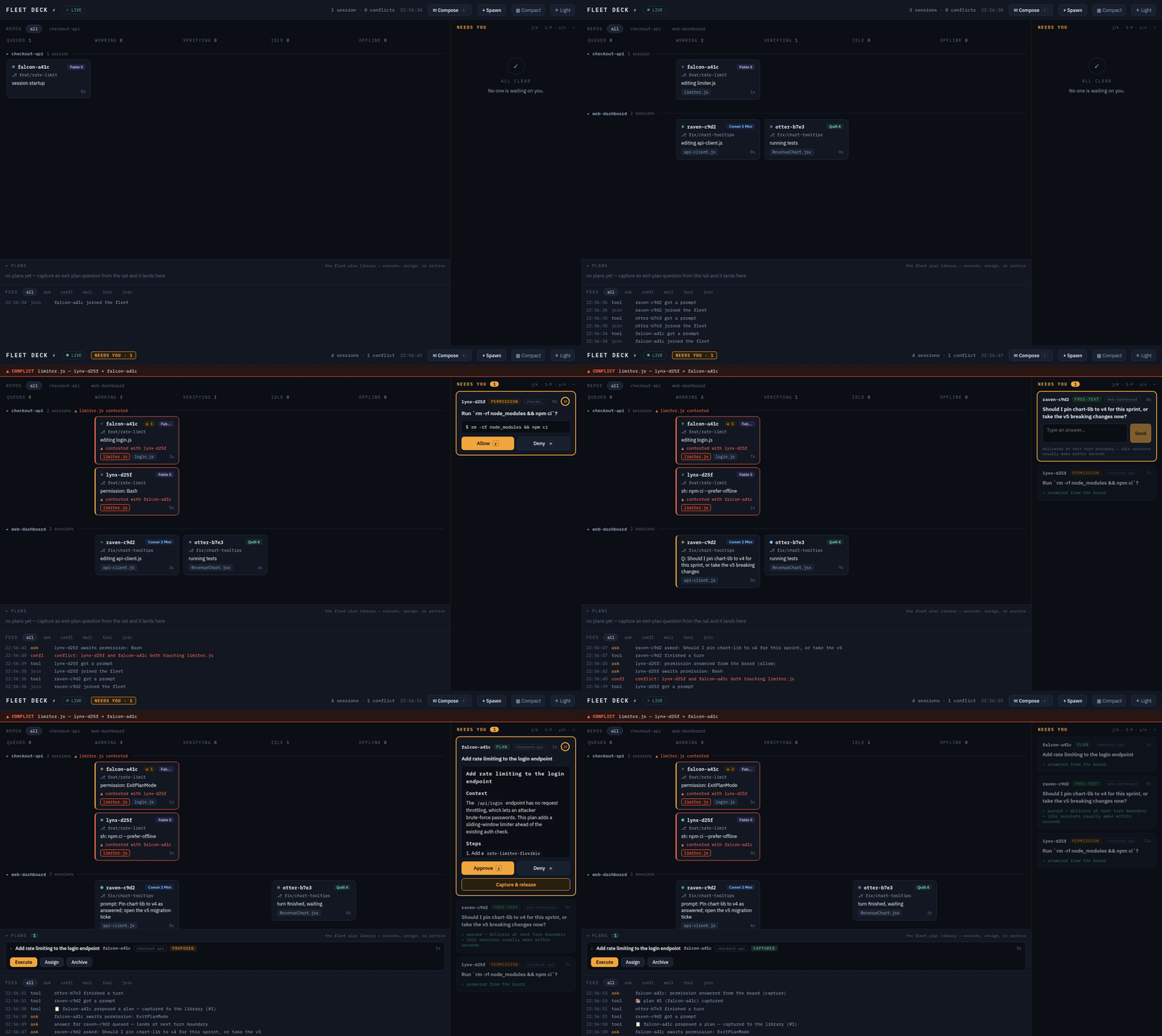
Every session on the machine appears on one local board — http://127.0.0.1:4711 — with a callsign (falcon-a3f2, otter-91c4... yes, the banner is literally the roster), a live column derived from what it's actually doing, and a mailbox. Sessions get whispered at when they're about to trample each other's files. Questions land in an amber rail you can answer from across the room. And when you're feeling ambitious, the board will spawn new workers, route tasks to whoever's idle, and file their plans in a library.
What it does
- See everything.
queued → working → verifying → needs-you → idle → offline, derived from hook telemetry — never self-reported, because sessions, like people, believe they are almost done. The model badge is derived the same way: Claude Code only reports the model at startup, so Fleet Deck reads it from the session transcript instead and the badge follows a mid-session/modelswitch rather than freezing on whatever the session happened to launch with. - Conflict radar. Two sessions touching the same file within 30 minutes get warned in context ("coordinate, don't clobber"), the board flashes hazard-red, and yes, it's worktree-aware — the same file edited in two worktrees of one repo is a merge conflict introducing itself early.
- Needs-you rail. Permission prompts, multiple-choice questions, MCP forms, and trailing "should I use bcrypt or argon2?" questions all become cards you answer from the board. The terminal never even asks — it just prints
⎿ Allowed by PermissionRequest hookand carries on, slightly smug. - Mail with honest latency. Message any session, a whole repo, or everyone. Delivered at the next turn boundary — idle sessions usually wake within seconds (a small watcher taps them on the shoulder). The board never promises "instant," because we don't lie to you, even about milliseconds.
- An orchestrator with no brain, on purpose.
assign auto: fix the flaky testpicks the best candidate — idle first, least buried, right repo — with a SQL query, not a model call. The core makes zero model calls. Your tokens are yours. - A dynamic fleet. The
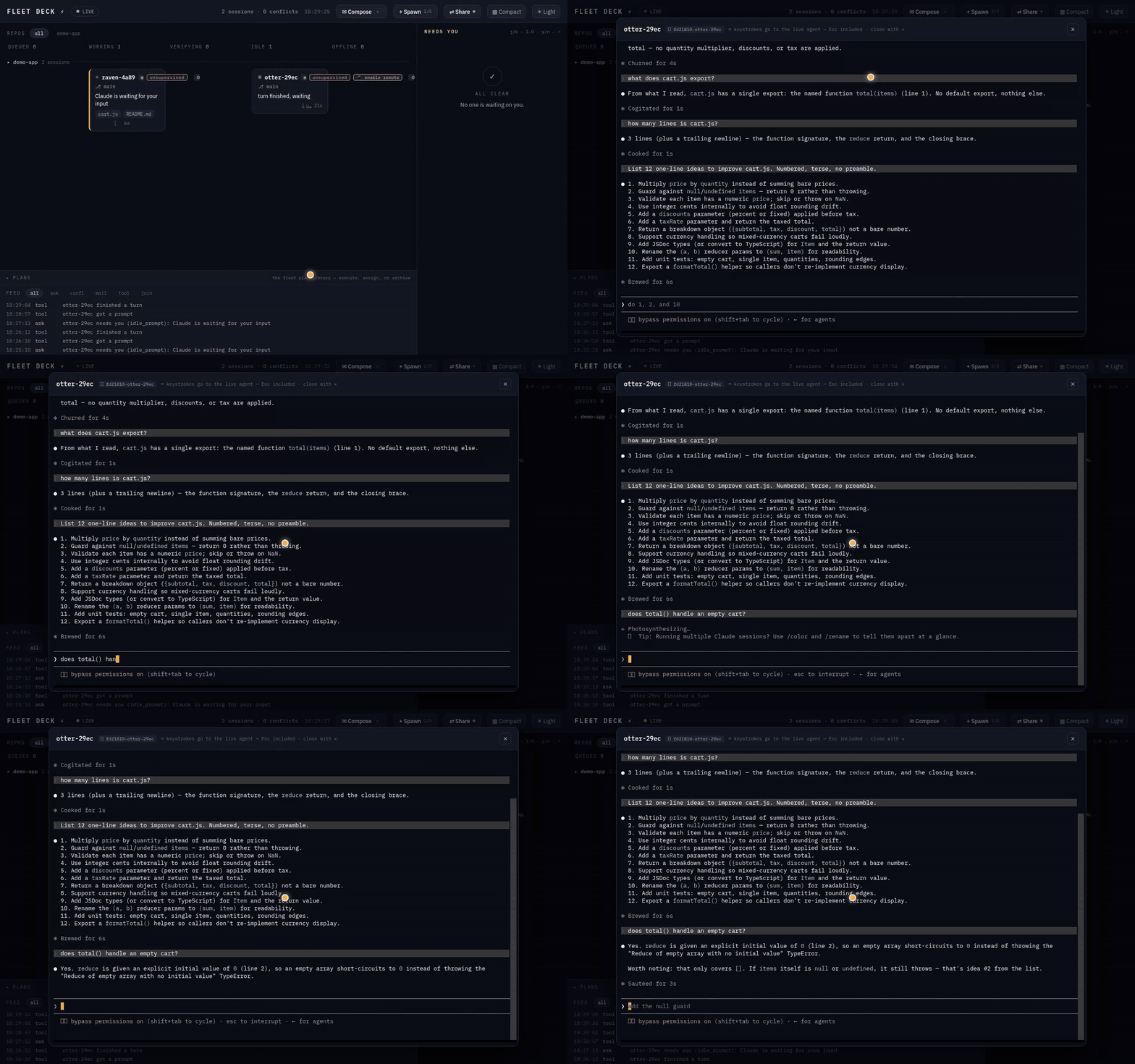
+ Spawnbutton starts a fresh interactiveclaudein a daemon-owned tmux window. Watch it work on the board, attach to the pane if you're nostalgic for terminals, kill it when it's done (there's a confirm; we've all misclicked). - A live terminal. Click a board-spawned session's tmux chip and its pane opens in a modal — an xterm.js terminal bridged over WebSocket to a tmux control-mode client (
tmux -C attach). No PTY, no native deps, and typing in the modal sends real keystrokes to the agent's pane: you're driving the actual session, not watching a replay. Shift+Enter gives you a newline instead of a submit, with nothing to configure: a terminal normally can't tell Shift+Enter from Enter — both are just a carriage return on the wire, which is why multi-line input needs/terminal-setupin a real emulator — but here the board is the emulator, so it simply sends theESC CRthat Claude Code's own keybinding asks for. The plain-tmux equivalent is stilltmux attach -t fleetdeck-4711:fd4711-<callsign>— same pane, more ritual. - The wall of screens.
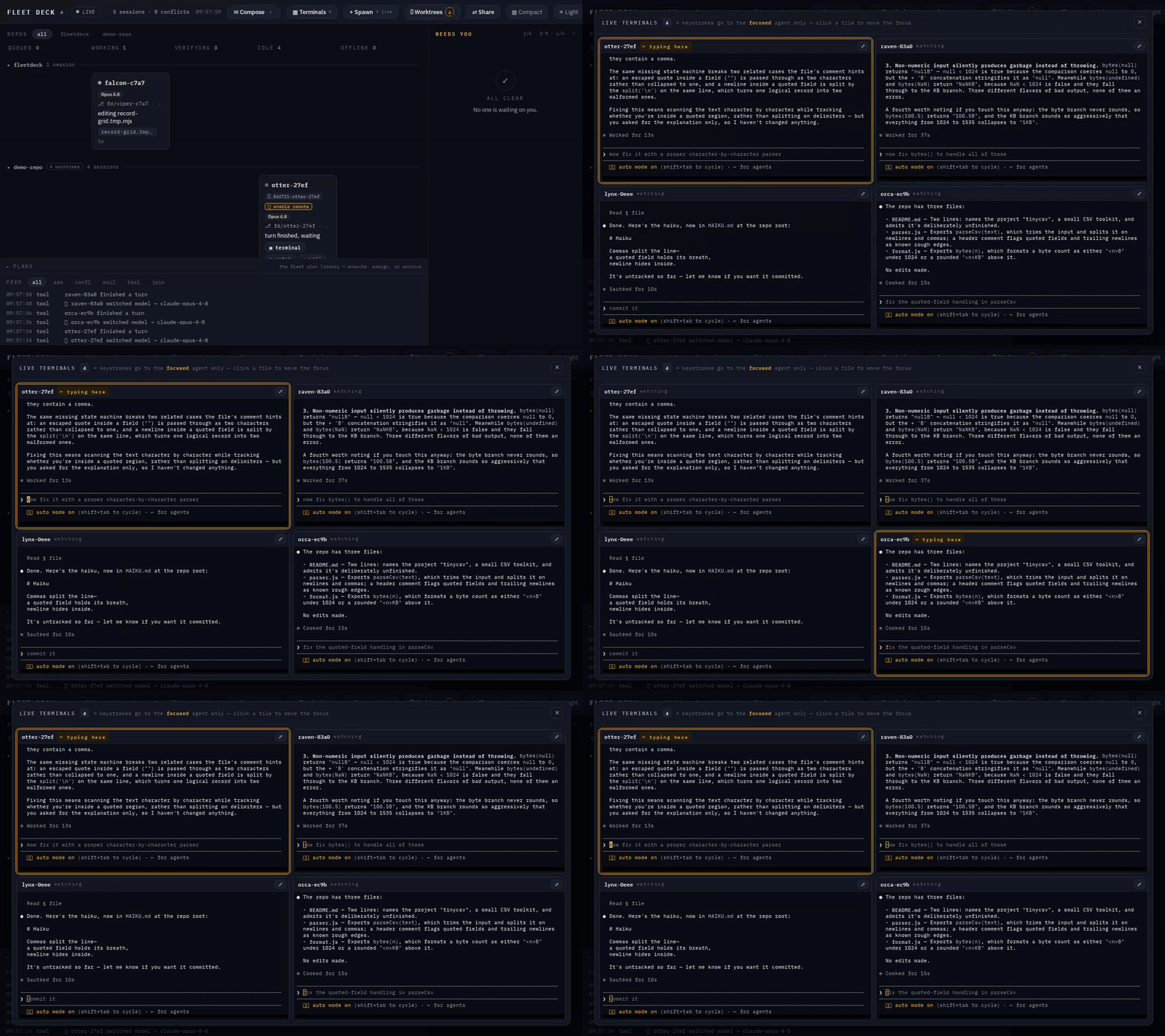
▦ Terminalsopens every live agent at once, in a grid. All of them stream; exactly one types — the focused tile wears an amber ring and says ⌨ typing here, and every other tile is stdin-disabled at the terminal itself, not merely ignored on the way out. A keystroke lands in a real agent and cannot be recalled, so which one it reaches is never something you have to infer. Click a tile to move the focus,⤢to promote it to full size. The whole grid shares one tmux control client, so the tenth tile costs a WebSocket, not a tenth tmux process. - Revive. A reboot kills the panes, not the work — worktrees and transcripts survive on disk. One
⟲click resumes a dead agent in its own worktree with its whole history: same callsign, same card. Whole columns at a time, if the night was rough. - Remote control. Put an agent on claude.ai and drive it from your phone. The card grows a 📱 chip that opens the session — named after its callsign, so the thing in your pocket is recognizably the thing on your board.
- A plan library. Spawn a planner in plan mode. Its plan lands on the board as a rendered card before it can act. Approve it, or capture it to the library and release the planner. Later, execute the plan with your own custom instructions — optionally in unsupervised mode, which is behind a red two-step checkbox that says exactly what it does.
Install
claude plugin marketplace add lacion/fleet-deck   # the repo is its own marketplace
claude plugin install fleetdeck@fleetdeck
That's it. Your next claude — any terminal, any repo, no wrapper, no launcher, no ritual — brings the fleet up and appears on the board at http://127.0.0.1:4711. Type /fleet in any session for a live summary.
Requires Node 22.5+ — and that's the whole list. There is nothing to npm install: the daemon ships as one bundled file and keeps its state in Node's built-in node:sqlite. Add tmux if you want the board to spawn workers or open their panes in the browser; everything else works without it. Linux, WSL2 and macOS. Windows-native is untested — if you try it, tell us what broke.
claude plugin marketplace add /path/to/fleet-deck   # a local clone
claude plugin marketplace add your-org/your-fork    # or your own fork
claude plugin install fleetdeck@fleetdeck
After changing anything under scripts/ you need npm run bundle (the daemon runs the bundle, not the source), and after changing the board, npm run build in board/. Then restart the daemon.
The 60-second tour
- Install. Open the board. Launch a
claudeanywhere — a card appears in about one second. - Launch a second one in the same repo and have them both touch the same file. Watch the hazard ripple. Read the whisper each session receives. Feel seen.
- Compose → ORCHESTRATOR →
assign auto: add input validation to the signup form. The daemon picks a session; if it's idle, it wakes up and gets to work. - Nobody available? The board offers a spawn a session for this button. One click, one new worker, prefilled with the task.
- Tick batch on the spawn form and paste in three tasks, one per line. Three agents, three worktrees, three branches, one click. Then hit ▦ Terminals and watch all three work at once.
- Spawn a planner (
permission mode: plan), give it something gnarly, and capture its plan. Execute it later with an unsupervised worker while you make coffee. The coffee is not optional; you're a fleet commander now.
Batch spawn: a fleet, not an agent
Tick batch in the spawn form and the prompt box stops being one prompt and becomes a task list — one agent per line:
fix the flaky worktree test
update the README install section
3x find the race in the spawn path
That's five agents in one click. Each one gets its own git worktree (<repo>--fd-<callsign>) on its own branch (fd/<callsign>), so they can all work the same repo without ever standing on each other's edits — that isolation is forced for a batch, not offered. The 3x prefix runs a line several times, which is how you race three independent attempts at one nasty bug and keep the best.
Before anything launches, the form shows you the exact list and the exact count. That preview is the guardrail — there is deliberately no cap on how many agents may be live at once. It's your machine and your token budget; Fleet Deck's job is to make the size of what you're about to do impossible to miss, not to pick a number for you.
Then hit ▦ Terminals and watch the whole fleet work at once:
How it works
 terminal 1..n : plain `claude` + this plugin's hooks
      │  events (http hooks, fail-open)      ▲ whispers, blocks, decisions
      ▼                                      │ (hook responses)
   fleetd — one Node daemon, loopback by default, SQLite state
      ▲                                      │ WebSocket push
      └────────── the board (React) ─────────┘
- Zero wrapper. The plugin's hooks make plain
claudefleet-aware. The first session's SessionStart hook elects and launches the daemon; the port bind is the election. - Fail open, always. Daemon down? Hooks time out silently and your sessions run exactly as before. Fleet Deck is not load-bearing; it's a tower, not a runway.
- Zero model calls in the core. Telemetry, conflict detection, routing, question relay: deterministic code. The only model cost added to your sessions is a ~100-token roster brief and the occasional whisper.
- Loopback by default; the LAN costs a key. Out of the box the daemon binds
127.0.0.1and nothing else on earth can reach it.FLEETDECK_BIND=0.0.0.0opens it to your network — and then a token becomes mandatory, no exceptions, because this API can spawn unsupervised agents and type into their terminals (LAN mode). Either way, your fleet does not phone home.
Revive: a dead agent is not lost work
When the machine reboots — or tmux dies, or WSL2 decides it has had enough — the panes go. The work doesn't. Each agent's git worktree is still sitting on disk, and so is its Claude transcript, and the daemon knows both paths.
So an OFFLINE card whose worktree and transcript both survive grows a ⟲ revive chip. Clicking it relaunches that spawn in the same worktree with claude --resume <session-id> (plus --dangerously-skip-permissions, if it had it before). Same callsign, same card, full history — because --resume keeps the session id, the revived agent's very first hook simply un-tombstones the card it already had, rather than opening a stranger's. When more than one card qualifies, the OFFLINE column head offers ⟲ Revive all (N).
It refuses honestly instead of guessing:
- 409 — the pane is somehow still alive, or that session already has a live spawn.
- 410 — the worktree or the transcript is gone. There is nothing to resume into and we will not invent one.
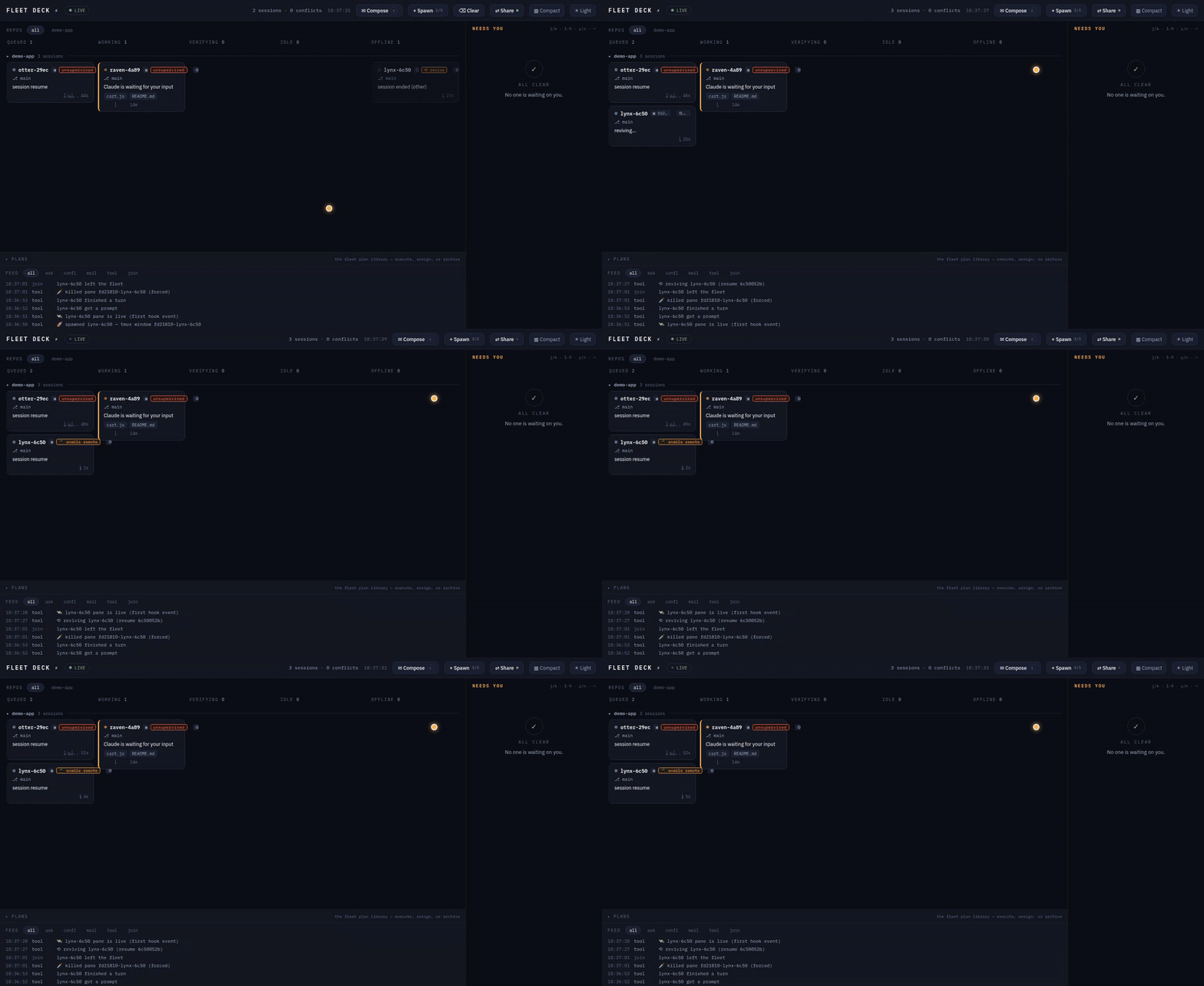
We built this the morning after a WSL2 restart took an entire fleet out overnight. Five agents came back with their work intact. It remains the most satisfying button on the board.
Remote control: the fleet in your pocket (/rc)
Claude Code can hand a session to claude.ai. Fleet Deck gives you three doors to that, and names the session after its callsign — so the thing you find in the claude.ai session list is recognizably the thing on your board.
- From birth. Tick 📱 remote control on the Spawn form; the worker launches with
--remote-control <callsign>. - On a running agent. A live, idle board-spawned agent shows a 📱 enable remote action. The daemon types
/rc <callsign>into its pane, waits for the TUI to render, and harvests the resultinghttps://claude.ai/code/session_…link out of the pane's scrollback. That URL is written to no file — scrollback is genuinely the only source, which is why the daemon goes and reads the screen like a person would. (If the capture misses it, the chip says so, and the live terminal will show you the link itself.) - On revive. A revived agent inherits the dead one's remote-control setting. The link is harvested fresh; the old URL died with the old session.
Either way, the card grows a 📱 remote ↗ chip that opens claude.ai in a new tab.
The guard, because it matters: enabling remote control is refused (409) unless the session is at a turn boundary — queued or idle. An agent that is mid-turn, or sitting on a permission dialog, is not waiting for a slash command; typing one there would answer the dialog. The board doesn't even offer the chip in those states, and the daemon refuses it if you ask anyway.
Retention, and the Clear button
Cards don't pile up forever. Nothing is ever deleted:
- A hook session that goes silent for 3 hours is presumed ended and lands in OFFLINE (
presumed ended (silent 3h)). A late hook resurrects it — the tombstone is a timestamp, not a grave. - An offline card older than 24 hours is archived off the board. The row stays in SQLite; it just stops competing for your attention.
- ⌫ Clear (which only appears when there's something to clear) does all of that now: archives every offline card, expires their undelivered mail and open questions, kills dead panes it owns — and lists orphaned worktrees rather than removing them. Deleting a git worktree is a decision with your name on it, not a chore we'll quietly do behind your back.
Knobs: FLEETDECK_PRESUME_DEAD_MS, FLEETDECK_RETAIN_OFFLINE_MS.
The fine print (read this bit)
- Spawned sessions are real billed Claude sessions. The spawn form says so, the cap defaults to 5, and nothing ever spawns without a human click.
assign autoroutes to existing sessions only. - Unsupervised mode means unsupervised.
--dangerously-skip-permissionsworkers never produce permission cards. The checkbox is red and asks twice. Pair it with the fresh-worktree option and sleep better. - The permission relay is interactive-only. Headless
claude -psessions deny permission-needing tools without consulting hooks — that's CLI behavior, not ours. Spawned fleet workers are interactive (in tmux) precisely so their prompts reach your board. - Version pin: Claude Code CLI 2.1.206+ (tested through 2.1.207). Fleet Deck leans on a couple of behaviors the docs don't mention (they work; we checked, repeatedly, at some cost to our dignity). A guard test fails loudly if a CLI update drops them. Contract tests replay recorded hook payloads so schema drift is caught in CI, not in your fleet.
- Ports:
FLEETDECK_PORT/FLEETDECK_HOMEenv vars; hooks are pinned to 4711 by default, so a truly separate fleet needs the port swapped in a copy ofhooks/hooks.jsontoo. On multi-user machines give each OS user their own port — TCP ports are shared per machine, and you probably don't want to co-manage a fleet with whoever else is on that box.
Tmux isolation & the one-port rule
FLEETDECK_TMUX_SOCKET— when set, the daemon runs every tmux command against that named server (tmux -L <socket>) instead of your default one. The tests anddemo/scripts always set it, and the reason is a scar, not a style choice: tmux bakes the first client's environment into a new server's global env, and every window created later inherits it. We once let an acceptance run start the default tmux server from inside a test session — and that evening's production spawns dutifully inherited the testFLEETDECK_PORT/FLEETDECK_HOMEand reported to a ghost daemon nobody was watching. The demo scripts now use a per-run socket (fdaccept-<pid>) andkill-serverit on exit; your default tmux server is never touched. Leave the variable unset in production.- 4711 is the supported production port. The plugin's http hooks in
hooks/hooks.jsonare pinned to 4711, while the SessionStart and watch scripts honorFLEETDECK_PORT— so running a fleet on any other port splits your hook traffic between two daemons, and neither one sees the whole picture. If you genuinely need a different port, swap it in a copy ofhooks/hooks.jsontoo (see the ports note above).
Opening the board on your other machine (LAN mode)
By default fleetd listens on 127.0.0.1 and nothing else can reach it. Set FLEETDECK_BIND=0.0.0.0 and it binds every interface, printing a ready-to-paste URL per address:
fleetd up on http://0.0.0.0:4711 (pid 12345, …)
fleetd LAN http://192.168.8.223:4711/?t=2a62f3c9…
fleetd LAN http://fleetdeck.local:4711/?t=2a62f3c9…   (mDNS — needs a resolver on the peer)
Open one of those on the laptop and the board comes up; the key is consumed at boot and scrubbed straight back out of the address bar, where a live credential has no business sitting. The header's ⇄ Share panel shows the same links with a QR code — point a phone camera at it.
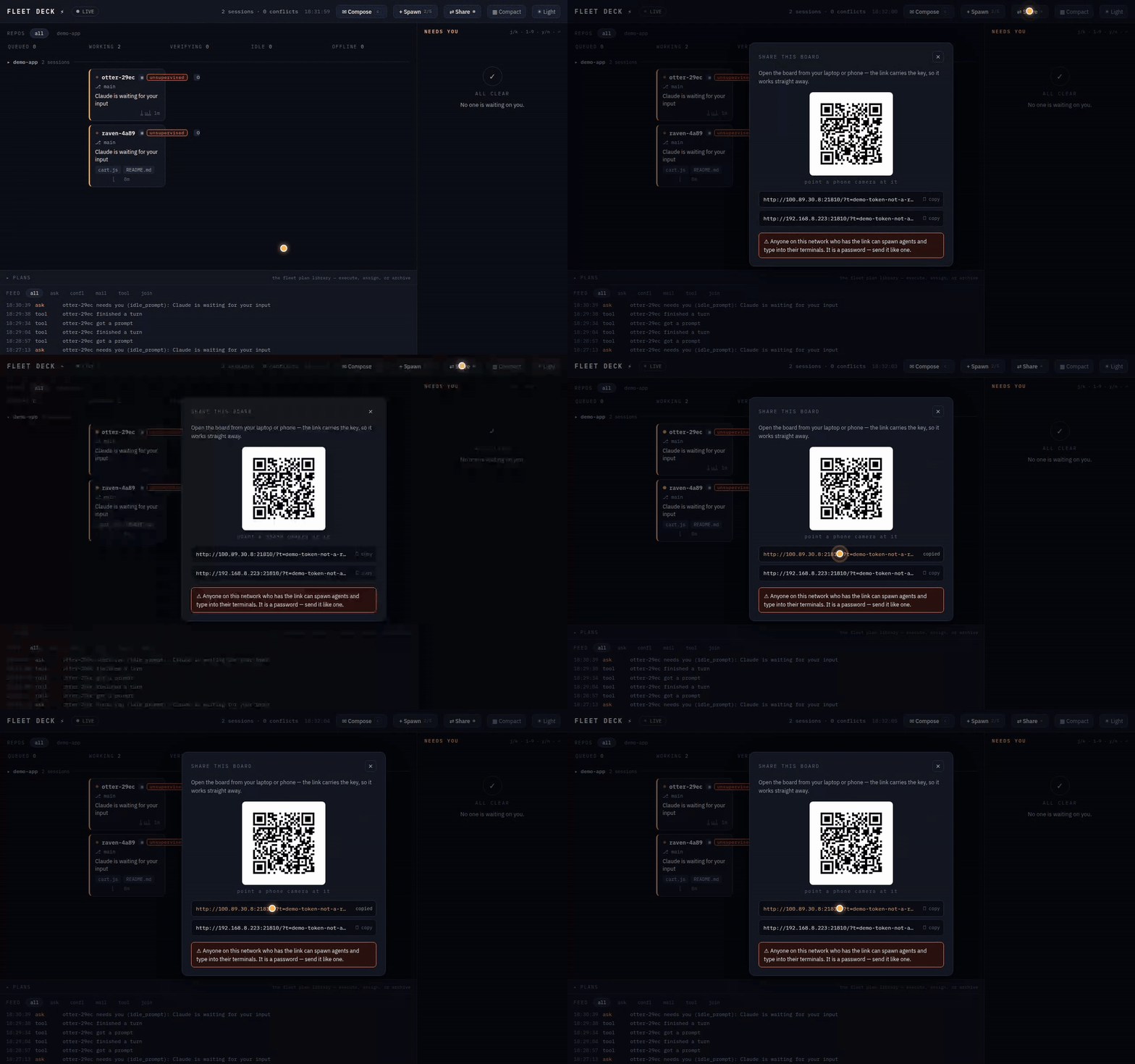
The ?t= is a password, and it is not decoration. This API can spawn agents with --dangerously-skip-permissions and type keystrokes into their terminals: unauthenticated, it is remote code execution for anyone on the network. So LAN mode requires a token — there is no insecure switch, and fleetd refuses to start rather than open an unauthenticated listener. The rules:
- Loopback needs no token, ever. Your hooks and your local board keep working exactly as before — this is why LAN mode changes nothing about a normal single-machine setup.
- Everything else must present the token, as
Authorization: Bearer <token>or?t=<token>. Wrong or missing → 401, no data. - The static shell is public; every byte of fleet data is not. The HTML and its JS bundle are served to anyone who asks — they contain no sessions, no callsigns, no key, just an empty board that knows how to ask for one. A stranger on the network gets that gate page and nothing else. This isn't a softening: a browser cannot put a key on the
<script>tag inside the page it is already loading, so gating the shell doesn't hide the board, it just serves a blank one — and because loopback bypasses the gate, you'd never see it locally. Ask us how we know. (There's a test pinning it now.) The printed link carries the key in the query string for the same reason: noAuthorizationheader exists on a first navigation. - Not a cookie, on purpose. Cookies ride along automatically, so any web page you happened to visit could quietly make your browser POST to your board and hand itself a live agent. A bearer token can't be forged that way.
- The token is generated once into
FLEETDECK_HOME/token(mode0600) — or setFLEETDECK_TOKENyourself (16+ chars). Treat it like an SSH key. Rotate it by deleting the file and restarting. - Untrusted networks (cafés, conferences, hotels): don't. Use Tailscale or an SSH tunnel — see below.
Discovery: mDNS, and the honest caveats
In LAN mode the daemon advertises itself over multicast DNS / DNS-SD with a small dependency-free responder (no Avahi, no Bonjour install): an A record for fleetdeck.local, plus _fleetdeck._tcp and _http._tcp services so it turns up in service browsers. FLEETDECK_MDNS=off disables it; FLEETDECK_MDNS_NAME renames it (two people running Fleet Deck on one network will collide on fleetdeck.local — rename one).
It is a convenience, never a dependency: if port 5353 is taken, multicast is blocked, or the network eats it, mDNS degrades to a silent no-op and the printed IP URLs keep working. Resolving .local needs a resolver on the other machine — macOS and iOS have one built in, most Linux boxes need avahi-daemon, and Windows is unreliable without Bonjour. If fleetdeck.local doesn't resolve for your peer, that's the peer's resolver, not the board — use the IP URL.
For the specific case of moving between your own machines (and the one that survives leaving the house), Tailscale beats mDNS: a stable private IP, works off-LAN, and MagicDNS already gives you a name — no discovery protocol required. Bind LAN mode, open the board at the tailnet address, and the token still guards it.
Every knob
All optional. Fleet Deck's defaults are the configuration we actually run.
| Variable | Default | What it does |
|---|---|---|
FLEETDECK_PORT |
4711 |
Daemon port. The plugin's http hooks are pinned to 4711 — read the one-port rule above before changing it. |
FLEETDECK_HOME |
~/.fleetdeck |
State directory: the SQLite db, the LAN token, watcher pid files. |
FLEETDECK_BIND |
127.0.0.1 |
Bind address. 0.0.0.0 is LAN mode, which makes a token mandatory. |
FLEETDECK_TOKEN |
generated into $FLEETDECK_HOME/token |
The LAN bearer token. Minimum 16 characters; the daemon refuses to start on a shorter one. |
FLEETDECK_MDNS |
on (LAN mode only) | off disables the mDNS/DNS-SD responder. |
FLEETDECK_MDNS_NAME |
fleetdeck |
The advertised name — i.e. fleetdeck.local. Rename one of them when two fleets share a network. |
FLEETDECK_SPAWN |
on | off disables spawning entirely; the board hides every spawn control. |
FLEETDECK_STALE_MS |
600000 (10 min) |
How long a working/verifying card runs without telemetry before it's badged stale. |
FLEETDECK_HOLD_MS |
50000 (50 s) |
How long a question hook is held open awaiting a board answer. Clamped to 250 ms–60 s, under the 65 s hook timeout. |
FLEETDECK_NUDGE_MS |
8000 (8 s) |
Grace before a silent new pane gets its one bring-up Enter (the trust dialog). Exactly once, ever. |
FLEETDECK_SPAWN_REGISTER_MS |
90000 (90 s) |
How long a spawned pane may run without phoning home before it's flagged stalled — loudly, and never auto-respawned. |
FLEETDECK_PANE_MAIL_GRACE_MS |
1500 (1.5 s) |
Head start given to the watcher before mail is typed into an owned pane instead. |
FLEETDECK_PRESUME_DEAD_MS |
10800000 (3 h) |
Silence after which a session is presumed ended. A late hook undoes it. |
FLEETDECK_RETAIN_OFFLINE_MS |
86400000 (24 h) |
How long an offline card stays on the board before it's archived out (never deleted). |
FLEETDECK_RC_HARVEST_MS |
2500 (2.5 s) |
Delay before the daemon reads the pane's scrollback for the claude.ai remote-control link. |
FLEETDECK_TERM |
on | off disables the live terminal (WebSocket + modal) altogether. |
FLEETDECK_TERM_REPAINT_MS |
80 |
Repaint coalescing window for the terminal bridge. |
FLEETDECK_TMUX_SOCKET |
unset | Run every tmux command against a named server (tmux -L). Tests and demos only — see the scar story above. |
FLEETDECK_AGENTS_CMD |
the claude agents CLI |
Override the agents-listing command. false disables that poller (hooks still feed the board). |
FLEETDECK_AGENTS_POLL_MS |
10000 (10 s) |
Agents-poll cadence, which also drives owned-pane liveness. Floor 100 ms. |
FLEETDECK_WATCH_POLL_MS |
25000 (25 s) |
The idle-session watcher's long-poll hold per request. Clamped 50 ms–25 s. |
FLEETDECK_WATCH_MAX_MS |
7200000 (2 h) |
Lifetime cap on a watcher process before it exits and waits for the next turn. |
FLEETDECK_SPAWN_CMD, FLEETDECK_TERM_CMD and the FLEETDECK_TEST_* family exist for the test harness — they replace tmux and the daemon with fixtures. They are not a supported way to run a fleet, and if you find yourself reaching for one in production, something has gone wrong upstream of this table.
Development
npm install
npm test                             # 303 contract tests against a real daemon
npm run bundle                       # rebundle the daemon after touching scripts/fleetd/
npm run build:board                  # rebuild the React board into board-dist/
npm test runs the suite serially (--test-concurrency=1), and that is not a style preference. Every one of these tests boots a real daemon that binds a real port and drives a real tmux server; run them in parallel and they contend for both, and you get one or two failures a run — a different one each time, each passing in isolation. That looks exactly like flaky tests and is in fact a flaky harness.
The demo/ scripts are live acceptance gates that start real Claude sessions (i.e., they cost money): run-smoke.sh (two sessions colliding on purpose), run-accept-phase3.sh (a permission approved from the board; a trailing question answered from the board), run-accept-spawn.sh (spawn → assign → board-approved permission → kill), run-accept-plan.sh (plan → capture → unsupervised execution). Run them deliberately, not casually.
Credits
Designed and built by a fleet of Claude agents coordinating through contracts, reviewed by Codex, supervised by one human with a board — which is to say: Fleet Deck was built the way Fleet Deck works. The repo is its own proof of concept.
Board design: "Console" direction — ink navy, amber means yours-to-act, IBM Plex Mono for anything that's data. The light theme exists and is lovely; the dark theme is correct.
License
MIT. Fly safe. ⚡
Yorumlar (0)
Yorum birakmak icin giris yap.
Yorum birakSonuc bulunamadi