Tresor
Health Warn
- License — License: MIT
- Description — Repository has a description
- Active repo — Last push 0 days ago
- Low visibility — Only 5 GitHub stars
Code Fail
- exec() — Shell command execution in internal/api/web/marked.min.js
- new Function() — Dynamic code execution via Function constructor in internal/api/web/sse-reassembler.test.js
- fs module — File system access in internal/api/web/sse-reassembler.test.js
Permissions Pass
- Permissions — No dangerous permissions requested
No AI report is available for this listing yet.
⚡Switch LLM Providers for Any Apps with One Click: A Single-Binary LLM Gateway with Auto API Translations.
Tresor
Switch LLM Providers for Any Apps with One Click
One binary, One click, Any App



🤔 Why Tresor?
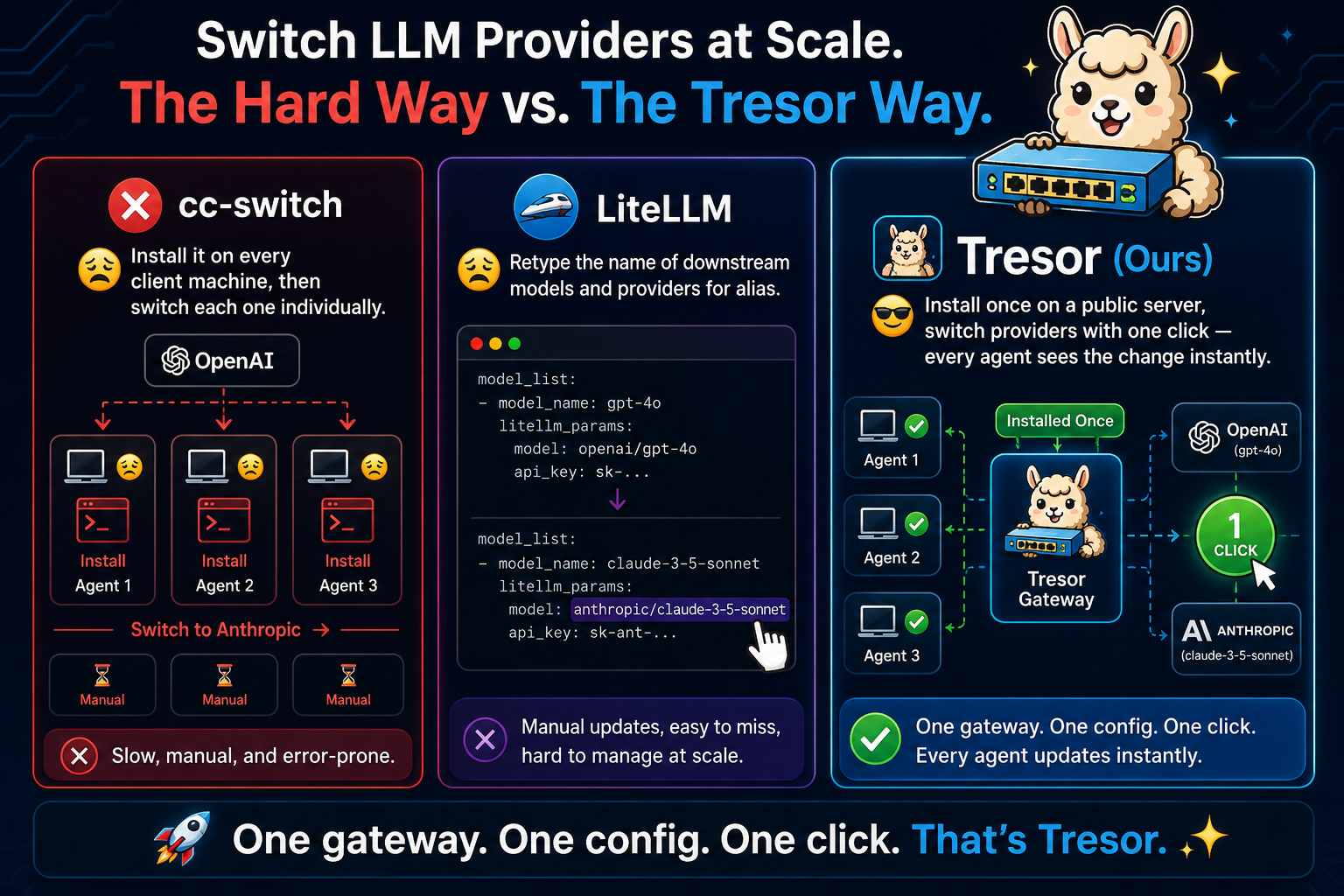
- One binary: No need to install on every PC/server where LLM apps live in.
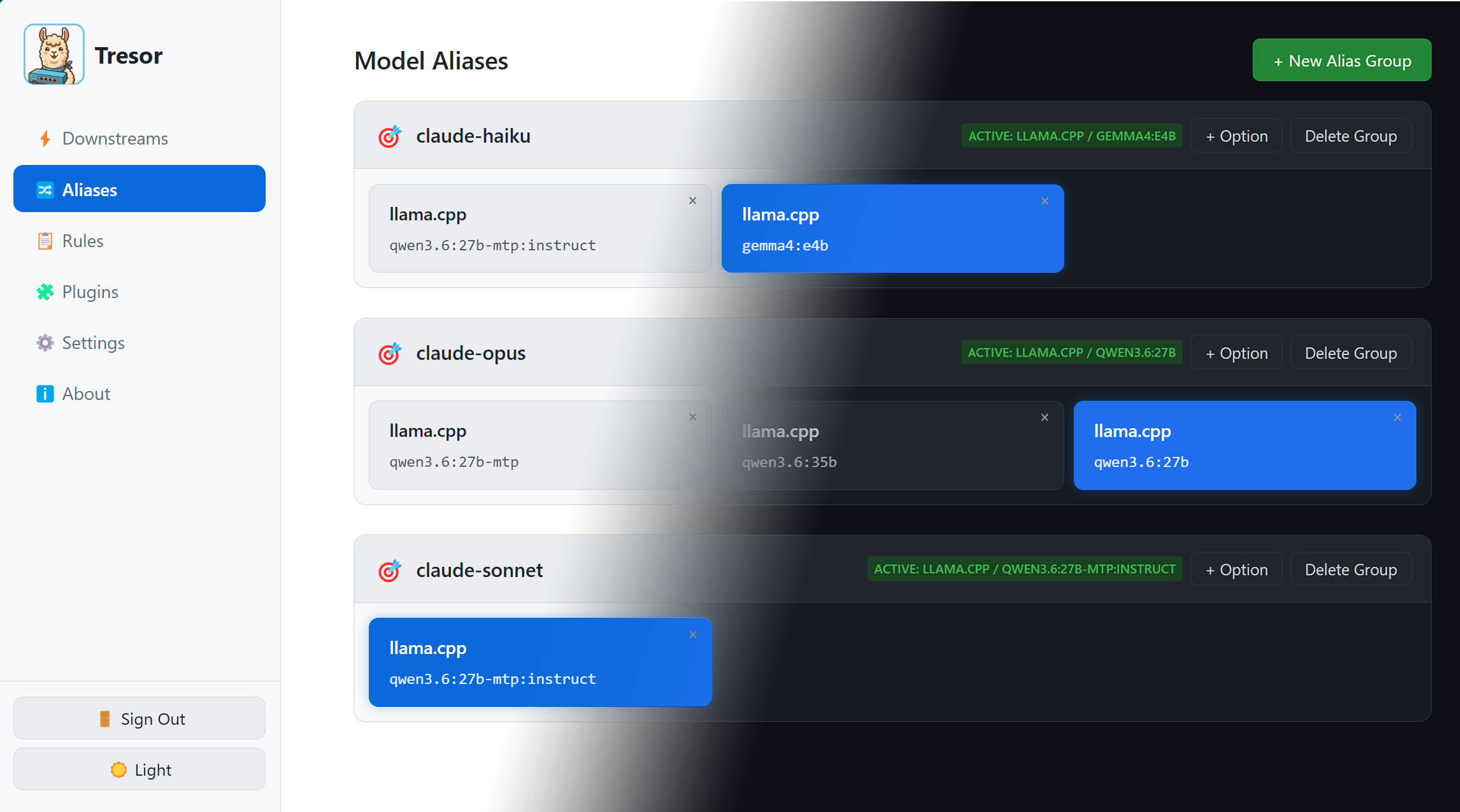
- One click: LLM provider switch via alias buttons in web UI.
- Any Apps: All LLM apps using OpenAI/Anthropic API do not need to reconfigure their LLM providers.
For apps that do not support customizable endpoint, a possible workaround is to modify DNS records and point the IP address to Tresor.
| Tresor (Ours) | cc-switch | LiteLLM | |
|---|---|---|---|
| One binary | ✅ | ❌(install on every PC) | ❌(tons of dependencies) |
| One click | ✅ | ✅ | ❌(retype model name) |
| Any App | ✅ | ❌(limited apps) | ✅ |
🔄 The Problem: Switching Providers at Scale
Imagine you have agents on three machines, all calling OpenAI. You want to switch them to Anthropic.
⚠ DISCLAIMER: Tresor is intended for personal use rather than LLM transfer stations, so it only have one administrative account. We are not planning to support commercial-purpose multi-user login.
⚡ What Tresor Does
Tresor is a single binary with two modes:
| Mode | What It Does |
|---|---|
| Daemon | 🖥️ Long-running HTTP gateway + admin REST API + embedded web UI |
| CLI | 💻 Command-line client for managing the daemon |
┌──────────────┐     ┌──────────────┐     ┌──────────────┐
│   Your App   │────>│    Tresor    │────>│  LLM Provider│
│              │     │    (gateway) │     │  (OpenAI,    │
│              │<────│              │<────│  Anthropic..) │
└──────────────┘     └──────────────┘     └──────────────┘
                         │
                         ├── Admin REST API
                         ├── Embedded Web UI
                         └── CLI Commands
Key Capabilities
- ⚡ Hot-Switch Models — Map one model name to any backend model and switch on the fly. Your app requests
gpt-4o; Tresor can route it to Claude Sonnet, Opus, or keep it on GPT-4o — all without restarting. - 🔄 Auto-Translation — Automatically convert between OpenAI, Anthropic, OpenAI Responses, and Google Gemini formats. Your app sends an OpenAI request; Tresor forwards it to an Anthropic, Gemini, or any other downstream and converts the response back — no rule configuration needed.
- 🔍 Traffic Inspection (off by default) — Inspect raw incoming requests and downstream LLM responses, by clicking the log entries. Curious about what your LLM Apps are actually sending to LLMs? Then this is for you! Works similar to claude-tap.
- 🌐 Embedded Web UI — Manage everything from a browser dashboard. No separate frontend deployment.
- 🔌 Plugin Pipeline — Chain transformation plugins per rule (header injection, image fix, format conversion, and more). Fourteen built-in plugins cover all common format combinations.
- 🔑 Proxy Authentication — Require clients to authenticate via
Authorization: Bearerorx-api-keyheaders (supports Anthropic-format clients like Claude Office plugin). - 📝 Single Config File — All settings in one portable YAML file. Changes via the web UI write back automatically.
- 🪶 Zero External Dependencies — Pure Go SQLite (no CGO), no external web framework, single compiled binary.
🚀 Getting Started
Warning: the program is heavily vibe-coded, but the author has tried the best to follow software engineering practices to ensure its quality. Use with caution.
Install
Linux / macOS — download the latest release with one command:
curl -fsSL https://raw.githubusercontent.com/Ladbaby/Tresor/main/setup.sh | bash
This installs the binary to ~/.local/bin/tresor and creates a config skeleton at ~/.config/tresor/config.yaml.
To include pre-releases, pass --prerelease or set TRESOR_PRERELEASE=true:
Warning: Pre-releases are highly unstable, so users are adviced to only consider the latest release. If the author confirm a pre-release build works, it will be later modified as the latest release.
curl -fsSL https://raw.githubusercontent.com/Ladbaby/Tresor/main/setup.sh | bash -s -- --prerelease
Windows — download a release binary manually from GitHub Releases.
Configure
- Option 1: Configure later via web UI.
- Option 2: Edit
~/.config/tresor/config.yaml.
Change bind_addr to 0.0.0.0:11510 if you want the server to be publicly available.
Start
# Start the daemon
tresor run --config ~/.config/tresor/config.yaml

# Point your LLM apps to: http://127.0.0.1:11510
# Open the web UI: http://127.0.0.1:11510 in your browser
Run as Systemd Service (Linux)
Run Tresor as a user-level systemd service — no sudo needed, auto-starts on login:
# 1. Create the user service unit
mkdir -p ~/.config/systemd/user
cat > ~/.config/systemd/user/tresor.service << EOF
[Unit]
Description=Tresor LLM Gateway

[Service]
Type=simple
ExecStart=$HOME/.local/bin/tresor run --config $HOME/.config/tresor/config.yaml
WorkingDirectory=$HOME/.config/tresor
Restart=on-failure
RestartSec=5

# Environment (uncomment as needed)
# Environment=HTTP_PROXY=http://proxy.example.com:8080
# Environment=HTTPS_PROXY=http://proxy.example.com:8080

[Install]
WantedBy=default.target
EOF

# 2. Enable and start the service
#    (--user creates a service under your user session)
systemctl --user daemon-reload
systemctl --user enable --now tresor.service

# 3. Check status
systemctl --user status tresor

# View logs
journalctl --user -u tresor -f
Note: If you installed Tresor to a different path, update
ExecStartandWorkingDirectoryaccordingly.
Build from Source
For developers or unsupported platforms (requires Go 1.26+):
go build -o tresor .
See the Installation docs for full instructions.
📚 Documentation
Full documentation is available at ladbaby.github.io/Tresor-docs/:
👤 For Users
- 🏠 Introduction — overview and architecture
- 📦 Installation & Quick Start — install from release or source, configure, run
- ⚙️ Configuration Basics — YAML config file reference
- 🔗 Downstreams — configure LLM provider endpoints
- 📏 Rules — define routing rules with transform pipelines
- 🏷️ Model Aliases — map model names and hot-switch backends
- 🌐 Proxy Modes — outbound proxy configuration
- 🖥️ Web UI Guide — manage everything from the browser
- 💻 CLI Reference — all command-line commands
💡 Use Cases
- 🔄 Transparent Provider Switching — route OpenAI-format traffic to Anthropic
- 🎛️ Model Aliasing — hot-switch between backends
- ⚖️ A/B Testing Backends — compare providers side by side
🛠️ For Developers
- 🏗️ Architecture — codebase structure, request flow, data layer
- 🔌 Plugin System — building custom transformers
- 🧪 Testing — test strategy and coverage
- 🤝 Contributing — how to contribute to Tresor
📜 Acknowledgement
- codex-proxy: API translation reference.
- Cherry Studio: API endpoint testing utility and UI design reference.
- LobeHub: Icons for models and providers.
- claude-tap: Traffic inspection reference.
- llama.cpp: Memory saving LLM inference.
- Qwen & Unsloth: High quality local LLM.
- Google Gemini: Icon creation.
- OpenAI ChatGPT: Comparison figures.
Reviews (0)
Sign in to leave a review.
Leave a reviewNo results found