ovat
Health Uyari
- License — License: Apache-2.0
- Description — Repository has a description
- Active repo — Last push 0 days ago
- Low visibility — Only 5 GitHub stars
Code Gecti
- Code scan — Scanned 12 files during light audit, no dangerous patterns found
Permissions Gecti
- Permissions — No dangerous permissions requested
Bu listing icin henuz AI raporu yok.
OVAT: OpenVINO Agentic Toolkit for AI PC. One YAML file and one command give you a tool-calling AI agent on Intel CPU, GPU and NPU.
Build a tool-calling AI agent on an Intel AI PC from one YAML file and one command.
Docs site • Quickstart • Examples • Reference • Architecture • Walkthrough • Platforms



pip install ovat
ovat setup                                    # install the model server, once
ovat init workflow.yml                        # write a starter config
ovat serve workflow.yml                       # start the model server
ovat run workflow.yml --input "what do my notes say about Q3?"
An agent is a language model that can call your functions ("tools"):
search your files, transcribe a recording, describe an image. OVAT builds
that agent from a config file and runs it on your own machine, through
OpenVINO Model Server
(OVMS). No API keys, no cloud, nothing leaves the machine.
New here? The OVAT docs site
walks through the project and the codebase step by step.
GSoC 2026, OpenVINO project #18. The full agent runs on Windows and
Linux with an Intel CPU, GPU or NPU. macOS works for development and for
local chat. See Platform support.
How it works
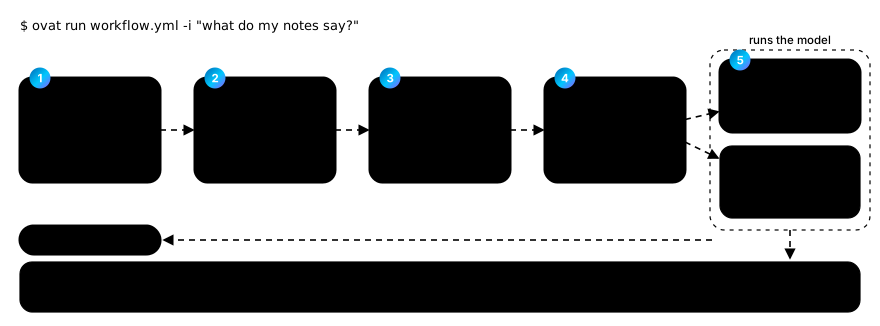
You write workflow.yml. OVAT checks it, wires up the model, the tools and
document search, and hands them to an engine: the loop that talks to the
model. The model runs on an OVMS server (Windows, Linux) or, for local chat,
inside the OVAT process itself.
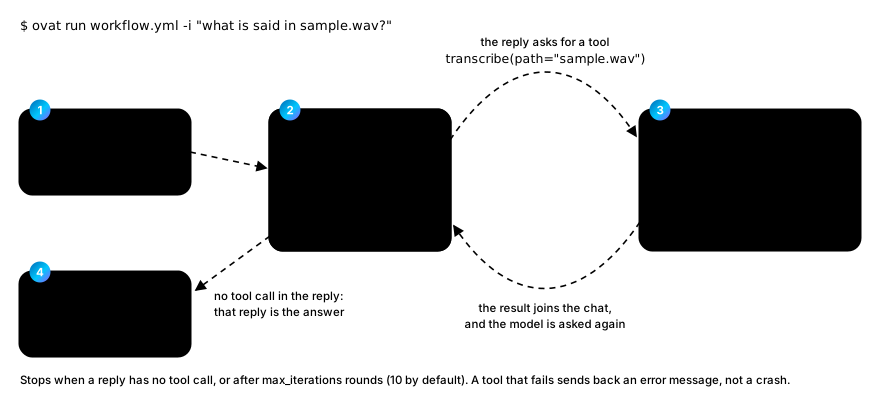
The engine runs a simple loop. It sends your question to the model. If the
reply asks for a tool, OVAT runs the tool and sends the result back. When a
reply asks for nothing, that reply is the answer.
Why OVAT
A tool-calling agent against OVMS is about 50 lines of code that every project
writes again: build the client, write each tool's JSON schema by hand, call the
model, check whether it asked for a tool, run the tool, add the result, loop,
cap the number of rounds, keep the history.
OVAT turns that into a config file:
model:
  name: Qwen3.5-4B-int4-ov
  device: GPU
tools:
  - name: search_docs
    type: builtin
agent:
  type: native
  max_iterations: 10
The loop, the schemas, the history and the error handling are OVAT's job.
Moving from a 16 GB GPU machine to an 8 GB CPU laptop is a three-line edit:
compare examples/workflow.yml withexamples/minimal.yml.
Every field, with its type, default and limits, is indocs/workflow_yaml_reference.md. That file
is generated from the code, so it cannot go out of date. A misspelt key is an
error, not something silently ignored.
One config, four agent frameworks
agent.type picks the engine. Nothing else in the file changes: not the tools,
not the prompt, not a line of Python.
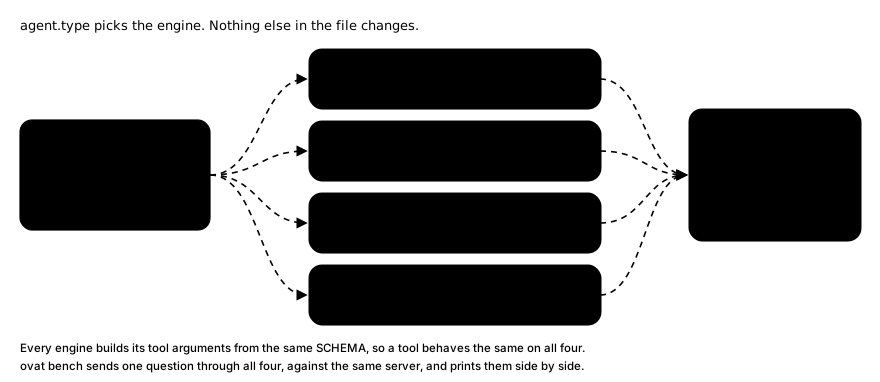
ovat bench sends the same question through every engine against the same
server and prints the results side by side:
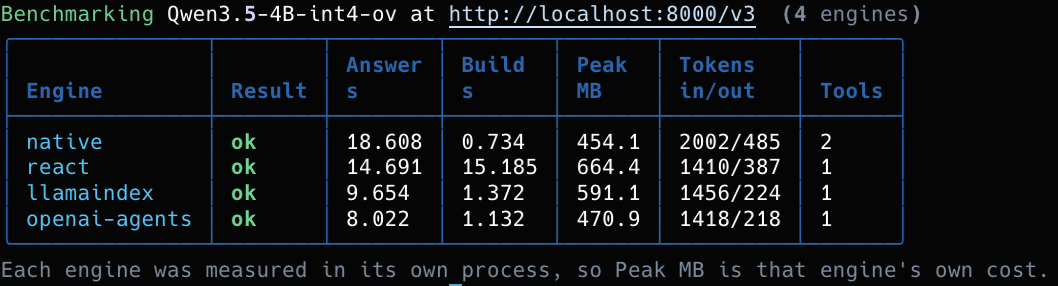
Recorded on an Intel AI PC (LunarLake, Arc 140V GPU) serving Qwen3.5-4B-int4-ov.
The token dashes in that screenshot are from before the framework engines
read OVMS's usage field; all four engines fill those columns now. A number
OVAT does not know still stays a dash instead of turning into a misleading 0.
Install
| Needs | Notes | |
|---|---|---|
| Python | 3.10 to 3.14 | python3 --version |
| OS (full agent) | Windows 11, Ubuntu 22.04 or 24.04, RHEL 9 | OVMS is x86-64 only |
| OS (development) | the above, plus macOS | everything except serving |
| RAM | 8 GB minimum, 16 GB comfortable | the default model wants about 5 GB |
| Disk | about 8 GB, or about 15 GB with RAG | RAG pulls in torch through the convert extra |
pip install ovat
Extras, so you install only what you need:
| Extra | Gives you |
|---|---|
| (none) | the native engine, all built-in tools, MCP, RAG, telemetry |
langchain, llamaindex, openai-agents |
the matching agent.type |
tui |
the full-screen terminal app (ovat with no arguments) |
convert |
optimum-cli, to convert Hugging Face models to OpenVINO format |
dev |
every framework above, plus pytest |
pip install "ovat[langchain,llamaindex,openai-agents,tui]"
Then install the model server, once per machine:
ovat setup
It picks the right OVMS download for your OS (and, on Linux, your distro),
checks its SHA-256, and unpacks it into ~/.ovat/ovms. Nothing is added toPATH and no environment variable is needed. OVAT is tested against
OVMS 2026.4.1. If you already have an older OVMS, ovat setup andovat doctor say so, and ovat setup --force replaces it. On macOS, ovat setup explains why there is nothing to install and what to use instead.
Why the pin matters: on the same 15 questions through all four engines, OVMS
2026.4.1 answered 56 of 60 correctly and 2026.2.1 answered 42 of 60. The
newer server also gave the same answer on every repeat, and its peak memory
was 4.9 GB against 17.3 GB. Measured on Windows on a LunarLake AI PC; not
yet repeated on Linux.
Linux needs a few system packages first. A minimal image ships with no
Python, and OVMS needslibxml2:sudo apt update && sudo apt install -y python3 python3-venv python3-pip libxml2 curl # Ubuntu 22.04 / 24.04 sudo dnf install -y python3 python3-pip libxml2 curl # RHEL 9 / Rocky / AlmaUbuntu 26.04 is not supported yet, because there is no OVMS build for it.
ovat setupwarns before downloading.OVMS on Linux also needs Jinja2 in the system Python. The Linux OVMS
uses your system Python, and its archive does not include Jinja2. OVMS's own
bare-metal guide
says to run this (on RHEL 9 usepip3.12):pip3 install "Jinja2==3.1.6" "MarkupSafe==3.0.2"Without it,
ovat servesays OVMS is ready, and then every chat request
fails with a 400 "Chat template not loaded correctly".ovat setupprints
this step,ovat doctorchecks it, andovat servewarns ifovms.log
shows the problem. On Ubuntu 24.04 pip can refuse with
"externally-managed-environment". Then install into a folder and pointPYTHONPATHat it beforeovat serve:python3 -m pip install --target "$HOME/.ovat/pylibs" "Jinja2==3.1.6" "MarkupSafe==3.0.2" export PYTHONPATH="$HOME/.ovat/pylibs"Windows needs nothing: the Windows OVMS zip carries its own Python with
Jinja2 inside. Other Linux distros: not verified.
Using a GPU or NPU? Update the driver first. An old driver usually shows
up as the device simply missing fromovat doctor, not as an error.
GPU (Windows),
NPU (Windows),
GPU (Linux),
NPU (Linux).
On Windows also install the
Visual C++ Redistributable;
OVMS will not start without it.
Installing OVMS by hand
is documented for machines with no internet access.
Get a model
ovat serve downloads the model on its first run. To fetch it yourself (the
only option on macOS):
hf download OpenVINO/Qwen3.5-4B-int4-ov --local-dir models/OpenVINO/Qwen3.5-4B-int4-ov
These are already converted to OpenVINO format. Nothing else to do.
| Model | Download | RAM | Use it when |
|---|---|---|---|
Qwen3.5-4B-int4-ov |
3.5 GB | 4.3 GB steady, 6.5 GB peak | Default. Text, vision and tools in one model |
Qwen3.5-0.8B-int4-ov |
0.9 GB | about 2 GB | an 8 GB machine, or a fast first try |
Qwen3-8B-int4-ov |
4.9 GB | about 6 to 7 GB | the strongest text answers; no vision |
whisper-base-int8-ov |
0.08 GB | small | the transcribe tool |
Only the Qwen3.5-4B row is measured, on an Intel AI PC, read from the OVMS
process (the model's memory lives there, not in OVAT). Rows that say "about"
are estimates from the model's size. Measure your own withovat run --telemetry. Loading needs 2.2 GB more than running does, and that
peak decides whether a model fits, so 8 GB machines should start with the 0.8B
model. Where the memory actually goes.
RAG (answering from your own documents) also needs an embedder, a small
model that turns text into numbers. It is the one model you convert yourself:
pip install "ovat[convert]"
optimum-cli export openvino --model BAAI/bge-small-en-v1.5 \
    --task feature-extraction models/bge-small-en-v1.5
Quickstart
ovat setup                                    # 1. install OVMS (once per machine)
ovat init workflow.yml                        # 2. write a starter config
ovat doctor workflow.yml                      # 3. check the machine and the config
ovat run workflow.yml --dry-run               # 4. build the agent, no server needed
ovat serve workflow.yml                       # 5. start OVMS
ovat run workflow.yml -i "summarise my notes" # 6. ask something
ovat serve workflow.yml --stop                # 7. shut it down
ovat doctor is the fastest way to find out what is wrong. It checks the
machine and the config together, and every yellow row says what to do. Here
it is on an Intel AI PC, all green:
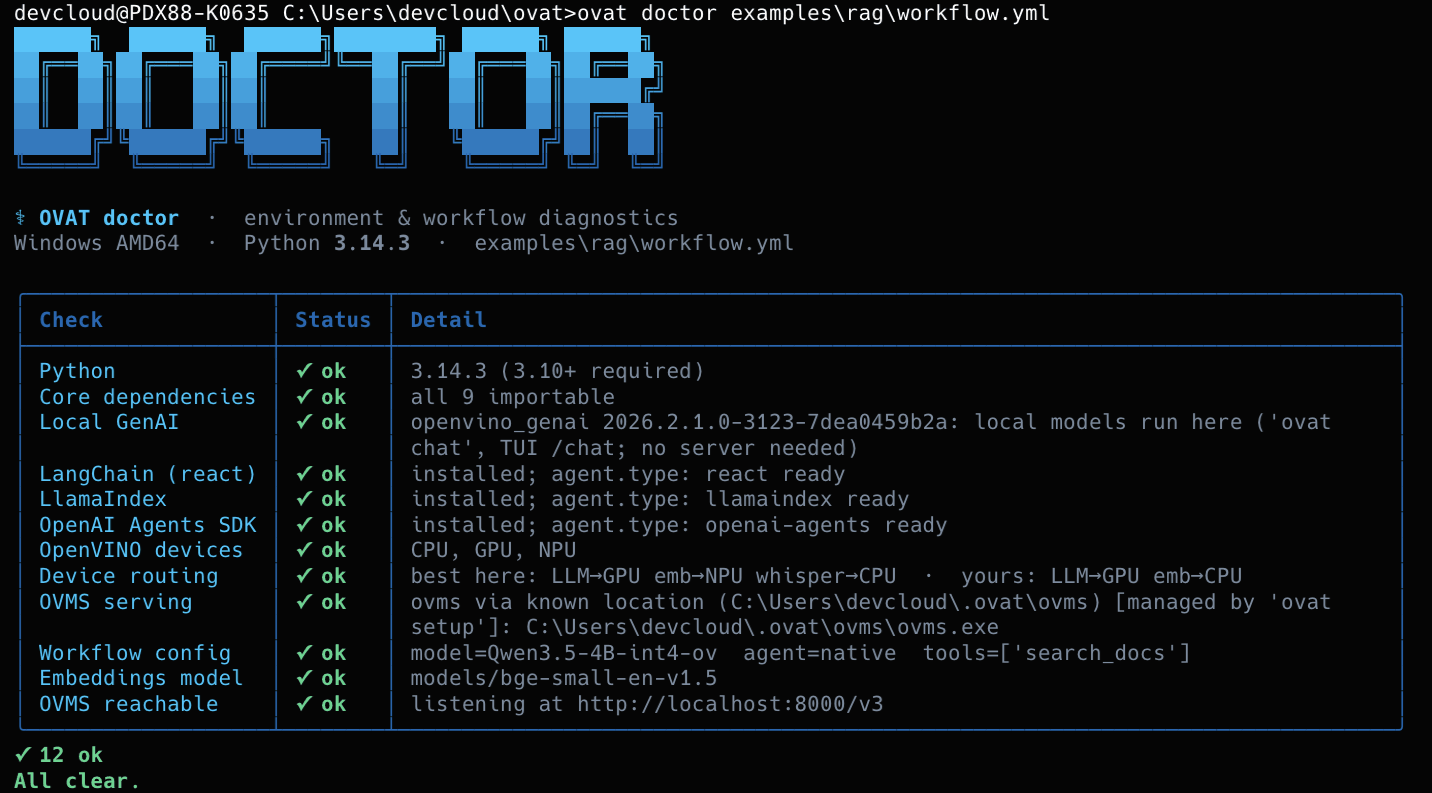
Step 5 takes a while the first time, because it downloads the model.serve shows the elapsed time and only gives up after five minutes with no
progress at all, so a slow connection is fine. If you skipped step 1,ovat serve offers to install OVMS for you.
OVMS listens on this machine only (127.0.0.1). To reach it from another
machine, run ovat serve workflow.yml --host 0.0.0.0, and setmodel.ovms_api_key_env so it asks for a key: without one, anyone on the
network can use the model.
On macOS there is no OVMS. Use the local path instead. ovat chat answers
from your indexed documents and needs no server:
git clone https://github.com/Lagmator22/ovat.git && cd ovat   # for the examples
hf download OpenVINO/Qwen3.5-0.8B-int4-ov --local-dir models/Qwen3.5-0.8B-int4-ov

pip install "ovat[convert]"                                   # for the embedder
optimum-cli export openvino --model BAAI/bge-small-en-v1.5 \
    --task feature-extraction models/bge-small-en-v1.5

ovat index ./examples/rag/docs examples/rag/workflow.yml
ovat chat examples/rag/workflow.yml -i "What is OVAT's memory budget?"
ovat chat finds a local model by itself (or take one with --model-path).
It has no answer length cap by default: the answer streams until the model
stops, and Ctrl-C stops it early. --max-tokens N sets a cap.
Every command
| Command | What it does |
|---|---|
ovat setup |
Install OVMS for this machine. Once, no PATH edits |
ovat init [path] |
Write a starter workflow.yml, with the device detected on this machine |
ovat doctor [config] |
Check Python, dependencies, devices, OVMS and a config |
ovat serve <config> |
Start OVMS in the background, on this machine only. --host 0.0.0.0 opens it to the network, --stop shuts it down |
ovat run <config> -i "..." |
Ask the agent a question. --trace, --telemetry, --dry-run, engine flags |
ovat chat <config> -i "..." |
Answer from your documents with a local model. No server, no tools |
ovat index <folder> <config> |
Read a folder of .md and .txt files into the search index |
ovat models [list|pull] |
List or download OVMS models |
ovat bench <config> -i "..." |
One question through several engines, side by side. --repeat N |
ovat telemetry |
Live CPU, memory and Intel hardware numbers. --once for one snapshot |
ovat tui |
The full-screen terminal app, same as ovat with no arguments |
ovat agent [config] |
The chat-first agent TUI: live tools, subagents, approvals, ! shell |
ovat a2a serve|card|call|token |
Offer a workflow to other agents over A2A, or ask one |
ovat <command> --help lists every option.
Examples
| Use case | Folder | Shows |
|---|---|---|
| RAG | examples/rag/ |
Answers from your own documents, naming the file each answer came from |
| ReAct | examples/react/ |
The same agent through LangChain, and all four engines compared |
| Audio + vision | examples/audio-multimodal/ |
Transcribe a .wav, describe an image |
| OpenTelemetry | examples/plano/ |
Request traces through the plano AI gateway |
| Agent, subagents, A2A | examples/agent/ |
ovat agent with a local, an A2A and a cloud subagent |
Each folder has its own README with the exact commands.
The examples are not in the pip package; clone the repo to run them.
Everything else in this README works frompip install ovatalone.
Search your documents (RAG)
RAG means "retrieval-augmented generation": find the right passages in your
documents first, then let the model answer from them. ovat index does the
first half once. Every question then searches that index.
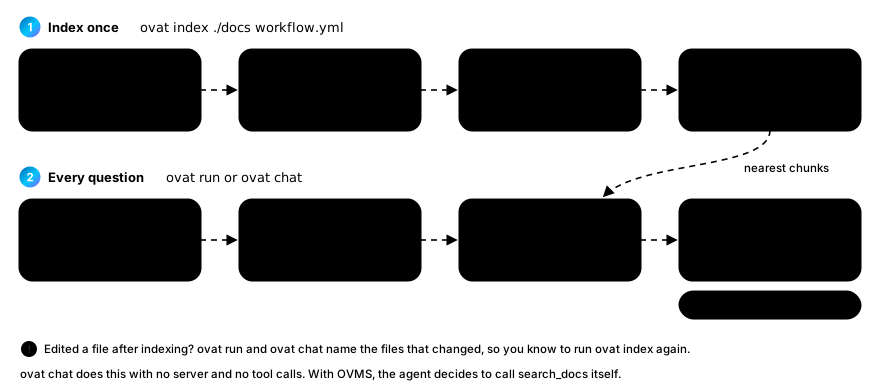
OVAT prints the sources: line itself, from what the search returned, rather
than hoping the model remembers to cite. If you edit a document after
indexing, ovat run and ovat chat tell you which files changed, so you know
to run ovat index again.
Engines, tools and MCP
Pick an engine for one run without editing the file:
ovat run workflow.yml -i "..." --react              # or --langchain
ovat run workflow.yml -i "..." --llamaindex
ovat run workflow.yml -i "..." --openai-sdk         # or --openai-agents
ovat bench workflow.yml -i "..." --out report.json  # all four, side by side
native is OVAT's own loop and needs nothing extra. The other three are
LangChain, LlamaIndex and the OpenAI Agents SDK, each pointed at your local
OVMS. All four record the token counts OVMS sends back, so ovat bench andovat run --trace show tokens for every engine.
Three tools are built in:
search_docssearches your indexed documents and returns the source paths.transcribeturns speech in an audio file into text.describe_imagedescribes an image or answers a question about it.
Models misspell file names. If a tool is asked for a file that does not exist,
it looks nearby for a very similar name, uses that, and says so in its result,
so you can always see which file was really used.
Any MCP server (MCP is a standard way to
plug tools into an agent) works as a tool too. The built-in tools are also MCP
servers themselves, so other agents can use them.
tools:
  - name: filesystem
    type: mcp_stdio
    command: ["npx", "-y", "@modelcontextprotocol/server-filesystem", "/docs"]
    env:                         # optional: variables this server needs
      API_TOKEN: ${MY_TOKEN}     # ${VAR} is read from your shell
An MCP server starts with only a few of your environment variables (such asHOME and PATH), so a stranger's server cannot read every secret in your
shell. env: passes on the ones it needs.
Which device runs what
OVAT asks OpenVINO which devices this machine has, and suggests where each
model should run. ovat init writes the agent model's device intoworkflow.yml, and anything you set there wins.
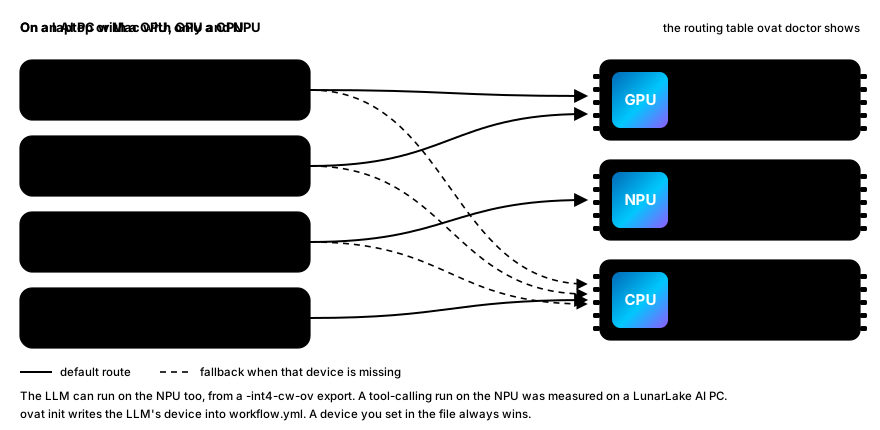
The NPU can run the agent too, tool calls included, but it needs a
model built for it: a channel-wise INT4 export (the -int4-cw-ov models), not
the usual -int4-ov. examples/document-qa-npu.yml
is a measured tool-calling run with Qwen3-8B-int4-cw-ov on a LunarLake NPU.
The details are in
ARCHITECTURE.md, Devices.
The terminal UI
pip install "ovat[tui]", then run ovat with no arguments. Answers stream
in, reasoning folds away, conversations are saved to disk, and /engine
switches between the local model and OVMS-with-tools in the middle of a
conversation:
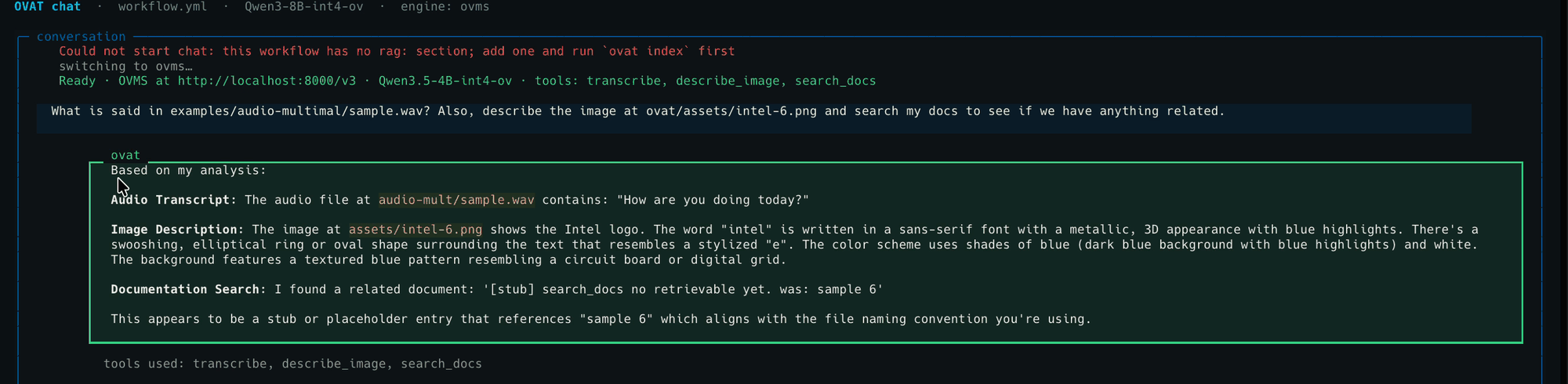
One question, three tools. The workflow had no rag: block, so the chat
switched itself to OVMS, and search_docs answered with a [stub] result
(that is what it does without an index).
ovat agent is the newer, chat-first TUI. The conversation is the whole
screen: the Intel mark at the top, one line per answer that folds all its
tool calls (and a subagent's progress) into a live summary, an approval
panel when a tool wants to send data off the machine, ! to run a shell
command, / for commands, and a bar with the model, device and live CPU,
NPU and RAM. Workflows can name subagents: another OVAT workflow, an
agent reached over A2A, or a model behind any OpenAI-compatible API.examples/agent/ has the commands.
The CLI never needs it. textual and pyfiglet come only with the [tui]
extra, and a test makes sure a plain install imports neither of them, nor
LangChain, LlamaIndex, the Agents SDK or the A2A SDK.
Telemetry
ovat run workflow.yml -i "..." --trace trace.json      # one run's trace
ovat run workflow.yml -i "..." --telemetry live.jsonl  # numbers sampled during the run
ovat telemetry                                         # live table for the machine
ovat telemetry --once                                  # one snapshot
In the TUI, /telemetry opens a page with two tabs. Live shows the
numbers and a status line for every source (live, silent, or not available
here, with the reason). Help explains what each number means.
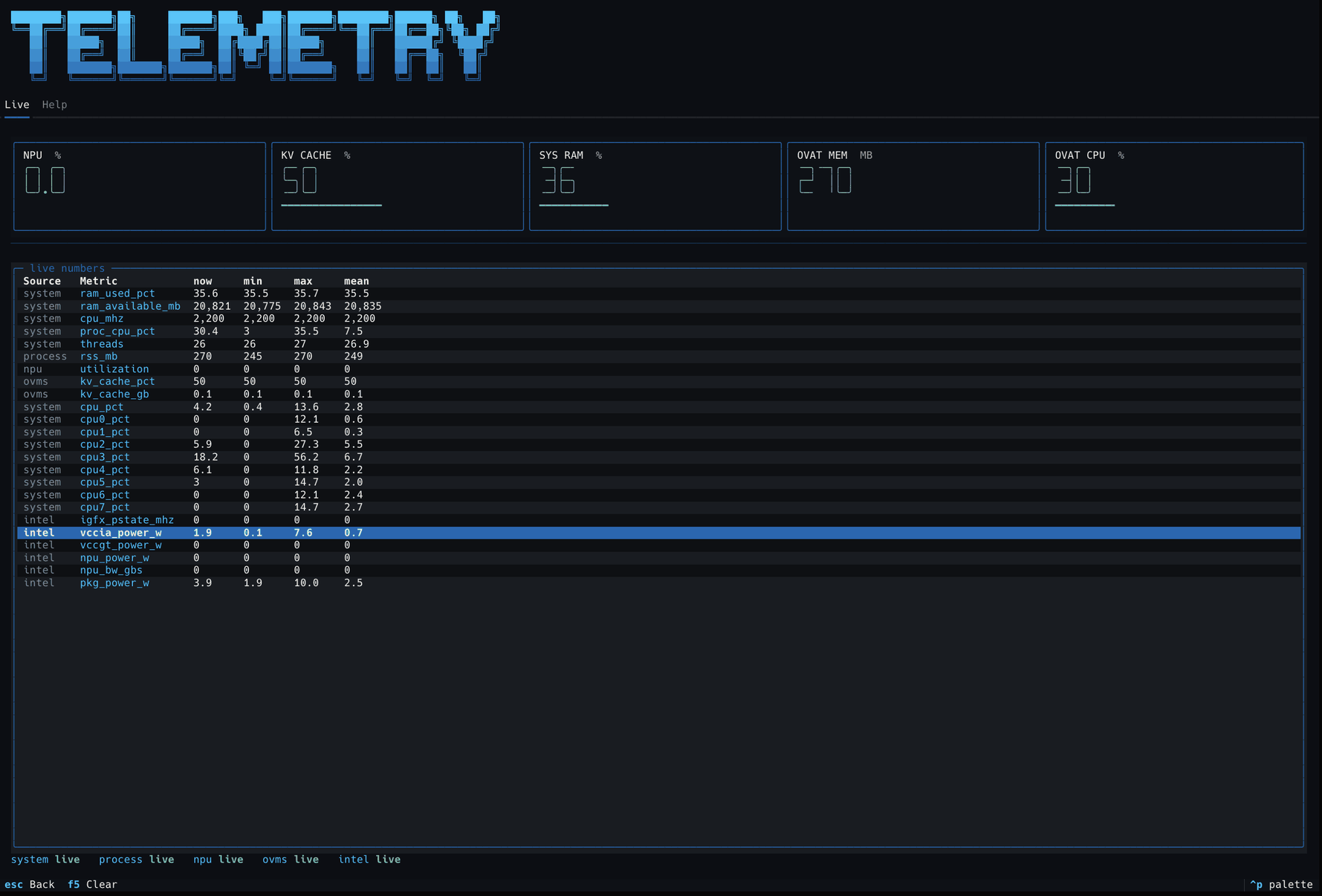
Two rules the numbers follow. Unknown stays unknown: a missing token count
is null, never 0. A missing source says why: on a Mac you see "Intel
Unified Telemetry does not run on macOS", not a row of zeros. Note that--trace measures the OVAT process. With OVMS serving, the model lives in
the OVMS process, so measure that one instead.
How telemetry works.
Platform support
| macOS | Windows 11 | Linux | |
|---|---|---|---|
init doctor index telemetry |
✅ | ✅ | ✅ |
chat (local model, no server) and the TUI |
✅ | ✅ | ✅ |
setup serve models run bench |
❌ no OVMS for macOS | ✅ | ✅ |
| GPU / NPU | ❌ CPU only | ✅ verified | ⚠️ not verified |
✅ means it was run on that platform. Linux GPU and NPU are not verified:
the Linux testing was done in WSL2, which has no access to the GPU or NPU
(no /dev/dri). The CPU path is proven there; the accelerators are not. They
are expected to work with current drivers, but nobody has shown it yet.
OVMS also has no build for Apple Silicon. Its x86 Docker image runs under
Rosetta, which is fine for small test models and slow for real ones.
Troubleshooting
| Symptom | Likely cause |
|---|---|
| The agent answers fluently but never calls a tool | Wrong tool_parser. Leave it out and OVAT picks it from the model name (qwen3coder for Qwen3.5, hermes3 for Qwen3) |
serve says ready, but every chat request fails with a 400 "Chat template not loaded correctly" (Linux) |
The system Python has no Jinja2. See Install, or run ovat doctor |
OVMS exited without becoming ready, empty log |
The python_off build of OVMS, or a missing Visual C++ Redistributable |
ovat doctor finds no OVMS |
Run ovat setup, or set OVAT_OVMS to the folder you unpacked |
doctor says your OVMS is older than 2026.4.1 |
ovat setup --force |
No GPU or NPU listed in doctor |
The driver is out of date. See Install |
search_docs returns [stub] |
No rag: section, or no --config on the MCP command |
| A warning that indexed documents changed | Run ovat index on that folder again |
serve looks stuck |
The first run downloads the model. Watch ovms.log |
ovat doctor <config> diagnoses most other problems.
Documentation
| Docs site | A guided tour of the project and the codebase |
docs/ARCHITECTURE.md |
How OVAT is built: the parts, four engines, both ways to run a model, and the design principles |
docs/DECISIONS.md |
Why: each design decision, the alternatives, and the measurement behind it |
docs/workflow_yaml_reference.md |
Every workflow.yml field. Generated from the code |
docs/BLOG.md |
A walkthrough: what OVAT is and how to use it |
examples/ |
Four runnable use cases |
AGENTS.md |
Contributor notes: hard rules and known traps |
Development
git clone https://github.com/Lagmator22/ovat.git && cd ovat
python -m venv .venv && source .venv/bin/activate     # Windows: .venv\Scripts\activate.bat
pip install -e ".[dev]"
pytest -q                    # about 800 tests, no server needed
pytest -m live               # against a running OVMS (AI PC only)
Tests marked live need OVMS and tests marked rag need bge-small on disk.
Both skip themselves when those are missing, so a fresh clone passes.
Licensed under Apache 2.0.
Yorumlar (0)
Yorum birakmak icin giris yap.
Yorum birakSonuc bulunamadi