herdr-mods
Health Uyari
- License — License: MIT
- Description — Repository has a description
- Active repo — Last push 0 days ago
- Low visibility — Only 7 GitHub stars
Code Basarisiz
- exec() — Shell command execution in agents/mods/agents-plus/colors.js
- exec() — Shell command execution in controls/mods/controls/colors.js
- exec() — Shell command execution in layout/mods/agents-plus/colors.js
Permissions Gecti
- Permissions — No dangerous permissions requested
Bu listing icin henuz AI raporu yok.
Mods for Herdr: Queue (prompts that wait for your agents), agent quota, runners, your stats, path menu and a controls menu
Herdr mods
Mods for Herdr, the desktop app for terminals and coding agents. Made for a setup
where several coding agents work at once, with self-hosted build machines beside them.
New: Queue
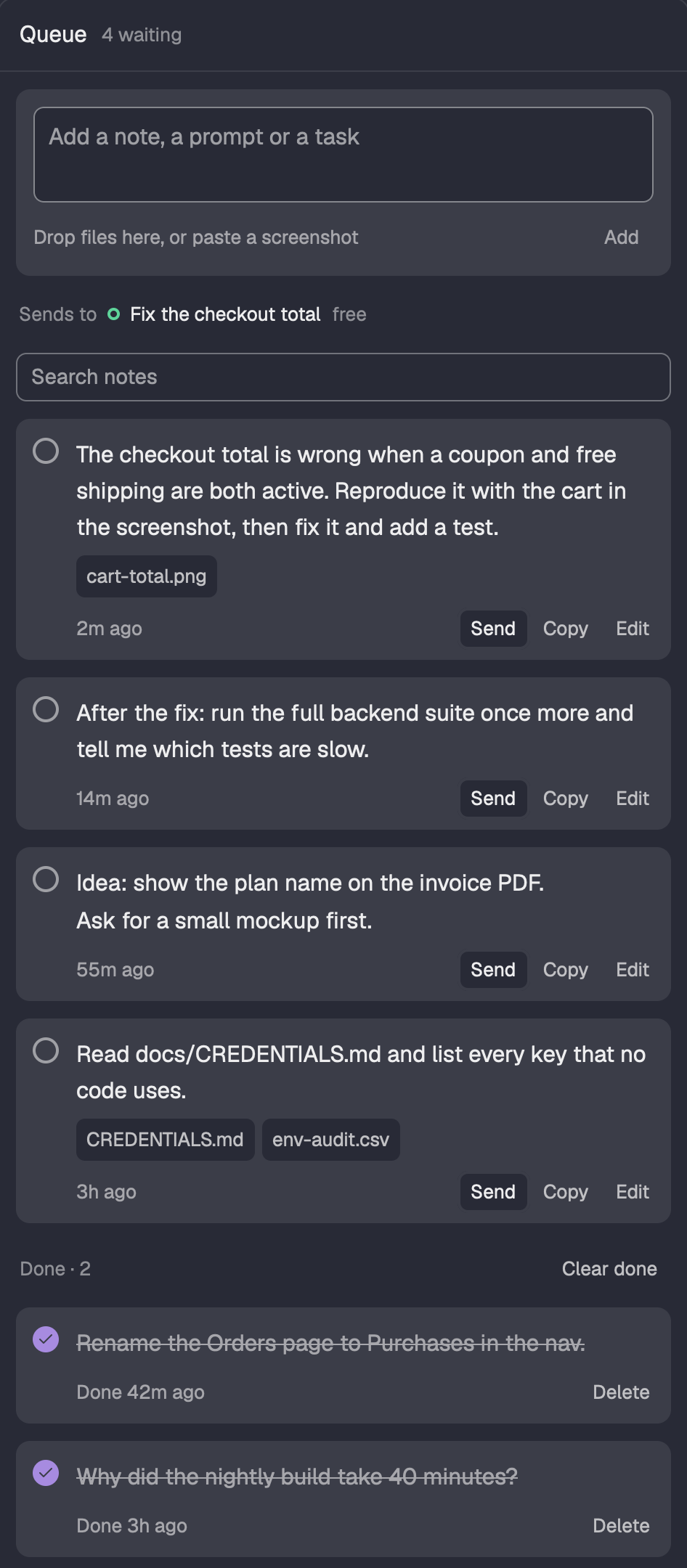
Your next prompts, out of your head and into a side panel. While an agent works, write what you
want it to do next, paste a screenshot or drop files on it. When the agent is free, Send pastes
the note and its file paths into that agent's terminal.
- Sends to the right agent. The line under the field names the agent (its program icon, its
title, free or busy). Send never goes to a plain shell and never guesses between two agents. - Screenshots and files. Paste an image from the clipboard or drop any file; the agent gets
each path on its own line. - One queue per space. Each Herdr space keeps its own notes; one click shows them all.
- Nothing lost. Done notes move down with a check and stay until you delete them, Undo follows
every delete, and a draft survives a restart. Notes are plain JSON in~/.config/herdr-app/queue.json.
Install it: ask the agent in Herdr to "add the Herdr mod at
github.com/Lakris2407/herdr-mods/tree/main/queue". More in queue/.
Mods
| Mod | What it does |
|---|---|
| Agent quota | Claude, Codex and other agents' usage limits in the status bar, plus live CPU, RAM and GPU load (system). |
| Runners | What waits for your self-hosted runners and build machines, what runs on them and each machine's load: a status-bar chip, a side panel and a timeline. |
| Your stats | Your own delivery numbers in a side panel: PRs merged, time to merge, AI share (Claude vs Codex), per-repo breakdown. |
| Queue new | Notes and prompts that wait in a side panel, with files and screenshots: one click sends one to an agent. |
| Path menu | Right-click a terminal to open the files and folders on screen. |
| Agents list | Herdr's Agents sidebar, changed: sub-agents show their task and how long they have run, the task comes first, and quiet text reads. |
| Controls | One menu to turn any status-bar block, tab-bar button and side-panel button off and on. |
| Fleet layout | The whole window these mods were made for, with the changed copies of Herdr's sidebar, tab bar, pane header and status bar. One install from herdr.dev/layouts. |

Install
Ask the agent running in Herdr: "add the Herdr mod at github.com/Lakris2407/herdr-mods/tree/main/runners"
(or quota, stats, queue, path-menu, controls, agents). Herdr's guide tells it to read every file first and to
say what the mod runs.
By hand: clone this repo, do the one-time setup, then copy the mods you want and
add their blocks as each mod's README says.
git clone https://github.com/Lakris2407/herdr-mods
cd herdr-mods
./sync.sh runners controls   # or ./sync.sh for every mod
sync.sh copies each folder's mods/ into ~/.config/herdr-app/mods (or $HERDR_APP_HOME) and runsherdr-app check on each mod. It never touches your layout or keys.json.
Mods are trusted code: they run programs such as gh, ssh and quota-axi. Each README lists what
its mod runs. Read it before you install.
One-time setup
Herdr's own layouts and mods are read-only, so the mods go into a copy of each.
Clone the layout (this switches to the clone) and the tab bar:
herdr-app do layout.clone '{"name":"main","as":"main-plus"}'
herdr-app do mod.clone '{"name":"tabs","as":"tabs-plus"}'
In
~/.config/herdr-app/layouts/main-plus.json, usetabs-plusfor thetabsblock.Replace the status block
{ "id": "status", "type": "block", "content": { "mod": "workspace-status" }, "size": { "px": 28 } }with a row. Each mod's README gives the block to add to
children:{ "id": "status", "type": "row", "size": { "px": 28 }, "resizable": false, "children": [ { "id": "status-main", "type": "block", "content": { "mod": "workspace-status" }, "size": { "weight": 1.9 }, "min": 160 } ] }Use weights, not fixed pixels, for the status blocks: then every block gets a share at any window
width, and each one draws less when it gets less room. Weigh them by what each needs: a block
whose share is smaller than its narrowest view is clipped, and a large share left empty is wasted.Order the row by urgency, not by mod: what needs you on the left (the space's branch and agents,
CI, the runners chip), machine telemetry on the right (system, then quota). Givestatus-mainaminthat fits the branch name, about 160. The weights in each README (runners 2.8, system 2.0,
quota 2.4) keep the window labels on the quota before the system graphs, which say less.Side panels go into the
panel-bodystack, beside Files and Changes. Give each one a button in~/.config/herdr-app/mods/tabs-plus/main.js: add its id to the enabled panels and apanelButton(...)beside the others. To hide buttons from the Controls menu, use
controls/tabs-plus.md instead.
Development
Edit a mod here, run ./sync.sh <folder>, and Herdr reloads it. Tests: npm test (Node 22 or
newer); they run each mod's data code in plain Node, with an in-memory herdr stub where it needs one.
Each folder is one mod as herdr.dev lists it: mods/<name>/, a RECIPE.md (the brief another agent
builds the mod from), a preview.png, and a keys.json if it needs keys.
License
MIT, see LICENSE. path-menu is a modified copy of Herdr's menu mod and stays under
Apache-2.0, see path-menu/LICENSE.
Yorumlar (0)
Yorum birakmak icin giris yap.
Yorum birakSonuc bulunamadi