langsmith-claude-code-plugins
Health Gecti
- License — License: MIT
- Description — Repository has a description
- Active repo — Last push 0 days ago
- Community trust — 68 GitHub stars
Code Basarisiz
- rm -rf — Recursive force deletion command in package.json
- exec() — Shell command execution in plugins/langsmith-gateway/bundle/gateway.js
- process.env — Environment variable access in plugins/langsmith-gateway/bundle/gateway.js
- network request — Outbound network request in plugins/langsmith-gateway/bundle/gateway.js
Permissions Gecti
- Permissions — No dangerous permissions requested
Bu listing icin henuz AI raporu yok.
LangSmith plugins for Claude Code
LangSmith Tracing Plugin for Claude Code
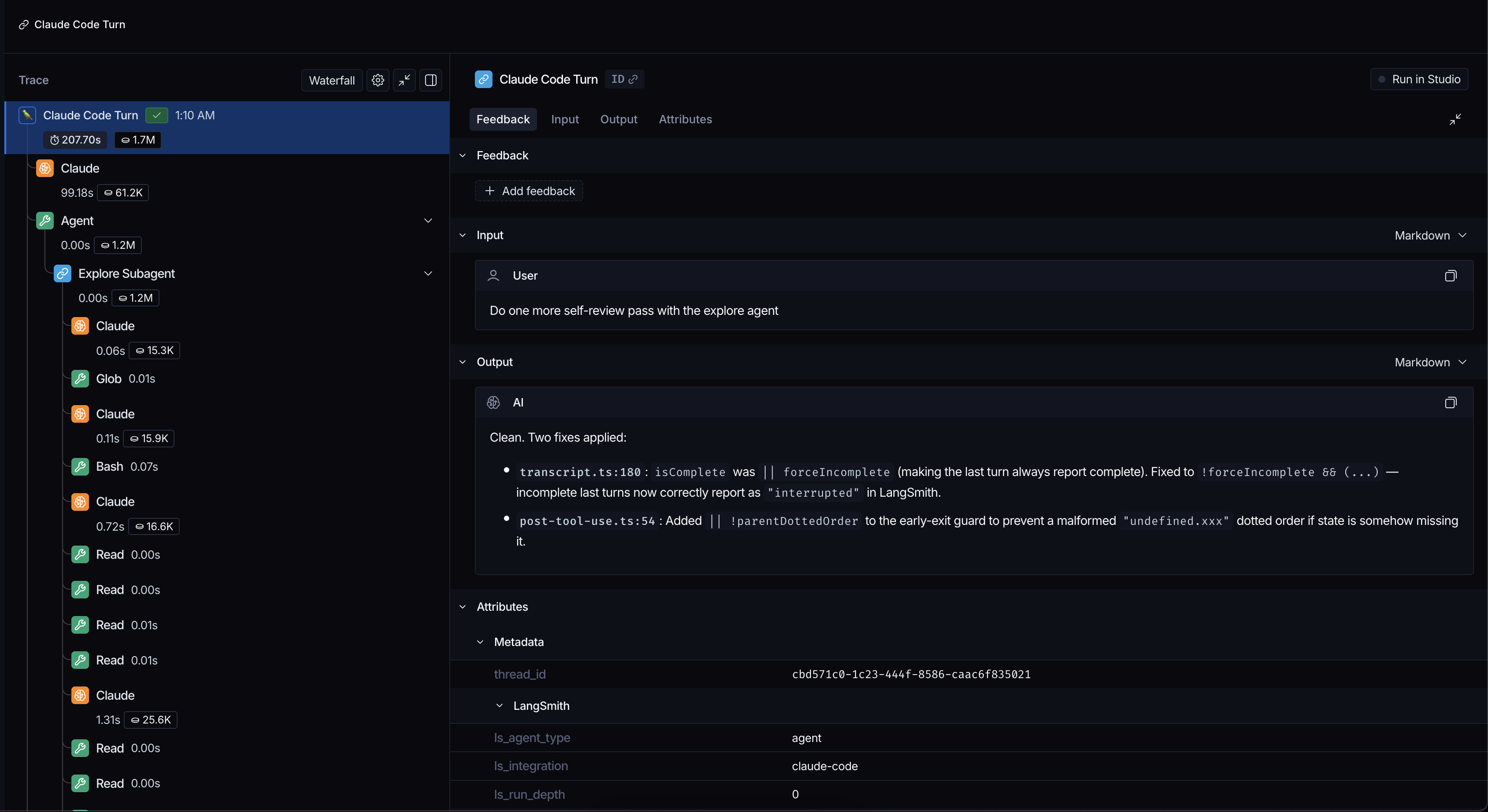
A Claude Code plugin that traces conversations, tool calls, subagent executions, and context compaction to LangSmith.
Setting up the LangSmith Gateway? Start with the required LangSmith CLI installation and browser login, then install and enable the separate langsmith-gateway plugin. The tracing plugin documented below does not require the LangSmith CLI and is optional when using the gateway.
Prerequisites
- Node.js v18+
Installation
As a Claude Code plugin
From within Claude Code, run:
/plugin marketplace add langchain-ai/langsmith-claude-code-plugins
/plugin install langsmith-tracing@langsmith-claude-code-plugins
/reload-plugins
To update, run:
/plugin marketplace update langsmith-claude-code-plugins
/reload-plugins
As a Claude Cowork plugin
Claude Cowork runs Claude Code in a sandboxed VM, thus the plugin needs to be added separately.
- Allow network egress for
LANGSMITH_CC_ENDPOINT(eg.https://api.smith.langchain.com) or for all domains - Add
langchain-ai/langsmith-claude-code-pluginsmarketplace in Customize > Personal Plugins (+) > Create Plugin > Add Marketplace - Edit each of the Claude Code hooks by prepending LangSmith Claude Code environment variables to
commandof every hook. Watch video to see step-by-step.
https://github.com/user-attachments/assets/1d44b30f-e0a8-4173-b60b-97a2d1fb95c5
[!IMPORTANT]
Make sure that 'Allow network egress' is either enabled for all domains or enabled forLANGSMITH_CC_ENDPOINT, otherwise Cowork might freeze.
From source (development)
pnpm install
pnpm build
claude --plugin-dir /path/to/langsmith-claude-code-plugins
Setting environment variables
Option 1: Claude Code settings file (recommended)
Add the following to a .claude/settings.local.json file in your project folder or ~/.claude/settings.json globally:
{
  "env": {
    "TRACE_TO_LANGSMITH": "true",
    "CC_LANGSMITH_API_KEY": "lsv2_pt_...",
    "CC_LANGSMITH_PROJECT": "my-project"
  }
}
Option 2: Export to shell
Add to your ~/.zshrc, ~/.bashrc, or ~/.bash_profile:
export TRACE_TO_LANGSMITH="true"
export CC_LANGSMITH_API_KEY="lsv2_pt_..."
export CC_LANGSMITH_PROJECT="my-project"
Getting your LangSmith API key
- Go to smith.langchain.com
- Sign in or create an account
- Navigate to Settings → API Keys
- Click Create API Key
- Copy the key (starts with
lsv2_pt_...)
What gets traced
With full tracing (the default), each LLM run includes:
- Inputs: accumulated conversation messages
- Outputs: assistant response content
- Metadata:
ls_provider: "anthropic",ls_model_name,ls_invocation_params(model, pluseffort/service_tierwhen the transcript records them), token usage
In full mode, all runs (LLM, tool, turn, subagent) automatically include identity metadata so you can attribute traces in LangSmith:
anthropic_user_id— read from theuserIDfield in~/.claude.json(the Claude Code installation's stable hashed user ID). Omitted if the file is missing or unreadable.local_username— the local OS username fromos.userInfo().
To override either field, supply your own value via CC_LANGSMITH_METADATA — user-supplied keys always win.
Tool runs include the tool name, inputs, and output content. Skill tool runs additionally set ls_skill_name — the invoked skill's name, read from the tool's skill input — so per-skill usage is queryable in run stats.
Interrupted turns (where the user cancels mid-response) are marked with status "interrupted" in LangSmith.
Opening the current session in LangSmith
Run /langsmith-tracing:trace to get a link to this conversation's trace. It does
not start a model turn or change any settings. When you trace to several projects,
you get one labelled link per project.
- A new thread is empty until a traced prompt finishes uploading.
- Changing projects does not move older traces.
- These are not public share links; recipients need access to the project.
- If the lookup fails, search LangSmith for the session ID it prints.
Muting a thread
Muting is off by default unless configured below. With tracing enabled, use these argument-free plugin commands:
/langsmith-tracing:mute— omit this thread's input/output content and unsafe metadata./langsmith-tracing:unmute— restore full tracing for subsequent turns.
Claude Code namespaces plugin commands; neither command accepts on, off, or status. Run /reload-plugins or restart Claude Code after installing or changing command definitions.
Muted runs retain their normal nesting, names, timing, status, model/tool identity, and token usage. Inputs become:
{
  "messages": [
    {
      "role": "user",
      "content": "[LangSmith system notice: content omitted because tracing is muted.]"
    }
  ]
}
Outputs use the same message content with role assistant. Raw errors, identity/repository attribution, arbitrary custom metadata, SDK runtime metadata, and replica metadata overrides are excluded in muted mode. Muting is independent of the secret-redaction setting below.
Preferences are sticky per thread and stored separately from transient tracing state in langsmith_state.privacy.json by default. The preference path replaces a trailing .json in the state-file path with .privacy.json; paths without a trailing .json append .privacy.json. Normal state cleanup does not remove them. If this preference file is unreadable or malformed, new turns use metadata-only tracing and commands refuse to overwrite it; repair the file or permissions before retrying. Deleting it removes all thread overrides and resets to the configured default (unmuted when unset).
Both commands apply from the next turn; the confirmation explicitly says the current turn is unchanged. A turn's mode is fixed when it starts and inherited by its subagents. In-flight work retains its mode across later commands, so unmuting never backfills full content into a previously muted run. A new turn after unmuting—including a task-notification turn—uses full tracing and may include earlier content in its context. There is no retroactive purge or content-tracking policy across turns.
Commands save only the thread preference, never change run parent selection, and are handled without a model turn. The master switch always wins: when disabled, neither full nor metadata-only runs are uploaded.
Default mute configuration
To start threads in metadata-only mode without running a command in each thread, set:
export CC_LANGSMITH_DEFAULT_MUTED="true"
# Use "false" to return to the unmuted default.
Or edit project .claude/langsmith.json, project-root langsmith-plugins.json, user ~/.claude/langsmith.json, or home-root ~/.langsmith-plugins.json:
{
  "enabled": true,
  "defaultMuted": true
}
Set defaultMuted to the JSON boolean false to default to full content. You may omit enabled to inherit the master switch from a lower-priority source. Credentials remain separate and are still required.
For all shared fields, precedence is environment > cwd/.claude/langsmith.json > cwd/langsmith-plugins.json > ~/.claude/langsmith.json > ~/.langsmith-plugins.json > defaults. Resolution is per field: an enabled-only file does not hide a lower-priority defaultMuted, and vice versa. Both project paths use the hook payload's resolved cwd (or the process working directory when omitted), not the plugin installation directory; no ancestor directories are searched. All four files support the full shared JSON contract below. A missing field falls through. Invalid present defaultMuted values restrict that source to muted, but a higher-priority field can override it. Environment values true/false are case-insensitive, without whitespace trimming; any other present value, including an empty string, conservatively means muted. An unset environment variable contributes no override; the final default is unmuted.
This default applies only when a thread has no explicit saved mute/unmute override. A saved unmute wins even over default mute; a saved mute survives default unmute. Config changes affect the next turn of threads without overrides, including task-notification turns. Existing turn/tool/compaction/subagent launch snapshots remain unchanged. Recovery paths without snapshots use the same thread preference and configured default. Config lookup never creates or modifies the privacy preference file, and commands only save an explicit thread override—not a global default.
The privacy file stores only explicit thread overrides, using the strict schema { "threads": { "thread-id": "metadata" } }; each mode must be "full" or "metadata", and no other top-level fields are allowed. Configuration alone owns the fallback default. A missing privacy file means no overrides and is not created by reads.
Master tracing configuration
Claude Code resolves the first applicable setting below; credentials are still required to upload.
| Priority | Setting | Behavior |
|---|---|---|
| 1 | TRACE_TO_LANGSMITH |
When present, case-insensitive true enables; any other value (including empty or whitespace-padded values) disables. Overrides every file. |
| 2 | Project cwd/.claude/langsmith.json |
enabled overrides lower file sources. |
| 3 | Project-root cwd/langsmith-plugins.json |
Used when project .claude omits enabled. |
| 4 | User ~/.claude/langsmith.json |
Used when both project files omit enabled. |
| 5 | Home-root ~/.langsmith-plugins.json |
Baseline when higher sources omit enabled. |
| 6 | No setting | Off. |
At each priority, a missing file or field falls through; an invalid present enabled contributes false. Malformed/non-object JSON or unreadable config restricts that source to enabled:false, defaultMuted:true; it is not a global veto. Higher-priority fields, including environment values, still win independently. TRACE_TO_LANGSMITH=true overrides file enabled:false. To disable tracing regardless of files, set TRACE_TO_LANGSMITH=false. A thread unmute override never enables tracing when the resolved master switch is off.
Shared langsmith-plugins.json contract
Security: trust repository tracing configuration before using this plugin. Project
langsmith-plugins.jsonand.claude/langsmith.jsoncan enable tracing, choose upload endpoints and replicas, supply credentials, and disable secret redaction. A malicious configuration can send conversation messages, file contents, and tool inputs/outputs to a third party. Review these files before using the plugin in an unfamiliar repository. Also review.claude/settings.jsonand.claude/settings.local.json: theirenvsettings can change the plugin's behavior too. Secret redaction is not a guarantee that uploaded content is safe to share. To prevent this plugin from uploading, disable it or ensure its effectiveTRACE_TO_LANGSMITHisfalse; a file-levelenabled:falsedoes not override an environment setting oftrue.
Use langsmith-plugins.json in the project root and ~/.langsmith-plugins.json for user defaults shared across coding-tool plugins. Claude-specific overrides live in project .claude/langsmith.json and user ~/.claude/langsmith.json. These files configure the plugins, not your application's LangSmith tracing.
All four paths use the same dependency-free parser (src/shared-config.ts). Files are read only at cwd/.claude/langsmith.json, cwd/langsmith-plugins.json, ~/.claude/langsmith.json, and ~/.langsmith-plugins.json; there is no ancestor search. Readable symlinks to regular files are supported. Directories, devices, FIFOs, dangling symlinks, unreadable files, malformed JSON, and non-object JSON restrict that source to enabled:false, defaultMuted:true. Only a truly absent entry is ignored.
| Exact JSON field | Type / default | Environment source |
|---|---|---|
enabled |
boolean / false |
TRACE_TO_LANGSMITH |
defaultMuted |
boolean / false |
CC_LANGSMITH_DEFAULT_MUTED |
api_key |
string / "" |
CC_LANGSMITH_API_KEY, then LANGSMITH_API_KEY |
api_url |
string / https://api.smith.langchain.com |
LANGSMITH_ENDPOINT |
project |
string / claude-code |
CC_LANGSMITH_PROJECT |
replicas |
array of objects / absent | CC_LANGSMITH_RUNS_ENDPOINTS |
metadata |
JSON object / absent | CC_LANGSMITH_METADATA |
redact |
boolean / true |
CC_LANGSMITH_REDACT |
redact_extra_rules |
array of {pattern:string, replace?:string} / absent |
CC_LANGSMITH_REDACT_EXTRA |
All shared fields use environment > cwd/.claude/langsmith.json > cwd/langsmith-plugins.json > ~/.claude/langsmith.json > ~/.langsmith-plugins.json > defaults, independently for each field. Strings, including empty strings and whitespace, are accepted unchanged. Arrays replace rather than concatenate; [] explicitly selects no replicas/rules. Metadata shallow-merges per key from defaults → home root → user .claude → cwd root → project .claude → env: nested values replace, and {} does not clear inherited keys. __proto__ is treated as own data, not a prototype mutation. File metadata is treated as untrusted user metadata by privacy filtering.
An invalid present enabled restricts only that field to false; an invalid present defaultMuted restricts only that field to true. Any other recognized field with an invalid value invalidates the entire common file: discard all its ordinary fields and restrict both switches. Ordinary values can still fall back to lower sources; higher-priority switch fields still override the restrictions (e.g. environment can override either switch from any invalid file without overriding the other switch). Unknown keys are ignored, including malformed harness extensions; adapters can access the decoded raw object separately. Diagnostics never include file contents.
Replica file entries use api_url, api_key, project (optional strings) and updates (optional JSON object, preserved). SDK aliases apiUrl, apiKey, projectName are accepted only inside replica objects. An own canonical key always wins, even if empty or invalid: api_key:null invalidates the common file even alongside a valid apiKey. Unknown replica/rule keys are stripped; {} is a valid replica. File tuple entries are invalid. CC_LANGSMITH_RUNS_ENDPOINTS supports SDK replica objects and the supported SDK tuple format. Rule patterns must compile as global regular expressions; any invalid file rule invalidates the common file. Malformed environment rules are skipped; an explicit environment [] overrides file rules.
{
  "enabled": true,
  "defaultMuted": true,
  "project": "my-project",
  "metadata": { "team": "platform" },
  "redact": true,
  "redact_extra_rules": [{ "pattern": "ACME-[A-Z0-9]+", "replace": "[REDACTED]" }],
  "replicas": [
    { "api_url": "https://api.smith.langchain.com", "api_key": "your-key", "project": "audit" }
  ]
}
Credentials may come from files, including replica-only credentials, but never enable tracing by themselves: all uploads require the master switch to be enabled. redact:false never bypasses muted content/provenance filtering. Keep credential-bearing files out of version control.
Secret redaction
By default, the plugin strips common secrets — provider API keys, JWTs, PEM blocks, and structural NAME=value, Authorization, and URL-credential shapes — from run inputs, outputs, and metadata before they are uploaded to LangSmith. Identity/attribution metadata (anthropic_user_id, local_username) is unaffected; only secret values are redacted.
- Set
CC_LANGSMITH_REDACTto a falsy value (false,0,no, oroff) to turn redaction off. - Set
CC_LANGSMITH_REDACT_EXTRAto a JSON array of{ "pattern": "...", "replace": "..." }rules to redact additional custom patterns.patternis a regular-expression string;replace(optional) is the replacement text. Malformed rules are skipped with a logged error.
{
  "env": {
    "CC_LANGSMITH_REDACT_EXTRA": "[{\"pattern\":\"ACME-[A-Z0-9]{16}\",\"replace\":\"[REDACTED_ACME_KEY]\"}]"
  }
}
Environment variables
The plugin respects the following environment variables:
| Variable | Required | Default | Description |
|---|---|---|---|
TRACE_TO_LANGSMITH |
No | File config, then off | Overrides every file when present; "true" enables, any other value disables. |
CC_LANGSMITH_DEFAULT_MUTED |
No | File config, then false |
Overrides file defaults when present; metadata-only tracing for threads without overrides. Case-insensitive true/false; invalid values mute. |
CC_LANGSMITH_API_KEY |
No* | — | LangSmith API key (falls back to LANGSMITH_API_KEY). *Required unless CC_LANGSMITH_RUNS_ENDPOINTS is set. |
CC_LANGSMITH_PROJECT |
No | "claude-code" |
LangSmith project name |
LANGSMITH_ENDPOINT |
No | https://api.smith.langchain.com |
LangSmith API base URL |
CC_LANGSMITH_DEBUG |
No | "false" |
Enable debug logging |
CC_LANGSMITH_PARENT_DOTTED_ORDER |
No | — | Dotted-order of an existing run to nest all Claude Code traces under |
CC_LANGSMITH_METADATA |
No | — | JSON object of custom metadata to attach to all runs (e.g. PR URL, author) |
CC_LANGSMITH_RUNS_ENDPOINTS |
No | — | JSON array of replica destinations for multi-project tracing |
CC_LANGSMITH_REDACT |
No | "true" |
Set to a falsy value (false/0/no/off) to disable client-side secret redaction before upload |
CC_LANGSMITH_REDACT_EXTRA |
No | — | JSON array of { pattern, replace } custom redaction rules, applied alongside the built-in secret patterns |
Usage with GitHub Actions
You can use this plugin with anthropics/claude-code-action to trace Claude Code runs in CI. Add the following to your workflow:
- uses: anthropics/claude-code-action@v1
  env:
    TRACE_TO_LANGSMITH: "true"
    CC_LANGSMITH_API_KEY: ${{ secrets.LANGSMITH_API_KEY }}
    CC_LANGSMITH_PROJECT: "my-project"
    CC_LANGSMITH_METADATA: |
      {
        "pr_url": "${{ github.event.pull_request.html_url || '' }}",
        "pr_number": "${{ github.event.pull_request.number || '' }}",
        "pr_author": "${{ github.event.pull_request.user.login || '' }}",
        "repository": "${{ github.repository }}",
        "commit_sha": "${{ github.sha }}",
        "trigger": "${{ github.event_name }}"
      }
  with:
    anthropic_api_key: ${{ secrets.ANTHROPIC_API_KEY }}
    github_token: ${{ secrets.GITHUB_TOKEN }}
    plugin_marketplaces: |
      https://github.com/langchain-ai/langsmith-claude-code-plugins.git
    plugins: |
      langsmith-tracing@langsmith-claude-code-plugins
    prompt: |
      Your prompt here
Make sure to add LANGSMITH_API_KEY and ANTHROPIC_API_KEY as repository secrets.
See .github/workflows/claude-code-review.yml for a full working example.
Nesting traces under an existing run
Set CC_LANGSMITH_PARENT_DOTTED_ORDER to nest all Claude Code traces as children of an existing LangSmith run. This is useful when Claude Code is invoked programmatically as part of a larger traced workflow.
Python
import subprocess
from langsmith import traceable, get_current_run_tree


os.environ["LANGSMITH_TRACING"] = "true"
os.environ["LANGSMITH_API_KEY"] = "..."
os.environ["LANGSMITH_PROJECT"] = "claude-code"

@traceable
def run_claude(prompt: str):
    run_tree = get_current_run_tree()
    subprocess.run(
        ["claude", "-p", prompt],
        env={
            **os.environ,
            "TRACE_TO_LANGSMITH": "true",
            "CC_LANGSMITH_API_KEY": "...",
            "CC_LANGSMITH_PROJECT": "claude-code",
            "CC_LANGSMITH_PARENT_DOTTED_ORDER": run_tree.dotted_order,
        },
    )
TypeScript
import { traceable, getCurrentRunTree } from "langsmith/traceable";
import { execSync } from "node:child_process";

process.env.LANGSMITH_TRACING = "true";
process.env.LANGSMITH_API_KEY = "...";
process.env.LANGSMITH_PROJECT = "claude-code";

const runClaude = traceable(
  async (prompt: string) => {
    const runTree = getCurrentRunTree();
    const pluginDir = new URL(".", import.meta.url).pathname;
    const res = execSync(`claude -p "${prompt}" --plugin-dir '${pluginDir}'`, {
      env: {
        ...process.env,
        TRACE_TO_LANGSMITH: "true",
        CC_LANGSMITH_API_KEY: "...",
        CC_LANGSMITH_PROJECT: "claude-code",
        CC_LANGSMITH_PARENT_DOTTED_ORDER: runTree.dotted_order,
      },
    });
    return res.toString();
  },
  { name: "run_claude" },
);
The resulting trace hierarchy looks like:
Your outer run (chain)
└── Claude Code Turn (chain)
    ├── Claude (llm)
    ├── Read (tool)
    └── Claude (llm)
Tracing to multiple destinations (Replicas)
You can trace to multiple LangSmith projects or workspaces simultaneously using the CC_LANGSMITH_RUNS_ENDPOINTS environment variable. This is useful for:
- Sending traces to both a production and staging project
- Tracing to multiple workspaces with different API keys
- Adding extra metadata to specific replica destinations
For more information on replicas, see the LangSmith documentation.
Configuration
Set CC_LANGSMITH_RUNS_ENDPOINTS to a JSON array of replica configurations. This will override other client settings.
Option 1: Claude Code settings file (recommended)
In your local .claude/settings.local.json or global ~/.claude/settings.json:
{
  "env": {
    "TRACE_TO_LANGSMITH": "true",
    "CC_LANGSMITH_RUNS_ENDPOINTS": "[{\"apiUrl\":\"https://api.smith.langchain.com\",\"apiKey\":\"ls__key_workspace_a\",\"projectName\":\"project-prod\"},{\"apiUrl\":\"https://api.smith.langchain.com\",\"apiKey\":\"ls__key_workspace_b\",\"projectName\":\"project-staging\",\"updates\":{\"metadata\":{\"environment\":\"staging\"}}}]"
  }
}
Tip: To generate the escaped JSON string, use:
echo '[{"apiUrl":"...","apiKey":"...","projectName":"..."}]' | jq -cR .
Option 2: Shell environment variable
Add to your ~/.zshrc, ~/.bashrc, or ~/.bash_profile:
export CC_LANGSMITH_RUNS_ENDPOINTS='[{"apiUrl":"https://api.smith.langchain.com","apiKey":"ls__key_workspace_a","projectName":"project-prod"},{"apiUrl":"https://api.smith.langchain.com","apiKey":"ls__key_workspace_b","projectName":"project-staging","updates":{"metadata":{"environment":"staging"}}}]'
Replica format
Each replica object supports the following fields:
| Field | Required | Description |
|---|---|---|
apiUrl |
Yes | LangSmith API URL (typically https://api.smith.langchain.com) |
apiKey |
Yes | API key for the destination workspace |
projectName |
Yes | Project name in the destination workspace |
updates |
No | Optional metadata/fields to override on the replicated runs |
Experimental langsmith-gateway plugin (separate install)
Route model requests through LangSmith independently of tracing. The default is
OAuth-only gateway authentication, using gateway-managed provider keys and
provider billing. Native Claude credentials are forwarded only with explicit opt-in.
The gateway receives unredacted conversation/tool content; tracing settings,
mute, and redaction do not filter it. Review the operational and security reference
before enabling.
LangSmith CLI prerequisite
Install and authenticate the LangSmith CLI before installing or enabling the gateway plugin.
The gateway requires macOS/Linux, Node.js 20+, and Claude Code and langsmith on PATH.
These requirements are for the gateway, not the tracing-only installation above.
In your terminal, install the LangSmith CLI
if needed:
curl -fsSL https://cli.langsmith.com/install.sh | sh
Follow the installer's PATH instructions, then open a new terminal if needed solangsmith is available to both your shell and Claude Code. For a new production
configuration, log in using the CLI’s normal selected/default profile:
langsmith auth login
Complete the browser login using ordinary short-lived OAuth credentials, not the
CLI's static-token gateway setup flow. Setup does not check login; authentication
is checked on first model use. For an existing or alternate profile, follow the
profile and issuer guidance.
Without --profile, new gateway setups defer to the CLI’s persisted current_profile
(or default when none is selected). The sanitized token subprocess does not inheritLANGSMITH_PROFILE or other CLI environment overrides; use setup --profile name
if you need to pin an environment-only selection.
Install and enable the gateway in Claude Code
Install at user scope, inside Claude Code, so hooks run in all projects:
/plugin marketplace add langchain-ai/langsmith-claude-code-plugins /plugin install langsmith-gateway@langsmith-claude-code-plugins --scope user /reload-pluginslangsmith-tracingis a separate, optional install.Enable gateway routing globally:
/langsmith-gateway:setup --scope globalThis saves routing in
~/.claude/settings.jsonand starts the local daemon.
For only the current project, use/langsmith-gateway:setup --scope project;
it writes.claude/settings.local.json. Keep these credential-bearing files
private, untracked, and git-ignored; never commit credentials.New configs use API
https://api.smith.langchain.com, gatewayhttps://gateway.smith.langchain.com, the CLI default/current profile, and port52507.
Existing configs retain their CLI/profile/port and endpoints. All scopes share
one daemon and must use the same options. If the CLI is not found, check PATH
and retry setup.Continue using Claude Code. Default Claude models need no changes. If routing
does not update, see troubleshooting.
Gateway session-start and prompt hooks start the daemon whenever the private proxy
config is enabled, independently of routing settings (including managed-only routing).
They do not read user/project routing or interpret Claude managed policy/precedence.
Setup and disable still modify only the selected user/project settings files, not
managed settings; disabled private config is never implicitly re-enabled by hooks.
To undo routing, run /langsmith-gateway:disable --scope global or --scope project.
Restart affected Claude sessions to stop using the proxy. Global routing still
applies after disabling a project's local scope. Disable every active scope before
uninstalling; see disable and re-enable details.
Read-only gateway status
/langsmith-gateway:status
Reports saved global/current-project routing, shared configuration, and local
health without changing anything. Optional --scope global|project selects one
routing target. This is not a check of live session routing or upstream authentication.
Optional Claude subscription credential forwarding
/langsmith-gateway:setup --scope project --use-claude-subscription
/langsmith-gateway:setup --scope project
The first command opts in; the second turns forwarding off. Every explicit setup
without the flag saves false; hooks retain the saved choice between sessions.
Opt-in requires native Claude login and sends native credentials for built-in
Anthropic destinations, including gateway fallback legs; provider eligibility and
billing terms still apply. Both modes require LangSmith CLI login.
To switch modes, run setup on the configured scope after disabling all other active
scopes. Expect brief downtime. See mode switching and recovery.
Alternate API and gateway hosts
Use paired --api-url / --gateway-url flags and a matching OAuth profile.
You can optionally specify an LangSmith auth profile with --profile name--api-url does not change a saved OAuth issuer. Before changing endpoints,
profile, CLI, or port, disable all scopes and follow the
switching-destinations procedure,
including session shutdown and drain before login.
For model overrides and token-counting limits, see model details.
Known limitations
Currently, subagents are only traced upon completion. This means if you interrupt a conversation turn during a subagent run,
the subagent runs will not be traced.
Development
pnpm install
pnpm test        # Run tests
pnpm build       # Regenerate tracing and experimental gateway bundles
After making changes, run pnpm build, then run:
claude --plugin-dir /path/to/langsmith-claude-code-plugins
and send a new message in Claude Code to pick up the updated hooks.
License
MIT
Yorumlar (0)
Yorum birakmak icin giris yap.
Yorum birakSonuc bulunamadi