langroid
Health Gecti
- License — License: MIT
- Description — Repository has a description
- Active repo — Last push 4 days ago
- Community trust — 3944 GitHub stars
Code Basarisiz
- rm -rf — Recursive force deletion command in .github/workflows/pytest.yml
Permissions Gecti
- Permissions — No dangerous permissions requested
Bu listing icin henuz AI raporu yok.
Harness LLMs with Multi-Agent Programming







Documentation
·
Examples Repo
·
Discord
·
Contributing
Langroid is an intuitive, lightweight, extensible and principled
Python framework to easily build LLM-powered applications, from CMU and UW-Madison researchers.
You set up Agents, equip them with optional components (LLM,
vector-store and tools/functions), assign them tasks, and have them
collaboratively solve a problem by exchanging messages.
This Multi-Agent paradigm is inspired by the
Actor Framework
(but you do not need to know anything about this!).
Langroid is a fresh take on LLM app-development, where considerable thought has gone
into simplifying the developer experience;
it does not use Langchain, or any other LLM framework,
and works with practically any LLM.
🔥 ✨ A Claude Code plugin is available to
accelerate Langroid development with built-in patterns and best practices.
🔥 Read the (WIP) overview of the langroid architecture,
and a quick tour of Langroid.
🔥 MCP Support: Allow any LLM-Agent to leverage MCP Servers via Langroid's simple
MCP tool adapter that converts
the server's tools into Langroid's ToolMessage instances.
📢 Companies are using/adapting Langroid in production. Here is a quote:
Nullify uses AI Agents for secure software development.
It finds, prioritizes and fixes vulnerabilities. We have internally adapted Langroid's multi-agent orchestration framework in production, after evaluating CrewAI, Autogen, LangChain, Langflow, etc. We found Langroid to be far superior to those frameworks in terms of ease of setup and flexibility. Langroid's Agent and Task abstractions are intuitive, well thought out, and provide a great developer experience. We wanted the quickest way to get something in production. With other frameworks it would have taken us weeks, but with Langroid we got to good results in minutes. Highly recommended!
-- Jacky Wong, Head of AI at Nullify.
🔥 See this Intro to Langroid
blog post from the LanceDB team
🔥 Just published in ML for Healthcare (2024): a Langroid-based Multi-Agent RAG system for
pharmacovigilance, see blog post
We welcome contributions: See the contributions document
for ideas on what to contribute.
Are you building LLM Applications, or want help with Langroid for your company,
or want to prioritize Langroid features for your company use-cases?
Prasad Chalasani is available for consulting
(advisory/development): pchalasani at gmail dot com.
Sponsorship is also accepted via GitHub Sponsors
Questions, Feedback, Ideas? Join us on Discord!
Quick glimpse of coding with Langroid
This is just a teaser; there's much more, like function-calling/tools,
Multi-Agent Collaboration, Structured Information Extraction, DocChatAgent
(RAG), SQLChatAgent, non-OpenAI local/remote LLMs, etc. Scroll down or see docs for more.
See the Langroid Quick-Start Colab
that builds up to a 2-agent information-extraction example using the OpenAI ChatCompletion API.
See also this version that uses the OpenAI Assistants API instead.
🔥 just released! Example
script showing how you can use Langroid multi-agents and tools
to extract structured information from a document using only a local LLM
(Mistral-7b-instruct-v0.2).
import langroid as lr
import langroid.language_models as lm

# set up LLM
llm_cfg = lm.OpenAIGPTConfig( # or OpenAIAssistant to use Assistant API
  # any model served via an OpenAI-compatible API
  chat_model=lm.OpenAIChatModel.GPT4o, # or, e.g., "ollama/mistral"
)
# use LLM directly
mdl = lm.OpenAIGPT(llm_cfg)
response = mdl.chat("What is the capital of Ontario?", max_tokens=10)

# use LLM in an Agent
agent_cfg = lr.ChatAgentConfig(llm=llm_cfg)
agent = lr.ChatAgent(agent_cfg)
agent.llm_response("What is the capital of China?")
response = agent.llm_response("And India?") # maintains conversation state

# wrap Agent in a Task to run interactive loop with user (or other agents)
task = lr.Task(agent, name="Bot", system_message="You are a helpful assistant")
task.run("Hello") # kick off with user saying "Hello"

# 2-Agent chat loop: Teacher Agent asks questions to Student Agent
teacher_agent = lr.ChatAgent(agent_cfg)
teacher_task = lr.Task(
  teacher_agent, name="Teacher",
  system_message="""
    Ask your student concise numbers questions, and give feedback.
    Start with a question.
    """
)
student_agent = lr.ChatAgent(agent_cfg)
student_task = lr.Task(
  student_agent, name="Student",
  system_message="Concisely answer the teacher's questions.",
  single_round=True,
)

teacher_task.add_sub_task(student_task)
teacher_task.run()
🔥 Updates/Releases
Click to expandAug 2025:
- 0.59.0 Complete Pydantic V2 Migration -
5-50x faster validation, modern Python patterns, 100% backward compatible.
- 0.59.0 Complete Pydantic V2 Migration -
Jul 2025:
Jun 2025:
- 0.56.0
TaskToolfor delegating tasks to sub-agents -
enables agents to spawn sub-agents with specific tools and configurations. - 0.55.0 Event-based task termination with
done_sequences-
declarative task completion using event patterns. - 0.54.0 Portkey AI Gateway support - access 200+ models
across providers through unified API with caching, retries, observability.
- 0.56.0
Mar-Apr 2025:
- 0.53.0 MCP Tools Support.
- 0.52.0 Multimodal support, i.e. allow PDF, image
inputs to LLM. - 0.51.0
LLMPdfParser, generalizingGeminiPdfParserto parse documents directly with LLM. - 0.50.0 Structure-aware Markdown chunking with chunks
enriched by section headers. - 0.49.0 Enable easy switch to LiteLLM Proxy-server
- 0.48.0 Exa Crawler, Markitdown Parser
- 0.47.0 Support Firecrawl URL scraper/crawler -
thanks @abab-dev - 0.46.0 Support LangDB LLM Gateway - thanks @MrunmayS.
- 0.45.0 Markdown parsing with
Marker- thanks @abab-dev - 0.44.0 Late imports to reduce startup time. Thanks
@abab-dev
Feb 2025:
- 0.43.0:
GeminiPdfParserfor parsing PDF using
Gemini LLMs - Thanks @abab-dev. - 0.42.0:
markitdownparser forpptx,xlsx,xlsfiles
Thanks @abab-dev. - 0.41.0:
pineconevector-db (Thanks @coretado),Tavilyweb-search (Thanks @Sozhan308),Exaweb-search (Thanks @MuddyHope). - 0.40.0:
pgvectorvector-db. Thanks @abab-dev. - 0.39.0:
ChatAgentConfig.handle_llm_no_toolfor
handling LLM "forgetting" to use a tool. - 0.38.0: Gemini embeddings - Thanks @abab-dev)
- 0.37.0: New PDF Parsers:
docling,pymupdf4llm
- 0.43.0:
Jan 2025:
- 0.36.0: Weaviate vector-db support (thanks @abab-dev).
- 0.35.0: Capture/Stream reasoning content from
Reasoning LLMs (e.g. DeepSeek-R1, OpenAI o1) in addition to final answer. - 0.34.0: DocChatAgent
chunk enrichment to improve retrieval. (collaboration with @dfm88). - 0.33.0 Move from Poetry to uv! (thanks @abab-dev).
- 0.32.0 DeepSeek v3 support.
Dec 2024:
- 0.31.0 Azure OpenAI Embeddings
- 0.30.0 Llama-cpp embeddings (thanks @Kwigg).
- 0.29.0 Custom Azure OpenAI Client (thanks
@johannestang). - 0.28.0
ToolMessage:_handlerfield to override
default handler method name inrequestfield (thanks @alexagr). - 0.27.0 OpenRouter Support.
- 0.26.0 Update to latest Chainlit.
- 0.25.0 True Async Methods for agent and
user-response (thanks @alexagr).
Nov 2024:
- 0.24.0:
Enables support forAgents with strict JSON schema output format on compatible LLMs and strict mode for the OpenAI tools API.
(thanks @nilspalumbo). - 0.23.0:
support for LLMs (e.g.Qwen2.5-Coder-32b-Instruct) hosted on glhf.chat - 0.22.0:
Optional parameters to truncate large tool results. - 0.21.0 Direct support for Gemini models via OpenAI client instead of using LiteLLM.
- 0.20.0 Support for
ArangoDB Knowledge Graphs.
- 0.24.0:
Oct 2024:
- [0.18.0] LLMConfig.async_stream_quiet flag to
turn off LLM output in async + stream mode. - [0.17.0] XML-based tools, see docs.
- [0.18.0] LLMConfig.async_stream_quiet flag to
Sep 2024:
- 0.16.0 Support for OpenAI
o1-miniando1-previewmodels. - 0.15.0 Cerebras API support -- run llama-3.1 models hosted on Cerebras Cloud (very fast inference).
- 0.14.0
DocChatAgentuses Reciprocal Rank Fusion (RRF) to rank chunks retrieved by different methods. - 0.12.0
run_batch_tasknew option --stop_on_first_result- allows termination of batch as soon as any task returns a result.
- 0.16.0 Support for OpenAI
Aug 2024:
Jul 2024:
Jun 2024:
- 0.2.0: Improved lineage tracking, granular sub-task configs, and a new tool,
RewindTool,
that lets an agent "rewind and redo" a past message (and all dependent messages are cleared out
thanks to the lineage tracking). Read notes here.
- 0.2.0: Improved lineage tracking, granular sub-task configs, and a new tool,
May 2024:
- Slimmer langroid: All document-parsers (i.e. pdf, doc, docx) and most
vector-databases (except qdrant)
are now optional/extra dependencies, which helps reduce build size, script
start-up time, and install time. For convenience various grouping of "extras" are
provided, e.g.doc-chat,db(for database-related dependencies). See updated
install instructions below and in the docs. - Few-shot examples for tools: when defining a ToolMessage, previously you were able to include a classmethod named
examples,
and a random example from this list would be used to generate a 1-shot example
for the LLM. This has been improved so you can now supply a list of examples
where each example is either a tool instance, or a tuple of (description,
tool instance), where the description is a "thought" that leads the LLM to use
the tool (see example in the docs). In some scenarios this can improve LLM tool
generation accuracy. Also, now instead of a random example, ALL examples are used to generate few-shot
examples. - Infinite loop detection for task loops of cycle-length <= 10 (configurable
inTaskConfig. Only detects exact loops, rather than approximate loops where the entities are saying essentially similar (but not exactly the same) things repeatedly. - "@"-addressing: any entity can address any other by name, which can be the name
of an agent's responder ("llm", "user", "agent") or a sub-task name. This is a
simpler alternative to theRecipientToolmechanism, with the tradeoff that
since it's not a tool, there's no way to enforce/remind the LLM to explicitly
specify an addressee (in scenarios where this is important). - Much-Improved Citation
generation and display when usingDocChatAgent. gpt-4ois now the default LLM throughout; Update tests and examples to work
with this LLM; use tokenizer corresponding to the LLM.gemini 1.5 prosupport vialitellmQdrantDB:update to support learned sparse embeddings.
- Slimmer langroid: All document-parsers (i.e. pdf, doc, docx) and most
Apr 2024:
- 0.1.236: Support for open LLMs hosted on Groq, e.g. specify
chat_model="groq/llama3-8b-8192".
See tutorial. - 0.1.235:
Task.run(), Task.run_async(), run_batch_taskshavemax_cost
andmax_tokensparams to exit when tokens or cost exceed a limit. The resultChatDocument.metadatanow includes astatusfield which is a code indicating a
task completion reason code. Alsotask.run()etc can be invoked with an explicit
session_idfield which is used as a key to look up various settings in Redis cache.
Currently only used to look up "kill status" - this allows killing a running task, either bytask.kill()
or by the classmethodTask.kill_session(session_id).
For example usage, see thetest_task_killin tests/main/test_task.py
- 0.1.236: Support for open LLMs hosted on Groq, e.g. specify
Mar 2024:
- 0.1.216: Improvements to allow concurrent runs of
DocChatAgent, see thetest_doc_chat_agent.py
in particular thetest_doc_chat_batch();
New task run utility:run_batch_task_gen
where a task generator can be specified, to generate one task per input. - 0.1.212: ImagePdfParser: support for extracting text from image-based PDFs.
(this meansDocChatAgentwill now work with image-pdfs). - 0.1.194 - 0.1.211: Misc fixes, improvements, and features:
- Big enhancement in RAG performance (mainly, recall) due to a fix in Relevance
Extractor DocChatAgentcontext-window fixes- Anthropic/Claude3 support via Litellm
URLLoader: detect file time from header when URL doesn't end with a
recognizable suffix like.pdf,.docx, etc.- Misc lancedb integration fixes
- Auto-select embedding config based on whether
sentence_transformermodule is available. - Slim down dependencies, make some heavy ones optional, e.g.
unstructured,haystack,chromadb,mkdocs,huggingface-hub,sentence-transformers. - Easier top-level imports from
import langroid as lr - Improve JSON detection, esp from weak LLMs
- Big enhancement in RAG performance (mainly, recall) due to a fix in Relevance
- 0.1.216: Improvements to allow concurrent runs of
Feb 2024:
- 0.1.193: Support local LLMs using Ollama's new OpenAI-Compatible server:
simply specifychat_model="ollama/mistral". See release notes. - 0.1.183: Added Chainlit support via callbacks.
See examples.
- 0.1.193: Support local LLMs using Ollama's new OpenAI-Compatible server:
Jan 2024:
- 0.1.175
- Neo4jChatAgent to chat with a neo4j knowledge-graph.
(Thanks to Mohannad!). The agent uses tools to query the Neo4j schema and translate user queries to Cypher queries,
and the tool handler executes these queries, returning them to the LLM to compose
a natural language response (analogous to howSQLChatAgentworks).
See example script using this Agent to answer questions about Python pkg dependencies. - Support for
.docfile parsing (in addition to.docx) - Specify optional
formatterparam
inOpenAIGPTConfigto ensure accurate chat formatting for local LLMs.
- Neo4jChatAgent to chat with a neo4j knowledge-graph.
- 0.1.157:
DocChatAgentConfig
has a new param:add_fields_to_content, to specify additional document fields to insert into
the maincontentfield, to help improve retrieval. - 0.1.156: New Task control signals
PASS_TO, SEND_TO; VectorStore: Compute Pandas expression on documents; LanceRAGTaskCreator creates 3-agent RAG system with Query Planner, Critic and RAG Agent.
- 0.1.175
Dec 2023:
- 0.1.154: (For details see release notes of 0.1.149
and 0.1.154).DocChatAgent: Ingest Pandas dataframes and filtering.LanceDocChatAgentleveragesLanceDBvector-db for efficient vector search
and full-text search and filtering.- Improved task and multi-agent control mechanisms
LanceRAGTaskCreatorto create a 2-agent system consisting of aLanceFilterAgentthat
decides a filter and rephrase query to send to a RAG agent.
- 0.1.141:
API Simplifications to reduce boilerplate:
auto-select an available OpenAI model (preferring gpt-4o), simplifies defaults.
SimplerTaskinitialization with defaultChatAgent.
- 0.1.154: (For details see release notes of 0.1.149
Nov 2023:
0.1.126:
OpenAIAssistant agent: Caching Support.0.1.117: Support for OpenAI Assistant API tools: Function-calling,
Code-intepreter, and Retriever (RAG), file uploads. These work seamlessly
with Langroid's task-orchestration.
Until docs are ready, it's best to see these usage examples:0.1.112:
OpenAIAssistantis a subclass ofChatAgentthat
leverages the new OpenAI Assistant API. It can be used as a drop-in
replacement forChatAgent, and relies on the Assistant API to
maintain conversation state, and leverages persistent threads and
assistants to reconnect to them if needed. Examples:test_openai_assistant.py,test_openai_assistant_async.py0.1.111: Support latest OpenAI model:
GPT4_TURBO
(see test_llm.py for example usage)0.1.110: Upgrade from OpenAI v0.x to v1.1.1 (in preparation for
Assistants API and more); (litellmtemporarily disabled due to OpenAI
version conflict).
Oct 2023:
- 0.1.107:
DocChatAgentre-rankers:rank_with_diversity,rank_to_periphery(lost in middle). - 0.1.102:
DocChatAgentConfig.n_neighbor_chunks > 0allows returning context chunks around match. - 0.1.101:
DocChatAgentusesRelevanceExtractorAgentto have
the LLM extract relevant portions of a chunk using
sentence-numbering, resulting in huge speed up and cost reduction
compared to the naive "sentence-parroting" approach (writing out full
sentences out relevant whole sentences) whichLangChainuses in theirLLMChainExtractor. - 0.1.100: API update: all of Langroid is accessible with a single import, i.e.
import langroid as lr. See the documentation for usage. - 0.1.99: Convenience batch functions to run tasks, agent methods on a list of inputs concurrently in async mode. See examples in test_batch.py.
- 0.1.95: Added support for Momento Serverless Vector Index
- 0.1.94: Added support for LanceDB vector-store -- allows vector, Full-text, SQL search.
- 0.1.84: Added LiteLLM, so now Langroid can be used with over 100 LLM providers (remote or local)!
See guide here.
- 0.1.107:
Sep 2023:
- 0.1.78: Async versions of several Task, Agent and LLM methods;
Nested Pydantic classes are now supported for LLM Function-calling, Tools, Structured Output. - 0.1.76: DocChatAgent: support for loading
docxfiles (preliminary). - 0.1.72: Many improvements to DocChatAgent: better embedding model,
hybrid search to improve retrieval, better pdf parsing, re-ranking retrieved results with cross-encoders. - Use with local LLama Models: see tutorial here
- Langroid Blog/Newsletter Launched!: First post is here -- Please subscribe to stay updated.
- 0.1.56: Support Azure OpenAI.
- 0.1.55: Improved
SQLChatAgentthat efficiently retrieves relevant schema info when translating natural language to SQL.
- 0.1.78: Async versions of several Task, Agent and LLM methods;
Aug 2023:
- Hierarchical computation example using Langroid agents and task orchestration.
- 0.1.51: Support for global state, see test_global_state.py.
- 🐳 Langroid Docker image, available, see instructions below.
- RecipientTool enables (+ enforces) LLM to
specify an intended recipient when talking to 2 or more agents.
See this test for example usage. - Example: Answer questions using Google Search + vecdb-retrieval from URL contents.
- 0.1.39:
GoogleSearchToolto enable Agents (their LLM) to do Google searches via function-calling/tools.
See this chat example for how easy it is to add this tool to an agent. - Colab notebook to try the quick-start examples:
- 0.1.37: Added
SQLChatAgent-- thanks to our latest contributor Rithwik Babu! - Multi-agent Example: Autocorrect chat
July 2023:
- 0.1.30: Added
TableChatAgentto
chat with tabular datasets (dataframes, files, URLs): LLM generates Pandas code,
and code is executed using Langroid's tool/function-call mechanism. - Demo: 3-agent system for Audience Targeting.
- 0.1.27: Added support
for Momento Serverless Cache as an alternative to Redis. - 0.1.24:
DocChatAgent
now accepts PDF files or URLs.
- 0.1.30: Added
🚀 Demo
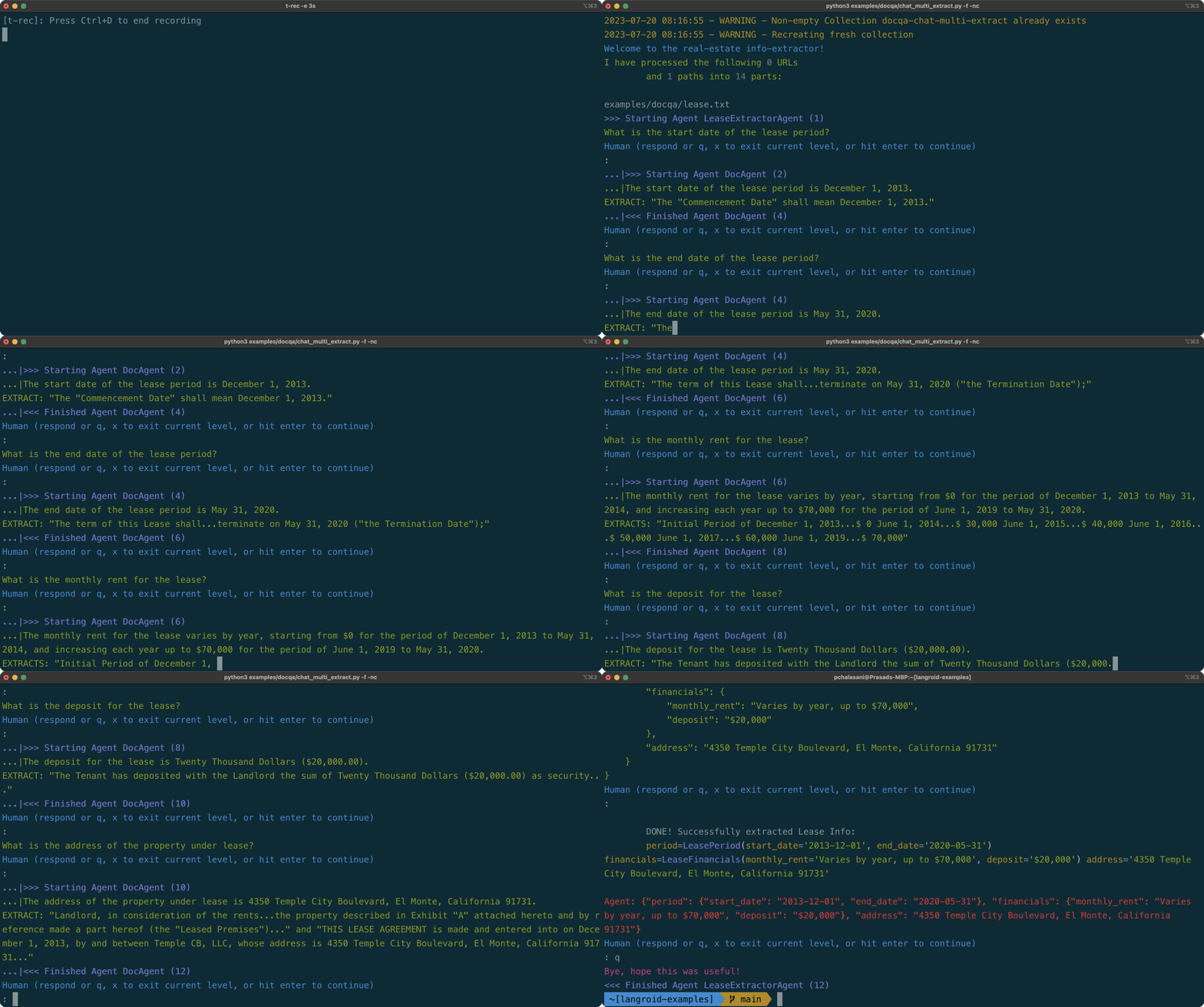
Suppose you want to extract structured information about the key terms
of a commercial lease document. You can easily do this with Langroid using a two-agent system,
as we show in the langroid-examples repo.
(See this script
for a version with the same functionality using a local Mistral-7b model.)
The demo showcases just a few of the many features of Langroid, such as:
- Multi-agent collaboration:
LeaseExtractoris in charge of the task, and its LLM (GPT4) generates questions
to be answered by theDocAgent. - Retrieval augmented question-answering, with source-citation:
DocAgentLLM (GPT4) uses retrieval from a vector-store to
answer theLeaseExtractor's questions, cites the specific excerpt supporting the answer. - Function-calling (also known as tool/plugin): When it has all the information it
needs, theLeaseExtractorLLM presents the information in a structured
format using a Function-call.
Here is what it looks like in action
(a pausable mp4 video is here).
⚡ Highlights
(For a more up-to-date list see the
Updates/Releases
section above)
- Agents as first-class citizens: The Agent class encapsulates LLM conversation state,
and optionally a vector-store and tools. Agents are a core abstraction in Langroid;
Agents act as message transformers, and by default provide 3 responder methods, one corresponding to each entity: LLM, Agent, User. - Tasks: A Task class wraps an Agent, and gives the agent instructions (or roles, or goals),
manages iteration over an Agent's responder methods,
and orchestrates multi-agent interactions via hierarchical, recursive
task-delegation. TheTask.run()method has the same
type-signature as an Agent's responder's methods, and this is key to how
a task of an agent can delegate to other sub-tasks: from the point of view of a Task,
sub-tasks are simply additional responders, to be used in a round-robin fashion
after the agent's own responders. - Modularity, Reusability, Loose coupling: The
AgentandTaskabstractions allow users to design
Agents with specific skills, wrap them in Tasks, and combine tasks in a flexible way. - LLM Support: Langroid supports OpenAI LLMs as well as LLMs from hundreds of
providers (local/open or remote/commercial) via proxy libraries and local model servers
such as ollama, oobabooga,
LiteLLM that in effect mimic the OpenAI API. See the supported LLMs. - Caching of LLM responses: Langroid supports Redis to cache LLM responses.
- Vector-stores: Qdrant, Chroma, LanceDB, Pinecone, PostgresDB (PGVector), Weaviate are currently supported.
Vector stores allow for Retrieval-Augmented-Generation (RAG). - Grounding and source-citation: Access to external documents via vector-stores
allows for grounding and source-citation. - Observability, Logging, Lineage: Langroid generates detailed logs of multi-agent interactions and
maintains provenance/lineage of messages, so that you can trace back
the origin of a message. - Tools/Plugins/Function-calling:
Langroid supports OpenAI's function calling, as
well as an equivalentToolMessagemechanism which works with
any LLM, not just OpenAI's.
Function calling and tools have the same developer-facing interface, implemented
using Pydantic,
which makes it very easy to define tools/functions and enable agents
to use them. Benefits of using Pydantic are that you never have to write
complex JSON specs for function calling, and when the LLM
hallucinates malformed JSON, the Pydantic error message is sent back to
the LLM so it can fix it.
⚙️ Installation and Setup
Install langroid
Langroid requires Python 3.11+. We recommend using a virtual environment.
Use pip to install a bare-bones slim version of langroid (from PyPi) to your virtual
environment:
pip install langroid
The core Langroid package lets you use OpenAI Embeddings models via their API.
If you instead want to use the sentence-transformers embedding models from HuggingFace,
install Langroid like this:
pip install "langroid[hf-embeddings]"
For many practical scenarios, you may need additional optional dependencies:
- To use various document-parsers, install langroid with the
doc-chatextra:pip install "langroid[doc-chat]" - For "chat with databases", use the
dbextra:pip install "langroid[db]" - You can specify multiple extras by separating them with commas, e.g.:
pip install "langroid[doc-chat,db]" - To simply install all optional dependencies, use the
allextra (but note that this will result in longer load/startup times and a larger install size):pip install "langroid[all]"
If you are using SQLChatAgent
(e.g. the script examples/data-qa/sql-chat/sql_chat.py),
with a postgres db, you will need to:
- Install PostgreSQL dev libraries for your platform, e.g.
sudo apt-get install libpq-devon Ubuntu,brew install postgresqlon Mac, etc.
- Install langroid with the postgres extra, e.g.
pip install langroid[postgres]
orpoetry add "langroid[postgres]"orpoetry install -E postgres,
(or the correspondinguvversions, e.g.uv add "langroid[postgres]"
oruv pip install langroid[postgres]).
If this gives you an error, trypip install psycopg2-binaryin your virtualenv.
📝 If you get strange errors involving mysqlclient, try doing pip uninstall mysqlclient followed by pip install mysqlclient.
Claude Code Plugin (Optional)
This plugin provides two skills:
langroid:patterns- Your Claude Code agent can leverage this skill to produce
Langroid multi-agent code using proper design patterns.langroid:add-pattern- The agent can use this skill to record new patterns it
learns, for future reference, either autonomously or when prompted by the user.
Step 1: Add the Langroid marketplace
From terminal:
claude plugin marketplace add langroid/langroid
Or within Claude Code:
/plugin marketplace add langroid/langroid
Step 2: Install the Langroid plugin
From terminal:
claude plugin install langroid@langroid
Or within Claude Code:
/plugin install langroid@langroid
Once installed, simply ask your Claude Code agent to implement Langroid patterns in
natural language, e.g.,
set up a Langroid agent so it uses the EditTool, and wrap it in a task that ends as soon as the tool is generated
and it will automatically use the langroid:patterns skill to follow the right design pattern.
You can also ask Claude Code to record a new pattern when you discover one, e.g.,
record this as a new Langroid pattern for setting up MCP tools
Set up environment variables (API keys, etc)
To get started, all you need is an OpenAI API Key.
If you don't have one, see this OpenAI Page.
(Note that while this is the simplest way to get started, Langroid works with practically any LLM, not just those from OpenAI.
See the guides to using Open/Local LLMs,
and other non-OpenAI proprietary LLMs.)
In the root of the repo, copy the .env-template file to a new file .env:
cp .env-template .env
Then insert your OpenAI API Key.
Your .env file should look like this (the organization is optional
but may be required in some scenarios).
OPENAI_API_KEY=your-key-here-without-quotes
OPENAI_ORGANIZATION=optionally-your-organization-id
Alternatively, you can set this as an environment variable in your shell
(you will need to do this every time you open a new shell):
export OPENAI_API_KEY=your-key-here-without-quotes
All of the following environment variable settings are optional, and some are only needed
to use specific features (as noted below).
- Qdrant Vector Store API Key, URL. This is only required if you want to use Qdrant cloud.
Alternatively Chroma or LanceDB are also currently supported.
We use the local-storage version of Chroma, so there is no need for an API key. - Redis Password, host, port: This is optional, and only needed to cache LLM API responses
using Redis Cloud. Redis offers a free 30MB Redis account
which is more than sufficient to try out Langroid and even beyond.
If you don't set up these, Langroid will use a pure-python
Redis in-memory cache via the Fakeredis library. - Momento Serverless Caching of LLM API responses (as an alternative to Redis).
To use Momento instead of Redis:- enter your Momento Token in the
.envfile, as the value ofMOMENTO_AUTH_TOKEN(see example file below), - in the
.envfile setCACHE_TYPE=momento(instead ofCACHE_TYPE=rediswhich is the default).
- enter your Momento Token in the
- GitHub Personal Access Token (required for apps that need to analyze git
repos; token-based API calls are less rate-limited). See this
GitHub page. - Google Custom Search API Credentials: Only needed to enable an Agent to use the
GoogleSearchTool.
To use Google Search as an LLM Tool/Plugin/function-call,
you'll need to set up
a Google API key,
then setup a Google Custom Search Engine (CSE) and get the CSE ID.
(Documentation for these can be challenging, we suggest asking GPT4 for a step-by-step guide.)
After obtaining these credentials, store them as values ofGOOGLE_API_KEYandGOOGLE_CSE_IDin your.envfile.
Full documentation on using this (and other such "stateless" tools) is coming soon, but
in the meantime take a peek at this chat example, which
shows how you can easily equip an Agent with aGoogleSearchtool.
If you add all of these optional variables, your .env file should look like this:
OPENAI_API_KEY=your-key-here-without-quotes
GITHUB_ACCESS_TOKEN=your-personal-access-token-no-quotes
CACHE_TYPE=redis # or momento
REDIS_PASSWORD=your-redis-password-no-quotes
REDIS_HOST=your-redis-hostname-no-quotes
REDIS_PORT=your-redis-port-no-quotes
MOMENTO_AUTH_TOKEN=your-momento-token-no-quotes # instead of REDIS* variables
QDRANT_API_KEY=your-key
QDRANT_API_URL=https://your.url.here:6333 # note port number must be included
GOOGLE_API_KEY=your-key
GOOGLE_CSE_ID=your-cse-id
When using Azure OpenAI, additional environment variables are required in the.env file.
This page Microsoft Azure OpenAI
provides more information, and you can set each environment variable as follows:
AZURE_OPENAI_API_KEY, from the value ofAPI_KEYAZURE_OPENAI_API_BASEfrom the value ofENDPOINT, typically looks likehttps://your.domain.azure.com.- For
AZURE_OPENAI_API_VERSION, you can use the default value in.env-template, and latest version can be found here AZURE_OPENAI_DEPLOYMENT_NAMEis the name of the deployed model, which is defined by the user during the model setupAZURE_OPENAI_MODEL_NAMEAzure OpenAI allows specific model names when you select the model for your deployment. You need to put precisly the exact model name that was selected. For example, GPT-4 (should begpt-4-32korgpt-4).AZURE_OPENAI_MODEL_VERSIONis required ifAZURE_OPENAI_MODEL_NAME = gpt=4, which will assist Langroid to determine the cost of the model
🐳 Docker Instructions
We provide a containerized version of the langroid-examples
repository via this Docker Image.
All you need to do is set up environment variables in the .env file.
Please follow these steps to setup the container:
# get the .env file template from `langroid` repo
wget -O .env https://raw.githubusercontent.com/langroid/langroid/main/.env-template

# Edit the .env file with your favorite editor (here nano), and remove any un-used settings. E.g. there are "dummy" values like "your-redis-port" etc -- if you are not using them, you MUST remove them.
nano .env

# launch the container (the appropriate image for your architecture will be pulled automatically)
docker run -it --rm  -v ./.env:/langroid/.env langroid/langroid:latest

# Use this command to run any of the scripts in the `examples` directory
python examples/<Path/To/Example.py>
🎉 Usage Examples
These are quick teasers to give a glimpse of what you can do with Langroid
and how your code would look.
⚠️ The code snippets below are intended to give a flavor of the code
and they are not complete runnable examples! For that we encourage you to
consult the langroid-examples
repository.
ℹ️
The various LLM prompts and instructions in Langroid
have been tested to work well with GPT-4 (and to some extent GPT-4o).
Switching to other LLMs (local/open and proprietary) is easy (see guides mentioned above),
and may suffice for some applications, but in general you may see inferior results
unless you adjust the prompts and/or the multi-agent setup.
📖 Also see theGetting Started Guide
for a detailed tutorial.
Click to expand any of the code examples below.
All of these can be run in a Colab notebook:
import langroid.language_models as lm

mdl = lm.OpenAIGPT(
    lm.OpenAIGPTConfig(
        chat_model=lm.OpenAIChatModel.GPT4o, # or, e.g.  "ollama/qwen2.5"
    ),
)

messages = [
  lm.LLMMessage(content="You are a helpful assistant",  role=lm.Role.SYSTEM),
  lm.LLMMessage(content="What is the capital of Ontario?",  role=lm.Role.USER),
]

response = mdl.chat(messages, max_tokens=200)
print(response.message)
See the guides to use
(local/open LLMs or remote/commercial LLMs).
cfg = lm.OpenAIGPTConfig(
  chat_model="local/localhost:8000",
  chat_context_length=4096
)
mdl = lm.OpenAIGPT(cfg)
# now interact with it as above, or create an Agent + Task as shown below.
import langroid as lr

agent = lr.ChatAgent()

# get response from agent's LLM, and put this in an interactive loop...
# answer = agent.llm_response("What is the capital of Ontario?")
  # ... OR instead, set up a task (which has a built-in loop) and run it
task = lr.Task(agent, name="Bot")
task.run() # ... a loop seeking response from LLM or User at each turn
A toy numbers game, where when given a number n:
repeater_task's LLM simply returnsn,even_task's LLM returnsn/2ifnis even, else says "DO-NOT-KNOW"odd_task's LLM returns3*n+1ifnis odd, else says "DO-NOT-KNOW"
Each of these Tasks automatically configures a default ChatAgent.
import langroid as lr
from langroid.utils.constants import NO_ANSWER

repeater_task = lr.Task(
    name = "Repeater",
    system_message="""
    Your job is to repeat whatever number you receive.
    """,
    llm_delegate=True, # LLM takes charge of task
    single_round=False,
)

even_task = lr.Task(
    name = "EvenHandler",
    system_message=f"""
    You will be given a number.
    If it is even, divide by 2 and say the result, nothing else.
    If it is odd, say {NO_ANSWER}
    """,
    single_round=True,  # task done after 1 step() with valid response
)

odd_task = lr.Task(
    name = "OddHandler",
    system_message=f"""
    You will be given a number n.
    If it is odd, return (n*3+1), say nothing else.
    If it is even, say {NO_ANSWER}
    """,
    single_round=True,  # task done after 1 step() with valid response
)
Then add the even_task and odd_task as sub-tasks of repeater_task,
and run the repeater_task, kicking it off with a number as input:
repeater_task.add_sub_task([even_task, odd_task])
repeater_task.run("3")
Langroid leverages Pydantic to support OpenAI's
Function-calling API
as well as its own native tools. The benefits are that you don't have to write
any JSON to specify the schema, and also if the LLM hallucinates a malformed
tool syntax, Langroid sends the Pydantic validation error (suitably sanitized)
to the LLM so it can fix it!
Simple example: Say the agent has a secret list of numbers,
and we want the LLM to find the smallest number in the list.
We want to give the LLM a probe tool/function which takes a
single number n as argument. The tool handler method in the agent
returns how many numbers in its list are at most n.
First define the tool using Langroid's ToolMessage class:
import langroid as lr

class ProbeTool(lr.agent.ToolMessage):
  request: str = "probe" # specifies which agent method handles this tool
  purpose: str = """
        To find how many numbers in my list are less than or equal to
        the <number> you specify.
        """ # description used to instruct the LLM on when/how to use the tool
  number: int  # required argument to the tool
Then define a SpyGameAgent as a subclass of ChatAgent,
with a method probe that handles this tool:
class SpyGameAgent(lr.ChatAgent):
  def __init__(self, config: lr.ChatAgentConfig):
    super().__init__(config)
    self.numbers = [3, 4, 8, 11, 15, 25, 40, 80, 90]

  def probe(self, msg: ProbeTool) -> str:
    # return how many numbers in self.numbers are less or equal to msg.number
    return str(len([n for n in self.numbers if n <= msg.number]))
We then instantiate the agent and enable it to use and respond to the tool:
spy_game_agent = SpyGameAgent(
    lr.ChatAgentConfig(
        name="Spy",
        vecdb=None,
        use_tools=False, #  don't use Langroid native tool
        use_functions_api=True, # use OpenAI function-call API
    )
)
spy_game_agent.enable_message(ProbeTool)
For a full working example see the
chat-agent-tool.py
script in the langroid-examples repo.
Suppose you want an agent to extract
the key terms of a lease, from a lease document, as a nested JSON structure.
First define the desired structure via Pydantic models:
from pydantic import BaseModel
class LeasePeriod(BaseModel):
    start_date: str
    end_date: str


class LeaseFinancials(BaseModel):
    monthly_rent: str
    deposit: str

class Lease(BaseModel):
    period: LeasePeriod
    financials: LeaseFinancials
    address: str
Then define the LeaseMessage tool as a subclass of Langroid's ToolMessage.
Note the tool has a required argument terms of type Lease:
import langroid as lr

class LeaseMessage(lr.agent.ToolMessage):
    request: str = "lease_info"
    purpose: str = """
        Collect information about a Commercial Lease.
        """
    terms: Lease
Then define a LeaseExtractorAgent with a method lease_info that handles this tool,
instantiate the agent, and enable it to use and respond to this tool:
class LeaseExtractorAgent(lr.ChatAgent):
    def lease_info(self, message: LeaseMessage) -> str:
        print(
            f"""
        DONE! Successfully extracted Lease Info:
        {message.terms}
        """
        )
        return json.dumps(message.terms.dict())

lease_extractor_agent = LeaseExtractorAgent()
lease_extractor_agent.enable_message(LeaseMessage)
See the chat_multi_extract.py
script in the langroid-examples repo for a full working example.
Langroid provides a specialized agent class DocChatAgent for this purpose.
It incorporates document sharding, embedding, storage in a vector-DB,
and retrieval-augmented query-answer generation.
Using this class to chat with a collection of documents is easy.
First create a DocChatAgentConfig instance, with adoc_paths field that specifies the documents to chat with.
import langroid as lr
from langroid.agent.special import DocChatAgentConfig, DocChatAgent

config = DocChatAgentConfig(
  doc_paths = [
    "https://en.wikipedia.org/wiki/Language_model",
    "https://en.wikipedia.org/wiki/N-gram_language_model",
    "/path/to/my/notes-on-language-models.txt",
  ],
  vecdb=lr.vector_store.QdrantDBConfig(),
)
Then instantiate the DocChatAgent (this ingests the docs into the vector-store):
agent = DocChatAgent(config)
Then we can either ask the agent one-off questions,
agent.llm_response("What is a language model?")
or wrap it in a Task and run an interactive loop with the user:
task = lr.Task(agent)
task.run()
See full working scripts in thedocqa
folder of the langroid-examples repo.
Using Langroid you can set up a TableChatAgent with a dataset (file path, URL or dataframe),
and query it. The Agent's LLM generates Pandas code to answer the query,
via function-calling (or tool/plugin), and the Agent's function-handling method
executes the code and returns the answer.
Here is how you can do this:
import langroid as lr
from langroid.agent.special import TableChatAgent, TableChatAgentConfig
Set up a TableChatAgent for a data file, URL or dataframe
(Ensure the data table has a header row; the delimiter/separator is auto-detected):
dataset =  "https://archive.ics.uci.edu/ml/machine-learning-databases/wine-quality/winequality-red.csv"
# or dataset = "/path/to/my/data.csv"
# or dataset = pd.read_csv("/path/to/my/data.csv")
agent = TableChatAgent(
    config=TableChatAgentConfig(
        data=dataset,
    )
)
Set up a task, and ask one-off questions like this:
task = lr.Task(
  agent,
  name = "DataAssistant",
  default_human_response="", # to avoid waiting for user input
)
result = task.run(
  "What is the average alcohol content of wines with a quality rating above 7?",
  turns=2 # return after user question, LLM fun-call/tool response, Agent code-exec result
)
print(result.content)
Or alternatively, set up a task and run it in an interactive loop with the user:
task = lr.Task(agent, name="DataAssistant")
task.run()
For a full working example see thetable_chat.py
script in the langroid-examples repo.
❤️ Thank you to our supporters
If you like this project, please give it a star ⭐ and 📢 spread the word in your network or social media:




Your support will help build Langroid's momentum and community.
Langroid Co-Founders
- Prasad Chalasani (IIT BTech/CS, CMU PhD/ML; Independent ML Consultant)
- Somesh Jha (IIT BTech/CS, CMU PhD/CS; Professor of CS, U Wisc at Madison)
Yorumlar (0)
Yorum birakmak icin giris yap.
Yorum birakSonuc bulunamadi