Clipal
Health Warn
- No license — Repository has no license file
- Description — Repository has a description
- Active repo — Last push 0 days ago
- Community trust — 112 GitHub stars
Code Fail
- rm -rf — Recursive force deletion command in .github/workflows/release.yml
- fs module — File system access in internal/web/static/app.test.js
Permissions Pass
- Permissions — No dangerous permissions requested
No AI report is available for this listing yet.
Minimal LLM API reverse proxy for Claude Code, Codex CLI & Gemini CLI — YAML routing, hot reload, and automatic provider failover. 极简 LLM API 反向代理:面向 Claude Code / Codex CLI / Gemini CLI,支持 YAML 配置、多上游优先级与自动故障转移。
Clipal

Clipal is the local LLM API proxy built for developer productivity. If you use AI coding tools like Claude Code, Continue, Aider, or Cherry Studio, Clipal acts as your intelligent traffic controller. It consolidates multiple model providers, handles automatic failover, manages API keys, and offers a beautiful Web UI—so you can focus on coding, not configuring.
Join the WeChat Group
Scan the QR code below to join the Clipal WeChat group and discuss usage, setup, and feedback with other users.

✨ Why Clipal?
🚀 One-Click CLI Takeover
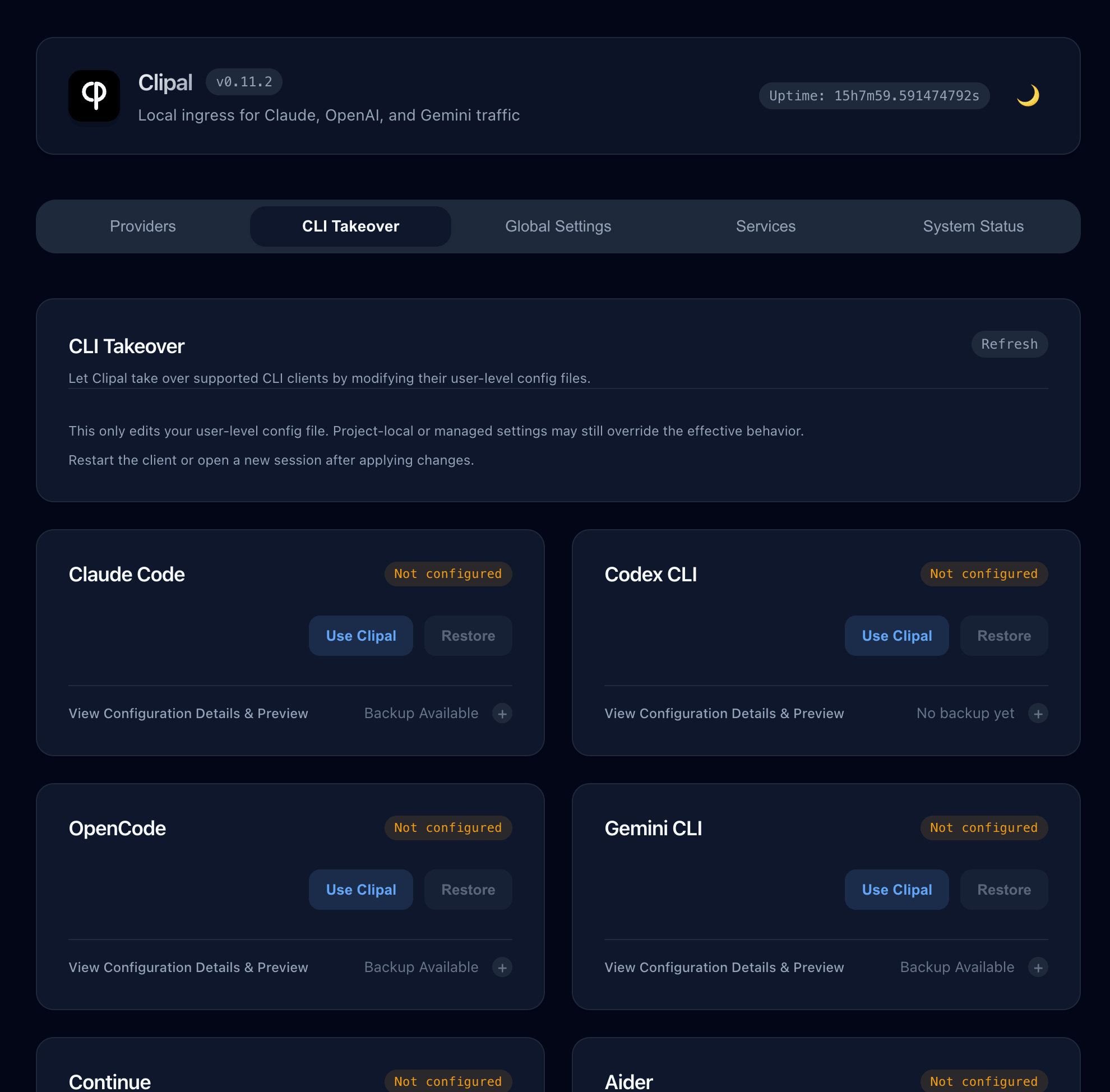
No more hunting for hidden config files. With a single click in the Web UI, Clipal can automatically take over the configurations for Claude Code, Codex CLI, OpenCode, Gemini CLI, Continue, Aider, and Goose.
- It configures the local base URL for you.
- It backs up your original settings.
- It provides a safe rollback whenever you want.
🛡️ Bulletproof Failover & Multi-Key Rotation
Tired of hitting rate limits or empty balances mid-generation?
- Multi-Key Pool: Configure multiple
.api_keysfor a single provider. Clipal rotates them automatically and retries locally before giving up. - Priority Failover: Fall back to secondary models or providers instantly with out-of-the-box circuit breaking and quota management.
- OAuth Upstreams: Authorize Codex, Claude, and Gemini accounts from the Web UI. They participate in the same ordering, pinning, enable/disable, and failover flow as API-key providers, and Clipal refreshes access tokens automatically when a refresh token is available.
🎛️ Beautiful Local Web UI
Manage your AI workflows visually. Add, edit, enable, or disable providers, pin a specific model, and manage global settings with a modern dashboard. All changes are hot-reloaded—no restarts required.
⚡ Frictionless Background Service
Clipal runs as a single, cross-platform binary on macOS, Linux, and Windows.
Type clipal service install and clipal service start to keep it running silently in the background forever. Use clipal status or clipal restart for quick management.
🔌 Supported Clients
Clipal standardizes client ingress entirely on a single local route: http://127.0.0.1:3333/clipal.
It natively supports the request flavors of:
- Anthropic / Claude
- OpenAI / Codex
- Google Gemini
Popular Supported Tools:
- AI Coding Assistants: Claude Code, Codex CLI, OpenCode, Gemini CLI, Continue, Aider, Goose
- Desktop Chat Clients: Cherry Studio, Kelivo, Chatbox, ChatWise (via OpenAI compatibility)
⚡ Quick Start
Let Your AI Install It
If you use a terminal-capable AI such as Claude Code or Codex CLI, you can send it the prompt below:
Please help me install and start Clipal. Project: https://github.com/lansespirit/Clipal

Please detect my current OS and architecture, check the project's Releases and docs, and complete the download, installation, and startup for me. Then confirm that I can open the Web UI successfully. Use these official links when needed:
- Releases: https://github.com/lansespirit/Clipal/releases
- Getting Started: https://github.com/lansespirit/Clipal/blob/main/docs/en/getting-started.md
- Web UI: https://github.com/lansespirit/Clipal/blob/main/docs/en/web-ui.md

After that, guide me through using the Web UI to enable CLI takeover and add my first provider.
1. Install Clipal
The fastest way is npm:
npm install -g clipal
clipal --version
Prefer a standalone binary? Download the right build from Releases and put it on your PATH.
Latest stable release: GitHub Releases latest
chmod +x clipal*
./clipal* --version
2. Run & Manage
Start Clipal in the foreground:
clipal
Or install it as a background service:
clipal service install
clipal service start
3. Open the Web UI
Visit http://127.0.0.1:3333/ in your browser to manage providers and apply CLI Takeover for your favorite tools. You can add providers directly in the Web UI; no manual config-file bootstrap is required.
📖 Complete Documentation
Dive deeper into what Clipal can do:
- 🚀 Getting Started
- 🔌 Client Setup Guide
- ⚙️ Config Reference
- 🖥️ Web UI Guide
- 🔀 Routing & Failover Magic
- 🛠️ Services, Status, and Updates
- 📚 Docs Home & Release Notes
🔒 Security & Privacy
- Clipal is fully local. The proxy listens on
127.0.0.1:3333by default. - The Web UI is strictly locked to localhost—even if the proxy listens externally, the management UI rejects non-loopback requests.
- Your upstream API keys are stored only on your machine and transparently injected into requests.
- OAuth credentials are stored only on your machine under
~/.clipal/oauth/, separate from YAML provider files.

📄 License
MIT
🙏 Thanks
Thanks to the linux.do community for its support.
Reviews (0)
Sign in to leave a review.
Leave a reviewNo results found