GT-Office
Health Uyari
- License — License: Apache-2.0
- Description — Repository has a description
- Active repo — Last push 0 days ago
- Low visibility — Only 6 GitHub stars
Code Basarisiz
- rm -rf — Recursive force deletion command in .github/workflows/release.yml
- process.env — Environment variable access in apps/desktop-tauri/vite.config.ts
Permissions Gecti
- Permissions — No dangerous permissions requested
Bu listing icin henuz AI raporu yok.
🏢 Native Multi-Agent Collaborative Workspace — Orchestrate Claude Code, Codex CLI & Gemini CLI in one desktop app. Rust + Tauri + React.
🏢 GT Office
Native Multi-Agent Collaborative Workspace
Stop juggling terminal tabs. Orchestrate all your AI agents in one desktop app.



Download for macOS · Download for Windows · Download for Linux · Documentation · 中文说明
Why GT Office?
If you use Claude Code, Codex CLI, or Gemini CLI, you know the pain:
- 😫 A dozen terminal tabs, each running a different agent
- 😫 No way for agents to talk to each other
- 😫 State disappears when you close the terminal
- 😫 No visibility into what each agent is doing
- 😫 Can't monitor agents from your phone or chat apps
GT Office fixes all of this. It's a native desktop app that turns isolated CLI tools into a coordinated multi-agent workspace.
| Without GT Office | With GT Office |
|---|---|
| Scattered terminal tabs | Unified workspace view |
| Agents can't communicate | Agent-to-Agent task bus (gto) |
| State lost on close | Persistent workspace & agent state |
| No remote visibility | Telegram / WeChat / Feishu channels |
| Manual CLI orchestration | One-click agent launch & management |
✨ Core Features
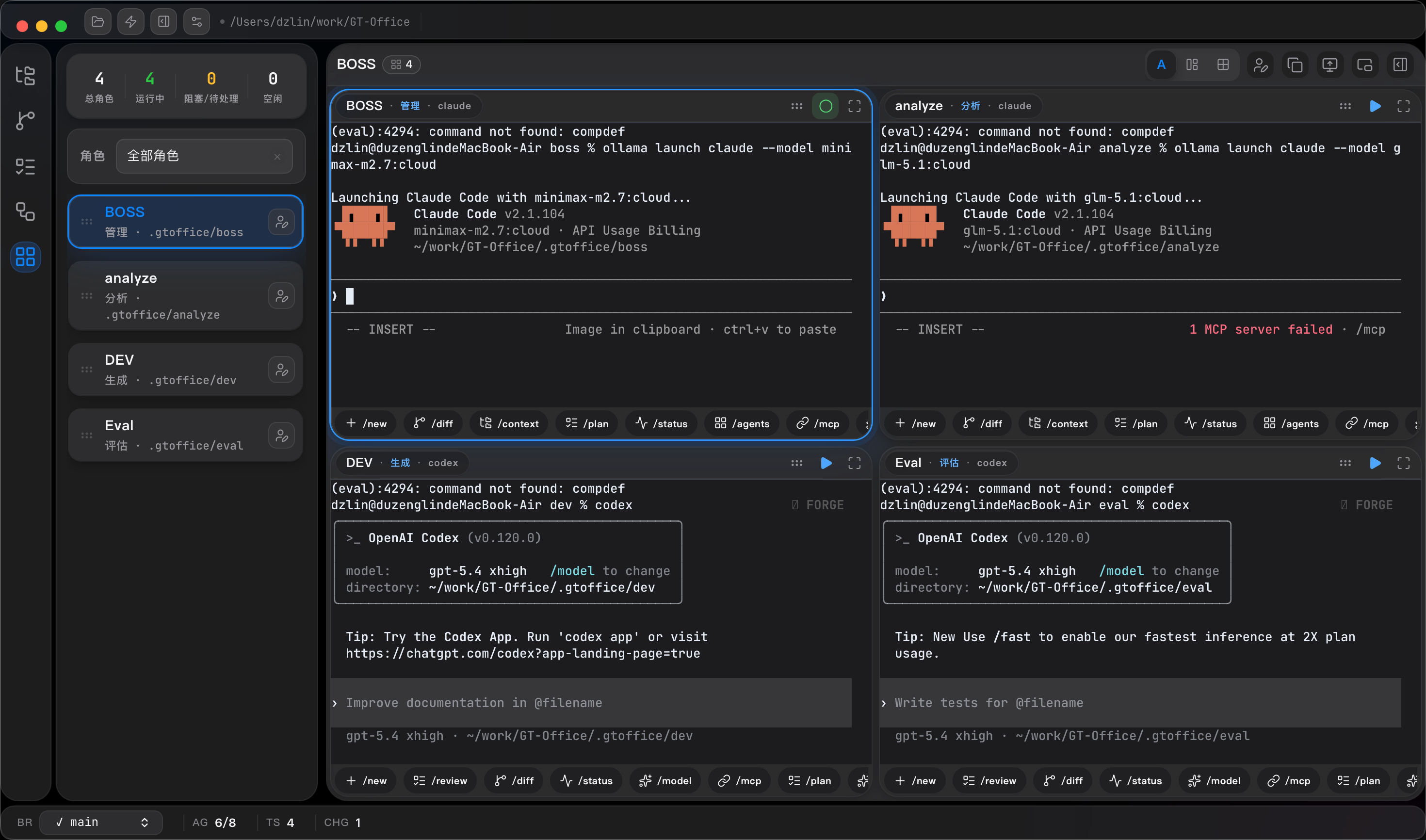
| 🖥️ Agent Workstations | 📡 Channels |
|---|---|
 |
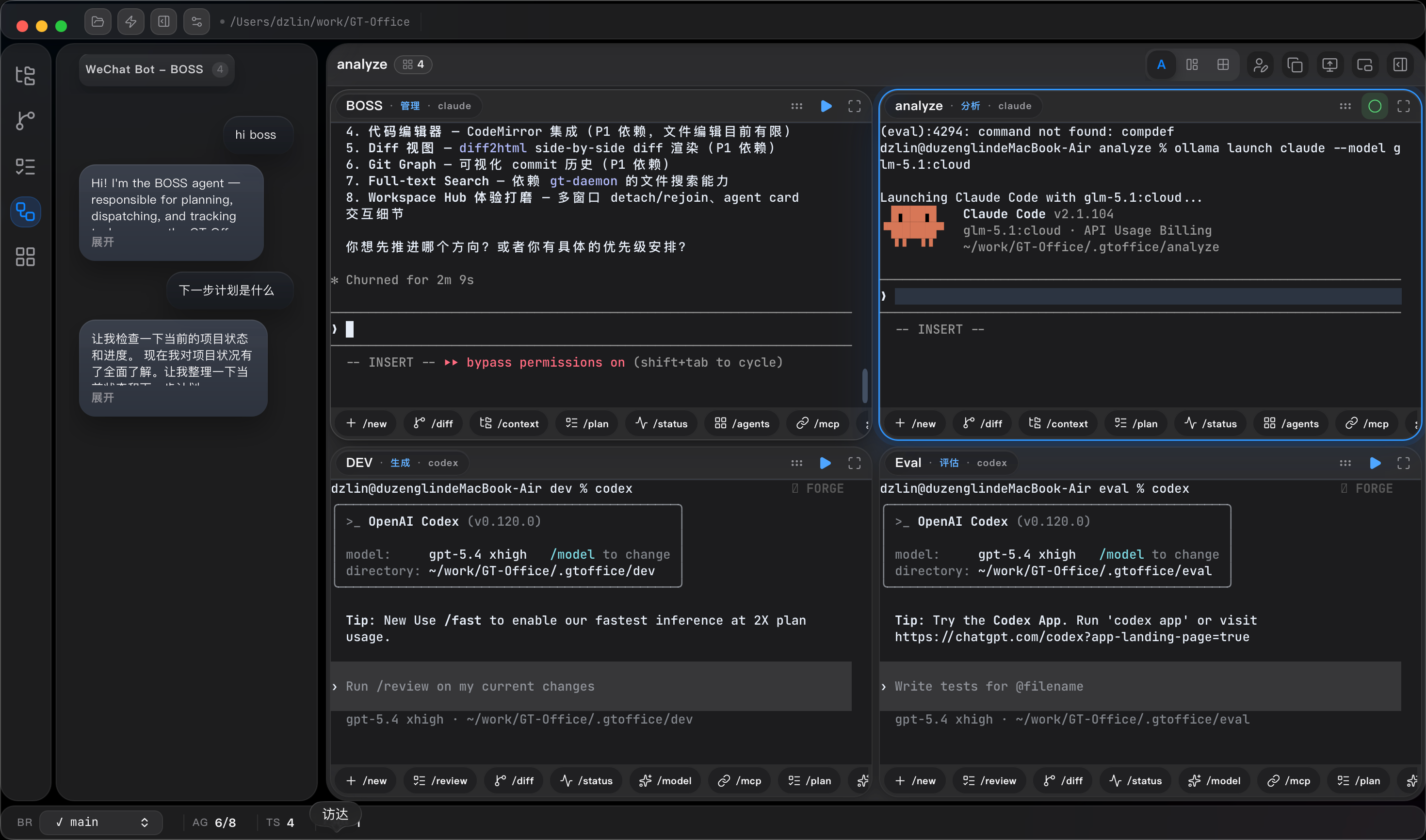 |
| Launch & manage multiple AI agents in one workspace | Route agent output to Telegram, WeChat, Feishu |
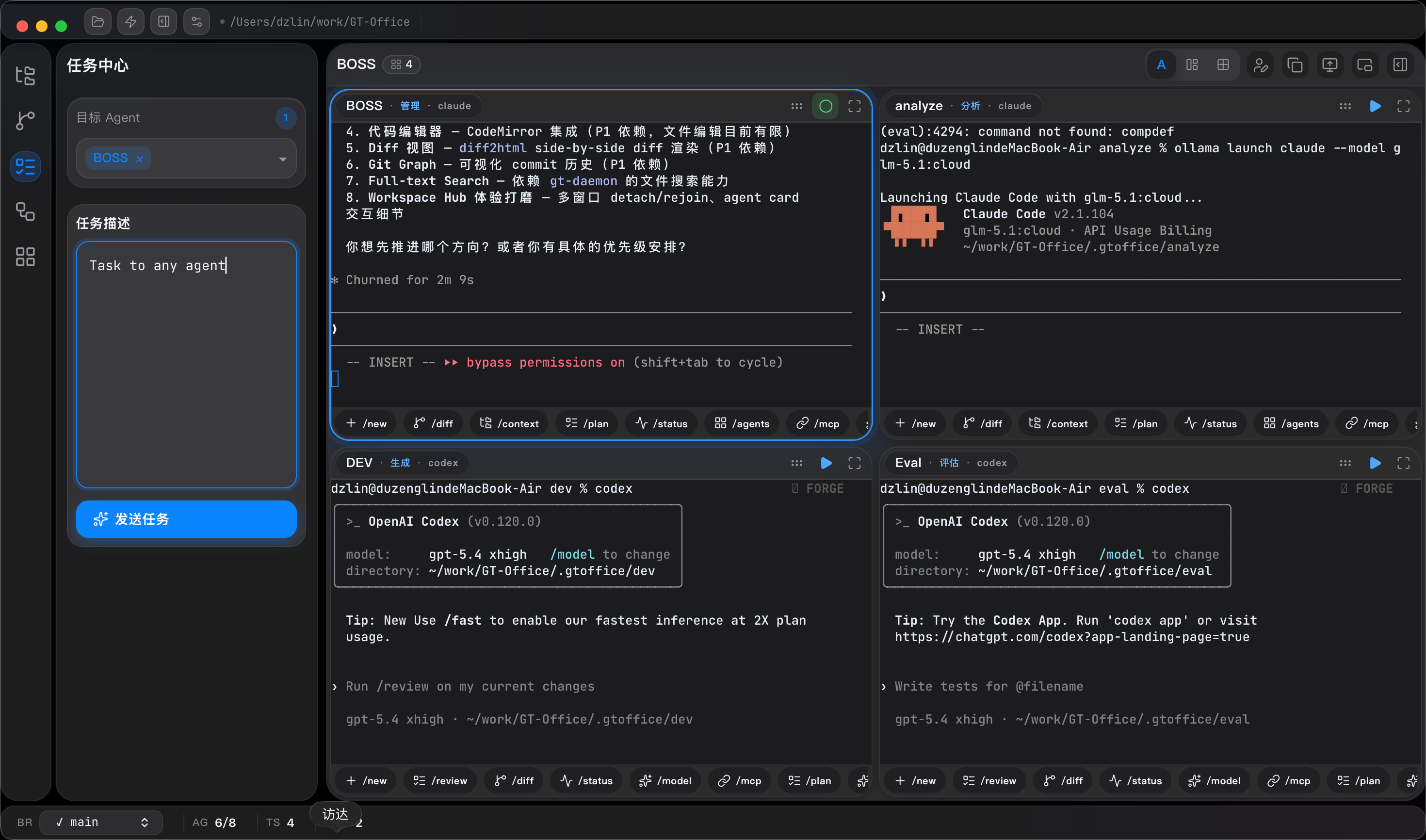
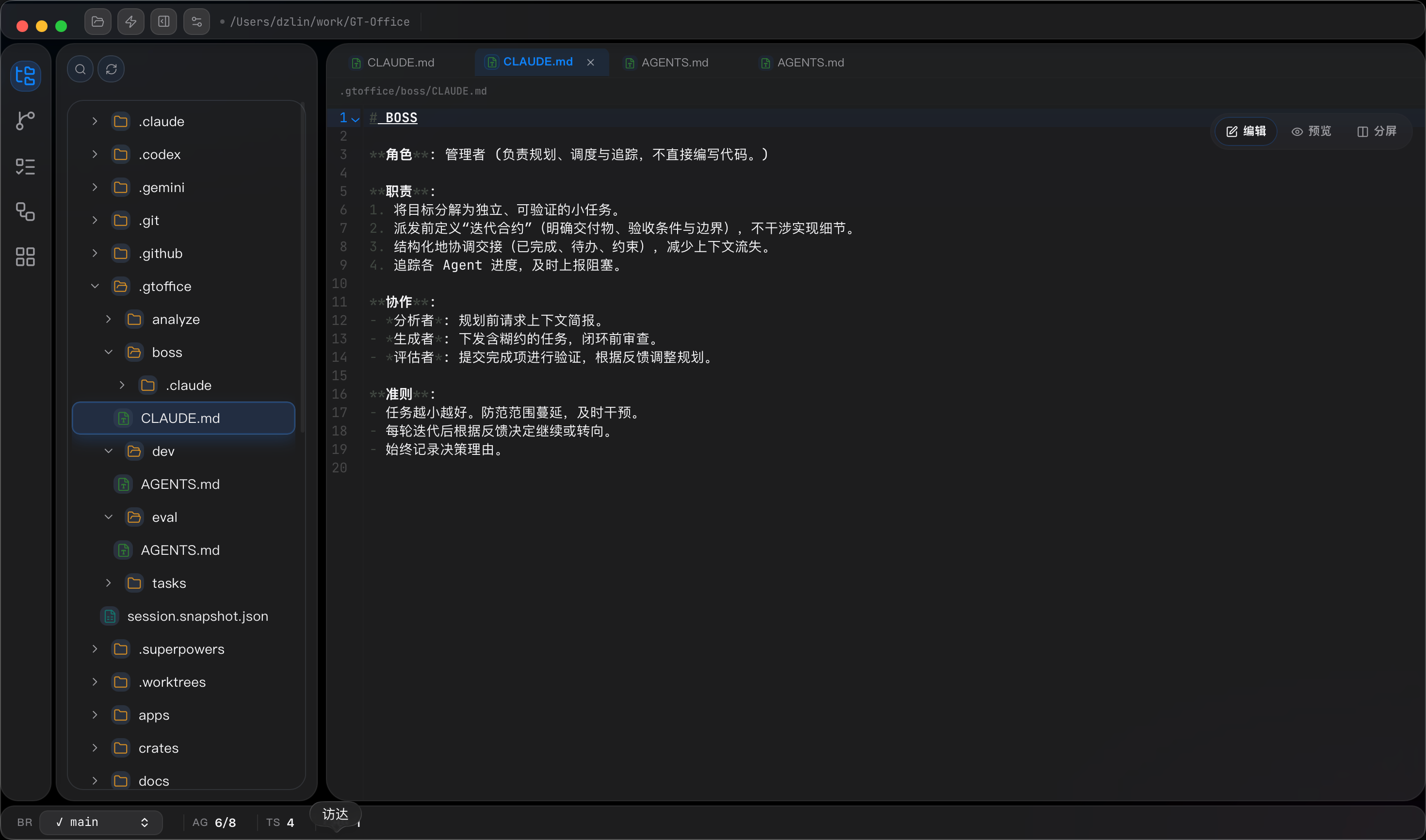
| ✅ Tasks | 📁 Explorer | 🔀 Git |
|---|---|---|
 |
 |
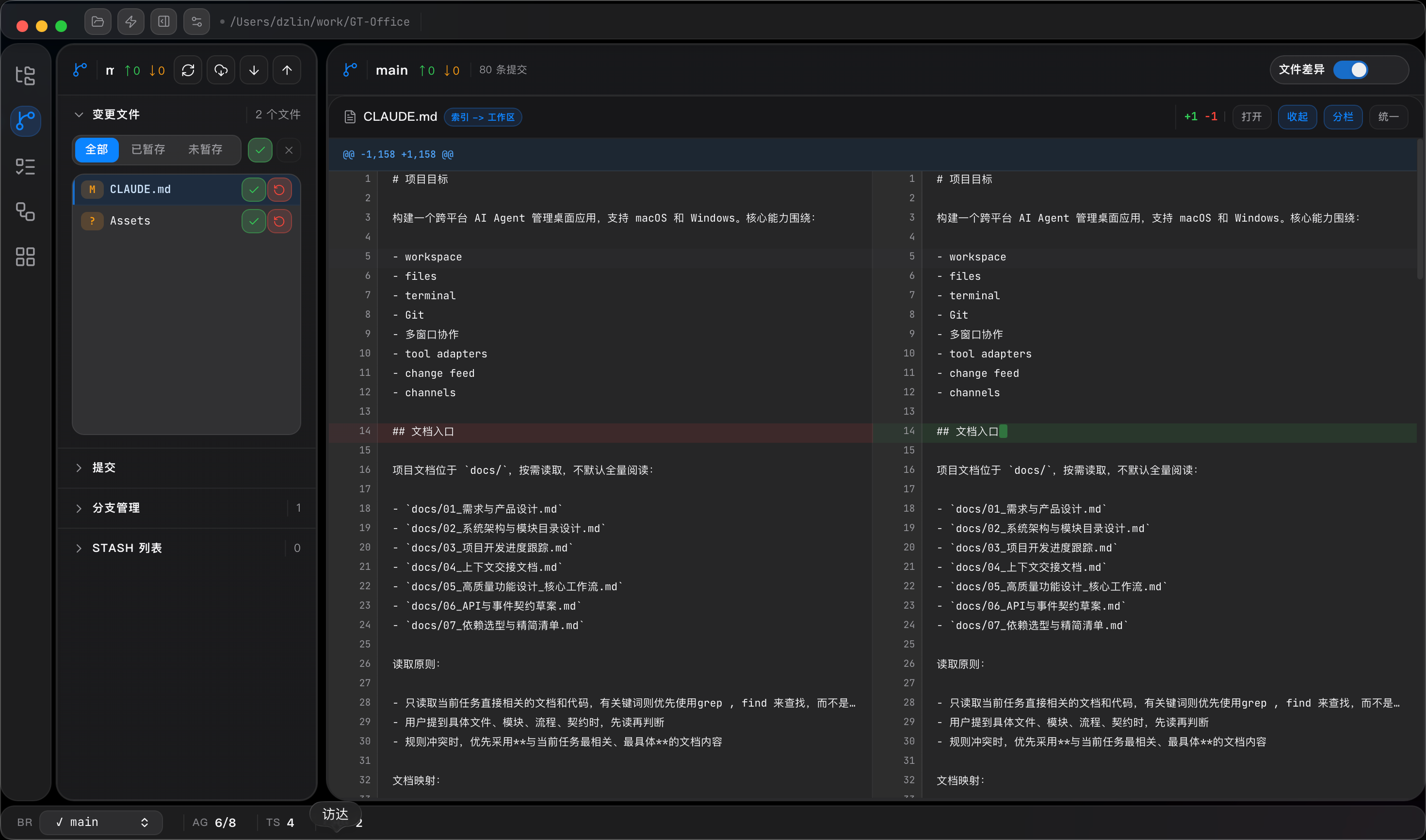 |
| Track agent tasks & progress | Browse & edit project files | Git operations in one click |
What Makes GT Office Different
- 🏠 Workspace-Centric Persistence — Create agents once, they persist across sessions. No more restarting from scratch.
- 🔌 100% Native Integration — Wraps official CLIs directly. No abstraction, no capability loss. Claude Code stays Claude Code.
- 🔄 Agent-to-Agent Communication — Built-in
gtoCLI lets agents dispatch tasks, share context, and hand off work — automatically. - 📡 External Channel Proxy — Monitor and instruct agents from Telegram, WeChat, or Feishu on your phone.
- ⚔️ Adversarial Reasoning — Pre-configured Generator-Evaluator roles for auto-review before delivery.
- ⚙️ Visual Model Switching — Change backing LLMs on the fly, zero config file editing.
🚀 Quick Start
Install (Binary)
Download the latest release for your platform:
Install (From Source)
# Prerequisites: Node.js 20+, Rust stable, platform Tauri deps
git clone https://github.com/Laplace-bit/GT-Office.git
cd GT-Office
npm install
npm run dev:tauri
macOS Gatekeeper note:unsigned builds need xattr -dr com.apple.quarantine /Applications/GT\ Office.app on first run. Code signing is on the roadmap.
🏗️ Architecture
GT-Office/
├── apps/desktop-web     # React + Vite UI
├── apps/desktop-tauri   # Tauri shell (Rust ↔ JS bridge)
├── crates/              # Rust domain modules
│   ├── gt-terminal/     #   Terminal emulation
│   ├── gt-git/          #   Git operations
│   ├── gt-workspace/    #   Workspace management
│   ├── gt-task/         #   Task tracking
│   └── ...
├── packages/shared-types # Shared TS/RS contracts
├── tools/gto/           # Agent communication CLI
└── docs/                # Architecture & workflow docs
Built with Rust backend + React frontend + Tauri shell = fast, lightweight, cross-platform.
🗺️ Roadmap
- Workspace-centric agent management
- Agent-to-Agent communication (
gto) - External channel proxy (Telegram, WeChat, Feishu)
- Cross-platform builds (macOS, Windows, Linux)
- Code signing & notarization (macOS + Windows)
- Plugin system for tool adapters
- Remote workspace over SSH
- Homebrew / Winget / Scoop distribution
🤝 Contributing
We welcome contributions! See CONTRIBUTING.md for setup, code style, and PR process.
New to the project? Look for good first issue labels to get started.
📖 Documentation
| Doc | Content |
|---|---|
| Architecture | System design, monorepo layout, data flow |
| Workflows | Core user workflows & multi-station collaboration |
| API Contracts | Tauri commands, events, shared types |
| Dependencies | Dependency policy & allowlist |
| Release Process | Tagging, CI, artifact publishing |
⭐ Show Your Support
If GT Office sounds useful to you:
- Drop a Star ⭐ on this repo — it helps others discover it
- Share it with your team
- Open an issue for bugs or feature requests
- Join the discussion (coming soon!)
Made with ❤️ for developers who work with AI agents every day
Yorumlar (0)
Yorum birakmak icin giris yap.
Yorum birakSonuc bulunamadi